SL Go: Second Life on a tablet, on the move and more

SL go logoImportant note: The SL Go service is to be shut down on April 30th, 2015. For more information, please read this report.

Update: On April 3rd, 2014, OnLive announced a revised pricing structure for SL Go, and on June 3rd, 2014, they  announced the extension of the free trial period to 7 days.

On Wednesday March 5th, Linden Lab and OnLive, the streaming / cloud gaming company announced the launch of the SL Go by OnLive (SL Go) public beta (available to UK, US and Canadian residents at the moment).

SL Go is a service which streams the SL viewer and  SL content directly to the user’s computer or tablet device (during the beta period, only Android is supported for tablets). As a streamed service, it allows, subject to network connectivity, the full richness and depth of Second Life to be displayed and used on tablets and low-end computer systems and laptops. The public beta is intended to broaden the use of the service, and to obtain further feedback in order to further enhance and refine it.

As a part of the preparations for the launch, I was one of a number of journalists and bloggers given preview access to the new service in order to try it out and provide initial reviews for readers. However, if you’re rather just skip ahead to the review part of this article, you can follow this link – but if you do, be warned, you’ll be missing out! 🙂 .

News that Linden Lab were involved in developing a mobile means of accessing Second Life first surfaced in October 2013, when selected users received an e-mail inviting them to sign-up for a closed beta for a new mobile service. Shortly after that, rumours began circulating that the work was linked with OnLive. Given the viewer’s complexity and  the dynamic nature of SL content, using a streaming service is perhaps the only way in which to bring the full richness and depth of the SL experience provided by the viewer to devices such as tablets.  Interestingly, however, the idea for using OnLive didn’t actually come from the Lab.

Gary Lauder, OnLive Chairman, approached LL's former CEO, Rod Humble, about OnLive providing SL to users through their service (Image courtesy of LinkedIn)
Gary Lauder, OnLive’s Chairman, approached LL’s former CEO, Rod Humble, about OnLive providing SL to users through their service (Image courtesy of LinkedIn)

Instead, it actually came from Gary Lauder, OnLive’s Chairman and owner. His company, Lauder Partners, invested in the original OnLive Inc in 2009, and when that entity got into difficulties in 2012, then stepped-in and acquired OnLive in August 2012 and formed the current company using the name. Lauder has a working relationship with the Lab’s former CEO, Rod Humble, and being aware of Second Life, he approached Humble in early 2013 with the idea of forming a synergy between the two companies.

Lauder made his approach because third-person adventure games have been particularly successful for OnLive. As such, Second Life was seen as a logical choice for extending OnLive’s reach into more immersive environments  while at the same time potentially offering Linden Lab with a solution for providing SL to tablet devices and to low-end desktop and laptop systems.

The task of initially investigating whether SL could be successfully run through OnLive servers was passed to Nick Barsetti, the Senior Manager of Customer Relations at OnLive. “One of my staff members and I were able to get it up and running on the service … and my jaw just absolutely dropped,” he says while discussing the service with Draxtor Despres ahead of the launch. “I said, ‘I’ve never seen it run this fast!’ It was prior to the server-side rending release [server-side appearance, July / August 2013]. And as we know, that has speeded-up local viewers quite a bit … even with that, it was running 150+ fps, and we’ve even seen it run as high as 200 fps on a private island.”

With the proof-of-concept a success, OnLive started into the core development work, with Barsetti playing a key role, being both a former Linden Lab employee (Scout Linden) and a long-time Second Life resident who has been actively engaged in the platform for seven years, notably as a community leader in a Star Wars role-play group. As such, he is intimately aware of how the viewer and platform can be used and very familiar with users’ expectations and requirements when running Second Life, and this is very apparent in his conversation with Drax, which you’ll be able to hear in The Drax Files Radio Hour on Friday March 7th.

The SL Go website
The SL Go website (courtesy of OnLive)

SL Go is a service provided entirely by OnLive, which sits between the Lab’s servers and the user (and is, most likely, one of the contributing factors behind the August 2013 ToS changes). As such, it requires those wishing to use the service (including users with an existing OnLive account) to register at the SL Go website.  Those who don’t have an account with OnLive will obtain one as a part of their SL Go registration. People with existing OnLive accounts will need to register with the SL Go website prior to being able to see SL Go through their OnLive client (computer or tablet).

Once registered, users can then purchase time credits for the service, download the SL Go app for Android via Google Play or the OnLive client for PCs or Macs in order to access SL Go.

SL Go by OnLive: streaming Second Life to your tablet

New SL Go accounts receive a free trial period of 20 minutes 7 days (see the update at the top of this article,  so that they can try the service to see if it suits their needs and assess how well it runs on their home or mobile network. Once this initial 20-minute period has been used, additional time credits can be purchased at the following rates:

  • $3.00 for one hour
  • $8.00 for three hours (representing a 10% saving on the base cost)
  • $25.00 for ten hours (representing a 15% saving on the base cost).

As noted at the top of this article in the updates, OnLive now charge a flat monthly subscription of US 9.95 (UK £6.95) per month for unlimited access to Second Life. 

It is possible that some may balk at having to additionally pay for accessing Second Life. However, as Nate Barsetti explains, there is an underlying reason for charging for the service. “OnLive is another layer placed between you and the Linden Lab network. So in order to fund this and keep it going, there is a payment model associated with SL Go.” He also believes that the potential benefits in using SL Go will sufficiently offset reservations people have about paying for the service. Time will tell on this.

As well as using SL Go on either an Android tablet or a computer system, it is also possible to use SL Go with the OnLive Games System (OGS)  to connect to a television and play games using a suitable USB or wireless keyboard and mouse and / or the included games controller (which can also be purchased separately).

The Online Games System with mini-console (left) and wireless game controller (right) can also be used to access SL using a television (keyboard also required)

As part of the preview, reviewers were supplied with a Samsung Galaxy Tab 3 10.1 with the SL Go app pre-installed, together with the OGS and a wireless keyboard for trying SL Go on a television, and a pre-assigned OnLive account. Unfortunately, I have been unable to test using SL Go with a television as a result of not being able to connect the OGS with my home network. As such, what follows is an overview of SL Go running on a tablet and on a low-end computer system (in this case, a 2010 PC EEE 1201N with 4 GB RAM and windows 7 home Edition, 32-bit).

Continue reading “SL Go: Second Life on a tablet, on the move and more”

SL projects update week 10/1: server, viewer, JIRA

A typical Simulator UG meeting (stock)

Server Deployments: week 10

As always, please refer to the server deployment thread in the forums for the latest updates / changes.

Main (SLS) Channel

On Tuesday March 4th, the Main channel was updated with the infrastructure update deployed the RC channels  in week 9.

Release Candidate Channels

On Wednesday March 5th, the three RC channels should be updated as follows:

  • BlueSteel and LeTigre should receive a new server maintenance project which contains the following bug fixes:
    • Fixed a bug in which the server release notes link in “About Second Life” would sometimes fail to appear
    • Fixed a bug in which certain objects had incorrect status when crossing between regions
    • Fixed a crash mode
  • Magnum will remain on the same version as week 9, which comprises the infrastructure update and enables support for a new version of the inventory service, AISv3.  To make use of this new feature, login with the Sunshine Project Viewer.

SL Viewer Updates

The Merchant Outbox viewer appeared as a release candidate (version 3.7.3.287344) on Monday March 3rd. This viewer addresses some of the problems affecting some users when using the Merchant Outbox, as specified in the release notes and my report here.

A new Snowstorm viewer is expected to surface in the viewer release channel as an RC the near future. Among other things, this should contain STORM-1831, which is designed to improve syntax highlighting in the viewer’s LSL editor by allowing the viewer to obtain the information required for syntax highlighting directly from the simulator the viewer is connected to. The server-side support for this was deployed at the start of 2014, and the viewer code,  contribution from Ima Mechanic with help from Oz Linden,  has been a little held-up in making its way through the Lab’s QA process. However, referring to it at the Simulator User Group meeting on Tuesday March 4th, Oz indicated the code is now on the “home stretch”.

JIRA Re-opening

There is still no news as to when this week the JIRA will be re-opened. There is also a question as to whether the re-opening will allow all reports to be viewed by anyone, or whether it will only apply to those reports filed once it has been reopened. Note that this is currently a question over the re-opening, not an actual official statement from the Lab. We’ll doubtless learn more once the necessary changes have been made to open-up the JIRA system once more.

Other Items

llSetKeyframedMotion: object stalls and autoreturn defeats

Prior to his departure from the Lab, Andrew Linden was approached by Talarus Luan about issues with llSetKeyframedMotion. Essentially, a number of issues have been reported with objects (such as vehicles) using the function, including:

  • SVC-7556 – Objects with llSetKeyframedMotion() stop running after region restarts (Talarus’ issue)
  • SVC-7787 – Objects using llSetKeyframedMotion() can defeat a parcel’s autoreturn if they travel to and from another parcel
  • BUG-1624

Responding to the issue of SVC-7556, Simon Linden said, “suspending in the middle of KF motion and resuming with that huge time jump sounds really ugly. I haven’t tried it, but if you want to code for that, it might be best to detect the region restart event, reset the position and re-start the key frame motion.” In terms of the Lab dealing with it, he admitted, “given the other things that need attention, it’s not likely to get to the top of the list soon.”

With regards to SVC-7787, his news was in a similar vein, “That is how parcel timing is designed … it measures the current time in the parcel, so if you leave and come back, it’s reset. So there’s a loophole there, yes … and I don’t think we’ve come up with a good alternative. “

RFL of SL 2014 kick-off celebration announcement

RFL of SL 2014 logo by Sunshine Zhangsun

The 2014 Relay  for Life of SL season gets underway on the weekend of March 8th / 9th with the kick-off celebration. This is the tenth year RFL of SL has been held, and all involved are working hard to ensure it is a special anniversary.

In a press release about the celebration, Nikki Mathieson, this year’s Event Chair, said:

A favourite time of year, for many Second Life residents, is about to begin. The experience of working together for a cause that touches each of us so deeply is like no other experience, online or off. The support and camaraderie, the depth of passion to do more, reach further and spread awareness, while fundraising make this yearly campaign so special and amazing. We strike REAL blows to cancer. Relay For Life of Second Life is an incredible group of people who work hard KNOWING that they are saving REAL lives against an all-too-REAL disease. We need more volunteers to come join us and spread the word.. COME RELAY WITH US.

The kick-off regions will be opening to RFL of SL teams at 17:00 SLT on Friday March 7th, and the celebration proper get underway at noon  SLT on Saturday March 8th.

In keeping with this year’s overall theme for RFL of SL, A Journey of Promise, the celebratory weekend will focus on  A Journey Through the Continents. Relay teams have been invited to set-up kiosks on the path round the world within the kick-off regions, where they’ll be able to run a raffle or silent auction (or both) and / or a kissing booth, and have up to six vendors so that they can start-up their in-season fundraising efforts.

A look along the track from RFL SL 2012

Activities through the weekend will include (all times SLT):

  • 17:00 Friday March 7th: regions open for Relay Teams to set-up in their assigned spaces along the path around the world, followed by a tailgate party
  • 10:00 Saturday March 8th: T1 Radio commence their celebration broadcasting from the regions
  • 12:00 noon, Saturday March 8th: Opening Ceremony featuring RFL Planning and other committee members, and cancer survivor Nickib27 will share her experiences and the role the American Cancer Society played in her fight. The ceremony will be streamed live by T1 radio for those unable to attend
  • Saturday March 8th afternoon / night: a range of entertainments featuring DJs and liver entertainers
  • Sunday March 9th will feature a dance troupe, more music and entertainment, and at 13:00, a game of Family Feud which will allow three Relay teams to compete with one another and the Planning Committee!
  • 22:00 Sunday March 9th: the kick-off celebration closes.

There is still time of those Relay Teams not registered for the celebration to do so. Teams just need to register via Google Docs, and do so by 23:59 SLT on Tuesday March 4, 2014.

Commenting on the celebrations, Stingray Raymaker, American Cancer Society staff partner, said: “I’m really excited about this year’s Kick-off because it’s the biggest Kick-off event that we’ve ever planned. The ceremony will be fantastic, but I’m really excited to see what our teams are selling in their Relay vendors!”

Other Relay for Life events scheduled for 2014 in SL include:

  • May 4-10: Halfway There Journey Week
  • July 19-20: Relay Weekend
  • August: Wrap-up Party

About RFL of SL

Relay For Life is the signature fundraising event of the American Cancer Society, and has grown into a world-wide event in the fight against cancer in all its forms.

Relay For Life of Second Life is an annual activity that takes place in Second Life in July each year. Volunteers form or join teams to have fun while fundraising and raising awareness from March through mid-July. In July, teams build campsites and walk a track, just like in a real world Relay. Over the last nine years, Relay For Life of Second Life has raised more than $2 million for cancer research and is the largest charity event in the virtual worlds. Several thousand volunteers from more than 80 countries participate each year, truly making it a global event.

Related Links

Merchant Outbox viewer reaches release candidate status

Even with Direct Delivery being the norm now for SL Marketplace deliveries, some SL merchants are still experiencing problems with the Merchant’s Outbox functionality. To help deal with this, the Lab issued a project viewer at the start of January 2014 which included a number of fixes for some of the issues being encountered.

On March 3rd, this Merchant Outbox viewer moved to the viewer release channel as a release candidate viewer – version 3.7.3.287344. The core issues addressed by this viewer are listed in the release notes as:

  • ACME-1219 Merchant Outbox viewer crashes on Exit on Windows 7
  • ACME-1220 User needs to click OK twice to dismiss Merchant Outbox notification
  • ACME-1221 Merchant Outbox Initialization fails with 404 error with new account in Merchant Outbox viewer
  • MAINT-2287 Merchant Outbox panel unusable and unrecoverable if outbox folder disappears
  • MAINT-2301 Send to Marketplace from Merchant Outbox says it fails when it doesn’t
  • MAINT-2452 Merchant outbox with genuine failure “409 conflict” causes all further imports to fail
  • MAINT-3319 Merchant outbox: Second Life 3.6.8 (282375) build – results when user has a merchant outbox misplaced in inventory.
  • MAINT-3320 Viewer crash when deleting trash which contains Merchant Outbox

(Note that while JIRA links are given, they will result in a permission violation warning until such time as the JIRA is re-opened, which is anticipated for later in week 10.).

So, if you have been encountering issue with the Merchant Outbox, and while it may not solve all woes, it might be worth giving this release candidate a try. Hopefully, with the release of this RC, the code should also now more readily filter through to TPVs in the coming weeks / months.

The Lefevre Mansion

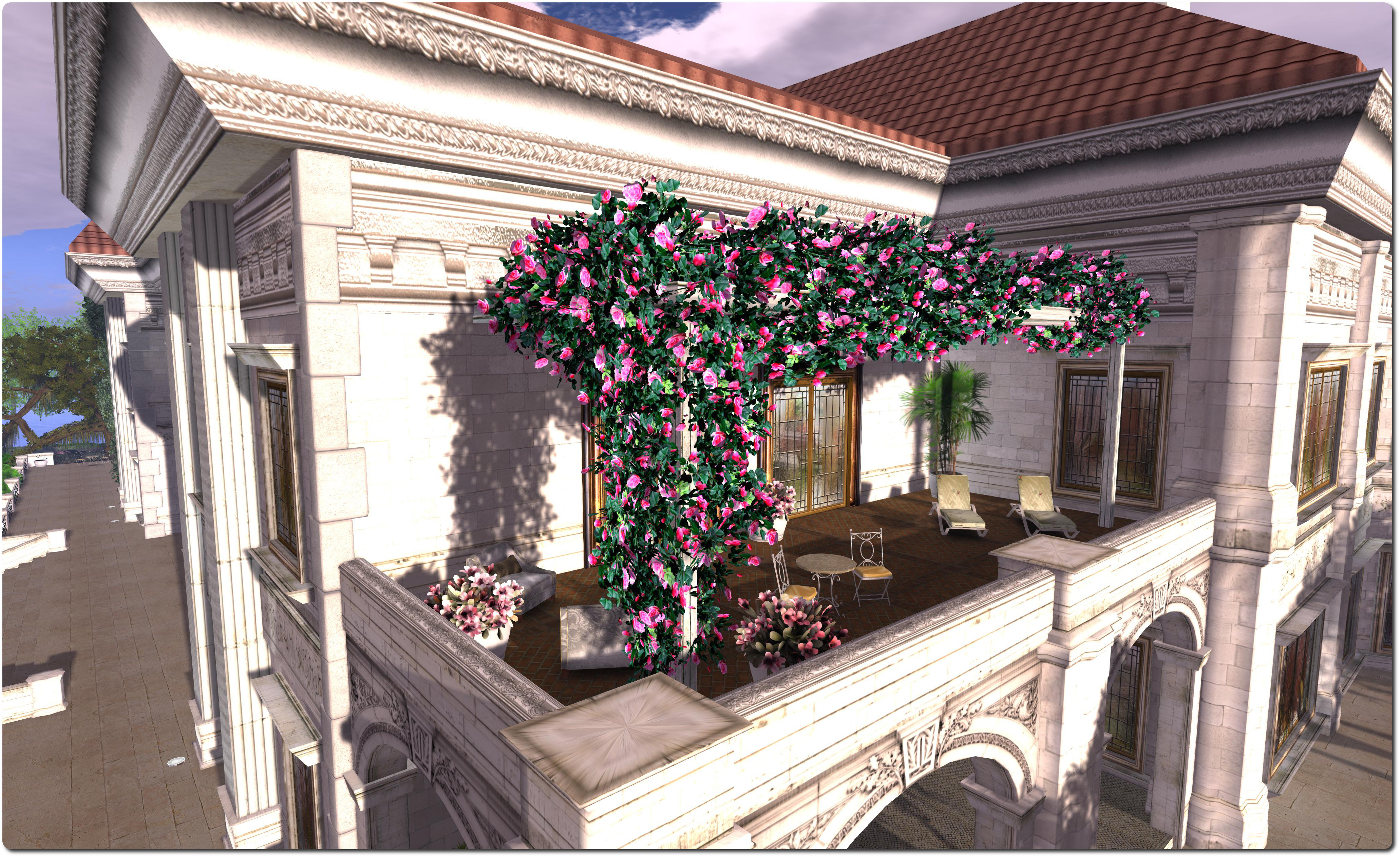
The Lefevre Mansion, March 2014The Lefevre Mansion, March 2014

I’ve been a huge fan of Kaya Angel’s work, and his Angel Manor has long been a favourite of mine; so when I read Quan Lavender’s post about a new build he has completed on behalf of his friend, Marcusgay Lefevre and the Lefevre family, it zapped to the top of my list of must see places.

And it is, in a word, magnificent.

The Lefevre Mansion, March 2014The Lefevre Mansion, March 2014

The Lefevre Mansion and grounds occupy two regions, the mansion and the majority of its outbuildings sitting in a full region, and the adjoining homestead largely given over to gardens and open spaces.

The house itself is (obviously) much smaller than Angel Manor, but this doesn’t mean it is in any way lacking. If anything – and this is not a slight towards Angel Manor – the smaller size makes it somewhat more intimate and personal in feel; two essential elements for anywhere which is intended to function both as a public space and as a private residence.

The Lefevre Mansion, March 2014The Lefevre Mansion, March 2014

There is definitely a feeling of visiting a landed estate when touring The Lefevre Mansion. Both regions are beautifully landscaped, and from the arrival point, the visitor travels past the estate’s art gallery (possibly a coach house complex converted for this purpose?), through the wrought iron gates bearing the estate’s name, and can then follow the drive into the estate, passing the bath house before turning up and round to the front of the house. Or, if you prefer, you can turn off the main drive before reaching the bath house, and cross a well-tended lawn to arrive at a reflecting pool overlooked by the grand facade of the back of the house.

Inside the house, the rooms are lavishly and beautifully appointed, and all focused on the grand ballroom. I confess to being quite in love with the library, and could happily spend hours in there, if only the books could be taken and read! When exploring, do keep in mind that many of the rooms on the upper floor are a part of the family’s private residence.

The Lefevre Mansion, March 2014The Lefevre Mansion, March 2014

This is another build which is not so much seen as experienced; it’s not enough to simply wander around, each room deserves the time take o linger and absorb the ambience; camming needs to be done with care or some detail might be easily missed. Great use is made of baked and scripted light effects, and ALM should be enabled, as there are touches of materials to be found around the house and in the grounds which add further depth to the overall look and feel.

The Lefevre Mansion, March 2014The Lefevre Mansion, March 2014

When you’ve finished admiring the magnificent stately home, why not hop on the teleporter near the main entrance and see what might be going on up at the Partycular Theatre, which also has a home in the region.

Highly recommended.

Related Links

UKanDo 3.7.2: More nips and tucks

logoConnor Monaron issued a further updated to the UKanDo viewer on Thursday February 27th.

Version 2.7.2.27938 brings the viewer up to parity with the Lab’s 3.7.2 code base and with RLV 2.8.5.10 and offers a series of inventory-related TPV updates, some rebranding and fixes, and the ability to re-skin the viewer with the default LL viewer skin. Release notes for the update are available here.

Inventory Updates

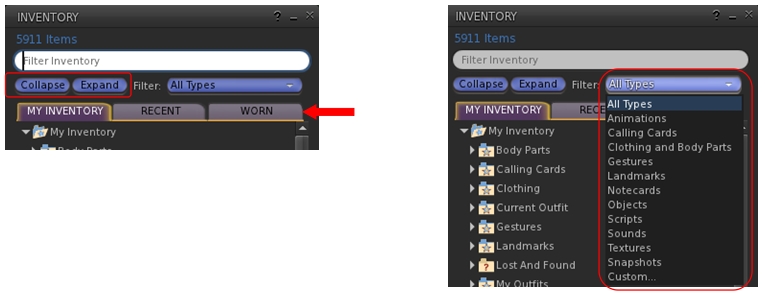
Version 3.7.2.27938 now incorporates three additions to the inventory floater which are popular among several other TPVs:

  • A pair of Collapse and Expand buttons: the first of these will close all folders and sub-folders in your inventory floater; the second will open all folders and sub-folders in your inventory floater, displaying the full tree
  • An inventory search filter drop-down list: allows inventory searches to be filtered by criteria on the drop down (e.g. only search for Landmarks matching the search term)
  • An inventory Worn Items tab: displays everything your avatar is wearing, by folder.
The new (to UKanDo) inventory floater options: the Collapse and Expabnd buttons and the Worn items tab (l): the inventory search filters drop-down (r)
The new (to UKanDo) inventory floater options: the Collapse and Expand buttons and the Worn items tab (l): the inventory search filters drop-down (r)

UKanDo Preferences Tab Updates

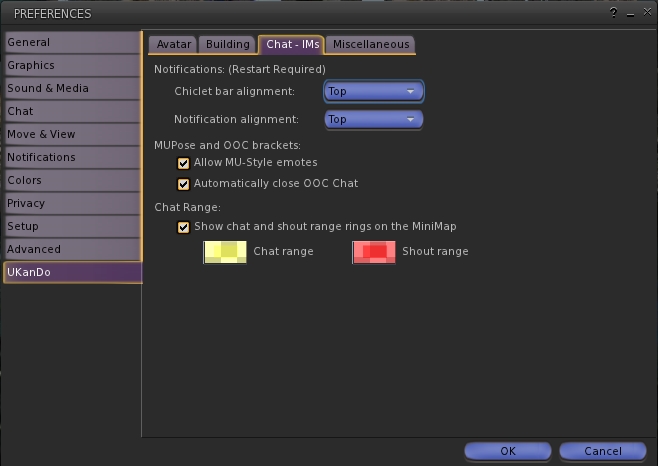
The UKanDo tab in Preferences has also been overhauled, with the options rationalised. A new sub-tab is added: Chat – IMs, which pulls together the chat / IMs related options previously found in the Miscellaneous sub-tab into a tab of their own (chat range indicators for the mini-map, notifications alignments, MUpose* and OOC options). Similarly, the Group Land Rez option is moved from Miscellaneous to Avatar (under the new Inventory heading) and also appears in the Build sub-tab as well.

UKanDo 3.7.2 sees the UKanDo tab in Preferences re-worked to make finding options easier.
UKanDo 3.7.2 sees the UKanDo tab in Preferences re-worked to make finding options easier, including a new Chat – IM sub-tab

LL Default Skin

UKanDo users can now opt to re-skin their viewer with the default Lab viewer skin. This is reported as being a part of the UKanDo 3.7.2.27938 update, but appears to work with earlier releases as well (tested with 3.7.0). Be warned, the process does require some fiddling on the user’s part:

  • UKanDo must be shut down
  • The skin folder  must be downloaded from the UKanDo website download page as a ZIP archive
  • The user needs to locate the viewer  install location (e.g. for 64-bit Windows: C:\Program Files (x86)\UKanDoViewer) and then rename it (e.g. “skins_old”)
  • The downloaded skins folder then needs to be dragged from the ZIP archive and dropped into the viewer’s install location (e.g. for 64-bit Windows: C:\Program Files (x86)\UKanDoViewer)
  • UKcanDo can then be restarted, and will use the LL default skin.

The original UKanDo skin can be restored by following the steps above, making sure the original skin folder is renamed “skins”.

Feedback

Another small-ish update, aimed at keeping the UKanDo viewer on a par with LL code updates whilst also incorporating a few nips and tucks.

The option to change the viewer skin is a somewhat convoluted process, especially compared to those TPVs which allow you to select a skin style from within them (e.g. through a Preferences tab) and then applies the selected style with a simple re-start. Whether UKanDo will also move in that direction, remains to be seen; as it is the copying / renaming of folders following each update to the viewer could get a little tiresome for some users.

That niggle aside, a compact and useful update for UKanDo users.

Related Links