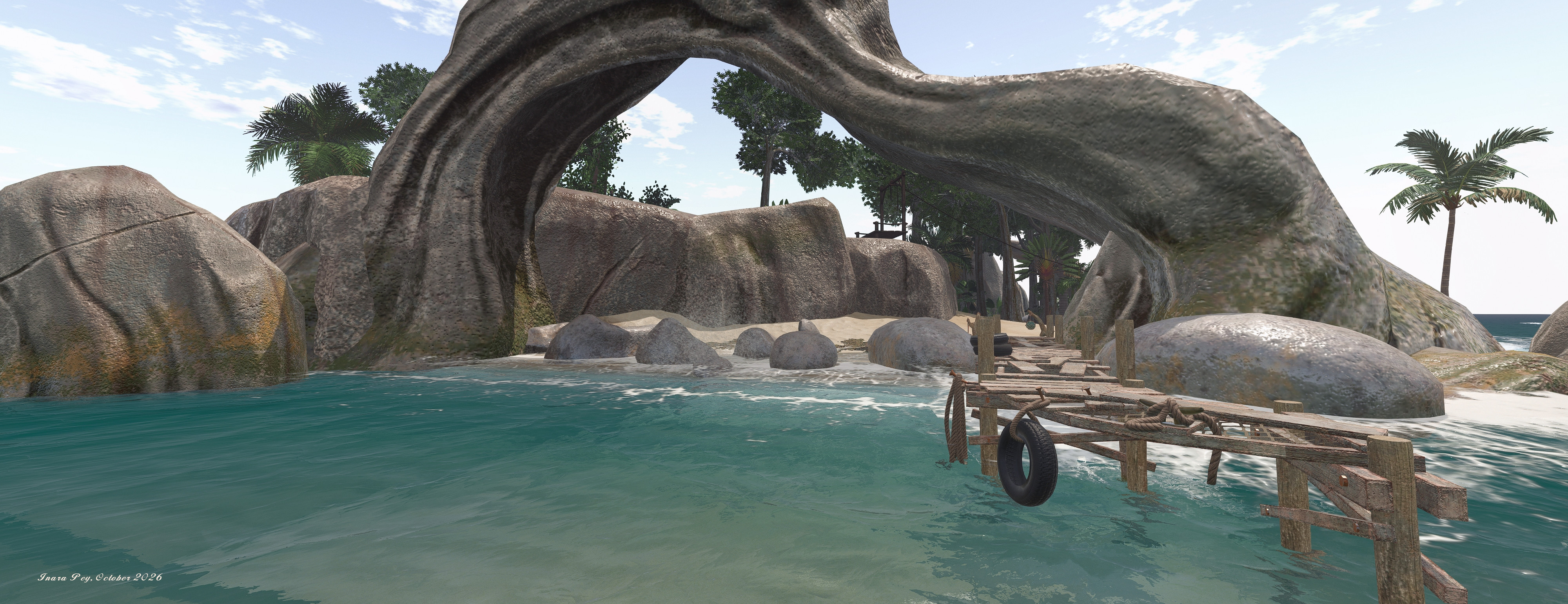
Landscaping in Second Life is fun; I enjoy building home environments and landscape parcels and properties for friends and anyone interested.
However, when it comes to coastal areas, things can be a little tricky. Whilst there are a number of coastal and beach building kits available in Second Life, they don’t always fit the bill as fully as we might like; the sand colour might not always be suitable or retexturing prove a little tricky or the ebb and flow of the tide doesn’t look quite right. All of this now changes courtesy of the Cube Republic Coastal System.
Cube Republic Coastal System
Now, in the interests of transparency, I will note that Cube is a long-standing friend in Second Life, a person I admire for his outlook on life as well as for his creativity. As such, my opinion might be considered biased; however, Cube has always, with the likes of Alex Bader (Studio Skye) and Sasaya Kayo (HPMD) been one of my go-to landscaping creators for pretty much all of my projects.
This is because, simply put, Cube is a passionate creator; his plants and trees are modelled with care and attention to detail such that they reflect their physical world opposites pretty much perfectly. Similarly, his terrain kits – rocks, caves, landforms and so on – offer a huge amount of realism.
Cube’s boardwalk with customisable graffiti, Cube Republic Tropical Demonstration Island
With the Coastal System, Cube brings a new level of realism to coastal waters. Comprising 34 beach sections, 6 rocks and making use of PBR, this kit brings together everything any landscaper needs for creating superb coastal areas and beaches with the most realistic ebb and flow of tide every seen in SL.
The 34 beach elements have a choice of 8 looks for the sand, allowing them to be used in pretty much any environment from tropical to volcanic, with the rock elements having a five finishes. This is enough to make the system highly flexible in and of itself – but it is not the most outstanding aspect of the kit.
Cube Republic Tropical Demonstration Island
That lies with the ebb and flow of the tide as it runs up and down the beach – it is the most realistic effect I’ve witnessed in SL, and worlds away from other systems. The way in which the incoming wave crests foam, the surface of the water rolling up the sand even as underneath, it is being sucked back out to leave steamers of latte-like foam behind is incredibly life-like.
Achieving this level of dynamic movement has not been easy; Cube has been working to perfect it for well over six months, modelling tidal motion first using fluid simulation – requiring some 30 hours of baking to achieve for a region – prior to moving on to actual rendering and video editing to produce the finished result as seen in the kit. The result is remarkable and well beyond anything which can be demonstrated in still photos; hence why I’ve included a short video, captured at Cube’s Tropical Island demonstration region, where the kit has been used – and which should be visited by any landscaper wishing to see the tide effect first-hand.
Cube Republic Coastal System
This is not the only innovation Cube has included in his kit. Also included is a bioluminescence feature. Managed via the system’s HUD, this allows the ghostly glow created by micro-organisms which can be visible along stretches of beach unpolluted by nearby lights to be present along beaches built with this kit. The effect can be toggled on or off – or set to follow the day/night cycle of a parcel or region.
And if all this weren’t enough, the kit’s rocks include tidal sounds and spray effects which can be enabled and adjusted by direct touch, whilst PBR allows some superb effect with sea water washing over shoreline rocks. To further help extend / integrate elements into a coastal scene, Cube has included a total of 16 PBR materials – 8 terrain and 8 feathered sand and a comprehensive user guide to help even the most inexperienced user make sense of things (although some familiarity with SL’s in-world building / editing tools is required to put things together).
The Coastal Kit is currently exclusively available at Famished for L$1249, after which it will be generally available through Cube’s in-world and Marketplace stores.
The Water Air Land Technologies (WALT) River 400 Hop by Ape Piaggio, a super little boat
Several months ago now, Apo Piaggio passed me her – then – latest creation, the WALT River 400 Hop, a compact little speedboat which is ideal for exploring inland waterways – as the name suggests – and also does very well out on open waters. I’ve been meaning to review it for a while, so my apologies to Ape to only just recently getting to it.
The first thing to note about this boat is that at L$2,900, it is literally packed to the gills with features and capabilities which make it easily among some of the best small boats (and larger ones for that matter!) in Second Life.
The package comprises the boat, a trailer for moving it around on land, a neat little owner’s HUD in the form of a Smartphone and a box of accessories which includes 2 texture sets (1024 and 2048 resolution); the trailer mentioned above, an avatar adjustment tool; a “Hook” tool and script allowing the trailer to attach to a vehicle (preferably with a towing hook) and the excellent user manual.
The River 400 Hop alongside Ape’s Little Bee speedboat as a size comparator
In terms of size, the River 400 Hop really is small – small that the Bandit 170, which I reviewed back in April 2020 and thoroughly enjoy using, and under half the length of Ape’s ever-popular Little Boat power boat (reviewed in 2015). Like the latter (and the majority of Ape’s vehicle releases) comes neatly packaged in a box feature a miniature of the boat and its trailer.
Handling the boat is presented with keyboard, chat and HUD options, depending on your preference. There is also a comprehensive set of chat commands both for operating the boat and for things like lounging in the seats, setting up on-board options such as the Bimini or canvas “tent” (if out in bad weather!) or permissions for driving the boat, etc. Some of these may trigger dialogue menus in the top right of the viewer window, and the complete family of dialogues can be triggered by simply touching the sides of the boat. I’m not going to go through all of them here as there is that comprehensive user guide – so RTFM 🙂 .
The River 400 Hop’s HUD presents itself as a Smarphone with icons (lfet) to access the various functions such as general status (centre) and navigation (right). The icons themselves are very easy to remember once used a couple of times. HUD operation is covered in full in the boat’s user guide.
The easiest way to start / stop the outboard motor is by typing “start” or “stop” in chat from the driving seat, whilst mooring can be achieved with the “moor” command – moor on that in a bit. Steering is via the Left / Right arrow keys (or A and D if you have your viewer set that way), the Up arrow key (or W) gradually increases the throttle for forward motion, the Down arrow key (or S) retards the throttle for slowing or shifts the boat into reverse. Meanwhile Page Up (or E) steps up the throttle in 50% increments or set it to neutral if moving in reverse; similarly Page Down (or C) will also set the throttle to neutral if moving in reverse, otherwise will set reverse speed to 50%.
As the boat has an outboard motor, this can be manually raised / lowered and trimmed using SHIFT-Left arrow or SHIFT-Right arrow respectively, or the boat can be set to automatically raise or lower the engine when stating / stopping, and to auto trim during operations. Again, more of this in the manual.
Overall the boat handles well – although for river cruising, I would advise against setting the throttle too high; the River 400 Hop is nippy and can pinball along rivers if you’re not careful. The boat includes a region crossing recovery system as well, easing the pain there.
The boat can reach a fair speed on the open water and offers various camera positions for driving.
There is a range of sitting poses for when moored and the seating can become bench recliners with singles and couples poses (all accessed via the dialogue menu’s Seats option), while the front seat can be adjusted by touch and the rear seat touched to reveal the fuel tank – like many of Ape’s vehicles, you have to give the River Hop a drink every so often to keep it going! A ladder for swimming on the left stern quarter can be raised / lowered.
Mooring is one of the interesting aspects of this boat. Issue the Moor command, and the appropriate dialogue will be displayed, given you various choices for mooring – which may vary depending on set-up / where you are. Again, the user guide explains all, but it’s worth mentioning the mooring buoys and side-to-side options.
The mooring buoys allow you to effective “moor” the boat anywhere and maintain station, the boat sitting between a pair of fore-and-aft buoys.
Side-to-side allows you to tie-up alongside other River 400 Hop boats and (in the future) other WALT boats.
There is an option to drop anchor, but this is also part of the boat’s realism functions which help lift the experience of using the boat. In essence, with the realism options available, you have to correctly position the boat in order for the anchor to work – the HUD can help with this.
The small size of the River 400 Hop coupled with its easy low-speed handling make it ideal for pootling around inland waterways such as the rivers of Bellisseria.
These realism options allow the boat to respond to both the effects of the SL wind, such that it will drift when the engine is off or at idle (unless moored) and the wind can also affect the boat’s head as well, depending on the direction. All of these options can be toggled by the dialogue menu system, as can the boat’s rocking motion (often found in water craft). As with many of Ape’s boats, as well as periodic refuelling, the engine on the River 400 Hop should be monitored against high temperatures.
Anyone familiar with Ape’s Little Bee knows that it includes a trailer and a VW Beetle, allowing it to be carried by road. The River 400 Hop boat offers a similar capability, albeit with some differences. Firstly, there is no “winching” capability on the trailer to haul a boat out of the water and onto it using a suitable slipway. Instead, with the trailer close to water, its own menu system can he used to rez a version of the boat in-world (rezzing permissions allowing) and hide the version on the trailer, and vice versa, if taking the boat “out” of the water. Secondly, rather than having a dedicated towing vehicle, the River 400 HOP comes with an experimental tow system which can be used to hook-up the trailer to almost any vehicle. There’s even an included tow hook if your vehicle doesn’t have one!
This approach does complicate custom painting the boat if the trailer is used – the version on the trailer will need to be repainted as well if it is to match. Suggestions on how to achieve this are in the user guide. However, to get a version of your customised River Hop rezzed by the trailer, simply edit the trailer, delete the version of the boat in its contents and then drop a copy of your version into the trailer.
The trailer comes with its own comprehensive menu system for fine-tuning control when towing, toggling the light on/off etc. Whilst experimental, it is fun. The boat can also do its share of towing –the AA tube, AA Banana or Ape’s own FI Wakeboard. Again, the user guide covers this.
With a host of additional features – fender rezzing, weather cover rezzing, region crossing recovery steps (if things go wonky), a nice security suite, etc., – all typical of the care Ape puts into WALT products, the River 400 HOP is a nifty little thing and offers plenty of opportunities for fun.
It’s been a while since I’ve had the pleasure of reviewing a product by Ape Piaggio, so it was with a sense of expectation and curiosity – Ape’s products have never disappointed – I received the WALT (Water, Air, Land Technologies) Jet Board a few weeks back for a sort-of final evaluation (others had done a lot more work than I in helping Ape bring it to market). And the expectation proved justified.
A jet board is essentially a short surfboard with a water jet propulsion module and hydrofoil suspended beneath it. It is ridden in much the same manner as a surfboard, standing atop it and using bodyweight transfer to steer it. The key difference is the propulsor powers it along rather than it being used to ride waves, with the thrust of the propulsion unit controlled via a hand-held remote operating either wirelessly or via a tether to the board.
Modern, electrically-powered jet boards entered popular use in the 2010’s when board races started to become a common water sporting event. However, their history goes back as far as the 1960s, while precursor to the whole idea, the powered surfboard (the motor in this case allowing the surfer to ride the board our into the surf rather than having to paddle it) goes back even further. However, it is the modern electrically-powered version of the Jet Board that Ape has produced.
The WALT Jet Board packaging
Priced at L$800, the WALT Jet Board is delivered in Ape’s familiar “toy box” packaging (which is attractive in and of itself), and comprises the Jet Board, the WALT Adjust Tool Box (a HUD and script which allow any personal animations added to the Jet Board to be properly adjusted), and an instruction manual. The board itself is a nicely detailed, clean design, weighing-in at 6 LI. Unlike other products by Ape, it doesn’t use a dialogue-driven menu system to access controls and options; everything is managed through clicking on the board itself, with information displayed via a hovertext HUD.
Jet Board Controls and Operation
Using the Jet Board is as simple as rezzing it out on Linden Water and and then right-clicking to sit. This will trigger a nice little animation, positioning your avatar in the water at the back of the board before making a “kick jump” to raise out of the water and straddle-sit the board. Doing so will trigger a local chat display of the board’s key controls, as outlined below.
Seated, board stationary
Seated / standing, board in motion
General:
Click the board = page through animations
SHIFT + ← = adjust sit position down
SHIFT + → = adjust it position up
(adjustments auto-saved)
Hold-click options (toggle on / off):
2 seconds: battery usage
4 second: battery recharge
6 seconds: board hover text
8 seconds: simulation mode
10 seconds: race mode code
12 seconds: driving tips
Throttle:
PgUp = increase throttle – double tap for throttle to 100%
PgDn = decrease throttle – double take to reduce to 0%
Driving controls:
↑ = raise the front of the board (“rider weight to the rear”) and ride on the foil
↓ = drop the front of the board (“rider weight forward”) to drop the front of the board & ride with the board in the water
← = turn left (“rider lean to left”)
→ = turn right (“rider lean to right”)
Once seated on the board, the easiest way to get used to it is to give a double-tap on PgUp. This will set the throttle to 100% and your avatar will stand on the board and ride it as it jets off. You can then use the Left / Right Arrow keys for steering, and the Up Arrow key to push the nose of the board up. This is the equivalent of shifting your centre of mass more towards the back of the board, encouraging the tip to rise. When this happens, the hydrofoil under the board starts to generate lift, pushing the board out of the water, reducing drag.
Once up on the foil, it is not necessary to maintain full throttle. The art is maintaining your centre of gravity over the sweet spot: if you have the full hover text display enabled, you want to keep the nose of the board up around 410mm. at lower speeds this may require occasional taps on the Up Arrow to maintain – but be careful not to over-do it; get the nose too high and the motor will be unable to pull sufficient water through the propulsor, killing forward momentum and dropping the board back down onto the water.
Foil-borne on the WALT Jet Board
When the speed is too low for standing, or if the throttle is cut, you’ll drop down into the straddle-sit position. If you want to move around on the board while seated, just give the PgUp key two or three individual taps to get the throttle up to 10-15%, and you’ll make headway and be able to steer.
Motion on the board is accompanied by some nice animations. When standing, your avatar will constantly bend and flex its legs is response to whatever buffeting / rising and falling the board is experiencing. When you turn, your avatar will naturally lean into the turn as if using bodyweight to influence direction. Similarly, when seated and in motion, turning will see your avatar use one or other leg as a rudder.
Permissions, Animations, Battery Charging and Texturing
Driving Permissions
There are no driving permissions associated with the Jet Board; if you rez it, anyone can hop on and use it. This means it can be easily combined with a rezzing system if desired, or copies of the board can be used with family and friends. However, if you do want to lock a board you’ve rezzed out – then, when you are not seated on it, left-click on it for about 2 seconds and the engine lock will engage, preventing any use of the board. You must repeat this step to unlock the board when you want to use it yourself.
Sit Animations
The WALT Jet Board comes with four default sit animations beside the straddle sit. These can only be activated when the board is stationary – which make sense. They can be cycled through by left-clicking the board when it is at a complete stop.
You can add your own animations to the board as well. Instructions on how to do this and in using the WALT Adjust Tool Box to fine-tune such additional animations are provided with the Jet Board. However, when using the Tool Box, note that while it supports couples animations, the Jet Board is a single person / single seat craft.
Battery Charging
Jet Board recharging
A battery charging system is included, and the need to recharge can be toggled on / off via a hold-click option, as noted in the table above.
To initiate charging simply left-cleck the board when not seated on it. The battery cover will open and a little solar charger on its own floatation device will be revealed, with cables connected to the battery.
A hover text charge status is displayed over the board as charging takes place.
Once charging is complete, the charger will de-rez and the battery cover replace itself. If you do not require a full recharge of the battery, left-click the board at any time to stop the recharge operation.
Texturing
For those who like to custom texture their vehicles (I generally do so with mine, but have yet to settled on a personalised texture scheme), Ape provides a dropbox containing the required .PSD files.
A Personal View
The Jet Board is a fun ride; it takes a little practice to master, but once you’re used to it, you’ll find yourself zipping over the water with ease. The lack of driving permissions makes it easy to share with friends, as noted, while the charging sequence is a nice touch.
While my tests were not exhaustive, I found it handled multiple regions crossings pretty well, even when repeatedly circling back and forth between regions, and I experienced little in the way of total loss of control. The hold-click menu perhaps takes the longest to get used to, and can cause frustration as it is easy to step past the option you want. However, given you’re only likely to want to use these options occasionally, it’s not a mark against the board.
Certainly, at L$800 for a unit that is Copy / Mod, the WALT Jet Board represents really good value and offers something very different to the run-of-the-mill surfboards, windsurfers and single-sit jet skis.
Th No Cottage Bizar combined: foreground: the version used to create the house; Centre Background: the version containing the swimming pool / home gym
Back in January 2023, I wibbled on about the NO Cottage Bizar by Marcthur Goosson (see: The NO Cottage Bizarin Second Life). Despite its unusual name, this is a sublime mesh model of a ruin dating back to medieval times and which has seen more recent attempts to revitalise it through the construction of newer brick walls and installation of modern windows, frames and doors.
As I noted in my previous article, the model is particularly well suited to kitbashing and / or modding, something which back in January saw me convert it into a pool house with hot tub and (after that article was written) a personal exercise space, and which has remained a part of the home island since then. However, having recently got my periodic itch to change things up, home-wise, I started wondering how it might be turned into a comfortable home and perhaps combined with the existing pool house. The answer turned out to be a combination of “surprisingly easily” – further demonstrating the potential for this building design.
The original build – it is delivered as a complete 99 LI build, without a rezzing box, and the Copy-Mod version includes a set of shadow maps to help with the production of custom textures. There is also a full permissions version.
To give a recap on the basic model, it comes in 2 versions, both at 99 LI. One is supplied at Copy / Mod / No Transfer and priced at L$1,499; the second is supplied Full permission, at a price of L$11,500. Both include shademaps, and the Full permissions version includes all diffuse, normal and specular maps. I opted for the Copy / Mod version, but have recently come to rue not getting the Full permission version. The building is supplied boxes but without a rezzer; after unpacking it’s just a case of pulling it from inventory, placing it and you are good to go.
By default, the building has 5 rooms, three on the ground floor, with one extending out to one side so its roof forms a terrace / broad balcony, and two on the upper. There’s also a small courtyard formed by the addition of brick walls at some point in its recent history, seen on the left of the image below. The textures and material maps used give a good degree of depth to the build, with enough variation in style to give the impression of a building extend over time using different stonework.
The rooms themselves are of mixed size, with two on the ground floor linked by an impressive stone arch into which modern doors have been set, guarded by heavy wooden doors on one side. The two upstairs rooms can be accessed separately, one by a pair of wrought iron stairs leading up from the innermost of the ground floor rooms, and the other via original stone stairs within the building’s single tower (which also provides access to the rooftop terrace / balcony mentioned above).
Four of the rooms of the No Cottage (out of the box”: two on the lower floor, linked by the large arch and two sets of doors and the paired stairways to the upper level (top), and the two upper floor rooms (bottom).
Now admittedly, the default interior texture do give the building a drab, dank look – entirely intentionally and no critique of Marcthur as they fit the broad theme of the building “as is”; however, for a comfortable sense of home, some of them probably need brightening up. Fortunately, Marcthur has considered this and provided sufficient mesh elements / mesh faces in the build to make this relatively easy for the most part. Thus, with some suitable wall, ceiling and floor textures it is very easy to brighten the place up, whilst leaving the original stone untouched as a contrast.
For my part, I opted to use the room off to one side of the build as a new kitchen, retexturing the wall in a mix of “wallpaper” and (for their exteriors) stucco. Running the full width of the No Cottage, the room is ideal for this kind of use. Meanwhile, the rooms linked by the archway became, respective, the dining area (complete with sofa for enjoying pre- and after dinner drinks!) (also replacing the cement on the outer wall with a white stucco to enhance the look), whilst the first of the rooms linked by the archway and double doors became an ideal dining area with an additional sofa for enjoying pre- and after inner drinks and the living room.
Another view of the two copies of the No Bizar combined. Left and lower, the version forming the house; right and elevated, the version with the pool and home gym, the brick-fronted courtyard of which (centre) forms the link between the two.
In its default form, with huge fireplace, double wrought iron stairways and heavy concrete pillars supporting one side of the arch, this latter room can at first seem too cramped to become a comfortable living space. However, it is very easy to open it out – such as by the removal of one of the stairways and replacement of the huge fireplace (I used the LISP Mid-Century fireplace by Pandora Popstar), and perhaps the removal of the concrete columns supporting the archway in the room (I also disguised the archway’s broken stonework with an arch of my own).
Removing one of the wrought iron stairways also allows the floor above to be remodelled to give more space, which I opted to use to fell the room become a comfortable bedroom, retaining the door connecting it with the other upper floor room, which became the bathroom (as well as serving a second purpose, of which more anon).
The four rooms after modding, in the same order an shown earlier. Top: the top lower floor rooms, now forming the dining area and lounge. Note the absence of a stairway and the revised arch in the lounge top help open it out. Top: the bedroom, making use of the added floorspace provided by the removal of a stairway, and the bathroom with access at the far end to reach the pool, etc.
If you want even more space, the walled courtyard can be easily converted into a room: just add ceiling/roof, floor and glazing (with the removal of the wrought iron element from the original). How the new room is then used is a matter of personal choice; I opted to install a new “front door” and make it an entrance-come-music room, increasing the sense of space in it by removing the doors separating it from the rest of the house.
One of the things I decided I wanted to achieve early-on in converting a copy of the No Cottage into a house was to combine it with the pool house version I’d created in a manner which suggests they are a single structure. Given the No Cottage essentially has a single mesh forming most of its shell, this might sound a hard-to-achieve goal; but with a little imagination it needn’t be.
Looking down on the “new” room formed out of the original courtyard (shown in the inset image, lower right), complete with glazed windows and a new “front door”.
Cutting a long story short, I managed it through the simple expedient of turning the house through 90º to the existing pool house and then placing it on a lower elevation. This allowed me to align the lower level of the pool house – notably its courtyard with is two stone arches – with the the house version. By aligning ne of the arches from the pool house courtyard with an upper floor window of the house, which could then become a connecting door linking the two (via the bathroom). By removing the wrought iron from the wall of the courtyard, I was also able to provide a second means of access the pool house from the garden (working alongside the double doors off to one side of the building.
To help blend this arrangement with the rest of the land, and to add to the sense this was once a very large structure, I availed myself of the various sets of ruined walls Marcthur also offers, and which are themselves based on elements of the No Cottage build. These were used to construct a ruined gatehouse and tower a short distance from the house, together with the remnants of a curtain wall and a wall to help with the split in elevation between the two versions of the No Cottage.
Looking across the pool house courtyard to where the two versions of the No Cottage have been aligned to give the impression they are a single building. Note the new door within the left-hand archway providing access to the house. The opening in the brick wall behind the sculpture provides access to the pool house from the garden.
As these kits are textured in a manner to suggest they have been ravaged by fire, to don’t entirely blend with the lighter stonework of the No Cottage (hence leaving me rueing the fact I didn’t but the Full permissions version!), but the gap between them and the house hopefully gives the impression the latter avoided the fire experienced by the former.
For those looking for the opportunity to obtain a building design offering some good potential for modding and which can fulfil a variety of roles from house to club venue or bar to deserted ruin – or even to house a swimming pool! – then it is really hard to fault the No Cottage Bizar, as I hope this piece again shows.
The long room to the right of the No Cottage is ideal for conversion for a number of uses. I opted to make a a rather spacious kitchen (partially visible).
Sailing the Bandit Skûtsje past Fastnet Light, Blake Sea
Analyse Dean was kind enough to forward a copy of her latest sailing creation to me, in the form of a popular type of Dutch barge called a skûtsje (which, I believe I’m correct in saying is pronounced skootshuh), a very unique sailing vessel with roughly 200 years of history and which today is prized as a houseboat, a unique sailing yacht and – perhaps most prominently – as a racing vessel.
The skûtsje was specifically a product of Dutch Frisia, first built in the 18th century (with construction of new vessels continuing through into the early 20th century), for the express purpose to hauling a wide range of goods designed to transport goods to and from what is now called the province of Friesland and major commercial centres such as Amsterdam and also to / from the Wadden Sea Islands.
Slipping into Second Life and on the way home after a trip out across Blake Sea and back
To achieve this, skûtsje tended to have unique features: large forward cargo holds, cabins to the stern, a shallow draft, flat-bottomed and keelless hull, whilst being narrow of beam (no more that 4m) and with a maximum length of about 20m (the latter two being dictated by the inland waterways and locks they had to navigate.
All of this is very much captured within Analyse’s Bandit Skûtsje. At 23.5 metres, bow-to-stern and roughly 4.4 metres at the beam, it is scaled a little larger than an actual skûtsje – but is nevertheless properly proportioned and suitable for most SL avatar builds. It has the familiar bluff bow and stern, large rudder and paddle-like leeboards mounted on either beam, all found within the original. A capacious hold (potentially marking the skûtsje as ideal for participation in Get the Freight Out) occupies most of the length of the hull, with a low-slung, simple cabin to the stern.
I’ve not (as yet) done much to customise my skûtsje outside of giving it a name and the dolphin which usually adorns my boats
As is typical with Bandit designs, the vessel offers a choice of control options – keyboard, local chat, HUD options – to give the widest choice and combination of controls to owners when sailing. It is powered by the latest generation BOSS5 Dynamic Sailing engine, developed by Analyse and Dutch Mainsail, which gives a pleasingly smooth ride, the vagaries of Second Life allowing. Also like its physical world namesake, the Bandit Skûtsje is propelled by two sails: a gaff-rigged main sail and a jib. Both may seem oversized for the vessel, but this is in keeping with the type, their large size allow the vessel to better handle the wide range of sailing conditions (inland waterways, coastal exposed coastal shallows and the Zuiderzee), with which it had to contend.
It terms of that sailing, the Bandit model acquits itself with aplomb; it is surprisingly responsive to the tiller (although those more familiar with directing a boat using a wheel may have to go through a period of adjustment) and does tend to handle region crossings with ease. It also includes a couple touches from the original which add to the experience of sailing it. The first of these is the pair of very prominent leeboards mentioned above.
Under full sail
Intended for use individually, and according to need, leeboards were once in common use with boats operating in shallow waters, where a conventional keel often could not be used and vessels needed to be flat-bottomed. In short, they are designed to act in a similar manner to the central keel on sailing boat to both minimise the lateral motion of the vessel under sail (i.e. having the wind push it sideways) and to counter the roll (heel) that lateral force might induce, and which might threaten to capsize it. With the Bandit version the leeboards can be deployed as the boat heels, helping to maintain headway and speed – although they can also induce additional drag if used incorrectly, so practice in their use may be required.
The second touch is that the Bandit Skûtsje relies solely on wind for its primary means of propulsion; there is no engine to fall back on. This is again in line with the vast majority of physical world skûtsje, and means that when the sails are furled, it must be literally manhandled – punted along in the required direction using a “skûtsje pole” – one of which is supplied with the boat and can be attached to an avatar for use when required. This can make trying to moor the boat a challenge – particularly given it again reflects its physical world counterpart in having inertia – but it also adds a new dimension of fun to manoeuvring it sans any use of the sails.
A further novel aspect to the skûtsje is that for a good part of its life the type has been used for racing. This appears to have started fairly early on in the boat’s history, and may have naturally sprung out of commerce-driven competition between working boat owners. However, by the 19th century, races offering prize pots were being organised.
These regatta – called Skûtsjesilen – have a long and colourful history of their own, and they continue to this day, formalised by the Sintrale Kommisje Skûtsjesilen (SKS) since 1945. More recently – since 1981 and thanks to the growing popularity of restored skûtsje as pleasure craft / houseboats – by the Iepen Fryske Kampioenskippen Skûtsjesilen (IFKS). Such is the nature of these races, enthusiasts have even been known to convert their vessels so that for most of the year they can be used as a sailing home, but come the regatta season, entire cabins and all unnecessary weight can simply be removed from the cargo hold space, leaving a lean, clean boat available for racing.
This aspect of the skûtsje is also available to the Bandit version, thanks to the inclusion of a No Modify version of the barge specifically designed by Analyse to be raced; it is supported by a racing pack, allowing owners to organise races among themselves and set-up courses – although it would be nice to think a group similar the one formed for racing Bandit Folkboats (and which I blogged about way back in 2015!) might come into being.
Making speed along Blake Channel
At L$3750 (and that the time of writing, only available in-world but this may yet change), the Bandit Skûtsje is well-priced given the overall package. As well as all of the items mentioned above – two versions of the boat, the HUD (which can be used with either), skûtsje pole, and racing kit, the package also includes a textures set for re-texturing and customising the boat (just download the required PNG files and modify them), a collection of national ensigns for re-texturing the boat’s flag, a 20 LI display model of a skûtsje in full sail (supplied No Mod), a stand for mounting the boat when it is out of the water and a very comprehensive user guide which also offers a concise history of the skûtsje.
My thanks to Analyse for her generosity in providing me with a copy of the Bandit Skûtsje. I’ve had fun learning to get to grips with it – even to the extent of blue water sailing around and round Blake Sea – and have found it to be a lot of fun! So, if you’re interested, hop along to Dutch Harbor and try-out the demo version there for yourself!
The 86′ Domino by Spartaco Zemenis and Dogma9 – cruising at speed past Fastnet Light, Blake Sea
In 2021 Spartaco Zemenis sent me – entirely unprompted – a copy of the Moon Shadow motor cruiser he developed and sells alongside of Dogma9 under their respective winLab and Dogma9 Brands. While this was done in no expectation of a review but as a simple “thank you”, I found the boat so enjoyable to use, I ended up customising it and writing a review anyway (which those interested can read in Riding a Moon Shadow in Second Life). Within that review, I noted that the Moon Shadow – which I rechristened Moondancer after re-painting / texturing it – was the largest boat I’d driven / owned in Second Life.
Well, that record has now been broken! Recently, Spartaco forwarded me the latest version of the Moon Shadow, together with a copy of the 86′ Domino, a super yacht also built in collaboration with Dogma9 and available through their respective stores. At roughly 1.6 times the length and almost half as wide again as the Moon Shadow (so around 37 metres in overall length and 9 metres across the beam), it is now by far the largest boat I’m ever likely to own in SL!
Passing under the impressive Second Norway suspension bridge as I head out towards open waters aboard the 86′ Domino
The size of the boat is perhaps reflected in both its LI and price. By default, it tops out in motoring mode at 324 LI, although this can increase with various options (such as meals) are rezzed out as well, while the cost is a possible “eep!” inducing L$15,000 via the Marketplace, or L$12,000 if purchased in-world. However, for this, you do get a considerable amount of bang-for-(Linden) buck in what is a genuinely stylish yacht.
Inspired by the luxury vessels produced by Italy’s Riva brand in the physical world – a brand somewhat popular among mesh model makers – the Domino draws directly on the Riva 86′ Domino to offer keen SL boating enthusiasts with a vessel which looks good, is packed with options, has a high level of script optimisation, and – I can say having handled it out on Blake Sea at speed across multiple east-west-east crossings (admittedly with only me on-board) and more gently through the channels and waterways of Second Norway – is an exceptionally agile vessel which handles itself very well.
In all three decks are provided on the boat, the uppermost forming the large flying bridge, with driver / pilot’s station seating up to three, and with a very large pair of sunbeds behind the cockpit area. Steps accessed via a floor hatch to one side provide access to the main deck, which comprises an over-the-stern outdoor seating area where lunch might be taken, and which provides access to the swimming / diving fantail and (empty) jetski garage / dive equipment store below.
Forward of this stern deck is the main day cabin, fully furnished and with the main cockpit to the front of this (control of the boat auto-switches between here and the flying bridge on the touch of a console button). Three points of access from the main deck provide access to the lower deck (one either side of the main cockpit, one within the rear deck area, hidden inside what appears to be a storage locker). The lower deck is split into two fully furnished double bedrooms, a galley, a bathroom, and a small seating area within the fore-and-aft companionway. Forward of the day cabin, and reached via sliding doors is the forward sun deck and sleeping area, and the boat’s bows. And this is just scratching at the bare bones.
My untouched Domino alongside one with a more custom finish at Blake Sea – Sirens Isle
Other features include:
The ability to carry up to 15 avatars (region crossings allowing!).
Fully functioning television media centres and laptop.
Animation and poses systems both built-in to the furnishings and via control panels located in various cabins, for a total of 250 couples animations and 120 single multi-function animations, with avatar movement between seats without the need to stand up.
150 interactive objects, including:
A selection of meals that can be rezzed on the main deck table and drinks and snacks that can be rezzed from the fridge.
Items that can be rezzed when working at the galley.
Working doors on rooms, closets, lockers, etc.
Full projected lighting system for internal illumination.
A working satellite ‘phone which allows the user to place calls (IMs) via a configurable list of recipients (and I would advise caution on using the default list of contacts 🙂 !).
Scripted dynamic control system that can be used to adjust boat handling (stability / performance balance) to suit your driving needs.
Automated resource management with manual override: when the engine is running, all scripts deemed unnecessary to motion / navigation are turned off to reduce the vessel’s simulator resource use.
Listening to the inimitable Tuva Semmingsen in concert on the 86′ Domino’s day cabin TV screen
The last two points are particularly useful when driving the Domino. With a 152 server load and 39.3 physics load, it is no lightweight when it comes to region crossings even without avatars and their associated loads, so minimising resource use and managing performance are important aspect in ensuring crossings are as smooth as possible.
HUDs
A key aspect to managing the Domino is the driver / pilot’s HUD. This provides access to the majority of the boat’s controls via clear icon buttons, with a second “page” for manually locking / unlocking individual sitting positions, whilst camera options can be selected from the presets at the top of the HUD. In order to work, the HUD needs to be synced to a copy of the boat. This is achieved by wearing / adding the HUD and then sitting on the boat as the driver. Once attached, the controls, although graphical, are pretty clear.
As well as e primary owner / driver’s HUD, the Domino is equipped with two additional HUDs:
A camera HUD available via tissue box like containers on the boat itself. These can provide passengers with a HUD offering the same camera options as the driver’s HUD, allowing them to shard the same experience in viewing a ride and to switch their camera position if they wish.
An owner’s flag HUD, allowing the boat’s flag to be customised. This is pre-loaded with a number of national flags, but owners can also drop their own flag designs into it, either in one of the three spare slot, or in one of the used slots, if there is a particular pre-set flag option they won’t use. Clicking the HUD (when synched to the boat in the same manner as the driver’s HUD) will then apply the flag texture to the faces of the flag.
The 86′ Domino lends itself to re-texturing and simple re-tinting (to a degree). I’ll be looking to enhance the two-tone hull finish (mostly likely snow white and a sea blue-grey for the hull and superstructure elements). although uncertain what I might do with the interior furnishings and décor – yet.
General Handling
The controls are the usual: ↑ and ↓ for the throttle, with ↓ beyond 0 engaging reverse, while ← and → control steering (with the WS and AD handling these respectively for those preferring letter keys for movement). In addition – and a useful capability in a vessel of this size – is the inclusion of fore-and-aft side thrusters. Providing the throttle is set to 15% or below, pressing SHIFT-→ or SHIFT-← will push the entire boat sideways, allowing it to ease alongside piers for mooring.
The two driving positions (main cabin and flying bridge) have buttons that will move the driver between them – including when the boat is in motion. I’m not sure how much value my experience holds for region crossings, given I’ve only taken the Domino out on my own. However, for my more extensive testing, I did take it from the south-east corner of Second Norway up through and around the islands to the Blake Sea Channel at moderate to low speeds, prior to turning on the taps from Vest onwards for two full-throttle runs across Blake Sea into the waters of Nautilus and back, as well as a loop of Blake Sea at varying throttle speeds prior to mooring at Blake Sea – Sirens Isle alongside (serendipitously) the “Dogma version” of the Domino. I encountered a few moments of crossing stutter along the way and some issues of the camera not being sure of what it should be doing, but both boat and camera quickly sorted themselves out without any need on my part to cut power or do anything else, so nothing of the experience was lost.
Were I to sum-up my experience with the boat, albeit it over less than half-a-dozen trips (two of them reasonably long-distance, it would be “smooth and pretty much perfect”. But again, that is boating with no more than two on-board, and only myself during the longer / faster rides.
Another interior shot, this one looking down towards the lower deck galley on the 86′ Domino, with the door to the second sleeping berth just off to the right of the picture
Customisation
Textures for the boat are supplied in two packs contained within the Notecard manual. These can be copied to inventory and the textures downloaded for modding. However, I would note this is something that could potentially be improved; while the textures are split between interior and exterior, the labelling is not the friendliest (e.g. “86_Dimino_Int_101”; “86_Domino_Ext_006”, etc.). This can make matching some of the textures with their locations on the boat a little more complicated than it perhaps needs to be (why couldn’t “86_Dimino_Int_101” simply be called Something like “Domino_Int_Bathroom”?). Givingn a hint of location might be tricky with some elements of the external textures, given the way they are split along the hull mesh to maintain correct scaling when applied – but it would perhaps allow those attempting to mod the boat with a greater level of confidence than “texture X” really does match “panel Y” rather than a 100% reliance on Eyeball Mk 1.
Elsewhere, the boat can be additionally customised through the linking of parts and items. The manual spells out the cautionary notes in doing this (which are minimal), and as noted above, there are some 3rd party creators supplying elements for the Domino – search “86′ Domino” on the MP. Just how much customisation the boat will take in terms of linking additional elements to it needs to be considered; the linkset count is already at 248 objects, so there’s not a lot of overhead to play with.
My semi-modified 86′ Domino seen from overhead
General Feedback
As I mentioned earlier, I’m no fan of big cruisers and yachts in SL, some of which can look (to me) to be ridiculously oversized. However, I do like both the Moon Shadow and the 86′ Domino -with the latter perhaps outdoing the former simply because of this sleek looks, despite its much increased size. Niggles-wise, there is the labelling of textures noted above, and the LOD models have been perhaps a little compromised other than for the high detail model. However, neither of these are going to stop those on board the boat from really appreciating it.
I’m not sure if it is me or tweaking to the scripts, but the 86′ Domino also seems to handle better at low speeds and the Moon Shadow; for a boat of its size it managed some of the narrower channels around Second Norway with aplomb, particularly those crossed by the little drawbridge style road bridges (well, “little” when compared to the 86′ Domino!), making the experience of trying to shoehorn this big a boat through channels its perhaps not designed for an actual pleasure. At speed, it becomes very responsive without once feeling like it is about to get away from you.
Overall, for those looking for a luxury yacht that handles well and is packed with features, the 86′ Domino is well worth looking at. It’s not a boat I’d use regularly, simply because of my predisposition towards smaller vessels. It would be nice if the boat could be offered with a time-limited demo for those wishing to try it, given the price Had this not been gifted, it would have been the biggest barrier for me in considering a purchase), but for the large boat enthusiast in SL, it’s unlikely the 86′ Domino sill disappoint.