On Monday, October 26, 2026 (SLT), Firestorm released version 7.2.5.81788 of their viewer. On Monday, October 26, 2026 (SLT), Firestorm released version 7.2.5.81788 of their viewer.
This release brings Firestorm into line with most of the recent releases of the official Second Life viewer (SLV) up to and including release 26.3, with additional cherry-picked updates from upstream. Note that the following is not a complete review of the 7.2.5 release and all the changes made therein; it focuses on the more visible and user-facing updates. Those requiring a list of all changes and updates, including all bug fixes, etc, should refer to the Firestorm 7.2.5 release changelog, which also provides all proper credits for the work. |
Table of Contents |
General Notes
Installation
- Only download Firestorm from the Firestorm website. Do not utilise any other third-party site purporting to offer the Firestorm viewer, and remember Firestorm will never ask for log-in credentials in order to download a release version of their viewer.
- There is no need to perform a clean install with this release if you do not wish to.
- Do, however, make sure you back-up all your settings safely so you can restore them after installing 7.2.5.
Linden Lab Updates
This release brings Firestorm to parity with the following recent official viewer releases from Linden Lab.
Viewer 26.2 – “Flat UI”
Version and release notes: 26.2.0.25386466510 – May 2026.
- Implements the Lab’s modernised “Flat UI”, including:
- Adoption of Google Inter typeface, designed specifically for UIs, which is more readable.
- Improved font scaling and layout handling.
- A “flat” visual design on buttons, tabs, and menus so labels are more readable.
- Blue highlight colour to increase visibility of selected list items.
- Voice moderation by authorised users on their own land:
- Region owners and estate managers can moderate voice on parcels configured to use the region voice channel (‘Restrict Voice to this parcel’ disabled).
-
Parcel owners can moderate voice on parcels configured to use their own parcel voice channel (‘Restrict Voice to this parcel’ enabled).
-
If a parcel is owned by a group and uses its own voice channel, any group member with the ‘Moderate Group Chat’ ability can moderate.
- Those who are not land owners or Estate managers, some public test parcels have been set up at WebRTC Voice 1
- Assorted bug fixes and improvements – refer to the official viewer release notes.
Firestorm Specific Notes for the 26.2 Viewer Updates
- Flat UI Changes:
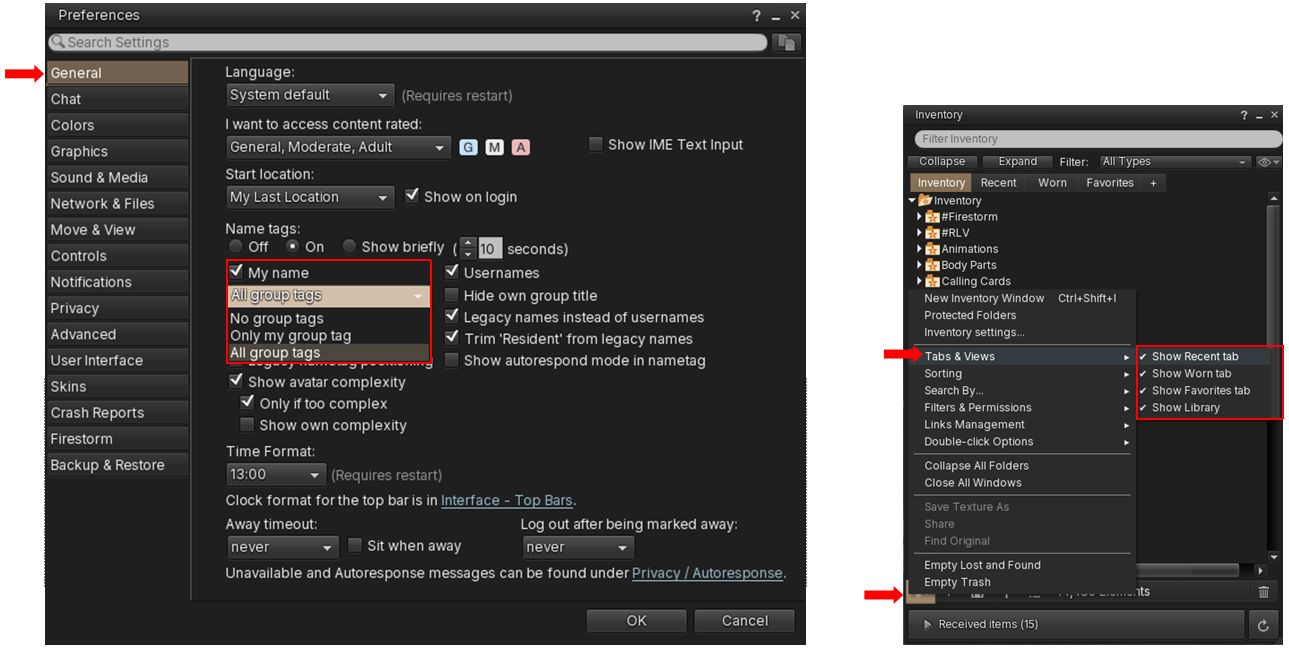
- Google Inter typeface is available for all skins – Preferences → User Interface → Font → Font Scheme drop-down.
- The complete “Flat UI” scheme is only implemented for the new AnsaStorm skin – Preferences → Skins → AnsaStorm from the Skin drop-down or from the login screen: Mode drop-down → Modern.
- Voice Moderation:
- A new Voice connection stats section has been added to the end of the Statistics floater – Ctrl-Shift-1.
- General Updates from 26.2:
Viewer 26.3 – Maintenance
Version and release notes: 26.3.0.31203661088 – August 2026.
-
Add inventory favourites by right clicking objects on your avatar. On Firestorm:
- Context menu: right click → Add to Favourites.
- Pie Menu right click → More → Inventory → Add Favorite.
-
Support for Windows Voice Clarity on Windows 11 – cancels echo, suppresses background noise, and reduces reverberation in real-time using AI.
- New ‘mute’ based filter for conversation history – Top Menu → Comm → Conversation Log → View/sort options → Show Blocked. Hides blocked avatars from the call/conversation history.
- PBR support for pipette.
- Assorted bug fixes and improvements – refer to the official viewer release notes.
Upstream Fixes included with Firestorm 7.2.5
- General fixes:
- Horizontal scroll bar sometimes appearing in chat window – FIRE-36857 and Github Issue #6225.
- Fixed emojis breaking tooltips – FIRE-36997 and Github Issue #2559
- Fixed gesture deactivation not working when deactivating via inventory links – FIRE-36950 and Github Issue #6227.
- Fixed system avatars right hand disappearing on Linux – FIRE-35104 and Github Issue #6240.
- Fixed crash on LLImageGL:scaleDown(int) – FIRE-37001 and Github Issue #6163.
- Fixed StopPlayout crash – Github Issue #6109.
- Selection of cherry-picks for the FIRE-36494 out of memory crash: virtual memory overflow in logs; Record memory in Bugsplat’s attributes; Restored system memory factor, but in LLMemory.
- Audio-related fixes:
- Fixed voice not automatically reconnecting after a voice server crash or restart – Github Issue #6251.
- Fixed warning when unplugging an audio device – Github Issue #6344.
- Separate voice queue from main queue to guard against crash – Github Issue #6315.
- Fixed crash on audio device change – Github Issue #6109.
New Features for Firestorm 7.2.5
Major Feature: Firestorm Animation Override Overhaul
A significant overhaul for the Firestorm Animation Overrider intended to “move away from a basic, single-track animation player and replace it with a highly customizable, multi-layered animation system”. Key updates comprise the following.
Run Multiple Animations Simultaneously in an Animation State – Animation Tracks
This capability allows distinct Animation Tracks to be set for a given Animations State (e.g. Standing, Walking, etc.), allowing specified animations to continuously play across all animations within that state. For example: a tail wag against all walking animations.
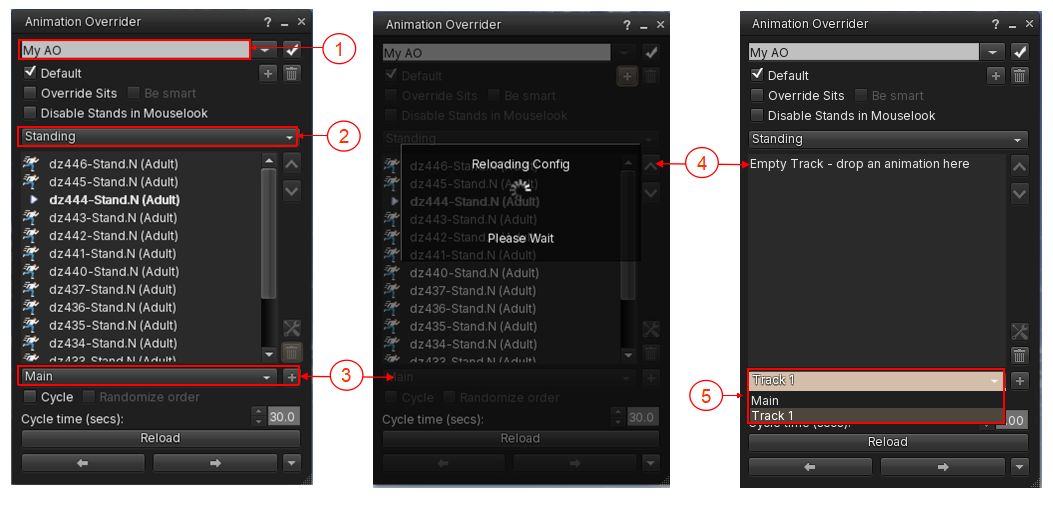
Open the Firestorm Animation Override floater via the toolbar button and then:
- Make sure you have the required animation set selected via the drop down at the top of the AO floater (if you use more than one animation set).
- Select the required Animation State from the State drop-down.
- Click the + button alongside the Track drop-down at the foot of the animation list. The AO will display “Reloading Config. Please Wait.”
- When the reload has completed, a blank AO list for the Track will be displayed, per the instruction in the Track, drag and drop the required animation(s) into the Track and allow it to update.
- To switch between viewing the Main list of animations for the given State and any Track(s) you have created, click the Main/Track drop-down and select. Use the + button to add further Tracks (if required) as defined above.
- To delete a Track, select it via the drop-down as described, then highlight each of the animations within it and click on the Dustbin icon immediately above the + button to delete each of them from the list. When the list is empty, the Track will be automatically deleted.
Animation Grouping
Introduces the ability to group animations together and execute them at the same time, presenting an alternate and more powerful capability to Animation Tracks.
For example: you have a set of standing animations, a set of bento tail animations and a set of bento ear animations, and you want to associate a specific tail movement and a specific ear movement with a specific stand as your AO cycles through your Standing state. Creating an animation Group would allow you to do this, ensuring that the desired animations play together and for the same duration.
Animation Groups can be used to create pairs or sets of animations which can be added to or changed as required.
To create and use an Animation Group:
- Make sure you have the required animation set selected via the drop down at the top of the AO floater (if you use more than one animation set).
- Select the required Animation State from the State drop-down. Continue with either 3. or 4.
- EITHER:
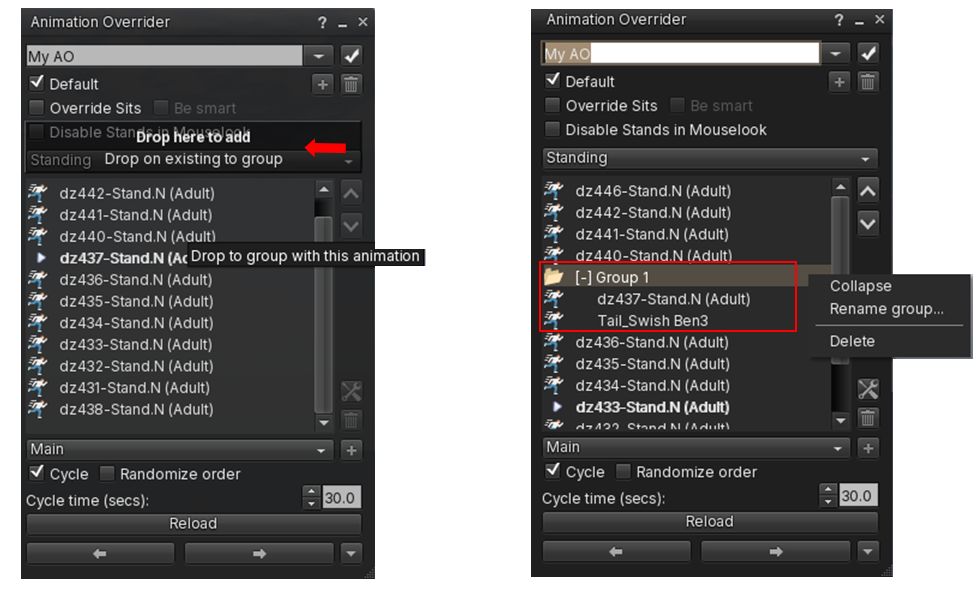
- Drag a required animation (e.g., as per the example above, a bento tail animation) and drag it the the AO floater and over the existing animation within the list to which you wish to add it to form a Group.
- You will be prompted: Drop on Existing to Group.
- Make sure you have selected the required animation in the list and release the mouse button.
- Repeat the above three steps to add further animations to the same Group.
- OR:
- Create a folder in Inventory, and drag and drop all the required animations for the Group into that folder (again, use the example cited above, this would be the stand animation, the tail animation and the ear animation).
- Then drag the folder over to the required Animation State list (Standing, Walking, etc.).
- You will be prompted: Drop Folder to Create and Animation Group.
- Release the mouse button to drop the folder into the State list.
- As the AO cycles through the Animation State list (for things like stands) or the Group is selected by moving it to the top of a State List (as with walks) – all of the animations in the Group will play together, and for the defined cycle time, if applicable.
Further notes:
-
To add an animation to an existing State list without Grouping it with an existing animation:
- Drag it from inventory to the AO Floater and onto the pop-up option Drop Here to Add, displayed at the top of the State list.
- To expand, collapse delete or rename an Animation Group:
- Locate the required Group in the AO Floater.
- Right-click on it for a context-sensitive menu.
- click on the required option.
- Group folders can be moved up/down a State list to determine the order of play, as with animations in general.
-
To remove or delete animations from a Group:
- Locate the required Group in the AO Floater.
- Expand it, if required.
- Right-click on the required animation in the Group and select either Move out of Group to move the animation back to the main State list or Delete to remove it from the Group.
- Note: if there are only two animations in a Group, either moving or deleting one will result in either both being moved up to the main State list, or the remaining animation after the deletion being moved up. Either way, the Group will be effectively deleted.
“Always Played” Quasi-State
A new dedicated Always state meant for constantly active body parts, such as Bento-rigged ears and tails, ensuring they animate continuously without being interrupted by standard body posture changes
-
In the animation state drop-down (Standing, Walking etc.,) scroll to the end of the drop-down and select Always at the end of the the list.
-
Any animations added to this state play continuously, no matter which animation state is active.
- In addition:
-
Animations in the Always state can be optionally cycled and randomised.
-
Always state also supports animation grouping.
-
UI Context Menus
Adds right-click context menus directly onto the AO animation list, making editing, renaming, expanding, and deleting layout entries easier
Additional AO Updates
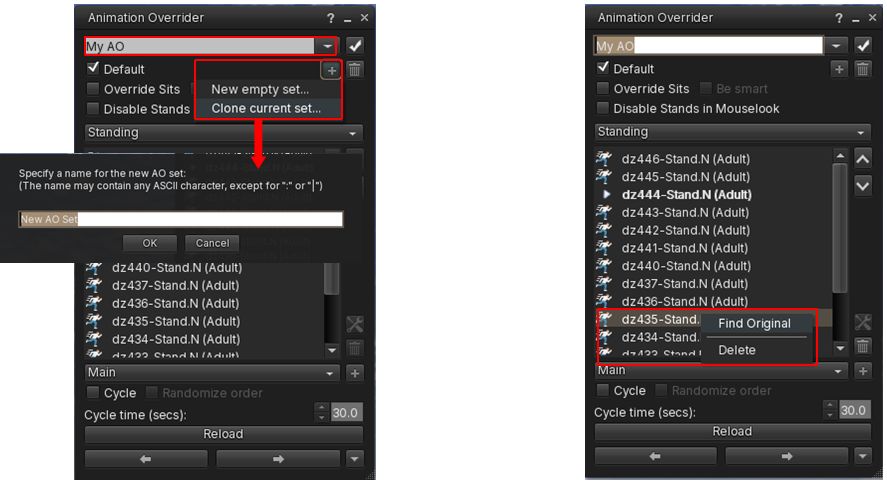
- New option to clone a Firestorm Animation Overrider set:
- Select the required AO Set from the drop-down at the top of the AO floater.
- Click the + button directly below the drop-down.
- Select Clone Current Set.
- Enter a name for the cloned set in the pop-up and in accordance with the notes displayed in the pop-up.
- New “Find original” AO animations in Inventory:
- Right-click on an animation listed in a State / Track list.
- Click on Find Original.
- Inventory will open (if not already open) and the selected animation will be highlighted.
- Assorted fixes and optimisations, as per the release notes.
Inventory Additions and Improvements
Custom Filter Inventory Tabs
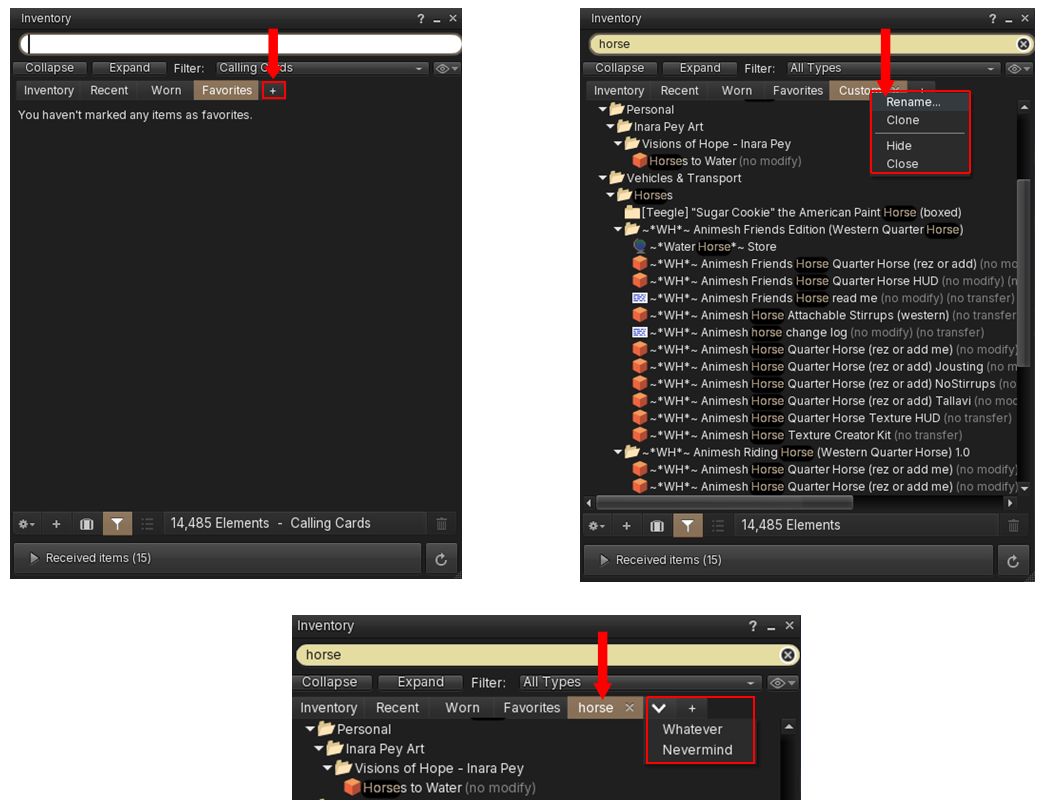
Firestorm 7.2.5 introduces the ability to create up to 64 custom Inventory tabs and use them to display selected items.
- Click the + button at the top of the Inventory floater at the end of the tabs (Inventory, Recent, etc).
- A new Custom Tab is created.
- Use Search / the Filter drop-drop to display selected items.
- Right-click on a Custom Tab to:
- Rename it.
- Clone it to another Custom tab.
- Hide it.
- Close (/delete) it – this will lose any associated filtering.
- Note that:
- Custom Tabs will persist between log-in sessions and save their search term &and filters.
- Support full inventory searching and filtering.
- Hidden Custom Tabs can be revealed as a drop-down list by clicking the down arrow displayed between the default Tabs and the + button.
- Click on an individual Custom Folder in the drop-down list to unhide it.
- By default, when closing a custom Tab, a pop-up is displayed warning that the associated search filtering will be lost. This can be disabled by:
- Check the the Do Not Show Me This Again box in the pop-up.
- Unchecking Preferences → Notifications → Alerts → Confirm before I close a custom inventory filter tab.
Wearable Favourites: Filtering via Folders
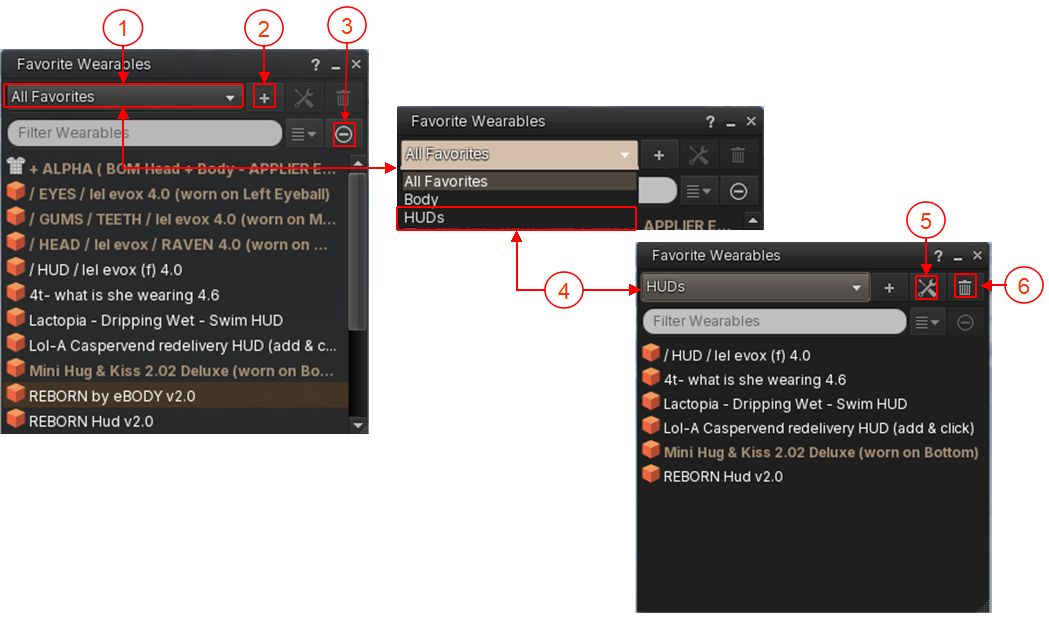
The Firestorm Favourite Wearables floater now supports filtering via different folders. This allows you to:
- Create labelled views of the Favourite Wearables floater as drop-down choices.
- Assign items in All Favourites to a defined custom folder by right-clicking on it within a list (e.g. All Favourites) and then selecting Assign to Folder → folder name, or by dropping them into a custom from Inventory,
- Rename and delete custom folders as required.
- Example use: create a custom folder for all your HUDs contained in Favourite Wearables and then filter on that when looking for a specific HUD.
General Notes:
- Folders created using the Favourite Wearables floater will be listed under #Firestorm → #Wearable Favourites (locked) folder.
- If an item is listed in more than one Favourite Wearables folder, it will only appear once in the All Favourites view.
- If a custom folder is deleted, it will not delete the corresponding links in All Favourites or the original items in Inventory.
- Preserves current folder view after assigning items.
Additional Inventory and Appearance Features / Updates
- New: alphabetical and newest-first sort options to Outfits menu – top menu → Avatar → Outfits → Outfits tab → Show sorting options.
- New: Copy Name to Inventory context menu for copying folder or item names.
- Right click any inventory item or folder → Copy Name.
- Use paste to paste name into new folder / object name field.
- New: Hide the Inventory Library folder – will hide the Library folder in the Inventory Folder.
- Inventory floater → Gear button (bottom left) → Tabs & Views → uncheck Show Library to hide / check to show.
- Note this will also hide the Library from the texture picker when editing objects, the load sky and water picker in the day/night cycle floater, and the My Environments floater (World → Environments → My Environments).
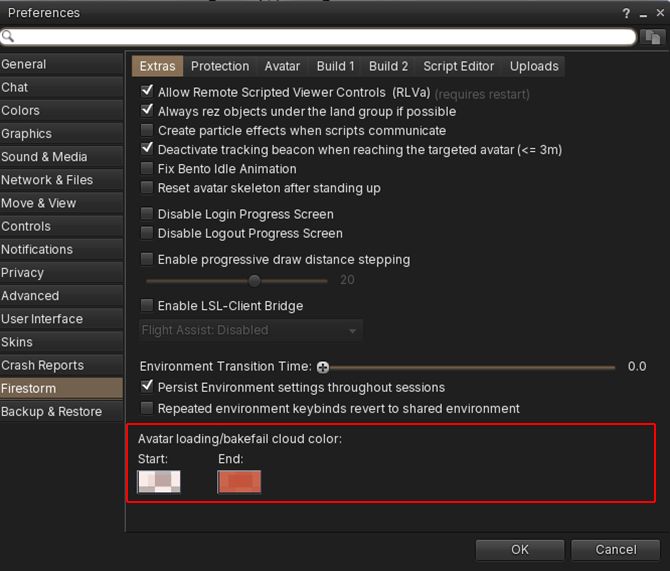
- New: Custom colours for avatar clouds: two new Preferences options to customise the colour of the avatar loading / bakefail clouds:
- Preferences → Firestorm → Extras → Avatar loading/bakefail cloud color – set Start and End colours.
- Improvement: Inventory Gear button options have been reorganised into cleaner submenus.
- Inventory floater → Gear button (bottom left).
- Numerous Inventory and appearance / outfits improvements and fixes – please refer to the release notes.
Creation & Building – New Features
Colour Controls for Build Gizmo
Improved access for the visually impaired:
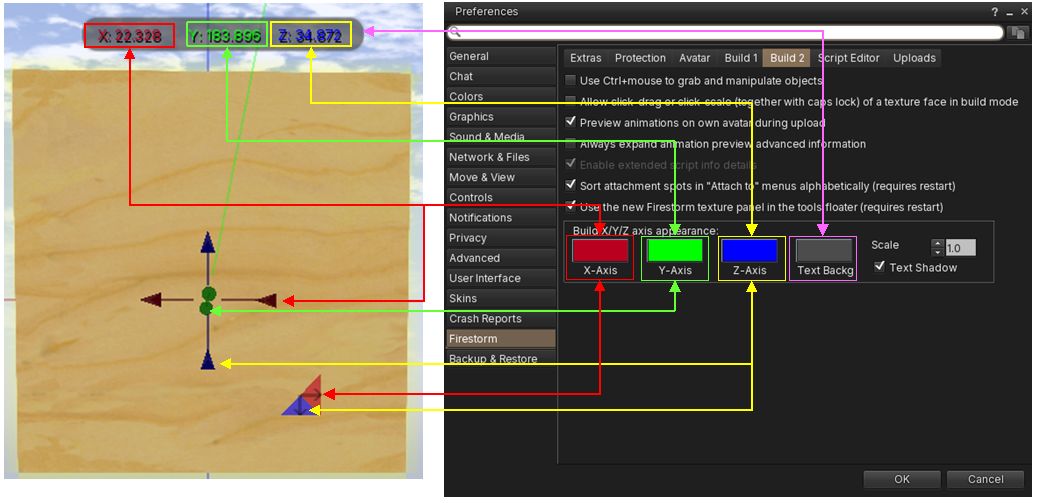
- Choose custom colours for the X, Y, Z movement axes and rotation rings in the Build Gizmo, and for the stretch handles on a object.
- Customise the background colour for the position / rotation / scale information at the top of the screen when editing an object and set whether it should be shadowed or not.
- Increase or decrease the Gizmo’s size (scale).
- Set via: Preferences → Firestorm → Build 2 → Build X/Y/Z axis appearance.
Create Notecard in Object Contents
- Create new notecards directly in the Contents of an object.
General Updates for Content Creation
- Prim count has been returned to the Build floater and is displayed next to land impact.
- Live byte counter added to the lower left corner of Notecards, indicating how many bytes have been used out of the maximum of 65536 bytes. Notes:
- When embedding items in a notecard the byte counter won’t update until there is a key stroke after the embedding.
- The counter may vanish if the notecard floater is made too narrow to display it.
- Fixed local mesh skinning issue with glTF rigged mesh to ensure unweighted bones and now filtered and ensure correct remapping.
- Fixed inconsistent texture picker preview mode
Contact Sets
- New options for the display of Contact Sets in a Profile’s group list: in the Profile panel groups section, if the avatar is in one or more contact sets you can choose to list the contact sets either at the top or the bottom of the groups list, or not display at all.
- Comm → Contact Sets → Configure → Global Settings → Contact sets in profile → Below groups list , Above groups list , Hidden.
- New option for a configurable colour for off-line contacts in the contact sets lists.
- Top Menu → Comm → Contact Sets → Configure selected contact set → Custom offline contact colour.
- New option to hide people icons in Contact Sets lists.
- Top Menu → Comm → Contact Sets → Configure selected contact set → Show people icons in Contact Sets lists.
- New “?” help link to the wiki in Contact Sets configuration window.
- Top Menu → Comm → Contact Sets → Configure selected contact sets gear menu → ?.
- Contact Sets are now sorted by online contacts first in several Contact Sets views: by online status first (online at top), then by name for All-Sets, No-Sets, Pseudonyms and Non-Friends.
Quality of Life Improvements
- Chat link safety improvements: labelled and bracketed chat links now have clearer hover previews, helping residents see where a link is going before clicking it. This is intended to make chat links easier to inspect and harder to misuse.
- Hover previews for labelled chat links are now enabled by default.
- Link hover expanding/unmasking function is now larger with an instant preview in tooltip.
- New separate options for nearby chat and other chat contexts:
- Preferences → Firestorm → Protection → Preview real URL of bracket links in IMs and group chat (on hover)
- Preferences → Firestorm → Protection → Preview real URL of bracket links in nearby and object chat (on hover)
- Added special handling for Second Life and hop links so they remain visibly labelled.
- The Firestorm icon is now used for Firestorm trusted links, instead of the LL Eye-in-Hand icon.
- New option to set a default fallback group tag when entering unassigned regions:
- Display Groups (Ctrl-Shift-G) → Group Titles → Click Group to be set as Default → click Set as Default.
- A ✓ is displayed next to the chosen default Group. Title.
- This Group tag will then be used when entering any region without an assigned Group tag (see Firestorm 7.2.4 – Region-Based Group Activation.
- There is also a new checkbox to toggle the option off/ on.
- Voice capture/device handling: while voice is enabled, your operating system may show the microphone as being in use for the duration of the voice session rather than only while actively speaking.
- Exposed colour swatch for group chat history that comes from the server – this allows changing the default “muted green” colour of the recent messages fetched from group chat servers when a group window opens.
- Preferences → Colours → Chat Colour → Group chat history from server
- Improved Group Titles search – the Group Titles filter field previously only allowed searching for the group role title. Now you can additionally search for region name and group name in the Group Titles filter field.
- Your home location is now displayed in the “Teleport Home” navigation bar button tooltip.
Other Notable Updates
- Omnifilter: a flexible, client-side message filtering and response helper built into the Firestorm viewer. It allows you to define custom rules that inspect incoming messages and, when a match is found, provide predefined actions such as text replacement or automated script dialog replies.
- Firestorm 7.2.5 brings significant updates and improvements to Omnifilter, to extensive to cover in an overview.
- Please refer to the release notes for Firestorm 72.5 and to the Firestorm Omnifilter documentation.
- CmdLine: enables the use of the chat bar as a command line.
- Firestorm 7.2.5 brings significant updates and improvements to Omnifilter, to extensive to cover in an overview.
- Please refer to the release notes for Firestorm 72.5 and to the Firestorm CmdLine documentation.
- Music & Media:
- Stream title history: the number of entries is now configurable with a spinner to choose Max. Entries: added a Clear button to clear the stream title history list; added a Copy to Clipboard” button – Selected lines from stream title history can be copied to clipboard – Top Menu → World → Stream Title → History.
- The visibility of stream title windows now persists across sessions.
- UI Skinning and Fonts:
- AnsaStorm Modern Skin – utilises the LL “Flat UI” – see Flat UI notes earlier in this overview.
- New font – Inter Tight – Preferences → User Interface → Font → Font Scheme → Inter tight.
- Inter Tight fonts have more spacing above and below the text which is causing multi-line text like Script Dialog windows to appear larger then before, so a new Preferences option has been added for user-defined line spacing: Preferences → User Interface → Font → Line spacing (requires restart).
- Major refactoring of terminology within the UI (e.g. Blocked for Muted) – please refer to release notes.
- Numerous updates and fixes – please refer to the release notes.
- RLVa: various fixes, as per the release notes.
In fact, everything else – please refer to the release notes; due to matters of a late release notification coupled with RL requirements, this overview has been somewhat rushed. My apologies for that.