In July, I reviewed Radegast 1.28.872 as part of a series on text clients for Second Life / OpenSim. As a part of that article, I took a quick look at the 3D scene renderer then under development.
Today, Latif Khalifa has announced Radegast 2.0, with the 3D viewer is now released. Not only that, but avatar physics are included and the ability to render mesh objects! Here, in full, is the announcement:
“The Radegast Development Team is proud to announce the immediate availability of Radegast version 2.0.
“This release brings the 3D Scene Viewer that allows users to see the 3d worlds around them. Most of the object rendering features are implemented and functional, including the support for showing regular prims, sculpties and meshes, but one should keep in mind that this is still very experimental and might cause crashes. Known issues include: not entirely correct avatar rendering, no support for glow or flexible prims. If you do encounter problems please do report them in our issue tracker.
“In addition to the Scene Viewer, Radegast 2.0 comes with the support of the new avatar physics wearable type. There is also a crash reporter that will ask you to submit the crash reports should something unexptected happen. We encourage you to submit those reports as they make the future releases of Radegast better.”
I have to say that of all the “text” clients, Radegast is personally my favourite simply because of the scene rendering. so you won’t be surprised to learn I’ve already downloaded the .EXE file and will be trying it out – and reporting back – very shortly.
In the meantime, for those of you who’d like to try it, here are the links:
Last month I reported on a new virtual environment being created by Wemomedia, called The Blu. The Blu presents itself as project that brings together digital media, social networking and collaborative workspaces into a global shared creative space. Neville Spitieri, co-founder of WemoMedia, the company behind The Blu, describes it thus:
“The Blu is a global mission to create the ocean on the world-wide web. It’s an interactive world where every species and habitat is a unique work of art created by digital artists and developers from all over the world.”
Which sounds very exciting, and the project certainly seems to have the support for various visual effects luminaries and digital artists. Given my fascination with ocean exploration, it was enough to pique my curiosity and get me to register for the Beta. Today I received an invitation to register The Blu and start exploring.
Registration is very straightforward, requiring the usual – name, username, e-mail, password. For the Beta at least, there is no e-mail verification process, and once you’ve completed the registration process you can log-in to the main website.
Your Home Page
The Blu home page
This is pretty straightforward, comprising your current status, access to your profile page and credit standing (you get 100 Blu Credits to start) right at the top of the page. Beneath this is a simple menu bar:
Home is your personal home page (the one you’re on)
The Blu launches the virtual world itself in a separate browser window
My Collection takes you to a page listing the various species you have collected in-world or purchased
The Store take you to the online store where you’re able to purchase species
Community take you to a list of The Blu Users – clicking on a name / icon here take you to their Home page, where you can connect with them, or become a Friend / Fan.
Beneath this is a map of the currently available “spheres” you can explore, with your home location indicated by a star. As I’m in the UK, my home sphere is Europe, landscaped as an undersea cliff environment.
The lower section of the page is split into two. Your Event Stream is on the left – what you and anyone you are connected to has been up to (fish collected / purchased, messages posted, etc.) – think Twitter page / Facebook Wall. The right side features various other elements – including the opportunity to become a Maker for The Blu. When your Home page is viewed by others, the Event Stream moves to this side of the page, and the species you have collected appear on the left side.
Entering The Blu
Clicking The Blu from the menu bar, or clicking on DIVE next to your Home page map launches a separate Viewer window and loads the Unity 3D Viewer (the first time you run The Blu, it will prompt you to download the Viewer, which installs seamlessly with your Viewer. Here is where things get interesting / confusing.
Music greets you as the Viewer completes loading and you slip gently beneath the waves to arrive at your default environment. The question then becomes, “OK, so what the bloody hell do I do now I’m here?”
The short answer is – explore!
Moving the mouse cursor around the Viewer window will allow a limited amount of camera movement – so pointing over to the left side of the window will cause the camera to pan left, etc., and there’s no need to press any key. Note that in some views, the camera will proceed on its own, and you can make only minor adjustments to your course.
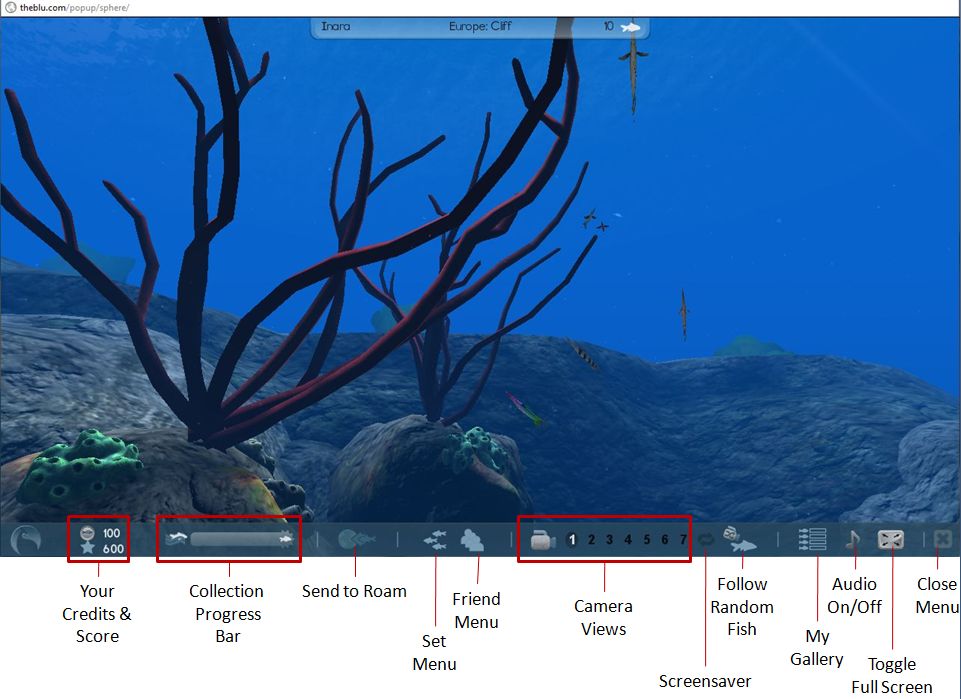
Hover the mouse at the bottom of the screen and a toolbar will fade-in (above). You can change the camera view of your location by clicking one of the 7 pre-set camera positions. In some of these you will see fish, sponges, anemone, etc. Clicking on any of the latter will display two floaters – one providing a brief description of the plant / item, the other details of the item’s creator, with a link to view their profile.
Clicking on a fish for the first time will display a floater asking you to collect the remaining fish in the “collection” to which the one you clicked belongs, and will open an additional Information Bar under the toolbar, listing the fish you need to find to collect the set. If you close this bar, the collection progress bar in the main toolbar will activate, indicating your progress in locating and clicking on fish.
Clicking on a fish you’ve already collected will bring up the two information floaters for the fish and its creator. You can view the creator’s profile in summary in the Information Bar when you click on Viewer Maker’s Profile, and you can ask to be a fan / make contact with them / view their web page.
Fishes in a set you have yet to collect generally show-up in one or other camera views, and tend to have a luminescent glow around them – an audio tone will also sound when a fish from the set you’ve yet to collect enters your sphere. Alternatively, rather than use the camera controls to hunt down fish, you can use the FOLLOW RANDOM FISH button, and see where you end up.
Collecting a set
When you have collected a full set, each fish in the set gets a cameo appearance on-screen, and you can then elect to move on to collecting your next set – or if there are no remaining sets, you can click on a fish and then use the SEND TO ROAM button to select another ocean sphere. The fish will then take you there in a manner similar to (but far smoother than) an SL teleport minus the progress bar. Once you have arrived at a new location, you can start collecting more fish – with everything you collect appearing on your Event Stream and each fish you#ve collected appearing on your My Collection webpage.
Buying Fish
Fish can also be purchased using your credits. This can be done one of three ways:
When collecting them in the Viewer – click on the shopping trolley for a fish in the set display (see image above)
By going to your My Collection webpage
By visiting The Blu’s store.
In the case of the latter two – use the links in the menu bar of your Home page to display the relevant webpage. Both will display the available fish as icons. Hovering the mouse over a fish brings up additional options (see right) including price, a purchase button and a link to the species’ web page. Alternatively, you can double-click on a fish to go directly to the species’ webpage, which also has a purchase button.
A word of warning here: if you click on the shopping trolley within the Viewer, or any purchase button in a webpage, that’s it – you’ve bought the fish. There is no confirmatory pop-up warning prior to completing a purchase. Instead, you are given the options to continue browsing or “dive in” to the Viewer window once more. The lack of any form of confirmatory pop-up is, I feel, an oversight – I was forced to buy a fish while simply checking-out what options are displayed during a purchase; people “clicking to see” may equally find this a little annoying.
Should you run out of Credits, you can purchase more via your Home page. They come in packs ranging from 20 for $3 USD through to 1700 for $100 USD. Fish themselves range in price from 20 Credits upwards; how they are priced (by the user or the vetting team and / or based on some scale related to size / complexity) is unclear.
Species’ Webpages
The species’ webpage for a fish allows you to read-up on the fish (click on the + under the fish name area on the page), and also see how many variants on the species have been created for The Blu (click on the + below Variants to expand the bar) and you can display each of the available variants by clicking on each of them in the drop-down bar.
Species information expanded in the species webpage
You can additionally mark a fish as a “favourite” and /or leave a comment about it for others to read when they visit the page.
Playlists
You can also use the fish you collect to create your own “playlists” – these appear to be screensaver-like movies that feature the fish you have collected and placed into an ocean sphere of your choice.
Playlists are created using the MY GALLERY button on the Viewer toolbar, with opens up the Playlist display.
Clicking on the NEW button in the display allows you to create and name a playlist, select the ocean sphere you wish to use, and then select the fish you wish to add to the playlist. Clicking on SAVE saves the playlist, which is then displayed in the playlist area. Double-clicking on a playlist will cause it to play in the Viewer window until the window itself is clicked, and you are returned to the “main” ocean, and can resume your search for more fish.
Creating Content
Creating content requires you re-log into the site (without signing-out first) by clicking on the BECOME A MAKER button on your Home page. This takes you back to the login screen where you use the same username / password combination to log-in to the Maker platform and get delivered to your Maker Home page.
Maker home page
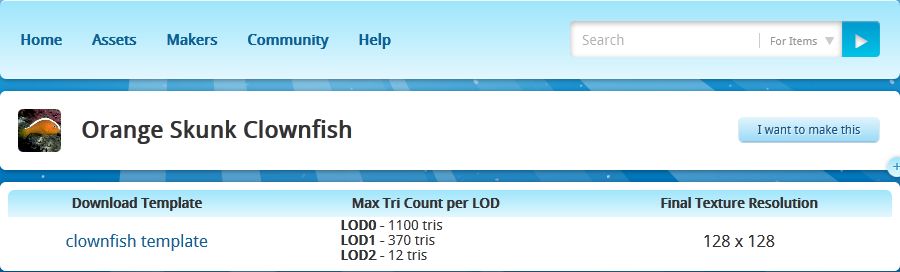
Here you can review existing assets (creations), select a species you want to create, request permission to create an entirely new species, etc. Clicking on a species brings up the template page, which allows you to download any available template you can use to create the fish in question, and provides LOD (Level of Detail) and texturing information. Templates are in Autodesk .FBX format. I’m no 3D modelling expert, so am unsure as to how well this sits with the likes of Blender and Wings3D in terms of pulling the template into the application for use, although it obviously works with high-end applications.
Template and information for creating a species / variant
.FBX is also the file format for uploading a species for review / acceptance for use in The Blu. Makers of accepted species / variants get paid each time a copy of the species is sold.
Thoughts and Feedback
Currently, The Blu is a bit of a curate’s egg – at least from a user’s perspective. When all is said and done, there is little to do but splash around various ocean scenes and collect fish – but even this is mildly addictive.Once you’ve started gathering a set of fish, there is something oddly compelling about having to get all the fish in the set – and then move on to the next set. Or maybe it’s just me developing a virtual form of OCD! Either way, it’s engaging – but I’m not entirely sure exactly how engaging, or shake the feeling that the novelty will wear off sooner rather than later.
Graphics-wise The Blu is crisp and sharp. Being made up of mesh creations, it is streets ahead of Second Life in many respects – but then, it is an entirely different environment when it comes to content creation (the environments are pre-designed and all fish and other species are vetted prior to being added to the system). It might also be a promise of what is to come, to some degree, within the likes of SL as mesh creations become more widespread.
The Viewer itself is very functionally smooth and the animations are for the most part very realistic and movement is superb. Some of the larger fish occasionally exhibit odd “folding” motions if you happen to catch them from certain camera positions, but on the whole the visual experience is quite immersive.
The Blu: a typical scene
The Viewer appears to suggest there will be more on offer as things develop – what is the purpose in having points, for example? Why have undersea “flora” clickable? Is it simply to provide information about the item and its maker, or will there be more in time? The lack of any clear information on the main website both adds to the desire to dive in and try things – but is also maddingly frustrating in some areas – the above being cases in point.
Something I have found disappointing lay in the information presented within the Viewer when clicking on a fish: generally a couple of lines (written by the maker?) which tend not to reveal that much. To get any detailed information on the species, one has to swap over to one Home page, then look the fish up via the My Collection or Store pages, call-up the species’ webpage and then expand the information drop-down. This tends to ruin any semblance of an immersive experience. While one doesn’t want the Viewer unduly cluttered-up, it would be better of the species information could be displayed when clicking on the fish itself.
It would also be nice to see more information on the various habitats and environments under the sea as well. Maybe this is on the cards for the future.
As a social medium, The Blu is currently lacking the ability to – well, socialize. There is the Event Stream, there are options to make friends / become a fan / connect (not entirely clear on what the differences are and no explanation given) – but no real means of directly interacting with other people. There is no clear way of exchanging messages openly or in private, etc. Again, there is every possibility that this is coming – but it seems odd that some greater ability to interact with others is lacking even at this stage, given The Blu’s stated goals.
You may touch a fish that “belongs” to someone else during your travels. When this happens you have the opportunity to Connect to them if you are not already friends, or you can use their fish to roam to another ocean sphere, etc.
I’m not sure how popular The Blu is going to be among the general populace. As a collaborative project, it holds possibilities for digital artists, but more needs to be done on the communications side of things to allow greater interaction between Makers. Similarly, more needs to be built into the system to sustain the interest of the “casual” user. Frankly, it is hard to see why people will want to buy the fish available. While artists may understand the appeal of supporting one another, the greater population probably isn’t – to be brutally honest – really that interested. There simply isn’t anything (at present) that compels someone to collect and then buy the fish on offer – you can’t do anything further with them once purchased, for example. This needs to be addressed in some way, I would venture to suggest, if doing so is not already on the cards.
For a Beta, an novel experiment. It’s going to be interesting to see how this develops.
“My name is Jessica Lyon. My goal during my time with the Emerald Project, was always to give the users what they want. That goal has never and will never change. I’m very happy to announce, it continues…
“A few days ago, I assembled a team of developers to work on a new viewer. Some who were originally Emerald developers, some who were not. All are respected reputable residents in the SecondLife Community. The goal was simple, to provide users with what they want and do it transparently.
“I’m am very proud to announce the launch of the Phoenix Viewer.”
Phoenix was aptly named, rising from the ashes of the Emerald project, to soar gracefully as potentially the more successful and popular of all Second Life third-party Viewers – and all in the space of a few short months.
The Phoenix party with dramatic windlight settings active
To mark the anniversary of that blog post and Phoenix’s birth, Jessica and her team held a party, hosted by Ed Merryman on Wailele Moku sim.
Jessica Lyon
Some 50 people were on the sim for most of the celebrations, which included speeches, music and dancing and general merriment.
Many of the Phoenix development and support teams were present, including Jessica herself, who was out on the dance floor and mingling, and there were opportunities to be had to chat about Phoenix and Firestorm.
It’s been a remarkable twelve months for the Phoenix team. Not only have they met – and exceed the wants and hopes and desires of a huge number of former Emerald users and overcome the angst and concerns that surrounded that particular episode of SL history, they’ve worked equally hard on developing Phoenix’s potential successor, Firestorm, which is already proving to be a huge success even before it has reached the status of a formal release.
So it’s been a remarkable and productive – not to mention successful – year. As a former Phoenix user now committed to Firestorm, I’d like to give my thanks to Jessica and the team for all of their effort over the year and say that I hope this is the first of many such birthday celebrations for both Phoenix and Firestorm in Second Life and in the OpenSim environment.
Linden lab have added a new category to the latest Viewer Search (V2 + TPVs): the ability to search for support items.
The support options can be displayed by either selecting SUPPORT from the drop-down list of search options at the top of the Search window, or by clicking on the SUPPORT option towards the bottom left of the window. Bother of these will refresh Search and display a set of six check boxes you can use to refine your search of support subjects (note that you will probably have to resize the window to see all six). These are:
Linden Lab Policies
Knowledge Base
Answers
Forums
Blogs
All wiki
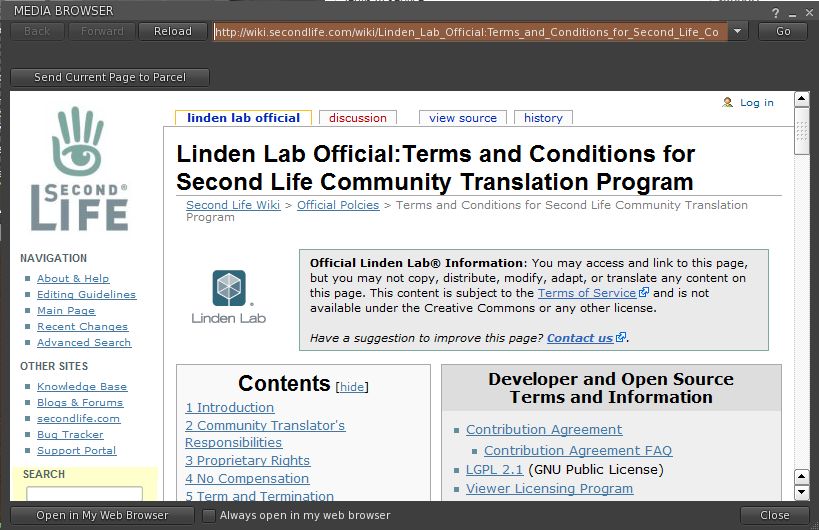
By default, the first three options are checked as active. Search results themselves can be displayed either in your Viewer’s media browser or in your web browser, depending on how you have set your browser preferences.
Typical support search result displayed in the Viewer’s media browser
Overall, a useful and considered addition to Search.
Just on a month after Jacek Antonelli announced she would be retiring from the Kokua / Imprudence project, the team have announced they have a new project organiser in the shape of ZATZAi Asturias.
ZATZAi, aka Sean Greyhound in SL, has been active in SL since 2005, and among other notable activities, helped organise the in-world elements of SLCC 2007, and his appointment has been warmly received.
Also, this weekend see Imprudence celebrate its third birthday, and the team are marking this with a series of events across a number of grids. In Thursday 1st, they celebrated on their “home” grid, 3rd Rock. Over Friday and Saturday, they’ll be travelling to InWorldz, OSGrid and Second Life, with an open invite for friends and supporters and everyone else to join them in celebrating. Here’s where:
During SLCC 2011 Rod Humble mentioned that Premium accounts would be improving during the current months in terms of the benefits afforded to those taking out such memberships, and at “no extra cost”. Also during the convention, Vogt Linden indicated the Linden Homes may well be up for an overhaul as they weren’t perhaps performing as expected.
Quite what the changes to Premium memberships were to be, or whether changes to Linden Homes would be an immediate part and parcel of the changes or something separate, wasn’t made clear during the convention. It also sounded like the changes might be a little way down the road.
Well, in the latter regard, it appears that we didn’t have long to wait for things to start changing.
Today, Linden Lab have formally announced changes to Premium accounts, “starting with exclusive gifts and sandboxes”. Here’s a couple of extracts from the announcement:
“Premium members will regularly receive exclusive virtual items that you won’t find anywhere else. The very first gift is a stylish set of furniture crafted by Colleen Desmoulins of The Loft. The set features a sofa, tables, plants and lamps to enhance your home’s cozy factor. You can change the look of most of the furniture to fit your home’s unique style and decor — whether you live in a Linden Home or elsewhere.”
And:
“Explore your creative side or just get down to the business of creating without the distractions of a more public space in one of the many Premium-only Sandboxes in Second Life. There are four new, exclusive Premium-only Sandbox Islands you can access right now to give you more room than ever to bring your creations to life. Members can visit right now.”
I’m actually all in favour of seeing Premium accounts overhauled and improved – but I’m curious as to how the gifts such as the furniture mentioned above are selected. The words “exculsive” and “won’t find anywhere else” suggest the items have been especially commissioned by Linden Lab. If this is so, it’s probably going to raise eyebrows (and questions) as to how the content creators making the gifts are being selected, and whether they are being renumerated by LL, etc. This in turn could easily lead to some negativity and claims of preferential treatment / the creation of yet another FIC.
The idea of gifts needs to be carefully balanced in other ways as well: while they may encourage newcomers to sign-up for Premium, but give away too many practical gifts and there is a risk of being accused of “strangling” commerce. Take this initial offering: furniture. As the announcement states, the items could be used within a newcomer’s Linden home – so at a stroke, LL appear to have “prevented” any need for newcomers taking up Premium membership for having any need to go shopping for basic SL “needs”.
So while a welcome idea, this is going to need some consideration and thought as it rolls forward, lest it results in upset elsewhere.
Premium sandboxes are liable to prove popular among those that cannot afford to set aside prims / space for their building work, and as such are liable to be less potentially fractious.
As a long-term SL “resident”, these two aren’t enough to encourage me beck into the realm of Premium membership – not for the concerns raised above, but simply because I already have so many things in my inventory, it is hard to conceive of a “must have” gift I don’t already have, or would be willing to buy from a fellow content creator anyway. Similarly (and while I may be in a minority), I have all the private build space I need, so exclusive sandboxes aren’t an attraction.
Which is not to say I dismiss what LL are trying to achieve. Far from it.
Rather, this initial benefits seem aimed towards the “newer” user within in SL, rather than the “established” user base (where Premium accounts are in the minority). Ergo, if the hope is to encourage more “oldbies” to revert back to Premium / take out Premiums for the first time, it is probable that LL are going to have to offer different incentives to those of us who have been around the block a few times.
Nevertheless, beefing-up Premiums is a good idea, and a lot of people are sure to be watching what develops in this area in the coming months.
Addendum 1st Sept 4:17 PDT
Linden Lab updated their blog post to include a video extolling Premium membership, which I’ve embedded below.
 In July, I reviewed Radegast 1.28.872 as part of a series on text clients for Second Life / OpenSim. As a part of that article, I took a quick look at the 3D scene renderer then under development.








 Just on a month after Jacek Antonelli announced she would be retiring from the Kokua / Imprudence project, the team have announced they have a new project organiser in the shape of ZATZAi Asturias.
 Inara Pey: Living in a Modemworld