Tutorial: Using EEP for reflective floors

With EEP, it is now possible to have reflective floors at the parcel level that everyone can see, and contained within the parcel

Within Second Life there have been numerous ways to produce reflective floors within buildings – the most popular being to build a near-duplicate of what is in a room / building and inverting it “below” a textured, semi-transparent floor, allowing the duplicate to act as a reflection.

It’s a clever means of achieving the idea of reflections in polished floors, and has the advantage of being relatively “efficient” performance-wise (if a little hard on land impact, depending on the degree to which a person goes with the “reflected” items under the floor), as it means re-use of loaded textures and avoids rendering avatar reflections and mirroring movement. Although that said, the fact that the technique doesn’t show avatar reflections can spoil the effect.

Nitroglobus Roof Gallery provides an excellent demonstration of using a duplicate build to create the illusion of a reflective floor (although note the lack of any avatar shadow)

As has long been known, Linden Water can also be used as a means of producing reflective floorsthat can reflect avatars as well as objects. However, under Windlight, it has tended to suffer from a couple of observable weaknesses: if applied at the region level, it meant all water viewed from the region with produce the mirror effect – which could be a problem when outdoors (e.g. a mirror-flat surrounding sea); while to use it at parcel level meant using a viewer that accepted viewer-side parcel Windlight support – so anyone not using such a viewer would see a building / room with “flooded” floors.

EPP, with its simulator support for for parcel-level environment settings, means that is now possible to use Linden Water to create reflective floor effects within ground-level building that can more easily been seen by anyone entering the building, regardless of the viewer they are using. There are some pre-requisites involved, both it terms of creating the effect and viewing it, but even so, it is relatively easy to implement for anyone who wishes to do so.

Those prerequisites are:

  • As the approach uses Linden Water, it can only bee used at ground level (and on ground-level rooms of such buildings).
  • Some skill with terraforming is required, in particular:
    • Lowering / levelling land – this is important as the “reflective” floors must be at water level.
    • Ability to sub-divide land into parcel – this is particularly important if there is Linden Water is visible from outside the building with reflective floors, as you’ll be making changes to how Linden Water appears.
  • For parcels, you’ll need to have permission to set the environment at parcel level – if you do not own the region, and parcel level EEP support has been disabled via the region level controls, you will have to discuss the matter with the region holder / owner.
  • Those visiting the building must have Preferences → Graphics → Water Reflections set to All Avatars and Objects or Everything in order to see the water reflecting everything, including avatars.

The approach works best with your own builds, but can be used with pre-fab builds if they are modifiable, and can have floors modifed / replaced.

1 Prepare Your Land and Building

The first thing you need to do, is determine the shape of the floor space you wish to has as a reflective space and prepare the part of your land where it is to go.

  • Make a simple prim template of the shape of the room / building.
  • Place the template on your land where the room is to be positioned.
  • Keep in mind that depending on your location, you may want to sub-divide your land (if you have the necessary permission) so you can see natural-looking Linden Water when outside your house.
  • Use the terrafrorming tools in the Build / Edit floater to carefully lower the land under the template to expose the Linden Water.
  • Note that the “reflective floor” will, when the work is finished, need to sit just below the level of Linden Water. This means you may have to set it lower than the floors in other rooms on the ground floor of the building, or have the building itself surrounded by a mesh / prim surround to blend it with the ground level.
  • When you’re set, position the building and if necessary sub-divide your parcel.
  • Edit the building and:
    • Sset each of the floors you wish to be reflective to around 80% transparent – note that you may have to experiment with this setting, depending on the floor texture you use.
    • Apply a suitable texture for the reflective floor(s) (e.g. a wood texture for a polished wooden floor, or a marble effect for a public building).

2. Set the Water Environment

As noted above, you’ll need a suitable normal map to replace the one used for Linden Water.

  • The easiest way to do this is to use the Mirror Water environment asset that is included in the viewer under Library → Environments → Water.
  • You will need to copy this asset from its default Library location to your inventory (e.g. to the Settings folder – or a sub-folder within Settings, if you organise your EEP assets in sub-folders).
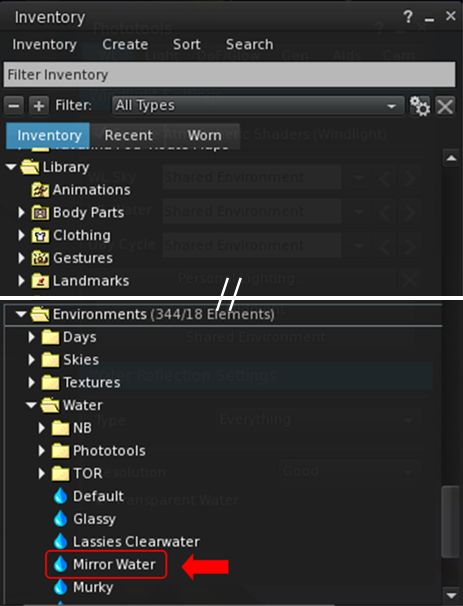
You can use the Mirror Water environment asset to help create your reflective floor. Make sure you copy it (e.g. via drag-and-drop) to your Settings folder
  • With the Mirror Water environment asset copied to your inventory, double-click on it to edit it. This will open the Fixed Environment – Water panel.
  • Within the panel, make the following changes (see the image below for reference):
    1. Set the water fog colour to white (note that depending on things like ambient lighting, the floor texture you use, etc., you may need to adjust this towards a more grey colour).
    2. Set all of the following to 0.0:
      • Fog Density Exponent and Underwater Multiplier.
      • Fresnel Scale.
      • X, Y, Z Reflection Wavelet Scale.
      • Large and Small Wave Speed.
      • Refraction Scale (Above) and (Below).
    3. Set Fresnel Offset to 0.50 (note that depending on things like ambient lighting, the floor texture you use, etc., you may want to adjust this up or down).
    4. Set Blur Multiplier to 0.80 (note that depending on things like ambient lighting, the floor texture you use, etc., you may want to adjust this up or down).
    5. From the Save / Apply Drop-down, select Save As and save your updated environment asset under a new name (e.g. “Reflective Floor”).
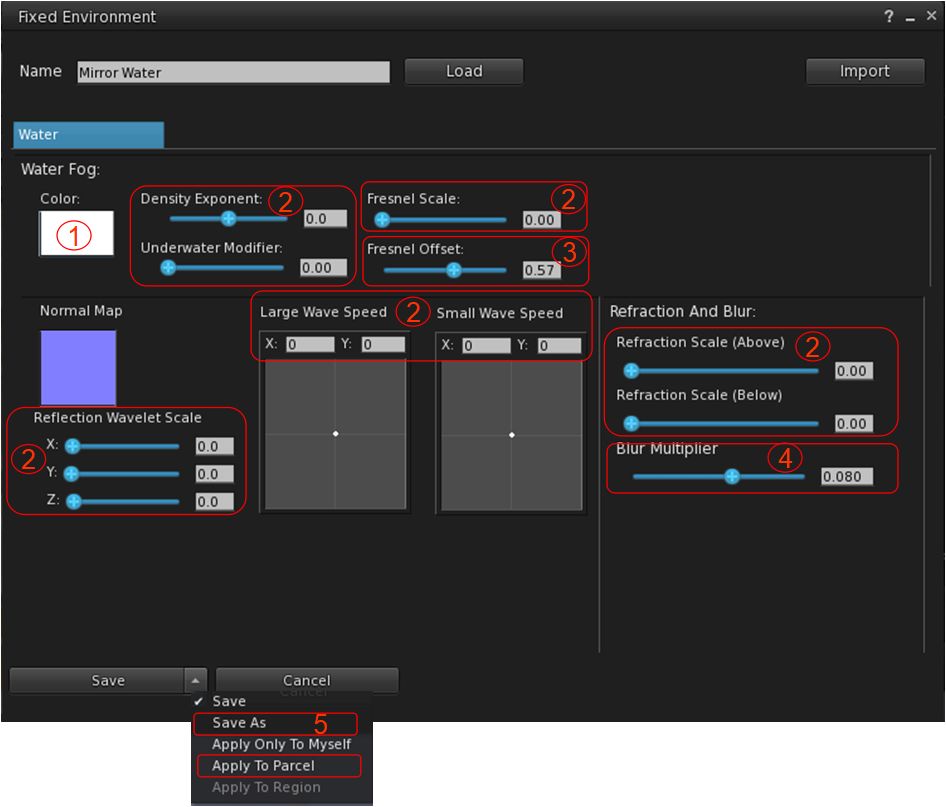
Adjusting the water settings for a reflective floor effect
  • Once saved, Select Apply to Parcel from the Save / Apply drop down to apply the environment to the parcel.

3. See How It Looks / Fine Tuning

You should now have a nicely reflective floor to your building, as shown below.
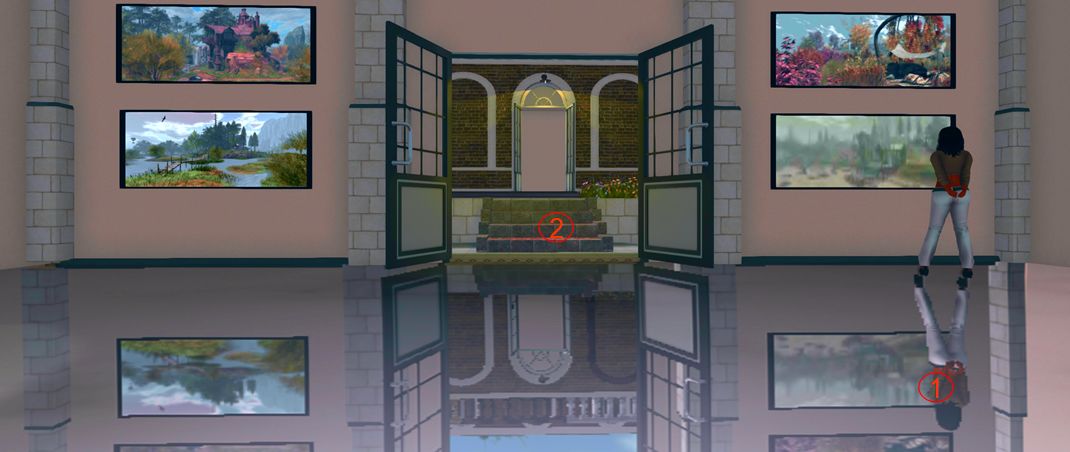
The finished product again, as per the banner image, note the avatar reflection and well as the reflections of in-world objects (1), and also the use of steps to access the low-set floor of the gallery from the outside “ground level” (2)

What’s more, if the building is sitting within its own parcel, when you leave the building, any visible Linden Water should look like natural water  / waves (although if you cam into the building or glimpse the “reflective floor” from outside of the parcel, it might look a trifle odd until you actually enter the parcel).

You might find that some additional “fine tuning” of the build is required to achieve a perfect result. If you’ve placed your floor a little above the level of Linden Water, for example, you may find your avatar “floats” over its reflection (below left), or if the floor is set a little too far below the level of Linden Water, the avatar and reflection may appear to “merge” at feet / ankles. But errors can be corrected with careful adjustment of your floor either down or up.
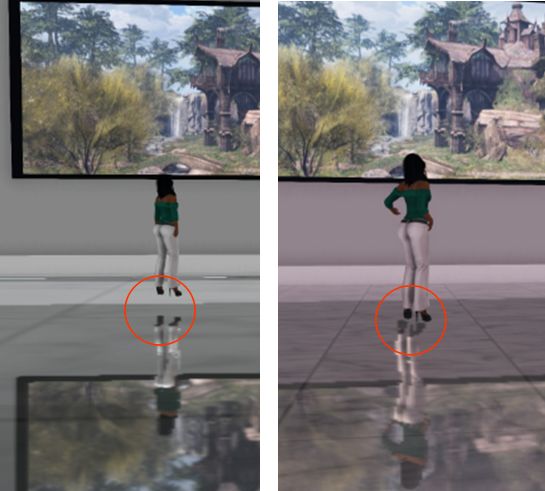
You may have to adjust the floor level relative to the Linden Water level to prevent avatar reflections giving the impression avatars are floating above the floor (l) – or standing with feet embedded in it – and actually standing on the floor (r).

Conclusion

There are still some limitations on the effectiveness of this approach: as noted above, it can only be used for ground-level interiors, and the effect does require visitors to have their graphics preferences set to reflect avatars in Linden Water. However, once set-up, it can add a certain edge to places like stores and galleries.

I’m not sure how much of a performance hit would occur in viewers trying to render a lot of avatars and their moving reflections in a ballroom or other dance venue, so these might require greater consideration. But if you do want to have a different ground-level flooring for your building, and you can meet the prerequisites noted above, it might well be worth giving it a go.

A trip to Templemore Cove in Second Life

Templemore Cove, August 2020

I’ve always enjoyed Luis Lockjaw’s region builds, particularly his Templemore designs from Hesperia through to Lutz City, going by way of Elysium City, so an opportunity to visit his latest Templemore design – Templemore Cove – carried with it a certain anticipation.

Past Templemore builds have had something of a fantastical feel to them, one rooted in reality, but with a twist of fantasy that has made them attractive to the eye whilst tickling the the imagination. For this iteration, things are a little more straightforward: the presentation of a shoreline town clearly in a tropical / sub-tropical location, rich in palm trees and surrounded by off-shore islands sitting is water that – going by the trawlers docked to one side of the region – rich in fish.

Templemore Cove, August 2020

The town itself could be anywhere, but has a distinctively central / southern American feel to it, so much so that by turn, the setting suggests it might be somewhere in Florida, at others perhaps somewhere like Cuba or another large Caribbean island, or perhaps somewhere like Panama or San Salvador.

Florida is particularly evoked by the luxury yachts and powerboats to the east, the pools and neon Motel signs. Cuba and South American townships are suggested by the sun-faded gay colours of buildings, be they apartment houses or places of business, together with – in places at least – the age of some of the types of vehicle to be found.  Swimming pools are much in evidence, whilst the town is built along a grid pattern that is again suggestive of somewhere in the United States, as do the broad board walks. And whilst most of the buildings are shells, it doesn’t prevent visitors appreciating their attractiveness.

The Templemore builds have always had an association with music, and that is very much the case here, with stages to the south and east, whilst the north-side beach offers a chance to escape and relax.

Templemore Cove, August 2020

It is clear that throughout, considerable care has been put into this design – as is always been the case with Luis’ region builds. However, it would be remiss of me if I didn’t point out that this detail comes at a cost: this is a full region with the private region land capacity bonus – and this has been used to the maximum in terms of the amount of mesh and texturing (and if not in terms of physical capacity), all of which can place a significant load on a view that is running with shadows enabled, a higher draw distance, etc.

As an example of this, whilst taking photos with shadows set and a draw distance of 190 metres, I found my fps bouncing fairly heavily between single-digits and mid-teens with under half-a-dozen avatars in the region, some times dropping as low as 4-4.2 fps, which made moving uncomfortable. Things were marginally better with shadows off, but it’s possible those on older systems may well find Templemore Cove heavy going.

Templemore Cove, August 2020

Nevertheless, Templemore Cove has an attractiveness that is worth seeing, particularly if you do enjoy taking photos of Second Life locations.

SLurl Details

Colour and monochrome in Second Life

Love & Love Gallery: Kerupa Flow

I first visited Love & Love Art Gallery, curated by Lylaya Love (lylaya), back in June 2020. Since then, it has relocated, and earlier in August, two new exhibitions opened, featuring the work of Kerupa Flow and Norton Lykin respectively.

Kerupa Flow presents another series of her truly remarkable tablet-and-pen creations, the majority of which are monochrome in nature. There is a richness of diversity present in these pieces, suggestive of multiple roots for Kerupa’s work. To take just a handful: When it Rain, for example has an ink wash style about it, whilst Hug and Curious Walker hint at pen-and-ink drawings whilst Lurking Now is surreal in nature and the landscape of Indelible Night carries an abstracted element within it.

Love & Love Gallery: Kerupa Flow

I admit to finding Kerupa’s work quite fascinating since first encountering it in 2015; her work is always rich in the narrative it contains, and all of the pieces offered here carry that same strength and depth – perhaps most notably her 3D piece, I’ll be sure to find you.

Across the hall, Norton’s work tends towards the striking, with bold, strong colours, and this exhibition is no exception. Twelve pieces of a somewhat abstract nature with a twist of futurism are presented here, offering reflections on love, life, art and the cosmos.

Love & Love: Norton Lykin

Several of the pieces reflect the art of others – Mario2 Helstein and Giovanna Cerise, as re-imagined through Norton’s eyes. These are particularly striking, while Sunrise with Shadows and Red Moon present unique views of the most recognisable occupiers of our solar system (outside of Earth).

When visiting, be sure to take the teleport mat to the gallery’s lower floor where, at the time of my visit, Patrick Moya’s iconic art was still on display, nicely balanced by a display by Oblomov (Jos Bookmite) I reviewed back in June 2020.

Love & Love: Norton Lykin

SLurl Details

Second Norway: a closer look

Second Norway Airport

At the start of August 2020, we made the move to Second Norway (see Farewell, Isla Pey, hello, Isla Caitinara). Since then we’ve been settling in, and as I noted a few days ago, I’ve been playing with a scene rezzing system so that we can have a choice of homes on our island (see: House changing with a scene rezzer in Second Life – and we’re up to three designs now 🙂 ).

However, what surprised me about our move was the feedback (comments on this blog and via IM) from people under the misapprehension that the April / May change in ownership of the estate had somehow resulted it in being “broken up” and replaced by “cookie cutter islands”. In fact, while there have been changes to the estate, much of the original Second Norway remains – and as a frequent visitor-turned-resident, I can also say that none of its spirit has been lost.

In this, I hope this small selection of photos helps to illustrate that point.

The central regions in the estate still have their road and rail system – the latter having (I understand) been ungraded. For water access, this roads mean that the familiar drawbridges are still present

Of course, the airport is still there – as can be seen in the banner image for this piece. So to – contrary to rumour – the road and rail system, as shown above.

The estate also has a good mix of residential and commercial spaces – Motor Loon’s famous MLCC brand is still present for example. On the south side of the estate, AustinLiam has taken this a stage further – an entire group of regions set out as a village, offering his houses and commercial units and other buildings in a contiguous setting with roads, waterfront areas, moorings, and more.

AustinLiam’s regions on the south side of Second Norway

Of course, there are the outer islands – which in the future may well expand, depending on demand, but the Vanity Bonito’s team have also put in new infrastructure that offers opportunities that may not have been so readily available previously: such as the Eidet Event Centre sitting on is own wooded island.

The Eidet Event Centre, Second Norway

Residents within the estate have also sought to offer places of interest as well – camp sites, vacation centres, air fields (although the latter seem to mostly lack rez zones) – all of which add to the estate’s appeal.

Another look at Austin Liam’s commercial regions

With a balanced approach to building codes and themes, as well as offering tenants terraforming rights on their islands, Second Norway is a good mix of the “old” – the central regions with their roadways, rail lines, airport and bridges – and the “new”, with the updated island designs, allowing it to both retain its character whilst offering newcomers a good mix of opportunities.

So if you’ve not paid Second Norway since the changes, now’s the time to hop in your boat or ‘plane, pull up the map and take a look!


2020 Simulator User Group week #35 summary

Cascadia, June 2020 – blog post

The following notes were taken during the Simulator User Group meeting of Tuesday, August 25th, 2020.

Simulator Deployments

Please refer to the server deployment thread for news and updates:

  • On Tuesday, August 25th, the majority of servers were updated to server maintenance update 547110, previously deployed to the RC channels comprising updates to assist with the cloud uplift.
  • On Wednesday, August 26th, there will an RC deployment with version number still TBA at the time of writing, so please check the deployment thread for update. This should  comprise, in the words of Rider Linden:
We hope will help with test pilots being cut in half by their helicopters and other such unpleasantness. There may still be a few issues with unexpected collisions on a region crossing. But we think we have most of the cases. That is going out to LeTigre at least, we may put it on other channels also.

SL Viewer

The have been no official viewer updates to mark the start of the week, leaving the pipelines as follows:

  • Current release viewer version 6.4.7.546539, dated August 11, promoted August 17, formerly the Arrack Maintenance RC viewer – NEW.
  • Release channel cohorts:
  • Project viewers:
    • Custom Key Mappings project viewer, version 6.4.5.544079, June 30.
    • Copy / Paste viewer, version 6.3.5.533365, December 9, 2019.
    • Project Muscadine (Animesh follow-on) project viewer, version 6.4.0.532999, November 22, 2019.
    • Legacy Profiles viewer, version 6.3.2.530836, September 17, 2019. Covers the re-integration of Viewer Profiles.
    • 360 Snapshot project viewer, version 6.2.4.529111, July 16, 2019.

In Brief

  • The improvements to region crossings have resulted in a race condition that mean the receiving region can start acting on a vehicle (running scripts, etc), before avatars are correctly re-seated. As noted, the RC deployment in the planning for Wednesday, August 26th, should help with addressing this.
  • Further thought is being put into how to improve region crossings further, but there will always be limits to what can be achieved due to the nature of the beast (handling data between two region simulators and the viewer), as Mazidox Linden pointed out:
Ultimately moving data blobs around takes time. Moving a lot of data blobs around to a lot of different places at once takes a lot of time and a lot of complexity. It’s never going to be totally seamless without I-Don’t-Want-To-Think-About levels of rearchitecting. And I’m sure even that would come with trade-offs.

Maxidox Linden, SUG Meeting, August 25th

  • HTTP-out restrictions remain in place on the Aditi regions running on AWS infrastructure. Work is progressing on code that will allow these restrictions to be lifted, although the implementation (when ready) will come in stages. One of these stages will be to make the new HTTP-out code available on regions still in the Lab’s co-lo (Aditi first, then Agni) to allow for more widespread testing.

2020 viewer release summaries week #34

Logos representative only and should not be seen as an endorsement / preference / recommendation

Updates for the week ending Sunday, August 23rd

This summary is generally published every Monday, and is a list of SL viewer / client releases (official and TPV) made during the previous week. When reading it, please note:

  • It is based on my Current Viewer Releases Page, a list of all Second Life viewers and clients that are in popular use (and of which I am aware), and which are recognised as adhering to the TPV Policy. This page includes comprehensive links to download pages, blog notes, release notes, etc., as well as links to any / all reviews of specific viewers / clients made within this blog.
  • By its nature, this summary presented here will always be in arrears, please refer to the Current Viewer Release Page for more up-to-date information.
  • Note that for purposes of length, TPV test viewers, preview / beta viewers / nightly builds are generally not recorded in these summaries.

Official LL Viewers

  • Current release viewer version 6.4.7.546539, dated August 11, promoted August 17, formerly the Arrack Maintenance RC viewer – NEW.
  • Release channel cohorts:
    • Love Me Render RC viewer, version 6.4.8.547427, August 21st.
  • Project viewers:
    • No updates.

LL Viewer Resources

Third-party Viewers

V6-style

V1-style

Mobile / Other Clients

  • No Updates.

Additional TPV Resources

Related Links
