SL project updates 2017 14/2: TPVD meeting, server updates

Maison de L’amitieblog post

The notes in this update are taken from the following sources:

  • Server Beta User Group meeting, held on  Thursday April 6th, 2017 at 3:00pm SLT – transcript here
  • The TPV Developer meeting held on Friday, April 7th, 2017 at 12:00 noon SLT.

A video of the TPV Developer meeting is embedded at the end of this update. My thanks as always to north for providing it. Timestamps in this report, where relevant, will link you to the point in the video where items are discussed (via a new browser tab).

SL Viewer

No changes to the current pipeline since part one of the week’s update:

  • Current Release version 5.0.3.324435, dated March 13th – snapshots to e-mail hotfix
  • Release channel cohorts:

    • Maintenance RC viewer version 5.0.4.325124, dated Monday, April 3rd  – review
    • Voice RC viewer version 5.0.4.324770 released on March 20th – several improvements to voice
  • Project viewers:
    • Project AssetHttp project viewer, version 5.0.4.324828 dated  March 30th – This viewer moves fetching of several types of assets to HTTP / CDN – overview
    • Project Alex Ivy (“LXIV”), 64-bit project viewer, version 5.1.0.503537 dated March 17th
    • 360-degree snapshot viewer, version 4.1.3.321712 dated November 23rd, 2016 – ability to take 360-degree panoramic images – hands-on review
  • Obsolete platform viewer version 3.7.28.300847 dated May 8th, 2015 – provided for users on Windows XP and OS X versions below 10.7.

64-bit Build Instructions & Windows Crash Rates

[11:15] The Lab plan to update the viewer build instructions on the wiki to match the 64-bit build process once the 64-bit viewer reaches release status, and the build process is seen as stable.

[29:14] The 64-bit build is being tested across all versions of Windows back to Windows 7. While the current project viewer cohort of users is small, there is evidence that Windows 7 64-bit systems have a “significantly higher” crasher rate with the viewer than Windows 8 or Windows 10, with Windows 10 systems having the lowest overall crash rate.

SL Voice: Linux Updates and Blocking Older Versions of SL Voice

[0:49] Vivox, the company that provides the Voice back-end service and delivers the Voice plug-in for the viewer are no longer providing updates for Linux. This means there will no longer be any Voice updates for the Linux flavour of the viewer unless Vivox reverses that decision.

[1:42] The plans to block older versions of SL Voice to ensure  users are only using the most recent versions of the plug-in, first announced in the latter part of 2016 and placed on hold in December 2016, remain on the back-burner with Oz  Linden noting, “We don’t have any time line for disabling older Voice versions … We may or may not get to it.”

Region Access Changes

There are two changes to region access which are currently in progress.

Region Capacity and Access

[2:36] The first is the Improved Region Capacity and Access updates as reported by the Lab on Tuesday, April 2nd, and which are being rolled-out in stages. There has been some negative reaction to these change (some basic account users have been particularly vocal about the upper capacity to a very busy region being “reserved” for Premium members); however, the deployment which was placed on its own limited server channel (McRib),  appears to be going well and so will be rolled to a larger selection of regions in week #15 (commencing Monday, April 10th).

[3:28] The Lab will continue to look at avatar capacity within region types  as they continue to make other changes to the system, and if the opportunity arises to increase the numbers, they “probably will” (quote). Of course, increases to region capacity on the back-end can have a negative impact at the viewer end of the equation, where the viewer and client system potentially have to work than much harder.

Revised Region and Parcel Access Controls

[4:40] The Lab is revising how Public Access controls are set at both region and parcel access. This involved changes to both the back-end (already on RC) and a set of changes to the viewer UI. You can read more about this in my separate report here.

Simulator Operating System Update

[4:07] As noted in recent SL project updates in these pages, the Lab has been working on a new region simulator build using an updated version of Linux. These work has been on test on Aditi (the beta grid) for the last several weeks (on channel DRTSIM-323), and is due to move to an RC release in week #15, pending no last-minute show stoppers arise in final QA  / test.

This is an extensive back-end change to the simulator, which should be largely invisible to users. However, the Lab will be watching the initial deployment carefully, because as Mazidox  Linden commented at the server beta meeting, “It won’t change anything you should notice, and could change anything, at the same time.” This being the case, there is a standing request that as the update is deployed, those using regions running on the RC channel(s) on which it is running (see the week #15 server deployment notes in the Second Life Server forum, once published) to be extra vigilant and report anything untoward they may see / encounter.

Once this operating system update has been completed, the Lab will start work on a further update.

Other Items

Rendering Cost Calculations

[19:25] The Lab is running a background project to look at the cost of rendering a wide range of Second Life features across a range of different client systems running the viewer. The tests for this work have now been defined and are about to be put into use. Once sufficient data has been gathered, the Lab will use it to determine what might need to be done to improve the accuracy of the avatar rendering calculations with a view to making them more accurately reflect the real cost of rendering high poly count items. Changes will be communicated through forums such as the TPV Developer meeting ahead of any implementation.

[33:55] One potential project which might help with mesh avatar complexity is to allow system layer texture baking to be applied to mesh avatars. This has been the subject  of numerous discussions at the Content Creation User Group meetings (see here and here for more), and while it is still not officially adopted as a project by the Lab, they are continuing to take a detailed look at the idea,

Ban List Improvements

[28:00] This was first raised at the TPV Developer meeting held of Friday February 17th. Essentially, the region ban lists are seen as difficult to use, particularly where the ban list is extensive. There have also been requests that the upper limits for both region and parcel ban lists are raised.

Both subjects are still subject to discussion within the Lab, and while no project is currently on the cards to deal with either, it seems likely that were they to be addressed, they would be addressed together. It has been noted that one possible driver for change might be the upcoming changes being made to how Public Access is managed for regions where it is set (see above).

Windows 10 / Nvidia Shadowplay Bug

Whirly Fizzle has reported a bug which appears to have started with a recent Nividia driver update or a Windows 10 update. In short, launching the Nvidia GeForce Experience and enabling ShadowPlay on a Windows 10 system with Nvidia graphics, which tend to result in a viewer crash. See BUG-11530 for more, including a response from Nvidia on the issue.

New region and parcel access controls coming to Second Life

At both the Server beta meeting on Thursday, April 6th and the TPV Developer meeting on Friday April 7th, Grumpity Linden and Oz Linden revealed more about the upcoming changes to region and parcel access settings.

The server-side update for thee control are currently on the three RC channel (server maintenance package (17#17.03.31.325149) – but the changes as a whole will not come into effect until after there has been a significant UI update to the viewer.

So what is changing?

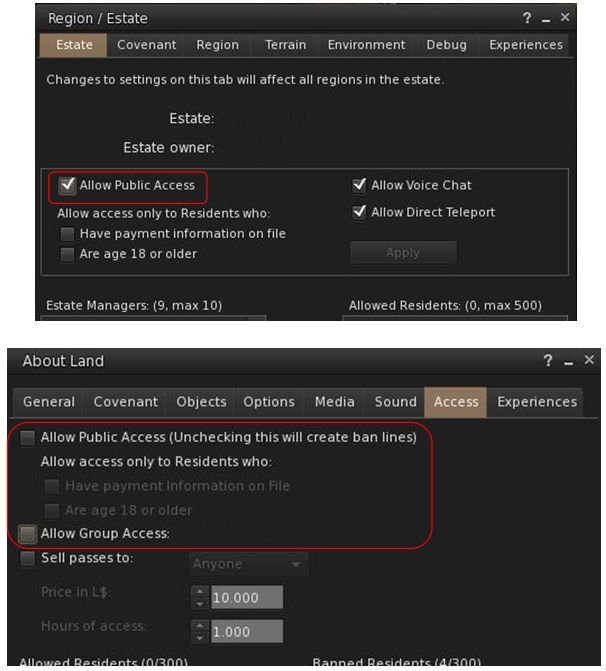
In short, the new controls – once they are available through the viewer – will mean that when a region is explicitly set to Public Access via the Region / Estate floater, parcel owners will no longer be able to unhceck Allow Public access or set other restrictive access (e.g. Group Only) in the About Land floater for their parcel – so no more ban lines on regions explicitly set to Public Access. However, parcel-level ban lists will still apply and if things like security orbs are allowed with the region in question, they will still work as well.

Note that no change will occur where Allow Public Access has not been explicitly set within the Region / Estate floater. In these instances, parcel owners will still be able to set their own access.

This change is being made for several reasons. For example, it is something many region owners (and those who sail / boat / fly  / drive through ostensibly public regions) have requested; it is also something many estates have in their covenant but cannot actually enforce; and so on.

With the upcoming changes, if an estate is set to Allow Public Access (top), parcel holders on that region will no longer be able to override the public access using the About Land access options (above). However,the parcel ban list and and installed security system will still apply

These changes mean that the viewer UI – as noted – will be undergoing some significant changes.  Exactly how extensive thee changes will be is unclear. However the Lab is conscious of the need to ensure there is no ambiguity in the controls, and that issues such as BUG-4994 which results in a parcel being set to Group access (and gaining ban lines) if both the Public and Group access options are checked, are also resolved as a part of the work.

At the Server Beta meeting on Thursday, April 6th, Grumpity Linden commented on the UI updates thus:

We are trying to find the best way to express the access sets most clearly … The UI is changing to better convey what your actual settings permit …

1) EO & EM can now force parcels to be no more restrictive than the Estate level setting.

2) UI for both Estate and Parcel access management is confusing. We’re making changes to make it less confusing. The weirdness where you check “Public access” and “Group access” and end up with group ONLY unless you also check “PIOF” and then you get group + public w/PIOF … that will not stand.

UI will grey out unavail options; also, estate level setting will include a warning dialogue to hopefully deter EM from messing with this override willy-nilly.

It is anticipated that a viewer (project or RC) with the required updates could be appearing in week #15 (week commencing Monday, April 10th).

The changes and the upcoming viewer UI updates were also discussed at the TPV Developer meeting, from which the following audio excerpts were extracted and put together.

These comments can be heard in full on the video of the TPV Developer meeting, commencing at the 4:45 time stamp.

Catznip R12: a peek at upcoming inventory management improvements

I recently received an IM from Kitty Barnett recently, asking me if I’d be interested in taking a look at some new features she’s been working on for the upcoming Catznip R12 release which is Coming Soon™.

Obviously as someone who has followed (and uses) Catznip (although not as frequently as I use Firestorm, admittedly), I was delighted to take a look. Nor was I alone, Kitty also put together a couple of articles on the features on the Catznip blog, (which you can find under the titles Three Days of Teasers Day #1 and Day #2 – a third part was planned but that pesky thing called the physical world got in the way of Kitty’s plans), and invited Catznip users to have a look.

With Kitty’s approval, I’ve summarised those two articles here – and if you are a Catznip user already, and haven’t seen Kitty’s original documents – please hop over to the Catznip blog, have a read & offer feedback.

Inventory Management

Catznip has tended to position itself as the viewer for shoppers, and with the upcoming R12, Kitty offers some enticing new features to make shopping and inventory management a lost more pleasant. She introduces the basic concept thus:

Whenever you buy or grab something you have to click that “Buy”/’Pay”/”Keep” button anyway so wouldn’t it be great if we could just do some pre-sorting right then and there?! It wouldn’t really interrupt the flow of going to an event and hovering up demos or buying things you’re sure you want since you don’t actually have to go to your inventory while you’re at the event and you’d be able to teleport home with an inventory no worse off then when you arrived.

And so with this in mind, Kitty has revised the Buy / Pay floater and the Accept Inventory floater so that they offer you the ability to select where incoming items are going to be stored in your inventory.

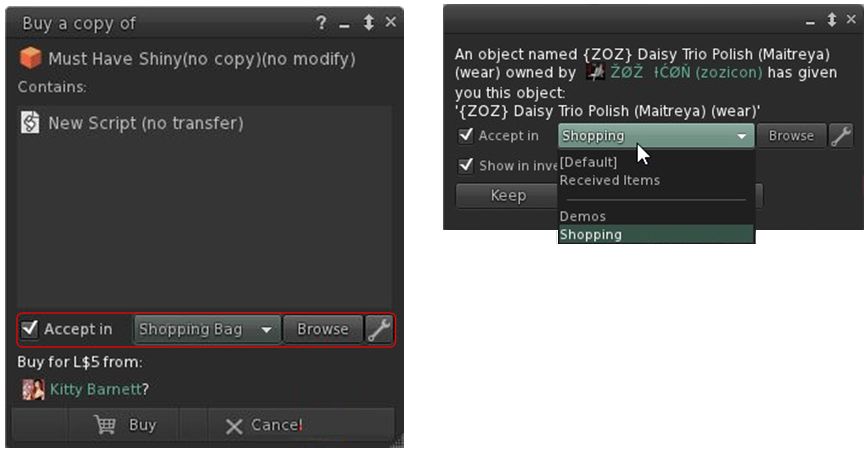
Catznip R12’s upcoming options to select where items your buy / receive go in your inventory. Credit Kiity Barnett / Inara Pey

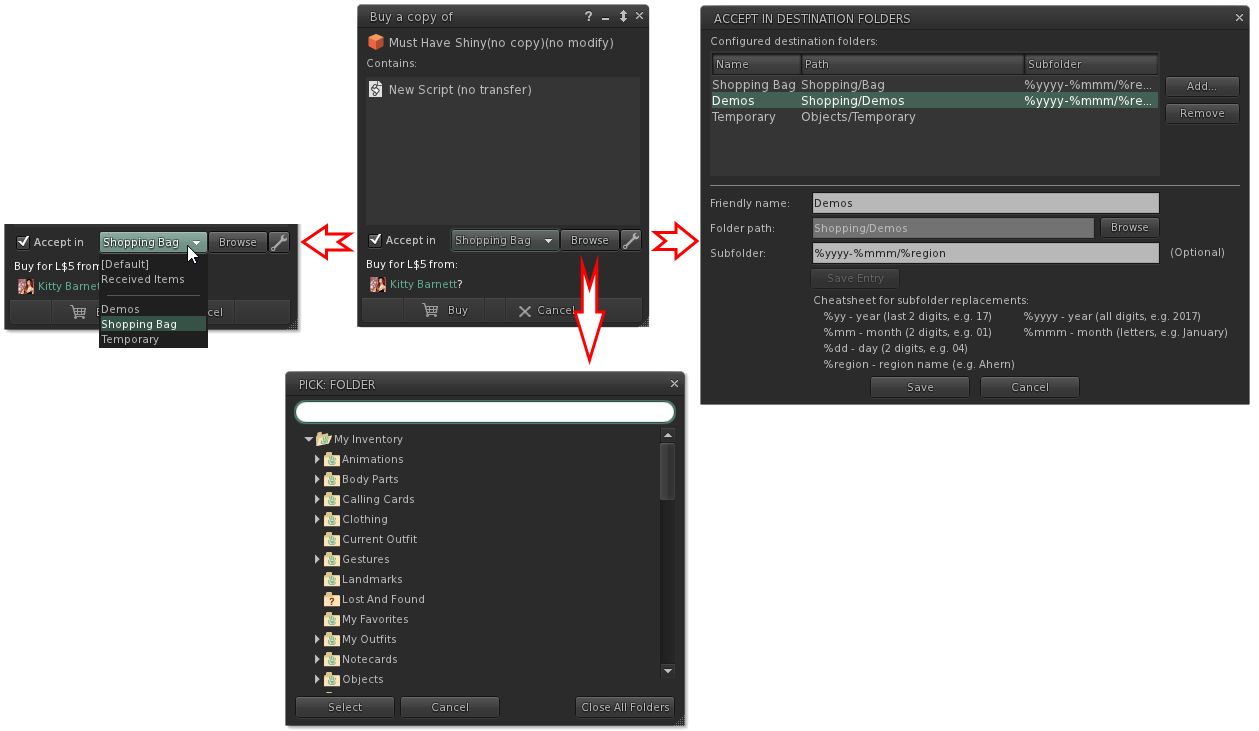
The options should be fairly self-explanatory. Check Accept in and the remaining options are activated. The drop-down will display a list of folders you have opted to allow incoming items to be delivered (show in the image on the right), the browse button allows alternative from you list of folders in the drop-down to be selected, and the spanner button allows you to establish your list of destination folders. The roadmap of these various options is shown below.

What the options do. Note they are available in both the expanded floater view (centre) and the collapsed view (left) – click for full size, if required. Credit: Kitty Barnett

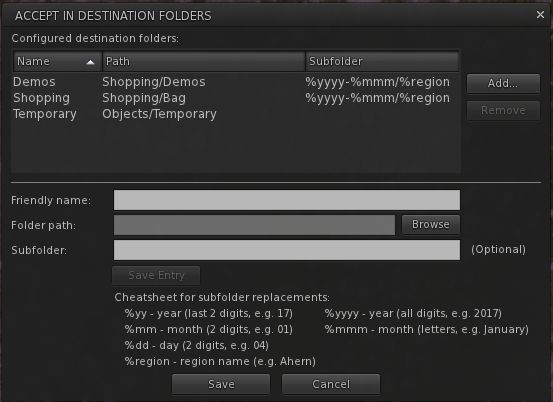
Note only can you select the folders into which you want incoming purchases to go, you can also set Catznip R12 to dynamically create new folders in which to place incoming items. This means, for example, that if you got to a big shopping event at one location, you can set the viewer to deliver all the demo you obtain / items you purchase into folders define by – say – the month in which you got them, and the location where they were obtained.

So, for example, if in April you go to shopping event X on region YYYY, and grab a load of demos, and then later in the month go to event A on region BBBB and grab more demos, you can have them delivered to sub-folders in your “Demos” folder, respectively labelled “April 2017 YYYY” and “April 2017 BBBB” – both of which are dynamically created by Catznip as they are needed. So even if you don’t get around to trying them for days after your visit, you can quickly and easily locate the demo items without have for fiddle around searching for folders and objects.

The panel for setting folders into which incoming purchases can be received, and the option for setting dynamically created sub-folders within that folder. Credit: Kitty Barnett

Inventory Searching

Inventory searches can be a pain. Even with the search filters, things are hardly ideal. To help improve things, Kitty has in the past added additional search options to Catznip such as Open Folder In, which considerably eases the pain for further refining searches / making items visible in folder which might otherwise remain hidden as a result of the search term / filters initially used to try to find things.

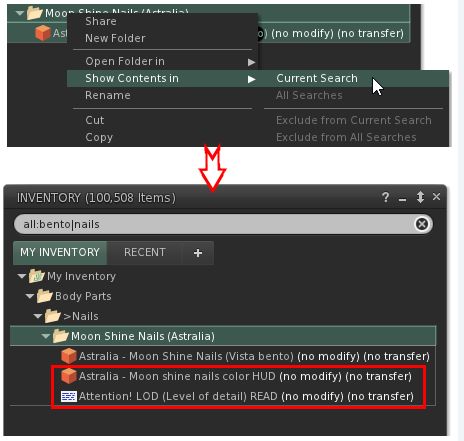
With Catznip R12, she further improves things by adding a new Contents In capability. Rather than displaying the results of a search in a separate tab, this option displays the folder(s) matching your search criteria with all of the contents visible, rather than just the items which might match your search criteria, making it much easier to see if the folder(s) contain what you are looking for (particularly where some / all of the items in the folder might not be consistently named, and so might otherwise be masked from view after a search).

The New Show Contents In presents a more refined way to see all of the contents in a folder when they might otherwise be masked by the search criteria / filter you have set. Credit: Kitty Barnett.

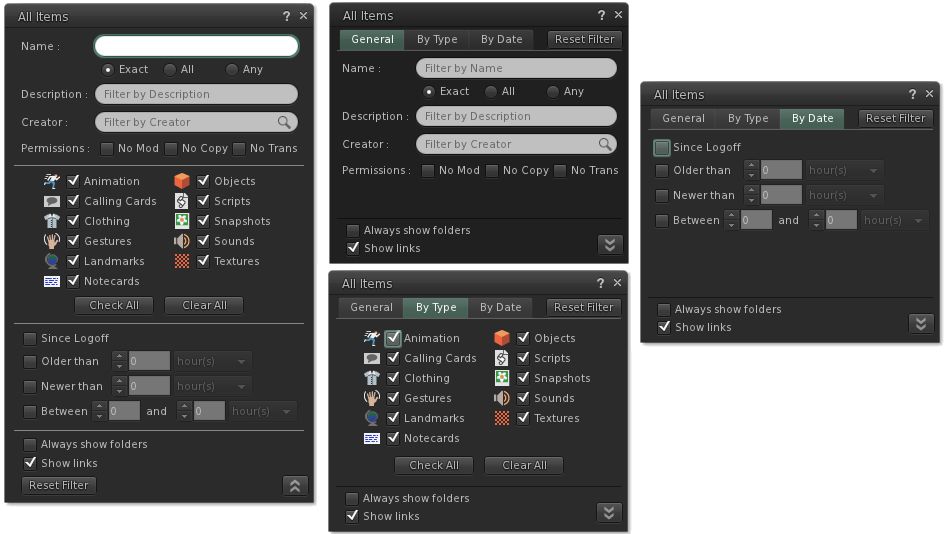
Finally – and not a part of the two articles by Kitty linked-to above – Catznip R12 will see further refinements to the inventory search features themselves, and highlighted in the set of images below. I’ll have more on this when the viewer is ready for release.

The Advanced Inventory filter floater for Catznip R12 in its expanded and tabbed forms.

Feedback

I’m not the world’s greatest shopper in many respects. In the physical world, I’ve reach that point in life where I know what I like to wear and am happy wearing it; shopping for fashion or trends passes me by. This is reflected in my SL time as well; I don’t go to the major shopping events, be they fashion or the gacha events. I tend to be targeted in what I’m buying.

But, that said, there are times when I can hit a store and go demo-mad, and I find it annoying that depending on how they are delivered, demos can end up anywhere in the top-level of my inventory when delivered as a folder, or get rudely shoved in Objects. I’m also slightly OCD in my inventory management and ordering.

Both of these being the case, I’ve long wanted to have the means by which I could better control what goes where when entering my inventory, rather than having to set aside time after (say) an infrequent demo splurge shunting folders and boxes around my inventory. So the new destinations options get a big thumbs up from me. Similarly, inventory filtering and searching has long been in need of refinement, so I’m looking forward to having a play with kitty’s updates in more detail when R12 surfaces.

And when might that be? Well, there is still some work to be done before the viewer is ready for a full release – but there is a chance that a preview version might be available on a limited basis in the next few days.

In the meantime, Kitty welcomes constructive input on these ideas, so again, if you have any suggestions, comments, additions, or obvious things that could be added (keeping in mind that if you’re not a Catznip user then there are already quite a few inventory/appearance features that you might not be used to) – she’d like to hear from you. Drop your comments here or  – better – on the Catznip blog posts, which I’ll again linking to below to save scrolling.

Fantasy Faire: nominations for king, queen and chancellor, and a Quest teaser

via Fantasy Faire

One of the features introduced to Fantasy Faire 2015 was the opportunity to nominate and then vote for the King and Queen of the Fairelands and their (strictly non-human) Chancellor.

Nominations came from across all realms of fantasy, with the top five for the positions of king and queen (human or human-looking nominations only)  and chancellor, went forward for a public vote-off during the course of the Faire.

The very first king, queen and chancellor of the Fairelands were, respectively, Havelock  Vetinari and Granny Weatherwax and Greebo the cat, all of which marked a fitting tribute to the late Sir Terry Pratchett, who passed away in March 2015, just ahead of that year’s Faire.

Havelock  Vetinari, Granny Weatherwax and Greebo the Cat were the first elected king, queen and chancellor of the Fairelands in 2015.

In 2016 came the time to elect a new king, queen and chancellor, with the honours this time going to The Goblin King, October Daye and The Last Unicorn.

Now, a year on, it is time for the royalty of 2016 to put aside their sceptres, and the chancellor his chains of office. As Fantasy Faire 2017 approaches, Fairelands Folk are once again being asked nominate those they feel should be elected king, queen and chancellor for this year’s event.

The Goblin King, October Daye and The Last Unicorn were the elected king, queen and chancellor of the Fairelands in 2016

You can nominate your choices through the form below (or if you prefer, go directly to the same form on the Fantasy Faire website. Any character from the worlds of fantasy is eligible; the only major requirements being that nominations for king and queen must be human (or human-type) characters, whilst nominations for chancellor are restricted to non-human (or non-human type) characters.

Note that a) characters should be chosen from works of fantasy  (including fairy tales, high fantasy, steampunk, urban fantasy, vampire sagas, etc) which can be written or graphical texts or films, TV or radio shows; and b) past winners are not eligible for re-election.

Nominations close at midnight SLT at the end of Saturday, April 22nd.

Get ready for the Fantasy Faire Quest

The Quest: The Bard Queen’s Song

The first teaser for the 2017 Fantasy Faire Quest appeared on Thursday, April 6th. Entitled The Bard Queen’s Song, it sees a little bit of a twist occur with things.

In previous years, a call has gone to Heroes and Heroines to come to the Bard Queen and assist her in righting wrongs. But this year, it is the Bard Queen herself who has seemingly vanished – and that could be very bad news for the Fairelands!

Fortunately (or so it says here in a script handed me by a pair of very small hands) Farion Sunbreeze has realised something is amiss; that while the Bard Queen has been known to skip off out of the Fairelands every once in a while, this time It Is Different and that Something Is Amiss – and he (and The Lads) are going to put matters to rights!

Only problem is, Farion is a pixie (as are The Lads). So, yeaaaaaahhhh – they’re going to need some a lot of help.

So, once again, the call goes out to the heroes and heroines of the Fairelands:  dare you travel you Morbus, where the Unweaver has sought to sew his malice, turning beauty into chaos and nature against itself? Dare you find your way to the Alchemist’s tower, and once there do ….

… Do what, exactly? Well, that would be telling – but keep your eyes on the Fantasy Faire website (and maybe these pages) for future teasers. For the last couple of years, I’ve road-tested the Quest; whether fortune favours me the same privilege this year, I know not – but either way, the Quest is not something to be missed!

Additional Links


A World of Details in Second Life

Melusina Parkin – World of Details

“Although I love landscapes and broad views, my photographer’s eye needs to go close the things,” Melusina Parkin says of he recently opened exhibition World of Details. “Maybe I got impressed forever by the words said by Mies Van De Rohe – one of my favourite Masters of 20th Century aesthetics – ‘God is in the detail’.”

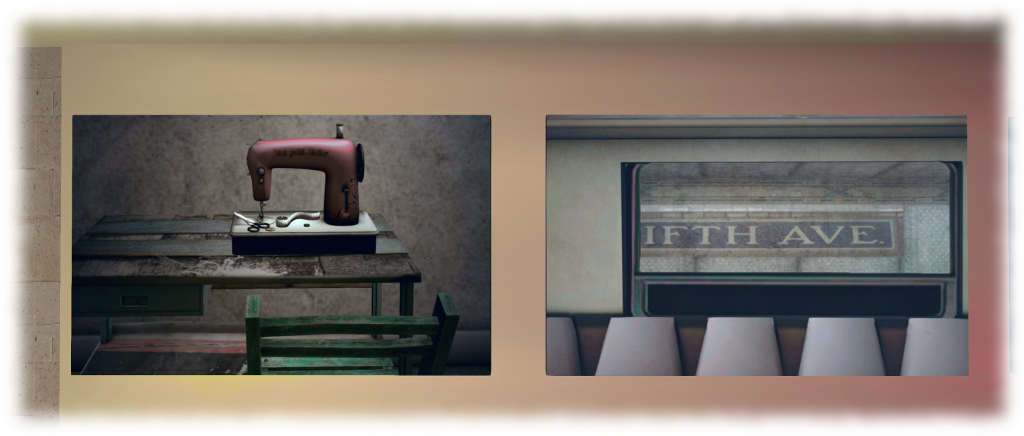
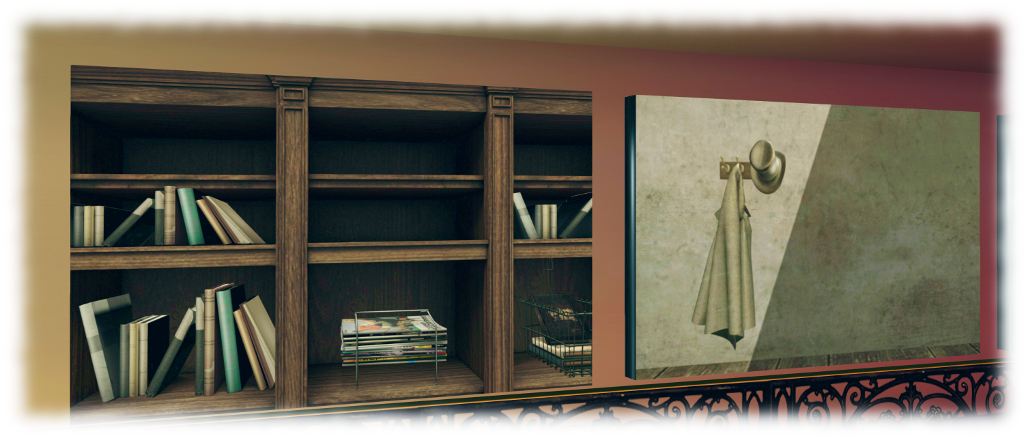
And so it is that we are led on a journey of fine detail through more than thirty images arranged around the split-level floor at Delmonico’s Artspace, where Melusina once again reveals that she truly does have an eye for detail and composition. In some respects, A World of Details shares a heritage with Closer Looks, and exhibition I reviewed in May 2014. As with that exhibition, the pieces here focus on the smaller details of a scene: instead of an entire workspace, we have a single typewriter or sewing machine; rather than the street, we have the street sign. Thus, common everyday things we might otherwise  never notice or which we take for granted are presented in a new light.

Melusina Parkin – World of Details

“Isolating a detail is an exercise of cleansing for our mind;” Melusina states. “It means to concentrate attention on a piece of reality,  until it loses its relationship with the environment and reveals its own meaning (or its own triviality). Then, we have to rebuild the context and to insert the detail into. These operations – made by our eye, that is: by our mind – can make true what Bertolt Brecht says in The Exception and the Rule: ‘We ask you expressly to discover that what happens all the time is not natural. For to say that something is natural […] is to regard it as unchangeable’.

She continues, “Moreover, attention to details can take us to the awareness that beauty and meanings aren’t compellingly in elaborated and sophisticated things, but they’re common and widespread.  I try to enhance all that by shooting everything I notice when I look close at anything. Sometimes I subtract or add light or colours, sometimes I isolate things deleting parts of their environment. Point of view, light and cut-off can enhance the subjects’ power of suggesting something.”

Melusina Parkin – World of Details

The majority of the pieces on display are new in terms of being exhibited; something which again helps with the feeling that World of Details and Closer Looks share a common bond. What is remark is – as noted above – the way in which the ordinary, the trivial, the things we regard as serving a physical function in life, become in and of themselves, art. The framing, colour palette, angle and focal point within each; the way each – as Melusina notes – offers a visual metonymy of a larger scene or of someone’s life.

Study is warranted, because each image reveals more than might at first be thought; as Melusina says, “All of them tell us something about their creators. All of them are both actors and silent spectators of the play we call ‘our life'”.

SLurl Details

Maison de L’amitie in Second Life

Maison de L’amitie – click any image for full size

Update, September 2019: Update: Maison de L’amitie has relocated.

I first visited Maison de L’amitie a year ago in April 2016. For reasons that escape me, I never actually blogged about it. So a suggestion from Shakespeare that Caitlyn and I should head on over came as a timely reminder.

As I recall (with the aid of photos taken at the time), a year ago Maison de L’amitie presented a rural scene with windmills, vines and lots of green. A year on and the region – designed by Corina Wonder with help from  Lan Erin – now presents a seafront environment which, although surrounded on all four sides by water, suggests that the land should actually continue to the south-east, where it otherwise falls sharply into the sea.

Maison de L’amitie

It is a place evocative of sea-side vacation destinations; much of the region is given over to water to form a natural bay which reflects a golden-hued sky. Sand bars to the south and west protect the bay on two sides. These form two broad, low beaches, the one to the south adjoining a sharp upthrust of land against which a little village sits. Running before this, and separating it from a sandy waterfront, is a wide road overlooking a line of rowing boats moored just off-shore, watched over by cormorants, gulls and a pelican.

The little hamlet – has a decidedly Mediterranean look to it: whitewashed walls fading from the effects of the sun and air doubtless heavy with sea-salt, sitting under red-tiled roofs. The houses and villa occupy a set of terraces stepping up the hill, a broad stone stairway dissecting them. On the lowest tier, at the roadside, sits a cosy-looking villa hotel. above and behind it are more houses – perhaps chalet-style accommodation for the guest of the hotel. The uppermost terrace is the home of a small chapel and the remnants of other buildings, their broken walls adding a certain charm to the island while suggesting a history lies here awaiting discovery.

Maison de L’amitie

Down on the waterfront, the road crosses the water via the triple arches of a sturdy stone bridge to arrive at a grand château. Sitting amidst tidy lawns with trim yew bushes on parade either side of the wide footpath lading up to it, the château appears to have been converted into a ballet school, and offers a commanding view out over the bay from this windows and from its well-tended lawns.

And out on the bay, boats lie at anchor, two single-masted sailing boats, a motor-cruiser, a fishing boats and – a commanding presence among all of them – a three-masted corvette. This sits with sails furled, far enough out to suggest it is standing guard over the bay and the little hamlet. Another protector can be found at the end of the western sand bar, looking out towards the corvette, warding boats away from the risk of running aground.

Maison de L’amitie

Maison de L’amitie is a place for meandering, unhurried exploration. The beaches offer  space to walk on golden sand, coupled with little snuggle points on  or under old rowing boats or on blankets just above the edge of the tide. A little book store between beach and village presents a place for browsing, while a short walk beyond it and around the headland, the broken finger of an old lighthouse lies forlornly at the foot of the hill against which the village has been built. Elsewhere lies a chance to see inside the workshop of a craftsman who makes surf boards, and everywhere are opportunities for photographs.

For those who wish to rez props for use with photos, a land group is available to join – either accept via the greeter at the landing point or step into the reception at the hotel, where you can touch the visitor counter up on the gallery overlooking the reception desk, and join the group. Should you enjoy your visit, please consider a donation towards the continued upkeep of the region for others to enjoy.

SLurl Details