Firestorm 4.6.9: a Christmas feast of features and fixes!

firestorm-logoUpdate Thursday, December 11th: There will be a hotfix update for Firestorm, which will likely be made available on Friday, December 12th. This is to correct a couple of issues related to voice and RLV/a discovered with the 4.6.9.42969 release, and will likely add some additional fixes as well. I’ll have a further report available once the update is available.

On Wednesday, December 10th, the Firestorm team announced the release Firestorm 4.6.9.42969.

This is a hefty update which brings with it a lot of new functionality, together with bugs fixes and assorted improvements and updates.

As always, the complete list of changes, together with all attributions,  can be found in the release notes / change log, and I refer readers to that document for specifics on all contributors, FIRE JIRA links, etc. The following is intended as an overview of some of the more major / interesting changes, updates and  fixes to be found in the release.

The Before We Begin Notes

For best results when installing this release:

Firestorm Blocking

Note that as a result of the Firestorm team’s policy to keep only 3 versions running, version 4.6.1 will be blocked, most likely early in the new year. The advice from the team is that If you are on 4.6.1, to please update now. Version 4.4.2 will continue to remain for Mac users until all the major Cocoa Mac bugs have been resolved. However, if you are not a Mac user, then there really isn’t any reason for you not to have updated, and the team again ask that you update as well

Lab Updates

This release sees Firestorm remain on a parity with the Lab’s 3.7.8 code-base. However, a number of updates and fixes have been cherry-picked from upstream (such as the group ban functionality – see below), particularly bug fixes and stability improvements – please refer to the change log for details.

Building and Scripting Updates

The new buttons for cycling through objects in a linkset

Some additional updates and tweaks have been made to assist builders and scripters:

  • There are two new buttons located in close proximity to the Edit Linked check box.
    These buttons cycle forward or backward through a selected linkset, in the same way as the existing keyboard short cuts. note the buttons will only be active when Edit Linked is checked
  • The issue of the script editor failing to open scripts in copied objects (see VWR-27512), which has affected v2 and v3 viewers, is corrected with this release of Firestorm, and the fix has been contributed to Linden Lab for inclusion in the official viewer code
  • The build toolbar button should no longer be disabled when it shouldn’t be.

Communications Updates

Firestorm 4.6.9 brings with it a large number of features, updates and improvements to communications. These include, but are not limited to, the following.

Audio / Voice

  • Parcel media and audio now have a separate auto-play option (Preferences > Sound & Media > General > Allow audio to auto-play/Allow media to auto-play). Parcel audio should now auto-play correctly on logging-in
  • A reset voice button has been added to Preferences to help with fixing voice issues (Preferences > Sound & Media > Voice Settings)
The new voice reset button to help fix voice issues
  • You can now “zoom in” on a speaker using voice to hear them more clearly (Comm > Nearby Voice > Right click a name >Zoom in)
  • Voice level icons in the radar are now independent from other voice level icons
  • Sounds used for opening scrip dialogues can now be customised (Preferences > Sound & Media > UI Sounds 2 > Script Dialog)
  • The viewer now automatically adds http:/ to the music URL in the parcel audio panel.

Auto-response Updates

With Firestorm 4.6.9, auto-response messages are now localised. There is also a new option for an item of inventory to be automatically sent with your auto-response messages, when set. The selected item must be COPY / TRANSFER in order for this capability to work, and will be sent when one of the following is set:

  • Busy / do not disturb
  • Away
  • Autorespond
  • Autorespond to non-friends.

To set an item of inventory to be sent with auto-response messages, drag and drop a suitable item from your inventory and into Preferences > Privacy > Autoresponse > Autoresponse Item.

Firestorm 4.6.9 allows you to send an inventory item when auto-responding into incoming IMs. The item must be COPY / TRANSFER in order for this to work

In addition, this release fixes getting an IM from yourself to yourself saying “Autoresponse sent” if somebody answers from an off-line IM via email. Also, having both “Autorespond to non friends” and “Only friends and group can call me or IM me” set no longer results in you getting two new IM sound alerts for every non-friend IM plus the non-friend receives your auto-response twice for each IM sent.

Contacts List

The Contacts List floater has been revamped to match the look of the nearby chat and IM session floater, for a smoother and unique appearance. In addition, an option to pay someone directly from your Contacts List has been added to the right-click context menu (Comm > Contacts > Right click a name > Pay).

New to Firestorm 4.6.9 as well is the ability to choose which name columns should be displayed in the Contacts List. You can now choose between choose between user name, display name, full name, or a combination of these, and you can now display full names in your Contacts List as “Username (Display name)“. Finally, a option has also been added to hide the permissions columns (whether those in your Contacts List can see when you’re on-line, map you, etc.). 

All of these options can be found under Preferences > Firestorm > General.

The Contact List display options in Preferences

Continue reading “Firestorm 4.6.9: a Christmas feast of features and fixes!”

Viewer-managed Marketplace meeting

secondlifeFurther to discussions at the TPV Developer meeting on Friday, December 5th, the Commerce Team have confirmed that there will be an in-world meeting at which the new Viewer-managed Marketplace (VMM) functionality will be discussed, and feedback sought.

The meeting has been scheduled for Friday, December 12, 2014, at 11:00 SLT, and will take place on the VMM test region of ACME F on Aditi. Content creators and merchants who use the SL Marketplace to sell their creations and goods are invited to attend the meeting, although (obviously) familiarity with using the Viewer-managed Marketplace functionality is required.

The meeting announcement reads in full:

Friday, December 12, 2014, at 11am Pacific time, several Lindens will be inworld to get your feedback on the Viewer-Managed Marketplace (VMM). We’ll be meeting on Aditi in the “ACME F” region (secondlife://Aditi/secondlife/ACME%20F/128/128/24).

For those of you not yet familiar with VMM, it allows you to easily manage your inventory on the Second Life Marketplace using the Second Life Viewer. Items no longer need to be loaded into the Merchant Outbox or a Magic Box, and are instead sold directly from your inventory.

If you are interested in attending the session, please try out VMM* and bring your feedback to the meeting. If you are unable to attend, you can submit feedback through JIRA or by commenting on this post.

* If you are prompted in the viewer to sign up for Beta access, you must first log into Marketplace on Aditi and Create a Store before signing up.

Those who have yet to try the VMM functionality, but who would like to attend the meeting, will need to download the VMM project viewer and log into one of the following regions on Aditi: ACME D; ACME E or ACME F, and, as the Commerce Team note, have a store on the Aditi Marketplace. In addition, my overview notes on the beta and the project viewer may be of assistance when trying-out the viewer within the test regions.


SL project updates week 50/1: server, viewer, misc

Black Basalt Beach; Inara Pey, August 2013, on FlickrBlack Basalt Beach, August 2013 (Flickr) – blog post

Server Deployments – Week 50

As always, please refer to the server deployment thread in the forums for the most recent news and updates.

On Tuesday, December 9th, the Main (SLS) channel was updated with the server maintenance package deployed to the three RC channels in week #49. This update comprises:

  • A fix for BUG-7515 “Restarting region turns off ‘block parcel fly over’”
  • A fix for BUG-4949 (non-public) “Cannot manage block list with certain object names”
  • A fix for BUG-7850 “Experience tools: ‘Script trying to teleport other avatars!’ script error” appears incorrectly
  • A fix for BUG-6789 “Spelling mistake in llGodLikeRezObject”
  • Minor server change to help configure the texture and mesh CDN.

On Wednesday, December 10th, all three RC channels should receive a new server maintenance package comprising:

  • A fix for BUG-7595 “Allowed & Blocked experiences persist with parcel owner change after purchase or abandoning”
  • A fix for (non-public) BUG-7036 “Experience based scripts in attached child prims reference their operation by region position instead of root position like non-experience based scripts”
  • A fix for (non-public) BUG-7048 “llGetExperienceDetails() returns 4 for state and “operation not permitted” for state message while over mainland parcels that have the experience allowed”
  • A fix for BUG-6757 “Different error code returned for an Experience that is not permitted to run on a parcel / region OR a user clicked No on the permission request dialog”
  • Additional internal Experience Key fixes
  • To find experiences with all unicode names you have to leave the search field blank and page through all results

SL Viewer

No further updates to any of the SL viewers (release, RC or project) since my last viewer release summary. Please refer to my Current Viewer Releases page for the current status of SL and TPV viewers.

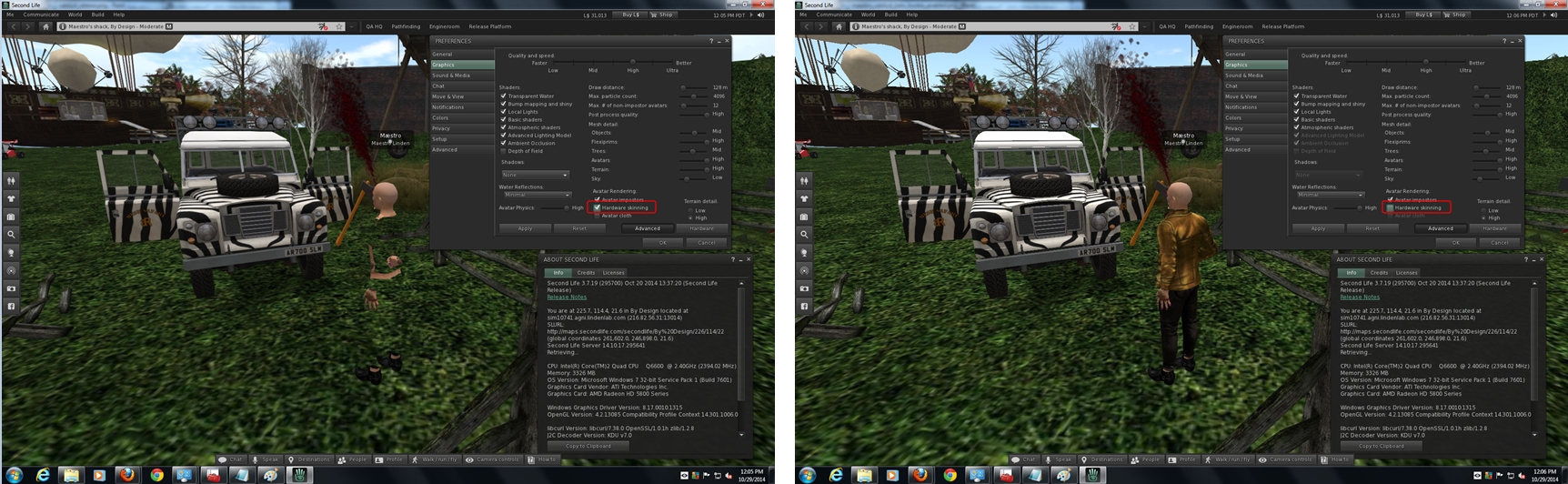
However, as I noted in a separate report, the most recent AMD update to their Catalyst™ drivers, version 14.12 does not resolve the problem of failing to display rigged meshes unless the viewer’s hardware skinning is disabled. I’ve also been informed that this issues also extends to the most recently AMD / Nvidia Omega driver update.

Experience Keys / Tools

the RC deploy due on Wednesday, December 10th, sees a number of fixes and updates for the Experience Keys / Tools project. Again, commenting on the status of the project at the simulator User Group meeting on Tuesday, December 9th, Simon Linden said:

 We’re getting close on that … there are some last-minute things to take care of, and we’re being extra careful that we have the systems in place to handle the key-value storage usage.    How much load that will create is some interesting guesswork, but it’s better to be over-prepared.

However, with the holiday season now fast approach, and with it no change windows for server and viewer updates popping-up, it may be that the project doesn’t make it to a deployment beyond its current beta status until the new year.

Once Experience tools are deployed, the Lab will seek to address issues through the Simulator User Group meetings. However, if there is sufficient demand in terms of issues raise for discuss, etc., during the Simulator UG meetings so a to warrant a separate meeting, they will look into doing so.

Group Chat

Commenting on his recent group chat work, Simon had this to say:

There’s another chat server update this week.   It’s pretty minor, but you shouldn’t see the problem where it gets way behind and then starts delivering ancient (more than 5 minutes old) messages.  I’m still chasing the main bug but this should make the recovery faster and less confusing. The new code is on only one of the server cluster machines but will go to more this week, assuming we don’t see new problems.   So far it’s looking good.

He went on to comment that, while a complete overhaul of the group chat system is unlikely, simply because it is unlikely to result in a significant enough improvement in things, despite recent improvements. “the servers still spend more work updating your chat member lists than it does sending messages. That’s just not right.” So it would seem further tweaking of things will continue in 2015.

Tuesday, December 16th will be the last Simulator User Group meeting for 2014.

Lab seek suggestions on improving Second Life

secondlifeLinden Lab has launched a new feedback form, inviting platform users to offer up constructive suggestions on how the Second Life experience might be improved.

The blog post announcing the new form reads in full:

What’s the one thing Linden Lab could do that would have the biggest impact on further improving your Second Life experience?

Many Second Life users have thoughts on this – from different approaches for the way things are done today, to brand new features that could dramatically improve their experiences, to seemingly small things that could have a big impact. Today, we’re launching an easier way to share your ideas with us, a new “Feedback & Suggestions” page on SecondLife.com. You can also find this page by going to Help and finding New Feature Suggestions in the drop down.

Just sign-in with your Second Life account, select the topic or category that’s most appropriate, and describe your suggestion in the text box. Once you submit, you’ll see a confirmation page and receive an automated email as well. We won’t be able to reply individually to each suggestion, but every idea will be routed to the appropriate Lindens and each one will be reviewed and considered.

We’ll of course continue to be on the lookout for ideas as they continue to surface in social media, direct conversations, or via JIRA, but this new page should make it easier than ever for any Second Life Resident to share suggestions directly with us.

The new form is easily accessible via your Second Life web dashboard, or through the support portal page, where it appears as the "Suggestions" link in the lower right corner of the page
The new form is easily accessible via your Second Life web dashboard

Covering a range of topic categories, including the likes of avatars, communications, content creation, groups, inventory, commerce, land, mesh, navigation, performance, scripting, teleports, tools, user interface, viewer, and the all-important “other/unknown”, the new form is simple to complete, and can be accessed directly from your Second Life dashboard and the support portal.

As the form notes, it is not intended for support requests, bug reports, and other inquiries; these should continue to be directed through the Second Life Support Portal and the JIRA.

Also, please do remember that suggestions are being sought – not statements. So, for example, a demand for reducing tier isn’t going to gain much traction. But if you actually have a considered plan for how tier might be lowered in such a way as to not damage the Lab’s ability to generate the revenue it needs to continue operating (and have some good figures to support your case) – now is the time to drop them into the form and let them take a look.

The suggestions form can also be access from the SL support portal via the link in the lower right corner of the portal web page
The suggestions form can also be accessed from the SL support portal via the link in the lower right corner of the portal web page

Obviously, not every suggestion will be acted upon; but this is still nevertheless a good move by the Lab.

Up until now, the most direct route of putting an idea to the Lab has been via a “feature request” submission through the SL JIRA. However, the JIRA has been something a lot of users have preferred to steer clear of, seeing it as confusing and / or intimidating when trying to complete a report. Therefore, the offering of a simple, clean form for people to use is to be welcomed, and kudos given to the Lab for offering it.

Latest AMD Catalyst™14.12 drivers continue SL rigged mesh woes

Firestorm users: don’t miss my review of the 4.6.9 release.

Update, March 21st: AMD have release a new set of Catalyst™ drivers, version 15.3 beta, which include a potential fix for the rigged mesh issues – see my notes here.

Update, February 28th: Singularity have issued a supplemental update to address mesh rendering issues.

Update, December 13th: Yoho Waco offers a work-around for this problem – see his comment following his article. As an Nvidia user, I cannot test the workaround myself, but feedback indicates it works. I’ve also added Yoho’s workaround with additional information as an article in its own right.

Update: I have been informed (see the comment following this piece from JC de Bes, that this issue also extends to the most recent  Omega drivers release.

Whirly Fizzle dropped me a line concerning the latest AMD Catalyst™ drivers update, 14.12, which is apparently being pushed out by AMD via automatic update.

As those on systems using AMD graphics cards are likely to be aware, there have been ongoing issues with the Catalyst drivers which have impacted Second Life, notably with regards to rigged meshes which, since the deployment of the 14.9.2 drivers by AMD, cause rigged mesh to be invisible unless hardware skinning is disabled (see BUG-7653).

The 14.12 Catalyst™ drivers currently being deployed by AMD do not address this issue; worse, as it is being pushed via automatic update from AMD, it may see an increase in issues being experienced for anyone using an AMD GPU, regardless of the viewer they are using, and even if they have recently rolled back to an earlier version of the driver.

The latest AMD Catalyst™ 14.12 drivers currently being deployed via automatic update continue the issue of driver issue: with Hardware skinning enabled, rigged messhes will not render (l); disable it, and they'll render OK (r) - click for full size; image courtesy of Maestro Linden
The latest AMD Catalyst™ 14.12 drivers currently being deployed via automatic update continue the issue of rigged meshes being invisible with Hardware skinning enabled (l), but visible with it is disabled. Image courtesy of Maestro Linden

The two ways of dealing with the problem / avoiding it, are to:

  • Either turn off hardware skinning off in the viewer (Preferences > Graphics > uncheck Hardware skinning), which is hardly ideal, or
  • Roll back to pre-14.9.2 Catalyst drivers via the AMD download site. Those affected should consider using (at the latest in terms of release numbers) version 14.9.1 – but be aware this driver has issues of its own (see BUG-7947 and BUG-7627). Therefore, the 14.4 drivers might be a better option.

Uninstalling  the current AMD video drivers may be warranted prior to installing older drivers, and there is a request within the JIRA report linked-to above that those affected by the issue also raise a bug report directly with AMD to help bring this matter more to their attention.

Samsung’s Gear VR headset reaches the marketplace

Samsung's Gear VR: now available in the US & pre-orders being taken in the UK
Samsung’s Gear VR: now available in the US & pre-orders being taken in the UK

Can’t wait for the Oculus Rift consumer edition to arrive? Got a Samsung Galaxy Note 4 phablet (or thinking of upgrading your existing contract to a Note 4?) Then you can get into the VR revolution wirelessly, if still pretty much on a “beta” basis.

The Gear VR headset, featuring Oculus technology, is now available in the US for around $200.00. The headset can be ordered from the likes of AT&T and direct from Samsung US, which both price the headset at $199.00 – although a game controller is a purchasable extra (Samsung offer 30% off the price of their gamepad if purchased with the headset)

Offering a wireless, portable VR experience, the Gear VR headset requires the Samsung Galaxy note 4 phablet

Within the UK, advance order of the Gear VR headset are currently being offered by the likes of Expansys for £159.99 sans controller but inclusive of VAT. Handtec are offering the headset at £185.99 inclusive of VAT, or £239.99 (inc VAT) for the headgear and a controller.  Handtec are also supplying a 16Gb micro SD card for the Note 4 along with both versions of the headset. This contains a collection of immersive trailers and film tie-ins, and a Cirque du Soleil 360-degree immersive experience, all of which are separately available through the Oculus Share store.

Samsung are offering 30% off the price of their game controller (which works with most of their smartphones) t US purchasers of the Gear VR headset
Samsung are offering 30% off the price of their game controller (which works with most of their smartphones) t US purchasers of the Gear VR headset – although the company also admits, a game controller isn’t the best way to partake of an interactive VR experience…

The Samsung Gear VR Innovator’s Edition headset combines the Note 4’s Super AMOLED 2560×1440 and software (remembering that the Note 4 is not included in the Gear VR’s retail price) with the Oculus Rift’s optics,  head tracking and dedicated controls – you can see the full specs on the Samsung global site.

According to The Verge, the tracking controller is from the Oculus DK1. Also, note that although the finish product is more polished than the Oculus DK offerings, “innovator” in the name should be taken as indicative that it is still a “beta” unit.

This is something the company itself is emphasising, with Samsung virtual reality VP Nick DiCarlo carefully defining the marketing approach to this release of the Gear VR, “We’re very carefully trying to avoid overhyping this, but we think it’s going to be amazing.” DiCarlo also notes that while company’s game controller is being offered at a discount when ordered with the headset, game controllers are perhaps not the ideal companion for immersive VR experiences.

That Handtec are  also offering offerings from the Oculus store helps to underline the fact that the Gear will work with content that is already available. In this regard as well, Titans of Space, already hugely popular with DK1 and DK2 users, is pointedly listed as being available for the Gear VR, as is cyberpunk hacking game Darknet. Oculus Mobile themselves are keen to point-out that they are working on both sides of the net with products suitable for both mobile options and for desktop / laptop options.

Titans of Space: an Oculus  / Gear VR experience which allows users to experience the majesty of the solar system
Titans of Space: an Oculus / Gear VR experience which allows users to experience the majesty of the solar system

Samsung is also promoting a new VR service alongside the headset – although this still, at the time of writing, has yet to be rolled-out. It’s called Milk VR, which the company defines as:

Milk-VRThe company’s first virtual reality content service. Milk VR will deliver new and immersive 360° videos five days a week, with channels in music, sports, action and storytelling. The service also tracks what is trending across the VR landscape, to help viewers find the best VR content.

Samsung’s belief is that by making VR a mobile experience, they stand to help it gain more widespread acceptance as an entertainment medium – hence the Milk VR offering. “If VR is only ever for gaming, it’s going to be a great and successful business,” DiCarlo told The Verge in another interview. “But part of what we’re hoping to do is really have VR evolve over time towards a mainstream thing that people do in a lot of different cases.”

This is perhaps also reflected in the company’s recent launch of Project Beyond, a 3D, 360-degree camera rig designed to capture videos and stream them on the Gear VR.

However, not everyone is convinced that releasing the Gear VR now is necessarily a good move. At the end of November, having tried a pre-release version of the headset, TechRadar noted:

Where the Oculus Rift is tethered and feels like a “grown up” version of virtual reality, the Gear VR feels more accessible as a mainstream product. But this December may be too soon for Gear VR to hit the market. Sure, it’s targeted at early adopters and developers but making it widely available doesn’t seem to be the right move. Given more time to improve latency and allow more content to flow in, it could very well be a hit.

It might also be argued that while both Project Beyond and Milk VR are interesting concepts, they perhaps also demonstrate a lack of imagination, regulating VR to what James Cameron recently critiqued as little more than “stand and watch” (although it has to be said Milk VR could easily offer more in the way of involvement and interaction, depending upon the content curated through it). Nevertheless, by making VR more accessible and less reliant on slaving yourself to a computer, Samsung is more on the right track in making VR a more accessible medium with full freedom of use.

Nor are they entirely alone – Carl Zeiss recently launched their $99 (£79 / 99 Euro) Zeiss VR One, which is intended to work with a range of mobile ‘phones, starting with the Galaxy S5 and iPhone 6 (in a novel move, users are being asked to vote on which other ‘phone should be supported by the headset in the future). The headset is tied to an app supplied by the company, which may limit initial offerings, but Zeiss are also offering developers wanting to work with the Zeiss VR One access to their open source Unity3D SDK so that games and other offerings can be more easily developed.

Zeiss VR One - yours for $99.00 (£78.00  / 99 Euros
Zeiss VR One – yours for $99.00 (£78.00 / 99 Euros)

While mobile headsets may well be the means by which VR could achieve deeper market penetration than being constantly slaved to a computer, they will require  fair amount of maturing. The Gear VR Innovator Edition, for example, despite having a higher image resolution capability, thanks to the Galaxy Note’s screen, actually delivers pretty much the same per-eye experience as the Oculus DK2, so on-screen text can still appear blurred and hard to read.

Nevertheless, it will be interesting to see where this all leads, and what else might pop-up in the mobile sector of the new VR market ahead of the Oculus Rift eventually making its appearance. And on that point, please don’t see the arrival of the Gear VR as indicative that the Oculus Rift is now “just around the corner”; Brendan Iribe seems to have been pretty clear on that subject recently, and the emphasis at Oculus VR is still on getting it “right”, rather than getting it “out”.

All images of the Gear VR and the Milk VR logo courtesy of Samsung; image of the Zeiss VR One, courtesy of Carl Zeiss AG; image from Titans of Space courtesy of Drash VR LLC.