Linden Lab announces new Second Life Marketplace maintenance policies

via Linden Lab

On Wednesday, August 12, 2026, under the title Improving Marketplace Search and Product Discovery, Linden Lab new new Second Life Marketplace maintenance policies designed to help improve the shopping experience. The approach builds on operations carried out in the past on a periodic manual basis, but will not be carried out on a monthly basis using automated tools.

The new policy comprises two parts:

  • Unlisting products:
    • If a Merchant has not logged in for one year AND a specific product has not generated a sale in one year, that individual product listing will be automatically unlisted from Marketplace.
  • Disabling stores:
    • If a Merchant has not logged in for two years AND their store has not sold anything in one year, the entire store will be automatically disabled.

Important notes for context:

  • In Both of the above policies, products and stores will only be acted upon if both elements of the criteria are met during a review.
  • Neither policy option will result in anything being physically deleted from the Marketplace; affected products and/or stores will simply cease to be visible when browsing the Marketplace and in things like search returns.
  • Merchants will be able to reactivate unlisted products  / disabled stores by logging into the Marketplace and updating them.
  • Active merchants and actively maintained products will not be affected by these changes.
  • These new policies for products and stores will come into effect on Monday, August 17, 2026.

In order to avoid accidental / incorrect unlisting of products / stores, the blog post suggests merchants periodically:

  • Review older or lower-performing listings.
  • Refresh product listings, images, descriptions, or pricing to help improve visibility and sales activity.

As noted, there have been manual operations to clean-up the Marketplace in a similar manner to this is the past, and requests for the de-listing of inactive products has been frequently requested during Web User Group (WUG) meetings, so these new policies appear to be aimed at making making the process easier to handle via automaton whilst also addressing the requests made at the WUG meetings.

Those with any concerns  / feedback on these polices can raise them through the forums or via the WUG meetings, the next one of which will take place as follows:

  • 14;00 SLT, Wednesday, September 2, 2026 at this location. Note that meetings are held in a mix of Voice and text chat.
  • Summaries of past Web User Group meetings are available here.


SL Marketplace: store managers introduced

On Thursday, May 2nd, 2019, Linden Lab deployed the latest updates to the SL Marketplace, chief among which is the introduction of the store manager.

A store manager is another user a merchant with a Marketplace store can designate to manage some operations of their MP store. This is a capability that merchants have long requested, both through the forums and the Web User Group meetings, and the response to the deployment has already been positive.

Key points with store managers:

  • Merchants can nominate up to five store managers.
  • By default store managers can:
    • Edit store details.
    • Edit product details.
    • List an unlisted item.
    • View store and product details.
  • In addition, merchants can optionally allow store managers to:
    • Unlist an item.
    • Redeliver items (including changing automatic redelivery status).
    • Add/remove revenue distributions.
    • Add/remove listing enhancements.
    • Change prices.
    • However,these additional permissions can only be added once for a store manager: if they are to be changed at all, the store manager must be removed, and then re-added with the changed permissions.
  • If a store manager does not have any of the additional permissions, those fields appear as inactive in the edit and bulk edit pages. Similarly, the associated controls do not appear for store managers that do not have permission to unlist items, add/remove revenue distributions, or add/remove listing enhancements.
  • Store managers can access the store using their own log-in credentials – not the merchant’s.
  • All store manager action (creation, settings permissions, removal) are set through the merchant’s My Marketplace > Merchant home options.
  • Instructions for adding / removing Store Managers can be found in the official Second Life Marketplace store managers Knowledge Base article.
Store Managers are added via the My Marketplace > Marketplace Home page (1), then clicking Edit Store Information (2) and scrolling to the bottom of the Store Information Page to click Add Manager (3). Add the name of the Store manager and setting the additional permissions for term via the pop-up (4), then clicking the ADD button when all is set (5). Remember that if permissions are to be changed, the Manager must be removed and re-added with the required permissions

In addition, and to provide merchants with oversight of the actions taken on their store:

  • All actions taken by (a) store manager(s) are logged and can be reviewed by the merchant (My Marketplace >  Merchant Home > View audit logs in the left menu.
  • E-mail alerts can also be set to be sent whenever a store manager performs an action on the merchant’s store.
  • Additionally, no store manager will be able to:
    • Archive products.
    • Add/remove other managers.

Again, full details on managing Store Managers can be found in the Knowledge Base article, and any specific issues with the system should be reported via the Jira.

Second Life: November Marketplace update

On Thursday, November 1st, 2018, Linden Lab blogged about further updates and fixes to the Second Life Marketplace. the post also confirms that the promised clean-up of older listings is now in progress.

The clean-up is something that has been requested multiple times through various forum threads over the years, and has been a frequent topic at Web User Group meetings in recent months. In short the clean-up should only  affect:

  • Merchants who have not logged in for five years
  • And only those items which have not sold within two years.

The clean-up is an unlisting of items, not a deletion. Should any merchant notice items have been unlisted that they believe should not have been, they are asked to raise a Jira so that Commerce Team can investigate.

New to the Marketplace with this update are:

  • Three new Categories to Marketplace:
    • Gachas
    • Anthropomorphic
    • Animated Objects
  • A new Anime Marketplace communities.

The blog post lists the fixes for the update as:

  • Marketplace order confirmation mail should include a product link and seller data. So it will from now on.
  • “Items per page” kept resetting to 12 in wish lists.  Annoying!
  • Any search field will now display an x on the right side once the user has started typing.  This will allow you to quickly remove/delete all text in the field instead of having to backspace out the information.
  • Merchants can no longer review their own listings.  Obviously, yours are the best. 
  • Store favourites used to say “Sold by [current user]” instead of the store owner.  That’s silly!
  • Merchant dashboard Report pages were missing the store banner
  • Updates to search for more precise results
  • Fixed searching within “manage listings”
  • Marketplace review helpfulness rating buttons were broken, but we unbroke them.
  • We will now notify a marketplace shop owner if items have their rating changed
  • Marketplace profile – some incorrect truncation of Policies box content was going on, so we put a stop to it
  • You could not preview listing with no price, but now – you can. 
  • Buying item for users not in the marketplace would throw an error, but that’s fixed.  
  • New Marketplace wish list didn’t work in other languages than English.  Wish list Joy to the world!
  • Added a helpful pop-up for the keywords field, which describes Boolean search functionality, so more people can discover it. 

While it is subject to confirmation, the next Web User Group meeting should be on Thursday, November 29th, 2018. Check the WEB wiki page for the schedule nearer the time.

SL Marketplace update: wish lists and favourites

via Linden Lab

After  pause of a couple of weeks when a last-minute hitch held up deployment, the latest Marketplace update rolled out during week #41, with the Lab blogging about it on Wednesday, October 10th, 2018.

It’s an update that sees a trio of new features added to the MP, all of which have been the subject of numerous requests – wish lists and favourites / follows. The update also includes a number of bug fixes.

For this article, I’m looking purely at the wish list and favourites options:

  • Wish lists:
    • Add items you’re not ready to buy to your personal wish list.
    • Make purchases from your wish list.
    • Share your wish list with friends (so they can buy you rez day gifts, etc.).
  • Favourites:
    • Add favourite items to a personal list for easy relocation.
    • Make purchases from your list.
    • Add favourite products to your wish list.
    • Add favourite stores to your list (use them to check on new releases more easily).
    • View one of your favourite stores from the list.

Adding Items to Your Wish List and Favourites Lists

Individual items are added to your wish list   / favourites list by viewing them in the Marketplace and then click on the Add to Wishlist or Add to Favourites options, located on the right of the item display.

Individual items can easily be added to your personal wish list or favourites list

Add A Store to Your Favourites

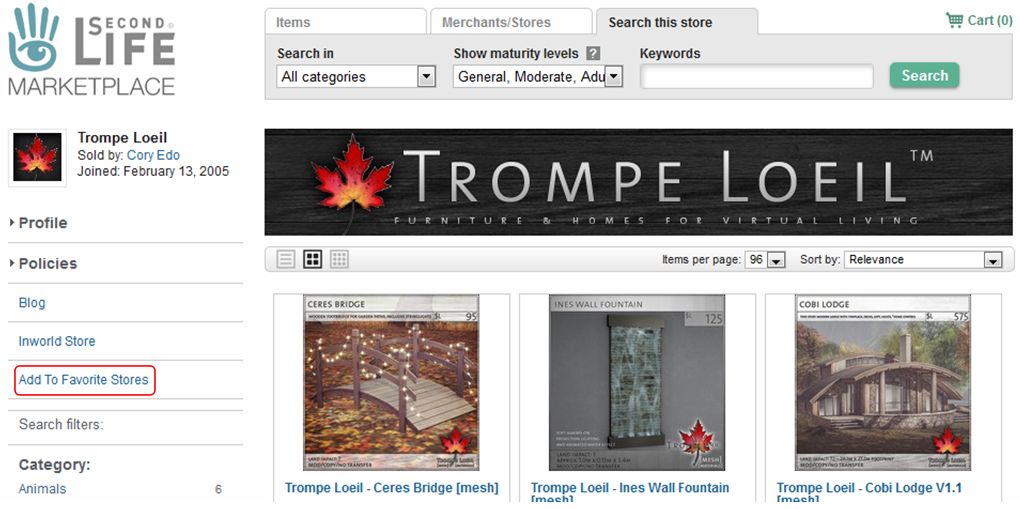
To add a store to your favourites, open the store’s main page in the Marketplace, and click the Add To Favourite Stores option on the left of the store’s main page.

Adding a Marketplace store to your Favourites

Viewing Your Favourites

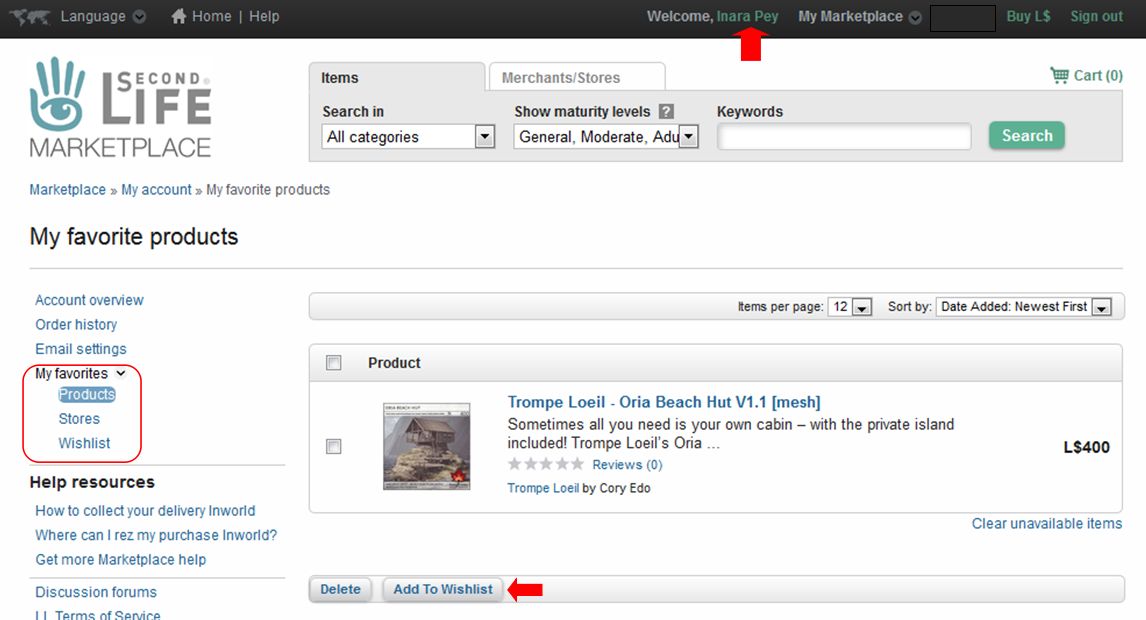
You can view your favourites whilst on the Marketplace by clicking on your account name (top right) to go to your account page, then clicking the My Favourites drop-down, which will display the options: Products (favourites), Stores, Wishlist. The Products page will open by default, but may be blank if you have not selected any favourites.

You can access your lists from your Marketplace account page : click your account name at the top (arrowed) then click the My Favourites drop-down (circled, left). This will display the list options and open your Products (favourites) page (shown). Note the Add To Wishlist button, arrowed at the bottom.

With these lists:

  • Clicking on an item in the Product or Wishlist pages will take you to the Marketplace listing for that item.
  • Stores in the stores list will be displayed with up to four of their most recent releases.
  • Clicking on a store in the Stores page will (unsurprisingly) take you to the store.
  • Listed items / stores can be removed individually or in bulk by clicking on the check box on the left of an item / store and then clicking the delete button.
  • Favourite items can be added to your wish list via the Add To Wishlist button on the Product page.
  • You can share your wish list with friend using a dedicated URL:
  • You can view your wish list or list of stores directly using the following URLs:


SL UG updates #35/3: viewer and Marketplace

Grumpity and Alexa Linden host the Web User Group meetings monthly Alexa’s barn.

A brief update, as it was pointed out to me that I missed the Web User Group on August 22nd, and the updates to the Marketplace that were reported in the forums by Grumpity Linden at around the same time.

SL Viewer

A new Maintenance RC viewer was issued on Friday, August 31st. The Rakomelo Maintenance RC, version 5.1.9.519162, offers some 29 fixes and updates, including two for receiving Friend requests and Group notices when off-line via the new HTTP capabilities, and which had not been working correctly following the initial deployment of the capability. These update should match recent server-side updates to the caps, and prevent group notices and Friend requests received whilst off-line failing to be delivered when next logging-in.

There are a number of other useful fixes with this release  – please refer to the release notes / download page linked to above for details.

Marketplace

I didn’t actually make the August 22nd Web User Group meeting, hence the lack of an update in week #34.

However, as has been pointed out to me, Grumpity Linden posted to  the forums concerning a number of Marketplace updates, which I’m simply going to list here for completeness:

  • Gift email was missing if the gift message was blank.  Everyone should get a gift email!
  • Residents with the last name Resident couldn’t leave product reviews.  That was bad, and is fixed.
  • Character count of product description included newlines and so was obviously wrong.  Righted that wrong.
  • Favourites which are no longer available are now marked as such, and can all be removed with a single click
  • Email changes on SL now propagate to the Marketplace.
  • Allow merchants to choose to list multiple “Custom Avatar Brand Names”
  • Retain “Sort By” preferences between pages and sessions.  Makes sense.
  • You can now remove items from the Related Items pop-up.
  • It’s “Land Impact” not “Prim Count”.
  • The Mesh Quiz is a thing of the past.  It will stay in the past, but will surely live on in our memories.

Grumpity also notes that some much-requested updates are “coming soon”: wish lists, favourite sellers, and an auto-complete for brand names.

She also indicated a fix for BUG-225309 “Marketplace: ‘Best selling products’ no longer sorts by best-selling” is in the works, as is a fix for BUG-225307, “Editing Marketplace Listings does not show inactive items to add as related or demo” – although this has apparently been closed as “working as intended”, which is slightly different to providing an actual “fix”! 🙂 .

The next Web User Group meeting (which is open to discussion of all of the Lab’s web properties, not just the Marketplace, is scheduled for Wednesday, September 26th, 2018 at 14:00 SLT. I’ll try to drum this into my head so as not to miss it, as I have done for the last couple!

Lab blogs about web and Marketplace updates

On Friday, November 4th, Grumpity Linden posted news via the Tools and Technology blog, on the recent updates to the Lab’s web services which support Second Life, and improvements / updates recently made to the Second Life Marketplace.

It was the updates to the SL Marketplace which made up the bulk of the summary, which has been listed chronologically rather than via service. However, as people might prefer reading thing by subject matter, I’ve split the list of updates / improvements between the Marketplace and the Lab’s other web services.

The SL Marketplace updates and improvements, implemented in September and October 2016, comprise:

  • Fixes:
    • A fix for sorting reviews by rating.
    • A fix for duplicate charging of PLE subscriptions.
    • Fixes for some remaining hangers-on from the VMM migration (unassociated items drop down + “Your store has been migrated” notifications.
    • A fix to Boolean search giving overly broad results (BUG-37730)
    • A fix to the Marketplace for an issue where a Firefox update was ignoring browser-specific style sheet settings on Marketplace.
  • Disabling of fuzzy matches in search on the Marketplace so that search results will be more precise (+ a switch added to allow the Lab to enable or disable fuzzy matches in search).
  • Archived listings are no longer indexed.
  • If a store is renamed, all of its products are now re-indexed.
  • Blocked users can no longer send gifts through the Marketplace.

In term of the remain web services, Grumpity notes that the Lab has recently:

  • Provided a number of unspecified bug fixes for the support portal
  • Provided a fix for the “Create Your Own Map” link, which used to generate an invalid SLurl
  • Updated the new user sign-up flow to give more consistency in password requirements
  • Updated the Second Life System Requirements.

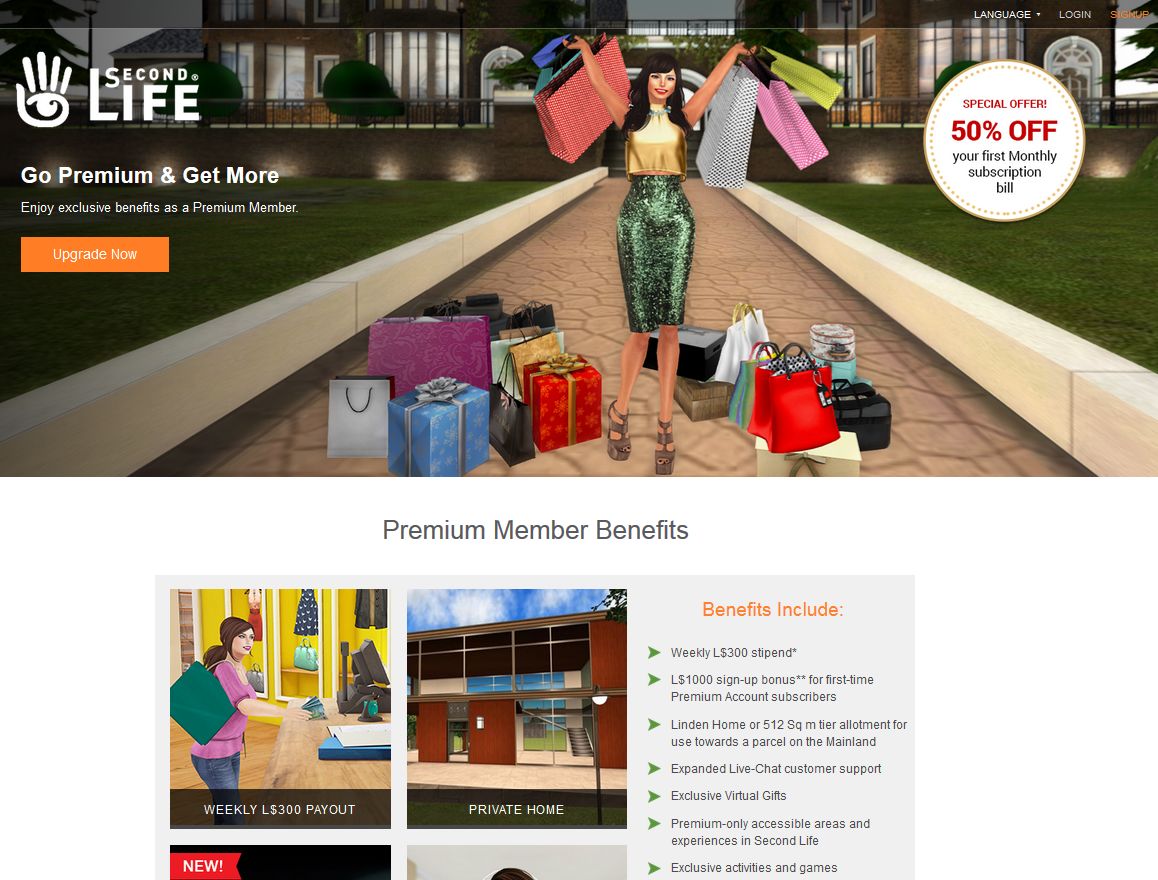
Finally, and launched just ahead of the November 2016 premium subscription offer, is a  Premium Membership landing page aimed at potential incoming new users as a part of the Lab’s rotating series of landing pages, and which currently features the premium subscription offer.

The new Second Life Premium landing page, highlighting the current Premium subscription offer, and launched on October 31sst, 2016
A part of the new Second Life Premium Membership landing page, highlighting the current Premium subscription offer, and launched on October 31st, 2016