SL projects update week 21 (2): server releases, Interest list, group ban list

Server Deployments

As always, please refer to the release forum  thread on the weekly deployments for the latest updates and discussions.

Due to issues with the JSON deployment made to all three Release Candidate channels in week 20, there has been no Main channel deployment in week 21.

On Wednesday May 22nd, the three Release Candidate (RC channels should each receive the following updates:

  • Magnum should receive an update to the server maintenance project deployed to all three RC channels in week 20 which includes fixes for bugs within the LSL support to create and parse JSON-formatted strings, which I reported on in my week 20 report.  This week’s update fixes some bugs related to the changes. Release notes.
  • BlueSteel should receive a further update to the experience tools project, and there should be no visible changes with this update. Release notes
  • LeTigre should receive an update related to the simulator’s interest list subsystem which reduces scene loading time when entering a new region. Release notes.

Interest List Bits

Andrew Linden
Andrew Linden (image captured by Opensource Obscure)

As noted in week 18, Andrew Linden has been working on fixing a bug which he specifically mentions in terms of Meeroos, but which can affect other animals as well, which he described as:

If you turn your camera away from a crowd of Meeroos, wait several seconds, then turn back around… the Meeroos will be updated, but not quite in the right order. So sometimes you’ll see a head move to the new position, then a fraction of a second later the rest of the body.  So I have a theoretical fix that doesn’t crash the simulator (anymore)

Providing an update at the Simulator User Group meeting on the 21st May,, he said, “I do have a little news about the Meeroo animation bug… I wasn’t able to fix it after all… but I did reduce it or eliminate it for meeroos that are nearby (closer than 10m).” He also noted an issue with the Meeroos’ animations which he believes to be “Mostly by slow scripts, low bandwidth connection, or general lag,” which results in the Meeroos walk animation appearing to be broken. He believes the fix in his new project will enable nearby Meeroos to update correctly when being viewed, and he’ll be revisiting the problem once the initial fix has been deployed, although he’d be interested in hearing back on how well the partial fix works, once the fix has gone out.

Baker Linden: Group Ban List and Other Work

Baker Linden: getting closer to working on group bans

Baker Linden reports that he is making “really great progress” on fixing leading and trailing spaces in display names. He’s currently working on some unit tests and dealing with a couple of minor issues, but he hopes that overall it will be ready for QA later in the week. He did admit that, “I’m unsure how useful it’ll be — anyone that wants to game the system will just append a bunch of other characters that appear before letters… But at least whitespace will be stripped.”

Once this has happened, he’ll be finishing-off the fixes for name searches using the People floater and the correct removal (unmuting) of muted avatars and objects from the viewer’s mute list. As soon as these two issues have been dealt with, Baker will be pushing forward with the new group ban list capability as requested in JIRA SVC-8127.

Cutting into “Cumberland”

CuriosityOn Sol 279 of its mission (May 19th 2013), Curiosity completely its second major drilling operation intended to retrieve cuttings from inside a rocky surface in the “Yellowknife Bay” area of Gale Crater on Mars.

The operation took place on a rocky outcrop dubbed “Cumberland” a short distance from the site of the initial drilling operation, which took place on a rocky area dubbed “John Klein” in February 2013. Samples gathered from the drilling will be processed by CHIMRA – the Collection and Handling for In-situ Martian Rock Analysis – prior to being delivered to the Chemistry and Minerology (CheMin) and Sample Analysis at Mars (SAM) instrument suites inside the body of the rover.

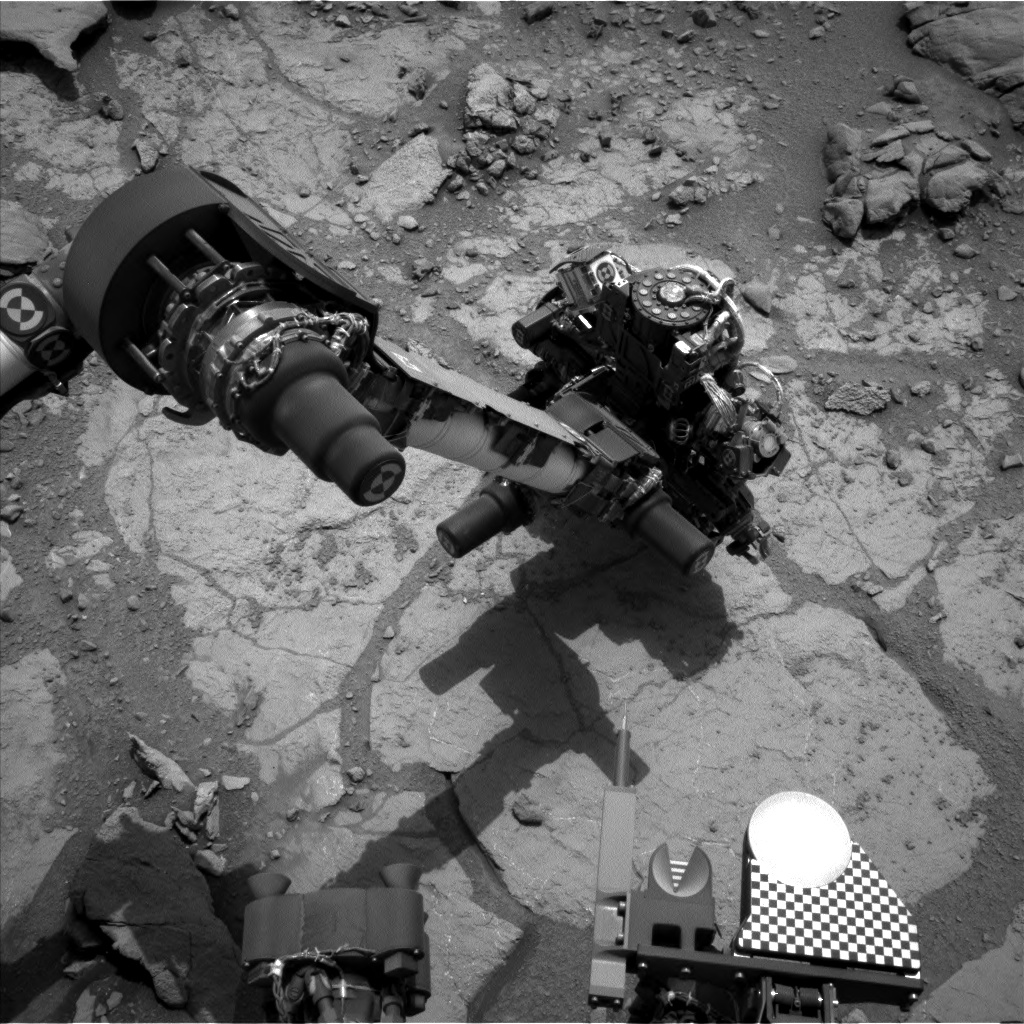
A “raw” (unprocessed) image returned by Curiosity’s Left B black-and-white Navcam as drilling operations are underway at “Cumberland” rock on Sol 279 (May 19th, 2013).

The primary aim of this work is to check findings gathered in the analysis of samples obtained from “John Klein”. These indicate that Yellowknife Bay long ago had environmental conditions favourable for microbial life, with conditions which included the key elemental ingredients for life, an energy gradient that could be exploited by microbes, and water that was not harshly acidic or briny.

“Cumberland” itself is very similar to “John Klein”, but has more of the erosion-resistant granules that cause the surface bumps. The bumps are concretions, or clumps of minerals, which formed when water-soaked the rock long ago. Analysis of a sample containing more material from these concretions could provide information about the variability within the rock layer that includes both “John Klein” and “Cumberland”.

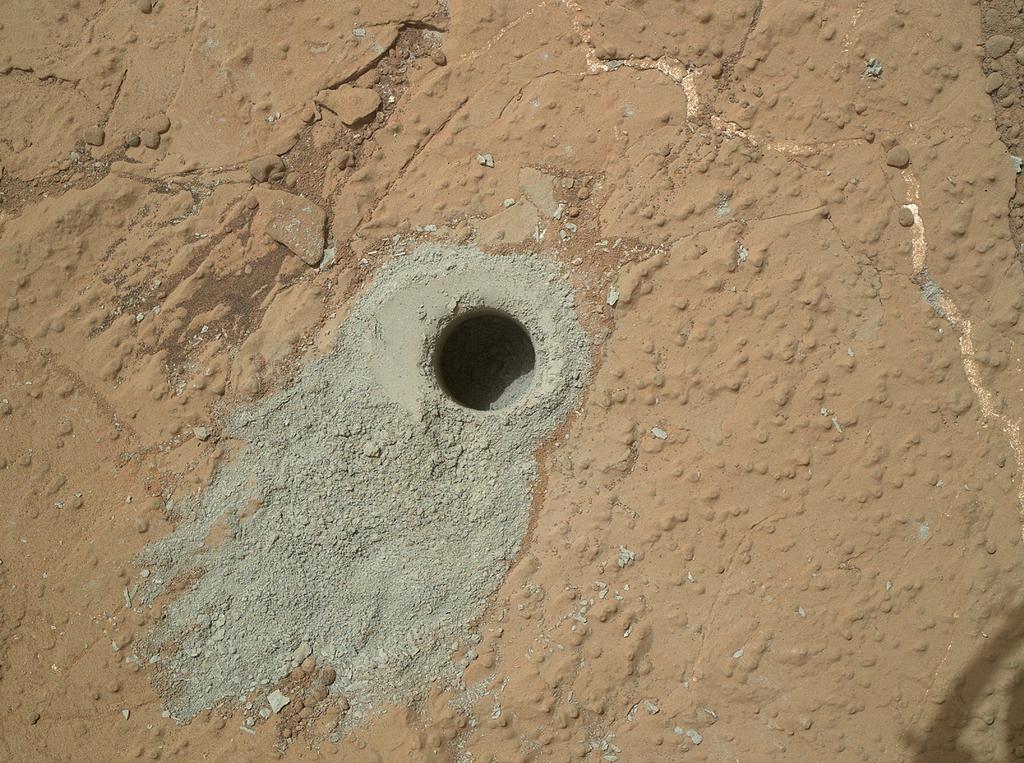
Imaged by the Mars Hand Lens Imager, the hole cut into “Cumberland,” during the 279th Martian day, or Sol, of the rover’s work on Mars (May 19, 2013) cuttings collected by the drill from this hole will be delivered to the rover’s on-board CheMin and SAM instruments for analysis. The hole is some 1.6 cm across and 6.6 cm deep

The initial hole cut into “Cumberland”, which lies some 2.75 metres (9 feet) from “John Klein”, was made to a depth of 6.6 cm (2.6 inches), which was sufficient to force cuttings up into the collection bowl in the drill head itself. In the coming days the cuttings will be passed into CHIMRA and then to the rover’s sample-gathering scoop where they’ll be visually checked by the rover’s camera systems prior to being passed through the sieving mechanisms within CHIMRA ready for delivery to CheMin and SAM.

Once delivered to both instruments, analysis of the samples is liable to take a place over a few days prior to results being returned to Earth.

Related Links

First Annual OpenSim Community Conference announced

On Monday May 20th, the Overte Foundation and Avacon announced the First Annual OpenSim Community Conference, which will take place on the 7th and 8th September 2013.

OSCC-banner

The official programme will be held in-world on purpose-built grid, designed specifically for the conference. In addition, the conference grid will be HyperGrid enabled,  allowing attendees to move between it and other grids which may be hosting social events linked to the conference.

The conference is intended to be a celebration of the OpenSimulator platform and the large and varied community using it. As such, it will feature two days of keynote speakers, presentations and panels on different topics, and an exposition area to showcase community activities and projects and event sponsors. Therefore, anyone who is interested in the OpenSimulator software and the future of the metaverse is invited to attend, as well as OpenSimulator developers, grid administrators, and members of the community who participate on OpenSimulator grids.

Registration and Speakers

Registrations for the conference will open on June 17th 2013 on a first-come-first-served basis. The organisers hope to accommodate 200 users in total, and once that number has been reached, community members will still be able to register for the live UStream version of the conference, which will be provided on-line free-of-charge.

The exposition area of the conference grid will not be restricted to ticket-only access, and so will be only to anyone wishing to visit, subject to constraints on the number of avatars that the exhibition regions can hold at any given time.

The First OpenSimulator Community Conference programme will be held in-world on a purpose built grid (image of illustrative purposes only, and not representative of the conference grid)
The First OpenSimulator Community Conference programme will be held in-world on a purpose built grid (image for illustrative purposes only, and not representative of the conference grid)

The conference will comprise five tracks in order to cluster break-out sessions into common areas of interest. Anyone wishing to attend the conference as a speaker is invited to submit a proposal under one of the following headings – note that relevant guidelines are provided for each track, and should be read in full prior to submitting a proposal:

All speaker proposals must be submitted no later than July 1st, 2013.

Sponsors and Volunteers

While the conference is being held in virtual space, it does incur some expenses (such as the professionally managed set-up and operation of the conference grid and the streaming and other web services). As such, the conference is seeking sponsorship from businesses, entrepreneurs,  and community members alike to help support the conference through a range of sponsorship opportunities, which are tax-deductible for US residents minus the value of any tangible benefits.

The conference also needs volunteers to assist with a wide variety of roles including greeting attendees, moderating breakout sessions, assisting with building and scripting tasks, providing technical support, and so on. If you are experienced with the OpenSimulator platform and have an interest in helping, please complete the Volunteer Application form.

About the Organisers

The Overte Foundation is a non-profit organization that manages contribution agreements for the OpenSimulator project.  In the future, it will also act to promote and support both OpenSimulator and the wider open-source 3D virtual environment ecosystem.

AvaCon, Inc. is a 501(c)(3) non-profit organization dedicated to promoting the growth, enhancement, and development of the metaverse, virtual worlds, augmented reality, and 3D immersive and virtual spaces. We hold conventions and meetings to promote educational and scientific inquiry into these spaces, and to support organized fan activities, including performances, lectures, art, music, machinima, and much more. Our primary goal is to connect and support the diverse communities and practitioners involved in co-creating and using virtual worlds, and to educate the public and our constituents about the emerging ecosystem of technologies broadly known as the metaverse.

Related Links

Tatara: a furnace for creating sculpts and mesh

In real life a tatara, or 鑪, is a traditional Japanese furnace for smelting iron and steel. In Second Life, Tatara, xreated ny Yuzuru Jewell under his Kanae Projects brand name, is a suite of tools which can be used to create sculpt maps and mesh collada files ready for upload to SL, and which includes both texture and bitmap editing capabilities as well.

Tatara combines a number of tools in order to manage this. The tools can be used individually or collectively, depending on the complexity of the object being created, and have a range of menu-driven options to further enhance their capabilities. The tools themselves are:

  • Tsuchi – allows an object to be displayed in orthographic projection from three directions, allowing to be edited and refined
  • Rokuro (lathe) – which I looked at in November 2012, which can be used to create basic shapes and forms for export as sculpt maps / meshes
  • Tokoroten (“extruder”) – which allows shapes or parts of shapes to be stretched, twisted, etc.
  • Mage – which can create more organic shapes and pipes and tubes, etc.
  • Wappa – which can be used for detailed editing of a section of a shape created using Mage
  • A bitmap editor and a texture / drawing tool.

Once a desired shape has been created, it can be saved / exported from Tatara as a sculpt map (.TGA format) or as a mesh .DAE file, each of which can be uploaded to Second Life, and file formats such as .OBJ and .XML are also supported. There are a number of sample shapes provided within the suite to help people get started, and files produced via other means can also be opened in Tatara and previewed / edited. When loading files produced elsewhere, Tatara automatically disables any tools which cannot be used in editing the loaded shape (so you may find, for example, that loading a sculpt map will disable the Rokuro and Tokoroten tools).

Using the Mage option in Tatara to create a teapot using an uploaded image as a guide

Tatara can be downloaded free-of-charge in a trial mode which will remain functional for three days. This allows access to all the features in the suite, other than saving / exporting creations. For this, a licence option must be purchased via Yuzuru’s in-world store. In addition, Tatara includes four optional plug-ins:

  • Cam and gear plug-ins for the creation of either cams or gears, which must be downloaded separately
  • Polyhedron plug-in which allows you to choose ten or more kinds of polyhedrons
  • Stair plug-in which allows the creation of four different types of stair, each with a user-definable number of steps.

Each of the four plug-ins also requires the purchase of a user licence to fully unlock them.

Installation

Tatara is available in three versions: Windows 32 and 64-bit versions and a Mac OSX version. There is no installer per se – the necessary files are provided in a ZIP file, which simply requires downloading and then unpacking to the desired folder.

Once unpacked and launched, Tatara will start-up and display a prompt for your user name and password. If no licence has been purchased, clicking cancel will allow access to the application in the trail mode.

A mesh shape: left - created using Tatara (Tsuchi); bottom - the saved DAE file being uploaded to SL; right - the finished shape with texturing applied (images courtesy of Yuzuru Jewell)
A mesh shape: left – created using Tatara (Tsuchi); bottom – the saved DAE file being uploaded to SL; right – the finished shape with texturing applied (images courtesy of Yuzuru Jewell)

Use

The UI itself comprises two parts: on the left, a preview pane which displays a representation of your model, which can be drag-rotated in all three axes to examine the design; on the right a series of tabs accessing the various tool options, together with a set of menus and options – some of which may be tool-dependent.

Getting to grips with Tatara is a little complex, but Yuzuru provides a solid user guide on the Tatara page of his website and a range of tutorials on his blog. Even so, it is fair to say the tools do require a good understanding of modelling and projection, and achieving a desired goal can take time if you’re not used to using creation / editing tools of this type. Nevertheless, the results can be very worthwhile, and for those wishing to add to their armoury of content-creation tools, whether looking to make sculpts or basic mesh, Tatara and Yuzuru’s other tools are well worth a look.

Designing a a ceiling light frame using Tsuchi and, inset, trhe finished, textured piece about to be installed (click to enlarge)
Designing a ceiling light frame with the aid of Tsuchi and, inset, the finished, textured piece about to be installed (click to enlarge)

The full range of tools provided by Yuzuru comprise:

  • Rokuro – reviewed in this blog in November 2012
  • Rokuro_Pro – a version of Rokuro which includes a texturing capability and a series of plug-in tools
  • Tokoroten (“extruder”) – creates extruded forms of sculpted prim
  • Tatara – an advanced sculpted prim editor which includes functionality from Rokuro and Tokroten and well as three additional modes, which can be used individually or collectively to create sculpt maps
  • Shibori (“iris” – as in camera eye) – a “shrinkwrapper” for shrinking a sculpt around a given shape
  • Nomi (“chisel”) – creates a sculpted prim or mesh with a relief surface from one picture using the picture’s brightness
  • Hanko (“seal”) – a tool which allows you to add your signature to a sculpt map.

Related Links

SL project news week 21 (1): viewer release process

Work continues on implementing the new viewer release process, although it is unlikely to debut this week (week 21). Commenting on the state-of-play at the Open-source Development meeting on Monday May 20th, Oz Linden said, “There are some new services to stand up, and I don’t have enough experience with that to be able to estimate it well.” He also indicated that the necessary changes to the log-in process I reported on in week 20  are still being progressed with care.

However, as of May 20th, 2013, the viewer beta repository has been discontinued by the Lab. This means that the next beta viewer to appear – which is due to be the Materials Processing viewer due out possibly later this week – will be built directly from the Materials project repository and not a merge with the existing beta viewer, although it will go through the existing beta channel for release and made available via viewer download page.

Viewer Naming

Under the new system,  viewer names will be broadly streamlined, with beta and release candidate versions of viewer being broadly identified by the viewer type and project name (e.g “Second Life Beta Materials” or “Second Life Release Candidate Materials”), prior to being updated as the release viewer.

“Willing to Update”

As previously noted in this blog, when a user downloads a specific viewer, they will only receive updates specific to that viewer until such time as it reaches a release status (although user can theoretically run several viewer side-by-side, and receive the required updates to each of them as they become available). However, the beta viewers will in future a new Preferences option, “Willing to update to release candidates” (Preferences > Setup).

The new beta viewer option for updating to RC status

Precisely how this option works is unclear (I have contacted Oz Linden on the matter but have yet to hear back), but it appears to suggest that if unchecked, then notification of any RC updates to the viewer will not be forwarded to the user  / automatically downloaded and installed, and will thus leave the user running with the viewer in a beta state until such time as a mandatory update is forced as the viewer becomes the de facto release viewer.

How Many?

The new release process means that there will be more viewer options to download via the Alternate Viewers wiki page. How many depends on the number of projects and general work is going on with the viewer. However, it also means that once operational, there should be fewer incidences when a specific project or issue interrupts the flow of viewer through to release status, as occurred towards the end of the 2012, when the viewer releases became “stuck” in the beta release channel as a result of a single crash issue.

Related Links

CastAR: looking at the virtual through a different pair of glasses

There has been a lot of excitement about Oculus Rift (OR) over the last few months and how it could revolutionise immersive gameplay, including the potential it offers to SL (and vice-versa).

Now The Verge reports on another innovative development using a headset system called  CastAR, and augmented reality system aimed at the gaming market and formally announced at the 2013 Maker Faire in New York. Whether it might find a suitable use within Second Life remains to be seen. However, whether it does or doesn’t, it is a fascinating concept which could potentially bring the world of high-end, ultra-expensive augmented reality capabilities directly into the home (and workplace?) for a variety of uses.

Currently in the earliest stages of development, CastAR essentially projects virtual environments into the real world, where you can directly interact with them in a variety of ways. It is the brainchild of former Valve employees  Jeri Ellsworth, a hardware engineer, and programmer Rick Johnson. “Former” because they were let go by the company in February 2013, along with 23 other engineers, after spending a year on the project. However, not only did Gabe Newell, co-founder and Managing Director of Valve let Ellsworth and Johnson go – he gave them his blessings to take the idea and the associated IP with them (a remarkable move in itself).  Since then, they’ve founded their own company, Technical Illusions, and have been hard at work developing a system which, according to The Verge, they’ve already poured a better part of a year of their lives.

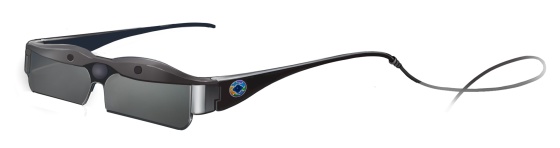
Conceptual art for the production CastAR glasses (image courtesy of Technical Illusions / The Verge)

The system comprises a special pair of glasses which house a set of projectors which beam the image from your computer – such as a game – onto a retroreflective projector screen. A camera also built-in to the glasses sees infrared LEDs positioned around the edges of that projector screen, allowing the glasses to track the exact position of your head so that the software can adjust the 3D perspective in real-time. The result is the projection of images and objects from the computer as 3D objects which you can move around and examine.

This is in marked contrast to the likes of Oculus Rift, where images are displayed on screens within the headset. The result is that even on the small-scale prototype the team have so far developed, it is possible to move around the projected image and interact with it: Sean Hollister from The Verge demonstrated playing a Jenga-like game which allowed him to dismantle virtual towers of block using a hand-held wand. He was also able to demonstrate playing a two-player shoot-’em-up, with both players using the same retroreflective surface, but each seeing views unique to their relative position and head movement.

The initial CastAR prototype glasses shown at the 2013 Maker Faire
The initial CastAR prototype glasses shown at the 2013 Maker Faire (image courtesy of The Verge)

Right now, CastAR is in a very rudimentary stage of development, as indicated in the coverage found in The Verge, as are the potential uses for the system.  Ellsworth and Johnson have presented an early prototype of the system at the 2013 Maker Faire in New York,  where they have also been soliciting feedback on possible uses for CastAR.

One suggested idea would be to make the retroreflective surface room-sized, allowing for complete augmentation / immersion in  3D environment where one and not only look around, but also interact with the objects they find. Quite how this would be achieved is open to debate; redecorating an entire room as a holodeck environment isn’t something that is likely to be welcomed in the average home – although the potential for low-cost specialist environments might be another matter.

However, entire holorooms aren’t necessarily what Technical Illusions are considering. As The Verge states, the team are still very much open to idea, and while Rick Johnson “envisions little children filling their Tonka trucks with virtual sand; family board games; and incredible sessions of Dungeons & Dragons“, Jeri Ellsworth is quoted as saying, “I suspect we’re going to be very surprised about what people find fun in this space,”

One of the aims the team has is to keep overall retail cost of the unit low – around $200 once it is available on the market, largely thanks to their ability to use readily available components, and also in being able to design their own chips and code. To fund the project, the team plan to launch a kickstarter fundraiser in the near future, and will be making a Software Development Kit available to game-makers. However, the aim is very much to try to make the system a commercial product in its own right. This may start small, with simple games played on a small projection surface and a couple of headsets with control wands – but how far the system goes beyond that could be anyone’s guess.

Related Links