Angel Mist – The Cloud Garden, December 2022 – blog post
The following notes were taken from the Tuesday, February 7th, 2023 Simulator User Group (SUG) meeting. They form a summary of the items discussed and is not intended to be a full transcript. A video of the entire meeting is embedded at the end of the article for those wishing to review the meeting in full – my thanks to Pantera for recording it.
Server Deployments
On Tuesday, February 7th 2023, the simhosts on the Main SLS channel were restarted without any change to their simulator code, leaving them on release 577734.
On Wednesday, February 8th, 2023, the RC channels will also be restarted without any version update.
Available Official Viewers
There have been no updates to the current list of available official viewers, leaving them as:
Release viewer: Maintenance Q(uality) viewer, version 6.6.9.577968 Thursday, February 2, 2023.
Performance Floater / Auto-FPS RC viewer, version 6.6.9.577251, January 4, 2023.
Project viewers:
PBR Materials project viewer, version 7.0.0.577997, February 2, 2023. This viewer will only function on the following Aditi (beta grid) regions: Materials1; Materials Adult and Rumpus Room 1 through 4.
Puppetry project viewer, version 6.6.8.576972, December 8, 2022.
In Brief
The announcement about the Group Chat History gave rise to a discussion on the capability and making it more robust and deeper (e.g. be presenting more than just the last hour of group chat when used), together with general improvements to chat history management (timestamps, etc.). Please refer to the video for the full context.
BUG-229675 “Stopping llSetKeyframedMotion should always succeed and never shout an error” was again raised and noted as a not unreasonable request. Again, please refer to the video for further details.
Wednesday February 1st issues: a post-mortem on these was published on Thursday, February 2nd – please read it here for specifics.
Logos representative only and should not be seen as an endorsement / preference / recommendation
Updates from the week through to Sunday, February 5th, 2023
This summary is generally published every Monday, and is a list of SL viewer / client releases (official and TPV) made during the previous week. When reading it, please note:
It is based on my Current Viewer Releases Page, a list of all Second Life viewers and clients that are in popular use (and of which I am aware), and which are recognised as adhering to the TPV Policy. This page includes comprehensive links to download pages, blog notes, release notes, etc., as well as links to any / all reviews of specific viewers / clients made within this blog.
By its nature, this summary presented here will always be in arrears, please refer to the Current Viewer Release Page for more up-to-date information.
Note that for purposes of length, TPV test viewers, preview / beta viewers / nightly builds are generally not recorded in these summaries.
Official LL Viewers
Release viewer: Maintenance Q(uality) viewer, version 6.6.9.577968, promoted Thursday, February 2, 2023.
Release channel cohorts:
Maintenance R RC viewer, version 6.6.10.578087, February 3 – translation updates and the return of slam bits.
Project viewers:
glTF / PBR Materials viewer, version 7.0.0.577997, February 2, 2023. This viewer will only function on the following Aditi (beta grid) regions: Materials1; Materials Adult and Rumpus Room 1 through 4.
Jitters Coffee Shop, Heterocera – December 2022 – blog post
The following notes were taken from my audio recording and chat log transcript of the Content Creation User Group (CCUG) meeting held on Thursday, January 19th 2023 at 13:00 SLT. These meetings are for discussion of work related to content creation in Second Life, including current work, upcoming work, and requests or comments from the community, and are chaired by Vir Linden. Dates and times can be obtained from the SL Public Calendar.
Notes:
These meetings are conducted in mixed voice and text chat. Participants can use either to make comments / ask or respond to comments, but note that you will need Voice to be enabled to hear responses and comments from the Linden reps and other using it. If you have issues with hearing or following the voice discussions, please inform the Lindens at the meeting.
The following is a summary of the key topics discussed in the meeting, and is not intended to be a full transcript of all points raised.
Official Viewers Summary
Available Viewers
On Thursday, February 2nd, 2023:
The Maintenance Q(uality) viewer, version 6.6.9.577968 was promoted to de facto release status.
The PBR Materials project viewer updated to version 7.0.0.577997.
On Friday, February 3rd, 2023 the Maintenace R RC viewer updated to version 6.6.10.578087 – translation updates and the return of slam bits.
The remaining official viewer pipelines are unchanged, as follows:
Performance Floater / Auto-FPS RC viewer, version 6.6.9.577251, January 4, 2023.
Project viewers:
7.0.0.577780, January 25, 2023 – This viewer will only function on the following Aditi (beta grid) regions: Materials1; Materials Adult and Rumpus Room 1 through 4.
Puppetry project viewer, version 6.6.8.576972, December 8, 2022.
General Viewer Notes
It is believed the next viewer due for promotion will be the Performance Floater / Auto FPS viewer, at which point all viewer releases will officially all be based on VS 2022 for Windows, as this is the first RC viewer merged with the VS 2022 release process (previously a separate viewer build fork).
glTF Materials and Reflection Probes
Project Summary
To provide support for PBR materials using the core glTF 2.0 specification Section 3.9 and using mikkTSpace tangents, including the ability to have PBR Materials assets which can be applied to surfaces and also traded / sold.
To provide support for reflection probes and cubemap reflections.
The overall goal is to provide as much support for the glTF 2.0 specification as possible.
In the near-term, glTF materials assets are materials scenes that don’t have any nodes / geometry, they only have the materials array, and there is only one material in that array.
It is currently to early to state how this might change when glTF support is expanded to include entire objects.
The project viewer is available via the Alternate Viewers page, but will only work on the following regions on Aditi (the Beta grid): Materials1; Materials Adult and Rumpus Room 1 through 4.
The latest update to the viewer includes improvements to probe light blending (e.g. between overlapping manually-placed probes), additional work on radiance and irradiance, and the resolution quality of reflections set back up to 256×256 per face (but will downgrade to 128×128 if the viewer has less than 2 GB of available VRAM). All of this should leave the visual quality of reflection probes “pretty close” to what will be seen in the RC / release version of the viewer.
However, there is still a hard transition line between line between overlapping automatic probes and manually place probes, and LL want to encourage those using probes to use full scene manually-placed probes to ensure a much better quality of reflections.
Automatically-placed probes have had parallax correction removed, this should prevent the issue of people seeing the ray traced sphere of the probe rather than the reflection of the environment. Parallax correction is now only available with manually-placed probes.
Screen Space Reflections (SSR) have also been integrated with the reflection probes so that when the viewer does a look-up on a reflection probe and SSR in enabled, if there is an available SSR that gives a better result than the (generally automatic) reflection probe’s sample, it will be used instead.
In addition, there has been further work on optimisation and frame rate smoothing.
Still to be addressed in the viewer:
Some general artefacts still requiring clean-up, notably water reflections / light speckling, objects being rotated in reflections, and some remaining issues with colour curves on HUD attachments.
Further UI work.
There are some glTF materials caching issues which have yet to be addressed.
LL is in the process of finalising compliance with the glTF standards. This does not impact viewer and glTF testing on Aditi (the beta grid), but will require updates to the viewer which are likely to come into force during RC / beta testing, meaning that only the updated viewer should be used from that point forward. However, it should not impact / alter overall functionality within the viewer.
This is the result of an incorrect assumption being made about some of the data required by the glTF specification would “always be there”, when in fact the filtering process LL uses to ensure glTF files uploaded do not contain anything malicious was dropping some of that data (so the visuals were correct, but the data was “wrong” compared to the standard).
In an effort to have media on a prim work on glTF materials in a similar manner to the current SL materials (where setting a face to media on an object overwrites the diffuse (texture) map), setting media on a PBR materials face will overwrite both the diffuse and emissive maps, whilst sill allowing media to be viewed on a shiny surface, et., as per the current behaviour.
There is concern about the impact of allowing “double-sided” materials as a part of glTF PBR (e.g. the risk of over-use, potential performance impacts, etc.).
LL acknowledged that a lot of samples they’ve tested from Sketchfab do contain a a lot of “unnecessary” double-sided surfaces, and so are considering implementing a check and warning on import where this occurs.
There is currently a checkbox for enabling / disabling double-sided materials in the PBR viewer’s materials editor, but LL’s view is that allowing double-sided content is not going to “ruin SL forever” – a view not necessarily shared by some creators.
Vulkan
It is possible that 2023 will see the resumption of work to add support for the Vulkan / MoltenVK (for OS X) API alongside of OpenGL, as the latter is both growing increasingly long in the tooth and is gradually being deprecated / no longer used / supported on a number of fronts.
Within LL, it is believed that implementing this support will not only get SL past the issue of OpenGL’s status, but also offer performance improvements within the viewer (e.g. allowing SL to be less CPU-bound and make more use of the GPU, reducing the volume of draw calls, etc.).
In Brief
LL have been experimenting with pulling purchased content using glTF materials from Sketchfab and importing it to SL. The process is not easy, and it is acknowledge more work needs to be done to smooth this out at some point in the future – it will not be improved before the current project moves to a release status.
This raised the question of licensing, rights, mesh uploads to SL and the Terms of Service, with a not from LL that this likely needs to be reviewed as a whole, and guidelines provided to specify requirements for uploading content purchased by / built via 3rd party sites and things like license compliance (together the the need for LL to determine the means of gatekeeping things like license compliance).
Routes to upload from the likes of Sketchfab would be beneficial, as it would mean creators used to building for those platforms could pull their content into SL without having to learn a further (esoteric) set of content creation requirements.
There was a general discussion on texture compression with glTF (which remains in place for all maps other than normal map, where compressed lossless is viewed as important), and on glTF allowing backward-facing normal maps (unsupported with the current SL materials system), and possible problems / benefits these might lead to.
In terms of which parts of the glTF specification SL is supporting, LL will likely produce a living document that will detail the initial support, and which will be updated when further support is added / certified by Khronos.
For future work, it appears at present that supporting glTF mesh imports would take priority over implementing glTF materials extensions from the specification.
Related to the above point, discussions are in progress within LL on how to continue to support COLLADA (.DAE) mesh imports into SL without actively supporting COLLADA format.
Reasons for sunsetting direct COLLADA import to SL include: there are still a lot of traps creators can fall into with the SL implementation of COLLADA support which can be a barrier to entry for those wishing to engage in SL as creators (similar traps do not exist within the glTF standard); maintaining the COLLADA importer adds cost and overheads, as every importer update has to be tested against it and adjustments made where they break COLLADA uploads.
One option under consideration is the use of the Open Asset Import Library (Assimp). This acts an an intermediary (so .DAE files get converted to the glTF mesh format), allowing a route of upload for COLLADA file to SL without LL having to maintain the COLLADA import mechanism directly, reducing the overheads of having to both test against it and maintain COOLADA import support.
This route would also allow other mesh formats (e.g. .FBX) to be “supported”, with the glTF specification support document mentioned above, available for creators to check which elements within the glTF specification they may need to add in order to get a like-for-like between their build format (.DAE. .FBX, etc.), and glTF.
Concern was raised about what the removal of direct COLLADA import might do the the market for full permission .DAE files which can be purchased through the SL Marketplace for upload to SL (although it is not clear how big this market is).
It is hoped that any approach taken would offer at least a robust a means of importing COLLDA meshes as the current importer.
Also under internal discussion is how to support hierarchies in the context of glTF assets and what that means (e.g. import an asset with a node graph hierarchy, attach it to a mesh, and then manipulate the hierarchy via the edit tools or LSL).
Cover Second Life front-end web properties (Marketplace, secondlife.com, the sign-up pages, the Lab’s corporate pages, etc.).
They are not intended for the discussion of Governance issues, land fees / issues, content creation & tools, viewer or simulator development / projects. Please refer to the SL calendar for information on available meetings for these topics.
A video of the meeting, courtesy of Pantera, can be found embedded at the end of this article (my thanks to her as always!), and subject timestamps to the relevant points in the video are provided. Again, the following is a summary of key topics / discussions, not a full transcript of everything mentioned.
Updates for January 2023
Land Portal Release
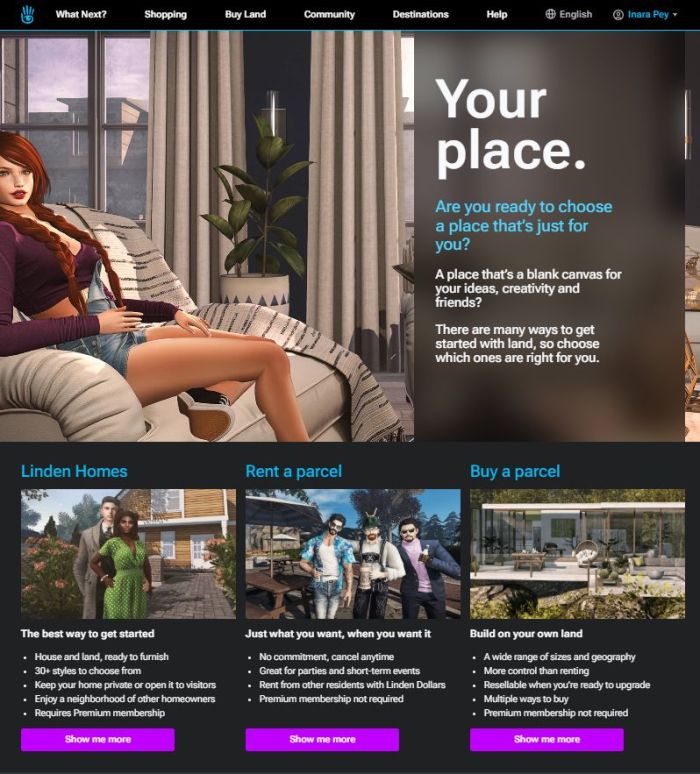
[Video: 06:00-08:00] The new Land Portal has been launched. This is intended to be a central hub from which to get to all aspects of land “ownership” – purchasing regions, renting land from a private estate, renting or purchasing Mainland; obtaining a Linden Home.
[Video: 10:33-10:49] There are currently no actual functionality changes to the pages behind the portal – these will come in time.
[Video: 8:51-9:22] The first of the Land pages to undergo update and improvement will be the Linden Homes page. This will make it easier to see and select available Linden Home styles – but this update “will be a while” before it is surfaced.
Translations for the Portal and the Land pages will come in due course.
The Portal has been used as something of a prototype, bringing together tools and technologies the Lab intend to use to build-out updated versions of their websites and portals, and ensure they are mobile-friendly.
A portion of the new land portal front-end – click to visit
A technical blog post on what the web tools and ongoing website redesign means will be published be the Lab in the near future.
The deployment of the Marketplace Search updates has been further delayed, as indexing all searched to date is taking longer than anticipated to complete.
All other work is completed – the code is in place and ready to go – but LL want to ensure that search and order histories all remain in place when the switch is thrown.
once fully deployed, the new MP Search will have a close parity with the updated web search deployed in 2023, including its own relevance engine.
One idea being floated internally at LL is the idea of awarding worn / attached items a “gold star” to items with a “low Land Impact”.
The suggested approach would be to have some form of automated “side bake” mechanism which takes avatar attachments and assesses their LI, and then awards them a “gold star” on the basis of whether or not they remain within some defined “LI threshold”. “Gold star wearables” would then be searchable as a category / categories within the MP.
The core aims of this would be to:
Encourage wearable items creators to ensure their clothing and avatar attachment are more render performant/efficient (avatars currently have perhaps the highest performance impact, as no real constraints are currently placed on the complexity of worn items, so there is no incentive to model them as efficiently as possible).
Encourage consumers to consider what they are purchasing and its impact (“the gold star means it is better for you and SL”).
This does raise concerns of further gaming of LOD (level of detail) in order to bring items in under the threshold, with the result that while they gain the “gold star” they nevertheless immediate collapse into one (or a small group) or triangles when seen from even a minimal distance – with creators who do so then “recommending” users set their viewer’s LOD rendering unnaturally high – and in the process further negatively impacting viewer performance.
Alternatives offered at the meeting:
Utilise the revised avatar complexity calculations which form a part of the ARCTan project by which to measure the complexity of worn items (the problem here being the ARCTan project stalled some 2+ years ago and has yet to be re-started).
Utilise the “good LOD” calculations used for Animesh to encourage creators to model their clothing / attachments responsibly.
General Marketplace Discussion / Exchange of Ideas
Variants (officially “Styles” – e.g. having multiple colour options for an item in a single listing) was again raised. No further direct feedback on this was given; however, at the January meeting it was indicated the work (which has apparently largely been done) is being “re-prioritised” in the face of the delays in deploying the updated MP Search.
“One click demos” were suggested for the MP – being able to click on an attachment offing in the Marketplace and the item is temporarily worn in-world. This is something Garfield Linden indicated was of interest to him, and requested a Feature Request Jira on the idea.
Search:
Phonetic searching was requested (particularly handy for those not well-versed in the currently-supported languages / dyslexia, where fuzzy search might over-compensate with results). Sntax [sic] Linden acknowledged the “appeal” of phonetic searching.
Filtering clothing / attachments by body type: this is something the Marketplace Team are already looking at in terms of the “most popular” bodies – although how representative this might be of SL’s diversity is hard to determine.
Pay what you want – suggested as a possible option to allow merchants to offer items for free, but with the option for buyers to offer a “tip” in payment.
The functionality for this may be overly complicated to implement.
However, in considering Marketplace updates / a rebuild, LL have looked at options for offering coupons, sales, and “price changey” options, so this idea will be added to the list for further internal discussion.
It was acknowledged that Marketplace load times in the viewer’s browser (and the load times of other SL web properties a user may already be logged-in to) are “to darn high”, and that there are “performance skirmishes” to be had in this area.
A suggestion was made for the Marketplace to support “related items” between stores. This would require engagement by Merchants, but the idea would be if Merchant A produced items intended for use with something Merchant B produces, they could mutually list one another’s products as being related. It could also be technically complex to implement.
Marketplace and CasperVend integration: this is something LL would like to do following the purchase of CasperTech, and have had discussions about, but there are no firm plans as to have it might be tackled as yet.
The following notes were taken from the Tuesday, January 31st, 2023 Simulator User Group (SUG) meeting. They form a summary of the items discussed and is not intended to be a full transcript. A video of the entire meeting is embedded at the end of the article for those wishing to review the meeting in full – my thanks to Pantera for recording it.
Server Deployments
On Tuesday, January 31st 2023, the simhosts on the Main SLS channel were updated with simulator release 577734, comprising both the HTTP custom headers update described above andthe updates previously deployed to BlueSteel and Le Tigre in week #3), comprising: stability improvements, fixes for a number of bugs, including the one preventing 30-second sound loops from being played back, and introduces new functions to the LSL API to allow for sound playback across any prim in a linkset. The new LSL functions include:
On Wednesday, February 1st, 2023, the RC channels should be updated with simulator release 577942. This version adds additional LSL functions for generating RSA and HMAC hashes, and another for replacing a substring of a string, as well as augmenting someexisting functions with new parameters.
Maintenance R RC viewer, version 6.6.9.577678, January 30.
Maintenance (Q)uality RC viewer, version 6.6.9.577581, January 18, 2023.
Performance Floater / Auto-FPS RC viewer, version 6.6.9.577251, January 4, 2023.
Project viewers:
PBR Materials project viewer, version 7.0.0.577780, January 25, 2023 – this viewer will only function on the following Aditi (beta grid) regions: Materials1; Materials Adult and Rumpus Room 1 through 4.
Puppetry project viewer, version 6.6.8.576972, December 8, 2022.
In Brief
Removing the LSO bytecode compiler (non-Mono) / forcing all compilers to use Mono:
While this would make it easier for LL to improve the language, after hearing back that LSO was still heavily used (and the uses that it’s put too), nothing is likely to be changed until after BUG-233084 has been implemented.
Even then, LSO may not be entirely turned off.
The above sparked a discussion on BUG-227303 “collisions makes a script stop running and revert its mono status”, float points, script compiling, and more. Please refer to the video for more.
Rider Linden is looking into trying to fix BUG-233015 “Objects will fail to rez or attach if LinkSetData has any key/value containing certain characters”, which is seen as an encoding dependency issue.
This could lead to a breakage in LSD (Linkset Data) during any fix deployment, as servers using the older formatting will not be able to read the newer formatting.
A possible way to avoid this might be update decoding first, and deploy that, then fix the encoding issue.
Logos representative only and should not be seen as an endorsement / preference / recommendation
Updates from the week through to Sunday, January 29th, 2023
This summary is generally published every Monday, and is a list of SL viewer / client releases (official and TPV) made during the previous week. When reading it, please note:
It is based on my Current Viewer Releases Page, a list of all Second Life viewers and clients that are in popular use (and of which I am aware), and which are recognised as adhering to the TPV Policy. This page includes comprehensive links to download pages, blog notes, release notes, etc., as well as links to any / all reviews of specific viewers / clients made within this blog.
By its nature, this summary presented here will always be in arrears, please refer to the Current Viewer Release Page for more up-to-date information.
Note that for purposes of length, TPV test viewers, preview / beta viewers / nightly builds are generally not recorded in these summaries.
Official LL Viewers
Release viewer: Maintenance P (Preferences, Position and Paste) RC viewer version 6.6.8.576863 Monday, December 12.
Release channel cohorts:
Maintenance (Q)uality RC viewer, version 6.6.9.577968, January 30, 2023.
Project viewers:
glTF / PBR Materials project viewer, version 7.0.0.577780, January 25, 2023 – reflection probes update; linear colour space; improved VRAM utilisations. This viewer will only function on the following Aditi (beta grid) regions: Materials1; Materials Adult and Rumpus Room 1 through 4.





 Inara Pey: Living in a Modemworld