The following notes were taken from the Tuesday, January 24th, 2023 Simulator User Group (SUG) meeting. They form a summary of the items discussed and is not intended to be a full transcript. A video of the entire meeting is embedded at the end of the article for those wishing to review the meeting in full – my thanks to Pantera for recording it.
Server Deployments
On Tuesday, January 24th 2023, the simhosts on the Main SLS channel were updated with simulator release 577628, comprising an update for HTTP_CUSTOM_HEADER usage in llHTTPRequest(). Previously, a maximum of 8 custom headers were allowed, and each header had a hardcoded limit of 253 bytes. With this update, both of these limits
On Wednesday, January 25th, 2023: the RC simhosts should be updated with simulator release 577734, comprising both the HTTP custom headers update described above andthe updates previously deployed to BlueSteel and Le Tigre in week #3), comprising: stability improvements, fixes for a number of bugs, including the one preventing 30-second sound loops from being played back, and introduces new functions to the LSL API to allow for sound playback across any prim in a linkset. The new LSL functions include:
Week #5 should see the deployment of a fresh simulator RC. It will have a fix for key sorting in LSD Find Keys. llVerifyRSA and llSignRSA and llHMAC. A region_rating for llGetEnv and a few more stats in llGetSimStats.
Available Official Viewers
This list reflects the current status of available official viewers on January 24th, 2023:
Release viewer: Maintenance P (Preferences, Position and Paste) RC viewer version 6.6.8.576863 Monday, December 12, 2022 – No change.
Maintenance R RC viewer, version 6.6.9.577678, released January 19 – translation updates and the return of slam bits.
Maintenance (Q)uality RC viewer, version 6.6.9.577581, January 18, 2023.
Performance Floater / Auto-FPS RC viewer, version 6.6.9.577251, January 4, 2023.
Project viewers:
PBR Materials project viewer, version 7.0.0.577610, January 19, 2023.
This viewer will only function on the following Aditi (beta grid) regions: Materials1; Materials Adult and Rumpus Room 1 through 4.
Puppetry project viewer, version 6.6.8.576972, December 8, 2022.
In Brief
BUG-233107 “Objects failing to render is happening more frequently of late” – is rising slowly up the priority list, however, from the discussion at the meeting:
There may actually be two issues at work, with some conflating them into a single problem, and / or there is an issue impacting both the viewer and the simulator.
Both issues may additionally be cause a race condition with messaging, leading to rendering / rezzing problems.
It is suggested, pending an actual fix, alt-camming out a good distance, waiting several seconds and then ESC-ing the camera back to its default position can fix both issues by forcing the viewer to call for a complete scene update.
One of the problems is most persistent on either initially logging-in or following teleporting into a region; it rarely happens on crossing between regions via foot or vehicle.
Please refer to the video below for further discussions at the meeting.
Logos representative only and should not be seen as an endorsement / preference / recommendation
Updates from the week through to Sunday, January 22nd, 2023
This summary is generally published every Monday, and is a list of SL viewer / client releases (official and TPV) made during the previous week. When reading it, please note:
It is based on my Current Viewer Releases Page, a list of all Second Life viewers and clients that are in popular use (and of which I am aware), and which are recognised as adhering to the TPV Policy. This page includes comprehensive links to download pages, blog notes, release notes, etc., as well as links to any / all reviews of specific viewers / clients made within this blog.
By its nature, this summary presented here will always be in arrears, please refer to the Current Viewer Release Page for more up-to-date information.
Note that for purposes of length, TPV test viewers, preview / beta viewers / nightly builds are generally not recorded in these summaries.
Official LL Viewers
Release viewer: Maintenance P (Preferences, Position and Paste) RC viewer version 6.6.8.576863 Monday, December 12.
Release channel cohorts:
Maintenance R RC viewer, version 6.6.9.577678, released January 19- translation updates and the return of slam bits.
Maintenance (Q)uality RC viewer, version 6.6.9.577581, January 18, 2023.
Project viewers:
glTF / PBR Materials project viewer, version 7.0.0.577610, January 19, 2023 – Screen Space Reflections update + fixes. This viewer will only function on the following Aditi (beta grid) regions: Materials1; Materials Adult and Rumpus Room 1 through 4.
Where Our Journey Begins, November 2022 – blog post
The following notes were taken from
My audio recording and chat log transcript of the Content Creation User Group (CCUG) meeting held on Thursday, January 19th 2023 at 13:00 SLT.
Pantera’s video of the Third Part Viewer Developer (TPVD) meeting held on Friday, January 20th, 2023 at 13:00 SLT, embedded at the end of this article.
These meetings are chaired by Vir Linden, and their dates and times can be obtained from the SL Public Calendar; also note that the following is a summary of the key topics discussed in the meetings and is not intended to be a full transcript of all points raised.
Note, The TPVD meeting was abbreviated to 20 mins.
Official Viewers Status – TPV Meeting
Available Viewers
On Thursday, January 19th, 2023, the Maintenance R RC viewer was updated to version 6.6.9.577678 – translation updates and the return of slam bits.
On Wednesday, January18th, 2023:
The Maintenance (Q)uality RC viewer was updated to version on 6.6.9.577581 – new Debug settings UI, quality of life improvements.
The PBR Materials project viewer updated to version 7.0.0.577610, on January 19, 2023 – SSR support.
This viewer has been reported as “broken” when running on systems with AMD GPUs, a situation that was being investigation as these notes were being written.
This leaves the rest of the currently-available official viewer as:
Release viewer: Maintenance P (Preferences, Position and Paste) RC viewer version 6.6.8.576863 Monday, December 12, 2022.
Release Candidate viewers:
Performance Floater / Auto-FPS RC viewer, version 6.6.9.577251, January 4, 2023.
Project viewers:
Puppetry project viewer, version 6.6.8.576972, December 8, 2022.
General Viewer Notes
Vir pointed out that as Microsoft has ended support for Windows 8 on January 10th, 2023, it is no longer regarded as a supported operating system for running Second Life, and the viewer will not be tested against it (and the System Requirements page has been updated to reflect this, specifying Windows 10+ most recent service pack as the baseline supported Windows OS.
The second phase of the Github work in on-going, notably updating all the viewer build libraries.
Inventory Enhancement Project – Both Meetings
Linden Lab is looking to enhance the Inventory system.
The first element of this work is to be the addition of a fixed-resolution thumbnail preview capability, allowing users to see a small image of a given object (where this makes sense – so the likes of note cards and scripts would be excluded) within inventory, with these thumbnails either being of individual items or entire folders.
This work has now started, but it will be “some time” before there is anything user-facing to show.
A code contribution from Kitty Barnett (Catznip) for an inventory texture tool tip / preview may well be folded in to this work.
Once the thumbnail preview work has been completed, it is possible the Lab will look to further enhancements to inventory management. One future enhancement under consideration is support for folders to be included in the Contents inventory of individual objects.
glTF Materials and Reflection Probes – CCUG
Project Summary
To provide support for PBR materials using the core glTF 2.0 specification Section 3.9 and using mikkTSpace tangents, including the ability to have PBR Materials assets which can be applied to surfaces and also traded / sold.
To provide support for reflection probes and cubemap reflections.
The overall goal is to provide as much support for the glTF 2.0 specification as possible.
The project viewer is available via the Alternate Viewers page, but will only work on the following regions on Aditi (the Beta grid): Materials1; Materials Adult and Rumpus Room 1 through 4.
Screen Space Reflections (SSR) has now been integrated into the Project Viewer, (January 19th onwards), although work around this is still being finalised, notably mixed Reflection Probes with SSR.
Some fixing is required to the default colour curves in the viewer.
Stability issues have been noted on Intel integrated graphics hardware, and these are being investigated / fixed.
There have now been a total of two further weeks focused on optimising the viewer’s performance, and the results of this work should be available in the next update to the Project Viewer.
UI updates: the viewer will likely see some UI updates as it progresses:
The next update will likely include a new dedicated icon for on the Build floater for creating Reflection Probes.
The drop-down in the Build floater Textures tab (Currently Materials and Media on the release viewer, may be re-labelled for PBR (where it is Materials, Media, PBR) to more clearly differentiate between the current materials maps system and “new”” PBR materials.
Similarly, the new Materials Inventory folder in the Project Viewer may also be renamed to avoid the potential for confusion between the use of PBR materials assets and the current materials maps system.
Further, the menu option Build → Upload → Materials (in the Project Viewer) may be reamed to more clearly reflect it is for PBR materials, not material maps.
Exactly was terms will be used is TBD, but the general push (from LL’s perspective is to use meaningful lbeels on options and menus which can be Googled with some relevance by those wanting to know more about the underpinning file formats / standards, etc.
Work is going into messaging between the back-end and the viewer to ensure it will scale once the viewer starts to see widespread use.
In Brief
As the PBR Materials project is approaching a possible RC release, the questions has been asked as to what is next on the graphics front. While no formal decision has been made, options include:
A return to looking at adding something like Vulkan / MoltenVK (for OS X) API support alongside of the OpenGL API (which has been slated for deprecation by Apple and is growing increasingly long in the tooth). This work is being looked at more as a performance optimisation rather than a visual boost to rendering (e.g. allowing SL to be less CPU-bound and make more use of the GPU, reducing the volume of draw calls, etc.).
Further expansion of the glTF work to include mesh (and moving away from Collada .DAE), animations, etc. But again, no definitive plans / direction has been agreed within the Lab.
While there is a appetite at the Lab to support as much as the glTF 2.0 specification, some aspects will be excluded from the list – mentioned at the meeting were Setting the filter mode and sampler state of textures, both of which were described as “problematic” for implementation within SL.
Overhauling / updating support / options for ground textures.
The CCUG meeting saw a general discussion on animations, the skeleton and all that it involves (bones, attachment points, collision volumes, rigging, etc., and the rules / policies surrounding them, couched initially in the potential for expanding the skeleton / avatar system – for which there are currently no plans to do so beyond what has already been done.
Pivot points: (related to the above) past CCUG meeting saw some extended discussion on implementing pivot points on the skeleton, and LL indicated they would investigate this. Since then, it has become increasingly apparent that a node hierarchy would be beneficial and potentially easier to implement; ergo pivot points have been pulled into the pot for a future hierarchy project.
There is a known bug where Premium Plus users – who gain free texture uploads – are being charged for textures included in mesh uploads. An upcoming simulator-side maintenance update should correct this.
A request was made at the CCUG meeting to allow mesh uploads greater than the 64m single object size limit, to make it easier to import large structures / scenes without having to curt them into sections (and thus avoid potential issues in fit, scale, update, etc, and can result in Interest List related rendering issues).
LL is unlikely to change the limit, but would prefer to provide improved tools that can help content creators / scene builders.
One should tool discussed – which is currently not in development – is that of a “scene view” tool which identifies every individual instance of an object in scene, and provides a mechanism to allow (subject to permissions, obviously) them to be swapped-out to fix things like “broken” items / those for which there is an update / replacement.
The following notes were taken from the Tuesday, January 17th, 2023 Simulator User Group (SUG) meeting. They form a summary of the items discussed and is not intended to be a full transcript. A video of the entire meeting is embedded at the end of the article for those wishing to review the meeting in full – my thanks to Pantera for recording it.
Server Deployments
On Tuesday, January 17th 2023, the simhosts on the Main SLS channel were restarted with no deployment, leaving them on simulator version 576542.
On Wednesday, January 18th, 2023: the RC simhosts should receive two new simulator updates:
577628 – (Le Tigre RC Channel) an update for HTTP_CUSTOM_HEADER usage in llHTTPRequest(). Previously, a maximum of 8 custom headers were allowed, and each header had a hardcoded limit of 253 bytes. With this update, both of these limits have been removed; the only limitation is that the total custom HTTP header size must be under 4096 bytes.
The cryptographic signing utilities – potentially llHMAC (per BUG-233005) and llSignRSA and llVerifyRSA (per BUG-233009) had to be delayed due to “last minute snag” requiring a further look at the functions.
577595 – (Bluesteel and Magnum RC channels) contains stability improvements, fixes a few miscellaneous bug. It also fixes the bug preventing 30-second sound loops from being played back, and introduces new functions to the LSL API to allow for sound playback across any prim in a linkset. The new LSL functions include:
Maintenance (Q)uality RC viewer, version 6.6.9.577418, January 4, 2023.
Performance Floater / Auto-FPS RC viewer, version 6.6.9.577251, January 4, 2023.
Project viewers:
PBR Materials project viewer, version 7.0.0.577486, January 11, 2023.
This viewer will only function on the following Aditi (beta grid) regions: Materials1; Materials Adult and Rumpus Room 1 through 4.
Puppetry project viewer, version 6.6.8.576972, December 8, 2022.
In Brief
As well as the crypto signing noted above, there are a couple of new functions coming down the pipe dealing with cryptographic hashing which are described as being useful for things like JWT or other HTTP auth schemes:
It has been suggested that the server-side of Pathfinding might be in line for a re-visit, although no time frame for when this might be or what it might comprise has been determined as yet.
It is reported that llRequestAgentData(id,DATA_NAME); is failing with increased frequency (the issue was first reported in BUG-231884), with other request functions also reported as having issues (e.g. llRequestSimulatorData incorrectly reporting a region’s online status until the region is restarted). It’s not clear at this point in time what is causing these problems, but server-side caching errors might be the cause of some.
A request has (again) been made for the servers to have valid SSL certificates. A Jira has been filed on this, and the engineering team are going to try to get it moved forward with TPTB.
BUG-227303 “collisions makes a script stop running and revert its mono status”, is now described a “high on the list” of things to be addressed.
BUG-10442 “llGetHTTPHeader does not accept custom headers” has been raised as something to be addressed given the upcoming release of Simulator RC 577628.
BUG-233107 “Objects failing to render is happening more frequently of late” continues to be an issue, an might be occurring more frequently for some, and its priority has been raised.
BUG-233140 “LSL Feature Request: PSYS_PART_TEXTURE_ANIM” a feature request relating to animated particles has been raised and accepted. Whilst seen as a 2nice to have”, and something that might spark renewed interest at poking at the particle system (viewer performance permitting) – it generated interest and discussion at the meeting.
On Monday January 16th, 2023 (PDT), the Firestorm team released version 6.6.8 of their viewer.
This is another release which might be described as more a maintenance update, intended to keep Firestorm in step with the current official viewer code base, together with focus on bug fixes more than new features.
However, that said, there are some significant updates to be found in this release, both from Linden Lab (as with the incorporation of Legacy Profiles) and also from the Firestorm Team (notably the Mesh Preview Upload by Beq Janus).
So, without further ado, lets get into things and see what’s what. And please note that as per all my articles on viewer updates and releases, this is not a full blow-by-blow breakdown of absolutely everything in the release; rather, it is intended to highlight the more significant updates and fixes people are liable to find useful, and offer some general notes .
For a complete breakdown of changes, please see the official release notes for Firestorm 6.6.8.
Installation
There is no need to perform a clean install with this release if you do not wish to.
Do, however, make sure you back-up all your settings safely so you can restore them after installing 6.6.8.
Linden Lab Updates
Firestorm 6.6.8.68380 is fully merged up to the Linden 6.6.7 code-base, plus some cherry-picked items from upstream, per the notes below.
Hotfix Releases
MFA / ToS Hotfix, viewer version 6.6.7.576223, November 2022 – ensures the viewer correctly required a double-entry of MFA tokens on launching the viewer and on accepting a Terms of Service update.
Modal Hot Fix, viewer version 6.6.4.575022, September 2022 – correcting a crasher within the viewer code.
Fix for a transparency “alpha” blending issues in the above viewer release. In cases of many layers of textures that included transparencies, this would cause some of the lower layers to not render at all.
Improved reporting of spam and phishing attempts from the Group Chat and IM window with the addition of Report Abuse right-click option
Improved land sale option: when selling land, Sell land to “specific person” will show your own name in the “Near Me” list in the people picker – BUG-231954.
Ability to restrict media on a prim to this parcel via World → Parcel Details → Sound → Obscure MOAP – BUG-10416.
Media on a Prim fixes: media will no longer loop when it should not; audio for media no longer plays when the object is edited.
Fixed the Search floater opening without appropriate search results after performing a search from the NavBar
Fixed the “360 snapshot” floater not being refreshed after second clicking on the “World” → “360 snapshot” menu item.
Legacy Profiles
In 2022, Linden Lab made the formal transition back to present avatar profiles through an integrated floater within the viewer with the promotion of viewer version 6.6.3.574158 was promoted to de facto release status in August of that year (although the web-based version of profiles can still be accessed – with reduced functionality – via my.secondlife.com).
With Firestorm 6.6.8, Firestorm incorporates the Lab’s Legacy Profiles code into their existing Profiles floater, with some changes to the latter as noted below.
Firestorm Profiles floater: as it was (l) and as it is with Firestorm 6.6.8 (onwards) (r)
These tabs / options / buttons have been renamed, but the functions remain the same, unless noted below. Note that Interests has been removed.
The Web tab is renamed Feed and displays the user’s Second Life Feed (under my.secondlife.com).
2nd Life and 1st Life tab images:
The 2nd Life Profile picture has a revised aspect ratio.
Within your own profile: clicking the image swatch in either will open a texture picker, allowing you to select an image for either.
Within your own 1st Life tab are three buttons:
Upload Photo – allows you to upload an image from your computer to the 1st Life Tab to preview it (image must still be uploaded to inventory and applied, if it is to be saved & used).
Change Photo – opens a texture picker, allowing you to select an image from inventory to add to your 1st Life tab.
Remove Photo – removes any displayed image from the swatch.
Display Name / Multi-option button:
When viewing your own Profile, the tool button to open the Display Name edit fields is opened.
When viewing the Profile of a Friend, displays a pop-up with the following check-box options:
See when I’m online.
Find me on the world map.
Edit, delete or take my objects.
Note that active options will appear in white on the displayed profile, and inactive will appear greyed out, for eas of reference.
When viewing the Profile on a non-Friend, this area is blank.
Unknown: a new status option (alongside Online and Offline), displayed when the person concerned is not someone you have friended, and who has their viewer set to only show their on-line status to friends.
In addition, and to reduce drama, if a Friend is hiding their status, they will show as Offline, rather than the status in their Profile being blank.
Firestorm Updates and Improvements
Github Actions
Firestorm 6.6.8 is the first set of releases built through the GitHub Actions infrastructure rather than depending on individual developers. This is a significant shift in emphasis for viewer development – and one mirroring moves being made in the same direction by Linden Lab. Benefits include removal of single-person for feature development and providing a more reliable, repeatable build mechanism.
Building and Scripting – Local Mesh (Beta)
Firestorm 6.6.8 introduces Local Mesh as a beta implementation. Developed by Beq Janus, Local Mesh is intended to allow users able to upload mesh to preview their objects in-world (using a “surrogate” object, which can be as simple as a cube prim), and also see edits made to the .DAE file in real time.
The primary aim of this capability is to allow creators check their creations without having to go through the unpredictability of access to Aditi (the Beta grid) for such checks / tests, as well as presenting that real-time viewing of edits to the .DAE file.
The capability works for unrigged mesh, worn rigged mesh and Animesh, and once rendered, the object can have textures and materials applied for testing, as required.
Local Mesh follows the same basic principles as Local Textures, notably:
Meshes are only visible to you through the viewer instance used to apply them.
Meshes only remain visible to you during the current log-in session. A relog will both clear the list of Local Mesh Assets and reduce the “surrogate” object for any local mesh you have “rezzed” in-world to a basic shape.
Local Mesh is accessed via the Build menu: Build → Local Mesh, which in turn opens a new floater, comprising 3 tabs.
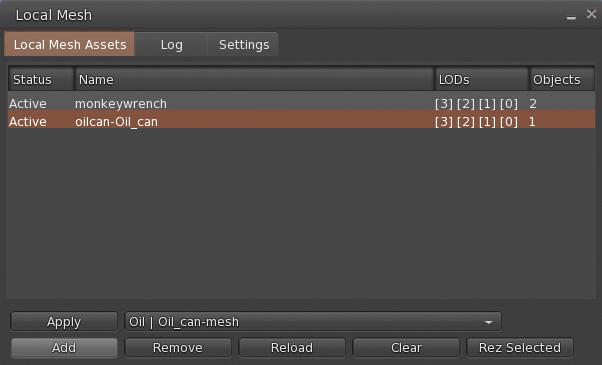
The Local Mesh floater. Credit: Beq Janus
Local Mesh Assets Tab
Displays the current list of .DAE files obtained from your computer which are available for potential rendering in-world to view. Objects are listed in the middle section of the tab, together with their assigned LODs. When more that one file is listed, the highlighted file name is the one that will be acted upon.
This tab includes the following buttons:
Add: opens a file picker and allows you to navigate to and select a .DAE file from your computer. When the file is selected and Open in the picker is clicked, the file is added to the list of available .DAE files.
Remove: will remove the highlighted .DAE file from the Local Mesh Assets list and should clears any corresponding in-world object.
Reload: Re-loads the selected file in the Local Mesh list and reapplies it to the Mesh object inworld so use this to applies the most recent edits to your .DAE file to your in-world object.
Clear: Reverts a selected Local Mesh object inworld to it’s normal state (so, if a cube prim was used, the object will revert to a cube).
Apply: if you have a suitable mesh in-world yo can select it and click this button to apply the properties of the file highlighted in Local Mesh Assets to it.
Rez Selected: will prompt you to rez a primitive in-world (via the Build floater, and then applies the properties of the file highlighted in Local Mesh Assets to the rezzed prim.
The Local Mesh workflow
Log Tab
Logging for Local Mesh
If the status of your Local Mesh file in the Local Mesh Assets list shows “Error” instead of “Active”, check the log for the cause of the error.
Settings Tab
Assume scale is in metres:- Ignore the cm scale units used by tools such as Maya,
LOD Suffixes: Choose a standard or manually edit
SL Standard – Lowest is LOD0, High has no suffix
Game Engine Standard – Unity.UES etc, Lowest is LOD3, High is LOD0
LOD names – English LOD names, Lowest is LOWEST, High is HIGH
Converting a Local Mesh to a Local Animesh
Right-click → Edit the required local mesh (in-world or worn).
Add your animations and control scripts to the object.
Select the Features tab in the Build floater and check the Animated Mesh option.
Additional Information
For a complete overview of Local Mesh functionality, please refer to Announcing Local Mesh, by Beq Janus, principal developer of the capability, and which can be found on her blog – which is a must-read for anyone interested in content creation and the technicalities of Second Life. In addition, the ? button of the Local Mesh floater will display web-based Help pages based on the floater tab in which the ? button is clicked.
Building and Scripting – General Updates
Build Floater:
Face selection cycle now starts at face 1 instead of face 0 – FIRE-32282.
Shift+clicking the link/faces button now includes the next face/link into the selection (Build → Select Elements → “Include next part or face” / “Include previous part or face”) – BUG-232757.
Physics updates:
Mesh physics options in mesh upload preview floater
The bounding box now sets a physics cube around the entire mesh even if it is multi part in the mesh uplaoder.
eshes with a hull based (non triangle) user physics will not be convexified when scaled to below 0.5m – BUG-232869 and FIRE-32359.
Animation upload preview on own avatar should no longer fail when the Firestorm AO is enabled – FIRE-32315.
Logos representative only and should not be seen as an endorsement / preference / recommendation
Updates from the week through to Sunday, January 15th, 2023
This summary is generally published every Monday, and is a list of SL viewer / client releases (official and TPV) made during the previous week. When reading it, please note:
It is based on my Current Viewer Releases Page, a list of all Second Life viewers and clients that are in popular use (and of which I am aware), and which are recognised as adhering to the TPV Policy. This page includes comprehensive links to download pages, blog notes, release notes, etc., as well as links to any / all reviews of specific viewers / clients made within this blog.
By its nature, this summary presented here will always be in arrears, please refer to the Current Viewer Release Page for more up-to-date information.
Note that for purposes of length, TPV test viewers, preview / beta viewers / nightly builds are generally not recorded in these summaries.
Official LL Viewers
Release viewer: Maintenance P (Preferences, Position and Paste) RC viewer version 6.6.8.576863 Monday, December 12.
Release channel cohorts:
No updates.
Project viewers:
glTF / PBR Materials project viewer updated to version 7.0.0.577486 on January 11, 2023.




 On Monday January 16th, 2023 (PDT), the Firestorm team released version 6.6.8 of their viewer.


 Inara Pey: Living in a Modemworld