Sansar Product Meetings week #36: R36 feedback and Q&A

Back in the Nexus: Lt. Pey on shore leave! A shame LL did away with free camming here…

The following notes were taken from my audio recording of the September 5th (week #36) Sansar Product Meeting, which took the form of a Q&A  / feedback session on the recent R36 release. As always, key points are summaries, but please also refer to the official video.

R36 Update 1

Friday, September 6th saw Linden Lab issue the first e36 update, including a number of bug / issue fixes, including:

  • Fixes for several crash issues caused by:
    • Equipping a custom avatar, then heading to an experience.
    • The Zen Garden world, which had issues tied to scripted sounds.
  • Some Nexus quest objectives could not be completed without reloading the Nexus multiple times. This should allow users to complete the quest without having to reload the world.

Please refer to the release notes for the full list of fixes.

Avatar 2.0

General

  • Will the default avatars be changed prior to the arrival of body morphing? There will be no major changes to the avatar skeleton. However:
    • When fully body deformation is introduced, there will be a new range of default avatars offer different shapes, builds, etc.
    • There may be a few minor tweaks to the base avatar.
    • Body morphing will use the same system as in place for the face.
  • The collision capsule doe the avatar has changed with Avatar 2.0, and this has caused some issues with levels in building, doorways, etc., seeming to be too low for the avatar to move under.
  • Avatar 2.0 introduced different movement speeds according to height. This was done as an experiment, and the Lab is looking for feedback on it.
    • This has already caused some issues in games involving running / running – smaller avatars can no longer easily participate as they are unable to jump far enough / high enough.
    • A suggestion has been to keep the feature, but make it optional or controllable at the world level.
  • Will there be a way to give hints on the morph bones auto-rigging system? The system is still being fleshed-out, and discussion like this will be held through Discord.
  • When importing an avatar with skin, will Sansar accept the weights applied by the creator, or will parts of it always be auto-weighted?
    • Animated skin weights will always be used as is specified by the creator.
    • The auto-skinning to the morphs is actually to a completely different skeleton not currently available to creators and comprising 300+ bones with 8 influences per vertex. LL are just trying to have the system take care of all interactions with it, so that creators don’t have to worry about the complexity of trying to skin to it.
    • However, the Lab is looking for a way to allow creators to indicate which elements they wish to pay attention to / ignore – hence why ear control points are currently masked to assist with hair.
  • Will the shadow lighting used in the Look Book be improved? Yes, this is being worked on.

Face and Deformation

  • Some feedback is that the deformation options are not as nuanced as anticipated (e.g. limited scope to change the shape of the head; greater variety of eye shaping options, etc.)
    • Some tools for managing facial deformation didn’t make it into this release, including some pre-made shapes for eyes, nose, etc.  These will be added. Other suggestions, such as changing the shape of the back of the head independently of the forehead, will be noted for consideration.
  • Texture uploads (skins):
    • This is being worked on, but release time is currently not clear. As per previous meeting notes, providing the ability is dependent upon updating the licensing system to incorporate the avatar, so that creators can sell their skins, head presets, etc.
    • More default skins could be provided, but the Lab would prefer to offer the upload ability, mentioned above for users to upload their own skins.
  • Will it be possible to create and sell face morphs for those who are not comfortable in using all of the deformation tools? Yes. That’s why there are the preset slots within the face tools. The same will be true for full bodies created using the Sansar base avatar, once full body deformations have been introduced and everything has been hooked into the licensing system.
  • All of the ear control points in the auto skinning are masked off (except for the root) in order for hair to work. This will be iterated on to improve it, but for now it means that ears on uploaded mesh heads do not respond to ear morphs in the facial deformation tools.
  • Can sliders be provided to adjust how much of a facial area / feature is selected in order to help fine-tune changes when using the deformation tools / to make is easier to select smaller areas? This would require a vertex-based editor rather than a control point based editor. So, no.

Clothing

  • Will rigged items (hair, etc), be resizeable:
    • No plans outside of resizing as part of the avatar uniform scaling, as seen as problematic due to overall impact on other avatar elements – animations, etc.
    • Clothing rigged to the Avatar 2.0 skeleton should morph with the body (when deformations is available) and head.
  • Can the MD adjustment tools be modified to allow non-uniform stretching / scaling? Unfortunately, MD does not support this.
  • Will there be some form on icon in the Store / avatar inventory to denote MD clothing made specifically for Avatar 2.0 (and that should fit without adjustment / transformation?). Yes, this is being considered, together with tags.

Nexus

  • What are the goals LL hope to achieve with socialisation in the Nexus?
    • What’s been deployed is just the start – social spaces, quests etc., more to come.
    • Example: Lab is looking at ways groups of people can meet in the Nexus and then travel together.
    • It’s also recognised that not everyone will wish to be dropped into the Nexus when logging-in, so the Home Space will likely be re-visited in the future for people to get to it more directly.
  • Are behaviours at the Nexus being monitored? Will changes be made based on people’s behaviour? Yes.
    • Use of the Nexus is being monitored from end to end – how people behave, socialise, react to the portals, respond to the quests, etc. These observations will inform development and enhanced of the Nexus.
    • Direct feedback from individuals is welcome, but the observation of behaviours and actions of users actually active within the Nexus.
    • The Nexus, Prime Portal and Codex will remain – but changes will be made on the basis of behaviour and feedback.
  • To make group travel easier, would it be possible to allow a users to drop a personal portal for a destination they’ve selected from the Prime Portal, so they and their friend to jump to a world not in their Codex, without everyone having to select the destination from the Prime Portal individually? – Will be looked into.
  • Logging-in to the Nexus means that if someone has to shut down the client while editing their appearance in Look Book, there is a risk that they will be logged into the Nexus naked. Can this be prevented? For now, don’t shut down the client leaving your avatar naked in the Look Book!
    • Also remember you can avoid the Nexus when logging in, by clicking the cancel button alongside the load progress bar and going directly to your Home Space.
  • Spawn point issues:
    • A number of people have “fallen through” the Nexus when logging-in, prompting a re-spawn. This has been noted by the Lab and is being looked into.
    • Multiple people arriving at the spawn point appear inside one another until they move. There is supposed to be logic at the spawn point to prevent this, and it will be looked at.
  • The current avatar cap per Nexus instance is 20 – this will be raised in accordance with the performance status LL gather from users.

XP System

  • XP system in its infancy right now.
  • As new storyline quests are release, the cap on levels will be increased.
  • And achievement system is also under consideration – as a user achieves various milestones, they be able to gain identity / vanity related items associated with their profile.
  • At some point the global XP system will be opened to creators to use and offer XPs to users. There are no plans to provide a means for creators to build their own XP systems using the Lab’s framework (i.e. create an XP system specific to their own worlds).

General Q&A

  • The usual four:
    • High heels for avatars: not on the roadmap at present.
    • 3D mouse support: not on the roadmap, will more likely be a general project to support game pads, joysticks, etc., if done.
    • Valve Index support: something the Lab wants, but no time frame, other than when the Lab get to work on it, it is estimated to be around 2-3 weeks of work.
    • Wiki: the more user-submitted guides that are made to the forum public documentation area, the more weight is given to the case for the Lab creating and offering / managing a wiki.
  • Persistence: yes, news! The Lab has entered into a design phase for persistence. No delivery date as yet, nor specifics, but it is firmly on the roadmap.
  • Can a means be provided for a creator to ban troublemakers from all of their worlds, rather than having to do so individually? This is a part of the on-going moderation tools / abilities discussions the Lab is having internally.
  • The ability for creators to offer rewards to users completing their quests is being worked on and will be arriving “fairly” soon.
Jamee Sandalwood at Windlight Gallery in Second Life

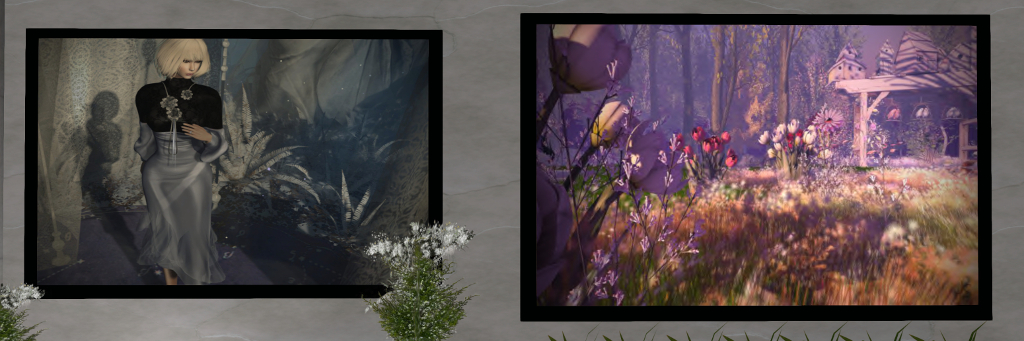
SL Through My Eyes – Jamee Sandalwood; Windlight Gallery, September 2019

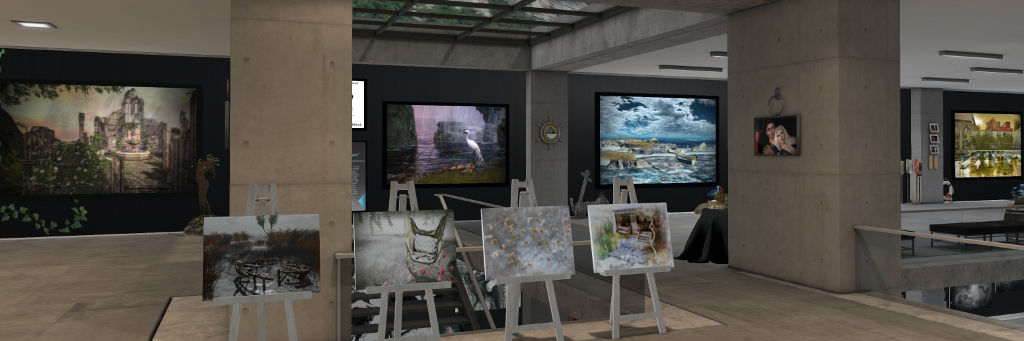
SL Through My Eyes is an extensive exhibition of Second Life photography by Jamee Sandalwood that is currently open at the Windlight Gallery, curated by John and Eleseren Brianna.  As the title of the exhibition – located on the upper floor of the gallery – implies, this is something of a personal look at Second Life, with Jamee introducing it thus:

This has been three years of inspiration in the making, and I am so proud to share it with you all. I hope you will find something that is special and reminds you of why you are part of this virtual world. SL has so many things to offer with so many talented and amazing people sharing their talents in ways that inspire. Each of these photos was taken as I was inspired by the beauty and creativity of someone who took the time to build something that was beautiful to me.

SL Through My Eyes – Jamee Sandalwood; Windlight Gallery, September 2019

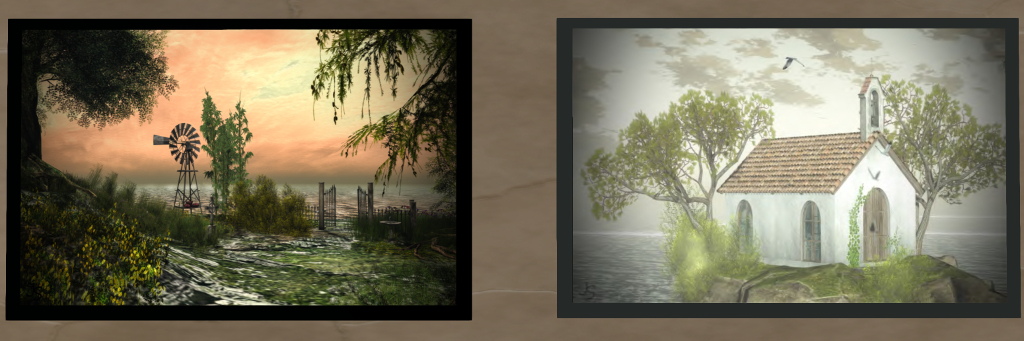
Jamee’s work covers fashion photography, avatar studies, abstracts and – obviously – landscapes. And while the focus of SL Through My Eyes is on the latter, it also touches on her other areas of artistic interest as well. A number of the pieces include self-portraits that also have a slant towards fashion, for example, while a study of a lion’s head is rendered as a painting that, while not abstract in style, has a wonderful sense of abstraction about it which suggests it could have been sculpted and that were one to reach out and touch it, fingers would be able to trace their way over the lines and creases that appear to give form to the fur and mane.

It is this richness of life and presence in Jamee’s work that I find so attractive. Her landscapes in particular always strike me as not just capturing the memory of a location, but its very breath as well.

SL Through My Eyes – Jamee Sandalwood; Windlight Gallery, September 2019

Whereas others tend to post-process to the point that while they have produced a work of art in its own right, they have in doing so perhaps lost the core essence of the place their works features. In her work, Jamee offers a lighter touch, one that still results in expressing her artistic muse and creativity, but which also retains the essence of the place in which the original image was taken.

A further attractiveness with this exhibition is the dressing Jamee has given the gallery space around her work: fantasy settings fronted by night flowers that seem to offer a way into the images; the accoutrements of a beach location accompanying her coastal and water images; ivy hanging from walls to bring together images of ruins and horses to form a vignette of their own. Among these elements are a series of small photos of Jamee and her SL companion, Matt Thomson; these add a further personal dimension to the exhibition that is delightful to see.

SL Through My Eyes – Jamee Sandalwood; Windlight Gallery, September 2019

SL Through My Eyes is an engaging and evocative exhibition of art by an exceptionally talented photographer and artist. I believe it will be open through until the end of September, and a visit is thoroughly recommended.

SLurl Details and Related Links

Lab blogs on experience scripts issue fix / workaround

Update, September 11th, 2019: The fixes for this issue have been deployed to regions on the LeTigre and Magnum RC channels in server deployment 2019-09-06T22:03:53.530715. Those wishing to test the fixes, and whose regions / experiences are not on either of these channels can file a support ticket to have their region moved. Use Help > About in the viewer to check the simulator version number running for your experience.

In my last few Simulator User Group (SUG) meeting updates, I’ve references issues being encountered by experience creators since a recent server-side deployment.

In short, in the last couple of weeks, any scripts compiled to an experience have failed to recompile. The finger had been pointed at server deployment 19.08.06.529800 being at fault.

However, the Lab has been engaged in fault-finding and attempts at rectifying the problem, and their work has revealed that the fault does not lie with any particularly server release, as an official blog post issued on Thursday, September 5th explains:

We have traced the problem to a loss of data in one of our internal systems. 

This data loss was due to human error rather than any change to server software. Why do we think this is good news? Because we can now easily prevent it from happening in the future. 

We have engaged in a first pass of recovery efforts which have yielded the restoration of the experience association for a number of scripts, and we are testing a server-based fix which will automatically correct most others. That fix is working its way through QA, and we will highlight this in the server release notes when it becomes available.

For those who have been impacted by the issue, the blog provides a set of step to take to correct matters should they not wish to wait for the back-end fix:

  1. Open the script in an object in-world or attached to you .
  2. Make sure the bottom widgets have your experience selected.
  3. Save.

These step should be enough to get experience enabled scripts running again.

Sansar: R36 – Avatar 2.0 the Nexus, the Codex and more

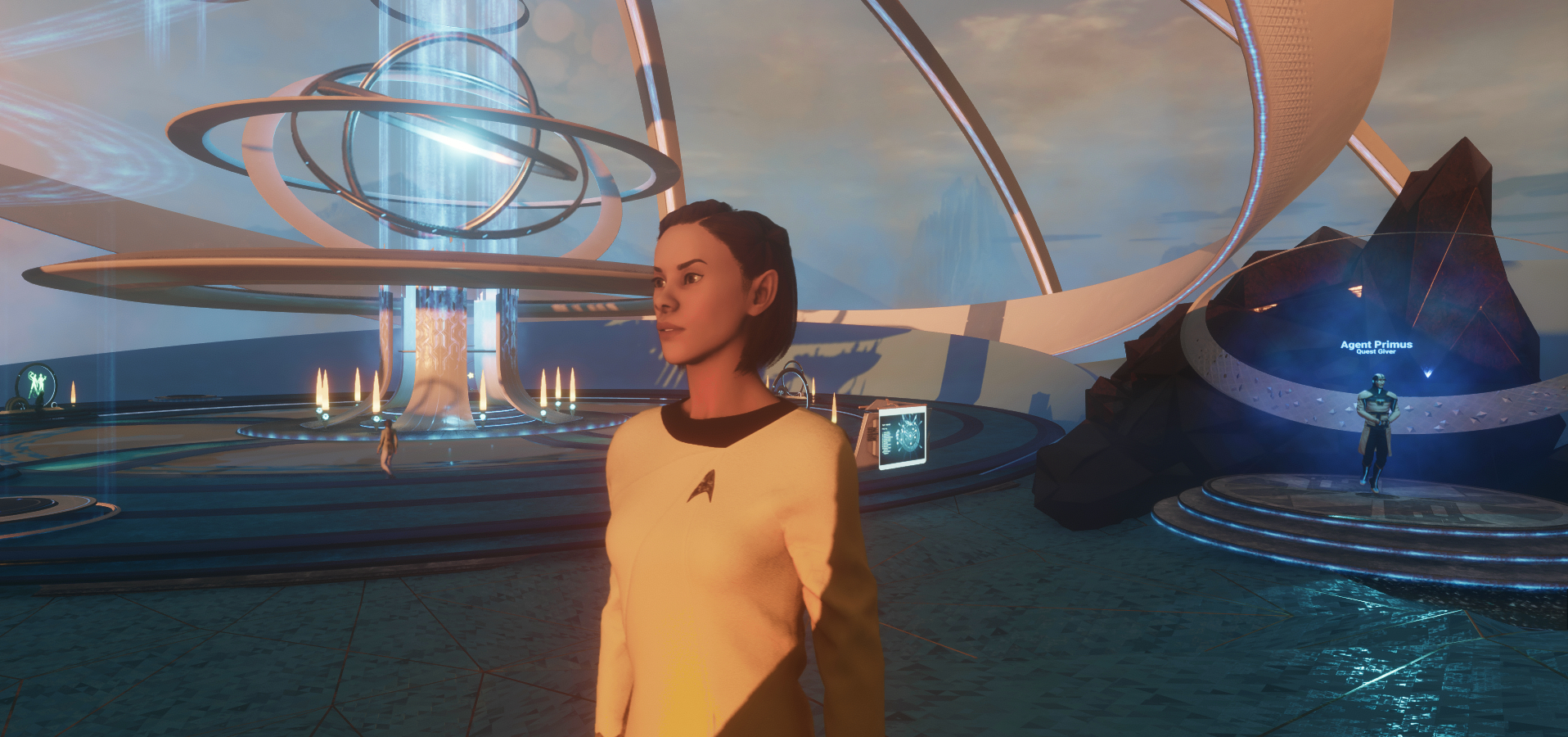
Levelling up: the R36 Sansar release with the Nexus and Prime Portal (background) and the new Avatar 2.0 (I went Trek for this shot). Also to be seen is Agent Primus (to the right) the “guide” to the Nexus and some of the associated quests, and a Core Portal (on the left), where Sansar events can be viewed / attended

Introduction

On Tuesday, September 3rd, Linden Lab released a major update to Sansar, which has seen the introduction of a number of new features and updated capabilities. It represents potentially the biggest single update to Sansar since the public opening of the beta two years ago. The chief updates comprise:

The all-new avatar 2.0, which comprises:

  • An entirely new avatar skeleton, designed to be more “unisex” between male and female, to allow easier swapping of clothes
  • A new range of default avatars.
  • New means of styling / customising the avatar, including new facial deformation capabilities (full body deformation to follow), and a set of modifiable facial “presets”.

The Nexus: a new landing point that all users will / can go to when logging-in to Sansar, and which includes:

  • Agent Primus.
  • New user tutorials.
  • Portals for exploring Sansar.
  • Social Spaces.

The Codex: a new UI element to allow users record and manage and quickly return to places they have previously visited while in Sansar.

Table of Contents


Experience points (XP): which include titles and levels, and which are gained through participating in Sansar, and depending on how they engage within the platform.

Such is the size of the release, I’ve split this article into a series of parts, all of which can be reached via the table of contents, above right. These sections are not intended as complete tutorials / guides, but rather to provide a general introduction and overview, particularly for those who may wish to try Sansar as a result of the R36 update.

R36 Official Documentation

For detailed information on the various aspects of R36, it is recommended you also refer to the official documentation, comprising:

Avatar 2.0

Introduction

Avatar 2.0 is the new all-singing, all dancing avatar for Sansar. In particular, it provides a new set of deformation tools and updated sliders designed to make customising an avatar’s face more intuitive, as well as offering a series of “preset” looks which can be used as a baseline facial shapes and edited and saved.

Also provided within the Look Book is a Transform tool, designed to help adjust Marvelous Designer clothing developed for Avatar 1.0 fit Avatar 2.0.

Note: this is not an in-depth look at editing avatar 2.0 or carrying out Marvelous Designer clothing adjustments. These are documented in detail on the Sansar website. The following is only intended as a general overview.

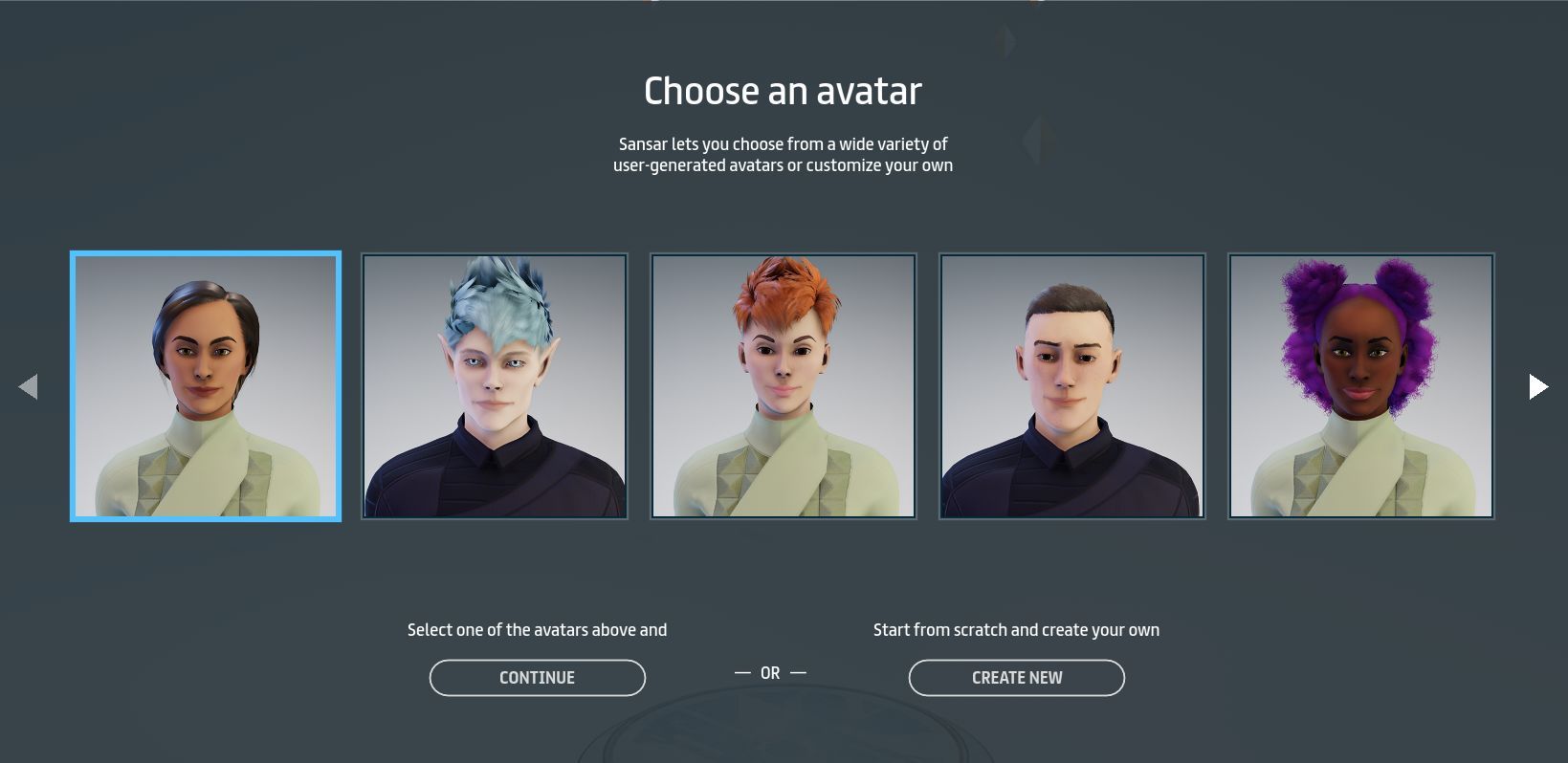
Avatar Picker

The Sansar avatar picker is displayed the first time a user logs-in to Sansar (or the first time an existing user logs-in following the R36 update)

New users logging-in for the first time (or existing users logging-in for the first time since this release was deployed) will immediately be presented with the new avatar picker. This broadly comprises two options:

  • Selecting one of ten default avatar styles. These attempt to offer a range of ethic looks, with two leaning towards science-fiction / fantasy (with the de rigueur pointy ears and pale eyes).
    • Some are of somewhat androgynous facial looks, so the clothing colours indicate gender: green = female; purple = male.
    • Scroll arrows enable  moving back and forth between the options, and a selection is made by clicking on the desired portrait and then on the Continue button.
    • This will load the avatar and drop the user directly into the Nexus – see The Nexus for more details on this.
  • Clicking on the Create New button. This will randomly select one of the default avatars and load the character editor.
The ten default avatars

The Avatars

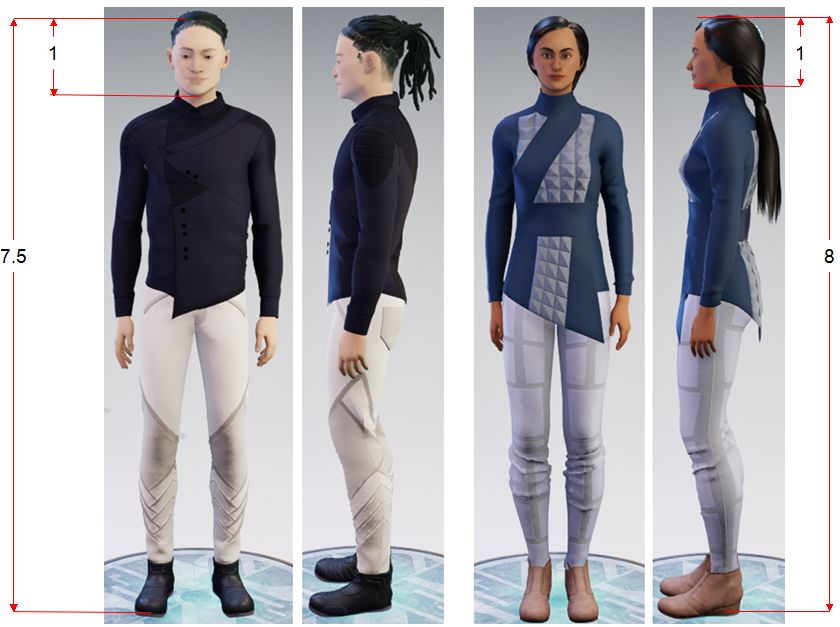
LL have stated that they have sought a more “stylised” avatar form between male and female in order to make some clothing elements more “unisex” in nature. This sound fine – until you see the default female avatars. “Androgynous” might be the kindest way to describe them, “elongated” might be another.

On the surface, the body proportions are around right: her height is 8 “heads” (the distance from top of head to chin) and most women are around 7-8 heads tall; her shoulder width is roughly 2.5 heads (measured from ear to ear), and the average woman’s shoulder width is around 2-2.5 “heads”. Similarly, the male avatar is in the proportions you might expect: an average 7.5 “heads” tall and 2.5 “heads” across the shoulder.

The problem is that of height. According to average height, women’s heights average between 4ft 10in and 5ft 6 in globally. By comparison, men average between 5ft 4in and 6ft – with a bias around the 5ft 7in-5ft 9in range. However, given there is little differentiation in the overall height of the male and female avatars, the result is a female look is painfully thin, hipless, and which sits uneasy on the eye.

Avatar proportions. Both male and female body proportions are roughly in keeping with the “norms” – but the female appears to have been vertically stretched (head and body) in order to match the male avatar, resulting in an odd, thin and hipless look

Of course, this can potentially be solved over time – providing full body deformation, allowing custom avatars into the starter picker, and so on. But it’s possible that for some coming into Sansar from other virtual environments, the female avatar is going to appear less than attractive. Or as I’ve heard it referred to already in the Nexus, “bleah!”

Editing and Styling Tools

R36 brings an updated set of avatar editing and styling tools / options. These can either be accessed when selecting an avatar for the first time (see above), or via the familiar Create button > Style My Avatar > Customise option.

The basic Look Book  / Editor still layout comprises 4 parts:

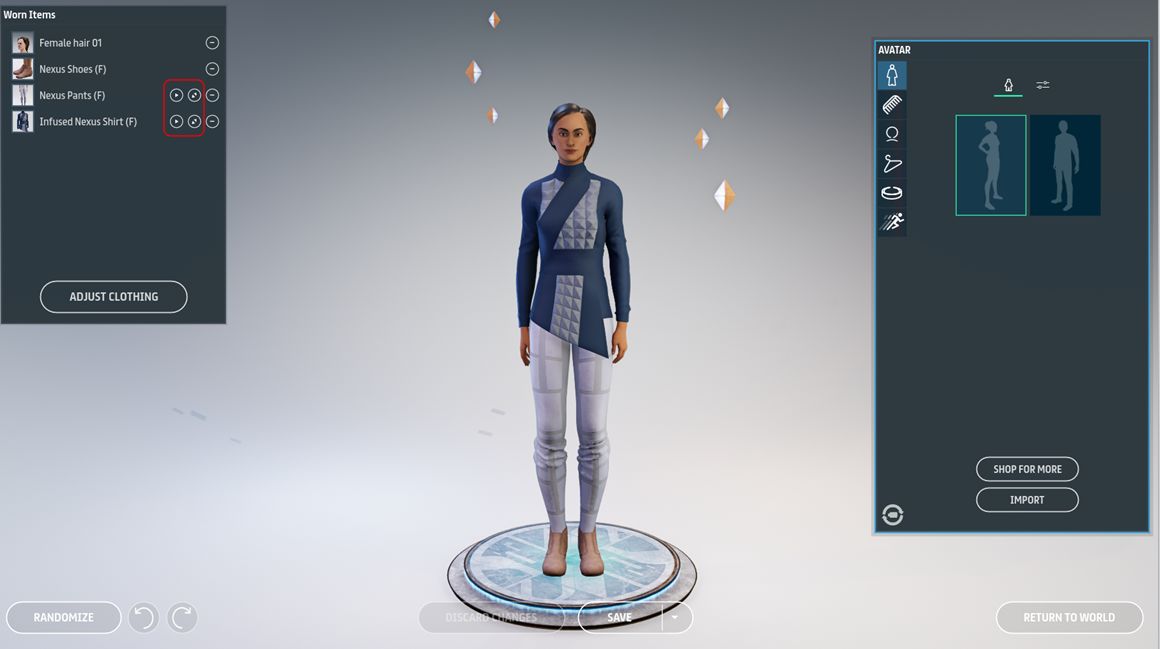
  • Worn items panel: the clothing and attachments currently worn. If the clothing has been created using Marvelous Designer, buttons for adjusting and transforming the clothing will also be displayed.
  • The avatar on a pose stand: which can be rotated with and right-click drag (desktop mode). Remember the free rotation button is available in the bottom left corner of the inventory panel. Note this view can change when editing an avatar, such as zooming on the head during facial editing.
  • The inventory panel: for accessing hair, clothing, accessories, etc for wearing / editing.
  • Buttons along the bottom of the screen for undoing / redoing changes, discarding / saving changes going back to your last location (Home Space or world spawn point.
The basic avatar editor window. Note the buttons for adjusting Marvelous Designer clothing (highlighted) on the left.

Those who have used the right-side inventory panel will be familiar with the tabs displayed (from top to bottom):

  • Avatar: pick the gender of the avatar.
  • Hair (comb tab): select the hairstyle.
  • Face (head icon): customise the facial features.
  • Clothing (coat hanger icon): select clothing to wear – note that any rigged clothing existing users may have had is no longer listed as it is incompatible with Avatar 2.0 (creators have a means to provide an update when / if available), so only Marevelous Designer items remain.
  • Accessories: (visor icon) available accessories – again, note that accessories specifically rigged for avatar 1.0 will have been removed from existing user’s inventory.
  • Animations (running icon): set-up emotes.
Hair
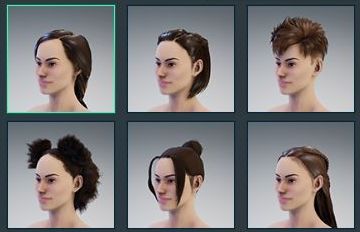
The six new female hairstyles. The male styles are pretty bland as well.

Provides twelve default hairstyles (6 female, 6 male), with colouring / tinting options, and buttons to obtain additional hair through the Sansar Store or to import your own custom hair.

The Lab were said to be “excited” by the new default hair options. I have to be honest, the most enthusiasm I could sum-up for them was “meh”.

Face and Facial Deformation

The facial deformation capabilities are perhaps the most extensive “visible” changes with the new avatar, outside of the overall shapes. These, and options to colour skin and eyes, are found on the Face tab, which contains a number of sections, some of them new or extended, as outlined below.

The facial customisation options – see notes below

The most obvious aspects of the facial editing options are the two colour pickers to select skin and eye colour – just click to apply the required tone / colour. The remaining options are:

  1. Presets: six slots for different head shapes / facial features. Defaults are supplied for each, and clicking on any of them will apply them to the avatar in edit mode. The presets can be modified, or the user can work from the original base avatar to make changes to the face, which can then be saved back to any one of the slots.
  2. Sliders: an extended set of sliders for modifying facial features: cheeks, chin, ears, eyes, jaw, mouth and nose.  These are designed for more subtle fine-tuning of features, rather than significant changes.
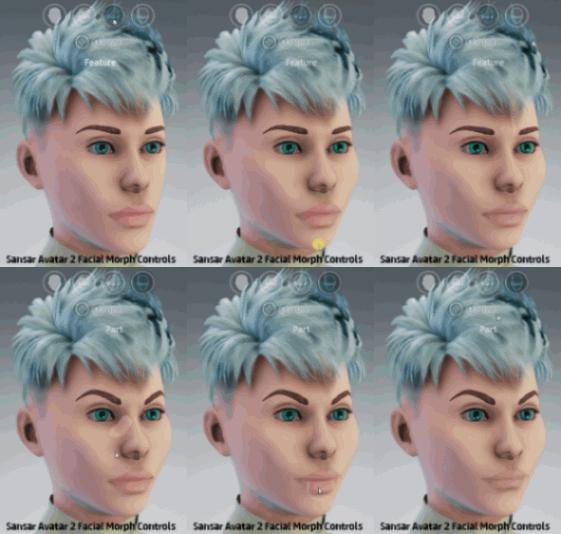
  3. Head deformation buttons: four options that allow the head / facial features to be modified directly. These are intended for major changes to the head / face / features and comprise (from left to right):
    • Head: allows the entire head to be modified.
    • Major Sections: allows large parts of the head / face to be selected and modified (e.g. forehead, forehead and top of head, lower cheeks and jaw, cheeks, nose and jaw, etc).
    • Feature: allows specific features – nose, , mouth, cheeks, chin, etc – to be adjusted.
    • Part: allows fine-tuning and adjustment of specific parts of facial features  – the corners of lips or eyes, the flair of nostrils, the shape of nose or ear tips, etc – to be modified.
  4. The adjustment tools: a set of the tools that work with each of the head deformation buttons, comprising:
    • Translate: allows the selected area to be moved up, down, front, back, left and right. Also enabled by tapping W on the keyboard.
    • Rotate: allows the selected area to be rotated, if appropriate. Also enabled by tapping E on the keyboard.
    • Scale: allows the selected area to be resized. Also enabled by tapping R on the keyboard.

When an area of the face / head is selected, it will be highlighted in white. Once the required tool has been enabled, a left click (in desktop mode) will allow you to modify the selected and highlighted area.

These options are intended for significant changes to the head / face. They can be used in concert with the sliders, which as noted above are intended more for fine-tuning changes. The gif to the right, courtesy of Linden Lab, demonstrates the use of the deformation buttons and tools.

For those used to working purely with sliders, this approach is liable to come across as complicated, and it does take time and practice to actually work out how to balance things and achieve a satisfactory result. However, there is no denying the system is potentially very powerful, offering almost infinite opportunities to develop a unique look.

Accessories

The default set of avatar accessories retains the sunglasses and Christmas / festive “deer antler” headgear strung with lights (popular among early adopters at holiday time, so a nod to the past). To these have been added a set of sci fi-ish hair clips and pieces.

Adjusting Clothing

One of the major concerns with Avatar 2.0 was that of clothing and fitting. All rigged clothing had to go by way of the dinosaur, but the Lab indicated that a set of transform tools would be included for Marvelous Designer (MD) clothing that would help them to fit Avatar 2.0, and be available to users for making necessary adjustments. These tools have been delivered, and they are both impressive and slightly frustrating.

The tools comprise two elements: and auto-adjust option and a set of manual transform tools.

Auto-Adjustment

This does exactly what the name implies: it automatically adjusts an item of MD clothing to fit an avatar as best as possible. It is accessed in one of two ways:

  • Via inventory:
    • Click and wear the item of clothing to be adjusted.
    • The cloth simulator will start.
    • Right-click on the thumbnail for the item in inventory.
    • Select Adjust from the drop-down menu.
  • Via the Worn Items panel:
    • Click and wear the item of clothing to be adjusted.
    • The cloth simulator will start.
    • Click the large Adjust button at the bottom of the Worn Items panel.

In both cases note:

  • It can take a while for the clothing to fully adjust – give the tool time to work.
  • It’s not always 100% accurate – clippings and gaps may need manual adjustment.
  • When it is clear no further adjustments are being made, click the Done Adjusting button below the avatar to make sure the updates are dully applied. You can then use the manual tools to make further adjustments, if required.
  • If you are happy with the results, make sure you save the updated appearance to a look in order to preserve the updates.
Manual Adjustments

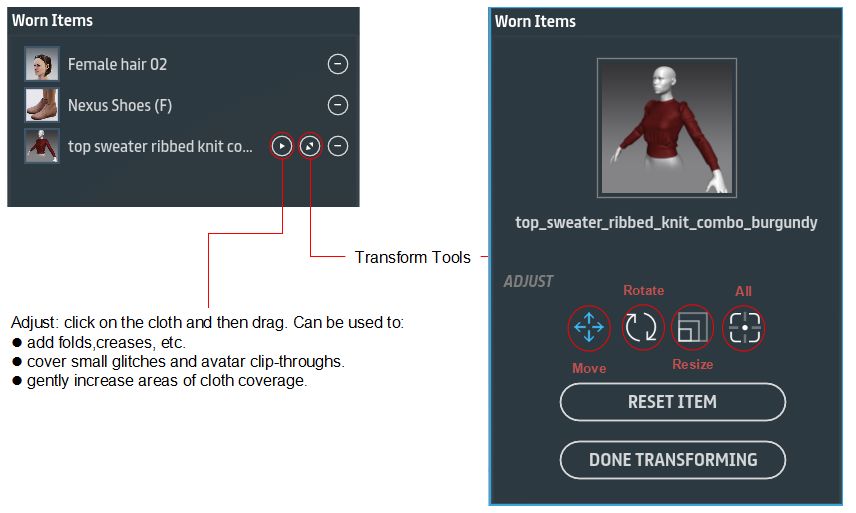
Manual adjustments can be achieved using the Adjust and Transform tools in the Worn Items panel.

  • The Adjust tool can be used to make fine adjustments to MD clothing – adding natural folds, creases, etc. It can also be used to overcome issues of clipping – the avatar or underlying clothing showing through.
  • The Transform tools reside in a separate panel and offer options to move, rotate and resize clothing. These can be used individually using three buttons on the panel, or combined into a single gizmo-type tool (the “all” button).
The manual adjustment tools for MD clothing

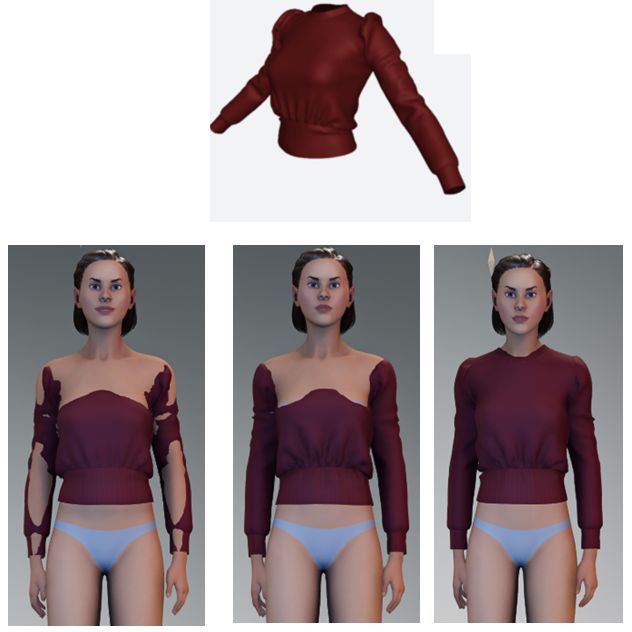
Depending on the garment, manual adjustment can be relatively simple or annoying frustrating and time-consuming. I personally recommend using auto-adjustment first and then, wherever possible, the Adjust tool. Particular frustrationsI found include:

  • What you see when making adjustments doesn’t always match how the garment will look when updates are finished – it’s best to periodically click the Done Adjusting button and then free rotating the avatar to check results, than in trying to do everything in a single pass.
  • The Transform tools only work on the cardinal points relative to the avatar – up, down, left, right. There are no diagonal handles on the resize option, which can made a simple job of adjustment into something far more complicated.
  • Time really is needed to get things right.
Manually adjusting can take time. Top: as the sweater should look. Bottom: when first worn (l); after auto-adjust (c) mid-way through manual adjustments (r) with neck line still to sort.

As with the auto-adjust option, it is important finished work is saved to a look in order to be retained.

Continue to the Nexus, Codex and XP System


2019 SL User Groups week #36/1: Simulator User Group

Carolina, July 2019 – blog post

Server Deployments

Please refer to the server deployment thread for updates.

Apparently, as a result of Labor Day in the USA and the threat of hurricane Dorrian, there was no SLS (Main) channel deployment on Tuesday, September 2nd.

As a result, on Wednesday, September 4th, there will be deployments across the entire grid – the SLS (Main) and the primary RC channels. The order of deployments will be the SLS (Main) channel, starting 30 minutes ahead of the usual time. Once completed, and providing there are no issues, it will be followed by the RC deployments.

  • The SLS (Main) channel is to be updated with server maintenance package 19#19.08.23.530380, comprising maintenance fixes and Log improvements, and previously deployed to the Magnum and LeTigre RC channels.
  • The three main RC channels (Magnum, LeTigre and BlueSteel) will all be updated with the same server maintenance package – 2019-08-29T20:20:39.530516 – comprising “simulator component of deploy tooling and process improvements”. This update sees the introduction of the new Simulator release notes pages (see below).

There will also be a small move of more regions (around 100) to the Cake RC channel on Thursday, September 5th. This will be a further expansion for the script usage improvements. People wishing to test these updates can put in a ticket to have their region moved to Cake – but should note that updates to that channel do not necessarily follow the same weekly schedule as the main RCs.

Release Notes

In May 2019, the viewer release notes moved to a new series of web pages (see: New SL viewer release notes pages: an overview). The RC deployments scheduled for Wednesday, September 4th will see the all release notes for the RC channels move to these pages as well. This means:

  • The there is a new link for simulator release notes on the main About Release Notes page.
  • This link leads to a list of recent simulator releases notes.
  • The release notes themselves have a new “more specific” version number system – as witnessed with the simulator release for the RC channels noted above.

It has been promised that these pages will be “more informative” with release information. This appears to take the form of Jira report reference numbers.

The link to the simulator release notes is now live on the About Release Notes page – click for full size, if required

SL Viewer

At the time of writing, there have been no updates to the current list of existing official viewers, leaving the pipelines as follows:

  • Current Release version 6.3.0.530115, formerly the Bakes on Mesh RC viewer, promoted August 26th – NEW.
  • Release channel cohorts:
  • Project viewers:
    • Project Muscadine (Animesh follow-on) project viewer, version 6.4.0.530100, August 19.
    • 360 Snapshot project viewer, version 6.2.4.529111, July 16.
    • Legacy Profiles viewer, version 6.2.3.527749, June 5. Covers the re-integration of Viewer Profiles.
  • Linux Spur viewer, version 5.0.9.329906, dated November 17, 2017 and promoted to release status 29 November 2017 – offered pending a Linux version of the Alex Ivy viewer code.
  • Obsolete platform viewer, version 3.7.28.300847, May 8, 2015 – provided for users on Windows XP and OS X versions below 10.7.

In Brief

  • “[Second Life: Failed to grant capabilities”] – this is an error people have been seeing recently. It generally occurs as a result of a general failure to set up communication between your viewer and a region when moving into that region.
    • When first connecting to a region, the viewer asks for – and  should receive – a set of “capabilities” – URLs where the viewer can connect and get or send info.
    • If this fails, it’s unlikely the viewer will be able to work with the region. The most effective way to deal with this is have the region restarted – so if you’re not the region holder, please drop them a line to let them know the region needs restarting or file a support ticket. If you are the region holder and you cannot restart the region or the issue is not resolved following a restart, please file a support ticket.
  • LL continues to investigate the issue whereby any scripts compiled to an experience prior to simulator version 19.08.06.529800 will not recompile on 19.08.06.529800 or later. In fact, Simon Linden was working on the issue while attending the meeting). The root cause does not appear to be within the updated server code, and for now, the only solution appears to be recompiling everything in the experience – which is acknowledged as being less than optimal.

Dancing in the Moonlight in Second Life

Hotel California – Dancing in the Moonlight, September 2019

I make no apologies for returning to Hotel California, the homestead region held by Schmexysbuddy just a month after my last visit (see: A touch of HollyWeird in Second Life); the designs he creates each month are amongst the most imaginative and eye-catching within Second Life, consistently offering environments that straddle the line between landscape and art.

For September, Schmexysbuddy present Dancing in the Moonlight, which is – for me – captivating in the rich juxtaposition of ideas and content, bringing together as it does art, sci-fi, a sense of dark humour, fantasy, dream and nightmare, all with what might be a very subtle underscore of an ecological warning. It is born out of suggestions from his partner, Racey, that served as the fertile ground on which the design grew. It’s also a place in which you can actually become a part of the setting and art.

This is a place that is genuinely hard to describe and which my images fail to do justice. Caught under a sky heavy with cloud that appears to form a roiling inverted sea-scape as it rolls overhead, the land is a uniform grey and pockmarked with impact craters, many of which are scudded and partially filled with wind-blown dust. Together they present the first enigma of the setting: are we on a Earth or on the Moon?

Hotel California – Dancing in the Moonlight, September 2019

This quandry is added to by the bay that cuts into the land, the foamed see passing under a great wrought iron bridge under which a submarine is passing, its twin grounded on the shores of the bay close by. This suggests a place on Earth – or at least a world with air and water. Yet, space suited figures can be seen near the shoreline of the bay. A further enigma comes in the form of a metal galleon drifting overhead, sails unfurled and stubby wings extended from its hull…

And that’s just the start of things. To the east of the region sits the brooding bulk of some form of structure that looks like it would be perfectly at home on the Moon or crouched on an asteroid (even with the advertising boards rising from its roof). It sets something of a tone in keeping with the space-suited figures and more such figures, these in red suits – albeit  without their support back packs gathered close by.

Hotel California – Dancing in the Moonlight, September 2019

Also close by is a network of pipe-like corridors snake over the ground and into the air, some fully enclosing the walkways within, others are open to the environment. All can be explored as they twist and turn, while further elements hang suspended in the sky or partially buried below. In this, the network offers something of a faint and static echo of A Petrovsky Flux (long since sadly gone of SL, but which you can read about here and here (2014) and here (2016)).  However, it is not the most obvious nod towards artistic expression in the region.

This comes in the form of the many sculptures by Mistero Hifeng that are scattered across and over the landscape. These are hard to miss, a fair number of them having been greatly scaled up. The manner in which these sculptures are mixed with the rest of the setting gives Dancing in the Moonlight something of a dream-like feeling. By this, I mean not so much that it is a dream (although it might well be), but rather it is a tapestry of imagines that are left at the edges of consciousness upon waking from a sleep marked by dreams; the kind of mental flashes we get when trying to recall the dreams. And if you are seeking the dreamer of these dreams, perhaps a look up at the flying galleon might yield a clue…

Hotel California – Dancing in the Moonlight, September 2019

But the dreams are perhaps not all pleasant; there is a hint of nightmare here as well. When examined, the NASA astronauts are revealed to be dead; their helmet visors smashed and their skulls devoid of flesh, tissue or muscle. Their cosmonaut colleagues across the bay are no better off, and the nightmare’s edge is increased with them by the presence something loosely resembling the space jockey from the Alien franchise – except where its chest should lie burst open, it instead offers a bed…

It is with the astronaut figures that the ecological message might creep into the setting. This is a place with an atmosphere, with all the familiarities of Earth So why would the people here be confined to space suits? Could it be the dream formed a warning of what could come of humanity’s excesses, with the statues standing as monuments to humanity’s lost creativity? I leave that to visitors to ruminate.

Hotel California – Dancing in the Moonlight, September 2019

What is without doubt is the sheer striking uniqueness of Dancing in the Moonlight, a place that is gloriously imagined, marvellously photogenic and quit mystifying in its presentation. It is absolutely not something to be missed. Oh, and that being a part of the scene I mentioned? Just accept the request to animate your avatar on arrival – and make sure your AO is turned off (you can move around while the animations play).

SLurl Details