Logos representative only and should not be seen as an endorsement / preference / recommendation
Updates for the week ending Sunday, May 13th
This summary is generally published on every Monday, and is a list of SL viewer / client releases (official and TPV) made during the previous week. When reading it, please note:
It is based on my Current Viewer Releases Page, a list of all Second Life viewers and clients that are in popular use (and of which I am aware), and which are recognised as adhering to the TPV Policy. This page includes comprehensive links to download pages, blog notes, release notes, etc., as well as links to any / all reviews of specific viewers / clients made within this blog.
By its nature, this summary presented here will always be in arrears, please refer to the Current Viewer Release Page for more up-to-date information.
Note that test viewers, preview / beta viewers / nightly builds are not recorded in these summaries.
Official LL Viewers
Current Release version 5.1.3.513644, dated March 27th, promoted April 13th – formerly the Media Update RC.
The Mars helicopter demonstrator: set to fly with the Mars 2020 rover mission. Credit: NASA
In November 2015 I wrote about an idea to fly a robotic drone helicopter on Mars as a part of the next rover mission, currently referred to as the Mars 2020 mission. On May 11th, 2018, NASA confirmed that Mars 2020 will now include the drone, to be carried by the rover as a technology demonstrator.
The unit, under development since 2013, is quite small; the body is the size of a box of tissues, and the contra-rotating rotor blades have a diameter of a metre (39 inches). Weighing some 1.8 kg (4.4 lbs), the drone will be battery-powered, using solar cells to recharge the batteries, which will also power a dedicated heating source to help it survive the cold Martian nights.
The drone will be carried underneath the rover, which will used the same “skycrane” landing mechanism as the Mars Science Laboratory (MSL) rover Curiosity. Once a suitable location for its deployment is found, the rover will lower it to the ground and move away to let the drone commence its first flight.
An artist’s impression of the key elements in the Mars Helicopter. Credit: NASA
Up to five flights are planned over a 30-day test campaign. The first will be very short-duration, enough to allow the helicopter to ascend to around 3 metres (9 feet) and hover for 30 seconds while the flight systems are checked out. Later flights will last up to 90 seconds and travel as far as a few hundred metres before landing to allow the solar panels to recharge the battery system.
Flying any sort of aircraft on Mars is a significant challenge. For example, the atmosphere of Mars is only one percent that of Earth, or the equivalent of being 30 km (100,000 feet) above the surface of the Earth – more the double the altitude any helicopter has been able to fly. This means the drone has to be both very lightweight and extremely powerful for its size if it is to get airborne on Mars.
To make it fly at that low atmospheric density, we had to scrutinize everything, make it as light as possible while being as strong and as powerful as it can possibly be.
– Mimi Aung, Mars Helicopter project manager
To achieve lift, The helicopter’s blades will rotate at up to 3,000 revolutions per minute, 10 times the rate of a terrestrial helicopter. The vehicle is also entirely autonomous – the time delay in Earth-Mars-Earth communications means that conventional drone flight under human control is impossible.
Mimi Aung, Mars Helicopter project manager. Credit: NASA
Instead, flight parameters will be uploaded to the Mars 2020 rover for relay to the helicopter, which will also be able to receive and act on additional instructions sent by the rover so that it doesn’t have to carry the entire flight plan within its own computer.
NASA sees Mars Helicopter as demonstrating how aerial vehicles might serve as scouts for future missions to Mars. This idea is explored in the most recent video promoting the mission, with a helicopter scanning and image the terrain around a rover.
The ability to see clearly what lies beyond the next hill is crucial for future explorers. With the added dimension of a bird’s-eye view from a ‘marscopter,’ we can only imagine what future missions will achieve.
– Thomas Zurbuchen, NASA associate administrator for science
As a technology demonstrator,the Mars Helicopter is seen as a high-rick project, although NASA has been keen to stress that if the helicopter fails for any reason, it will not impact the overall Mars 2020 mission. Nevertheless, the news the project will be carried on the rover mission hasn’t been positively received in all quarters – including within the Mars 2020 mission itself.
I am not an advocate for the helicopter, and I don’t believe the Mars 2020 project has been an advocate for the helicopter.
– Ken Farley, project scientist for Mars 2020
The concern among the rover science team is that the helicopter’s planned 90-day test campaign will prove to be a disruption in the rover’s overall science mission. However, Farley also indicated that the rover team are working to integrate the helicopter into the rover’s mission and accommodate its requirements.
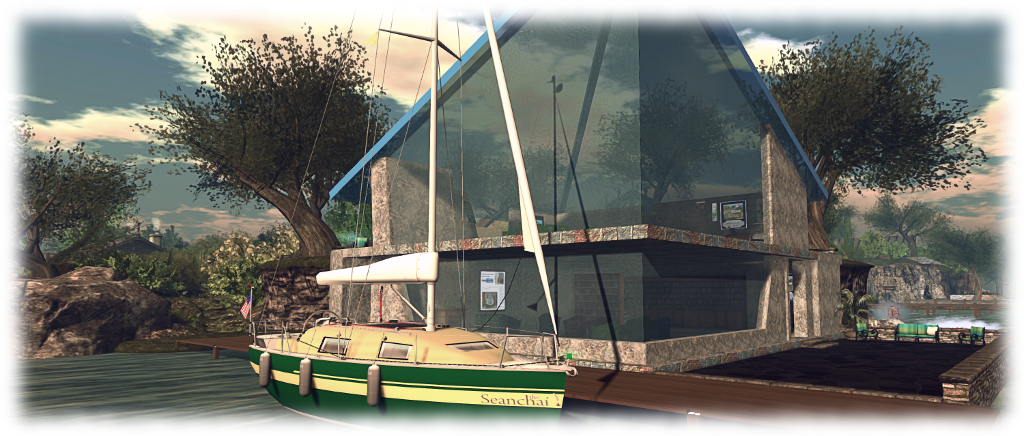
It’s time to highlight another week of storytelling in Voice by the staff and volunteers at the Seanchai Library. As always, all times SLT, and events are held at the Library’s home at Holly Kai Park, unless otherwise indicated.
Sunday, May 13th 13:30: Tea-Time with Tolkien
No heroes today! Indeed, no sword-wielding men, knife-bearing Elves, or axe-tossing Dwarves this day! Today’s Tea Time celebrates the Elders of Middle Earth – so old they can just remember when the young Elves arrived and began re-naming everything: Beorn, Tom Bombadil, Treebeard.
We visit two of these Elders, with selections from “The Fellowship of the Ring” and “The Two Towers.”
Join Corwyn, Kayden, and Caledonia in Ceiliúradh Glenon Holly Kai for more from Tolkien’s “Lord of the Rings” Trilogy.
Monday, May 14th 19:00: The Nitrogen Fix
2000 years from now, the Earth has acid oceans, mutating exploding plants, silent, tentacled observers, doomed Hill cities, nomad Outcasts, vicious, power-mad rebels.
In this world, fully depleted of freely floating oxygen – it has all been trapped in the Nitrogen Fix –, humans are the last native animal species on the planet. What civilization is left is isolated and separated.
A doomsday scenario? perhaps. But Hal Clement has a knack for making this beleaguered, suffering version of Earth and the trials of those living on it far more enticing that might be first thought.
Join Gyro Muggins as he travels to Clement’s world and see what might be found there.
Tuesday, May 15th: The Cold Dish (Walt Longmire #1)
Two years ago, four boys were put on trial for raping a Cheyenne girl. Now one of them – Cody Pritchard – is dead, shot and dumped in with a local farmer’s sheep.
For Walt Longmire, it means his hope of finishing out his term as sheriff of Wyoming’s Absaroka county in peace and quiet is at an end; instead, he finds himself in the middle of a murder investigation.
Plenty of people had cause for wanting Cody Prichard dead but who had the guts to do the deed? And are his three compadres next on the hit list? For Longmire, it means facing one of the more volatile and challenging cases in his twenty-four years as sheriff. One in which he means to ensure that revenge, so often regarded as a dish best served cold, is never served at all.
Join Caledonia Skytower as she reads the first volume of Craig Johnson’s tales of Sheriff Walt Longmire.
Wednesday, May 16th 19:00: Hello, Universe
In one day, four lives weave together in unexpected ways.
Virgil Salinas is shy and kind-hearted and feels out-of-place in his loud and boisterous family; Valencia Somerset, who is deaf, is smart, brave, and secretly lonely, and loves everything about nature; Kaori Tanaka is a self-proclaimed psychic, whose little sister Gen is always following her around; and Chet Bullens wishes the weird kids would just act normal so that he can concentrate on basketball.
None of them are friends; at least not until Chet pulls a prank that traps Virgil and his pet guinea pig at the bottom of a well.
This leads Kaori, Gen, and Valencia on an epic quest to find the missing Virgil. Through luck, smarts, bravery, and a little help from the universe, a rescue is performed, a bully is put in his place, and friendship blooms.
Join Caledonia Skytower as she reads Erin Entrada Kelly’s 2018 Newbery Medal Award-Winning tale.
Thursday, May 17th
19:00: Tales from the Mos Eisley Cantina
With Shandon Loring. Also presented in Kitely (hop://grid.kitely.com:8002/Seanchai/144/129/29).
21:00: The Sentinel
With Shandon Loring. Also presented in Kitely (hop://grid.kitely.com:8002/Seanchai/144/129/29).
Please check with the Seanchai Library’s blog for updates and for additions or changes to the week’s schedule.
The current charity is Project Children, growing peace in Northern Ireland one (or two) children at a time.
Raglan Shire, Second Life’s Tiny community once again throws open its doors to people from across the grid as participating artists and visitors to the annual Raglan Shire Artwalk.
This year marks the 13th Artwalk, which opened on Sunday, May 13th, and runs through until Sunday, June 17th. 2018. The event offers an opportunity not just to appreciate a huge range of art from both the physical and digital worlds, but to also tour the Shire regions and enjoy the hospitality of the Raglan Shire community.
A non-juried exhibition, the Artwalk is open to any artist wishing to enter, and has minimal restrictions on the type of art displayed (one of the most important being all art is in keeping with the Shire’s maturity rating). All of this means that it offers one of the richest mixes of SL art displayed within a single location in Second Life, with 2D art is displayed along the hedgerows of the Shire’s pathways and tree platforms overhead and 3D art among the community’s parks.
Each year attracts over a hundred SL artist – and this year is not exception. The depth and range of art on display is guaranteed to keep visitors exploring the paths and walks around the through the hedgerows – and if walking proves a little much, there are always the caterpillar rides to ease the load on the feet.
Also, teleport boards are provided to help people find their way around the exhibition spaces, while balloons which offer rides around the region and through the art displays. However, given this is an opportunity to visit and appreciate Raglan Shire, I do recommend exercising your pedal extremities and doing at least some of your exploration on foot – just keep in mind people do have their homes in the regions as well.
Given the number of artists involved, there isn’t a published list of participants, but anyone interested in the world of SL art is bound to recognise some of the names of the artists here. I personally couldn’t help but notice CybeleMoon’s (Hana Hoobinoo’s) hauntingly beautiful art along, John B’s (John Bleroit’s) marvellous macro photography, Bear Silvershade’s marvellous black and white photography and Relenne’s (Rey Vlodovic’s) nautical-themed photo-paintings.
This is also my second year of exhibiting at Raglan Shire, and my thanks go to the organisers of the Artwalk and the folk of the Shire community to be a part of this event.
With five weeks to enjoy the Artwalk, there’s no need to try to cram everything into a single visit, so why not plan to pay Raglan Shire a number of visits over the coming weeks and take the time to enjoy the art rather than risk being overwhelmed with the sheer volume of images on display? It’s more than worth the time to do so.
Using a projector and “reflective” surface in SL to creator a mirror in our living room at home. Note how the “reflection” changes as the viewing perspective moves
Second Life lighting projectors are an extremely useful capability that can be put to a wide variety of uses. I first covered their basics far back in 2011. Since then they’ve been notably easier to use (and that original article was subsequently updated to reflect this).
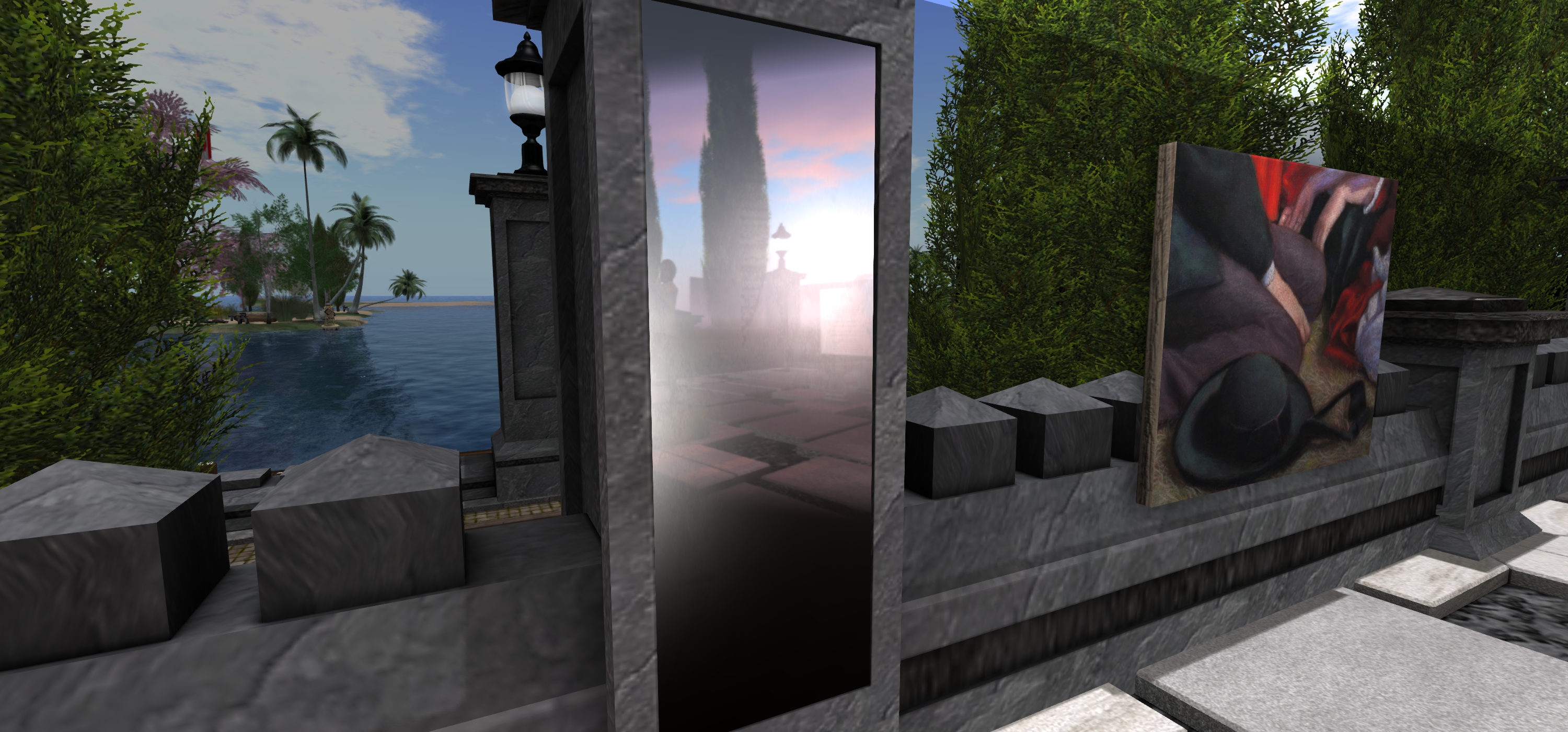
In 2016, for his art display, Mirrored Garden, at Holly Kai Garden (see here for details), Silas Merlin demonstrated a means to create mirror-like effects in Second Life, with a number of “mirrors” mounted around his sculptures “reflecting” them and the garden in which they were being displayed. I’ve since seen a number of SL artists use a similar approach to add depth to their work, and in April 2018, Adeon Writer offered a video tutorial on using projectors to create “portal-like” effects.
One of the “mirrors” Silas Merlin created for his Mirrored Garden art exhibition at Holly Kai Park in April 2016
Given the latter, I thought it high time a revisited a draft of an article about Silas’ approach I started in 2016, but never quite finished (my apologies to him), gave it a polish and present it as a tutorial for those interested in using projector-based “mirrors” in SL.
Prerequisites
For this time of “mirror” to work, those looking at it must have viewer’s Advanced Lighting Model (ALM) enabled via Preferences > Graphics. Anyone who does not have ALM enabled will just see a blank surface instead of any reflections.
The “mirror” itself is made up of a number of elements: the “reflective” surface itself (which can be a mesh or prim face), and one or more lighting projectors – the exact number and their placement will be subject to the effect you are trying to achieve.
For this tutorial, I’m producing a single “mirror” using a single projector to create a finished item – a simple household room mirror. Adeon’s video provides an outline on how to use multiple projectors to achieve a result.
Create the “Mirror”
The “mirror” is simple flat surface (face) of a prim or mesh. When done, it can be made part of a more ornate item – so you could add a frame around it, etc.).
Create a prim and size it.
Right-click the prim and click the Select Face radio button, then click on the face of the prim you want to make “reflective”.
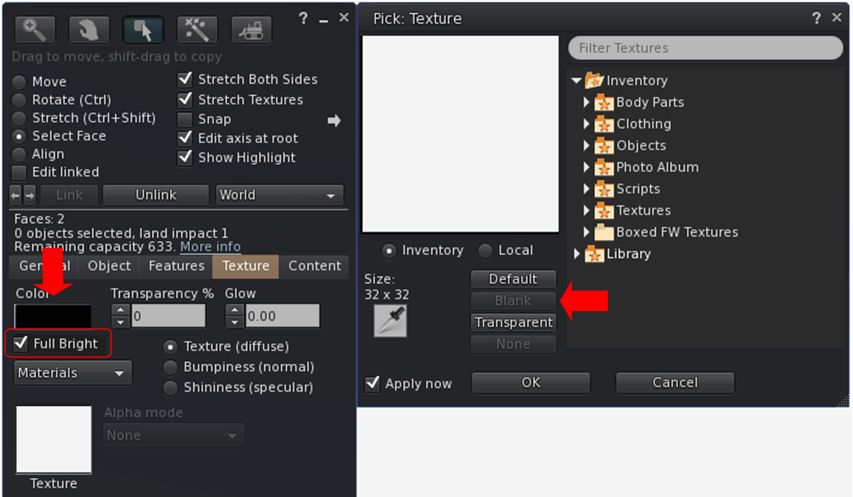
In the Edit > Texture tab:
Use the texture picker to set the texture to Blank.
Set the colour of the face you have selected to black and leave Transparency at 0
Enable Full Bright to reduce unwanted reflection of nearby lights.
Setting the texture options for a reflective “mirror” surface.
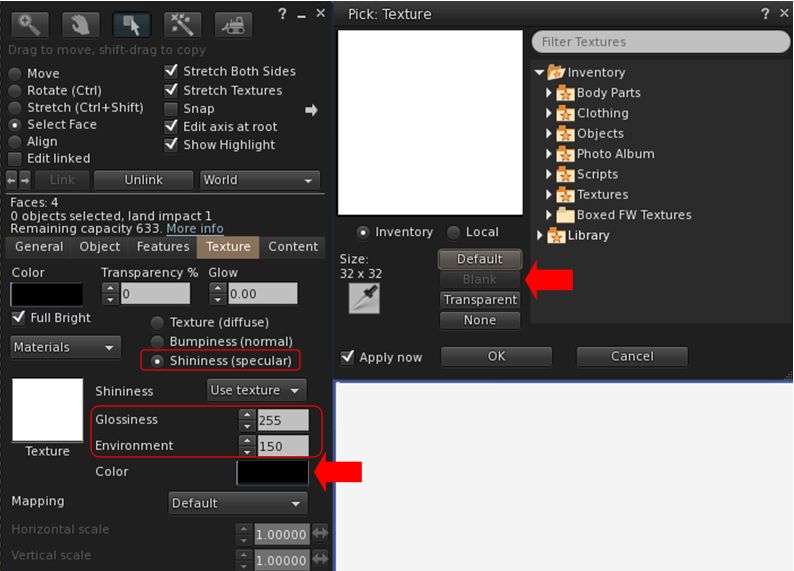
Click Shininess (specular) radio button and:
Use the picker to set the map to blank (white).
Set Glossiness to 255 (highest).
Set Environment to a value that works best for your overall lighting conditions – generally speaking, higher is better.
Set the specular colour swatch to black to further reduce unwanted light reflection.
Setting the specular options for your reflective “mirror” surface
Create Your “Reflections”
This can sound complicated, but it’s actually relatively straightforward, requiring two main steps: create an image that will form the “reflection”; create the projector that will use the image.
Create the “Mirror” Image
Position your “mirror” in the location you intend to hang it. Position your camera “in” the “mirror”, and facing out – so you are looking from the “mirror’s” point-of-view (e.g. from the wall on which it hangs looking out into the room it which it is hanging).
Take a snapshot at a reasonably high resolution.
Use an image editing tool to crop the image to give the desired look for the “reflection” – and flip it horizontally before saving.
Repeat for any additional projectors you are using, taking your snapshots from the perspective of each projector.
Don’t upload the texture(s) as yet.
Create the Projector(s)
Repeat the following steps for each of the projectors you’ll be using.
Create a prim.
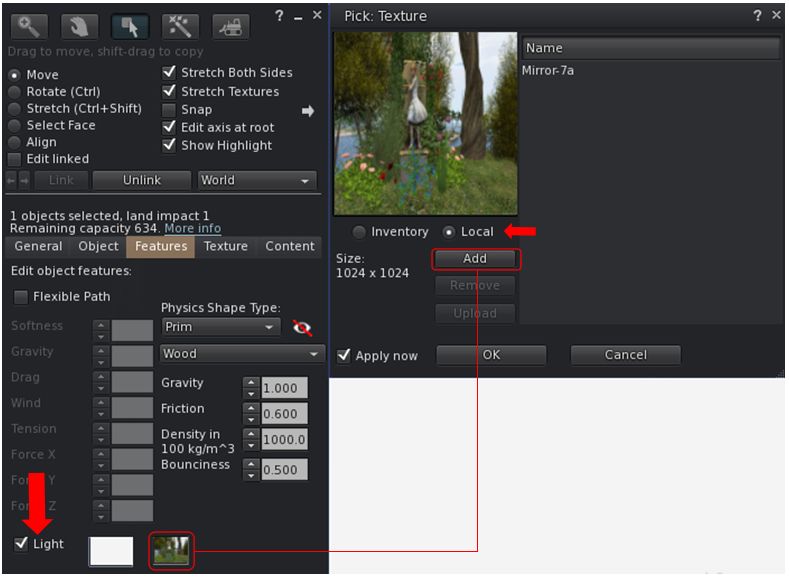
Edit the prim and select the Features tab.
Check the Light option to enable it and then:
Click the second box alongside the Light option to open the texture picker.
Click the Local radio button.
Use the ADD button to allow you to select the projector texture from your hard drive (note: only you will be able to see the results when using the Local option, but it allows you to experiment without having to upload textures multiple times).
When you have selected the required texture it will appear in the texture list on the right of the picker.
Click on the texture name to select it; the texture will be applied to the bottom face of the prim.
The following notes are taken from the TPV Developer meeting held on Friday, May 11th 2018. A video of the meeting is embedded below, my thanks as always to North for recording and providing it.
This was another short meeting – around 30 minutes, with about half of that covering SL projects, which are noted below. The rest of the meeting was more general conversation, and I’ll leave it to the video to cover them. As always, time stamps in the text below will jump you to the relevant points in the video.
SL Viewer
There have been no updates to the current crop of official viewers during week #19. This leaves the pipelines as:
Current Release version 5.1.3.513644, dated March 27th, promoted April 13th – formerly the media update RC.
Bakes on Mesh project viewer, version 5.1.3.513936, March 30th.
360 snapshot viewer, version 5.1.3.513006, March 6th (this version can have significant rendering issues, see my hand-on update).
Linux Spur viewer, version 5.0.9.329906, dated November 17th, 2017 and promoted to release status 29 November – offered pending a Linux version of the Alex Ivy viewer code.
Obsolete platform viewer, version 3.7.28.300847, May 8th, 2015 – provided for users on Windows XP and OS X versions below 10.7. This viewer will remain available for as long as reasonable, but will not be updated with new features or bug fixes.
[1:53 -2:45] Currently, the Ouzo Maintenance RC has a slightly lower crash rate than the Love Me Render RC, and so at this point in time looks like the more likely of the two to gain promotion to de facto release status.
Forthcoming Updates
[2:46-3:28] There are a number of viewer-visible updates which will be surfacing in upcoming viewers in the near future. These include (and in no particular order):
Updates to the estate management tools for better management and update of ban lists, etc.
Changes to viewer texture caching.
Further SL Voice improvements.
[24:43-25:39] New capability for abuse reports to be called from the simulator by the viewer, rather than being hard-coded into the viewer. This work had some delays while the AR categories were translated into other languages for display by the viewer. However both the simulator and viewer updates are now progressing
[30:45-31:35] New capability for receiving off-line IMs to avoid loss of IMs on logging-in. This capability is also now in testing.
GDPR and the Viewer
[5:25-7:17] The Lab recently offered an initial blog post on the upcoming European Union General Data Protection Regulation (GDPR – also see my blog post on the subject as well). Subject to further updates on the matter from the Lab, it would appear that the view being taken that data gathered by the viewer which is used in-world will not be subject to any requirements defined by the GDPR. A benefit the Lab has had in terms of GDPR compliance, is that the company has never viewed users’ personal data as a potential asset for revenue generation.
Other Items in Brief
[8:03-10:35] Texture Copying: There have been requests for the Lab to make texture copying “harder”. Given that texture data is held on a local computer, and UUIDs are trivial to capture, and the data they point to can also be obtained, this is no easy task. The Lab therefore finds itself caught between trying to offer better protection for textures and risking giving the impression they can prevent all texture copying, although they do look at ways to at least deter it.
[11:18-12:42 (mainly text chat) and 14:28-16:50 (with text chat)] Parcel Banning and Object Information: there appears to have been a recent change that means if an individual is banned from a region, they no longer receive information about objects on that parcel. The change, if made, may have been with good intent but is possibly having unwanted side effects. A JIRA is to be raised on the issue.
[12:43-14:20] BUG-216032: A recent back-end security change made to PRIM_MEDIA_CURRENT_URL reportedly broke a lot of content. Following initial complaints, the Lab offered to help those experiencing problems as a result of the change if they got in contact with the Lab. Some are reportedly still having issues, however, the Lab do not appear to have been contacted for assistance. so if assistance is required – contact Oz Linden.






 Inara Pey: Living in a Modemworld