SL project updates 16 24/2: server, viewer, group ban / chat

La Vie; Inara Pey, June 2016, on Flickr La Vie – blog post

Server Deployments – Recap

As usual, please refer to the server deployment thread for the latest information.

  • On Tuesday, June 14th, the Main (SLS) channel received the same server maintenance project, as previously deployed to all three RC channels, comprising “minor internal changes”
  • There was no deployment to either the LeTigre or BlueSteel Release Candidate channels
  • After being in doubt (see part 1 of this report), the Magnum RC deployment did take place. This contained the same code as is currently on the RCs, other than some additional diagnostic code executed when some enters a region.

SL Viewer

The Maintenance RC viewer updated on Thursday, June 16th to version 4.0.6.316614, which includes two additional fixes:

  • MAINT-6446 Correct password length handling to match web sites
  • MAINT-6486 Recompile Scripts does not process beyond first object/prim.

The VLC Media plug-in project viewer updated to version 4.0.6.316258 on June 15th, which includes on additional fix:

  • MAINT-6488 [Win LibVLC] After using a drop down list on a web page, it remains stuck on-screen even when URL is changed.

All other viewers remain unchanged:

  • Current Release version: 4.0.5.315117 (dated May 11), May 18 – formerly the Quick Graphics RC viewer
  • Inventory Message RC viewer, version 4.0.6.315555, dated May 23rd – removal of deprecated and unused UDP inventory messaging mechanisms from the viewer
  • Project viewers:
    • Project Bento (avatar skeleton extensions), version 5.0.0.316366, dated June 10th
    • Visual Outfit Browser viewer, version 4.0.6.316123, dated June 6th – ability to preview images of outfits in the Appearance floater
    • Oculus Rift project viewer, version 3.7.18.295296, dated October 13, 2014 – Oculus Rift DK2 support
  • Obsolete platform viewer version 3.7.28.300847 dated May 8, 2015 – provided for users on Windows XP and OS X versions below 10.7.

Group Ban / Chat

A major annoyance among many groups is that when an irritant is banned / ejected from a group whilst already engaged in group chat, they can continue to engage in the chat session until they close the group chat session window / tab – see SVC-32. However, an upcoming change to the group chat services, currently undergoing testing on Aditi, will change this.

While subject to change prior to going live, the updates on Aditi worked so that:

If a person banned or ejected is in the same region as the person banning them, the banned individual sees a dialogue box displayed over their group chat:
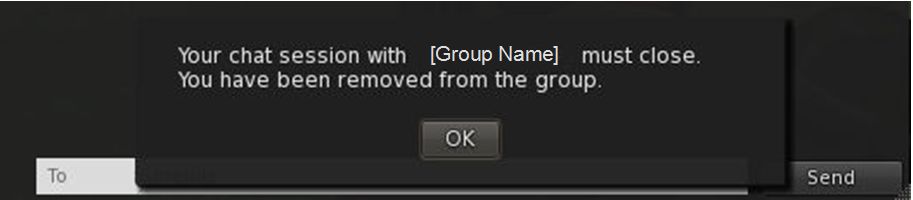
Group chat warning following a ban
Group chat warning following a group ban / ejection when in the same region as the person carrying out the banning / ejection

When they click on OK, the dialogue clears and the group chat closes. The group should also be removed from their group list, preventing them from re-joining the chat.

If the person being banned / ejected is in a different region to the person banning / ejecting them, there is no dialogue box displayed over their group chat. Instead, the chat window remains open, but any attempts to post chat messages result in the system message:
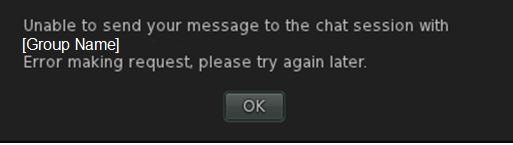
group chat-3
Message displayed when attempting to continue to use and open group chat after being banned / ejected from a group, when in a region different to that of the person banning you

The group will also remain in their group list until such time as they re-log. However, if they close the chat window and attempt to re-join it, they will receive the following message:
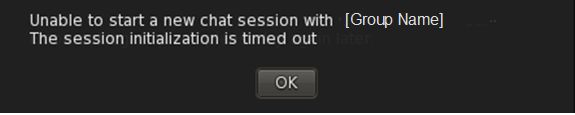
group chat-2
Message displayed on attempting to close / reopen the group chat after having been banned / ejected from a group

Currently, it appears as if this update will be included in a main grid Release Candidate update for week #25 (commencing Monday, June 20th).

Bento Fix

A fix for BUG10979 – “Scripted attachments attached to the new enhanced skeleton attachment points show as worn on ‘Invalid Attachment Point’ in the script limits floater” is available for  testing on Aditi on the Fire Ant 1 region, if anyone wishes to try the fix. If all goes according to plan, it should also be on the main grid in a Release Candidate server maintenance package in week #25.

With thanks to Rex Cronon for the SBUG meeting chat tanscript.
SL project updates 16 24/1: server, viewer, weekend issues

Khaled; Inara Pey, June 2016, on Flickr Khaled – blog post

Server Deployments

As usual, please refer to the server deployment thread for the latest information.

  • On Tuesday, June 14th, the Main (SLS) channel received the same server maintenance project, as previously deployed to all three RC channels, comprising “minor internal changes”
  • It is likely there will be no planned deployment / restart for either the LeTigre or BlueSteel RCs.

There is a deployment listed for the Magnum RC, which quotes the same version number as last week’s deployment. When I asked Simon whether or not this indicated there would be a deployment, he replied:

I believe they won’t actually roll it. The two versions in RC were almost identical, except for one bit of code that executed when entering a region.   We were comparing them for speed and are promoting the less laggy one. The slow code was kinda nice in that it gave us better diagnostics but wasn’t worth it.

Weekend Issues

On Friday, June 10th the main grid experienced a series of issues which appeared to be very similar to those which occurred at the start of May and were related to the central database node failure. I asked Simon if we would be seeing a further write-up from April Linden or another member of the ops team, prompting him to reply:

I’m not sure if April was going to write up another report. Last Friday’s outage was another main database failure.  I know they’re looking to see if there is any noticeable cause we could address.

Should a post appear, it will most likely be via the Tools and Technology blog, and I’ll of course cover it through these pages.

SL Viewer

Friday May 10th saw two viewer updates:

  • The Maintenance RC viewer updated to version 4.0.6.316312
  • The Bento project viewer updated to version 5.0.0.316366, comprising a small set of bug fixes.

Otherwise, all viewers remain as per my last projects update:

  • Current Release version: 4.0.5.315117, dated May 11th, promoted  May 18th, and formerly the Quick Graphics RC viewer
  • Inventory Message RC viewer, version 4.0.6.315555, dated May 23rd – removal of deprecated and unused UDP inventory messaging mechanisms from the viewer
  • The Visual Outfits Browser (VOB) project viewer, version 4.0.6.316123, dated June 6th. See my overview of the viewer for further details
  • VLC Media Plugin viewer, version 4.0.6.316087, dated June 3rd. Sees the Quicktime for Windows media plugin for the playback of media types such as MP3 MPEG-4 and MOV, replaced by one based on LibVLC (https://wiki.videolan.org/LibVLC/) Mac viewer currently unaffected.
  • Oculus Rift project viewer, version 3.7.18.295296, dated October 13, 2014 – Oculus Rift DK2 support
  • Obsolete Platform viewer, version 3.7.28.300847, dated May 8th, 2015 – provided for users on Windows XP and OS X versions below 10.7.


SL project updates 16 23/2: server, viewer, Avatar Complexity

Snuggles Forest
Snuggles Forest – blog post

Server Deployments – Recap

As usual, please refer to the server deployment thread for the latest information.

  • On Tuesday, June 7th, the Main (SLS) channel was updated with the same server maintenance package, comprising the addition of mnemonic names to be used in LSL scripts when attaching to the new attachment points on the Bento skeleton extensions and minor internal changes
  • On Wednesday, June 8th, all three RCs were updated with a new server maintenance package comprising “minor internal changes”.

SL Viewer

There have been no further changes on the viewer front since part 1 of this update, leaving the official viewer channels as follows:

Remaining Viewers

All other viewers currently remain unchanged from week #22:

  • Current Release version: 4.0.5.315117, dated May 11th, promoted  May 18th, and formerly the Quick Graphics RC viewer
  • RC viewers:
    • Maintenance RC viewer, version 4.0.6.315924, dated June 2nd. Includes fixes for the recent release of the Avatar complexity / Graphics Presets viewer release
    • Inventory Message RC viewer, version 4.0.6.315555, dated May 23rd – removal of deprecated and unused UDP inventory messaging mechanisms from the viewer
  • Project viewers:
    • The Visual Outfits Browser (VOB) project viewer, version 4.0.6.316123, dated June 6th. See my overview of the viewer for further details
    • VLC Media Plugin viewer, version 4.0.6.316087, dated June 3rd. Sees the Quicktime for Windows media plugin for the playback of media types such as MP3 MPEG-4 and MOV, replaced by one based on LibVLC (https://wiki.videolan.org/LibVLC/) Mac viewer currently unaffected.
    • Project Bento (avatar skeleton extensions), version 5.0.0.315657, dated May 26th – includes the “reset Skeleton” option and additional slider updates
    • Oculus Rift project viewer, version 3.7.18.295296, dated October 13, 2014 – Oculus Rift DK2 support
  • Obsolete Platform viewer, version 3.7.28.300847, dated May 8th, 2015 – provided for users on Windows XP and OS X versions below 10.7.

Avatar Complexity

There are some issues with Avatar Complexity which have been noted, but have yet to be addressed, One is that a “dirty” install the viewer (i.e. not removing the previous version + its supporting files from a computer will default avatar complexity to No Limit (BUG-18199).

Another (BUG-18195) is that initial default values for Avatar Maximum Avatar Complexity (defined by the graphics benchmarking) are not applying. These should be: Low: 35k; Low-Mid: 100k; Mid: 200k; Mid-High: 250k; High: 300k and High-Ultra / Ultra: 350k. Instead, the bug means that all graphics settings above Low are defaulted to 80k. This also means the Rest button for Avatar Complexity reverts the setting to 80K for all settings, rather than applying the correct default.

SL project updates 16 23/1: Server, viewer, TLS 1.2

Gates of Melancholy; Inara Pey, June 2016, on Flickr Gates of Melancholy – blog post

Server Deployments

As usual, please refer to the server deployment thread for the latest information.

  • On Tuesday, June 7th, the Main (SLS) channel was updated with the same server maintenance package, comprising the addition of mnemonic names to be used in LSL scripts when attaching to the new attachment points on the Bento skeleton extensions and minor internal changes
  • On Wednesday, June 8th, all three RCs should be updated with a new server maintenance package comprising “minor internal changes”.

SL Viewer

There have been a number of viewer updates and appearances in the various viewer channels.

Maintenance RC Viewer

The Maintenance RC viewer was updated to version 4.0.6.315924, on June 2nd. The update includes a series of additional fixes and a more descriptive set of release notes to describe the changes.   In particular, there are a new series of fixes for the recent release of the Avatar complexity / Graphics Presets viewer release, comprising:

  • A fix for some cases of invisible avatars due to JellyDolls feature.
  • A fix for the Appearance update being broken due to COF version getting out of synch. It will now be … *nsync.
  • A change so that Invisiprims are now preloaded and will remain transparent, not grey or black.
  • The Maximum Complexity setting will be set to recommended setting on first run. A Default preset will be added based on recommended settings, but not applied, so your current graphics settings are unaffected.
  • A “Show original” menu item has been added to the Appearance/Wearing tab.
  • A fix for an unhandled error when deleting empty list of graphics presets.

For the full list of updates, please refer to the release notes.

VLC Media Plugin Project Viewer

Released on June 3rd, the VLC Media Plugin viewer, version 4.0.6.316087, sees the Quicktime for Windows media plugin for the playback of media types such as MP3 MPEG-4 and MOV, replaced by one based on LibVLC (https://wiki.videolan.org/LibVLC/).

Note that is change is for Windows only at present, and is due to Apple discontinuing QuickTime for Windows support, leaving vulnerabilities within it.

Currently the Mac version of the viewer is unaffected, as Apple still support QuickTime on that platform. However, it will be updated to use LibVLC in the upcoming 64-bit versions of the official viewer.

Visual Outfits Browser Project Viewer

The Visual Outfits Browser (VOB) project viewer, version 4.0.6.316123 appeared on June 6th. Simply put, it allows you to use the Appearance floater to capture / upload / select images of your outfits and save them against the outfits in a new Outfit Gallery tab within the floater. See my overview of the viewer for further details.

Remaining Viewers

All other viewers currently remain unchanged from week #22:

  • Current Release version: 4.0.5.315117, dated May 11th, promoted  May 18th, and formerly the Quick Graphics RC viewer
  • Inventory Message Viewer, version 4.0.6.315555, dated May 23rd – removal of deprecated and unused UDP inventory messaging mechanisms from the viewer
  • Project Bento (avatar skeleton extensions), version 5.0.0.315657, dated May 26th – includes the “reset Skeleton” option and additional slider updates
  • Oculus Rift project viewer, version 3.7.18.295296, dated October 13, 2014 – Oculus Rift DK2 support
  • Obsolete Platform viewer, version 3.7.28.300847, dated May 8th, 2015 – provided for users on Windows XP and OS X versions below 10.7.

There is an update in progress for the Oculus Rift viewer, but no time frame on when that might appear. Currently, both it and the Obsolete Platform viewer are TLS 1.2 compliant (see below), so it will be interesting to see what happens with them both over the coming few weeks.

TLS 1.2

Linden Lab has issued a further reminder that as from June 15th, all Second Life users must be using a viewer and / or web browser that supports TLS 1.2 in order to make use of the Second Life WEB cashier services for L$ transactions (e.g. to send, receive, or exchange L$).

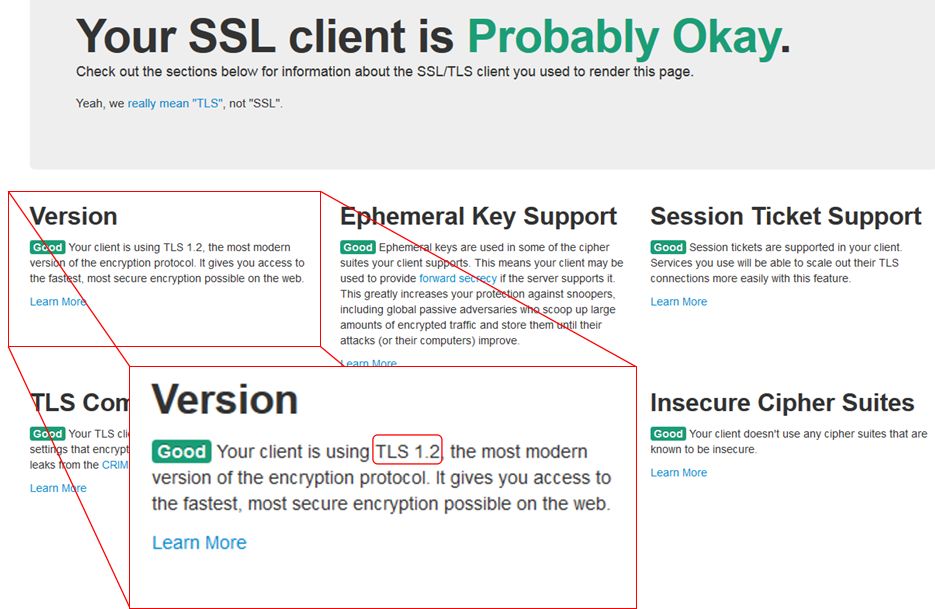
Actively maintained web browsers and viewers (official and TPV) should support TLS 1.2. However, older versions of third-party viewers and those viewers which have not been updated in recently, may not support it.  Users are therefore advised to visit https://www.howsmyssl.com/ with their browser and, if they are using an older version of a viewer, the viewer’s internal web browser, to check whether their browser / viewer supports TLS 1.2.

Use How's My SSL? to confirm whether the versions of the web browser and SL viewer you are using are TLS 1.2 compliant.
The Version notification in the top left of the How’s My SSL? web page will indicate whether your web browser and / or viewer (via its built-in web browser) is TLS 1.2 compliant.

As has been previously noted, this isn’t an arbitrary change on the part of the Lab. It is in response to an ongoing  set of regulatory / compliance requirements (as explained by the PCI Security Standards Council) which are global in scope.

SL project updates 16 22/1: server, viewer

{Ville Par La Mer} / Royaume de Versailles; Inara Pey, May 2016, on Flickr {Ville Par La Mer} / Royaume de Versailles – blog post

Server Deployments

As always, for the latest information, please refer to the server deployment thread.

  • On Tuesday, May 31st, the Main (SLS) channel was updated with the same server maintenance package previously deployed to all three RC channels, which included a server crash fix.
  • On Wednesday, June 1st, all the RC channels should be updated with a new server maintenance package, comprising the addition of mnemonic names to be used in LSL scripts when attaching to the new attachment points on the Bento skeleton extensions and minor internal changes.

SL Viewer

There have been no changes to any of the viewer channels so far this week, leaving things as per the end of week #21:

  • Current Release viewer, version 4.0.5.315117 (dated May 11), promoted May 18th – formerly the Quick Graphics RC viewer download page, release notes
  • RC viewers:
    • Maintenance RC viewer, version 4.0.6.315551, dated May 23rd – a modest but useful set of 24 fixes and updates to the viewer
    • Inventory Message RC viewer, version 4.0.6.315555, dated May 23rd – removal of deprecated and unused UDP inventory messaging mechanisms from the viewer
  • Project viewers:
    • Project Bento (avatar skeleton extensions), version 5.0.0.315657, dated May 26th – this build includes the “reset Skeleton” option and additional slider updates
    • Oculus Rift project viewer, version 3.7.18.295296, dated October 13th, 2014 – Oculus Rift DK2 support
  • Obsolete platform viewer version 3.7.28.300847 dated May 8, 2015 – provided for users on Windows XP and OS X versions below 10.7.

Project Bento

As anticipated, Project Bento, the avatar skeleton enhancements project, was deployed to the main grid to mark the start of more widespread testing, on Tuesday, May 31st. You can find out more via the following posts:

SL project updates 16 21/2: server, viewer, Bento

Frisland; Inara Pey, May 2016, on FlickrFrisland – blog post

Server Deployments Week #21 – Recap

As always, please refer to the server deployment thread for the latest information and updates.

There was a fast-tracked security update deployed to the LeTigre RC channel on Friday, May 20th. This update was also deployed as a server maintenance package to the Main (SLS) channel on Tuesday, May 24th.

On Wednesday, May 25th, all three RC channels were updated with a server maintenance package which combines the security update plus a new crash fix.

The security patch was apparently a precautionary measure, rather than a response to an actual exploit

Week #22 Deployments

The current RC update should move to the Main grid on Tuesday, May 31st, and the RCs should all receive a new package comprising:

  • A fix for BUG-10979 [Bento] Scripted attachments attached to the new enhanced skeleton attachment points show as worn on “Invalid Attachment Point” in the script limits floater
  • More checks for per-agent script limit
  • Internal improvements.

More news on these last two to follow.

Project Bento

As noted in my Project Bento update, the plan is for the back-end of Project Bento to be enabled on the main grid during week #22, most likely on Tuesday, May 31st. This will allow content making use of the Bento extensions to the avatar skeleton to be uploaded to the main grid. However, Bento content requires viewer-side updates in order to render correctly. Currently these are restricted to the Bento Project viewer and those TPVs which have adopted the Bento code ahead of the curve.

This also doesn’t mark the end of the Bento project; at this point, enabling Bento on Agni, is to expose the capabilities to a wider audience of content creators and allow broader testing.

Bento Viewer

The Bento Project viewer updated to version 5.0.0.315657 on Thursday, May 26th. This version includes the following significant updates:

reset skeletionA “Reset Skeleton” option, intended to fix cases where an avatar is distorted in your world view as a result of incorrectly applied joint updates. For example, a non-human avatar may show as “crunched up” because it is still in a human pose. Note that this option should also work for non-Bento avatars when become deformed as a result of swapping shapes / forms / animations as well.

Right-clicking on the affected avatar (your own or another) and selecting Reset Skeleton from the avatar context menu should correct the avatar’s appearance in your view. As this is a viewer-side update, it will not affect how anyone else sees the affected avatar until they use Reset Skeleton. The Lab has requested feedback on the capability if it fails to work as intended.

The viewer also includes a few late-breaking changes to the slider support for mesh avatars, including jaw shape and head shape. Sliders that affect the scale of mPelvis now also alter mHindLimbsRoot, to better keep the front and hind legs synced up.

SL Viewer

Other than the Project Bento viewer update, the list for official viewers remains as per the first part of this report.