Sansar Product Meetings 2020, week #15

The gang’s (almost) all here (l to r): Colo, Aleks, Torley, Lacie, Galileo, Cynno, Binah at the first Sansar Product Meeting under the Wookey banner

On Thursday, April 9th, Sansar held its first product meeting since being acquired by Wookey Project Corp (see: Sansar: looking at the apparent new owner – Wookey Projects Inc. and Linden Lab confirm the sale of Sansar to Wookey Project Corp – updated). The meeting was really a means for the team to say “hi! We’re here!”, rather than providing a huge depth of hardcore information, although there were some Titbits of news.

The following is a summary of the key points.

On Wookey and Sansar

No-one from the Wookey management team was present at the meeting, in part because they have yet to have avatars made; however, their presence is expected at times in future meetings, when they’ll be able to talk more about Wookey Project Corp and their goals / view of Sansar.
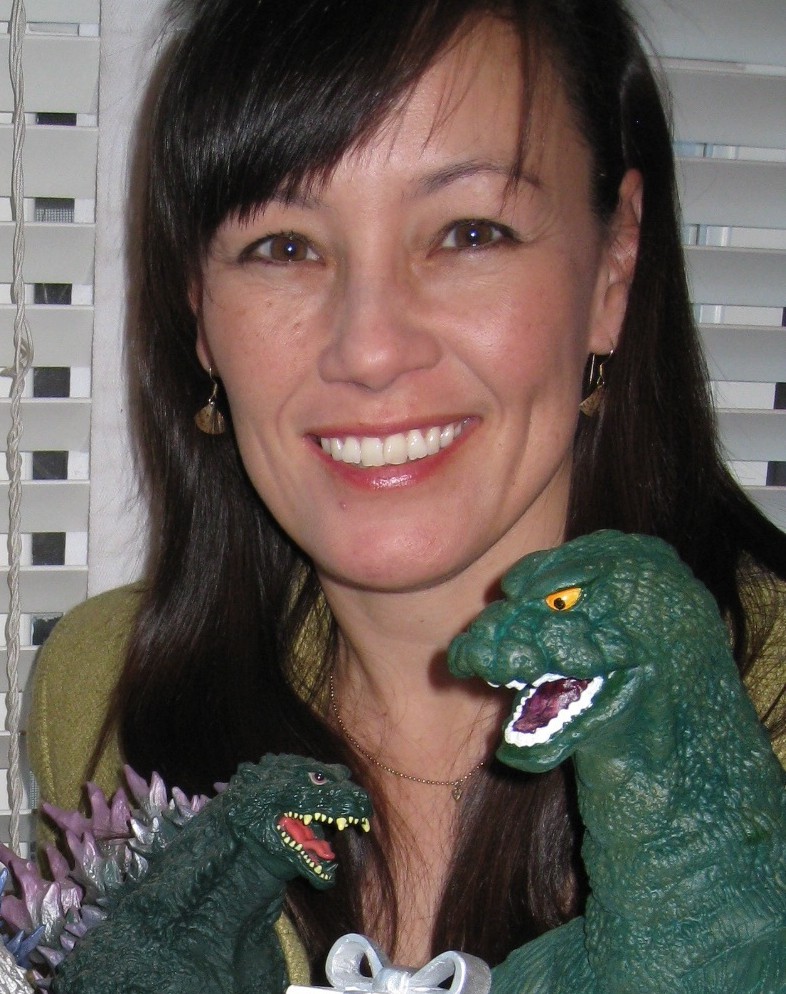
Sheri Bryant, Sansar’s GM at Linden Lab, and now heading the team at Wookey; credited with bringing the deal together for Sansar to move to Wookey. Fun fact: she’s a huge Godzilla fan, and her Sansar avatar – Cowboy Ninja – features a Godzilla shoulder pet.

A shout-out from the Sansar team was given to Sheri Bryant. Sheri (aka Cowboy Ninja in Sansar) was the General Manager for Sansar at Linden Lab, and she is credit with leading the work in bringing about the deal between LL and Wookey Project Corp. She has also moved to Wookey, where she remains in charge of Sansar.

Many of the team are already with Wookey- attending the meeting were: familiar names: Binah (UI Engineer); Aleks (Product Manager); Galileo, Lacie, and Torley, (Production Director, Sansar Studios). While he wasn’t that the meeting, Boden was also mentioned as having joined Wookey as well, retaining his position as a Product Manager.

Also joining the meeting were some new (to me at least) names:  Cynno (Art Production Manager Sansar Studios) and Sansar Studios (Colin – the Creative Director at Sansar Studios), both of whom report to Torley; together with  Colo, the Director of Engineering and the Release Manager, and Steel, one of the QA Engineers.

Many positions are still being recruited into, and it was indicated that there are a number of engineering team positions that need to be filled, and these and the SARS-CoV-2 situation are slowing the full resumption of work on Sansar. In this latter regard, the Sansar team was less distributed than the SL team while at Linden Lab, with most of them office-based; this means equipment, etc., has been / is being sourced and shipped to their home locations to allow them to start remote working.

The meeting was also an opportunity to say farewell to Galileo as the Sansar Community Manager, who is departing the Sansar team as a result of having accepted a new position with Pocket Gems, a games development company. This means Lacie will be taking over as the official Sansar Community Manager, although Galileo will continue to be an active Sansar user and involved in the COMETS programme.

Roadmap

As has been indicated through various sources (see the Lab’s press release and the Sansar blog post both announcing Wookey’s acquisition of Sansar), the emphasis remains on building Sansar as an events platform that will attract “thousands”.

There is no public road map as yet, although it is promised that one will be produced – probably not as granular as the internal road map – and might be available in two weeks time at the next Product Meeting. However, current areas of focus comprise:

  • Continuing on from where things were left off.
  • Moderation tools development and deployment.
  • Narrowing the new users on-boarding experience – making it easier for people to get from sign-up to event; improvement the tutorials, etc.
  • Working on stability improvements for events.
  • Tip jars are seen as being on the “tail end” of the moderation / on-boarding work.

However, it will take a little while longer for work to ramp-up once more due to both the current SARS-CoV-2 situation and the need to recruit additional personnel.

Avatars, Vehicles, Edit Tools Improvements, etc

Due to the current state of play, a lot of the planned / promised engineering / dev work has already been pushed back further in the road map. Specifically mentioned in this regard were:

  • Avatar improvements.
  • Vehicles.
  • Edit Mode improvement such as folders for items, etc.
  • Allowing world creators to nominate “admin staff” to help run their worlds.
  • Creator access to the Backpack.
  • Collaborative building.

Sansar Mobile Service

Back when Sansar had yet to début, there had been talk of the platform being accessible from mobile devices. Ultimately, this got pushed to one side – but is now something of a priority.

Not much can be announced at this point in time other than:

  • It will most likely be a streaming service, initially for iOS and Android.
  • It will not (initially at least) support VR headsets like Oculus Quest.
  • Precise initial capabilities are still TBD.
  • Again, no time frame on when any first cut might appear, nor have potential fees been set.

Event Partners

  • MonsterCat, Roddenberry Entertainment and Fnatic will be returning to Sansar to host events.
  • There have been continuing talks with musicians and “major names” about coming to Sansar to perform. None of the specifics are ready to be announced as yet, but some may be ready by the time of the next Product Meeting.

General Notes from the Meeting

  • Support tickets before March 24th, 2020 need to be resubmitted, if still relevant.
  • The partnership with Marvelous Designer™ should continue as before.
  • Two-factor authentication for Sansar is “on the list” of things the team would like to implement. However, no time frame on when it might start to surface.
  • The entire approach with the Nexus is to be re-examined, specifically with the view to making it more linear for incoming users to get from it to the event they wish to attend / the most popular locations in Sansar.
  • It is still planned to eventually extend the ticketing system so that world creators can use it with events they organise / host.
  • The Sansar team is looking into improved documentation sharing, tutorials, offering tips and tricks through a wiki-style environment, world templates, etc.

Possible Changes to Accounts

  • Wookey / Sansar looking at things like the partnership with Steam, subscription options, and how they are structured, but nothing to announce.
  • The number of worlds a Free account can publish may be revised in the future. Whether this will mean those who have already published multiple worlds will be allowed to keep all of them or not if they have published worlds beyond the new limit, is TBD.
  • There will likely be a tightening of requirements for users organising Sansar events (e.g. events may only be hosted by “authorised / approved / trusted” – details TBD – accounts).

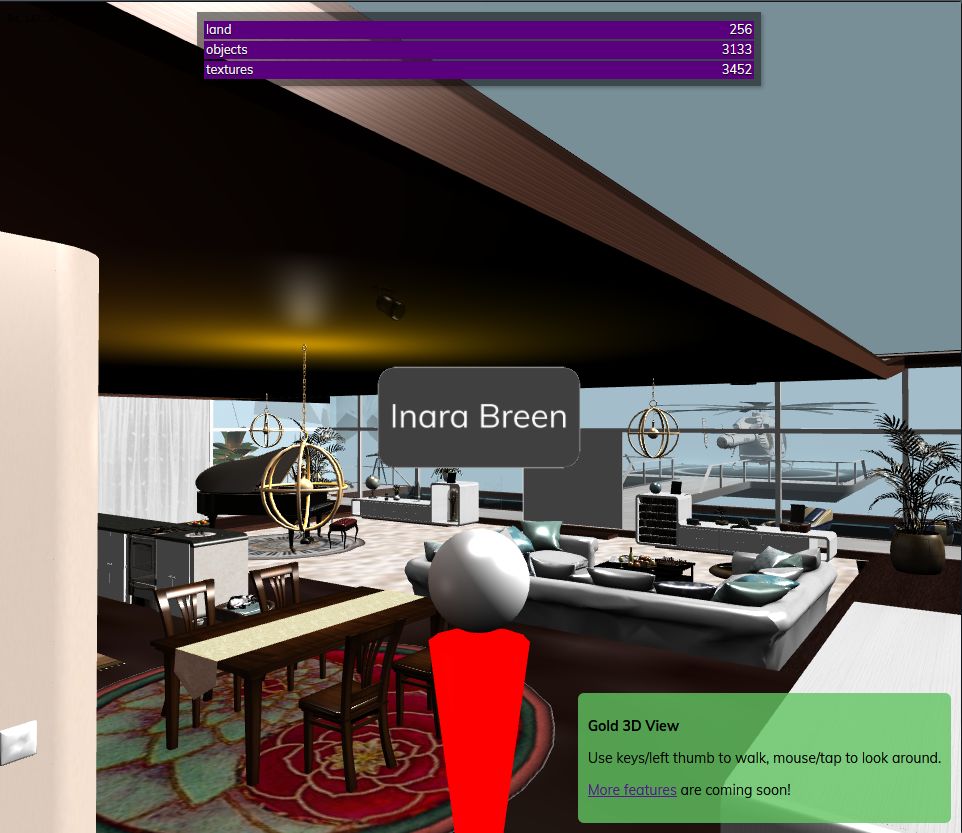
Speedlight: looking at the 3D world view

via Speedlight

At the end of March 2020, Speedlight, the browser / Android Second Life client, extended its world rendering capability to Free account holders whilst also offering Gold members the ability to move their avatars around.

Over the last few days, I’ve had the opportunity to take Speedlight’s world view for a test on both Free and Gold accounts, and this article is intended to act as both an introduction to the capability and to provide insight into where it stands at this stage of its development.

Before getting down to specifics, it should be remembered that it is still very early days in the development of Speedlight’s rendering capabilities – what is seen here is by no means anything close to what might be considered a “finished” product. Avatars, for example, are only presented as rudimentary “manniquins”, as the emphasis thus far has been on rendering in-world objects, and the Speedlight team plan to improve avatar looks in the future.

The Speedlight world view showing our living area at home. The rendering is acceptable, although there are some niggles that will doubtless be addressed in future updates (e.g. in this image, the “glass” doors rendered as soid grey objects, the ceiling rendering as black). Certainly, they are not enough to detract from what has been achieved at this early stage of work

Also at this point in time, the world view doesn’t offer any avatar / object interaction (no right-click options, etc.), and interaction (chatting, IMs) with other avatars is via switching tasks using the left menu. Other points worth keeping in mind with the world view are:

  • As I understand it, Speedlight uses an intermediary server for organising asset data information for download to the client, and this can have an impact of how fast a scene can be rendered. It also means that rendering can occur in “bursts” as object and texture data is collected (visible in the information bars at the top of the world view panel – see below), so it’s perhaps preferable to refrain from changing your camera view / moving your avatar until the scene has loaded.
  •  Key differences between Free and Gold accounts in terms of world rendering are:
    • Free accounts do not (as of the April 1st 4.093.0825 release) have the ability to move their avatar, but can orbit / zoom their camera.
    • Gold account can move their avatar via the Arrows keys when running in a browser, or via the on-screen “joystick” when using the dedicated Android app.
    • I understand from Speedlight support that the number of textures / objects a scene loads is “capped” for Free accounts at present, in order to prevent the intermediary server from being flooded with requests to handle asset information.
  • The world view requires a minimum of Android 7.0 to work on an Android device (either using the dedicated app or when running Speedlight through an Android flavour of a web browser). As I only have Android 6.0.1 at my disposal, this precluded me from trying Speedlight’s rendering on a mobile device.
  • In order to limit any excessive load, rendering is limited to a radius of apprximately 50-60m around your avatar / camera, with objects fading into haze – an effect that helps disguise what might otherwise be glaring “holes” in a scene.

Accessing the World View

  • Log-in to Second Life via your Speedlight account and Open your avatar account.
  • The Summary screen will be displayed.
  • Click / tap the 3D World View option in the left side menu.
  • If you have not run the 3D world view during the current session, a blank window is displayed with the message: Avatar Is Not Rendering 3D World.
  • Click / tap the button under the message to start the rendering process.
  • Rendering will commence, with a warning that it could take 2 mins. Given the variables involved (complexity of scene, information fetching / caching, network connectivity and speed, etc.) this is a not unreasonable estimate.
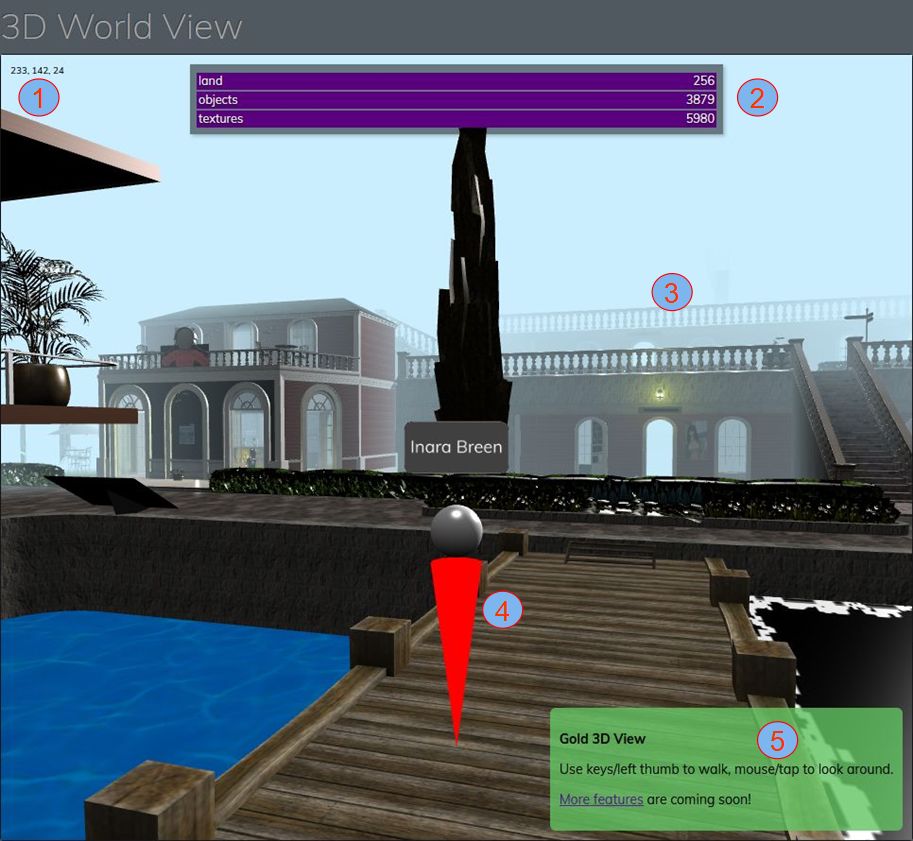
  • The information bars at the top of the world view (see image below) will report the land area, the number of textures and objects that are being processed / loaded.
The world view explained: 1: the X, Y, Z region coordinates of your avatar; 2: object and texture load count – will change as you cam / move / teleport. 3: horizon hazing at the limits of the pre-set draw distance; 4: avatar mannequin – displays a small green arrow (not always visible) to show direction being faced / avatar will move in (Gold only); 5: information bar – Gold membership shown; Free accounts have a yellow panel located on the left of the world view, carrying different information

Observations

Given this is still very much a first cut at scene rendering, what is presented is impressive, if with some niggles to be addressed, as noted above, and with things like dealing with blended alpha masks and with some transparent surfaces, etc.). However, these will hopefully be addressed over time.

Movement also seems to have a degree of latency surrounding it – possibly because of the use of an intermediary server on top of general network / connectivity aspects. This can be particularly noticeable when ceasing avatar movement, which can result in a degree of “rubber banding” as the avatar’s position as estimated by the client is updated with its position as recorded by the simulator. As such, I found it preferable to use light, repeated taps on the movement keys rather than holding them down for extended periods.

I also encountered a peculiar issue with my avatar simply refusing to stop walking, even after a teleport; something that I could only remedy by relogging. It’s something that may well be unique to me, although I’ve reported it to the Speedlight team just in case. Should anyone trying Gold membership with Speedlight encounter a similar problem also advise the Speedlight team?

Overall, and in terms of appearance, it is not unfair to say that Speedlight’s world view is pretty much on a par at this point in its development with that Lumiya’s world view during its earliest days of development – and look how far that went over time. Whether Speedlight will go on to mature to a similar level of capability with its rendering obviously remains to be seen. However, given that development is only a couple of months old (and niggles aside) what has been produced thus far is not to be sneezed at, and I look forward to continuing to cover the client’s development in the future.

Related Links

2020 Simulator User Group week #15 summary

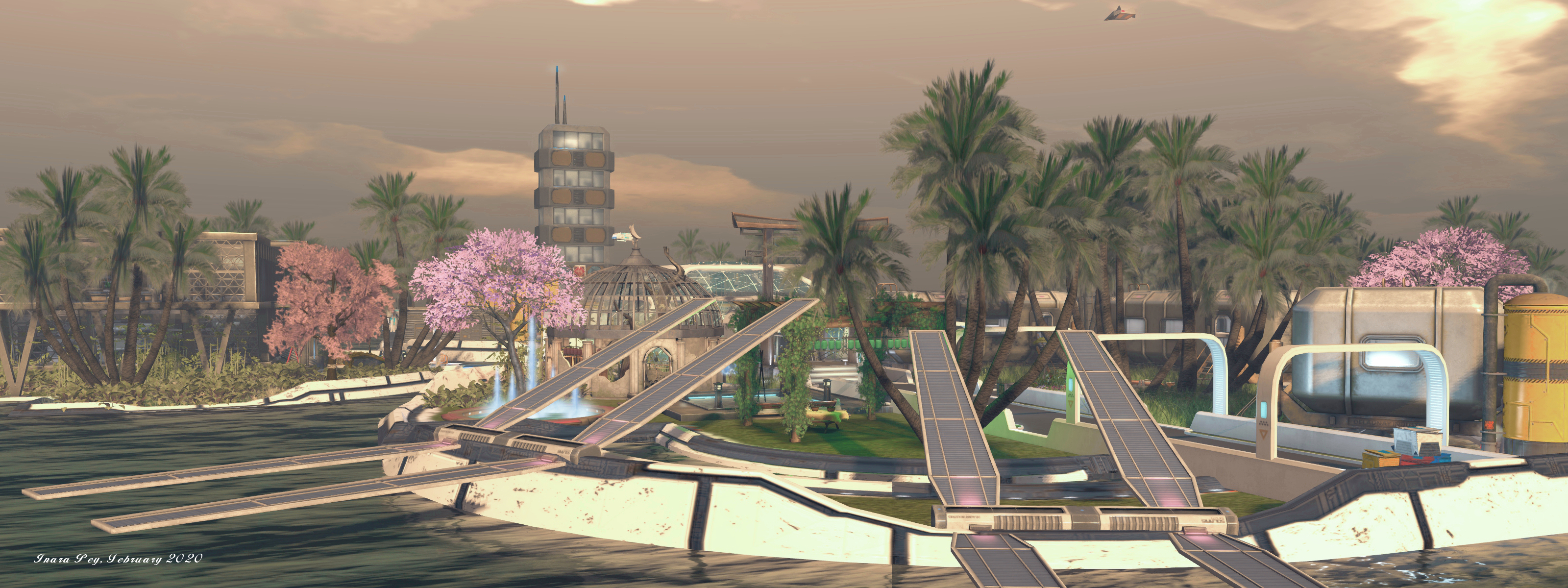
Aoshima, February 2020 – blog post

The following notes were taken at the Simulator User Group meeting held on Tuesday, April 7th.

Simulator Deployments

Please refer to the simulator deployment thread for updates.

  • There was no deployment to the grid on Tuesday, April 7th, 2020, leaving the majority of regions running simulator version 538914, containing support for the upcoming mobile companion applications (see: Second Life companion app: mini update, March 2020).
  • On Wednesday, April 8th, there should be two RC updates:
    • Simulator release 539362, containing infrastructure improvements related to the cloud uplift.
    • Simulator release 539684, containing the following:
      • BUG-228417 Emails created by llTargetedEmail() in deeded objects show owner as NULL_KEY in the received email metadata.
      • BUG-228412 Emails created by llTargetedEmail() are missing header info in the received email.
      • SL-12941 Disable TARGETED_EMAIL_ROOT_CREATOR in llTargetedEmail
      • SL-11502 New LSL function llTargetedEmail
      • BUG-226917 EEP Environment, New Sky should default to midday and not 6pm
      • BUG-226737 [EEP] The ‘get parcel_dayoffset’ request returns the value of the ‘parcel daylength’ parameter in the Region Debug Console.

SL Viewer

There have been no updates to the current crop of official viewers to mark the start of the week, leaving the current pipelines as follows:

  • Current Release version  version 6.3.8.538264, dated March 12, promoted March 18th. Formerly the Premium RC viewer – No change.
  • Release channel cohorts:
    • Camera Presets RC viewer, version 6.3.9.538729 March 25.
    • Love Me Render RC viewer, version 6.3.9.538760, March 25.
    • EEP RC viewer updated to version 6.4.0.538823, March 20.
    • Zirbenz Maintenance RC viewer, version 6.3.9.538719, issued March 19.
  • Project viewers:
    • Copy / Paste viewer, version 6.3.5.533365, December 9, 2019.
    • Project Muscadine (Animesh follow-on) project viewer, version 6.4.0.532999, November 22, 2019.
    • Legacy Profiles viewer, version 6.3.2.530836, September 17, 2019. Covers the re-integration of Viewer Profiles.
    • 360 Snapshot project viewer, version 6.2.4.529111, July 16, 2019.

In Brief

With work progressing on the cloud uplift, some concern has been raised by those using external services and HTTP calls to / from the simulators once the latter start to be transitioned and have their domains changed.

While in-world object URLs are dynamic, it’s been suggested that some use external services use URL validation with hard-coded domain names (e.g. “http://sim10446.agni.lindenlab.com….”) in response to issues, and will therefore need a formal warning of URL changes as a result of domain changes. Given this approach is not recommended, the fact that LL will start to transition simulators to AWS services later in 2020 should be taken as fair warning that such validation checks will break. However, for those with concerns:

  • Aditi (the beta grid) will be transitioned first, allowing scripts, external calls, etc., to be tested.
  • With respect to this issue,  llHTTP on the wiki will be updated to reflect domain changes and HTTP call requirements.

Previewing the Second Life Book Club

The Second Life Book Club studio, Book Club Island

First announced on Friday, March 27th, the Second Life Book Club launches on Wednesday, April 8th as part of efforts to broaden the appeal of Second Life and showcase what can be achieved with a virtual platform, as well as offering SL users a new and informative series focused on the world of literate – which is actually a popular subject among SLers thanks to the long-running work by the likes of Seanchai Library and others.

These are strange times indeed: With the current public health crisis sweeping across the globe, many of us are finding it more difficult to go out and physically do the things that comfort us and bring us joy. Socializing. Shopping. Dancing. We can’t wait to get out and explore in the physical world again – but, fortunately, you can do these things virtually right now in Second Life.

During this time of great anxiety, stress and social isolation, we’ve seen a spike in interest and activity in Second Life as people seek online outlets for comfort and social connections. Many are discovering for the first time how Second Life can bring people together for friendly conversations and fun social activities – such as live music performances, virtual nightclubs and deejay events and even book readings.

– From the Second Life blog post, March 27th, 2020

Hosted in-world at a new venue which uses one of the Lab’s turnkey solutions to help businesses and organisations make use of Second Life (in this case, the Conference Centre design), The Second Life Book Club is, in the words of the official press release (also a blog post) about it, an:

Initiative that enables authors to have real-time book readings, engage in meet-and-greets with their fans and promote their publications in front of a live audience within the Internet’s largest user-created virtual world [ which] will kick off with a multi-author panel that will discuss the new reality of writing and selling books in the age of COVID-19. The event will feature a live Q&A with best-selling authors Matt Ruff (“Lovecraft Country”), Ken Liu (“The Paper Menagerie and Other Stories”), SL Huang (the Cas Russell series) and CB Lee (the Sidekick Squad series).

– Linden Lab, Second Life Débuts Virtual Book Tours, April 7th, 2020

(l-to-r): Matt Ruff (© Lisa Gold); Ken Liu (© Lisa Tang Liu); SL Huang (©Chris Massa) and C.B. Lee (via Twitter) – the first SL Book Club guests

The Second Life Book Club is a monthly event produced jointly by Linden Lab and Draxtor Despres who also hosts episodes.

Shows will take place before a live Second Life audience, with the first edition taking place on 10:00 SLT on Wednesday April 8th, at the Second Life Book Club Island.  Audience space is limited, so if you are unable to secure a seat, it will be streamed live across all official Second Life social channels.

Further programmes and guests will be announced through the official Second Life blog.

Birds and Blue: a Nitroglobus escape in Second Life

Nitroglobus: Birds & Blue

As I’ve oft noticed in these pages, through her Nitroglobus Roof Gallery, Dido Haas presents some of the most evocative, engaging art to be found in Second Life. I’m constantly drawn back to the gallery each month as Dido has the ability to draw out the very best in the artists she invites to exhibit there, gracefully coxing their own inner voices to the fore.

However, Dido is herself a gifted photographer, although it is rare that she places her own art into the spotlight at her gallery. It is in part because of this that the latest exhibition at Nitroglobus is so attractive, because for April she offers a selection of her own work. I say “in part”, because Birds & Blue is very much a joint presentation from Dido (photography) and Harry Cover (ImpossibleisnotFrench – 3D elements).

We’ve turned Nitroglobus into a large pond, with the soothing sound of rippling water. Harry added awesome blue boats, barrels and super cool birds he made specially for this installation … For my part selected snapshots from my blog posts, which I made blue to fit into the mood of this installation, and I’ve added pieces of land (thx Miu) with seats and parasols, waving blue flower beds, rusty wind turbines, a beach hut, an animated rock and more… We hope you like to wander around, ‘cos it’s fun and should be enjoyed as such.

– Dido Haas describing Birds and Blue

Nitroglobus: Birds & Blue

The result is a setting that might be said to be much needed in the current times: big enough to have a wander around and enjoy the sounds and the setting; small enough to suit those who would rather just sit and admire the art and let the sounds wash over them and escape daily worries.

Tinted blue for the theme, Dido’s images further offer a means to relax and forget the worries of the world. Offering wide-open views, oft with coastlines and water, each piece sits as a window through which we can escape, perhaps to join Dido as she appears in many of the pictures, and share in her exploration.

When visiting, make sure you make your way up to the high beach house, where two of Dido’s black-and-white self-portraits offer s contract to the blue tones below.

Nitroglobus: Birds & Blue

A different kind of exhibition for Nitroglobus, but one that is nevertheless richly attractive.

SLurl Details

Singularity 1.8.9: the big catch-up

April 2nd, 2020 saw the first full release of the viewer 1.x style Singularity viewer in almost four years with the arrival of version 1.8.9.8338. The last formal release of the viewer had been in June 2016, with the release of version 1.8.7 – although there have been many, many, “nightly” builds of the viewer made available in the interim to help keep Singularity users up-to-date with viewer changes.

As I don’t tend to report on “beta” or “nightly” builds of viewers unless they contain something absolutely vital to users  – were I to try, it’s not unreasonable to say there would be times when I’d be writing nothing other than articles on viewers and clients – this release means there is potentially a lot for me to cover – the to possibly drown you in an ocean of text! To avoid this, please excuse me if I just touch on the core aspects of the update and point you towards the official release notes for a full list of updates.

In Brief

Linden Lab Derived Updates

Given the length of time that has elapsed between the last formal release and 1.8.9, the latter rolls-up a lot of significant releases from the Labs. As a summary, these comprise:

  • Animesh.
  • Bento.
  • Bakes on Mesh (system wearable on mesh bodies / heads – see my Bakes on Mesh Basic Primer).
  • Experiences (World → Experiences from the menu bar).
  • Viewer Managed Marketplace. Actually released prior to the previous full release of Singularity, the Viewer Managed Marketplace (VMM) functionality didn’t make it into the 1.8.6 or 1.8.7 releases, and so arrives for the first time now.
    • The Marketplace Listings Panel can be accessed via either World → Marketplace Listings in the menu bar, or by activating the Marketplace Listings toolbar button (View → Change Toolbar Buttons → check Marketplace Listings).
    • Singularity also allows the listing ID for any Marketplace listing (active or inactive) to be obtained by right clicking on the associated folder in the the Marketplace Listings panel and selecting Copy Listing ID.
    • In support of VMM, Singularity also provides a Marketplace button (View → Change Toolbar Buttons → check Marketplace). Note that this will open the Marketplace in the viewer’s internal browser, regardless of whether links are set to open in an external browser.
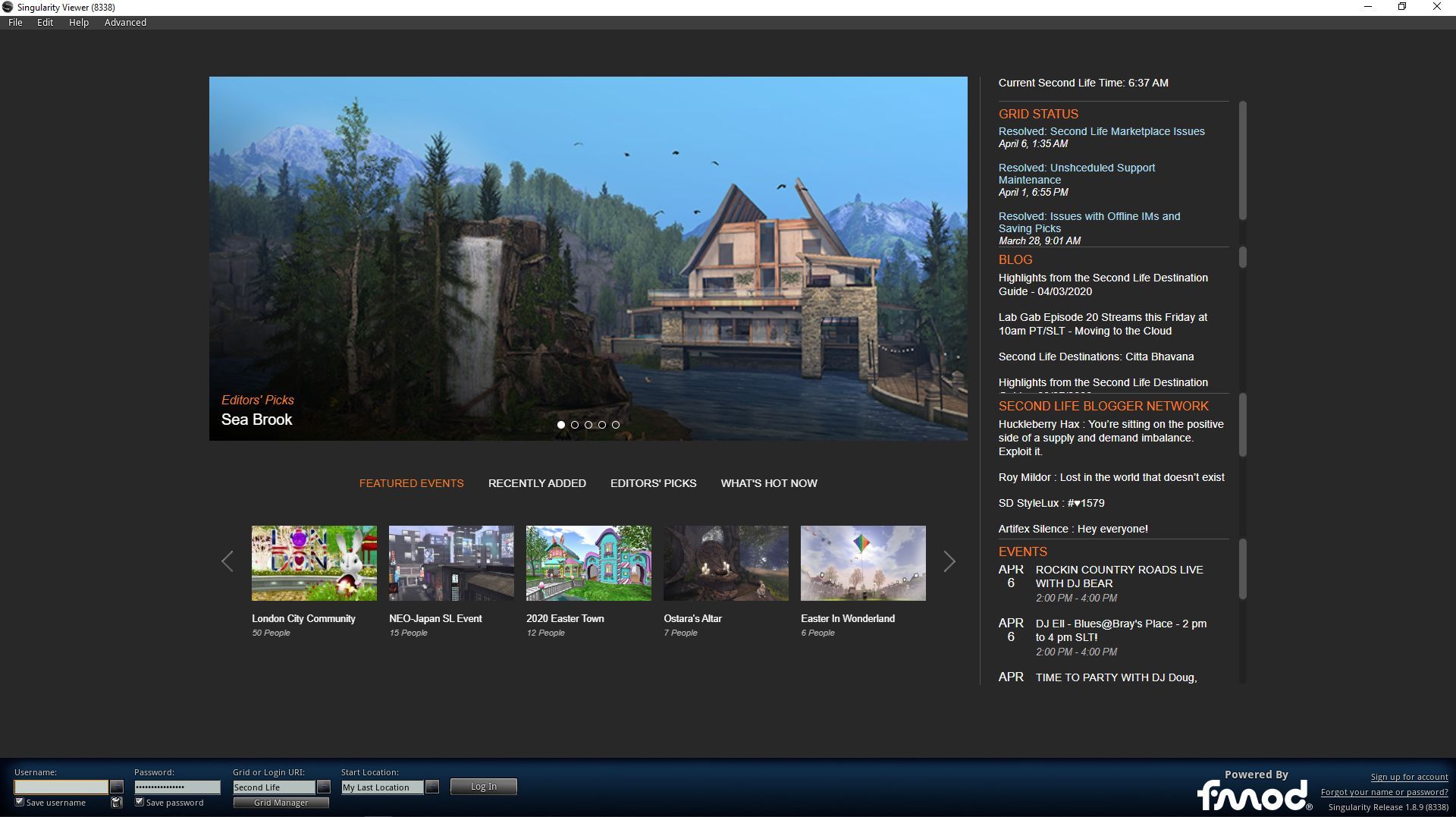
Singularity 1.8.9 also features the all-singing, all dancing LL viewer splash screen with tweaks

Singularity Updates

This is actually a huge list of new additions, improvements, updates and fixes. So big, in fact that trying to run through them here would give rise to a novel, rather than a review, as noted. So again, please refer to the official release notes for a complete breakdown.

Availability

At the time of writing, Singularity 1.8.9 had been released in 32-bit and 64-bit flavours for Windows; 64-bit Linux and promised an “emergency” version for OS X that is described as possibly “buggy” and “available soon”. As the download page on the Singu website still listed 1.8.6 as the last formal release for OS X, Mac users interested in Singularity are advised to watch the Singularity website for updates.

Feedback

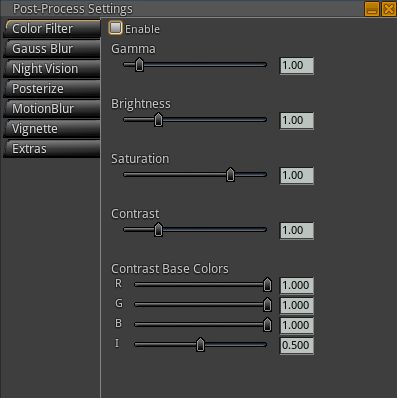
The Post-Processed Effects (PPE) panel (View → Change Toolbar → Post-Processed Effects) has some interesting real-time graphics processing options.

I’ve not had much time using Singularity 1.8.9, my total hours possibly amount to little more than an afternoon of fiddling. As such this feedback is perhaps a little more subjective in approach than might otherwise be the case.

All of the Linden-derived updates appear to work as expected, and the Singu-developed updates are certainly extensive and I have no significant issues with those I got to play with.

When it comes to rendering, where you’re looking, how far you can see, what is occluding your view, what to have cached, etc., all has a part to play in what the viewer renders, how fast it can do so and what your overall fps is. In an attempt at rudimentary “like-for-like” testing (e.g. same region, same location, same directions of view, roughly the same number of avatars, same graphics settings, etc), I found Singularly perhaps a little faster in rendering content than either the SL viewer or Firestorm, with average fps reporting pretty much on a par with, or very slightly higher than, those two viewers once rnedering had settled down for any given direction.

What I did notice with respect to 1.8.9, both in comparison to Firestorm and singularity 1.8.7, and when again, using the dame Windlight presets is that 1.8.9 produces a much more natural rendering result on my system  – gamma, haze, tone, etc., – than I’ve noted with either Firestorm or the SL viewer when using the “default” settings.

For those who like a v1-style UI coupled with something of a more “power user” range of options, Singularity 1.8.9 is liable to be just the ticket. Hopefully the huge amount of effort put into this release will mean that in future, the viewer will be better able to keep pace with changes coming out of the Lab.  Kudos to all involved in getting it back up to speed.

Related Links