Update July 2nd: version 4.4.2 has been released by the Firestorm team, and Firestorm 4.4.1 has been blocked from accessing Second Life. If you have previously installed Firestorm 4.4.1, you can install 4.4.2 without needing a clean install. If you are updating from Firestorm 4.4.0 or earlier, a clean install is strongly recommended. The downloads can be found on the Firstorm website.
Firestorm 4.4.1 was release on June 27th. However, it will shortly be superseded with Firestorm 4.4.2.
The reason for this is explained in a new Firestorm blog post, but the short version is that due to a slight mishap, some additional logging capabilities which had been enabled during the beta release of 4.4.1 and which were intended to help Linden Lab gather information for the forthcoming release of Server-side Baking / Appearance were not removed from the viewer when it moved to release status.
As a result, the system the Lab uses to gether data on viewers is now being completely overwhelmed by the amount of data Firestorm 4.4.1 is sending to it. Although it has taken a few days for the problem to be identified and the Firestorm tem notified, the result is that they are now taking some emergency corrective action:
With immeidate effect, version 4.4.1.34164 of Firestorm has been removed from the Firrestorm download page
A new version for Firestorm is being prepared for release. This version – 4.4.2 – will be no different to 4.4.1 other than the removal of the additional statistics logging code
When the new version is released, and to ensure the LL service is no longer inundated with excess data, Firestorm release 4.4.1.34164 will be blocked from accessing Second Life.
It is therefore essential for everyone who has updated to Firestorm 4.4.1 keep an eye on the Firestorm blog an update to Firestorm 4.4.2 when it becomes available. This should not require a clean install (as was the case with 4.4.1) – but please double-check with any associated blog post which is forthcoming when the release is made.
Again, it is essential that all users of Firestorm 4.4.1 update to Firestorm 4.4.2 as soon as it becomes available.
This summary is published every Monday and is a list of SL viewer / client releases (official and TPV) made during the previous week. When reading it, please note:
It is based on my Viewer Round-up Page, a list of all Second Life viewers and clients that are in popular use (and of which I am aware) and which are recognised as adhering to the TPV Policy
By its nature, this summary will always be in arrears
The Viewer Round-up Page is updated as soon as I’m aware of any releases / changes to viewers & clients, and should be referred to for more up-to-date information
The Viewer Round-up Page also includes comprehensive links to download pages, blog notes, release notes, etc., as well as links to any / all reviews of specific viewers / clients made within this blog.
As reported in part 2 of this update, the release viewer was updated on June 27th with a release containing a number of updates and fixes, including some for materials, such as occlusion culling is less effective than it should be, especially with regards to very large objects; light function sampling being incorrect in advanced lighting model and the legacy Shiny options being overly strong in deferred rendering. The initial fixes for these issues are considered important for TPVs to pick-up when integrating materials into their viewers, while follow-up releases (such as the new 3.6.1277824 beta viewer released on June 25th, being viewed as slightly less important at this time.
Materials continues to be updated and refined, and the Lab is gathering stats on viewer use with ALM enabled
The latest stats the Lab has on viewers show that some 30% of users are currently running with the Advanced Lighting Model option (ALM – otherwise known as deferred rendering), and are thus able to see materials in use in-world, although the stats also appear to indicate that up to 75% of the user base have hardware capable of running with ALM enabled, “with reasonable performance” in terms of frame rates (e.g. an average somewhat above 10 fps). However, given that fps is a highly subjective measure and somewhat dependent on a range of external factors (such as how many other avatars are in the region with you, whether you are moving around a lot or not, etc), the “YMMV” rule comes into play.
The Lab has already carried out a fair amount of performance tuning with ALM, and at the TPV Developer meeting on Friday June 28th, Oz Linden reported that further work is going on in this area, which will include some profiling of the shaders in order to try to further improve performance.
The expectation is now that the new viewer release process will come into effect during week 28 (week commencing Monday 8th July). The process is actually ready to go, but as with the server-side of things, the 4th July no change window means that the process cannot be implemented in week 27.
Vivox Update
Once the new process is running, the Vivox update is likely to be one of the first items to go to a viewer release candidate. This update should greatly improve Voice quality within SL. A further Vivox update is liable to follow this at some point.
Interest List Improvements
The viewer-side interest list updates are coming, although the viewer repro has yet to be made public, although again it is anticipated that a project or beta viewer with the updates will be made available after the holiday period, and TPVs will be able to obtain the code.
Viewer Settings
The Lab is moving to eliminate the use of viewer settings files based on channel name. This means that in future, a single SETTINGS.XML file will be used for all versions of an SL viewer which is installed. The code for this is moving towards the release channel of the SL viewer, and the hope is that it will prevent issues of confusion when settings appear to be “wiped out” when using multiple versions of the viewer (e.g. such as moving between the SL release viewer and the SL development viewer and back a few months ago resulted in people’s toolbar buttons “vanishing” from the release viewer).
As always, please refer to the week’s forum deployment thread for news, updates and feedback.
Second Life Server (Main) Channel
On Tuesday 25th June, the SLS Main channel received the server maintenance package deployed to the three RC channel in week 25. This fixes a number of crash modes, addresses an issue with neighbouring region visibility, and adds the new pathfinding property CHARACTER_STAY_WITHIN_PARCEL to llCreateCharacter() and llUpdateCharacter() – see my week 19 report for details – and the object return functions I reported on in week 23.
While not intended to fix issues of diagonally adjacent regions not being visible to one another (SVC-8130), there are reports that at least some of the regions which have suffered from this issue for a considerable time can be seen from one another once more – although Maestro Linden isn’t entirely convinced the underlying cause of the problem has been corrected.
Release Candidate (RC) Channels
On Wednesday 26th June, all three RC channels (Magnum, BlueSteel and LeTigre) received a new server maintenance package, comprising:
A fix for ‘llApplyImpulse now works only in the root prim’ (SVC-8227)
added to avoid changing the behaviour of existing scripts which may rely on llXorBase64StringsCorrect()’s current output
Added max_materials_per_transaction flag to /simulator/features cap
This number returns the maximum number of materials that can be sent to the “RenderMaterials” capability in a single request.
MAX_MATERIALS_PER_TRANSACTION
Speaking at the Server Beta meeting on Thursday 27th June, Maestro Linden described the max_materials_per_transaction flag thus:
It limits how many materials the viewer can request details for or set (POST, PUT methods) in a single message. By default, the limit is 50. The reason for the limit is that we don’t want the simulator to hang if a malicious viewer requests the details of 2 billion materials at once.
So, the capability for materials is called RenderMaterials [and] it has 3 HTTP access methods:
GET: get the full list of details of all materials in the region
POST: get the materials details for a list of material_ids (the server will only parse the first max_materials_per_transaction in the post data)
PUT: set the materials properties of up to max_materials_per_transaction object faces
GET is used when you first connect to a region and want to get the materials of everything [in the region, not just within draw distance]; POST is used if, for example, a new object is rezzed with a new materials type, and the viewer needs to resolve what the normal map is, etc; and PUT is used for object editing.
[So] if the viewer needs to edit 80 faces at once, for example, it will know that the server limit is 50, and POST in 2 messages (one for the first 50, the other for the other 30). [The] ‘max_materials_per_transaction’ flag in the features cap will be a way for the viewer to know if the server limit changes from 50 per message. I’m not aware of any plans to change that limit in the near future, though.
Deployments for Week 27
There will be no server-side deployments in Week 27 (commencing Monday July 1st), as US Independence Day is on Thursday July 4th. The next scheduled deployments will be in week 28, commencing Monday July 8th.
Pathfinding Bug
Elijah Linden has discovered a bug within the pathfinding code, wherein certain regions have continuous navmesh rebaking, which causes some annoying UI effects, hurts simulator performance somewhat and causes memory spikes. Regions can be affected even if pathfinding is turned off.
Voidpointer Linden assumes human form (stock)
The bug arose as a result of the recent CHARACTER_STAY_WITHIN_PARCEL property added to the pathfinding capabilities. Commenting on the bug at the Server Beta meeting on Thursday 27th June, Voidpointer Linden, who implemented the new CHARACTER_STAY_WITHIN_PARCEL property, said:
As part of the STAY_WITHIN_PARCEL changes, I needed to change the way the navmesh is constructed. This involved making sure that every region did a rebake once. Unfortunately, the criteria that I used to test whether a region needed rebaking had a flaw – it can’t see parcel edges underwater [possibly because the navmesh doesn’t include areas below sea level]. So if a region has more than 1 parcel and has no parcel edges above water, then it thinks it needs to rebake. So it does.
And does so repeatedly, as Elijah Linden reported in BUG-2975 (Regions continue to requests rebake after rebakes have been performed).
There is a fix for the issue, but it currently requires testing, and may not appear for a while. In the meantime, there is one assured workaround: if your region is suffering from the issue and has a parcel which is completely submerged, subdivide / raise one part of a boundary for that parcel (and which is not also a region boundary) above water so it can be found by the navmesh rebake process.
This bug is unlikely to be resolved before week 28 due to there being no deployments scheduled for week 27, as mentioned above.
SL Viewer
The SL release viewer updated to version 3.6.1.278007 on June 27th, containing the fixes from the 3.6.1.277611 beta release. This contains some updates related to the viewer being available via Amazon, and fixes for occlusion culling being less effective than it should be, legacy Shiny being too strong in ALM with materials,light function sampling is incorrect in advanced lighting model and a viewer compilation error.
The beta viewer updated to 3.6.1.277824 on June 26th, with the release notes listing the same updates as 3.6.1.277611 and 3.6.1.278007 – so these appear to be work-in-progress fixes.
Update July 2nd: version 4.4.2 has been released by the Firestorm team, and Firestorm 4.4.1 has been blocked from accessing Second Life. If you have previously installed Firestorm 4.4.1, you can install 4.4.2 without needing a clean install. If you are updating from Firestorm 4.4.0 or earlier, a clean install is strongly recommended. The downloads can be found on the Firstorm website.
Firestorm 4.4.1(.34164) arrived as a release on Thursday June 27th. This is another major update to SL’s most widely used TPV, and one which all Firestorm users should update to sooner rather than later.
The reason for this latter comment is one which should be familiar to anyone who regularly reads this blog – Server-side Baking / Appearance (SSB/A) is a-coming.
Subject to final confirmation, the Lab plans to start deployment of the server-end of the capability on July 9th, and while it might take a while to encompass the entire grid, it will mean that anyone using a pre-4.4.0 version of Firestorm is going to start seeing increasing numbers of grey avatars around them as they travel the grid and (quite likely) finding themselves being told they are a cloud when seen by others.
Updating sooner rather than later will also greatly assist those volunteers who give up copious amounts of time to help with the in-world Firestorm Support groups. Right now, the Firestorm team estimate more than 77,000 users are still running versions of Firestorm older than 4.4.0, and thus have no SSB/A capabilities. It’s going to be impossible to supply all of these users with support and advice if they all leave updating their viewer until the 9th July or later – so please, if you are reading this review and you are using a version of Firestorm older than 4.4.0, consider updating now.
Doing so means that should you need to contact the Firestorm support team directly, because you are encountering problems and cannot find help through the Firestorm wiki or the troubleshooting index, you’ll be far more likely to receive a timely response to your request for assistance.
Even those who have updated to 4.4.0 should make the move to 4.4.1, as it includes the very latest updates and fixes for the SSB/A code from LL. Outside of SSB/A, release 4.4.1.34164 offers a number of important fixes for 4.4.0, and so it’s again important for 4.4.0 users to step up to 4.4.1 to gain these benefits.
As always, there is a lot to cover in a Firestorm release, so I’m not going to plough through everything here – the official change log provides a breakdown of all updates and fixes. Instead, this review focuses on what I regard as the key updates / changes. As always, credits for the various updates and contributions to Firestorm which are mentioned here can be found in the release change log – again, please check them there.
What is NOT in this Release
I’m actually going to start with what is not in the 4.4.1 release. It does not include the following major updates from the Lab:
The Communications Hub User Interface
Materials Processing
The reasons for this are simple. For one thing, the Firestorm team have been largely focused on fixing issues and problems with Firestorm and on getting the viewer ready for the SSB/A release. This left them with little time to get changes resulting from the CHUI release by LL integrated into the viewer, although considerable work has been carried out in refactoring the code.
Similarly, there is no Materials Processing capability included with this release. This is in part because the Lab themselves have only recently moved the materials code to a release status (and it still has a number of very visible bugs associated with it), but mostly because changes made to the viewer as a result of the introduction of CHUI affect files which are also changed by the materials project. It is therefore important that the Firestorm team implement the changes in the same order – changes as a result of CHUI first, then the materials changes.
So those wanting to use materials in Firestorm are, unfortunately, going to have to wait a while longer.
New Features and Improvements from the Lab
Note these also include work by the Firestorm team arising from LL-development viewer updates.
“Missing prims fix” – MAINT-2647 / BUG-2116 / FIRE-8950 – this should hopefully resolve the majority of issues around prims / linksets failing to render in the viewer until an action such as right-clicking on them or toggling atmospheric shaders off / on is taken
Merge up to 3.4.5 codebase plus cherry picked fixes plus server-side appearance support improvements
Major under the hood refactoring in preparation for the CHUI merge
Added RegionHandshakeReply flags for Server-side Appearance – a fix for the SUN-74 issue.
Snapshots Fixes
Firestorm 4.1.1 includes an interim fix for the issue of black rectangles appearing in snapshots taken at very high resolutions. Note that this fix is not the recently released additional fixes arising from MAINT-628 made by Linden Lab. These fixes will be included in an upcoming release of Firestorm, and so the current fix should be considered interim.
Communications Updates
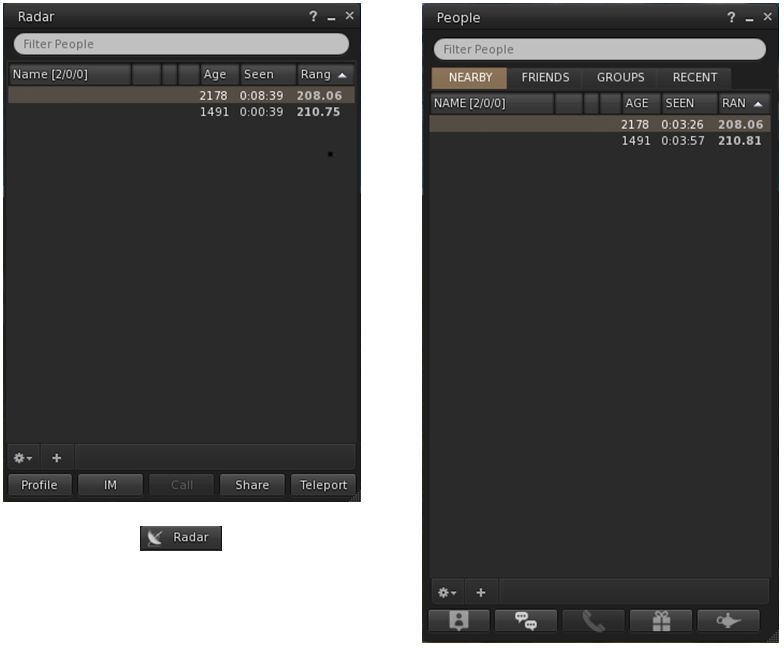
Radar can now be accessed via its own button / menu option / floater for those who prefer not to access it via the People floater. The new button can be selected from the Toolbar Buttons floater, which will open the new Radar floater. Additionally, Radar can be accessed via World > Radar from the menus.
The new Radar floater (left) and optional Toolbar button, compared to Radar as it appears in the Nearby tab of the People floater
The Radar retains all functions found when displaying it in the Nearby People floater, including the ability to display the mini-map within it.
The Payment icons on the Radar / Nearby People floaters have also been updated: $ indicates the user has Payment Information on File; $$ indicates Payment Information Used.
For those who use the Friends list (Comm > Friends or CTRL-SHIFT-F), highlighting a person’s name in the list and then tapping ENTER will start an IM conversation with that person (no need to click the IM button).
For those who use Growl, dialogue messages and inventory received from object messages are now displayed with Growl. In addition, all Growl preferences check boxes will only be enabled if Growl is installed on the user’s system.
Navigation Updates
Map beacon ranges now show the distance from the avatar, not the camera
Firestorm 4.4.1 removes the 2-second delay when using the click-to-teleport functions or teleport chat shortcuts (gtp, etc.) or the Teleport To function in Radar.
A new option allows region grid coordinates to be displayed on the World Map (Preferences > Move & View > Firestorm > Show grid coordinates on the world map), which OpenSim users might perhaps find more beneficial than most SL users.
Also, map beacon ranges now show the distance from the avatar, not the camera.
As always, please refer to the week’s forum deployment thread for news, updates and feedback.
Second Life Server (Main) Channel
On Tuesday 25th June, the SLS Main channel received the server maintenance package deployed to the three RC channel in week 25. This fixes a number of crash modes, addresses an issue with neighbouring region visibility, and adds new LSL capabilities:
The new pathfinding property CHARACTER_STAY_WITHIN_PARCEL, which can be used with llCreateCharacter() and llUpdateCharacter(), and is intended to help with keeping characters within parcel boundaries – see my week 19 report for details
The new object return functions I reported on in week 23, namely llReturnObjectsByOwner and llReturnObjectsByID, are intended to provide an automated means of returning objects to their owners – see my full update on these functions for details.
This package also includes the following:
An update to llReturnObjectsByID() to prevent it from returning other objects which are owned by the parcel owner or estate owner/manager
A fix for an issue in which LSL HTTP-in scripts would sometimes see the incorrect URL (BUG-2833)
A fix for Bug 2850 (Cannot rez objects in Bluesteel and LeTigre parcels which disallow object entry) – which caused this deployment to be replaced by the Magnum RC package in week 24.
The neighbouring region visibility issue referred to in the package is for SVC-8019, which is related to issues with regions failing to communicate with their neighbours for up to an hour are a restart, causing communications issues (e.g. LSL chat) across region borders. It is not intended to address the issue of diagonally adjacent regions not being visible to one another (SVC-8130).
Release Candidate (RC) Channels
On Wednesday 26th June, all three RC channels (Magnum, BlueSteel and LeTigre) should receive a new server maintenance package, comprising:
A fix for ‘llApplyImpulse now works only in the root prim’ (SVC-8227)
Added max_materials_per_transaction to /simulator/features cap
This number returns the maximum number of materials that can be sent to the “RenderMaterials” capability in a single request.
SL Viewer
General
With the release process yet to switch-over to the new system, the following viewer updates were made in week 25:
The SL beta viewer saw an additional release – 3.6.1.277611 on June 21st. This primarily included some fixes for the version of the viewer which is offered via Amazon for download, and rendering fixes
The Snowstorm Contributions Test Build viewer was updated to the 3.6.1 code base (version 3.6.1277577, June 20th, for details of the current contributions in the viewer, follow the link). This would appear to be the first step in merging-up a series of third-party viewer contributions which are liable to see a project / beta viewer release after the new viewer release process comes into use.
Viewer Release Process
Commenting on progress with the upcoming new viewer release process at the Open-source Dev meeting on Monday 24th June, Oz Linden said, “We’re in the final verification stages. Might even get it turned on this week.”
As a side note, and In preparation for the new process, I’ve revamped my Viewer round-up page to (hopefully) better reflect the fact that we should be seeing a broader spread of viewers being put out by LL. This is a work-in-progress, and the page may evolve further as the new viewer release mechanism comes into force. Similarly, the weekly summaries produced from this page are also being revised ready for the new release process.
Materials Viewer
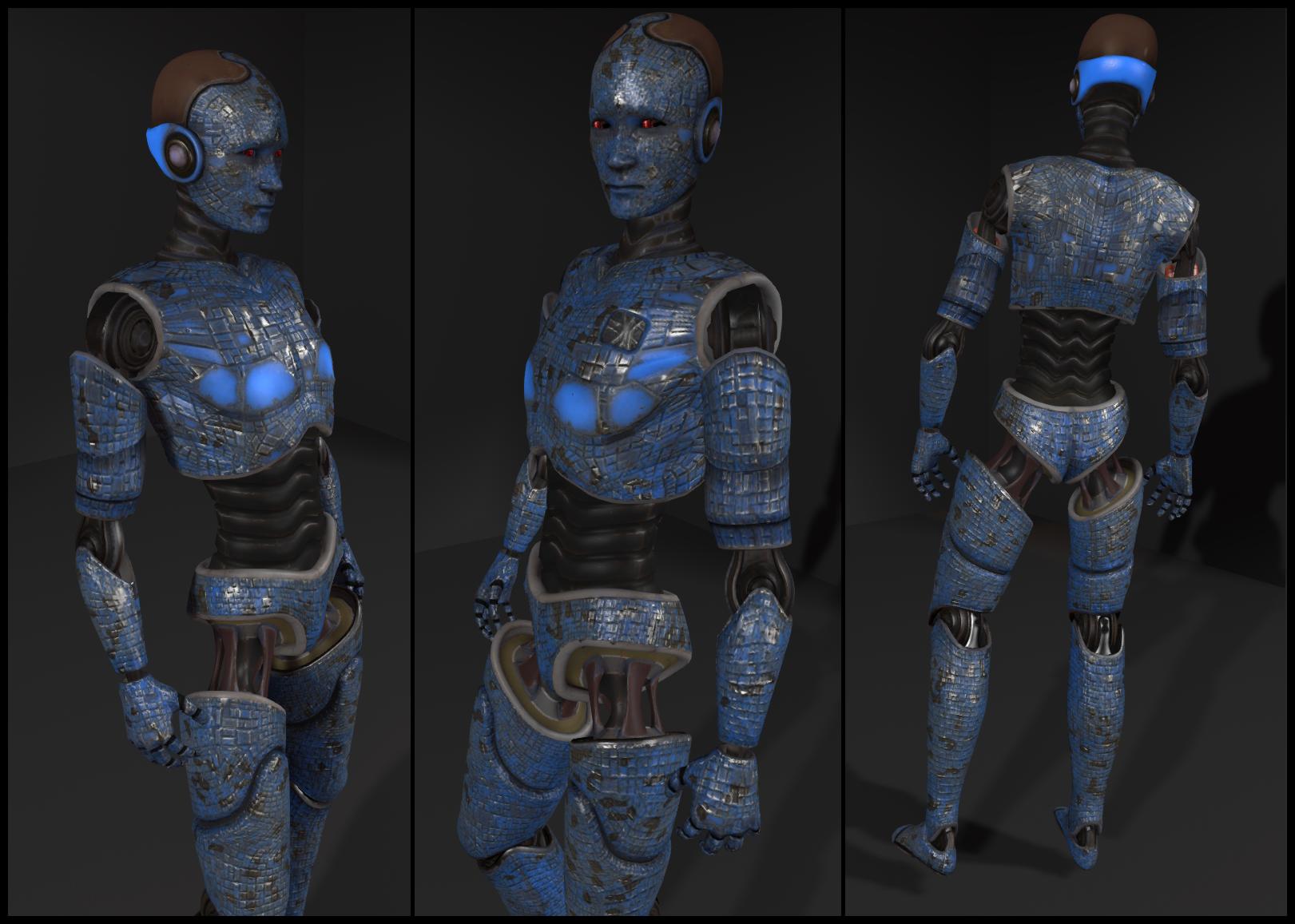
Despite issue with the materials viewer, there are a number of content creators already working on products which leverage the new capabilities. At the Open-source Dev meeting on Monday 24th June, Whirly Fizzle pointed people towards the work of Chip Midnight, who has been working on a mesh avatar using materials properties.
Chip Midnight’s mesh avatar model (click to enlarge)
Whilry also supplied a link to a thread on the SL Universe forums where Chip discusses the avatar. For those interested, it’s worth following the discussion for the next couple of pages – particularly Drongle McMahon’s reply to Chip on the subject of specular and gloss maps.
 Update July 2nd: version 4.4.2 has been released by the Firestorm team, and Firestorm 4.4.1 has been blocked from accessing Second Life. If you have previously installed Firestorm 4.4.1, you can install 4.4.2 without needing a clean install. If you are updating from Firestorm 4.4.0 or earlier, a clean install is strongly recommended. The downloads can be found on the Firstorm website.