This summary is published every Monday and is a list of SL viewer / client releases (official and TPV) made during the previous week. When reading it, please note:
It is based on my Viewer Round-up Page, a list of all Second Life viewers and clients that are in popular use (and of which I am aware) and which are recognised as adhering to the TPV Policy
By its nature, this summary will always be in arrears
The Viewer Round-up Page is updated as soon as I’m aware of any releases / changes to viewers & clients, and should be referred to for more up-to-date information
The Viewer Round-up Page also includes comprehensive links to download pages, blog notes, release notes, etc., as well as links to any / all reviews of specific viewers / clients made within this blog.
Updates for the week ending: June 23rd, 2013
SL Viewer
Current Release viewer updated to version 3.6.0.277516 on June 19th – core updates: materials processing – release notes
Second Life Beta version updated to 3.6.1.277611 on June 21st – core updates: materials fixes – release notes
Snowstorm (3rd party contributions) updated to 3.6.1277577 on June 19 (download)
Kokua 3.6.0.28975 was released on Friday 21st 2013, joining the in-development Black Dragon viewer (NiranV Dean) in becoming one of the first v3-style viewers to fully adopt Materials Processing.
I’ve been remiss in my coverage of Kokua’s development, which has been fairly steaming along over the last several months (the last update I gave was for Kokua 3.4.4 in January 2013), so this piece is a little bit of a catch-up on some of the major updates – such as SSB/A support – since then, starting with the 3.6.0 changes.
Straddling Worlds
Despite all the hoo-haw over the Lab’s move to sub-licence code libraries from Havok (a move which was incorrectly interpreted by some as being an attempt to stymie OpenSim), Kokua is one of the viewer which continues to happily straddle the SL / OpenSim divide by providing capabilities which work in both, as well as options specific to one or the other (such as SSB/A support for SL, and enhanced OSSL support and the ability ro disable SL’s build constraints for OpenSim use, for example).
Accepted onto the Linden Lab Thirty-party Viewer list in April, and listed in the Third-party Viewer Directory, Kokua avoids the Havok complication by providing pathfinding support without the navmesh visualisation capabilities (potentially no great loss to the vast majority of users) and by using the third-party mesh upload code for importing mesh objects, thus allowing it to comfortably span both environments.
3.6.0 Download and Installation
The Windows installer weighs-in at 36.3 MB, putting it towards the upper end of the installer list by file size, which is hardly surprising given the punch of extras the viewer includes. Installation itself was, for me, straightforward, the viewer neatly over-writing my previous version (I opted not to go my usual clean install route).
Firing-up the viewer yielded no anti-virus warnings from AVG Pro (which has recently being getting a little vociferous over SLplugin.exe of late with some viewer installations, despite having given it a pass in previous installs – the most recent flag going up with my installation of the latest SL viewer with materials support).
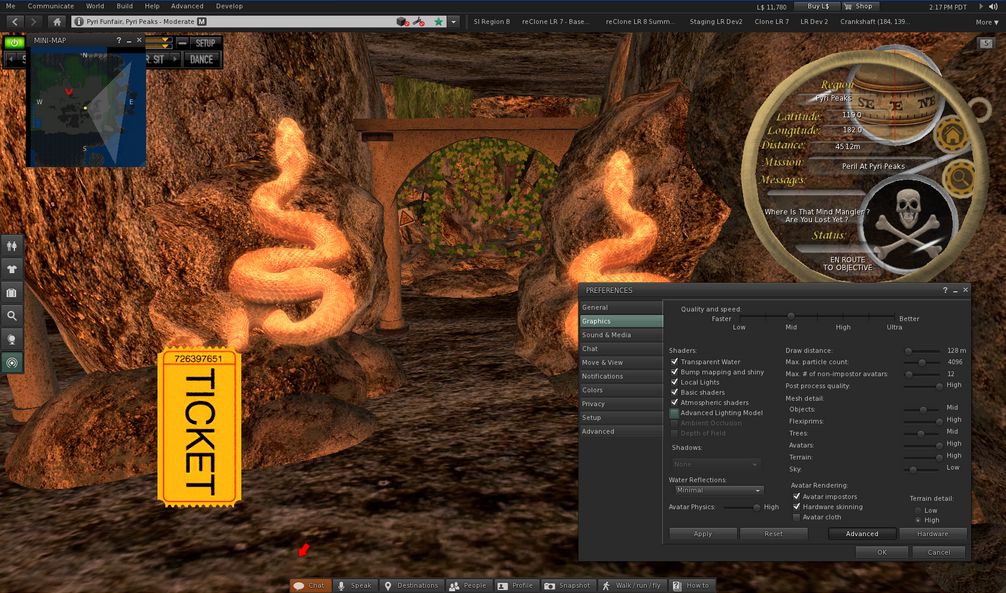
The current Kokua message of the day (MOTD) – coming from LL – raised a smile, using a little humour to underline the fact that SL users need to update their viewers.
A light-hearted reminder of the need for SL users to update to an SSB/A-ready viewer
Materials Processing Support
The release of Kokua 3.6.0 marks it as the first v3-style viewer to provide full viewer-side support for materials processing in for Second Life (if you’re on OpenSim, there are server-side updates required to make materials capabilities work, but there is already a preliminary effort to get these implemented).
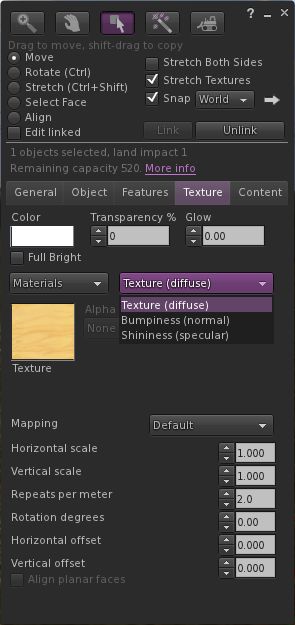
The updated Texture tab of the Build floater
If you’re not sure what materials processing means, please take a look at my primer provided for the SL viewer’s beta release.
As one would expect, materials support has been implemented as it is presented through the SL viewer: the Texture tab in the Build floater has been updated to provide support for normal and specular maps, which can be selected from a high-level drop-down (see right), and which include their own additional attributes (the “old” Bump and Shine options). Note that each materials map can be set with independent repeats and rotations.
Materials also includes some additional updates – the most noticeable of which is perhaps the ability to include an alpha mode when working with alpha masks. This can be set to one of:
None – the alpha channel is ignored, rendering the face opaque, or
Alpha blending – essentially the same as we currently have for any alpha texture, or
A 1-bit alpha mask with each pixel either 100% transparent or 100% opaque, with a cutoff setting to determine where the threshold is (alpha masks should render faster than alpha blending, and eliminate issues with alpha layer sorting), or
Emissive mask – so the alpha layer is interpreted as a per-pixel glow setting.
Materials support also includes gamma correction capabilities within the rendering system. This may cause scenes to render more darkly than in non-materials capable versions of Kokua, and as reported with the SL viewer, may cause some alpha rendering issues.
Graphics Updates
Materials Processing has seen various other changes made to the viewer to improve rendering, some of which have resulted in improvements to the GPU support table, and adjustments made to the graphics defaults themselves. While these may have been included in versions of Kokua prior to 3.6.0, they’re covered here for completeness.
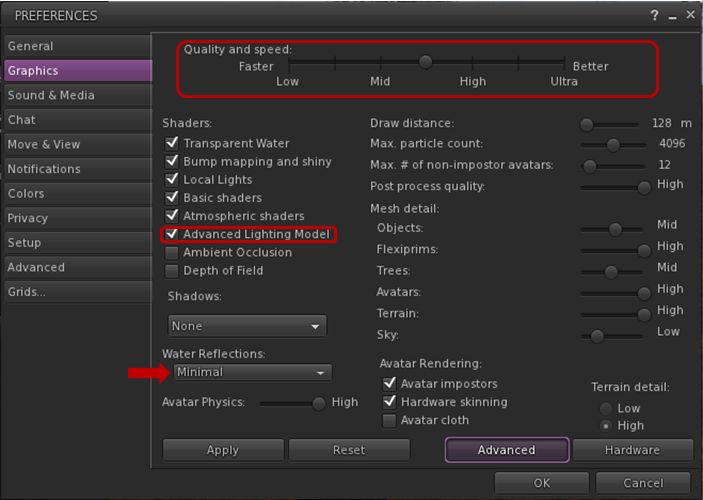
Graphics tab changes in Preferences and water reflections
First and foremost, the Quality and Speed slider now has seven pre-sets instead of four, adding mid-point settings between Low and medium, medium and high, and high and ultra. These are designed to better reflect the capabilities of supported graphics cards and to determine whether or not a card has the ability to support materials rendering by default (whether you actually want it to do so is up to you). As such, you may find that if you’ve not updated Kokua in a while, your default graphics setting is different from previous versions.
The other notable change (again, if you’ve not updated Kokua in a while and haven’t been following SL viewer changes over the last few months) is that the “lighting and shadows” check box has been renamed “Advanced Lighting Model” (ALM), and the option needs to be checked in order for you to see materials capabilities being rendered in your viewer.
Finally, and purely by way of a side note, if you enable ALM in SL and find you’re having issues with alphas rendering correctly with this release of Kokua (they appear entirely black), try changing Water Reflections (arrowed above) to anything other than Minimal. This may help resolve the issue for you. Another possible workaround for the “black alpha” problem is to disable ALM, click on OK to accept and close Graphics, then re-open Graphics and re-enable ALM.
Command Menu, Build Floater Updates and Look AT Options
The 3.6.0 release also sees a new Command menu implemented, which brings together those commands moved from other menus, popular commands and a number of chat commands imported from Firestorm and turned into menu options (such as “tp2cam” to teleport to your current camera location).
Additionally, the Build floater’s Object tab gets a port of the build parameters copy paste function from the (now defunct) Zen viewer as its implementation was newer than other LGPL licensed viewers, and which is completed with fine tuning tweaks from Firestorm.
A note card containing a message from Nyx Linden is doing the rounds in-world concerning Server-side Baking / Appearance. The note card reads in full:
Greetings all,
Nyx Linden (stock)
Wanted to give everyone a quick update on the status of Server Side Appearance. First of all, thanks to all who helped participate in last week’s pile-on test, and a special thanks to those viewers who are already integrating the RegionHandshakeReply flag posted recently. We’ll likely be doing one more pile-on next week, targeting a smaller set of users (to avoid inventory limits that have caused attachments not to load, etc) next week. Let me know if you’d like to participate.
We currently are not aware of any major release-blocking bugs and are starting to look at scheduling the roll-out process. We have a number of QA passes and tests to run through before we can get the final greenlight to do so, so we are currently targeting July 9th as the earliest date at which we will enable SSA for a significant portion of the grid (a server RC channel). Please note that if we find additional bugs in the meantime, or run into other scheduling difficulties this date could be pushed back. We will not be going to RC before this date however.
Please consider this an official warning that this is imminent – We’ve been saying for a while that we’re getting ready for release. We hope with a solid date in mind, all viewers can start messaging to their users that they will need to update or they will start to see issues. There are a few methods by which we will be messaging to the SL community as a whole about this, but we highly encourage you to use your judgement in the best way to reach out to your users and transition them to SSA-compatible viewers.
As always, if you have any questions, or see any issues that could be worrisome if they are not fixed before release, please do not hesitate to reach out to me and/or file a JIRA. Thanks for all your work in preparing for this release!
Nyx Linden
[link and all emphasis mine]
If you want to avoid seeing increasing numbers of grey avatars and / or avoid people telling you, “you’re a cloud” when you appear perfectly fine to yourself, update to a version of a viewer supporting SSB/A
As previously noted in this blog, the plan from the Lab has been to deploy SSB/A gradually. Speaking on this at the TPV Developer meeting on Friday June 14th, Nyx indicated the deployment would be a small group of regions prior to moving to a Release Candidate channel (either in whole or in part) and then progress from there.
However, with the preliminary date for this work to commence, and given that almost all maintained SL viewers are now SSB/A-ready (Dolphin and Exodus are the only exceptions at the time of writing), there really is no excuse for people not to update their viewer. The choices are arleady available:
Those who prefer the v1-style of UI have the choice of Cool VL Viewer and Singularity
Those who prefer the V3-style have the choise of the SL viewer, Catznip, Firestorm, Kokua, Niran’s, and RLV.
In addition, the Lumiya, Meltabolt and Radegast clients are also SSB/A ready.
Update June 21st: A new Materials Support and Tips thread has been started by Creator Linden in the Building and Texturing Forum (with thanks to Daniel Voyage for the poke).
Server Deployments – Week 25
As always, please refer to the week’s forum deployment thread for news, updates and feedback.
Second Life Server (Main) Channel
On Tuesday June 18th, the SLS main channel received the interest list improvement project which have been previously deployed to Magnum (week 22) and BlueSteel and LeTigre (week 24).
Release Candidate (RC) Channels
On Wednesday 19th June, all three RC channels (Magnum, BlueSteel and LeTigre) received the same server maintenance package, designed to fix a number of crash modes and address an issue with neighbouring region visibility. In addition this package:
Contains the new LSL pathfinding property CHARACTER_STAY_WITHIN_PARCEL, and the new LSL object return functions designed to assist land owners with the return of objects under controlled conditions
Provides fixes for A fix for an issue in which LSL HTTP-in scripts would sometimes see the incorrect URL (BUG-2833) and for Bug 2850 (Cannot rez objects in Bluesteel and LeTigre parcels which disallow object entry).
The neighbour region visibility issue fixed by the deployment is for SVC-8019, which is related to issues with regions failing to communicate with their neighbours for up to an hour are a restart, causing communications issues (e.g. LSL chat) across region borders, rather than being related to the issue of diagonally adjacent regions not being visible to one another (SVC-8130), which is still an issue on the main grid.
The fix deployed to the Release Candidates does not address issues of diagonally adjacent regions failing to render to one and/or the other
Commenting on the latter issue while testing it with an alt during the Server Beta meeting on Thursday May 20th, Maestro Linden said, “It looks like some kind of false communications timeout in the remote region, where it disconnects your viewer.” Currently, there is no proposed fix for the issue, although the Lab keep poking at it.
Materials Processing
Objects using transparencies as rendered with ALM off in the materials viewer (click to enlarge)The same items rendered with ALM active in the materials viewer (click to enlarge)
The Materials Processing project reached a release status on Wednesday June 19th, with the release of Second Life viewer 3.6.0.277516.
However, problems continue to be reported with transparencies rendering as black when using the viewer, (see MATBUG-175, MATBUG-193 and a similar bug, MATBUG-186).
Two possible workarounds for these problems have been suggested, which may work, depending on the precise nature of the issue, if you’re experiencing it:
Going into Preferences > Graphics and unchecking Advanced Lighting Model (ALM) before click OK to apply, then going back into Preferences > Graphics and enabling ALM once more
If you have water reflections set to Minimum in Preferences > Graphics, try setting them to a higher value and then unchecking / rechecking ALM.
Some of these issues were known well in advance of the viewer reaching a release status, which promoted comments of surprise during the Open-source Developer meeting on Wednesday June 20th that the viewer had been released. Commenting on this, Oz Linden responded:
I’m not at all surprised that people found combinations of visual attributes we hadn’t tested that were busted, really. There are a staggering number of combinations – after you factor in all the possible settings changes on top of them, the number is absolutely not even close to something we could test. The “black issue” makes it sound simple…. we probably had a dozen bugs during development that had that same symptom for different reasons. I’m sure we’ll get it sorted out.
Update June 21st: Kokua version 3.6.0.28975 has been released, which include Materials Processing support.
Update June 20th: NiranV Dean has released a version of his “in development” Black Dragon SL viewer with Materials Processing support. See his blog post for details.
If you are already running the release version of the viewer (3.5.3.276452) and have automatic updates enabled, the new version of the viewer, you should be notified that the update is available. If not, or if you have not previously installed the SL viewer, but wish to try-out the new materials capabilities, you can download and install 3.6.0.277516 by following the above link to the official download page.
A katara created by June Dion showing surface detail and reflective qualities using materials properties
For those not in the know, Materials Processing adds normal and specular maps to the in-world tools capabilities of the viewer (using the new land impact accounting system in the process!), allowing much higher / improved levels of realism be obtained with textures used on prim, sculpt and mesh items (they do not work on avatar skin and clothing layers).
I provided an overview of the Materials Processing, including brief notes on normal and specular maps when the project reached a beta viewer release status at the start of June, and I refer you to that post for details.
As noted in that article and elsewhere, the materials capabilities introduce a revised Textures tab to the Build floater in the viewer, which allows you to add normal and specular maps to objects and object surfaces, as well as textures (referred to a diffuse maps).
Materials Build floater Texture tab: The diffuse (texture) option, showing the Alpha mode drop-down options (l); the normal map options, with map picker and default bump map drop-down (c); the specular map options, in which the Shininess drop-down displays the familiar low, medium & high shiny options (r)
Note, as well, that in order to see materials in action, you’ll need to enable the Advanced Lighting Model option in the Graphic tab of the materials viewer. Please also see the Materials FAQ for other information relating to Materials Processing.
Given the capabilities are now available in the release viewer, and allowing for pressing activities around Server-side Baking / Appearance, it is likely that we’ll start seeing more TPVs start to adopt materials in the coming weeks (for example, the Cool VL viewer already has materials support in the experimental branch).
In the meantime, the Lab has released a video demonstrating the capabilities, complete with a Torley Dancing SL10B bear!
Materials Processing represents a collaborative project developed and implemented by both Linden Lab and third-party viewer developers. Originally a proposal submitted by members of the Exodus viewer team in 2012, the project has included the direct involvement of developers from Catznip (notably Kitty Barnett) and Firestorm (notably Tonya Souther) as well as from Exodus (notably Geenz Spad) in the development of the viewer-side tools and capabilities, with the Lab working on the server-side of the capabilities.
If you encounter any major issues with the viewer, such as alpha issues, severe problems with texture rendering as black, etc., please make sure you file a JIRA on the issue, with any screen shots you can provide in addition to details of your system (Help > About Second Life > COPY button to copy / paste system information).
As always, please refer to the week’s forum deployment thread for news, updates and feedback.
Second Life Server (Main) Channel
On Tuesday June 18th, the SLS main channel received the interest list improvement project which have been previously deployed to Magnum (week 22) and BlueSteel and LeTigre (week 24). This includes:
A fix for excessive AvatarAppearance packets being sent to the viewer [in which the simulator would send many unnecessary AvatarAppearance messages to the viewer]
A final fix for the “meeroo problem” whereby animations on Meeroos and other animals fail to update correctly when camming around.
Release Candidate (RC) Channels
On Wednesday 19th June, all three RC channels (Magnum, BlueSteel and LeTigre) should receive the server maintenance package briefly deployed to BlueSteel and LeTigre in week 24. to fix a number of crash modes, addresses an issue with neighbouring region visibility, and adds new LSL pathfinding capabilities and object return capabilities:
The new pathfinding property CHARACTER_STAY_WITHIN_PARCEL, which can be used with llCreateCharacter() and llUpdateCharacter(), and is intended to help with keeping characters within parcel boundaries – see my week 19 report for details
The new object return functions I reported on in week 23, namely llReturnObjectsByOwner and llReturnObjectsByID, are intended to provide an automated means of returning objects to their owners – see my full update on these functions for details.
This package also includes the following:
An update to llReturnObjectsByID() to prevent it from returning other objects which are owned by the parcel owner or estate owner/manager
A fix for an issue in which LSL HTTP-in scripts would sometimes see the incorrect URL (BUG-2833)
A fix for Bug 2850 (Cannot rez objects in Bluesteel and LeTigre parcels which disallow object entry) – which caused this deployment to be replaced by the Magnum RC package in week 24.
SSB/A Pile-on Test Update
Nyx Linden (stock)
On Friday June 14th, a Server-side Baking / Appearance pile-on test was conducted on the main grid (see my report on events). The Lab is still going over the results of the test and all JIRA filed and log files submitted. Giving a preliminary summary of the test at the Content Creation User Group meeting on Monday June 17th, Nyx Linden said:
We actually just recently got through looking at the bug reports that were filed. Things are looking good, if you know anyone who saw anything major during the pile-on test please encourage them to file a bug ASAP if they have not already done so.
The system seemed to work quite well for most people, and we’re looking closely at the people who were having trouble resolving to try to figure out exactly what happened. The baking service was doing fine, there were some other services that weren’t used to that many people changing their outfits that close together (hence some attachments had difficulty resolving, etc). If anyone knows of failure cases for SSA (aside from those reported if you log in with very old viewers), please let us know asap.
The test did not include a minor update intended for the viewer-end of things, or the code change to help avoid SUN-74. However, as mentioned in my last SSB/A update, the former isn’t required prior to SSB/A starting its deployment across the grid, while the safest way to avoid encountering problems with non-maintained viewers / viewer without the necessary SSB/A updates is to upgrade your viewer. Now.
Viewer News
Materials Processing
The final beta release (3.6.0.277409) performed well over the weekend, with a crash rate “comfortably under” 9%. The code has been merged with the release viewer and is in its final QA testing ready for deployment. Providing nothing unexpected happens, it should appear on the viewer download page as the release viewer very soon.
Viewer Release Process
Work is continuing on the new viewer release process, which may go live later in week 25 or early in week 26. In the meantime, and as reported in week 24, a viewer source repositories page has been produced on the wiki. There is also a further wiki page explaining the release process, although it is still under development. You can find it listed as the Viewer Integration and Release Processes.
Note that the new process does not mean there will be multiple versions of the release viewer available for download (although there will potentially be multiple project / beta / release candidate versions available for download).
Should two projects reach a point of being ready to go to a release status at the same time (such as with “project 1” and “project 2” in the diagram above), a decision will be made by the Lab as to which should go first. That viewer then changes status to release, with the code pulled back to the viewer-release repository. The second viewer awaiting release will then merge with the changes and put out a further release candidate, and will then move to a release status from there.
For ease of reference, the viewer download page and the Alternate Viewers wiki page remain the default places for most users to obtain versions of the SL viewer.
Other Bits
Object Contents Loading
We’re all familiar with using prims as storage for other items (e.g. “boxed” items sold through the Marketplace or using a prim to store items in inventory we don’t frequently use). when a prim has a large number of items in it, there can be a noticeable delay in seeing the contents listed in the Contents tab of the Build floater. In addition, adding objects can be prone to a slow response as well – and can cause problems such as the loss of No Copy items when dropping more objecting into the Contents tab while the system is already copying / adding items to a prim’s contents. I
n terms of the slow loading issue, some have reported times of 30-40 seconds when trying to list the contents of a prim with 100 or so items, and a question was asked at the Simulator User Group meeting on Tuesday June 18th on whether there was any particular reason for this.
Replying to the question, Andrew Linden started with a cautionary note, “Sure, people can create that many items in contents, but I wouldn’t rank it as a good idea.” He then went on, “I don’t know the exact nature of the bottleneck there, but 30 seconds sounds too long. I’m pretty sure it could be sped up, but I’d have to dig around to see why it is slow.”
Kelly Linden then added: “Object inventory transfer from server to viewer uses one of the oldest legacy methods in Second Life. Updating that is probably a good idea but would require a joint viewer and server version change, or some acrobatics on managing compatibility.”
While agreeing this might be the case, Andrew went on, “The UDP protocol should be able to transmit 300 items in much less than 30 seconds. I’ll try to look around to see what is limiting that. However, I should note… I won’t be attending next week. I’ll be on vacation.”
So, there may be further updates on this in the future.