Linden Realms revamped

The flames of Linden Realms

Linden Realms, first introduced by the Lab in 2011, has proven surprisingly popular among residents. An early example of the Lab’s (then) nascent experience tools, the appeal of the game is – in part at least – its relative simplicity (coupled with the Linden Dollar rewards). In short, players are delivered to a 12-region location (there are several – all identical – on the grid) – where they can receive a game HUD and instructions. Then it is a case of running around the landscape collecting crystals which can be exchanged for Linden Dollars.

Crystals come in three colours, reflecting their rarity  / value, and they can be collected by running over them. However, this being a game means there are a range of hazards – from the rock monsters patrolled the regions and which will chase you if you get too close, through to toxic waters, fireball-spewing rock carvings, treacherous caverns and so on. However, no-one actually dies from these hazards – being “caught” by any of them will lead to players being teleported to one of several “resurrection circles” (generally the one closest to the point where they were “caught”), and then they can resume the game. Or those are the basics.
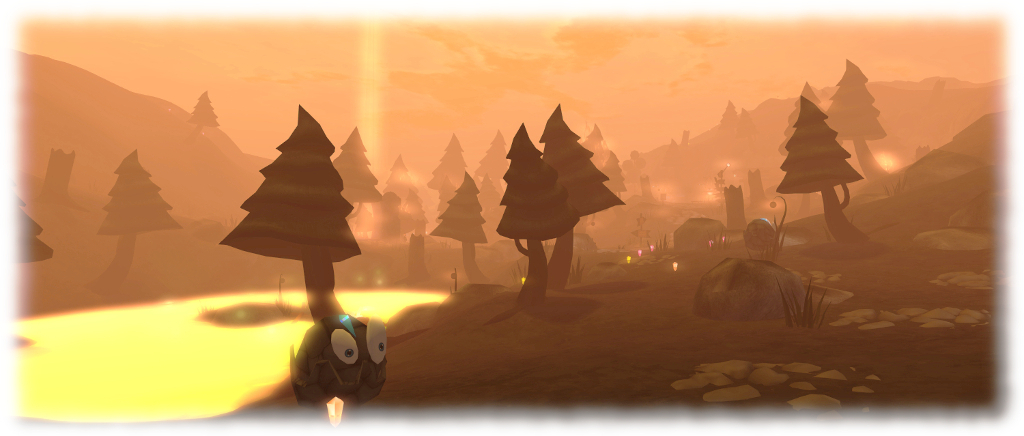
Linden Realms: the threats are still there, despite the flames

The game has been tweaked a few times along the way (such as being opened to all SL users a month after it opened, rather than remaining Premium-only), and on Thursday, March 15th, the Lab announced the latest of these tweaks: a new fiery look for the Realm regions. In a very brief back story, it seems the wicked Ruth (she of the villainy in Tyrah and the Curse of the Magical Glytches – see my review here) has used Magellan Linden’s coffin (launched into space as part of the prologue to the Tyrah story), to divert a comet so it has crashed on the Realms, leaving them in flames (technically, it should have flattened them, but I’ll push the space fan in me to one side 🙂 ).

From the  – admittedly brief – time I spent there, game play is still the same as previously, just now within a lurid,  smoky-orange environment where trees and building equally burn. How long it will remain so is hard to say, but right now, and allowing for the aforementioned point that Linden Realms has retained popularity through the last 6+ years, the new look and feel does appear to be attracting the curious and encouraging them to play.

Should you opt to renew your acquaintance with Linden Realms (or even hop over to play it for the first time), don’t forget that the regions are also available for the capture of Glytches from Tyrah and the Curse of the Magical Glytches mentioned above. Just be sure to wear your Tyrah HUD and Glytch capture weapon at the ready, as the note in local chat reminds you on first arriving within the Linden Realms regions:

If you would like to play Tyrah and the Curse of the Magical Glytches on this parcel (and many others) you need to be wearing a HUD and a weapon for collecting Glytches. If you do not have a HUD or weapons for collecting the Glytches, you can collect them from Hartyshire (144,126,23). You can read more about the game Tyrah and the Curse of the Magical Glytches at this URL: https://wiki.secondlife.com/wiki/Linden_Lab_Official:TCMG.
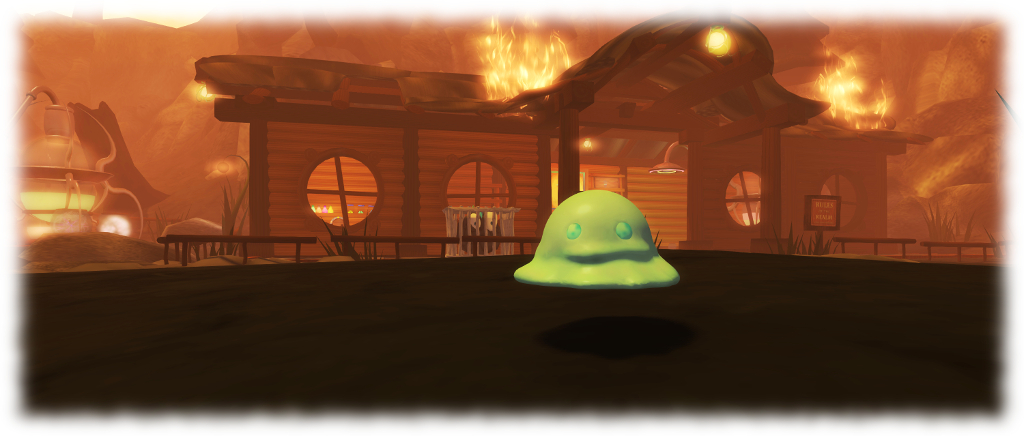
Glytches are also in Linden Realms, and can be hunted and caught is you’re wearing the Tyrah and the Curse of the Magical Glytches HUD (the Glytches will ignore you if you don’t)

And happy hunting, whether it is for crystals or Glytches – or both.

Linden Realms, Tyrah and other Linden-created destinations can be reached via the Portal Parks:

The poet and the Prince of Denmark in Second Life

La Maison d’Aneli – Nino Vichan: Hamlet 5 Scenes

Opening on Thursday, March 15th at La Maison d’Aneli, curated by Aneli Abeyante, are two new exhibitions by three well-known Second Life artists: one by Nino Vichan, and the second by Tutsy Navarathna and JadeYu Fang. They are two very different exhibitions, but they are drawn together through each of them having literary foundations. Both are reached via an initial arrival point, and can be reached via either the teleport disks or by clicking on the artist’s names on the main board (which will also deliver note cards). There’s also a direct drop down to one of the installations.

In Hamlet 5 Scenes, Nino Vichan presents his interpretation of five key scenes from Shakespeare’s Hamlet, Prince of Denmark. As Nino points out in his opening notes, we know of three versions of the play have survived through to modern times: the 1623 First Folio edition, considered to be the “definitive” version of the play; and the “First Quarto” (1603, aka “Hamlet Q1”) and “Second Quarto” (1604, aka “Hamlet Q2”).

La Maison d’Aneli – Nino Vichan: Hamlet 5 Scenes

The former of these two Quartos is now widely regarded as the “bad Quarto”, possibly written by an actor who participated in a production of Hamlet. While the Second Quarto is now regarded as an attempt by Shakespeare to published the “full” version of the play (it is some 1600 lines longer than the First Quarto) to set the record straight. In support of this, historian point to the title page of the Second Quarto stating that it is “Newly imprinted and enlarged to almost as much againe as it was, according to the true and perfect coppie.”

For his part, Nino takes these three versions as the leaping-off point for imaging Shakespeare within his study, struggling over the play, writing and revising it. For the purposes of the piece, we are Shakespeare, invited to take a seat – in turn – in each of the five chairs ranged around a central table. Each chair represents a specific element of the play, which we see through the playwright’s eyes, as it were, as he contemplates each.

La Maison d’Aneli – Nino Vichan: Hamlet 5 Scenes

For this to work. make sure your camera is not free-flying when sitting in a chair (hit ESC before sitting in each one). This will allow the act of sitting to take control of your camera and focus it on each scene. The chairs should be occupied in numerical order (each has a number visible on its upholstery), so that the scenes can be seen chronologically in reference to the play.

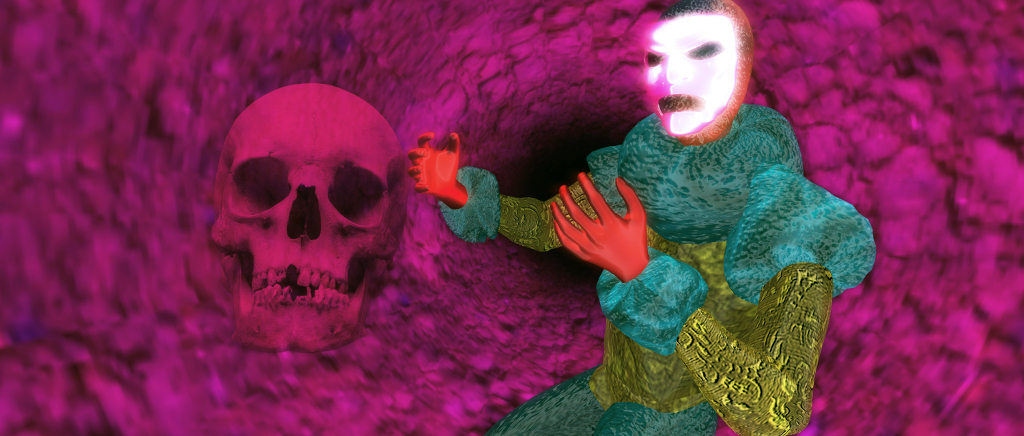
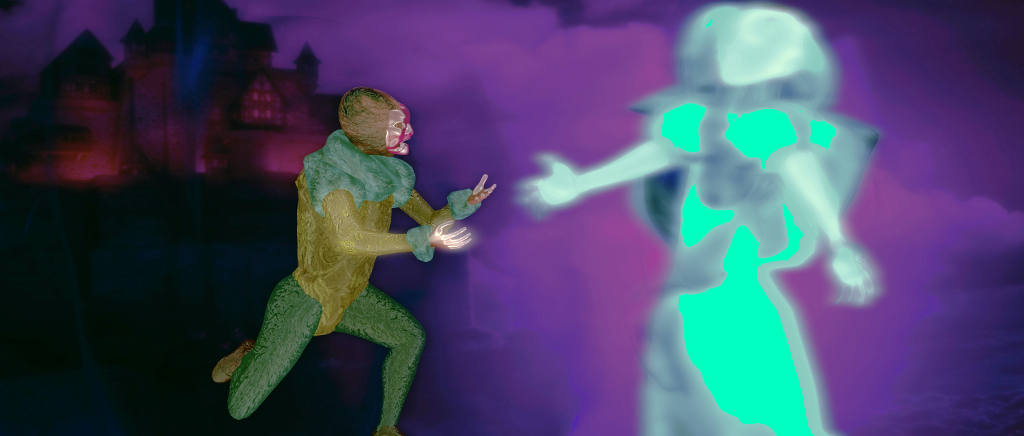
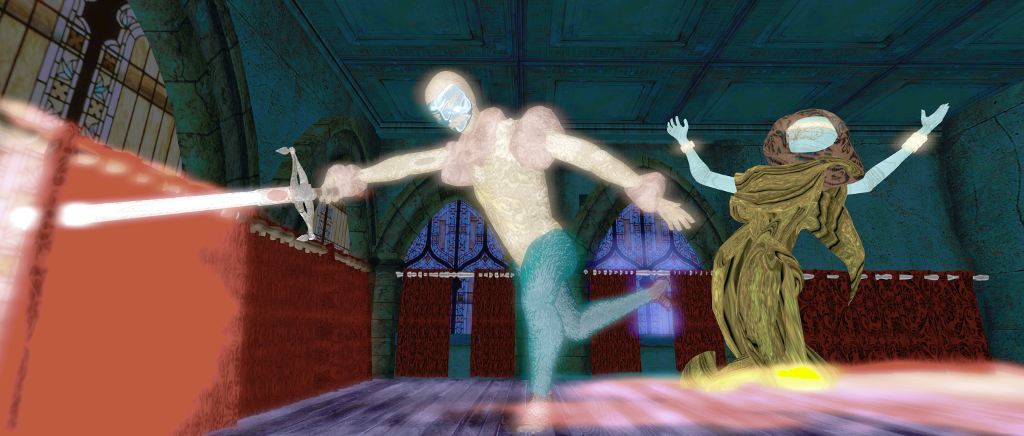
These scenes start with the sightings of the ghost of Hamlet’s father which set the events of the tragedy in motion, and conclude with Hamlet’s encounter with the skull of a jester he knew in his childhood (“Alas, poor Yorick. I knew him, Horatio: a fellow of infinite jest, of most excellent fancy; he hath borne me on his back a thousand times.” Between there sit the famous soliloquy, the murder of Polonius and the death of Ophelia. Modelled in 3D , using a mix of mesh and particles to achieve their effect, each offers unique view on the aspects of the play it represents, while the liner notes accompanying the installation offer further context, should it be needed.

La Maison d’Aneli: Tutsy Navarathna and JadeYu Fang – Bring Me Your love

For Bring Me Your Love, Tutsy and JadeYu present a tribute to the German-American poet, novelist, and short story writer Henry Charles Bukowski (born Heinrich Karl Bukowski; August 16th, 1920 – March 9th, 1994). The title of the installation is taken from Bukowski’s 1983 short story of the same name, illustrated by Robert Crumb.

This installation brings together images taken from around Second Life together with quotes from Bukowski and excerpts from his writing – poetry and stories. Blunt, at times aggressive in his use of language, Bukowski was forthright in his writings and views, and this is very much reflected in this installation, which is presented as a single piece – art and quotes making up walls and floors. To one side there is an area set aside for sitting and contemplation, complete with a  television set playing a loop of clips of television shows and films for the later decades of Bukoski’s life.  This area is also home to what might be regarded as the bric-a-brac of Bukowski’s life.

La Maison d’Aneli: Tutsy Navarathna and JadeYu Fang – Bring Me Your love

As noted above, these are two very different exhibitions, drawn together through each of them having a literary foundation. Each is individually fascinating, their core subject matter being very different, thus they make an ideal complimentary visit.

Slurl Details

VWBPE 2018: March 15th-17th – preview

VWBPE 2018

The 2018 Virtual Worlds Best Practice in Education (VWBPE) conference takes place between Thursday, March 15th and Saturday March 17th, 2018 inclusive. A grass-roots community event focusing on education in immersive virtual environments, VWBPE attracts 2200-3500 educational professionals from around the world each year.

I recently gave a brief overview of this year’s conference at the end of February, so this piece is intended to provide a little more meat for potential visitors.

As with recent years, the conference is focused on the 8 core VWBPE regions in Second Life, centred on the VWBPE Gateway.

Event Calendar

The best way to keep abreast of the full schedule is via the VWBPE 2018 event calendar. By default, this displayed in posterboard (shown below), but can easily be switched to agenda, month or stream views via the drop-down menu in the top right corner. Individual events can also be added to a number of personal calendars – Google, Outlook, Apple – making it even easier for attendees to track the events and activities they particularly want to attend at this year’s conference.

Use the drop-down at the top right of the VWBPE event calendar if you’d prefer to see it displayed in other formats

Note: event details pages in the calendar include a “Where” item with an apparent SLurl. These links tend to open a further copy of the event details page, rather than provide a SLurl map page. Instead, and where provided, use the “location” SLurl at the bottom of event pages for direct access to the location via a SLurl map page OR note the location name and use the event Teleport HUD in-world – see below for more.

Event Selection

The following is a (personal) selection of events those curious about VWBPE 2018 might want to attend:

Thursday March 15th

All times SLT

VWBPE 2018: Main Auditorium

Friday March 16th

  • 06:00-07:00: Morning Meet and Greet: meet VWBPE staff and volunteers, have your questions about events and the schedule answered and meet other attendees at the Social Area.
  • 11:00 – 12:00 noon: keynote: Bryan Alexander, Education Futurist: VRevolution calls for a new digital literacy at the Main Auditorium.
  • Social event highlights:
    • 12:00 noon – 13:00: Live Music with Keeba Tammas and her backup band, “The Tiny Maniacs” at the Social Area.
    • 14:00-14:50: Under the Sea Adventure: explore the beautiful underwater area of the social sim and become a mermaid or merman. Under the Social Area.

Saturday, March 17th

  • 07:00-08:00: Morning Meet and Greet: meet VWBPE staff and volunteers, have your questions about events and the schedule answered and meet other attendees at the Social Area.
  • 08:00-09:00: Blending VWs & Digital Tech. in Language Teaching: teaching immersive English literature by blending 3D worlds, machinima and other external digital tools. At Lecture Area A.
  • 12:00 noon – 13:00: Liberate Agency Amplification Via Avatar Identity: at Lecture Area B.
  • 16:00-17:00: Waiting for the VR Evolution: for many who have embraced change and have been early adopters, waiting for the rest of the world to catch up has not been easy. A discussion at the Quadrivium.
  • 18:00-19:00: VWBPE 2018 Closing Ceremony at the Main Auditorium.
  • Social event highlights:
    • 13:00-14:00: Games and Fun on the Social Plaza.
    • 17:00-18:00: Live Music with Nina Bing at the Main Auditorium.
    • 19:00-21:30: Music and Dancing featuring Lightning Production’s U2 Tribute Concert. In honour of St Patrick’s Day (19:00-20:00) followed by DJ Coz Okelly 20:00-21:30). All at the Social Area.
VWBPE 2018 Quadrivium

Getting About

VWBPE takes place across 8 regions (including the exhibitors spaces). While exploring on foot is fun, the quickest way to get to event / activity venues is via the VWBPE Teleport HUD, which can be obtained from the vendors at the VWBPE Gateway.

Simply ADD the HUD to your screen and click it when needed to open a dialogue box listing the key locations in the VWBPE regions. Click on the location you require to open the World Map with the location marked. Click on Teleport on the World Map to TP to the location. Simples!

The VWBPE Teleport HUD – click the HUD to display a dialogue box of destination in the VWBPE 2018 regions (appear top right of your screen). Click the desired destination to display it on the World Map, then click the Map’s teleport button to go to the location.

About VWBPE

VWBPE is a global grass-roots community event focusing on education in immersive virtual environments which attracts over 2,000 educational professionals from around the world each year, who participate in 150-200 on-line presentations including theoretical research, application of best practices, virtual world tours, hands-on workshops, discussion panels, machinima presentations, and poster exhibits.

In the context of the conference, a “virtual world” is an on-line community through which users can interact with one another and use and create ideas irrespective of time and space. As such, typical examples include Second Life, OpenSimulator, Unity, World of Warcraft, Eve Online, and so on, as well as Facebook, LinkedIn, Twitter, Pinterest or any virtual environments characterised by an open social presence and in which the direction of the platform’s evolution is manifest in the community.

Additional Links

Second Life: Mainland price restructuring

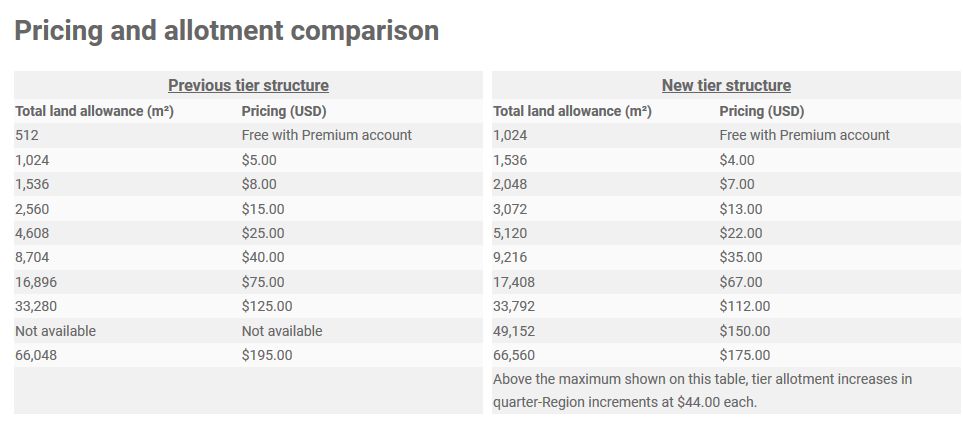
On Wednesday, March 14th, 2018 Linden Lab announced a restructuring of Mainland tier costs, with allotment of “free” land for Premium members doubled from 512 sq metres to 1024 sq metres.

The announcement was made via a blog post, which reads in full:

We’ve got some exciting news for both aspiring and existing Landowners who think the cost of land is too darn high in Second Life. Effective immediately, we’ve reduced Mainland costs by over 10 percent. 

But, wait…there’s more!

Premium members now also get DOUBLE the Mainland allotment! That’s twice as much space to build, create and design your own home, business or experience in Second Life at no extra charge! Premium subscribers now have 1,024m² included with their membership: you could keep your Linden Home and still have another 512m² left over, or use your entire 1024 allotment towards a parcel on the Mainland.  To learn more about specifics of this change, view our Pricing and Allotment Comparison chart.

We know that costs associated with land ownership can hinder some people from realizing their full creative vision in Second Life or even keep them from participating in Second Life as much as they’d like. In 2015, we decreased land setup fees by up to 40% and restored a 50% discount on set-up fees and ongoing maintenance fees for educators and nonprofits. In 2016, we offered a limited-time “buy-down” opportunity that rolled back maintenance fees on full islands and homesteads.

As Second Life begins to celebrate its fifteenth birthday, we hope that this latest price drop will be welcome news to those who aspire to explore their creativity in 2018 and beyond.

The new Mainland tier rates for Premium members (right), with the new “free” allowance of 1024 sq metres of land, compared to the pre-March 14th tier rates

Of course, when people talk about tier being “too damned high”, they are generally referring to the cost of private regions (particularly Homesteads), so this change in Mainland rates many not be looked upon favourably in some quarters. But the fact remains – as I pointed out in 2013 – lowering private region tier isn’t as easy a proposition for Linden Lab as some tend to think, the (roughly) 23% reduction in tier revenue the Lab has seen since November 2013, notwithstanding.

As such, this should be seen for what it is – an attempt by the Lab to encourage land take-up  – and leave us not forget there have also been calls to re-invigorate Mainland with all of its abandoned land – without unduly exposing their bottom-line. So, if nothing else, it will be interesting to see what this offer does both in terms of Premium subscriptions and in encouraging people to take-up their “free” 1024 square metres of Mainland (or go bigger and use the 1024 “free” + the reduced difference in remaining tier).

A slight spanner in the works here, of course is that obtaining Mainland parcels can be time-consuming, and comes with the initial overhead of the purchase price. Nevertheless, it will also be interesting to see if / how this affects Linden Home ownership. A complaint against the latter is that while they come with a 175 LI allowance and a house which does not count towards that total, the houses themselves are oft viewed as unattractive. So, will these changes encourage some of those with Linden Homes to abandon them in favour of a 1024 sq m parcel (the aforementioned pain in finding and purchasing a suitable parcel notwithstanding) with at least 350 LI and a house of their own choosing, even if it does count against that total?

Time will tell on this.

2018 SL UG updates #11/1: Simulator User Group

Kamigami, Pandora Resort Town; Inara Pey, February 2018, on Flickr Kamigami, Pandora Resort blog post

Server Deployments

As usual, please refer to the server deployment thread for the latest updates.

  • There was no deployment to the Main (SLS) channel on Tuesday, March 13th, leaving it on server version 18#18.02.12.512536. According to the deployment notes, the channel should have been restarted.
  • On Wednesday, March 14th, the main RC channels should be updated as follows:
    • TBC: no deployment to BlueSteel, leaving it on server version 18#18.03.05.513046.
    • LeTigre and Magnum should both receive a new server maintenance package, 18#18.03.12.513258, comprising internal fixes and further simulator logging improvements.

SL Viewer

Updates

  • The Media Update RC viewer updated to version 5.1.3.513038, on Monday, March 12th.
  • A new Maintenance RC viewer was release on Tuesday, March 13th. Version 5.1.3.513234, code-named Ouzo, after the anise-flavoured aperitif. This viewer includes over 50 bug fixes and improvements.

Remaining Pipeline

Besides these two updates the official viewer pipeline remains as follows:

  • Current Release version 5.1.2.512803, dated February 23rd, promoted March 1st – formerly the Nalewka Maintenance RC.
  • Release channel cohorts:
    • Love Me Render RC viewer, version 5.1.3.513005, dated March 2nd.
  • Project viewers:
  • Linux Spur viewer, version 5.0.9.329906, dated November 17th, 2017 and promoted to release status 29 November – offered pending a Linux version of the Alex Ivy viewer code.
  • Obsolete platform viewer, version 3.7.28.300847, May 8th, 2015 – provided for users on Windows XP and OS X versions below 10.7.

Other Items

Meeting Reminders

  • There is NO Content Creation User Group meeting this week – the next CCUG meeting will be on Thursday, March 22nd at 13:00 SLT.
  • There is no Web User Group meeting this week – the next WUG meeting will be on  Wednesday, March 28th, at 14:00 SLT.

Sansar Product Meetings #11/1: mid-March release news

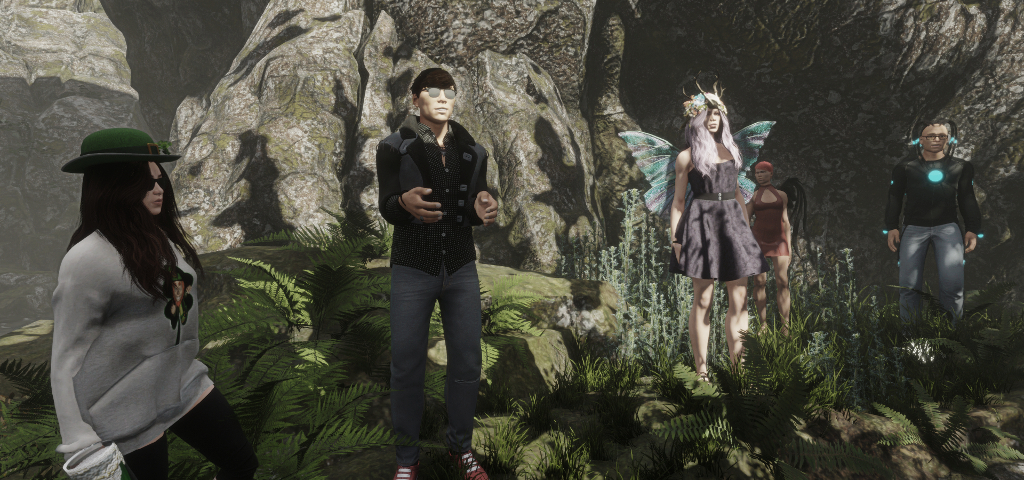
Pierre (centre, in sunglasses) and Cara (to his left, with wings) discussing the upcoming mid-March Sansar release on Tuesday, March 13th at Skye Naturae Virtualis

The following notes are taken from the Sansar Product Meeting held on Tuesday, March 13th. These weekly Product Meetings are open to anyone to attend, are a mix of voice (primarily) and text chat. Dates and times are currently floating, so check the Meet-up Announcements and the Sansar Atlas events sections each week. Official notes, when published can be found here.

Originally, the subject for the meeting had been listed as being the Sansar avatar. However, this was updated to a discussion about the upcoming “mid month” Sansar release.

Overview

March 2018 will see a “mid-month” release for Sansar – the exact date is still TBA, and it is being made because  a number of features are available earlier than the Lab had anticipated, and which Linden Lab is keen to get in front of users.

The following is a high-level overview of what to expect. Obviously, I’ll have more information on this when the release is deployed, and the release notes are available.

Performance Improvements

The Lab convened a “strike team” to address a number of performance issues, and the upcoming release should be marked by a umber of performance improvements.

Terrain Editor and Performance

One of the findings from the performance investigations is that the terrain editor used to sculpt height maps from within Sansar, and the terrains edited using it, can have a significant performance impact in both Edit and Run-time modes. There is no quick fix for this at present, as the terrain editor requires a significant amount of work, and the resources aren’t available at the moment. Because of this:

  • The terrain editor will be disabled with the next release.
  • There’s no date as to when a replace terrain editing system will be implemented.
  • Between now and the end of April, creators who have extensively used the terrain editor and height maps to produce terrain in their scenes / experiences, will be asked to remove / delete their existing terrain sculpts with tiles made via alternative means (e.g. custom made externally and uploaded for “as-is” use).

Pierre outlines the terrain editor issue

This means that with the mid-March update:

  • It will no longer be possible to upload new height maps.
  • It will no longer be possible to list new height maps on the Store, either uploaded or those already in inventory.
  • Creators who have placed height maps on the Store will be asked if they could unlist them to prevent people for purchasing them and using them in their scenes.
  • It will no longer be possible to paint, sculpt, reposition, rotate, etc., terrain in  scene.
  • It will no longer be possible to pull terrain sculpts from inventory for use in a scene.
  • Terrain elements will still work as expected in published experiences, but again, they will not be editable within the experience’s scene.

Then, between the mid-March update and the end of April:

  • Creators will be encouraged to remove / delete custom terrain sculpts as noted above, and replace them.
  • Terrain maps not removed by the end of April will be replaced by a place-holder item.
  • To help people get to grips with creating and uploading terrain elements, the Lab will be providing a new Sansar knowledge base article.

Feedback from those at the meeting:

  • A request has been made that the Lab allow higher resolution textures to be used with uploaded terrain tiles, particularly where larger experiences are concerned.
  • Another request was made for the Lab to make at least some of the scene template elements (e.g. the rocks and cliffs) available through the Store so that experience creators would have some “pre-built” terrain elements they could use.

Both ideas are being taken back to the Lab for consideration.

Events Creation

As reported in my week #10 update, with this upcoming release it will be possible for Sansar experience owners to create their own event listings.

  • The option to create an event – a meet-up, game, tour, and so on will only be in the client (it will not be possible to create events from the web).
  • Using the client, it will be possible to set the location, date, time and duration of an event (presumably with some form of description, although this wasn’t specified in the meeting).
  • Once created, all events will be displayed in both the client Atlas events section and on the Sansar Events page.

Scripting Improvements

Script Update Capability

With the upcoming release, scripters will be able to offer updates to their scripts listed on the  Sansar Store. The basic process will be:

  • Update the script and upload it to inventory.
  • In the client, locate the revised script, right-click on it and select the “Replace Item on Store” option.
  • This will take the script creator through a workflow to replace an existing script associated with a Store listing with the updated script.
    • If required, the listing can also be updated to include release notes or details of changes made to the script.
  • Those who then wish to update their versions of the script can then go to the store and download the update (which will be added to their inventory without deleting / replacing the original version) or, if they prefer, just keep using the original.

This functionality has been implemented and is being deployed to help with situations where changes to Sansar’s evolving script APIs can result in scripts being broken following updates. other options for updating goods on the Store will come in the future.

C# File Size Increase

With the upcoming release the file size for C# script files is increased to 1 MB.

LookBook Update

When using the LookBook to view your own  avatar accessories for listing purposes, etc, the green corner button will be replaced by a right-click option, which should also display the item name.

Continue reading “Sansar Product Meetings #11/1: mid-March release news”