March 2018 Web User Group Summary

Grumpity and Alexa Linden host the Web User Group monthly meetings at Alexa’s barn

The following notes are taken from the Web User Group meeting held on Wednesday, March  28th, 2017.

These meetings are generally held monthly on Wednesdays, and are chaired by Alexa and Grumpity Linden at Alexa’s barn. The focus is the Lab’s web properties, which include the Second Life website (including the blogs, Destination Guide, Maps, Search, the Knowledge base, etc.), Place Pages, Landing Pages (and join flow for sign-ups), the Marketplace, and so on and the Lab’s own website at lindenlab.com.

Meeting Format

A point to remember with the Web User Group meetings is that they are informal discussions on things like the Marketplace.

While the Lab does give information on the work they are carrying out, plans they have in-hand for updates to web properties, etc., equally, a lot of what is discussed is ideas and the taking of feedback from attendees, and should not necessarily be regarded as statements from the Lab as to what will happen, it priority, or anything else.

Within these reports, I try to indicate those plans / actions / projects that are in progress, and offer a differentiation between “firm” plans and ideas under discussion.

Marketplace

  • Priority item flagging: under discussion at the Lab is the idea – put forward by Merchants at a previous Web User Group meeting – that “certified” Merchants priority in flagging and the Marketplace reports. This “certification” might be through the payment of a fee.
  • Survey: the Lab is considering a Marketplace survey in which Merchants can indicate their preferences around possible enhancements, etc., to the Marketplace and perhaps submit and idea of their own.
  • Feature requests: specific, well thought out idea for new features for the Marketplace (and Second Life in general) can / should be submitted via the Second Life JIRA.
    • It is preferable that only one idea (or a limited set of related ideas) for new features is submitted per Feature Request submission.
    • Feature Requests are triaged (reviewed) by the Lab on a weekly basis.
The Feature Request form is accessed via your JIRA dashboard – log-in via your Second Life credentials required. Select Create Issue in the top right of your dashboard to open the default Bug Report form. Then click on the Issue Type drop-down and select New Feature Request to replace the Bug Report form with the Feature Request form.
  • Marketplace search: the Lab is aware that there are issues with the MP search function, and hope to be able to improve it. However, reporting that search “is broken” is sufficiently helpful. If there are specific instances where search fails to work as expected which can be specifically defined, these need to be reported via a JIRA bug report, with detailed steps so that the Lab can see (and reproduce) the problem, then take steps to address the issues.

Destination Guide

  • The Destination Guide suffers from a large number of locations listed within it which have ceased to exist in one way or another (the region no longer exists, it has changed hands and been re-purposed; the owner has made it private with access control, etc.).
  • There is curation of Destination Guide entries, but this is described as inefficient as it doesn’t parse all the DG categories “very frequently”.
  • There is discussion at the Lab about automating the curation process to help with the removal of outdated locations, but nothing so far is on the road map for implementation.

Place Pages

For an overview / looking at creating Place Pages, please refer to my article: Creating Second Life Place Pages.

Further development of Place Pages is planned, with one of the first added features, possibly appearing in the near future, is support for land auctions, offering the same functionality as the current auctions. This will be expanded over time to offer resident-to-auctions.

Name Changes – Further Information

  • “Original / legacy” last names will not be re-opened for use.
  • New users joining Second Life will still be given the automatic “last name” of “Resident”, but have the option of changing if they wish.
  • The fee for name changes has not been announced, however, at this point the indication is that the fee will be in fiat currency (i.e. US dollars) not Linden Dollars.
  • One of the reasons the return of last names will take time to be implemented is that all of the SL web properties – like the Marketplace – have to be updated to recognise users as they change their names (something which applies across almost all of the SL services when you think about it).

Governance and DMCA

Issues around Governance, the Marketplace and the DMCA process continue to be raised.

Governance User Group?

Often at user-group meetings questions are asked around matters of governance or which may be related to legal / financial issues (e.g. fraud or alleged cases of fraud). All of these matters are overseen by teams outside of the technical personnel who attend the in-world meetings, and so – while it may be frustrating for those raising the questions – cannot comment on or address such issues.

There are discussions at the Lab about holding a Support / Governance user group in the future. There is currently no date as to when this may take place, or whether, if it does, it will be a one-off or one of a series. However, once the dates have been established, it will be announced through channels such as the User Groups wiki page.

DMCA Filing

Currently, the Lab’s Infringement Notification Policy requires that DCMA notices are filed with Linden Lab via mail or fax.In December 2017, it was indicated that this would be revised so that DMCA’s can be filed via an on-line form. The provisional date for implementing this change had been around January / February 2018, however, it has been subject to delay.

Oz and Grumpity Linden indicated the reason the form has yet to be deployed is twofold:

  • The original version of the form was subject to a change in requirements, and so had to be re-worked.
  • The submission process has to be robust enough to prevent abuse (e.g. repeated multiple filings from an individual on the same issue);has to have checks in place to ensure the submitter’s credentials can be verified; and has to meet the requirements for non-Second Life users to be able to file a meaningful DMCA notice (e.g. in the case of an external company finding copies of their copyrighted material is being sold unlicensed through Second Life).

It is hoped that form will be available in the near future.
Lighting the Way with SoCo in Second Life

Lighting The Way Poster v3

Hello there! It’s your Dance Correspondent, R. Crap Mariner.

From the Wikipedia entry on Autism:

Autism is a developmental disorder characterised by troubles with social interaction and communication, and by restricted and repetitive behaviour. Parents usually notice signs in the first two or three years of their child’s life. These signs often develop gradually, though some children with autism reach their developmental milestones at a normal pace and then worsen.

SouthernComfort Magic (SoCo) organises and runs the Lighting The Way series of events as an awareness campaign for Autism, and here’s the announcement:

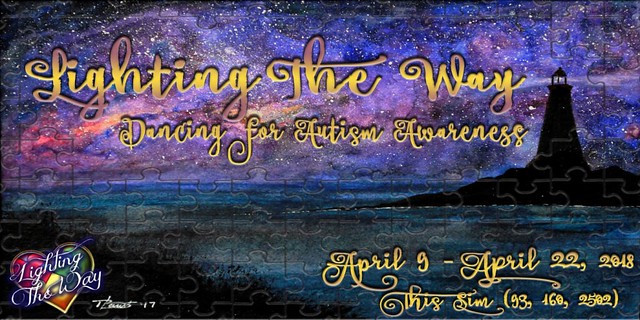
The past three years, the Lighting The Way Organisation within Second Life reached out to the dance community to take part in a weekend filled with dance and music for Autism. We have had such a huge response to this that we began running out of time slots. So this year, we will be having it on two separate weekends with many events running during the week. This year we will also have sponsors and business owners on the sim as well advertising their items.

The weekends for the shows will be Saturday, April 14th, Sunday, April 15th and Saturday, April 21st. The times for the shows can start as early as 6am SLT until 8pm SLT. If there is a specific time that works for you, just get with SouthernComfort Magic and we can work it out.

Not only are dance teams invited, but individual dancers and choreographers as well. We will have 2 variety shows during the 2 weekends. We will get everyone and anyone involved in raising awareness that would like to be a part of it.

Now, with that being said…. I would like to personally invite you to come and participate in this wonderful event. What I am hoping to accomplish again this year is for dance teams all over Second Life as well as individual choreographers/dancers to come together and perform for Autism.

That’s the TL;DR, but I want to learn more about the Lighting The Way event. What is it that got SoCo into raising awareness for Autism?

I know I want to know. So, let’s go exploring, shall we?

Lighting The Way To Lighting The Way

Lighting the Way

Soco teleported me over to the Lighting The Way build, which consists of a beautiful forest glade, a path that winds through rows of booths for event partners to show their support, and a performance stage with plenty of room for audience members to enjoy the shows.

(I felt a sense of accomplishment navigating around the water and fountain near the landing area, but SoCo told me that she’d put a transparent prim over the area to keep people from falling in.)

https://www.flickr.com/photos/isfullofcrap/41061762331/in/photostream/

https://www.flickr.com/photos/isfullofcrap/41061761791/in/photostream/

I asked her why she started Lighting The Way in Second Life.

The reason I started Lighting The Way was because of my two children,” she says, “whom both are on the autism spectrum. It was during this time I craved a means in which I could play an instrumental role in lighting the path from darkness for people who were diagnosed autistic.  My son suffers from the most severe form of autism while my daughter has the milder form known as Aspergers, so I decided to utilize SL as my platform for building awareness.”

Autism is a general term used to describe a group of complex developmental brain disorders known as Pervasive Developmental Disorders (PDD).

“When my son was diagnosed with Autism at the age of 2, Autism affected 1 out of 150 children. Today it affects 1 out of 68 (1 in 42 boys). Over the course of 11 years, I have watched my son go through changes that I would never wish upon anyone. However, he is the most lovable child that I have ever known, he is truly an angel from heaven. He has taught me more about life & the person that I want to be more than I ever thought possible.”

So the next time You are at a restaurant or at a mall & You happen to see a child throwing themselves down on the floor, screaming and/or shaking things, stop & think before You judge. Not all disabilities are easily seen.  Sometimes all one might see is the symptoms & without knowing the full situation, You’re judging someone incorrectly & unfairly.

Where did she get the name “Lighting The Way” ?

“I needed to have an official name for raising awareness and I thought of a lighthouse,” she said. “It was strong, firm, always there, it’s beacon shining brightly for those who were lost. So I incorporated that into this event. We all come together to stand firm to help light the way for those on the spectrum.”

Continue reading “Lighting the Way with SoCo in Second Life”

Eidola: reality and perception in Second Life

Eidola

Eidola (a phantom; an apparition; an ideal) is a new installation by Livio Korobase, which opened on March 16th, 2018. It’s a daring, imposing – and possibly overwhelming – build; seeking to explore the eye and the idea; how vision has helped form our perceptions and understanding of the world around us.

It’s an ambitious subject, one that dates back at least to the time of Pythagoras, as is indicated in the installation’s liner notes. He believed that we could see because the eye emits rays of light, and that these rays gave a person information about colour and shape. From this idea through Democritus to Johannes Kepler by way of Da Vinci, and with a mention of gestaltism along the way, the liner notes provide a framework for understanding the installation, including the fact it uses, as a means of both presenting ideas and navigating it, the five chapters of Ruggero Pierantoni’s  1981 book, The eye and the idea. Physiology and history of vision.

Eidola

Visitors arrive at a near central arrival point, which offers significant reading – including an excerpt from Wassily Kandinsky’s ruminations on the geometrical elements which make up every painting, and the basic plane, the material surface on which the artist draws or paints. This sits alongside extracts discussing the nature of visible light and the brain’s reaction to light entering the eye.

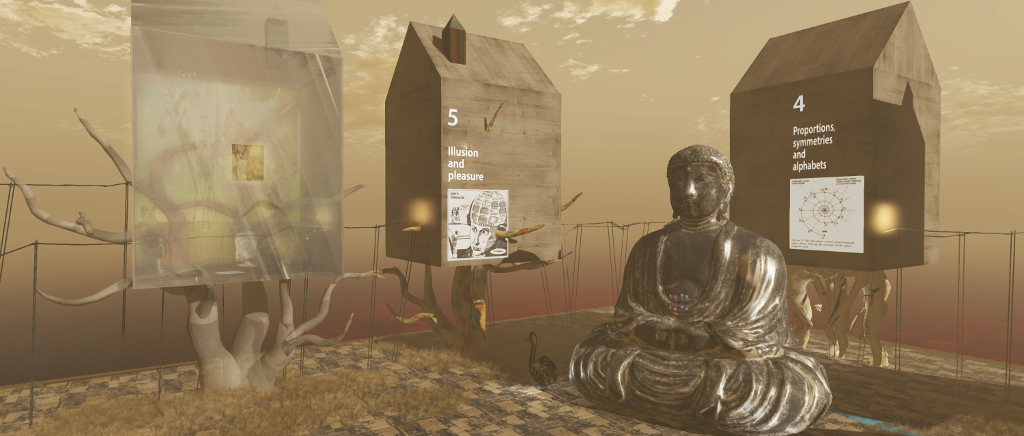
From here, visitors are invited to make their way through six vast houses, most of which are elevated in varying manners – on the backs of great statues, atop basalt columns, up in the branches of trees. The first five houses reflect the chapters of Pierantoni’s book, and the sixth something of a conclusion.  These are linked one to another by raised ladders on top of scaffolds laid out as horizontal walkways. The first of these can be reached via a short walk over the landscape, or a teleport board is available for those short of time, or returning for a further visit and wish to resume where they left off.

Eidola

Each of the houses is packed with information on its specific topic: Myths of Vision; Space, Inside and Outside; Light, inside and Outside; Proportions, Symmetries and Alphabets; and Illusion and Pleasure. Some of the walkways are on a single level, some are there to be climbed in order to see the contents in a house, and one includes a teleport. Outside of the houses, the walkways offer views across the surrounding landscape. This is filled with what might at first appear to be curios watched over by gigantic humans – but they are all in some way related to the overall theme of the installation.

At the end of the elevated walkways, beyond the sixth house, is the frame of a house. Approach and enter this, and the frame is revealed at an animated work of art built in reflection of the themes from the rest of the installation: perception, perspective, line, point, and more.

Eidola

Trying to quantify this installation is not easy; it is one that needs to be personally experienced. The amount of information it contains can be overwhelming if trying to take everything in during a single visit. But there is a lot of food for thought to be found in the houses for those interested in science, philosophy, psychology, history or art; therefore more than one visit might be the best order of business.

SLurl Details

  • Eidola (LEA 24, rated: Moderate)

Sansar Product Meeting #13/1: events, new users, fees

Sansar: The Whyst Garden, scene of the Tuesday, March 27th product meeting

The following notes are taken from the Sansar Product Meeting held on Tuesday, March 27th. These weekly Product Meetings are open to anyone to attend, are a mix of voice (primarily) and text chat. Dates and times are currently floating, so check the Meet-up Announcements and the Sansar Atlas events sections each week.

The subject for this meeting was events, although the discussions were inevitably far more wide-ranging.

Events

The mid-March release, now called the It’s A Party release, included the client-side option for Sansar experience owners to promote events they are running through the Sansar events listings in both the client and on the web. This is part of the Lab’s desire to increase the active user count within Sansar and to encourage more social / fun activities on the platform.

Event Surfacing

Some issues have been identified with the way events are surfaced in both the Sansar Events web page and the client.

  • Currently, the Events app in the client and the Events page on the web have a Featured tab which only lists upcoming events. Ideally, this tab should only list those events selected by Linden Lab to be Featured events; there should be a separate tab for Upcoming events, listing them in chronological order.
    • The Lab has not actually started curating user-submitted events. This will start happening in the near future.
  • Within the client Atlas, Upcoming events are only displayed when the Featured experiences tab is selected. Switching to any other Atlas view – All, Sansar Studios, My Friends, Favourites – and the list of Upcoming events vanishes. Ideally, the Upcoming events should persist across all client Atlas views.
    • A suggestion is to add an Events tab to the Atlas (as well as having the Upcoming list), which could either list events, or (preferably) open / switch to the Events app window.

Promoting Events / Inviting people to Events

The Lab is currently considering way to promote events and inviting people to events, both within and beyond Sansar. This is seen a part of building a comprehensive notifications system.

  • The ability to promote through social media platforms requires the inclusion of the authorisation processes / APIs for those platform, something which isn’t on the immediate list (at the current point in time, inclusion of something like Facebook authorisation might not be viewed positively anyway).
  • An idea raised at the meeting to include the option to export event items to meetup.com pages or Eventbite pages, for those who wish to use those services.
  • Inviting people to events is, in the Lab’s eyes, a complex issue, as it is tied to the permissions system, and to things like future abilities for event organisers to host their events in experiences built and owned by others, etc.
    • However, being able to directly invite people into an event is seen as critical, and far more beneficial than simply placing an event notice out on the web or broadcasting it purely through social media in the hope of attracting interest.

Paid Events

The Lab’s initial thinking around paid events takes two forms:

  • Ticketing: allowing event organisers to set up a “paywall” in front of their event (e.g. those wishing to attend must purchase a ticket through the Sansar Store).
  • Tipping: the means for those attending an event to tip the organisers at some point. This would include scripted support so tippers can be recorded / acknowledged. There will also be a means for event organisers to see how well their events are helping to monetise their experiences. Tipping can be approached in a number of ways:
    • Via a scripted object, which pays the experience owner / object owner directly;
    • Via gifting – payment from one person to another, although this requires the permissions system to be in place.
    • Via the Sansar Store – purchase a set price “tip jar” to pay the creator / event host (as both will currently likely be the same).

Event Co-ordination

The question was raised about encouraging event co-ordinators from Second Life into Sansar.

  • On the plus side, some event co-ordinators are content to obtain space (available for free in Sansar) and build-out their event using purchases from the Marketplace (or in this case, the Sansar Store).
  • One the minus side, there is no way, currently, for event co-ordinators to collaborate with experience owners in developing and building-out an event in partnership nor is there any means for event co-ordinators to be paid via the platform by an experience owner to plan and run an event on the experience creator’s behalf.

Other Events-Related Items in Brief

  • Support for Recurring Events: currently, events can only be created on an individual basis – there is no means to create a recurring event. This has been requested multiple times since the It’s A Party release was deployed, and it is something the Lab as added to their list of capabilities to be added to the events feature.
  • Linden Lab’s Current Events  / Marketing Approach: Linden Lab is currently experimenting with pulling live stream events into Sansar and trying to build an audience around them. In early Mars, for example, there was a series of Twitch live streams – painting, playing chess, dungeons and dragons discussions, etc.
  • Offering gifts: gifts can form a major part of events in Second Life. currently, event organisers cannot easily offer gifts directly to visitors to their events in Sansar – gifts can only be made available through the Sansar Store, which means they are available to anyone, rather than exclusive to the event.

New User On-Boarding

The Lab is in the process of developing a more advanced new user experience. This is to include a new tutorial, and may take the approach of dropping new users into a lobby space where they can socialise together, learn how to control their avatar, etc., prior to moving them on to the Atlas and broader explorations.

Events are seen as an important element of this work, as ideally, the Lab would like to direct new users coming into Sansar through their on-boarding process to places where there is activity and they will likely be welcomed.

Payment Channels for Sansar Dollars

The Lab is still looking to provide more channels for purchasing Sansar Dollars – e.g. PayPal, with plans to broaden the choices to match those in Second Life (e.g. credit / debit cards, PayPal, Skrill). However, this work has been on hold for a while, and it is not clear where it sits in the Lab’s current road map.

Transaction Fees

Sansar operates on a fundamentally different model to Second Life, in which transaction fees play a much large role as a means for Linden Lab to generate revenue from the platform.

This means, for example, that tips, as with any form of monetised transaction will be subject to a transaction fee (the same fee as applied to the Sansar Store). This will be applied on top of the tip / transfer amount, rather than subtracted from it (as with Second Life). So, for example, if the Sansar transaction fee is 15%, someone tipping another person S$100 will be charged S$115, including the transaction fee.

The Lab has been considering a minimum threshold amount that can be gifted that is fee-free, but once payments / transfers exceed that amount, the transaction fee is applied, the thinking being the payment is essentially for services rendered, and thus subject to “tax”.

It has been pointed out that for creators, up to 26.5% in fees can be levied (15% transaction fee, 10% fee for converting a S$ amount to fiat currency, and a bank transfer fee applied to the amount).

  • The Lab feels that while not necessarily set in stone, the fees represent a fair price point when compared to other content selling sites, where the fees and bt 30% or more. However, they also note those sites are able to offer revenue generation at volume to those selling through them, which Sansar cannot currently offer due to the user base size.

Ability to Pay Subscriptions via Sansar Dollar Income

In Second life, it is possible to cash-out Linden Dollar amount to fiat money and then leave the amount on account to pay things like Premium membership fees and tier. No similar mechanism currently exists in Sansar to allow creators to cash-out their $S balances and use the result $ balance to pay their subscription fees. This has now been raised as a feature request.

2018 SL UG updates #13/1: Simulator User Group

Soul2Soul River; Inara Pey, February 2018, on FlickrSoul2Soul Riverblog post

Server Deployments

As always, please refer to the server deployment thread for the latest updates.

  • The Main (SLS) channel was updated on Tuesday, March 27th, to server release 18#18.03.14.513292, containing the new server capabilities (see below).
  • At the time of writing, the Release Candidate channels were all TBD regarding potential deployments. This report will be updated if the deployment thread provides further information on the RC channels.

New Capabilities

The new capabilities in 18#18.03.14.513292 for the Main (SLS) channel is the first part of a set of server and viewer updates.

  • The new IM cap is to overcome of off-line IMs failing to be delivered when a user logs in. Currently, these are delivered via UDP, whether or not the viewer is ready to receive them. With the new capability (once grid-wide and implemented within the viewer), the viewer will request off-line IMs, which the server will package and deliver to the viewer via HTTP.
  • The new abuse report cap will replace the need for the viewer to have AR categories hard-coded into it. Once fully deployed, and a viewer update released, it will mean the view will request the current list of AR categories from the server when starting up, making the management of the list easier, and hopefully reducing the number of ARs filed under outdated categories.

Updates to the viewer incorporating these changes will be made available by the lab in the near future.

SL Viewer

  • The Maintenance RC viewer updated to version 5.1.3.513630 on Friday, March 23rd.
  • The Media Update RC viewer updated to version 5.1.3.513644, on Tuesday, March 27th.

The remainder of the pipeline remains as:

  • Current Release version 5.1.2.512803, dated February 23, promoted March 1 – formerly the Nalewka Maintenance RC – No change
  • Release channel cohorts:
  • Project viewers:
  • Linux Spur viewer, version 5.0.9.329906, dated November 17, 2017 and promoted to release status 29 November – offered pending a Linux version of the Alex Ivy viewer code.
  • Obsolete platform viewer, version 3.7.28.300847, May 8, 2015 – provided for users on Windows XP and OS X versions below 10.7.

In Brief

First Name / Last Name Changes

This is still a long way off from being implemented, however, Oz Linden confirmed llDetectedName() will return the current name for an avatar, no matter what the change. However, it may take some time for it to change everywhere due to caches.

More on the return of last names and name changes, please refer to The return of Second Life Last Names – update with audio.

SL Messaging Layer

Simon Linden is looking into the Second Life messaging layer, which may be the problem behind a lot of “lag” issues. “There’s actually a number of small improvements I want to make, but I’m being careful to do them one at a time and have real data showing it gets better,” he said in providing an update on the work.

Friendship Offers Failing

Some are experiencing Friendship offers failing, even when the offer is accepted – see BUG-215977. According to Simon Linden, this might require a server-side update to fully correct.

Region Crossings

Simon Linden has been looking at vehicle region crossings alongside of  Joe Magarac (animats) testing with the viewer (See Firestorm JIRA FIRE-21915, BUG-214653, this SL Forum thread, this Google document, and my update here for more).

Part of the issue, a previously noted, is viewer / simulator communications. If these are suffering latency or packet loss, then things can get rough with vehicle region crossing very quickly. This is something Joe has been trying to compensate for by introducing a script that turns off physics and freezes the vehicle when received by a new region until it can confirm the associated avatar data has arrived.

Unfortunately, excising the viewer from region crossing data handling would be difficult, as it has to be involved to move and change its primary connection for an avatar. It would take a major protocol change to remove the viewer from the region crossing loop and separate connection hand-off from crossings. Further, if such a protocol change were to be made, it would require more work to support both new and old until enough viewers get updated.

Mainland Price Restructuring

While the Lab does not issue numbers, Oz Linden indicated at the Simulator User Group meeting that since the Mainland Price Restructuring, “mainland ownership is up quite significantly.”

Tutorial: creating Second Life Place Pages

The Holly Kai Park Place Page banner
Introduced in 2017, Place Pages are a means to allow region and parcel owners to create a web browsable page (hosted by the Lab) for their location(s) in-world. These pages can then be shared through blogs, websites, Twitter, Facebook, etc., offering a means to promote those places to a broader audience, advertise events, etc so on. Table of Contents

In addition, all published Place Pages can be searched via the Place Page home page, or browsed as thumbnails.

There is an official Knowledge Base article providing information on creating and using Place Pages, but I thought I’d offer a step-by-step guide to setting-up one or more Place Pages.

Place Page Features

A Place Page showing the use of images, descriptive text and the inclusion of an events calendar. Click for full size

By default, every region and parcel in Second Life has a Place Page associated with it, derived from information in the parcel’s existing profile. These are provided in a default format, complete with place holder image. Each page comprises a number of features:

A banner “hero” image, together with additional images which can rotate as the page is refreshed or as a slide show; descriptive text; options for:

  • Listing a calendar of events.
  • Showing a region’s covenant – useful for residential rental regions).
  • Showing items for sale.
  • Adding a YouTube video.

Buttons to allow visitors to the page to launch their viewer and teleport directly to the location (assuming they are Second Life users – if not, they’ll be taken to the SL sign-up page).

In addition, a region’s Place Page can include a list of surfaced parcel Place Pages, and parcel Place Pages will include a link back to their “parent” region’s Place Page.

Prerequisites for Managing Place Pages

In order for you to be able to use the Place Pages to promote your in-world locations, certain criteria must be met:

  • You must own the parcel / region in question OR you must be assigned a the group ability to Toggle ‘Show Place in Search’ And Set Category within the group owning the land
  • For a parcel’s Place Page to be public, About Land > Show Place in Search for the parcel must be checked (incurring a weekly fee of L$30).

Managing Your Place Pages

Setting-Up a Place Page

  • Visit the Place Pages dashboard and log in using your Second Life credentials.
  • Access your available place pages either by clicking your name in the top right corner of the page and selecting My Places, or by clicking on My Places just below the banner.
Accessing your available Place Pages
  • Depending on your land holdings (e.g. the number of regions, the number of parcels on those regions), your list of available Place Pages might be short or long. Each Place Page item provides a summary and a default image.
  • Note:the Is Viewable? column in the list determines whether or not a Place Page is viewable or not.
    • True indicates the page is publicly viewable.
    • Not Viewable indicates the Place Page cannot be publicly viewed, either because you as the owner have set it that way, or because it relates to a parcel which does not have Show Place in Search checked within its About Land floater.
Sample Place Pages listing – note the region / parcel differentiator

When you have located the Place Page you wish to edit, click Edit on the right of the listing to open the Page in default / edit view. This comprises a number of easy-to-understand sections, complete with explanatory text.

  • Details: this section allows you to determine if the Place Page is publicly viewable, and define the information it displays.
    • Disable This Place Page: prevents the page being publicly displayed.
    • Show Covenant: displays the covenant associated with the land (if provided).
    • Items for Sale: item must be set to Show in Search on the General tab of the object editor window, and will be listed with price, description and a teleport button. Note that items not for sale will also be listed, but will appear at the end of the list with Not Available in the price column.
    • Show Calendar: displays a calendar of events for the region / parcel. Event must be created via the  Events section of your Second Life dashboard at secondlife.com.
    • Title: the title for the Place Page – shown overlaying the banner image.
    • Tag line: 150-charcter tagline for the Place Page, shown overlaying the banner image.
    • Description Editor: for entering formatted descriptive text to be displayed on the Place Page.
  • Optional: this section provides you with the ability to set the page, font, and link colours used on the page. There is also a space to provide a YouTube URL.
    • Note that at the time of writing the link colour only applies to the links in the Parcel Information section of your page; it does not apply to any links you may include in the description section of your page or any events listed with a calendar (if present). That can create visibility problems with these links, depending on the page background colour selected.
  • Images: Section for uploading at banner / Hero image and additional images that are displayed in rotation on the finished page.
  • Stats: general information on the region / parcel automatically displayed on the finished page as Parcel Information.

At the foot of the page are buttons to Update the page with any changes you have made, or Cancel them. Note that clicking Update will refresh the page and display your changes.

Including Parcels in a Region Place Page

If you have more than one parcel in a region, you can automatically include all of your visible parcel Place Pages in the region’s Place Page. Note, again, parcels must have how Place in Search set within their About Land floater (incurring a weekly L$30 fee) in order for them to appear on their “parent” region’s Place Page.

Parcels in a region can be listed in the region’s Place Page

Continue reading “Tutorial: creating Second Life Place Pages”