It’s been an amazing few days since Curiosity landed on Mars. The rover is off to a good start in what is called the “characterisation activity phase” of the mission, which is scheduled to last around a month.
The rover landed on Mars at 15:00 “Mars time”, equating to 06:14 BST on August 6th, or 22:14 PDT August 5th, at NASA’s Jet Propulsion Laboratory in Pasadena, with confirmation being received on Earth at 06:32 / 22:32 respectively .
This marked the start of the rover’s first day on Mars, officially designated Sol 0. Activities during Sol 0 comprised releasing various instruments and protective covers, such as those over the Hazcams at the front and rear of the rover, checking-out the UHF telecommunications system and the rover motor controller, confirming its orientation (facing a heading of 112.7 degrees (+/- 5 degrees) and with a slight tilt) and relaying some 5 Mb of data back to Earth via Mars Odyssey.
Sol 1
Sol 1 saw the rover gather data from the Radiation Assessment Detector and Rover Environmental Monitoring Station instruments and further tests on the high-gain antenna (HGA), located towards the back of the vehicle. This is important, as the HGA enables the rover to communicate directly with Earth when it is above the rover’s horizon, rather than signals having to be relaid via Mars Odyssey and Mars Reconnaissance Orbiter (MRO) – although both of these will continue to be used when direct rover-Earth lines of communications are unavailable.
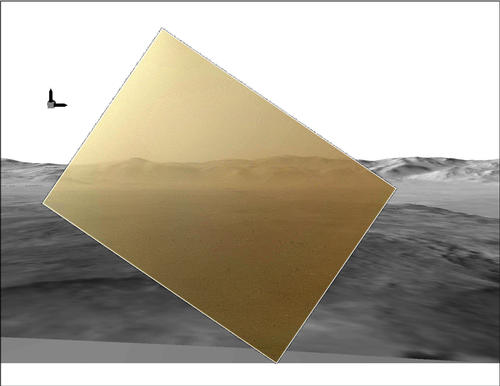
Curiosity took its first colour image of Mars using the Mars Hand Lens Imager, or MAHLI, located on the robot arm. This image appeared oddly rotated due to the arm being in its stowed position, MAHLI pointing outwards on the front left side of the rover.
First MAHLI image, taken with the camera in its stowed position, looking over the side of the rover. In the distance is the rim of the crater
The image appears cloudy as it was taken before MAHLI’s protective cover was still in place, coated by a film of dust thrown-up by the descent stage motors during landing. The image is facing north, and the visible ridge is the rim of Gale Crater, with the peak to the left being some 1,150m (3,775 ft) high and 24 km (15 miles) from the rover
Sol 1 also saw the rover complete an initial deployment of the forward remote sensing mast to enable calibration of the navigation cameras (Navcams) to commence. Calibration was expected to take around a Sol to complete, as test images of targets on the rear section of the vehicle had to be returned to Earth in order for any “manual” adjustments yo the camera systems to be calculated and then transmitted back to the rover.
MAHLI’s image (above) given context is a computer simulation of Gale Crater developed from hi-resolution images returned by MRO’s HiRISE and the High Resolution Stereo Camera on Europe’s Mars Express.
During Sol 1, MRO also captured a fabulous image of the landing zone from some 300 km above the surface of Mars, using it’s HiRISE camera system. The image clearly shows the shadow cast by Curiosity, together with parachute and aeroshell to the left and slightly below it (approx. 615m away) and the impact points for the heat shield (some 1.5 km (1 mile) from the rover) and descent stage. The latter, having flown clear of the rover’s landing-zone, impacted on the surface around 650 metres from the rover, leaving a classic oblique impact mark (common to asteroids striking a planet), which forms an arrow pointing back towards the rover. This image was later combined with images of Mars to create a short movie called Zooming in on the scene of Curiosity’s Landing.
Sol 2
Curiosity’s remote sensing mast, seen fully deployed prior to launch in 2011
On Sol 2, Curiosity completed calibration testing on the Navcams, and raised the remote sensing mast to its fully deployed position. An initial high-resolution image was then captured by the Navcam, looking out over the front of the rover (part of an exercise to help confirm the rover’s alignment relative to the sun).
The first image taken by the Navcams following full deployment of the remote sensing mast. The cameras are looking forward and down over the front of the rover, away from the sun (what JPL calls the “anti-sun” image)
Following this, the mast was rotated, allowing the Navcams to be used to capture images of the rover’s immediate surroundings, including a 360-degree panoramic collage of Gale Crater and Aeolis Mons (referred to as “Mount Sharp” by NASA, the unofficial name given to the mound prior to its naming by the IAU). The panoramic view was initially returned to Earth as a collage of thumbnail images.
The first 360-degree panoramic view of the landing site and Gale Crater returned as thumbnails by Curiosity
As it is currently only available at thumbnail resolution, the panoramic view was somewhat overshadowed by high-resolution images also returned by the Navcams, which stand as promise of things to come once the Mastcams start operations.
The Navcams were also used to image elements of the rover itself in order to gain a further indication of the vehicle’s overall condition, and these revealed no nasty surprises, and were later strung together to give and overhead “fish-eye” view of Curiosity (see the image towards the end of this article).
Use the page numbers below left to continue reading
Tuesday August 7th saw the roll-out of pathfinding across the main Second Life Server Release Channel. For those of you who may still be unaware of what pathfinding is, there is an overview on the SL wiki. However, for those wanting a shorter description, here’s how Rod Humble introduced it back in December 2011:
NPCs: coming to a region new you … ?
Because worlds feel most vibrant when they are full of life, one of our next focuses for Second Life is the ability to make high-quality “life” within it. So in 2012, we will be rolling out more advanced features that will allow the creation of artificial life and artificial people to be much smoother.
So, simply put, pathfinding is the means by a range of automated characters – people, animals, monsters, mobile objects (“mobs”) and so on – can be created and set into motion within Second Life far easier than has previously been the case. These can then navigate their way around obstacles, follow roads, climb inclines, and so on using specialised LSL commands and the “navmesh”.
Pathfinding has a wide variety of potential uses – as “background” in role-play sims using non-player characters (NPCs), the creation of game-play mechanics (such as the use of “food” to attract animals), and so on. Characters can be set to have certain behaviours – such as chasing you or fleeing from you, and so on.
Above: a video by “fpady”, demonstrating pathfinding using a spider which pursues an avatar
The following is designed to provide a very high-level overview of pathfinding and some of its key aspects as they are likely to impact the majority of SL users. It is not intended as an in-depth guide, and should not be used as such. Nor is it designed to be any kind of tutorial for creating pathfinding characters nor as a tutorial. Links are given throughout (and at the end) to more comprehensive information which can be referred to for a deeper understanding of pathfinding.
Viewer Tools
Pathfinding brings with it a new set of viewer tools and panels. Fore detailed information on these tools see, Pathfinding Tools in the Viewer. The folllowing notes are for broad guidance only, and are based on accessing the tools through the official SL Viewer.
Floaters
Pathfinding has three new floaters: Linksets, Characters and View / Test, all of which are explored in a little more detail later in this article. They are accessed either via the Build menu or through the right-click context menu thus:
The Build menu includes a new Pathfinding option, which opens a sub-menu allowing you to access any of the three new floaters
Right clicking on an object in a pathfinding region will display a Show in Linksets option in the context menu, which will open the Linskets floater
Right clicking on a pathfinding character will display an option to open the Characters floater
Information Panels and Address Bar Icons
Pathfinding adds a number of additional informational panels in the Build, Object Profile and Statistics floater of the viewer, as well as a new set of icons which many be displayed in the viewer’s Address Bar / SLurl Bar. Full details on these can be found in Pathfinding Tools in the Viewer, linked-to above.
Rebake Region Button
There is also a new button – the Rebake Region button – which may periodically appear towards of the bottom of your viewer’s window when on a region where the navmesh is being modified (see Navmesh, below).
At the time of writing, the tools are only fully available in the Beta (3.4.0.262596) and Development (3.4.1.262722) versions of the official SL Viewer, although this will obviously change as the new code is more widely adopted. Niran’s Viewer 1.48 provides the core pathfinding tools, but does not include the additional pathfinding attribute panels in the Build floater.
Navmesh
For those not familiar with the term, “navmesh” is short for navigation mesh. This is a representation of a region’s geometry generated and used by the Havok physics engine to determine paths for pathfinding characters. An overview of the navmesh is available on the SL wiki.
Every region where pathfinding is enabled has a navmesh, which is also shared with their immediate neighbours to allow cross-region pathfinding. For users not directly involved in the creation of pathfinding elements, the navmesh should be totally transparent, although the updates to the Havok physics engine required for it to work have led to a number of issues, some of which have yet to be resolved, which may have an impact on some activities in regions with pathfinding enabled (see Issues, JIRA and Bugs on the next page).
By default, the navmesh is active across an entire region (but it can be disabled if required – see Console Commands on the next page). However, parcels set to No Entry for objects will cut the navmesh at their borders, and pathfinding characters will not be able to navigate across them (although there is a bug with this (PATH-787, which is not open to public viewing): if a parcel is set to No Entry for object and sits on the border between two pathfinding enabled sims, it is possible that characters may attempt to cross the region boundary and enter the parcel. This is currently being worked-on by LL).
Region Rebakes
The navmesh can be somewhat fluid in nature, depending upon what is going on in a region and whether anything is being changed within the region which may affect the navmesh (see Objects, the Navmesh and Optimising Performance below for an example of changing the navmesh).
Optional pop-up which may be displayed on viewers in regions where the navmesh needs to be rebaked
When a change is made that does require an update to the navmesh, a Rebake Region button will appear towards the bottom of all pathfinding-capable viewers connected to the region, together with an optional pop-up message (right).
Anyone can click the Region Rebake button in order to initiate the rebake. Once the button has been clicked, it will change its appearance as the rebake proceeds (which can take a little time, depending on the complexity of the navmesh).
The Region Rebake button: indicating a region rebake is required (t), and while a rebake is in progress (b)
Objects, the Navmesh and Optimising Performance
Where pathfinding is enabled, objects need to be optimised to ensure the navmesh functions correctly. This requires setting the correct attributes for each object within the region. By default, all objects within a region are set to one of two attributes: Moveable Obstacle (all non-phantom objects) and Moveable Phantom (all phantom objects). Neither of these attributes contribute to navmesh calculations.
If pathfinding is enabled, but is not being used within a region, it is possible to leave objects with these default attributes. While this may have some impact on region performance, depending upon how heavily the region is being used, it shouldn’t be something that is overly noticeable to users.
However, if pathfinding is being actively used within a region, then the objects within the region must have their attributes properly set in order for the navmesh to be properly calculated and characters can properly navigate through / around / over them. This means updating objects to one of the following four attribute types, all of which directly contribute to navmesh calculations. These are: Walkable, Static Obstacle, Material Volume, and Exclusion Volume.
All six object atributes should be used as follows :
Walkable: all objects / surfaces pathfinding characters can move across (the terrain of a region is always set to Walkable and cannot be changed)
Static Obstacle: any object that should block character movement and which does not move (e.g. walls, trees, fences, railings, etc.)
Material Volume: can be used with phantom objects to alter the rate at which characters can move across a specific area (e.g. imagine a wooded area: a single Material Volume phantom prim could be used to reduce the speed characters traverse the woods, or even just the densest part of the woods)
Exclusion Volume: can used with phantom objects to create areas where characters cannot roam
Movable Obstacle: any object that should move (e.g. doors, gates, etc.), but which blocks pathfinding characters from moving through (so a door can still open / close, but characters will not move through it, regardless of its state)
Movable Phantom: phantom objects that have no affect on pathfinding characters
An example of how these attributes might be used is to imagine a room where pathfinding characters are to be active:
The floor would be set to Walkable
The walls and furniture would set to Static Obstacle
Doors would be set to Moveable Obstacle
If the room included a specific area where characters were not to roam, it would be denoted using a phantom prim set to Exclusion Volume.
Note that objects set to attributes that contribute to navmesh calculations will generate a request for a region rebake in order for the navmesh to be updated. Additionally, these objects have some special restrictions applied to them:
They cannot change their physical shape via LSL script (changing object position, shape parameters, scale, rotation, physics shape type, and linking/unlinking is generally blocked)
They can only be physically changed via the build tool by avatars who have modify permission and are in the same region as the object (i.e. they cannot be physically changed by avatars located in a different region, nor can they be moved across region boundaries by editing them and dragging them).
On July 24th, Toysoldier Thor posted about an idea he calls “virtual landmarks” in the Merchant’s forum. It’s a potential solution to an age-old problem most of us in SL face at one time or another: making sure all landmarks relating to your location in Second Life are always up-to-date.
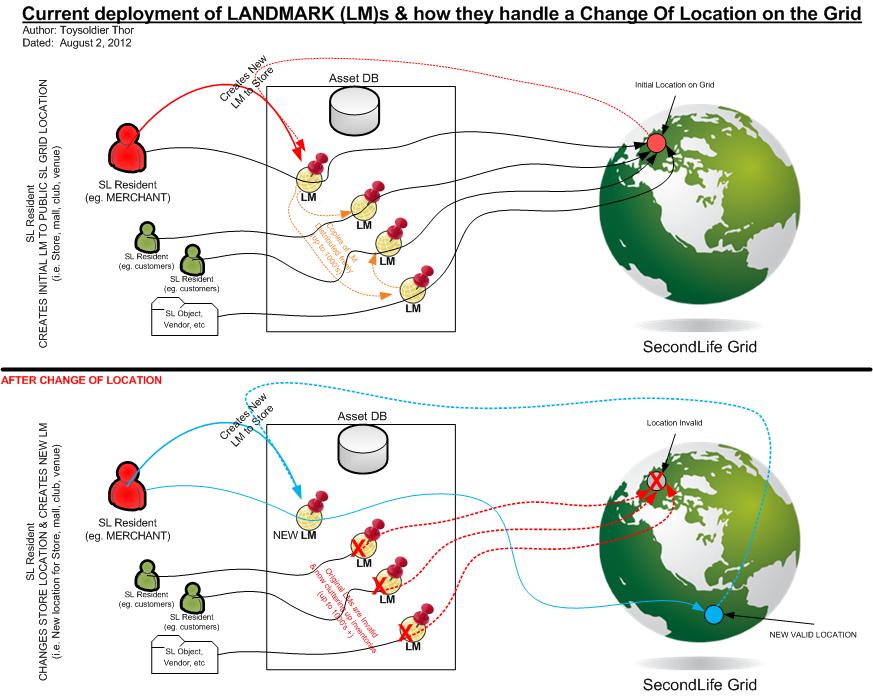
Whenever we move in SL, we’re faced with the fact that every LM we’ve ever given out for our old place is now worthless, and we have no choice but to start issuing new ones. For some, this isn’t a problem – but for others it very much is.
Merchants, for example, are faced with the fact that every single landmark they’ve ever placed within a package contained in a vendor server or magic box or in a Marketplace folder or used within landmark givers they’ve placed around the grid (at malls, satellite stores and so on), now needs to be individually replaced (and in the case of Marketplace folders, each folder manually re-linked to the relevant listing). For some this can run into several hundred items and many hours of additional work. Nor are merchants alone – the likes of role-play groups, clubs, and so on, can face similar issues, both in terms of updating landmark givers, etc., and in terms of ensuring patrons get updated LMs.
In short – it’s a nightmare.
The issue: change your SL location and old LMs no longer work – click to enlarge (credit: Toysoldier Thor)
Toysoldier Thor’s idea is so elegant and (in some respects) obvious, one is tempted to ask why such a system wasn’t developed for Second Life from the outset. He calls it Virtual Landmarks (VLMs), and it essentially works in a similar manner to how we navigate the web. He describes the idea thus:
The concept of a VLM would be identical to the critically important Internet service of DNS (Domain Name Services) in that Internet users can create and use easy to understand HOST NAMES to access all Internet services where the HOST NAME actually masks the underlying required IP Address that is needed to actually route and connect their computer to that respective host.
Well the same would hold true with VLMs. A VLM would be the equivalent to a DNS HOST NAME and the LM that is configured to be associated to this VLM would be equivalent to an IP ADDRESS.
One Change
In his proposal, rather than creating and distributing a landmark, a store-owner (or whomever) would create a user-friendly VLM (e.g. “My Wonderful Store”) which is then associated with the actual landmark for the store itself. This association is stored in a new service Toysoldier calls the “VLM Mapping Service”, and it is instances of the VLM – not the original – which are given to people or placed product packages, landmark givers, etc. When someone uses the VLM, their viewer sends a request to the Mapping Service, which looks-up the physical landmark associated with the VLM and sends the information back to the viewer, enabling the user to be teleported to their desired destination.
The beauty here is that if the underlying landmark is subsequently changed (because the destination store moves, for example), all the creator of the VLM has to do is associate the VLM record stored in the Mapping Service with the new landmark – and every instance of the VLM in existence will automatically route people to the new location when used. There is no need to pass out new LMs, replace existing LMs or anything else; one change, and that’s it.
The solution: VLMs and the Mapping Service – click to enlarge (credit: Toysoldier Thor)
There are further benefits of the idea, as Toysoldier points out:
The system could be developed such that a single VLM could be associated with multiple landmarks (such as a primary store location, a secondary store location, etc.). Then, should the primary location be unavailable for any reason, the person using the VLM would be automatically routed to one of the alternate destinations
A round robin capability could be included, such that a single VLM is linked to a number of arrival points at the same destination (such as a club or an event that is liable to be popular, etc.). People using instances of the VLM are then automatically delivered to the different arrival points in turn, helping to prevent overcrowding at one particular point
Duplicate names could be supported for VLMs through the use of asset UUIDs (so there could be many VLMs called “My Beautiful Store”, and asset UUIDs could be used to ensure a VLM sends a user to the correct destination
As with LMs at present, VLMs held within peoples’ own inventories can be renamed without affecting their function
The system does not prevent the direct use of landmarks.
While there is some potential for griefing within the proposed system (people maliciously creating an VLM with the intention of flash-mobbing a venue or mis-directing people to a location, for example), the risk is probably no greater than is currently the case with the use of landmarks. Griefing via the use of VLMs might even be easier to limit, as LL would have control of the Mapping Service and so could effectively remove / disable VLMs shown to have been created with malicious intent.
Earlier today I commented on the fact that NASA hoped that the Mars Reconnaissance Orbiter would be able to capture an image of Curiosity as it descended through the Martian atmosphere.
Well – take a look at these pictures!
MRO captures MSL / Curiosity, still within its aeroshell and suspended beneath its parachute (credit: NASA)And a closer view (credit: NASA)
The following is summary of changes to SL viewers / clients (official and TPV) which have taken place in the past week. It is based on my Viewer Round-up Page, which provides a list of all Second Life viewers and clients that are in popular use (and of which I am aware) and which are recognised as being in adherence with the TPV Policy.
This summary is published every Monday, and by its nature will always be in arrears. Therefore, for the most up-to-date information on viewers and clients, please see my Viewer Round-up Page, which is updated as soon as I’m aware of any changes, and which includes comprehensive links to download pages, blog notes, release notes, etc., for Viewers and clients as well as links to any / all reviews of specific viewers / clients made within this blog.
The Pathfinding viewer has been removed from the list, as the code is now incorporated in the Beta viewer
Dolphin rolled to 3.3.12.24739 on August 2nd – core updates: the reset, start, stop, remove, recompile script operations now request confirmation & can be accessed from the context menu of an in-world object; temporary upload is available when doing snapshots to inventory (release notes)
Niran’s Viewer rolled to 1.47 on Jul 30 – core changes: updates to experimental Preferences overlay; FPS counter will be displayed as text by default; assorted fixes (release notes)
Cool Viewer:
Stable branch rolled to 1.26.4.23 on Aug 4th, and is referred to as a “catchup release with the v1.26.5 branch”
Experimental version (SL3.3 renderer) rolled to release 1.26.5.2 on Aug 4
Shadow on the ground, Curiosity on Mars – one of the first images to be sent to Earth from the newly arrived rover (credit: JPL)
At 06:14 BST (05:14 UTC), Curiosity, NASA’s latest and largest rover vehicle, officially arrived on the surface of Mars at the end of a 570-million-km journey, and the start of what promises to be a truly remarkable international mission (the science package that forms the heart of the mission – the Mars Science Laboratory itself – includes instruments from Canada, France, Spain, Russia, Germany, the UK and Finland as well as the United States, while scientists from around the world will be directly involved in analysing data and images returned by the rover).
The entire landing sequence – referred to as the EDL, for Entry, Descent and Landing – proceeded flawlessly, with telemetry confirmed the rover was on the surface of Mars arriving at mission control 06:32, after being relayed to Earth via an orbiting space craft above Mars and the Canberra Deep Space Communications Complex, Australia.
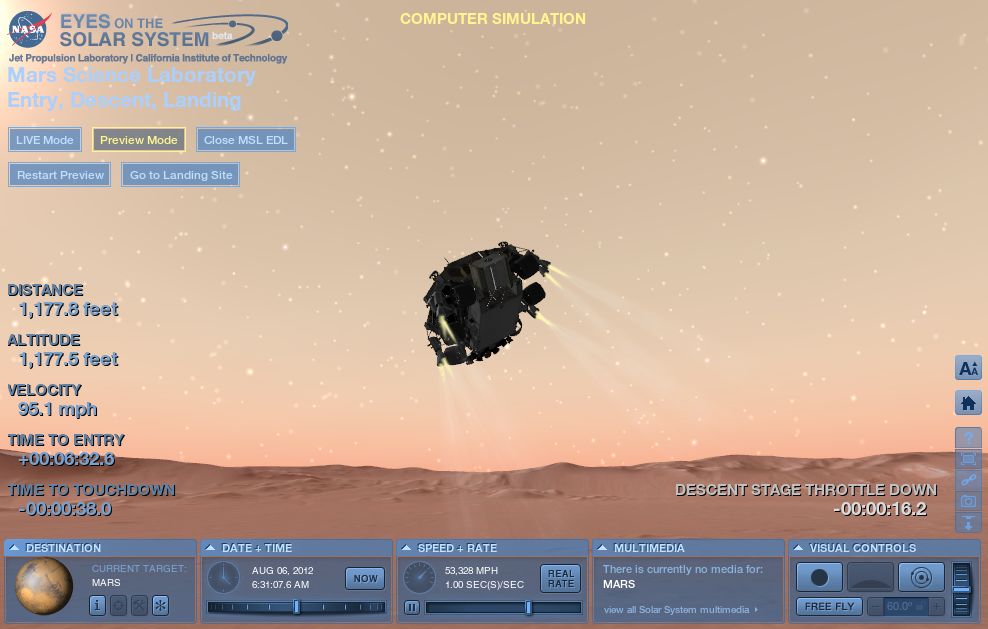
The landing was followed around the world, via NASA TV web feeds, Twitter and through the unique perspective of NASA’s Eyes on the Solar System, which presented a simulation of the entire EDL phase of the mission which could be played in real-time as events unfolded 246 million kilometres (154 million miles) away.
The descent stage simulated by Eyes on the Solar System (NASA)
The excitement of the event was genuinely palpable; not only was there the massive question as to whether the vehicle survive the “seven minutes of terror”, as the EDL had been dubbed by the mission team, there was concern whether NASA’s Mars Odyssey orbiter – the only vehicle in Mars orbit capable of relaying data received from Curiosity directly to Earth – would in fact be able to do so.
The 11-year-old orbiter has been struck by a series of problems over the last year, the most recent of which occurred immediately prior to an orbital manoeuvre designed to put the vehicle on the correct track in order to be overhead as Curiosity landed on Mars. While that problem have been successfully overcome, there was concern that the orbiter might fail to complete a final orientation manoeuvre designed to correctly align its antennae so it could act as a relay – and the manoeuvre itself could not be carried out until just 15 minutes prior to Curiosity arriving on Mars.
While NASA’s Mars Reconnaissance Orbiter (MRO) and Europe’s Mars Express were also on-hand to capture data transmissions from Curiosity, neither one has the ability to simultaneously receive data from the surface of Mars and transmit it directly back to Earth. Instead, telemetry from Curiosity would have to be recorded and then relayed to Earth many hours after then landing period. Thus, without Mars Odyssey, mission control – and the world at large – would have no idea as to Curiosity’s fate for a considerable period of time after the event.
As it was, everything worked flawlessly. Not only were the Odyssey team able to ensure the vehicle was on the right track ahead of EDL, the entire landing process ran to almost precisely to the projected schedule, key events occurring a matter of seconds behind the times being played-out on the Eyes on the Solar System EDL simulation.
For those used to the button-down shirt formality of NASA so beloved of Hollywood and familiar from achieve footage of the Apollo missions, the informality at JPL may have come as something of a surprise. As EDL progressed, team members passed jars of peanuts around, taking handfuls and munching on them in a long-standing tradition dating back to Ranger 7, the first US probe to successfully transmit close images of the lunar surface in 1964. Then, as Allen Chen, the EDL’s Flight Dynamics and Operations Lead announced, “Touchdown confirmed, we’re safe on Mars!” the room erupted into scenes of heartfelt jubilation with shouts, cheers, hugs and even one or two little dances.
Adam Steltzner (right), the man who lead the team responsible for the Curiosity’s descent and landing systems, reaction to the first images received from Curiosity on Mars (credit: Brian van der Brug/Los Angeles Times-POOL)
Even with Odyssey on track and correctly oriented, there was still some doubt as to how much data would be relayed before Mars Odyssey dropped below the horizon relative to Curiosity and direct contact from the rover was lost. As well as transmitting confirmation it was down and relatively safe, the rover had been pre-programmed to record a number of rapid-fire images using the front and rear hazard avoidance cameras (Hazcams) in order to give some visual indication of the vehicle’s general condition / possible orientation. However, the window for data transmission was so tight, there was doubt that any of the images would be captured, compressed and transmitted prior to Odyssey moving out of range.
Use the page numbers below left to continue reading
 It’s been an amazing few days since Curiosity landed on Mars. The rover is off to a good start in what is called the “characterisation activity phase” of the mission, which is scheduled to last around a month.







 Inara Pey: Living in a Modemworld