
Firestorm 6.6.14: maintenance catch-up and new features

On Monday August 14th, 2023 (SLT), the Firestorm team released version 6.6.14.69596 of their viewer.

This is another release which might be described as more a maintenance update rather thana major features release, intended to keep Firestorm in step with the current official viewer code base. However, it does include some new capabilities.

When reading the following, please note:

  • This article is not intended to over every update  / change / improvement within the release. These can be found within the Firestorm 6.6.14. release notes, which also provide full credit details for the changes.
  • This review focuses primarily on the new features included with Firestorm 6.6.14, together with an overview of its parity with Linden Lab’s official viewer code base and and overviews of various updates, improvements and fixes I believe will be of specific interest to Firestorm users in general.
Table of Contents

Finally, I have not had time to personally try this release to any great extent, so am not offering any personal feedback on it.

Update, August 17th: a JIRA has been filed that rigged meshes viewed in this version of Firestorm using the Local Mesh (BETA) capability (i.e. visible only to the person testing the mesh) introduced in Firestorm 6.6.8 may result in issues. If you are a content creator who uses the Firestorm Local Mesh (BETA) for viewing your rigged mesh creations, please see FIRE-33157

General Notes

Installation

  • Only download Firestorm from the Firestorm website. Do not utilise and other third-party site purporting to offer the Firestorm viewer, and remember Firestorm will never ask for log-in credentials in order to download a release version of their viewer.
  • There is no need to perform a clean install with this release if you do not wish to.
  • Do, however, make sure you back-up all your settings safely so you can restore them after installing 6.6.14.

Version Blocking

As per the Firestorm’s teams standard practice of only supporting 3 active versions of the viewer at any time, note that version 6.5.6 will be blocked from accessing Second Life three weeks from the date of version 6.6.14’s release.

Special Note: Windows 32-Bit Support

This release of Firestorm is likely the last to fully support the 32-bit version of thee Windows operating system. This is in keeping with LL’s announcement that Windows 32-bit is not longer a supported operating system (see: End of Support for Second Life 32-bit Windows Viewer and Updated Minimum System Requirements for MacOS to 10.13 or Second Life: Win 32-bit support ending; MacOS system requirements updating). A further reason for this is that as a part of the forthcoming switch to using physically based rendering (PBR) under the Kronos glTF 2.0 specification, Linden Lab will only be sub-licensing the 64-bit versions Havok physics library used within the viewer – it is further possible that in the future, other libraries needed by the viewer will only be supported in their 64-bit versions.

Those who are using the 32-bit version of Windows (estimated as around 2% of the Firestorm user base) are advised to check their systems – and if they are using hardware capable of supporting a 64-bit version, to make any necessary upgrades that may be required (generally in the area of RAM), and switch to Windows 64-bit.

An important point to note with this is that 32-bit versions of Windows will not be blocked from accessing Second Life. Rather, viewer upgrades (including the use of required build libraries) will no longer be checked for compatibility with Windows 32-bit. For Firestorm in particular, current 32-bit builds will remain available for the time being; however, no guarantee is given that this will continue to be the case with future releases.

Linden Lab Updates

Firestorm 6.6.14.69596 is fully merged up to the  Linden 6.6.14 code-base, per the notes below.

Maintenance T – Maintenance Transparent Translation

  • Viewer version 6.6.13.580918, July 2023.
  • Primarily focused on the shift of translation services (accessed via Preferences → Chat → Typing → Translation) from Microsoft Bing to  Microsoft Azure and DeepL. Also includes a range of Profile-related updates.

Maintenance S – Superlative Supports

  • Viewer version 6.6.12.579987, May 2023.
  • Predominantly translation updates.

Performance Floater & Auto FPS

  • Viewer version 6.6.11.579629, April 2023.
  • The official implementation of the Performance Floater & Auto FPS feature first implemented in Firestorm 6.5.3.65658 see my review here.

Maintenance R – Resident Inspired Improvements

Maintenance Q Viewer – Quality Contributions

  • Viewer version 6.6.9.577968, February 2023.
  • Assorted quality of life improvements in the viewer.

Maintenance P Viewer – Preferences, Positions and Paste fixes

Firestorm New Features

Building: Select (and Replace) All Matching Textures

A new option – Find All – within the Build / Edit floater’s Texture tab, allows all faces in an object or linkset using the same diffuse (texture) or normal or specular map, to be updated at once.

  • Right-click on the item / linkset to be updated and select Edit from the Context / Pie menu.
  • In the upper part of the Edit / Build floater click the Select Face radio button – (1) in the mage below.
  • Click the floater’s Texture tab to open it (shown in the image below), and:
    • Use the Texture / Bumpiness (Normal) or Glossiness (Specular) radio buttons – (2) in the image below – to select the map type to be updated.
    • Click on a face of the object / linkset containing the map to be updated. The face will be highlighted, and the selected map will be displayed in the Texture Swatch box on the Edit / Build floater  – (3) on the image below.
    •  Click on the Find All button to select ALL of the object faces containing the selected map – (4) in the image below.
  • When you are satisfied you have selected the correct map / surfaces, click the Texture Swatch in the Edit / Build floater to open the Texture Picker floater and pick the map you wish to use and apply it to all the selected faces in the usual manner.
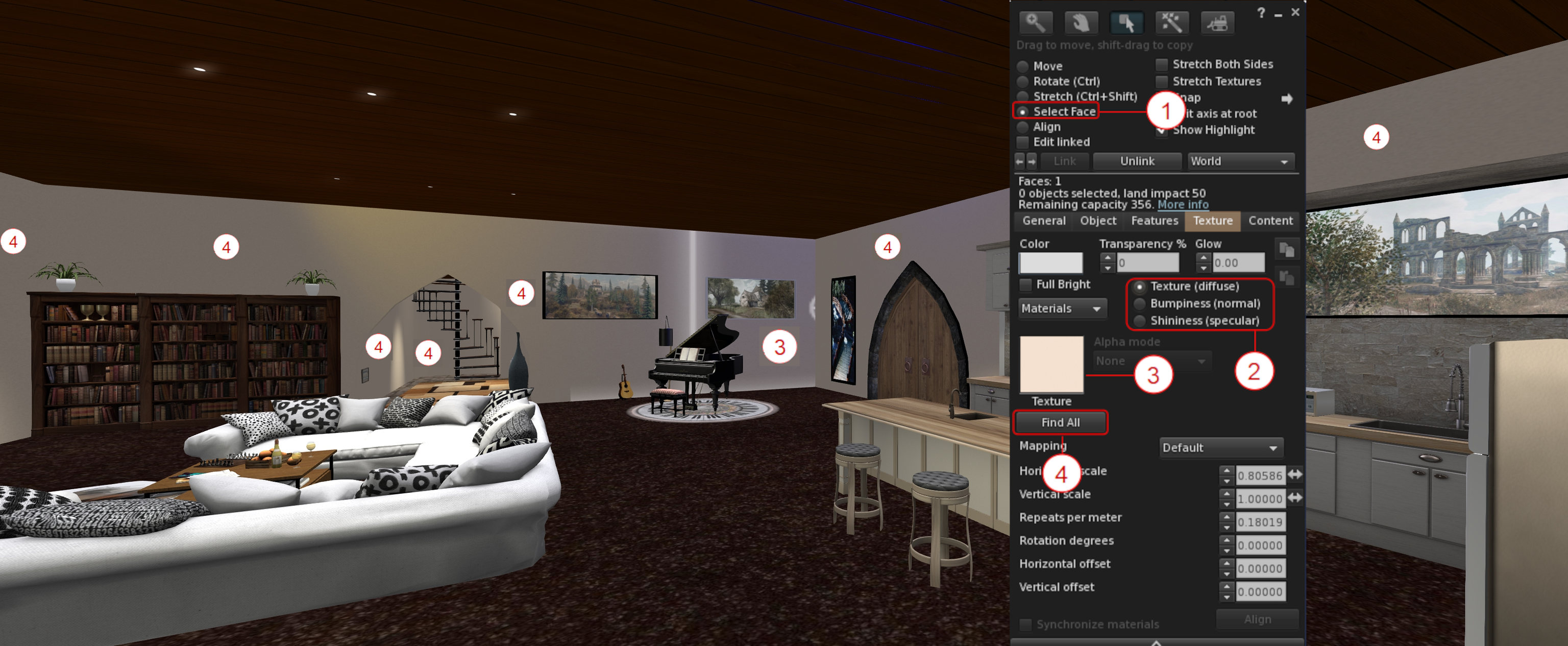
The Find All button for selecting all instances of texture / normal / specular map used on an object / linkset. See notes above for an explanation of the numbers

Building: Strip Unwanted Alpha Channels During Image Uploads

Images uploaded to Second Life can include an empty / almost empty alpha channel which can lead to rendering issues  (such as textures flipping back and forth on one another as the camera moves, impacting rendering performance) when the texture is viewed in-world. While such empty / near-empty alpha channels may be intentional, they are generally an accidental or unwanted artefact, and should be removed from the image to avoid issues such as those mentioned above.

To achieve this, Firestorm 6.6.14 introduces an automatic scan of images being uploaded to Second Life to check for alpha channels which are either empty or almost empty.

  • If such channels are found in an image, the Upload Preview floater will display an additional warning and checkbox: Empty Alpha Channel Will Be Removed (see the image below, left).
  • Leaving this warning checked will cause the the unwanted transparency information to be stripped from the image when it is uploaded.
  • If there is a need to have the transparency information uploaded with the image, the warning should be unchecked. However, note that doing so will display an additional caution and explanation on the impact of including alpha channels in images, together with two buttons, as shown in the image below, right.
  • Click the required button displayed by the caution to clear it, then click the upload button to proceed with the image upload.
Stripping unwanted alpha channels from images at upload

Additional notes:

  • The alpha state for the image, once uploaded – “no alpha” or “with alpha” – is displayed at the bottom of the upload floater, alongside the uploaded image size (as arrowed at the button of the image on the left, above).
  • The Uploaded Size field has been fixed to correctly show the size of the uploaded image in all cases. see: FIRE-32944.

Inventory: Show Only Coalesced Objects

Show only coalesced objects in Inventory

Firestorm 6.6.14 adds a new inventory option to display only coalesced objects (i.e. multiple items returned to inventory as a single group, rather than being returned individually).

  • The option can be found within the Inventory gear icon menu (the gear icon being located at the bottom left of the Inventory floater), directly under those for showing only Modifiable, Copyable or Transferable items in inventory.
  • Toggle the option on (check mark visible) and off (no check mark) as required.
  • Note the option works in cooperation with all other options in the menu.
  • This feature was added in response to FIRE-31369.

Blacklisting: Blacklist Animations via the Animation Explorer

With this release, it is possible to add any animation associated with your avatars and listed by the Animation Explorer to the Firestorm Asset Blacklist:

  • Open the animation Explorer (World → Animation Explorer).
  • Select the animation to be blacklisted and click the Blacklist button in the lower right section of the Explorer floater.
  • Repeat for any other animations, as required and close the floater when done.
  • Blocked animations can be reviewed / unblocked via the Asset Blacklist floater (World → Asset Blacklist).

Notes:

  • Blocking only applies to animations played through the simulator. Those played locally (i.e. within your viewer) will still be seen by you as playing, even if blocked.
  • A Blacklisted animation my still be seen by others for a brief period after blocking, as it will take a second or so for the block information to be propagated through the simulator.

Audio Streaming: Stream Title Floater and Track History

It is now possible to display information on the current song title and artist playing on the parcel audio stream (if active), and a history of the last 10 played music tracks. The information is displayed is its own floaters, accessed via the menu bar → World → Stream Title.

Enabling the music stream information, together with the additional recently played history (ported from Kokua)

Additional Firestorm Improvements of Note

Inventory

  • Reload Received Items: a button within the Received Items section of the Inventory floater will refresh the list of items in the section.
Received Items reload button
  • Ungroup folder: A request to confirm has been added when ungrouping a folder in inventory.
  • Inventory offer sound: the Inventory Offer sound (Preferences → Sound & Media → UI Sounds 3 → Inventory Offer) will now play when Automatically Accept New Inventory Items and the following Log Auto-Accepted Inventory Items to Chat are enabled (both under Preferences → Privacy → General). This is is response to FIRE-32396 .

Building and Scripting

    • Floater improvements: the floater can now be resized, lists will now scroll, and clipping of text on the Settings tab has been fixed. All in response to FIRE-32624.
    • Floater should now recognise and load all forms of “.DAE” (e.g. Dae DAe DAE dAE and daE). See FIRE-32180.
    • Meshes exported with Autodesk Collada should not longer fail, fixing FIRE-32599.
    • Scaling and rigged mesh handling corrected in accordance with FIRE-32604 and FIRE-32681.
  • Script Editor: A fix for the unindent after } when a previous line had a word wrap. See: FIRE-19959.

Animation Playback Floater and Preferences

The additional information displayed in the Animation Playback floater (Priority, Duration, Loop, Ease In, Ease Out and Joints) can now be toggled on/off using a drop-down button (see below).

Firestorm Animation Playback floater: advanced animation information can be shown / hidden via the drop-down button

In addition, the default state of the Playback Floater can be set via Preferences → Firestorm → Build 2 → Always Expand Animation Preview Advanced Information. By default the option is unchecked, meaning the advanced information will not be displayed when the Animation Playback floater is displayed.

General UI / Floater Updates of Note

  • Profile updates:
    • The View Profile option has been removed from the Context menu for your own avatar, as its already listed in the Community sub-menu. See: FIRE-32304.
    • Profile description text should not longer be truncated in some cases. See: FIRE-32901.
    • Unsaved text in the Notes tab of another avatar’s Profile should no longer be discarded when the Profile owner enters or leaves the region at the same time. See: FIRE-32926.
  • Area Search: updates have been made to Area Search to prevent some of the aggressive culling which is impacted Area Search results.
    • However, to get the best results when doing an Area Search, you will still need to turn slowly on the spot once, to fully load all the objects.
    • In addition, once an item is added to the Area Search it will/should not vanish a few seconds later as had been the observed behaviour with previous releases.
    • There are all partial fixes for FIRE-32688.
  • Assorted floater design, typographic corrections, layout corrections and tooltip updates, per the release notes.

Other Updates of Note

Asset Cache Update

Until now, automatic purging of the Asset Cache would only commence when the “max_cache” value was exceeded. This essentially meant that a) the Asset Cache could exceed this value, and b) once started, automatic purging would be pretty much constant, impacting viewer performance.

With Firestorm 6.6.14, this has been changed:

  • The “max_cache” value means just that: the largest size the Asset Cache will reach.
  • Two thresholds are set via debug settings:
    • A” high water” threshold set to 95% of the “max_cache” value. When this is reached, purging of the oldest caches files will commence.
    • A “low water” threshold set to 70% of the “max_cache” value. When this is reached, automatic purging will stop.
  • These two values  will ensure:
    • The “high water” threshold leaves 5% capacity available within the Asset Cache, allowing incoming data from a simulator to be properly caches during any automatic purging.
    • The “low water” threshold means that automatic purging, once started, will not be constant, potentially impacting viewer performance.
  • This also means that users can now set their cache to a ramdisk if they really want and it won’t (normally) overflow.

Library Updates

  • FMOD Studio updated to version 2.02.15.
  • Havok TPV library updated to version 1.0.577418, in line with LL.

Linux Updates

  • Improvement: Firestorm now uses system-wide fontconfig and freetype directly from the user’s system, rather than using 3p libraries packaged with the viewer.
  • Fixes:
    • A fix for the “alpha triangles bug”(see FIRE-23370).
    • WIP to get Linux crash reporting working with Bugsplat.
    • The ability to toggle between internal/external browsers in preferences on Linux (Preferences → Network & Files → Connection → Web Browser).
  • Updates:
    • Apr suite updated to version 1.4.5.230351228.
    • OpenJpeg Library updated to version 2.5.0.
    • CEF updated to version 1.12.2.202210012157_92.0.27.
    • Colladadom updated to version 2.3.230940029.
    • Libxml2 updated to version 2-2.10.3.230940019.
    • Xmlrpc updated to version 0.54.2.230940042

OpenSim Updates

  • Opensim VarRregions with non-power of 2 sizes no longer flood logs.
  • Avatar Profile fixes including: correct loading; UDP profiles restored; profile picks + notes should load, 1st Life notes should save back to the server.
  • Additional fixes per the release notes.

Links

2023 SL viewer release summaries week #31

Logos representative only and should not be seen as an endorsement / preference / recommendation

Updates from the week through to Sunday, August 6th, 2023

This summary is generally published every Monday, and is a list of SL viewer / client releases (official and TPV) made during the previous week. When reading it, please note:

  • It is based on my Current Viewer Releases Page, a list of all Second Life viewers and clients that are in popular use (and of which I am aware), and which are recognised as adhering to the TPV Policy. This page includes comprehensive links to download pages, blog notes, release notes, etc., as well as links to any / all reviews of specific viewers / clients made within this blog.
  • By its nature, this summary presented here will always be in arrears, please refer to the Current Viewer Release Page for more up-to-date information.
  • Note that for purposes of length, TPV test viewers, preview / beta viewers / nightly builds are generally not recorded in these summaries.

Official LL Viewers

  • Release viewer,  version 6.6.13.580918, formerly the Maintenance T RC viewer, promoted July 14th – No Change.
  • Release channel cohorts (please see my notes on manually installing RC viewer versions if you wish to install any release candidate(s) yourself).
    • No updates.
  • Project viewers:
    • No updates.

Note: The Alternative Viewers page appears to have suffered a hiccup, listing version 6.6.12.579987 as the “Win32+MacOS<10.13” RC viewer.  However:

  • The Win 32  + Pre-MAC OS 10.3 viewer was version 6.6.13.580794, promoted to release status on July 5th, and no subject to further update.
  • 6.6.12.579987  was the version number assigned to the Maintenance S RC viewer (primarily translation updates), originally issued on May 11th, and promoted to de facto release status on May 16th.
  • This entry on the Alternate Viewers page is therefore ignored on my main Viewer Releases Page.

LL Viewer Resources

Third-party Viewers

V6-style

  • No updates.

V1-style

  • Cool Viewer Stable release updated to version 1.30.2.23 on August 5 – release notes.

Mobile / Other Clients

  • No updates.

Additional TPV Resources

Related Links

2023 week #31: SL CCUG + TPVD meetings summary

Strandhavet Viking Museum, May 2023 – blog post

The following notes were taken from my audio recording and chat log transcript of the Content Creation User Group (CCUG) meeting held on Thursday, August 3rd, and the Third Party Viewer Developer (TPVD) meeting held on Friday, August 4th, 2023. 

Meetings Overview

  • The CCUG meeting is for discussion of work related to content creation in Second Life, including current work, upcoming work, and requests or comments from the community, together with viewer development work.
  • The TPV Developer meeting provides an opportunity for discussion about the development of, and features for, the Second Life viewer, and for Linden Lab viewer developers and third-party viewer (TPV) / open-source code contributors developers to discuss general viewer development.
  • As a rule, both meetings are:
    • Held in-world and chaired by Vir Linden.
    • Conducted in a mix of voice and text.
    • Held at 13:00 SLT on their respective days.
    • Are subject to the schedule set within the SL Public Calendar, which includes locations for both meetings (also included at the end of these reports).
    • Open to all with an interest in content creation / viewer development.
  • As these meetings occasionally fall “back-to-back” on certain weeks, and often cover some of the same ground, their summaries are sometime combined into a single report (as is the case here). They are drawn from a mix of my own audio recordings of the meeting + chat log (CCUG), and from the video of the TPVD meeting produced by Pantera Północy (which is embedded at the end of the summaries for reference) + chat log. Not that they are summaries, and not intended to be transcripts of everything said during either meeting.

Viewer News

No changes through the week, leaving the current official viewer in the pipeline as:

Note that the alternate viewer page also lists “Win32+MacOS<10.13 – 6.6.12.579987” as an RC viewer. However, the Win 32 + pre-Mac OS 10.13 was promoted to release status on July 5th, and viewer version 6.6.12.579987 points to the Maintenance S viewer, promoted to release status on May 16th.

General Viewer Notes:

  • The Inventory Extensions viewer has a couple of bugs which are preventing it progressing but are being worked on. There are also some simulator-side issues (inventory thumbnail images being dropped) which are also being addressed. However, this remains the next potential viewer for promotion to de facto release, alongside of the Maintenance U RC viewer.
  • The Maintenance U RC includes an extension to actions available when clicking on in-world objects. CLICK_ACTION_INVISIBLE effectively makes an object “invisible” to mouse clicks, allowing it to be clecked through to whatever might be lying behind it.  This functionality will be supported within the next simulator deployment, due in week #32.
  • The Emoji project viewer may see some font changes prior to progressing further (which may additionally require UI work in general) & is still adding further UI additions.

glTF Materials and Reflection Probes

Project Summary

  • To provide support for PBR materials using the core glTF 2.0 specification Section 3.9 and using mikkTSpace tangents, including the ability to have PBR Materials assets which can be applied to surfaces and also traded / sold.
  • The overall goal is to provide as much support for the glTF 2.0 specification as possible.
  • Up to four texture maps are supported for PBR Materials: the base colour (which includes the alpha); normal; metallic / roughness; and emissive, each with independent scaling.
  • In the near-term, glTF materials assets are materials scenes that don’t have any nodes / geometry, they only have the materials array, and there is only one material in that array.
  • As a part of this work, PBR Materials will see the introduction of reflection probes which can be used to generate reflections (via cubemaps) on in-world surfaces. These will be a mix of automatically-place and manually place probes (with the ability to move either).
  • The viewer is available via the Alternate Viewers page.

Further Resources

Status

  • LL is seeking feedback on how best to handle sky rendering. In short, ambient lighting is handled differently within “non-PBR” viewers and “PBR viewers” (notably, the latter uses HDR + tone mapping where the former does not).
  • As the majority of ambient environments have been designed using the “non-PBR” viewer rendering system, they undergo an auto-adjustment process within the PBR viewer so that that match the glTF specification requirements. Unfortunately, this can leave some skies / ambient lighting looking far too dark – and potentially lead to complaints from users on the PBR viewer (at least until more “PBR compliant” EEP assets make themselves available).
  • To compensate for this, LL included the option to disable the HDR / tone mapping processes in the viewer by setting Probe Ambience to 0 with Graphics preferences. However, doing this makes content specifically designed for PBR environments look muted and much poorer than they should. This brings with it the concern that to try to make their content look good in both “PBR” and “non-PBR” environments, creators will start to go “off-piste” (so to speak) from the glTF specification when making new content, thus defaulting the entire objective in trying to move SL to match recognise content creation standards.
  • There have been two main schools of thought within LL as to how to best handle both situations, these being:
    • Continue to iterate on the auto-adjustment system so it can handle a broader range of sky settings that are in popular use without them going overly dark within the PBR viewer.
    • Initially make HDR / tone mapping opt-in, rather than opt-out (so probe ambience is set to 0 by default, but can be set above zero by users as required) until such time as all viewers are running with PBR, then switch to making it opt-out (so HDR / tone mapping must be manually disabled).
  • General feedback at the meeting was for LL to continue to try to iterate and improve the the automatic adjustment to HDR / tone mapping for skies, so as to avoid the need for content creators to have to start producing “PBR” and “non PBR” versions of their content.
  • Outside of this, it has also been reported that multiple script-driven glTF materials updates (such has those that might be seen with the changing pattens on a disco floor, for example) actually cause multiple network connections, impacting network bandwidth to the viewer, which is hardly ideal.  This is currently being addressed, but until fixed on the simulator side, it will see a pause in glTF simulator updates being released.
  • The work on “hero” reflection probes for planar mirrors is continuing to progress.

Senra Discussions – CCUG and TPVD

Via the Content Creation Meeting:

  • A lengthy discussion on the Senra SDK and the requirement for Avastar with Blender – seen as a paywall block for creators who may not have previously entered the clothing market, but who want to in order to support Senra. Unfortunately, no-one directly involved in the Senra body development was at the meeting to handle questions.
    • Avastar is generally required with Blender as  the latter uses “none-standard” axes orientation compared to other tools, resulting in issues such as armature rotations being incorrect, plus its Collada export doesn’t (I gather, subject to correction here) support volume bones.
    • However, it was noted that other mesh bodies available within SL provide SDKs where these uses are fixed for Blender without the need to reference Avastar – so the questions were raised as to why LL haven’t done the same (or at least looked at those solutions).
    • The discussion broadened into issues with the avatar blend file itself which have long required fixing, with the promise that all comments on the SDK, Blender, and the avatar Blend file will be passed back to the relevant parties at the Lab.
      Those at the meeting from LL noted their hope that  – down the road – the switch from Collada to glTF-compatible formats will help to eliminate many issues related to avatar content creation, and if nothing else, will look to address specific issues . this, and that if nothing else, they will mark the need to fix the armature rotation issue with that work (“glTF Phase 2”) if it is not addressed beforehand.

Via the TPVD Meeting:

  • It was noted that there currently isn’t a formal venue for discussion Senra outside of the current forum threads or the Discord channel (for those able to access it.
  • The suggestion is currently to have a special purpose meeting – possibly under the CCUG banner – where those who developed Senra could respond to questions / concerns. This suggestion is being passed to Patch Linden who is better placed to arrange a meeting, given the Senra project largely falls within his remit.
  • There is a lot of concern / confusion over the SDK licensing (again, please refer to the forum thread on this for details).
  •  It was indicated that the Senra content will soon have inventory thumbnails included, ready for when the Inventory Extension viewer is promoted to release status.
  • Concerns about new users getting confused by wearing Senra items directly from the Library a) do not appear to be highlighted to indicate they have been added to the avatar (this is actually because the process of “wearing” the item has actually generated a copy within the user’s inventory, which *is* highlighted as added / worn); b) individual items added to an avatar in this manner go to the matching object class type system folder, *not* to a dedicated Senra folder (e.g. mesh clothing is copied to the Objects folder; skins go to the Body folder, etc.).

In Brief

Via the TPVD meeting

  • General discussions on:
    • Scalable fonts (as implemented by Genesis viewer).
    • How TPVs block older versions (for releases, the viewer requests a list of blocked versions from the TPV server in question (say, Firestorm, for the sake of argument), and if it finds itself on the list, it terminates trying to log-in to SL).
    • The move to de-dupe some asset types (textures, notecards, scripts  & (possibly) gestures by giving multiple CDN versions the same UUID number, including clarification on the difference between the original asset, the UUIDs for multiple versions and also inventory IDs (which handle permissions, etc.).
    • An extensive discussion on chat bubbles and toasts in the official viewer.
  • Please refer to the TPVD meeting video below for further details on the above discussions.

Next Meetings

† The header images included in these summaries are not intended to represent anything discussed at the meetings; they are simply here to avoid a repeated image of a gathering of people every week. They are taken from my list of region visits, with a link to the post for those interested.

August 2023 SL Web User Group (WUG) meeting summary

The Web User Group meeting venue, Denby

The following notes cover the key points from the Web User Group (WUG) meeting, held on Wednesday August 2nd, 2023. They form a summary of the items discussed and is not intended to be a full transcript. A video of the entire meeting is embedded at the end of the article for those wishing to review the meeting in full – my thanks to Pantera for recording it.

Meeting Overview

  • The Web User Group exists to provide an opportunity for discussion on Second Life web properties and their related functionalities / features. This includes, but is not limited to: the Marketplace, pages surfaced through the secondlife.com dashboard; the available portals (land, support, etc), the forums.
  • As a rule, these meetings are conducted:
    • On the first Wednesday of the month and 14:00 SLT.
    • In both Voice and text.
    • At this location.
  • They are open to anyone with a concern / interest in the above topics, and form one of a series of regular / semi-regular User Group meetings conducted by Linden Lab.
  • Dates and times of all current meetings can be found on the Second Life Public Calendar, and descriptions of meetings are defined on the SL wiki.

Marketplace

Re-Indexing for Listings Issue

  • An issue was discovered with MP product listings not showing up in search results or for store owners using their Manage Listing pages (although the product listing could be reached directly by entering its name).
  • This was traced to the items failing to be indexed correctly by the Marketplace service.
  • As a result, LL initiated a complete re-indexing of the MP at the start of week #31, and while it took time to complete, the issue should now be resolved and all product listing should be showing correctly via search, etc.
  • Those still encountering issues with their products should raise a Jira.

General

  • Best selling items ordering: when used within a specific MP store, this will in the near future order items according to how well they have been selling in comparison to the rest of the items in the store over the past 30 days, to better reflect current sales.
  • “Do Not Show Limited Quantities” in Search:
    • There have been requests to either have this option (shown in product search results at the foot of the left-side column along with Demos) enabled by default or limited quantity items should not be shown in Search results.
    • This has been requested primarily due to the issue of (new) users buying ex-gacha items without realising that are not buying from the original creator.
    • Given there are legitimate reasons for Limited Quantity items to be listed on the MP, excluding them from Search would be potentially  discriminatory.
    • Preferable solutions suggested were:
      • Retain the option and either reverse it – so it has to be enabled to include limited quantity items OR have whichever way the toggle is set stored within the user’s MP cookies, rather than the check box having to be be set against every search.
      • Add a further checkbox to specifically eliminate (or include, depending on the default setting) Gacha items from / with Search results.
      • LL implement a new product category – Limited Quantity – specifically for such products / items – although how well this would work is open to question, given there is a Gacha category which does not prevent those types of limited quantity items pitching up in Search results.
  • The above spread to a broader discussion on creators using unicode characters and punctuation symbols in their store names which actually makes it harder for them to show up in search results under the Merchants / Stores tab, unless a precise full or partial copy of their brand name is entered.
  • Listing Enhancement metrics: a request was made for those paying for Listing Enhancements to receive metrics (e.g. no. of times displayed, number of click-throughs generated, number of sales from click-throughs).
  • Product reviews:
    • A suggestion that LL should allow reviewers to just leave star ratings against items listed on the MP, as used to be the case with SL Exchange and is the case with Amazon.
    • A request for the MP to be open to reviews by those who have purchased a product in-world (and who may have used the MP as a form of catalogue to seek out items they then purchase in-world).
    • The ability to view an individual’s review history on the MP – allowing their fairness / bias to be better judged.
    • See also feature requests BUG-233138 “Social/Creator Focused Marketplace Feed” and BUG-233139 “A user-run first-line Moderation Tool”.
  • General discussions on:
    • The use of Favourites List and Wishlist options (e.g. Favourites List – as a means of quickly pulling up preferred brands and checking for new releases, requests for multiple Wishlists, etc., making lists more easily shareable other than by direct URL, etc.).
    • Preferred general Search results ordering (e.g. newest first or best selling).

Next Meeting

  • Wednesday, September 6th, 2023.

2023 SL SUG meetings week #31 summary

NordShore, May 2023 – blog post

The following notes were taken from the Tuesday,  August 1st Simulator User Group (SUG) meeting. They form a summary of the items discussed and is not intended to be a full transcript. A video of the entire meeting is embedded at the end of the article for those wishing to review the meeting in full – my thanks to Pantera for recording it.

Meeting Overview

  • The Simulator User Group (also referred to by its older name of Server User Group) exists to provide an opportunity for discussion about simulator technology, bugs, and feature ideas.
  • These meetings are conducted (as a rule):
  • They are open to anyone with a concern / interest in the above topics, and form one of a series of regular / semi-regular User Group meetings conducted by Linden Lab.
  • Dates and times of all current meetings can be found on the Second Life Public Calendar, and descriptions of meetings are defined on the SL wiki.

Server Deployments

  • On Tuesday, August 1st, all simhosts on the the SLS Main channel received the “Summer Blues” simulator update, comprising:
    • llGetPrimitiveParams will be able to identify animesh.
    •  The estate ban limit gets raised to 750, and the number of estate managers to 20, Not that the viewer-side changes to access these updates can be found in the Maintenance U(pbeat) RC viewer, listed in the Viewers section, below.
    • Two new LSL functions for LSD llLinksetDataDeleteFound and llLinksetDataCountFound.
    • Changes to UUID generation on certain items per my week 26 SUG meeting summary (e.g. textures, notecards, materials (particularly the upcoming PBR Materials)) to reduce the amount of duplication. These changes will not impact  UUIDs for objects rezzed in-world or made by the viewer.
    • Further work to correct some of the friends issues (as seen with BUG-232037 “Avatar Online / Offline Status Not Correctly Updating”). However, how effective these updates might be will not be fully understood until the update has been more widely tested through general use on Agni.
    • The update also included a certificate update for the simulators.
  • On Wednesday, August 2nd, the RC channels should all be restarted without any deployment.

Upcoming Simulator Releases

Simulator release now appear to be getting informal names (hence “Summer Blues”, above). The next up will be:

  • Dog Days – likely to include the unbinding of the Experience KVP database read / write functions from land (users will still require an Experience to access the KVP database), and set to be the next release to be deployed.
  • Bugsmash – currently with QA, and as the name suggests, contains a range of simulator-side bug fixes. It will also see the welcome return of visible RC channel names (now, if only we could see the return of server release notes ahead of the actual deployments).  Some of the fixes in this update comprise:
    • A fix in llRetunObjectsByOwner so that it won’t hit a throttle on large returns, and a fix to estate manage object return.
    • A change to the stack that gets displayed in the case of some script faults, intended to make it a easier to read.
    • A fix for the GroupMemberData cap giving out intermittently incorrect (but still well-formed) responses.
    • A minor fix about abandoned group land not showing correct previous owner.

Viewer Updates

No updates at the start of the week, leaving the current official viewers in the pipeline as:

Note: the alternate viewer page also lists “Win32+MacOS<10.13 – 6.6.12.579987” as an RC viewer. However, the Win 32 + pre-Mac OS 10.13 was promoted to release status on July 5th, and viewer version 6.6.12.579987 points to the Maintenance S viewer, promoted to release status on May 16th.

General Discussion

Please refer to the video for details on the following:

  • There is a general discussion on an exploit of llMapDestination().
  • BUG-234197 – “[PBR] Many duplicate material override messages for same object” – a potential need to throttle / omit scripted materials changes.
  • A further request was made for BUG-225228 “llStopAnimation is stopping all animations on detach instead of only the one specified” to receive LL TLC, together with requests for a series of other bugs and feature requests (such as the ability to click-through objects.
  • A question from Leviathan Linden on whether object inventory names – i.e. the names of items contained in an object – should be opened to allow leading / trailing whitespace. Short answer: “no”; suggestion, if whitespace alone is used in an object name, have the system replace it with the object type (e.g. object, notecard, texture, etc., possibly with a numerical indicator.


Note: there will be NO Simulator User Group meeting on Tuesday, August 8th, as the simulator team will be engaged in an internal meeting at the Lab.

† The header images included in these summaries are not intended to represent anything discussed at the meetings; they are simply here to avoid a repeated image of a rooftop of people every week. They are taken from my list of region visits, with a link to the post for those interested.

2023 SL viewer release summaries week #30

Logos representative only and should not be seen as an endorsement / preference / recommendation

Updates from the week through to Sunday, July 30th, 2023

This summary is generally published every Monday, and is a list of SL viewer / client releases (official and TPV) made during the previous week. When reading it, please note:

  • It is based on my Current Viewer Releases Page, a list of all Second Life viewers and clients that are in popular use (and of which I am aware), and which are recognised as adhering to the TPV Policy. This page includes comprehensive links to download pages, blog notes, release notes, etc., as well as links to any / all reviews of specific viewers / clients made within this blog.
  • By its nature, this summary presented here will always be in arrears, please refer to the Current Viewer Release Page for more up-to-date information.
  • Note that for purposes of length, TPV test viewers, preview / beta viewers / nightly builds are generally not recorded in these summaries.

Official LL Viewers

  • Release viewer,  version 6.6.13.580918, formerly the Maintenance T RC viewer, promoted July 14th – No Change.
  • Release channel cohorts (please see my notes on manually installing RC viewer versions if you wish to install any release candidate(s) yourself).
    • glTF / PBR Materials viewer, version 7.0.0.581126, July 26.
  • Project viewers:
    • No updates.

Note: The Alternative Viewers page appears to have suffered a hiccup, listing version 6.6.12.579987 as the “Win32+MacOS<10.13” RC viewer.  However:

  • The Win 32  + Pre-MAC OS 10.3 viewer was version 6.6.13.580794, promoted to release status on July 5th, and no subject to further update.
  • 6.6.12.579987  was the version number assigned to the Maintenance S RC viewer (primarily translation updates), originally issued on May 11th, and promoted to de facto release status on May 16th.
  • This entry on the Alternate Viewers page is therefore ignored on my main Viewer Releases Page.

LL Viewer Resources

Third-party Viewers

V6-style

  • No updates.

V1-style

  • Cool Viewer Stable release updated to version 1.30.2.22 on July 29 – release notes.

Mobile / Other Clients

  • No updates.

Additional TPV Resources

Related Links
