SL project updates week 16/1: server, viewer updates, misc

The City Skyline - Remnants of Earth
The city – Remnants of Earthblog post

Server Deployments Week 16

As always, please refer to the server deployment thread in the forums for the latest information and updates.

On Tuesday, April 14th the Main (SLS) channel was updated with the server maintenance package previously deployed to all three RC channels. This comprises a crash fix, minor CDN configuration updates and an internal server configuration update.

On Wednesday, April 15th, all three RC channels should receive a new server maintenance package, which comprises internal server logging changes and new flags for llGetObjectDetails()

  • OBJECT_BODY_SHAPE_TYPE – returned list entry is a float between 0.0 and 1.0. Anything > 0.5 is male, otherwise female; -1.0 if the avatar is not found
  • OBJECT_HOVER_HEIGHT – returned list entry is a float, -1.0 if the avatar is not found.

SL Viewer Updates

The Maintenance RC viewer, version 3.7.27.300636 was promoted to the de facto release viewer on April 13th. The viewer contains multiple fixes and improvements, as detailed in the release notes.

This release also includes the fix for the URI parsing error, which was originally issued in the HeatWave RC viewer (formally version 3.7.27.300424, which has been withdrawn from the release channel as a result.

Webkit Replacement, Flash and Quicktime

As I’ve reported on a number of occasions, Webkit is a third-party library which has been used within the viewer for a number of media-related tasks (powering the built-in web browser, displaying profiles, and is used with MOAP  and many in-world TVs). However, it has been something of a problem for the Lab,  with out-of-date libraries and other issues.

Because of this, there is a project under-way in the Lab to replace webkit with the Chrome Embedded Framework (CEF). Work on this within the Lab has been progressing, and they now have CEF working with the windows version of the viewer, and are now focusing on getting it working on the Mac version.  There are no plans to release a test or project viewer with CEF support until it is running on both platforms (it is thought that Linux will be able to use the Mac version).

Avatar Complexity (RenderAutoMute Functions)

The new rendering controls will allow users to set a level above which avatars will be rendered as a solid colour
The new rendering controls will allow users to set a level above which avatars will be rendered as a solid colour “jelly baby”

In week #47. 2014, I reported on how the Lab is working to give greater control to users over how other avatars are rendered in their own view.

Avatars can frequently have very high render costs associated with them which, even in modestly populated areas, can have a detrimental impact on viewer performance on lower specification hardware.

The idea with the new, still-to-be-released functionality is that users will be able to define a render weight for their viewer when drawing avatars. Any avatar that exceeds this limit will be rendered as a solid colour “imposter”, regardless as to how near / far they are from a person’s viewpoint.  Thus, the rendering load is reduced, improving overall performance.  Because of the solid colour aspect of the avatars when rendered in this way, they were somewhat quickly dubbed “Jelly Babies” after the sweets of that name. note they are only rendered like this in your own view, it doesn’t affect how others see them.

This work has been going on for some time, now, and is approaching maturity. Commenting on it at the Open-source Developer’s meeting on Monday, April 12th, Oz Linden indicated that things are currently waiting server side updates. Included in the functionality is a means by which someone can see the number of other people who are rendering their avatar as a “jelly baby”.

The capability can actually be experimented with at the moment, although it is a case of trial and error until the new UI controls are added to the viewer. Should you wish to try, go to Advanced > Debug Settings and type-in RenderAutoMute. This will list a series of options, of which RENDERAUTOMUTEFUNCTIONS and RENDERAUTOMUTERENDERWEIGHTLIMIT are the two you need:

  • RENDERAUTOMUTEFUNCTIONS is essentially the “on / off” option for enabling the other options, and must be set to 7 in order for any of them to work
  • RENDERAUTOMUTERENDERWEIGHTLIMIT is the function that determines how avatars are rendered. Try starting with a value of around 100,000 and experimenting from there.

Group Chat

BUG-9020 reports issues with people being unable to see anything typed in certain group chats they belong to – either their own messages, or anything typed by anyone else. The problem appears to possibly be more widespread than the report indicates – if you are experiencing a problem, please consider adding the details to the report: the specific groups, etc., and specific issues. The Lab is currently looking into this and checking through the additional logging / diagnostic tools they’ve added to the group chat services to see if anything is showing-up as causing the problem.

Other Items

In-viewer Translation Tool Fix

As noted in my week #12 update, the built-in viewer translation tools are now pretty much broken (Google and Bing). Nalates Urriah filed a bug report on the Bing situation recently (see: BUG-8794 “The Bing API used by the viewer is depreciated [sic]”).

Commenting on the situation at the Open-source Developer’s meeting on Monday, April 13th, Cinder Roxley indicated that the Alchemy TPV team are working to get the viewer translation tool working again, although there is currently no ETA on this. The fix is liable to appear in the Alchemy viewer, but the code will be contributed to Linden Lab.

Forum Log-in Issue

As noted in BUG-8953, there is currently an issue with signing-in to the the SL forums, and staying logged-in. the problems are broadly two-fold. In short, people are finding they are being randomly logged-out of the forums for no apparent reason, or are being redirected to the top-level community page when logging-in, rather than being redirected back to the page in the forums they had displayed prior to the log-in request being displayed (e.g. when replying to a post).

Watching the balloons

Balloons
Balloons

Balloons is Cica Ghost’s latest installation at Wondering Dew, where it replaces her wonderfully atmospheric Ruins, which I wrote about here. Having officially opened on Sunday, April 12th, Balloons is a similarly atmospheric piece, although in a somewhat different manner.

From the landing point, you look out over a low-lying landscape which undulates gently. Flowers and grass grow tall here, and a lone tree stands on the coast. In the distance stands a city, but a city that’s most unusual in form; rather than rising up into the sky, the tall buildings are bent and oddly deformed, stooping back towards the ground on which they stand. Fog or smoke enshrouds them, and giant cobwebs lay stretched between them, giving the city a neglected feel.

Balloons
Balloons

It is something that is seemingly lost on the denizens of this strange place. While most of them stand in the fields surrounding their city, few appear to be paying it any attention; their focus is instead on the balloons bobbing gently in the breeze, strings hanging tantalising down, most of them just out of reach.

Most, but not all; some have clearly dropped down to within reach of outstretched hands, to be grasped firmly and, whether it be with shocked surprise or sudden pleasure, have then lifted the ones grasping them up into the air, carrying them on the eddying currents of air so they float over the crowd and drift between the city’s curled towers.

Balloons
Balloons

Flying in this way is obviously a delight, something several of those left on the ground clearly wish to experience. To this end, some have been enterprising in their attempts, calling upon step ladders to help increase their ability to grasp passing strings as ballloons float overhead as other watch and point. Such is the wonder of these balloons, that even the bed-ridden reach longingly for a passing string and the hope of … what? Freedom? Flight? Escape?

And what of us, those who stand and watch, alongside the island’s cats as they look on mournfully, as neglected as the city itself? What are we to make of this scene? Is this perhaps a commentary on the dangers of obsession? The wilting fingers of the city’s tired towers with the shimmering cobwebs spread between them, perhaps a warning against becoming too focused on a single thing, be it an activity, object or something else?

Balloons
Balloons

Or are the balloons themselves a comment on our quest for freedom, to be able to soar above the problems of everyday life as presented by the shadowy city, its cobwebs symbolic of the many things which can obscure our view or even bind us in the mundane? The artist doesn’t seek to enlighten us; instead she leaves us to interpret things as we choose.

What she does provide, however, is a balloon which visitors can obtain for free at the landing point, allowing them to experience what it is like to float above the ground and beneath the sky like the citizens of this strange land. I won’t promise it’ll help you decide what is going on in this deceptively beautiful land; but I can say that floating around on the end of a piece of strong can be a lot of fun, and it’s easy to see why the locals enjoy it!

Bolloons should remain open through until the end of April, so why not hop over and see what’s going on for yourself?

Related Links

Streaming Second Life (and other grids): Frame enters the arena

My original ruminations on Amazon AppStream have led to a couple of people giving the service a go.  Nabadon’s Izumi  has tried the service with the OnLook viewer and OS Grid, and Bill Glover has given feedback through his blog on using AppStream with Firestorm connecting to Second Life.

However, as several people have said, AppStream isn’t the only way to go – there are other options. One of these is Frame, which uses Amazon’s AWS and Microsoft’s Azure cloud services. In fact, it was Frame’s founder, Nikola Bozinovic, who suggested people look at the service as s potential means of accessing SL and similar grids via the cloud through a comment he left on this blog. He also provided a link to a demonstration he his have said up using the official viewer, together with an invitation to try it out.

Nikola Bozinovic, founder of Frame, who extended an invitation to try the service as a possible means of accessing Second Life (and other grids) from the cloud

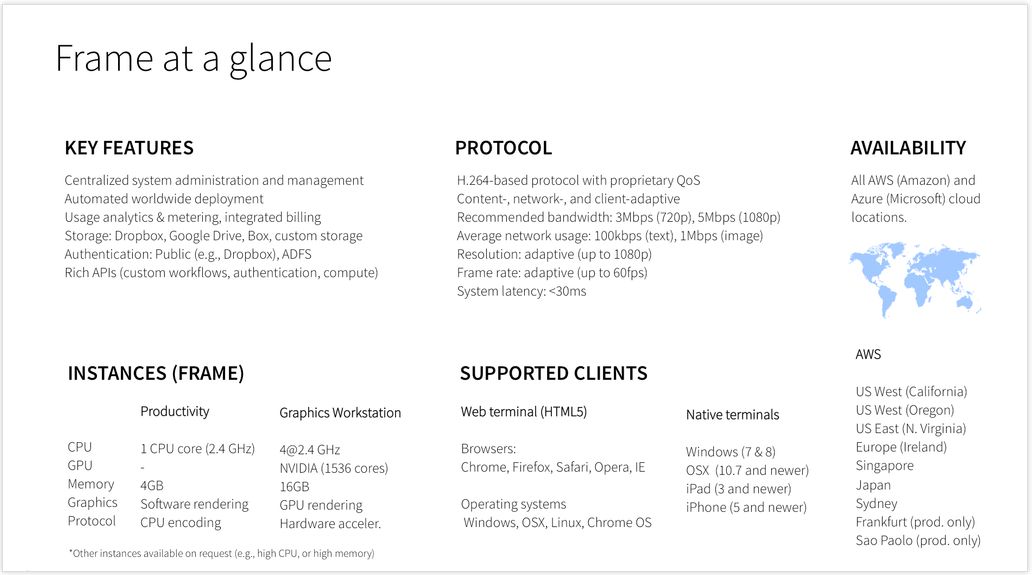
I don’t want to get blogged-down about what Frame is, but the infographic below should give the basics – suffice it to say here that it allows you to stream Windows and web apps, using a number of locations around the world, to a range of devices. It also provides a number of different use levels: Personal, Education, Business, and Platform. You can also find out more about it here.

The key point with Frame is that it potentially offers two approaches to accessing Second Life and other grids via the cloud:

  • As a do-it-yourself option, where you can sign-up for a Personal account, upload your choice of viewer and run it yourself when needed
  • As a packaged service similar to SL Go – which is how Bill Glover is approaching things through his Bright Canopy project, which has a demo up-and-running using Firestorm, and those interested can sign-up to find out about the work and try the demo version.

Nikola extended an invitation to me to try the Personal account  / “do-it-yourself” option for myself, which I was happy to do as a proof-of-concept attempt, and this article is primarily focused on doing that, and providing some short-form feedback. As Bill is working on the packaged service option, I’m not touching too much on that at this point in time.

A quick summary of the technical aspects of Frame (image courtesy of Nikola

Getting Started On your Own With Frame

Anyone wishing to try accessing Second Life through Frame can do so by requesting access to Frame Personal. An access code will be sent to you, allowing you to set-up your Frame account, and select the nearest PoP to you, and your preferred server type  (I opted for the four core system with 16Gb of memory and 20 free hours running a JavaScript client).

Once this has been done, the Launchpad is displayed. This is the normal starting point for Frame operations, and is used to manage the applications you’re running on the service (two are provided by default). This may take a short time to load the first time.

Adding a Viewer to your Frame Account

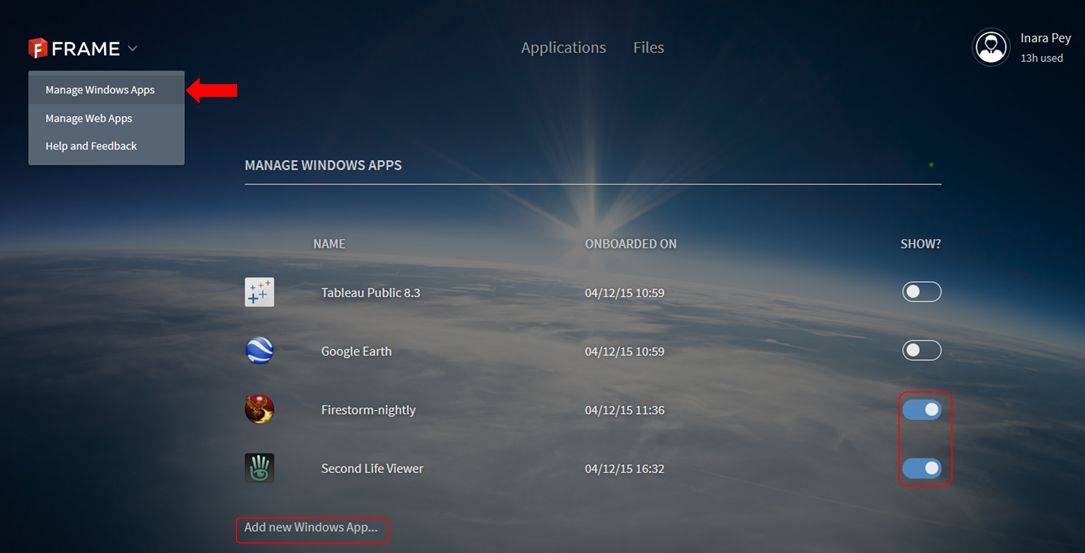
  • click on the chevron next to the Frame logo in the top left corner of the screen and select Manage Windows Apps.
  • A list of your installed applications is displayed (Tableau Public and Google Earth are provided by default).
  • Click on Add New Windows App … under the list.
  • Your virtual desktop will launch. Use the Chrome browser in the desktop to navigate to and download the Windows installer for your preferred viewer OR, if you have the EXE on your computer, use the Upload button (arrow in a circle) button in the lower right corner of the desktop screen to upload it.
Adding new applications to Frame is a matter of using the Manage Windows Apps (main menu) and the Add New Windows App function to run a virtual desktop from which you can browser for the application's installer and then download and install it. Frame will then automatically "onboard" it, and the application simply needs to be "switched on" via the toggle to the right of it
Adding new applications
  • Run the installer as if you were installing the viewer on your PC.
  • Once the viewer has installed, Frame will ask you if you wish to “on-board” it – confirm this, and accept the ToS – having read them, obviously! 😉 ).
  • When the “on-board” process has finished (it takes about 15 seconds), go to the gear icon in the lower left of your virtual desktop and DISCONNECT.This returns you to your Launchpad
  • Activate the viewer by toggling the “switch” to the right of it so it turns blue (shown above). This adds the viewer (and any other app you activate) to your Frame dashboard.
  • Click on Applications at the top of the screen to go to your dashboard. Double click the displayed viewer icon to launch the viewer.

While it may sound long-winded, the entire process of setting-up an application like this can be done in just a few minutes.

Continue reading “Streaming Second Life (and other grids): Frame enters the arena”

2015 viewer release summaries: week 15

Updates for the week ending: Sunday, April 12th, 2015

This summary is published every Monday, and is a list of SL viewer / client releases (official and TPV) made during the previous week. When reading it, please note:

  • It is based on my Current Viewer Releases Page, a list of all Second Life viewers and clients that are in popular use (and of which I am aware), and which are recognised as adhering to the TPV Policy. This page includes comprehensive links to download pages, blog notes, release notes, etc., as well as links to any / all reviews of specific viewers / clients made within this blog
  • By its nature, this summary presented here will always be in arrears, please refer to the Current Viewer Release Page for more up-to-date information.

Official LL Viewers

  • Current Release version updated to version 3.7.26.299635 on March 24th (formerly the Avatar Hover Height viewer) download page, release notes, wiki page, AHH overview
  • Release channel cohorts (See my notes on manually installing RC viewer versions if you wish to install any release candidate(s) yourself):
    • Maintenance RC viewer updated to version .7.27.300636 on April 9th – multiple fixes and improvements (download and release notes)
    • Avatar Layer Limits RC viewer version 3.7.27.300567 released on April 9th– allows users to wear up to 60 wearable layers (jackets, shirts, tattoo, alpha, etc.) in any combination  (download and release notes)
  • Project viewers:
    • Viewer-managed Marketplace project viewer updated to version 3.7.27.300470 on April 7 – allows Merchants to manage inventory associated with Marketplace Listings from within the viewer + sale of items which Merchants do not have the right copy will now be supported with the Direct Delivery purchase mechanism (download and release notes)

LL Viewer Resources

Third-party Viewers

V3-style

  • Restrained Love Viewer updated to version 2.9.9  on April 8th – core updates: re-enabling HTTP Inventory as a default (previously disabled by default), linking the hover height slider at the top of the viewer to the Lab’s Avatar hover Height capability (release notes)

V1-style

Mobile / Other Clients

  • Group Tools updated to version 2.2.33.3 on April 9th – core updates: unknown, release notes  / change log not supplied
  • CasperTech announce their withdrawal from curating and maintaining Metabolt – see my post here.

Additional TPV Resources

Related Links

CasperTech cease Metabolt client development

Metabolt, the 3rd-party text-based client appears to have ceased development, this time possibly permanently.

Rumours that development work on the client had ceased first arose in late 2013, after an extended period which had seen no updates or releases. However, in February 2014, news circulated that CasperTech were set to take over the curation of the project and continue it in the spirit in which it had been started.

The updated METAbolt log-in / splash screen from February 2014, the first indication that Metabolt would be continuing after several months of what appeared to be suspended development.
The updated METAbolt log-in / splash screen from February 2014 gave the first indication that Metabolt would be continuing after several months of what appeared to be suspended development.

The announcement was followed in June 2014 with an update to the client – version 0.9.71.0. However, since then, there haven’t been any further releases, which had again left some wondering if the client was still being actively developed.

It now appears the reason for the more recent lack of releases may in part be due to a dispute between CasperTech and the original developer of Metabolt over the use of the client’s name. A dispute which has resulted CasperTech withdrawing from active development of the client, as a recent terse announcement on the Metabolt web page makes clear:

The recent CasperTech announcement

Obviously, whatever arrangement (if any) had originally been reached between CasperTech and the original developer on how the client might be continued under its original branding is a matter for the two parties concerned, and not something for idle speculation. However, given a disagreement has now arisen on the matter, then as the CasperTech announcement states, this would appear to be the end of the line for the client in its current form at this point in time.

As can be seen from the notice, CasperTech are intending to issue an alternative client in the near future, although no time frames appear to be available at the time of writing this article. I’ll of course provide a review of any new client from them once it does appear.

Space Sunday: ice-cream sandwiches, sniffing the air and targets of Opportunity

CuriosityCuriosity is continuing its exploration and ascent of “Mount Sharp”, the huge mountain-like mound of deposited material occupying the centre of Gale Crater, which has been the rover’s home since it arrived on Mars in August 2012. And it is continuing to find curious and enigmatic hints about the past conditions in the crater, and about Mars as a whole.

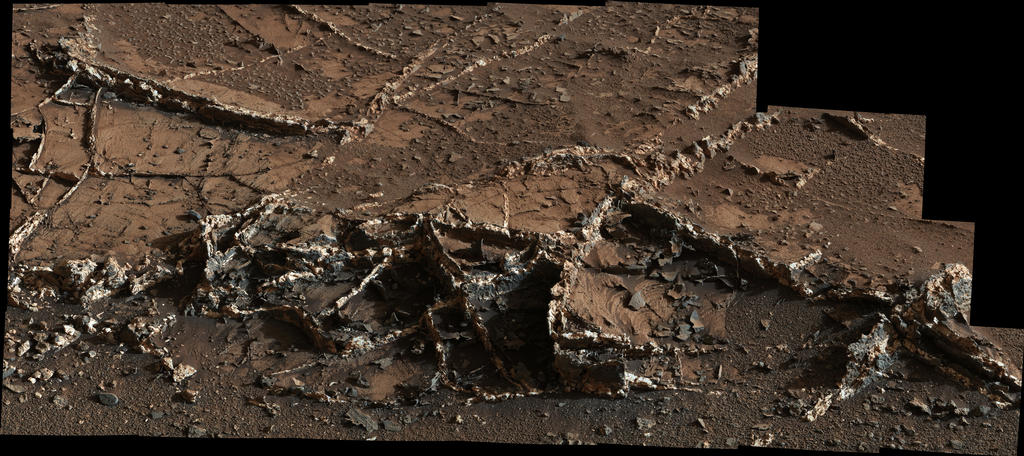
The rover’s most recent discoveries come from an area of rock dubbed “Garden City”, which contains areas of two-tone mineral veins quite unlike anything so far encountered in the rover’s travels.

The veins appear as a network of ridges left standing above the now eroded-away bedrock in which they formed. Individual ridges range up to about  6 centimetres (2.5 inches) high and half that in width, and they bear both bright and dark material. They are strongly suggestive of multiple episodes of fluid movement which occurred much later than the wet environmental conditions that formed lake-bed deposits which gave rise to “Mount Sharp’s” formation.

“Some of [the veins] look like ice-cream sandwiches: dark on both edges and white in the middle,” said Linda Kah, a Curiosity science-team member at the University of Tennessee, Knoxville. “These materials tell us about secondary fluids that were transported through the region after the host rock formed.”

This view from Curiosity’s Mast Camera (Mastcam) is a mosaic of 28 images showing a network of two-tone mineral veins standing up to a height of 6 centimetres (2.5 inches) from the surface of a rock dubbed “Garden City” – click for full size

On Earth, veins of this kind form as a result of fluids moving through move through cracked rock, depositing minerals in the fractures which often affect the chemistry of the surrounding rock. Curiosity has found bright veins composed of calcium sulfate visible on the surface of rocks at several other locations, which appears to be the same with the lighter material found as “Garden City”,   but the dark material suggest something else.

“At least two secondary fluids have left evidence here,” Kah said. “We want to understand the chemistry of the different fluids that were here and the sequence of events. How have later fluids affected the host rock?”

While there are no plans to gather any samples form “Garden City”, analysis of the three sets of samples gathered from within “Pahrump Hills” reveal that mineral deposits within the area vary according to elevation, revealing a complex process may have been responsible for the formation of the area. Samples taken from the lowest elevation of the area revealed themselves to be rich in clays and hematite, both of which commonly form under wet conditions.

However, at just a 5 metre higher elevation, jarosite, an oxidized mineral containing iron and sulfur that forms in acidic conditions, was the dominant mineral, while towards the top of the area, at an elevation of 10 metres, clay minerals and hematite were almost non-existent, and traces of jarosite were greatly reduced, while the samples – from “Telegraph Peak” – were rich in cristobalite and quartz, both of which are mineral forms of silica.

Quite what the process may have been that gave rise to this spread of deposits is unclear – the science team have several options to choose from, and are continuing their investigation.

Continue reading “Space Sunday: ice-cream sandwiches, sniffing the air and targets of Opportunity”