In October 2014, I reported on the viewer-managed Marketplace (VMM) project, which the lab has been developing for several months.
The aim of the project is to enable merchants to manage the creation and management of Marketplace product listing through the viewer, bypassing the need to use the Merchant Outbox (and have copies of items stored on the Marketplace inventory servers) or using Magic Boxes.
VMM does this by adding a new Marketplace Listing panel to to viewer, of which more below.
On Friday, November 21st, the Lab announced that wider beta testing of VMM is now ready to start on Aditi (the Beta grid). and is inviting merchants to download a new VMM project viewer they can use to test creating and managing product listing through the viewer.
Alongside of the announcement, the Lab also made available:
- A VMM Beta Knowledge Base article, explaining how to get started with using VMM
- A VMM FAQ which contains important additional information
- A VMM JIRA project for the reporting of specific issues and problems discovered during testing
- A VMM API wiki page for viewer developers (merchants do not need to worry about this!).
If you are a merchant and wish to test the VMM functionality, you’ll need to download and install the project viewer, and use one of the following three test regions on Aditi: ACME D; ACME E and ACME F. Using the viewer anywhere else can generate error messages when first logging-in (designed to indicate VMM is not available, and which will not interfere with using the viewer for other activities).
If you’ve never logged-into Aditi, please refer to the instructions on how to do so on the beta grid wiki page.
You may also wish to be logged-in to the Aditi Marketplace place.
When testing VMM, remember that it is not intended to enable all Marketplace-related activities through the viewer. Rather, it is intended to allow merchants to create new Marketplace listings with inventory, associate inventory with an existing Marketplace listing, remove items from a listing and unlist goods entirely. All other Marketplace activities will still have to be carried out within the Marketplace itself.
Also note that at present there is a bug within the Aditi Marketplace that will cause purchases to fail. The Lab is working to address this, and it shouldn’t interfere with testing VMM to create and modify product listings.
The following notes are intended to get you started with the project viewer and beta testing, please refer to the Lab’s VMM FAQ for other pertinent information.
The Marketplace Listings Panel

The heart of the viewer-managed Marketplace is the new new Marketplace Listing panel within the viewer. This will eventually replace the Merchant Outbox, although both are provided in the project viewer.
The Marketplace Listing panel allows a merchant to carry out a number of Marketplace tasks from within the viewer, such as: create a new product listing, modify a listing, change the items associated with a listing, etc.
It does this by enabling merchants to directly associate products in their inventory with product item listings on the Marketplace, eliminating the need to either upload copies of products to the Marketplace inventory servers via the Merchant Outbox or, in the case of limited stock items that are No Copy for the merchant, having them stored in-world in a Magic Box. When a customer purchases an item listed via VMM, it is delivered to them directly from the Lab’s asset servers.
This does mean that care must be taken when handing product items in inventory in order to avoid occidentally deleting items associated with Marketplace listings. To help with this, the folder associated with the Marketplace Listing panel remain hidden from view (as far as is possible) when working directly in the inventory .
Google Form
The first time you open the Marketplace Listing panel, it may display the following message:
This feature is currently in beta. Please add you name to this Google form if you would like to participate
If this happens, it is likely because you logged-in to a non-VMM region and then teleported to the test regions. To correct, simply log-in directly to one of the three ACME test regions (ACME D; ACME E and ACME F). The Marketplace Listing panel should open correctly; if you haven’t already created an Aditi Marketplace store, it will display a message requesting you do so, with a link to the Marketplace.
New Folders and Hierarchy
The Marketplace Listing panel introduces two new folders:
- Stock folders: these are used with items that are No Copy to the merchant. Stock folders look like normal inventory folders with a grid of squares on them, and will track the number of items left within them
- Version folders: these allow merchants to manage updated or special (such as seasonal) versions of a product without creating a new listing. They look like normal inventory folders with three horizontal lines across them
- Note that the Version folder is not intended to allow Merchants to have multiple items associated against a single product listing on the Marketplace (so you cannot have version folders containing different colours of the same dress and have them all associated with the same product listing).
Between them, these two folders form a part of a folder hierarchy in the Marketplace listings Panel, comprising:
- A Top level folder for the product
- One or more Version folders for different versions of the product (only one of which can be active against the product listing at any one time)
- Stock folders for limited stock No Copy items – note Stock folders should always appear inside a Version folder
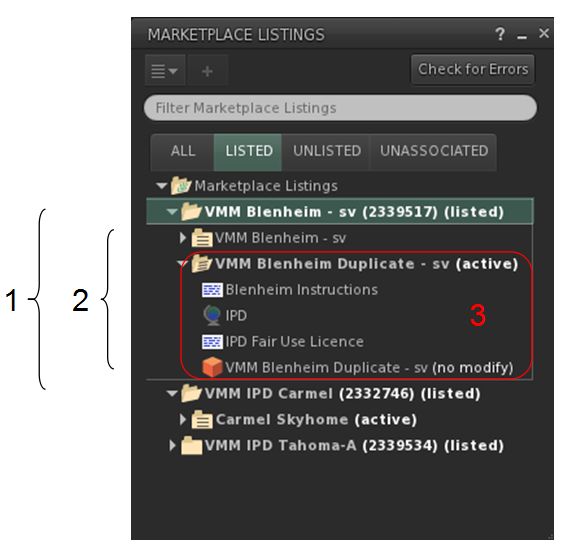
Notes on Using the Marketplace Listing Panel
The Knowledge Base article provides instructions on creating new item listings, etc., so I’m not going to run through things here. Instead, I’ll point to aspects of using the Marketplace Listing panel which may be of interest / assistance when starting to use it.
So, for example, when creating listings:
- If you drag and drop an individual item into the Marketplace Listings panel, the viewer will automatically create the required folder hierarchy (top folder & Version and, if required, Stock folder)
- if you have products already set-up in their own folders can drag-and-drop the entire folder into the Marketplace Listing Panel, although you may need to perform some folder renaming operations afterwards afterwards
Also, note that while most actions in creating a new listing can be carried out within the Marketplace Listing panel, it does still require the use of the listing creation page in the Marketplace in order to enter the listing details (price, description, etc).
This is accessed via the Edit Listing option in the right-click context menu in the Marketplace Listings panel, and will either display the listing page directly in the viewer’s built-in browser, or will prompt you to display the page in your external browser (depending on your preference). In the case of the latter, you may additionally have to log-in to the Marketplace if you haven’t already done so.

This isn’t a major hassle per se, but it does mean that there may be a temptation to finish off the entire listing process (e.g. updating the list page then listing the product one the Marketplace) from the web rather than the viewer. Should you opt to do so, it won’t cause any problems, as the Marketplace Listing Panel will be updated to reflect changes which directly affect it.
Again, to reiterate as it is important: remember that the items in the Marketplace Listings panel are still a part of your inventory (if you check the Recent tab of your inventory floater when working with the Marketplace Listing Panel, you’ll see everything listed there). This means that if you delete something from the panel, you are deleting it from your inventory – so be careful, and don’t purge trash before you’ve restored deleted items you may want if you happen to do this.
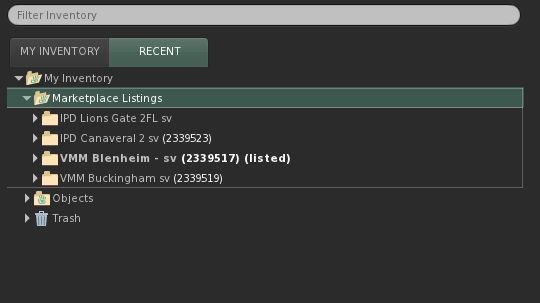
Once you start to use the Marketplace Listing panel, you’ll find it takes care of organising the items you place in it for you, using a set of four tabs:
- All: everything you’ve placed into the panel and in which you can carry-out all required actions without having to swap between tabs if you wish
- Folders with items actively listed on the Marketplace in them are be displayed in bold with “(listed)” in the title
- Unlisted items are displayed with their listing number in brackets beside their title
- Items without any listing association at all are display only their title
- Right-clicking on any folder in this tab will display only the options relevant to the folder as defined by its status (unassociated, unlisted or listed)
- Listed: all items which are actively listed for sale on the Marketplace
- Unlisted: Those items which may or may not have a Marketplace listing associated with them, but which are currently not listed for sale on the Marketplace
- Unassociated: items you’ve dropped into the panel, but have yet to associate with a listing or generate a listing number.
One thing that’s liable to prove popular is that VMM allows the sale of No Copy items through Direct Delivery, with the stock folder within the Merchant Listings panel tracking remaining quantities of such items, allowing a merchant to track stock levels directly through the viewer.

The process of manually migrating existing listings to use VMM items in your inventory is relatively easy. All that’s required is to associate listing ID of an existing Marketplace listing with an item placed in the Marketplace Listing panel. Once done, the updated item can be activated and listed via the right-click context menu, and you’re done.
If you haven’t got anything already listed on the Aditi Marketplace to test this, you can use the Merchant Outbox to run through the steps of setting-up a listing as is done at present, and then use that listing to test migration to VMM.

I found using the Marketplace Listing panel to be relatively straight-forward and encountered few problems (other than what probably amounted to operator error due to my staying up ridiculously late playing with it). I’m not entirely sure how the new mechanism is going to go down with merchants; the ability to sell No Copy limited stock items via Direct Delivery is liable to be welcomed, but it may be that people are initially a bit put off by the new listing process and clicking between tabs and making menu selections.
It’ll certainly be interesting to see what comes out of the beta testing.

 Inara Pey: Living in a Modemworld