Helping the community: the Phoenix Firestorm Support region

Update Aug 25th: The region is now open. See the link at the end of this article to visit.

This weekend, the Firestorm team will be launching a new in-world venture: the Phoenix Firestom Support island.

The region is designed to serve two purposes. One is to provide help and support for users of any calibre, via the use of in-world tutorials supported by real life help in the case of users new to SL, and via the provisioning of an area more focused on providing real life help for users more familiar with SL and the viewer. The second is to provide an in-world base of operations to support Firestorm users in particular.
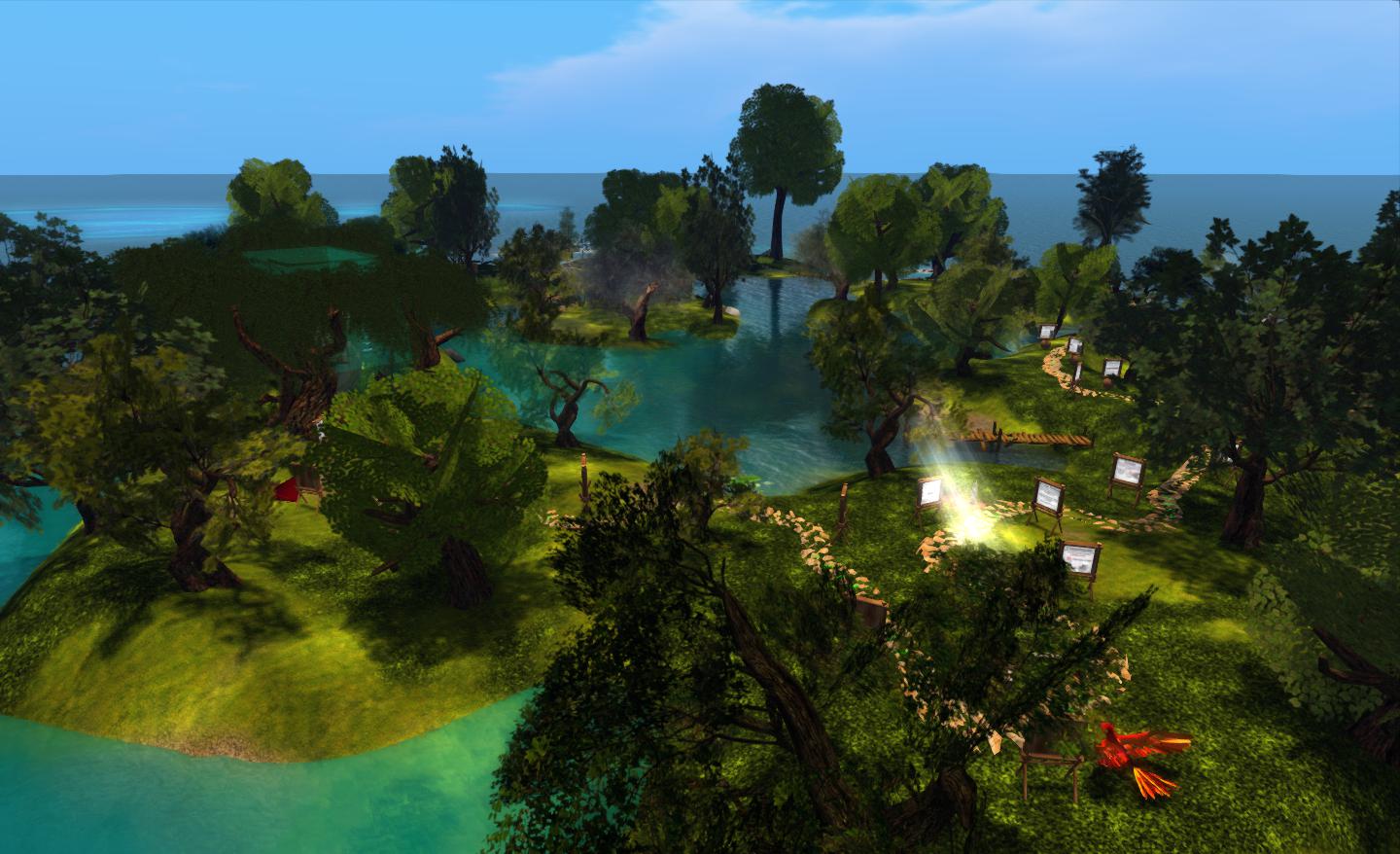
Firestorm’s new support island

The region is somewhat mindful of the old SL Orientation Islands where new users to SL learned about the basics of the viewer and how to do things – so much so, in fact, that I was half-expecting to find a beach ball and table during my preview explorations :). While neither turned up, I did smile on coming across a large and talkative phoenix, itself a reminder of the OI parrot…

However, this is not to say that the region has been deliberately modelled on the old Orientation Islands. As Jessica Lyon, the Phoenix / Firestorm project lead pointed out to me as we discussed the island and the ideas behind it, it’s a matter of form following function. A relaxed and visually pleasing tutorial path with few distractions naturally lends itself to this kind of open-air approach.

The main element of the region is a path which leads people around the island from the arrival point, taking them past various lessons in gaining familiarity with Second Life and the viewer. These are very much focused on “learn by doing” – such as jumping over a fence to understand walk / jump – and are very clearly and cleanly presented, and obviously intended for the more novice user.
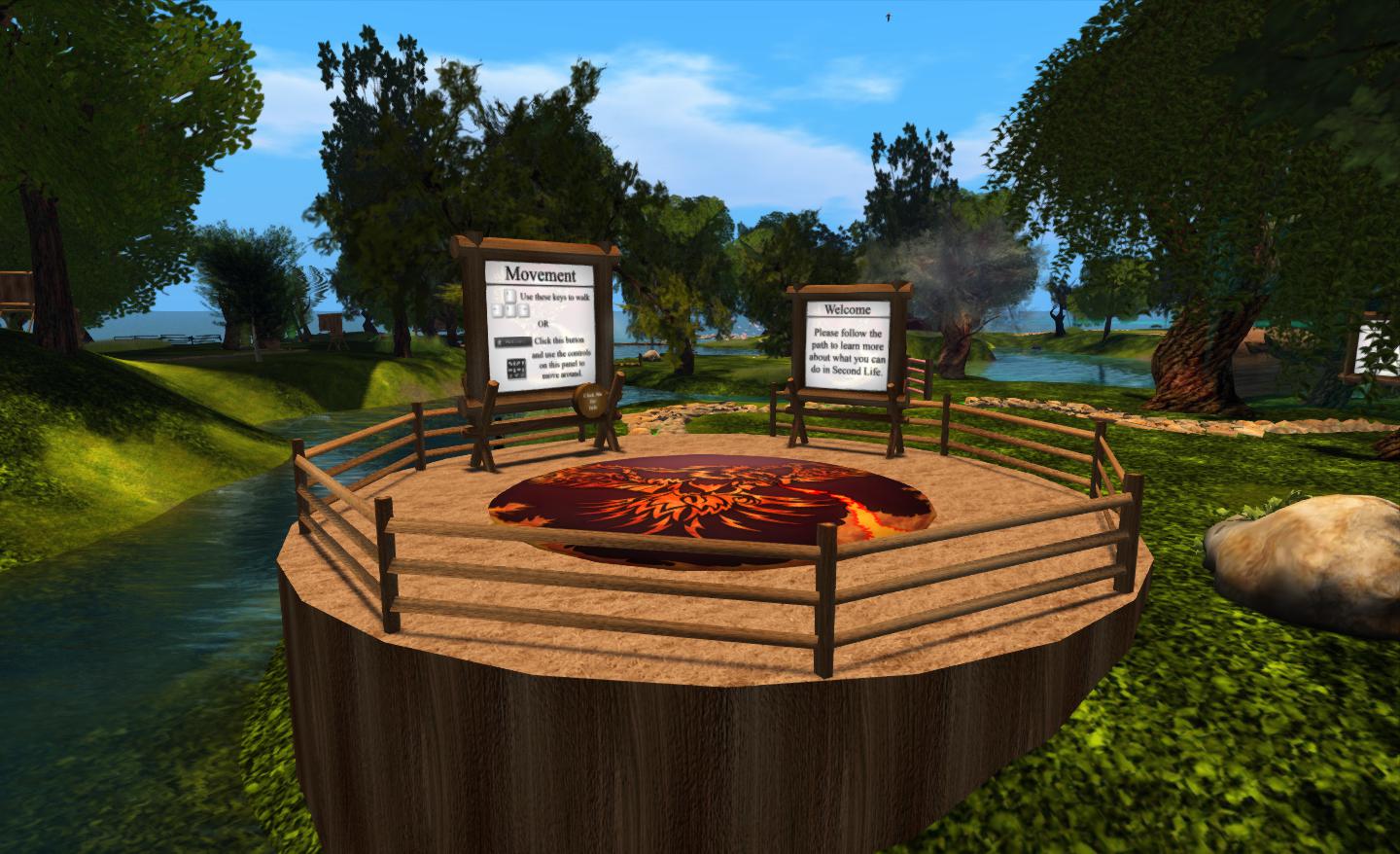
Arrival point

The signs are clear and concise, and while based on Firestorm running in a default mode (i.e. with the pie menu active), they easily translate to other viewers, whether they are using pie or context menus.

Within this sits a central area where questions about Second Life and viewer use that go beyond those that tend to be asked by “new” users can be addressed. This can be reached via a bridge from the outer area of the island or via a teleporter located at the arrivals point.

The central area, where the more experience user can seek focused assistance from staff and mentors

A key aspect of the region is that is designed to be staffed. Although it had originally been hoped that in-situ help relatively small, things haven’t quite work out as originally envisioned. “Our original plan,” Jessica told me, “Was to have a first entry to SL region for zero – 30 day accounts only, and would staff it with our own support staff and a careful selection of mentors/helpers. We have a RegAPI from LL [which would allow Firestorm to run a sign-up page and deliver new users directly to the region]. Unfortunately, it doesn’t work with “Resident” last names, so we had to switch to plan B. Plan B is to open the region to the public, and heavily staff it with mentors and helpers to ensure new and old residents alike get real help from real humans.”

As a result of the switch to “Plan B”, and to ensure the island is properly staffed, invitations to participate have been sent to the RHN, White Tiger Mentors, Mental Mentors and other groups. One potential benefit of this is it will help ensure there’s a much more diverse wealth of experience on-hand to deal with viewer-centric questions than might otherwise be the case were the island solely staffed by Firestorm-focused volunteers.

Continue reading “Helping the community: the Phoenix Firestorm Support region”

Relay for Life of InWorldz kickoff rally

August 25th will see the start of the first ever Relay for Life season held in InWorldz, with a special kick-off rally.

The three-month event will run through until November 17th and has the full support of the American Cancer Society.

Other key dates for the season include:

  • Saturday September 22nd: RFL of InWorldz Half-way Event
  • Friday November 2nd through Sunday November 4th: RFL of InWorldz Relay for Life Weekend
  • Saturday 17th November: RFL of InWorldz Closing Party.

The theme for this inaugural season is Colour of Hope, as featured in the season’s banner, as seen in the video, above.

The kick-off rally will be held on Dreamscapes of Poseidon (IWurl), commencing at midday IW time (PDT). It presents a chance for participants to learn how their involvement benefits the American Cancer Society’s goal to save lives and create more birthdays and the opportunity to meet the Society’s IW representative as well as gain inspiration from DJ KyFire Oakleaf’s library of originals created by all those who have been involved in the fight against cancer, including survivors, caregivers and loved ones of those who sadly succumbed to the disease.

Kick-off Rally Schedule

  • 12:00 pm KyFire Oakleaf – RFL Songs
  • 12:15 pm Hairy Thor Chair
  • 12:22 pm RFL Video
  • 12:30 pm TIGGS Beaumont
  • 12:37 pm KyFire
  • 12:40 pm Sting Raymaker
  • 12:50 pm KyFire Oakleaf- closing.

Following the kick-off rally, the season will comprise a number of events held within InWorldz, culminating in the Relay Weekend itself at the start of November. In it, individuals and teams will camp out, picnic, dance, play games and take turns circling around a track “relay” style to raise funds and fight cancer. The Relay Weekend will open  with cancer survivors leading the way around the track and being honoured in the Survivor Lap. They will be followed throughout the day by groups, teams and individuals participating in the track walk which will continue over 24 hours, and the weekend will include the beautiful, moving and silent luminaira ceremony, in which lights are lit in memory of a loved one who won the fight against cancer or in remembrance of a special someone who lost their battle.

Relay For Life represents hope in that those lost to cancer will not be forgotten, that those who face cancer will be supported, and that one day, cancer will be eliminated.

Related Links

Steaming into new waters

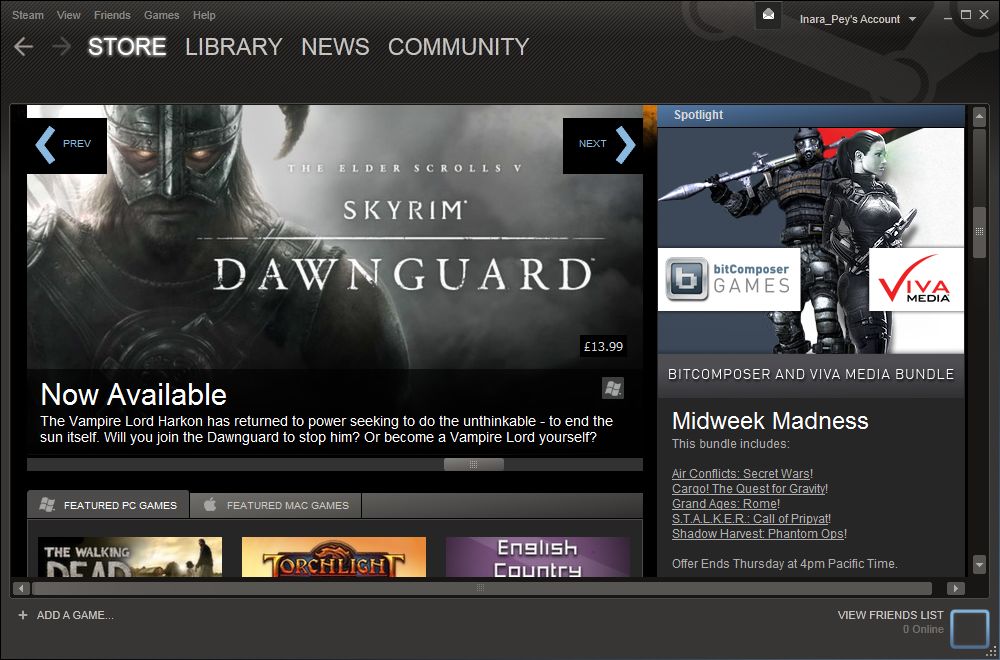
There has been a lot of humming and hawing since the announcement of SL’s forthcoming dip into the world of Steam. I passed brief comment at the news, but refrained from saying too much because a) I’m not a “gamer” and b) I’d never used Steam (although I did sign-up as a result of LL’s announcement to see what things are like for myself).

Steam client

Some of the feedback has been downright thoughtful and thought-provoking, as with Darrius Gothly’s take on things. Others have been the expected doom-laden predictions.

Sure, there is a potential for some trouble to come as a result of the link-up. Some will find temptation calling and coming into SL with the express intent to cause trouble; but I seriously doubt the amount or impact of outright griefing, will be anywhere near as bad as the doom merchants predict. What is more likely is that the vast majority of Steam users will like as not ignore the arrival of SL on their collective doorstep, either because they are too busy doing other things like knocking seven bells out of a digital foes somewhere, or because their preconceptions about SL are such that they have no interest (beyond, perhaps, poking their nose in to confirm those preconceptions).

As to those that do decide to take a leap of faith and sign-up for SL, why do people automatically assume they’ll do little than turn up and stomp all over our virtual daisies? As Darrius notes in his piece. A lot of SL users are also gamers themselves. They manage to bridge the “divide” between SL and games without issue – so why can’t people coming from the other direction do the same? Not every gamer is a hoodlum looking for the digital equivalent of a forehead to nut.

Steam is Also Opening It’s Doors

The negative bias expressed by those unhappy with the link-up seems to be born out of an assumption that Steam is all about playing games. It’s not. While games are the central emphasis, Steam is far more a community of people interested in a wide range of activities that reach beyond shooting up the next zombie or six. There are 3D modellers, content creators, machinima makers, and so on. In fact, such is the breadth of interest among users that Value, the company which owns the site, recently announced that they’ll  be launching a new “non-game” software service on Steam. In the official press release announcing the move, they state:

The Software titles coming to Steam range from creativity to productivity [my emphasis]. Many of the launch titles will take advantage of popular Steamworks features, such as easy installation, automatic updating, and the ability to save your work to your personal Steam Cloud space so your files may travel with you.

More Software titles will be added in an ongoing fashion following the September 5th launch, and developers will be welcome to submit Software titles via Steam Greenlight.

Ergo, when considering how SL will be promoted and where the appeal will lay, it’s worth remembering that there is an even chance it will not be placed within the “game” categories within Steam, but rather in the “creativity” category – something which immediately puts a different spin on how it will be perceived.

This would additionally fit with the fact that – for now at least – Second Life isn’t ready to be promoted as any kind of “game platform” (or as I prefer to term it, “game-enabling platform”). Oh, true enough, almost the entire thrust of LL’s development with the platform over the last 18 months has been to make it far more capable of supporting games and game-play environments; it doesn’t take a particularly keen observer to spot that. However, the platform isn’t there yet, not by a long shot. As such, it would be foolish for LL to push the platform as some kind of wonderful new game development tool or gameplay environment for a while.

The Needs of the Not-So-Many

I’d also tend to suggest that far from seeing the link-up with Steam as a means of trying to bring gazillions of users (“gamers” or otherwise) into SL, again as some have suggested (and others have blown raspberries at), Linden Lab are looking for something far more modest – again, at least to begin with.

Continue reading “Steaming into new waters”

Curiosity: stretch, wriggle and roll!

This week has been perhaps the busiest to date for the MSL team, with a series of milestones for the project being reached one after another which pretty much complete the initial characterisation phase of the mission (phases 1a and 1b). These have included the first firings of the rover’s laser system, an initial stretching of the instrument-laden robot arm and Curiosity’s first drive.

Zap!

On Sol 13 (19th August), the mission team carried out the first test firings of the ChemCam laser at a surface object. The inaugural target was a small rock some 7 centimetres (3 inches) across which scientists christened “Coronation” to mark the event, but which was previously designated N165. It had been selected as it presented a relatively flat surface to the rover.

The test firing lasted some 10 seconds, during which the rock was struck by 30 pulses from the laser system, each pulse delivering more than a million watts of power for about five billionths of a second to a tiny spot on the surface of the rock, vaporising it into plasma. Light from the plasma was captured by ChemCam’s telescope and fed via fibre-optics to the rover’s three spectrometers for analysis.

A composite image of the test firing. The background image is from Curiosity’s Navcam, showing N165. The two inset images are from ChemCam’s Remote Micro Imager (RMI)

The results were far better than anticipated, prompting ChemCam Deputy Project Scientist Sylvestre Maurice of the Institut de Recherche en Astrophysique et Planetologie (IRAP) in Toulouse, France, to comment, “It’s surprising that the data are even better than we ever had during tests on Earth, in signal-to-noise ratio. It’s so rich, we can expect great science from investigating what might be thousands of targets with ChemCam in the next two years.”

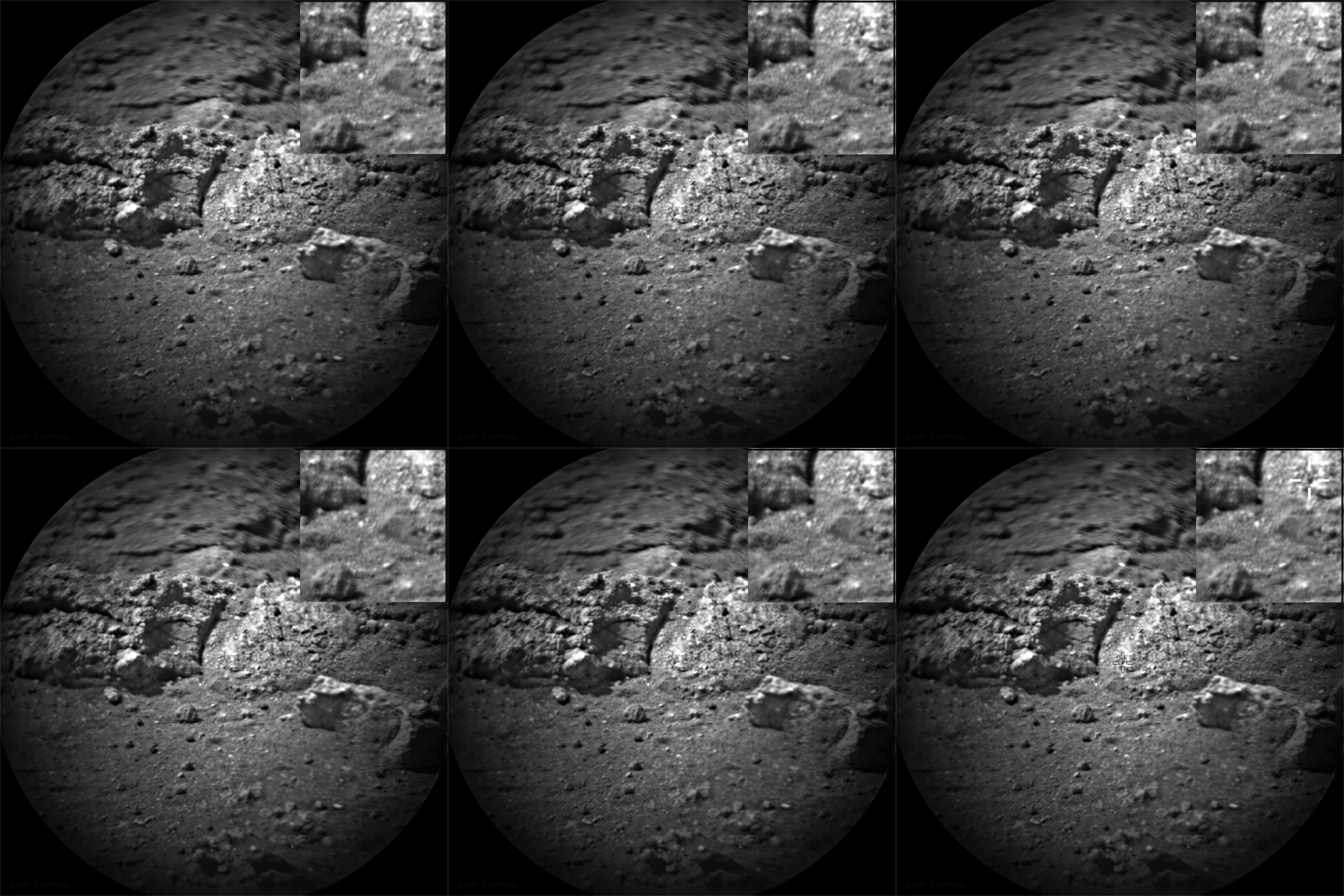
This was followed-up with a further series of firings on Sol 16 at some of the rocks exposed by the motors of the Descent Stage as it hovered in “skycrane” mode to lower the rover onto the surface of Gale Crater. Here the laser was fired some 50 times at three targets in the exposed rocks, which were also photographed by ChemCam’s RMI.

Images from ChemCam’s RMI showing a laser “hit” on Sol 16. The main image shows the rocks roughly 6 metres from the rover. The inset is  a composite “before” and “after” image of a laser strike. It shows an area on the rock 2.5 sq cm in size. RMI can resolve details as small as 0.5 to 0.6 millimetres

Stretch

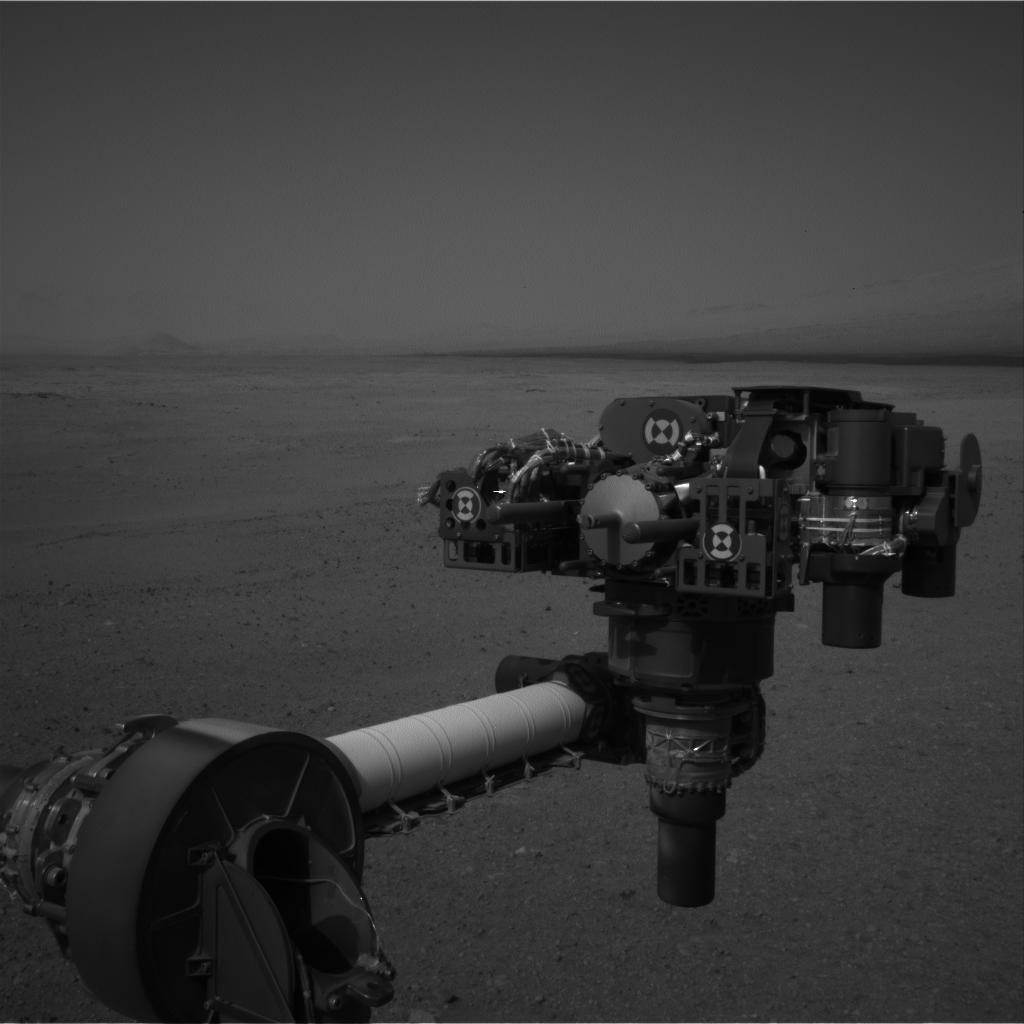
On Sol 14 Curiosity finally got to give her arm a bit of a stretch. The 2.1-metre (7 foot) long arm includes a 60-centimetre (2 ft) diameter “hand” called the Turret, which contains a range of scientific instruments and tools essential to the mission, including a dedicated camera (the Mars Hand Lens Imager, or MAHLI), a drill system, a scoop for collecting Martian soil (“fines”), and an Alpha-particle X-ray Spectrometer (APXS).

In this initial manoeuvre, the arm was raised, extended and rotated to use all five of its joints prior to it being stowed once more in preparation for Curiosity’s first drive. The manoeuvre marks the first step in calibrating the arm’s movements and preparing it for science operations. Further tests of the arm and its equipment load will take place over the next several weeks, but the system is unlikely to be fully commissioned until around mid-October.

Curiosity raises its turret of equipment as the robot arm is tested (image captured by the black-and-white Navcam system)

Continue reading “Curiosity: stretch, wriggle and roll!”

Materials processing: the what, why and where

On August 16th, Linden Lab announced the forthcoming arrival of material processing in SL in the form of specular and normal maps. At the same time, a video was released demonstrating some of the capabilities. But what does this actually all mean for the everyday user in SL? Here’s what I hope is a lay guide to things, including comments from one of the architects of the new system, Geenz Spad, as to how it came about.

Materials Processing

This is not intended to be a technical discussion on computer graphics mapping in general or on normal or specular maps in particular. Rather, it is intended to provide a broad, non-technical explanation as to how the latter work. 

Materials processing is the combining of various computer graphics “maps” to significantly increase the level of detail that appears on any object or surface within a computer game. Within Second Life, textures (themselves a form of computer graphics map called a diffuse map) are routinely used to add the illusion of surface details to in-world objects and surfaces. The new material processing capability will introduce two further kinds of computer graphics map to SL which can be used in-world with textures to dramatically increase the detail and realism of objects and surfaces. These additional maps are called normal maps and specular maps.

Normal  Maps in a Nutshell

Normal maps (sometimes referred to as bump maps, although they are more rightly the most common form of bump map) are a means of faking high levels of detail on an otherwise bland surface by means of simulating the bumps and dips that create the detail. Normal maps can be created in several ways.

For example, when working with 3D models, a common method is to make two models of the same object: one a very complex, highly detailed model with a high polygon count, the other a much lower polygon count model with significantly less detail. An overlay process is then used to generate a normal map of the detailed model’s surface features which can be applied to the less complex model, giving it the same appearance as the highly detailed model, but for just a fraction of the polygon count, reducing the amount of intensive processing required to render it.

Using a normal map to enhance the detail on a low-polygon model. The image on the left shows a model of some 4 million triangles. The centre image shows a model with just 500 triangles. The image on the right shows the 500-triangle model with a normal map taken from the model on the left applied to it (credit: Wikipedia)

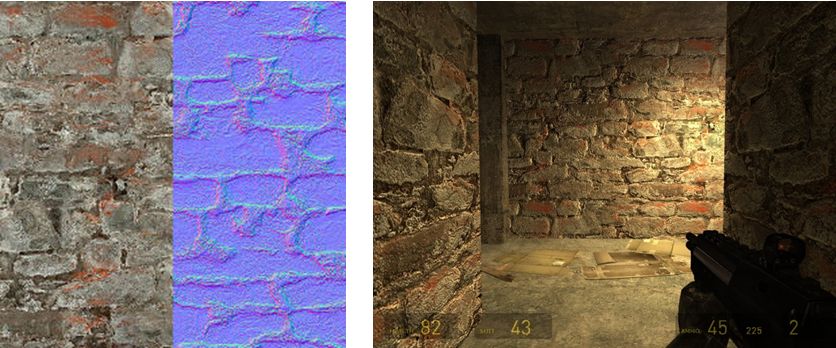
Another common way to produce a normal map is to generate it directly from a texture file. Most modern 2D and 3D graphics programs provide the means to do this, either directly or through the use of a plug-in (such as the nVidia normal map filter for Photoshop). When combined with diffuse maps, the normal map creates the impression of surface detail far greater than can be achieved through the use of the texture alone.

Normal map from a texture: left – the original texture (diffuse map) and its normal map shown as a split view; right – the material resultant from applying both maps to surfaces inside a game (credit: Valve Corporation)

Specular Maps

In the real world, every highlight we see in an object is actually the reflection of a light source. Surfaces and surface details reflect light differently to one another, depending on a range of factors (material, lighting source point(s),  etc.). Specular maps provide a means of simulating this by allowing individual pixels in an object to have different levels of brightness applied to them, giving the illusion of different levels of light being reflected by different points on the object.

When life gives you lemons: a mesh lemon with (l) a  normal map  applied, and (r) a normal and a specular map together. Note how light is apparently being reflected across the surface of the latter (credit: Mind Test Studios)

Like normal maps, specular maps can be produced in a number of ways, both within 3D graphics modelling programs and in tools like PhotoShop. As shown above, they can be combined with normal maps and textures to add detail and realism to 3D models and flat surfaces.

What Does This Mean for Second Life?

Second Life itself already includes a dynamic example of how normal and specular maps can be used: Linden Water. This is created using an animated normal map to create the wave-like effect for the water, while an animated specular map adds the highlights and reflections. The result is a very realistic simulation of moving water able to catch and reflect sunlight.

Just as the use of normal and specular maps create a very real illusion of water with Linden Water, the new materials processing capabilities will significantly enhance the look and realism of both mesh and prim content within SL. Mesh content should additionally benefit as it will be possible to produce high levels of detail on models with low polygon counts (as shown in first image in this article). This will improve rendering performance while also having the potential to lower things like land impact for in-world mesh items.

The only initial limitations as to where and how normal and specular maps can be applied is that they will not be applicable to avatar skins and system layer clothing. Any decision on whether the material processing capability should be extended to include these will depend upon at least two things:

  • Community feedback – whether there is a demand for normal and specular maps to be used with avatar skins
  • Understanding what is happening with the avatar baking process, and determining what is involved in getting the new baking process and material processing to work together.

Use the page numbers below to continue reading

Kitely goes mega

I’m a little late getting to this, as I’ve been swimming through a lot of SL-related stuff and other bits, so apologies to Oren and Ilan. 

On the 17th August, Kitely announced the addition of high performance big worlds and world pictures to their on-demand service.

Public World Page Images

Taking the second of the new additions first, Kitely users can now add an image of their world(s) to the Public Worlds listing. Previously, the Public Worlds list was just that – a text list of all worlds in Kitely available for public access. The use of images makes the list more visually appealing and gives those browsing the list a glimpse of the world prior to clicking on the image to access the region’s World Page.

Adding a Public Worlds image via the Manage World Advanced tab

Pictures can be set in one of two places – the World Page, and in the Advanced tab of the Manage World dialogue box. Submitted pictures are automatically resized to fit the available space on upload.

The Public Worlds page has been redesigned to support the new images,  with world images being displayed 12 to a page, with the world name below the image with the world owner’s name. Those worlds that have not yet had an image uploaded for the page will show the Kitely logo, and will generally be listed after all those that have an uploaded image available.

The updated Public Worlds page layout, with my own region in the list 🙂

Big Worlds

Following-on from the promise in the last update, Kitely have implemented their “big world” feature. This allows large, high-performance worlds to be created which can be up to 16 regions in size (i.e. 4 regions x 4 regions). In addition to the 16-region world, big worlds are also offered in four region (2×2) and nine region (3×3) sizes.

The free worlds offered within the Silver and Gold subscription plans can be used to create  various mixes of big worlds and standard regions, according to the user’s requirements. For example: a Silver plan might be used to create 10 individual regions, or two 2×2 big worlds and two “standard” individual regions or a 3×3 big world and single individual region, etc.

However, the size of a world can only be set when it is created, and cannot be changed afterwards. Therefore, single region worlds already created in Kitely cannot be converted to big worlds, regardless of the remaining quota of free regions in a silver or gold plan (e.g. if a user has 3 regions left in their free quota, they cannot combine them with an existing single-region world to create a 2×2 big world).

Additional worlds beyond a plan’s quota can be purchased using Kitely Credits (KC) at the rate of 10KC per region per day. So a 4-region (2×2) big world would cost 1200KC a month (4 regions x 10KC x 30 days), or as little at $4 a month when purchasing Kitely Credits at the maximum discounted rate. The costs of copying, exporting, and replacing big worlds are also dependent on the number of regions in the world. For example, copying a 4-region world will cost 40 KC (10KC per region).

Additional points of note about big worlds:

  • Big worlds have a “root region”, which is always the region in the South-west corner of the world
  • Big worlds have a “default region”, which is initially the root region (SW corner region) of the world, where incoming visitors arrive
    • This can be altered through the use of a tele hub, which can be placed in any region in the world, making it the default for incoming visitors
    • Deleting the telehub will not alter the updated default region
    • Moving the default region does not change the location of the root region
  • There is a limit of 100,000 prims for a world, regardless of the number of regions it contains.  How the total allocation is distributed among the regions within a big world is up to the world owner, but the total of 100,000 prims cannot be exceeded
  • When running in megaregion mode (see below), region crossings are completely eliminated
  • Vivox works seamlessly across all regions in a big world.

By default, Kitely’s big worlds use the OpenSim megaregion mode, wherein multiple regions have been merged into one contiguous region. This eliminates region crossings within a big world and all the dependent issues around them for building, vehicle movement, etc., and provides a much smoother overall performance.

However, Megaregions are an experimental feature so some OpenSim features don’t work properly (e.g. parcel audio only works in the root region). Kitely therefore allows big worlds to be run as either megaregions or non-megaregions; a check-box is provided in the Advanced Tab of the Manage World dialogue box to switch any inactive world (i.e. a world not currently running on a Kitely server) between the two modes.

Kitely have also added a new world template to help in the creation of big worlds. This is the Universal Campus, a 2×2 region build created by Michael Emory Cerquoni (a.k.a. Nebadon Izumi), and licensed under the Creative Commons Attribution-ShareAlike licence.

To support the safe archiving of big world builds, Kitely have extended to the OpenSim Archive (OAR) file format to support the saving of a multi-region world as a single OAR file. Currently, the file format cannot be used to export builds elsewhere, but the code has been submitted for inclusion in standard OpenSim, and once adopted by OpenSim, will allow the exchange of multi-region OAR files between Kitely and other grids (with limitations to protect 3rd party content), although pre-existing multi-region OAR files may require replacing should the file format change as a result of adoption by OpenSim.

In the meantime, Ilan Tochner, Kitely’s CEO has offered a workaround for people to import their own multi-region builds to Kitely ahead of the new file format being adopted.

Related Links