The following is summary of changes to SL viewers / clients (official and TPV) which have taken place in the past week. It is based on my Viewer Round-up Page, which provides a list of all Second Life viewers and clients that are in popular use (and of which I am aware) and which are recognised as being in adherence with the TPV Policy.
This summary is published every Monday, and by its nature will always be in arrears. Therefore, for the most up-to-date information on viewers and clients, please see my Viewer Round-up Page, which is updated as soon as I’m aware of any changes, and which includes comprehensive links to download pages, blog notes, release notes, etc., for Viewers and clients as well as links to any / all reviews of specific viewers / clients made within this blog.
A relatively quiet week. I’ve attempted to add summaries of what might be regarded as “core” changes / fixes to Viewers (where possible); these aren’t in any way supposed to be exhaustive – that’s what release notes and change logs are for! Hopefully, they’ll give a flavour for what has changed within a release.
I’m curious to know how many find these summaries and the main Round-up Page useful, and whether the additional information on release changes as seen here would be more appreciated if seen in the main Round-up Page.
Development: rolled to 3.3.4.259223, June 9th, which adds Kity Barnett’s contributed spell check to the Preferences -> Chat (button)
Dolphin rolled to 3.3.10.24429 on the 25th (just after this summary came out, so I’ve updated) – release notes here
Kokua experimental rolled to 3.3.1.22989 Beta-1c on June 22nd, with a mesh uploader fix
Restrained Love rolled to 3.8.3.3 on June 24th, which includes Kitty Barnett’s spell checker contribution to LL’s official code (available in the current LL Dev release) and numerous bug fixes (release notes)
Zen Viewer updated to 3.3.4.2 on June 21st, core updates: additions to the Grid Manager and updates to HACD and OpenAL (release notes)
Cool VL Viewer rolled to 1.26.4.19 on June 23rd – core changes: Implemented an import feature for Shape, Hair, Skin and Eyes in the appearance customize floater; Exposed the “Show media HUD” option in Preferences->Audio and Video; improved the texture exporting algorithm for the Object backup feature to prevent it hanging; increased the maximum size of scripts sources from 64Kb to 128Kb; numerous bix fixes (change log)
Libretto rolled to 0.18 on the 20th, core updates: fix to a “clothing not rezzed issue” and fixed avatars not being removed from radar when moving out of range (release notes)
Today, the 23rd June, SL officially turns nine – nine years of open, public access!
A tradition at all SL Birthday celebrations is that of the time capsule, and this year is no exception. The time capsule contains items donated by SL residents, which are placed on display at future SLB celebrations.
SL9B Time Capsule
Like every year, we have created a time capsule for you to add a memento of your time so far in SL – and there is still time for you to drop an item into it if you haven’t already. To do so:
Make sure your item is either FULL PERM (preferred) or at least COPY / TRANSFER (NO MOD items can be accepted, but may cause problems when being placed in future displays)
Make sure permissions are set not only for the item itself, but for any items (scripts, etc.) that it contains – one script not properly set can turn your item in a NO COPY / NO TRANSFER device that will be rejected when the content is reviewed after the event
Don’t donate a HUGE item – remember, it may well be displayed in the future!
Visit our SL9B time capsule and right-click on it to EDIT it, open the CONTENTS tab and drag your item from your inventory and drop it into the capsule’s contents (CTRL-D may be required to drag the item into the capsule’s contents)
If you get a “No Entry” sign, check the permissions on the item and its contents.
Note this is a 3-page piece. Please use the page options at the bottom of the article to page through.
There has been a lot of chat recently about Cloud Party, the newest “SL-like” virtual world to come into existence – due in part to the fact that it is backed by SL’s co-founder, Cory Ondrejka, thus giving it something of a high visibility. Like Kitely, Cloud Party is hosted within Amazon’s cloud computing architecture (hence part of the reason for the name of the platform), and – again as with Kitely’s initial beta phase – requires a Facebook account in order for all of the capabilities to be used.
Unlike most traditional grids, however, Cloud Party doesn’t require a dedicated viewer or client – it runs entirely within your preferred web browser (although users of the latest flavours of Internet Explorer may have issues as Cloud Party runs on WebGL, which isn’t natively supported in IE).
Also unlike most grids, cloud island doesn’t feature the usual 256×256 metre (or larger) default land mass; instead, regions are “islands” floating among the clouds (again, hence the name of the service). The precise size of these islands is hard to judge and at this point it time it is unclear if islands can be “joined” in away way to provide larger land masses.
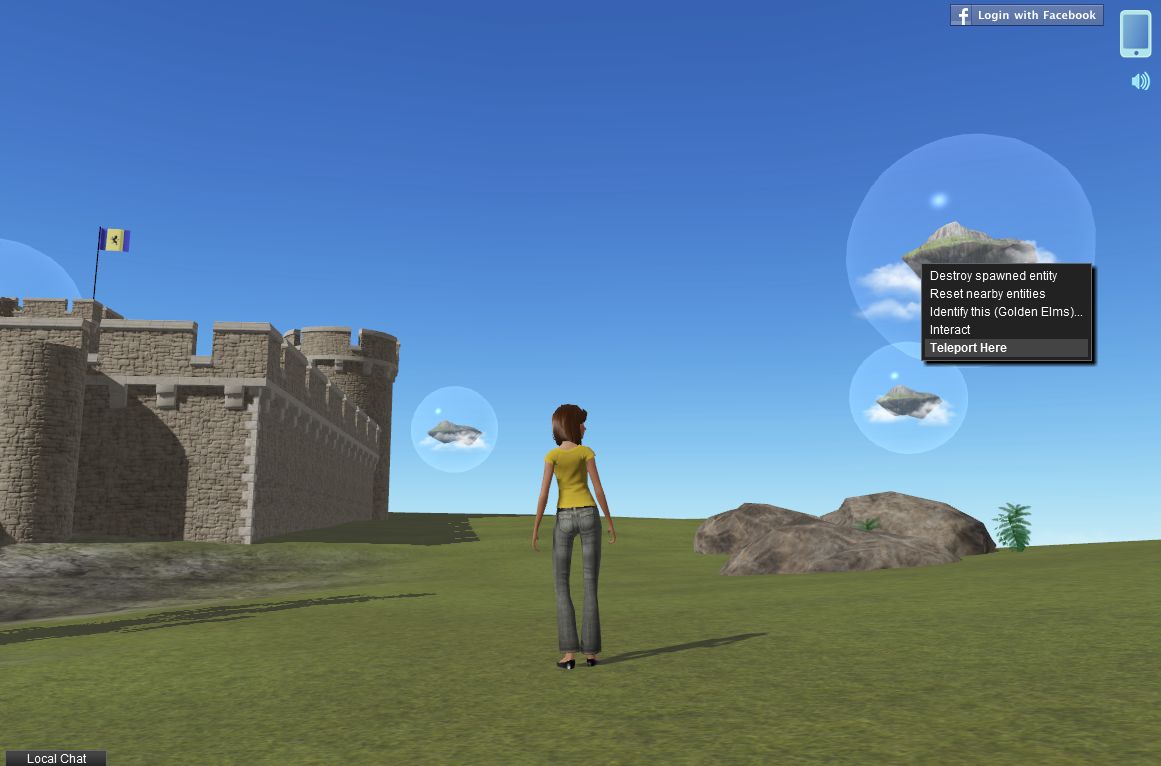
Islands in the sky: a typical in-world view in Cloud Play
That Cloud Party log-ins are (for the foreseeable future) only fully enabled via Facebook might also be off-putting for some. However, if you’re not a Facebook user, you can still log-in with limited functionality on an anonymous basis and at least get a feel for the app, which is what I did for several hours on Friday June 22nd.
Logging-in to Cloud Party is facilitated via the website.This offers the options of logging-in via Facebook or anonymously. This also present you with the obligatory “click to accept terms and conditions” pop-up, and options to use either “Gamer” movement controls or “Tablet” control features and a choice of male or female avatar.
Arriving in Cloud Party – what you’re seeing here is the full UI (see below)
A pop-up welcomes you on logging-in for the first time (or if you are logging-in anonymous, for the first time since closing your browser completely), and also opens-up a tutorial on the left of your screen. The tutorial covers a couple of subjects: Getting Started, which covers the basics of moving, camera movement and chatting, changing clothes, etc., while Building introduces you to the basics of building (at least if you sign-on with Facebook; building is disabled with anonymous accounts).
The Getting Started tutorial is fairly straight-forward, and while it may appear to be teaching those familiar with virtual worlds how to suck eggs, it is a handy way of getting people started, and having it open on the initial log-in is something LL should learn to do with the HOW TO option of their Viewer, rather than dumping newbies in-world with a nice (but initially pointless) Destination Guide display.
The interface itself is clean and simple. Top right of the screen you have a button to log-in via Facebook: if you have logged-in anonymously, this will allow you to switch over to your Facebook account (if you are currently logged-in to FB), with a simply log out/log in. If you’re not logged into FB itself when you hit the button, you’ll be logged out of Cloud Party and prompted to either log-in to your FB account.
Your Cell Phone: access to additional Cloud Party functions
Next to the FB button is your cellphone.Clicking on this opens up additional options and capabilities. Again, not all of these are available when logged-in anonymously. For example, as an anonymous user, you’re not connected to the Cloud Party asset library, so you have no access to the build tools and while you can open the Outfits option, you won’t have anything to wear. The cell phone is looked at in more detail below.
Bottom left of the app window is the Local Chat tab. Clicking this opens – yes, you’ve guess it – the local chat window, which functions pretty much as you’d expect from using SL, although irritatingly, it doesn’t appear to like the apostrophe, the use of which seems to close the chat window and switches focus back in-world. You can also right-click on people’s names in the chat window and open you Cell Phone to IM them, etc.
Getting Around
Cloud Party offers two options for movement when you log in: “Tablet” and “Game”. The latter works pretty much the same as most game systems, using both “click to move” whereby clicking on the ground moves you to that point or you can use the arrow keys WASD (when not focused in chat). “Tablet” apparently allows Tablet-like screen-touches to move your avatar.
You can also teleport directly to locations or people on the current island or to other islands you can see in the sky by right-clicking on an object / person / island and selecting TELEPORT HERE from the menu.
Right-click on avatars, objects or other islands to teleport to them
There doesn’t appear to be any privacy features available – or at least none in obvious use – as I managed to happily island-hop, jump to people’s homes (where the arrival point had been set in-doors) and so on without any let or hindrance. But again, this is an early beta, so privacy options – assuming I’m not missing them – may be coming in the future.
There’s one other means of getting around worth mentioning here, and that’s via the Navigate option on your Cell Phone. Clicking on the Navigation icon displays your “phone” in landscape orientation, with a range of categorised navigation options.
The Navigation “phone” floater with the Popular category displayed
Use the buttons at the top to display the various categories of destination available to you, and then scroll down / up the displayed lists to find a place of interest – then click the green GO button to teleport. Note that destinations in Navigate may be other Cloud Party islands or individual locations within an island, and that currently there is no means to search for a specific destination.
The default female avatar
Right-clicking on avatars, as well as allowing you to teleport to them, also presents you with options to start a private chat with them or view information about them. I’m not sure if these options are functioning as yet or whether I was unable to use them due to being logged-in anonymously.
The avatars in Cloud Party are pretty basic at present, and are somewhat mindful of early Unity 3D avatars. customisation is limited (restricted to skins and outfits, no sliders, etc. for altering shape), and they have a gawky default pose with rather a lot of rubbernecking. Those used to the sophistication on SL and OpenSim are liable to find Cloud Party avies limited – but again, this is only a beta!
Today is a very special day at SL9B – because we are holding our first charitable benefit this year.
Dream Seeker Estates had designated June as the month they would support the charity Broadway Cares / Equity Fights AIDS well before they came on board as sponsors of SL9B. We decided that in return for their support, we would have a day of fundraising for their chosen charity.
So today you will find special donation jars at the the stages, the auditorium AND the Welcome Area. Please give generously, to show your support of this important cause – and to show how support for such initiatives is, for Second Life residents, every bit as important as celebrating the Birthday.
About BC/EFA…
Broadway Cares / Equity Fights AIDS is one of America’s leading industry-based, nonprofit AIDS fundraising and grant-making organizations. By drawing upon the talents, resources and generosity of the American theatre community, since 1988 BC/EFA has raised over $195 million for essential services for people with AIDS and other critical illnesses across the United States.
BC/EFA is the major supporter of seven programs at The Actors Fund, including The HIV/AIDS Initiative, The Phyllis Newman Women’s Health Initiative, The Al Hirschfeld Free Health Clinic, The Actors Fund Work Program, The Dancers’ Resource, The Stage Managers’ Project and three supportive housing residences.
BC/EFA also awards annual grants to more than 400 AIDS and family service organizations nationwide.
Party and Fun are the two regions at SL9B sponsored by Fruit Islands, and they both live up to their names – and provide more insight into the sheer breadth and depth of SL’s community – and how it helps support RL communities and organisations. Again, with 72 parcels spread across the two sims, it’s impossible to cover everything, so here are some that particularly caught my eye.
A close-up look at 100-word Stories
Party is where you’ll find Crap Mariner’s 100-word Stories exhibit, which I mentioned in my SL9B Preview. Not only does this directly celebrate the written and spoken word within SL, it also providers LMs to other storytelling exhibits both within the SL9B regions, and which are celebrating SL’s anniversary elsewhere.
Mairead Fitzgerald’s magical Petite Experience …
Across the road from 100-word Stories is Mairead Fitzgerald’s brilliant and captivating Petite Experience. Here you can discover the growing world, so to speak, of petite avatars in SL. Things here are scaled to give you the sensation of being a petite wandering “normal”-sized SL, and you can find out about petite avatars and petite builds. The sheer delight of the build makes it one of my favourites at SL9B, so no apologies from me for including a couple of photos here!
…Where you can gain a whole new perspective on being very small in SL
Just behind the Petite Experience sits the Maze of Life, an exhibit for the Asperger’s Support Network. Created by Kelindra Talamasca, the maze is about finding one’s way in life and helpes represent the challenges those with Asperger’s or autism face.There is a very moving notecard provided with the piece, and I do recommend a visit. Autism itself is explained at the Autism Society of America’s pavilion on Fun – which again is a worthwhile-visit.
Also on Party are pavilions for Alcoholics Anonymous, which again demonstrates how SL reaches out to the real world to provide support, advice and information, and the SLe Educators, which shows that despite all the trails and tribulations educators have faced within Second Life, many still do operate here and are deserving of our – and Linden Lab’s – support. Close to these sits the Virtual Railway Consortium, providing a wealth of information, LMs and freebies for those interested in SL’s transportation and rail networks.
SLe Educators (lower right) AA, (left) and the VRC (centre, behind the AA pavilion) on SL9B’s Fruit Slands Party region
The educational theme is continued on Fun with a very-well package display by the Rockcliffe University Consortium, which provides information on education across SL and provides a visual history of Rockcliffe’s five years in Second Life.
One of SL’s most famous communities – that of Caledon – can be found on Party, with an impressive build that celebrates Caledon itself and art in Caledon as well as offering weary travellers across SL9B a place to sit down and catch their breath.
As many in SL and on Twitter know, I’m quite into space exploration and astronomy, so I enjoyed Takni Miklos’ planetarium, where you can explore the night sky in a very effective interactive piece. For those wanting to take the SL time machine, alongside of the planetarium is an original SL Starter Home, as supplied free to residents way back in 2003. Provided by Uccello Poultry, the build is a great little visit and – dare I say – a demonstration of how very little things have in some ways changed between houses then and houses found on *cough* Linden Homes estates…
Uceelo Poultry’s Sl 2003 starter Home with Takni Miklos’ planetarium beyond
The breedables communities in SL are well represented across Party and Fun with Oceania Breedables, Biobreeds, Meeroos and BattleBeast Breedables all having dispplays – the latter’s being a delightful “dragon-go-round” carousel.
On the dragon carousel
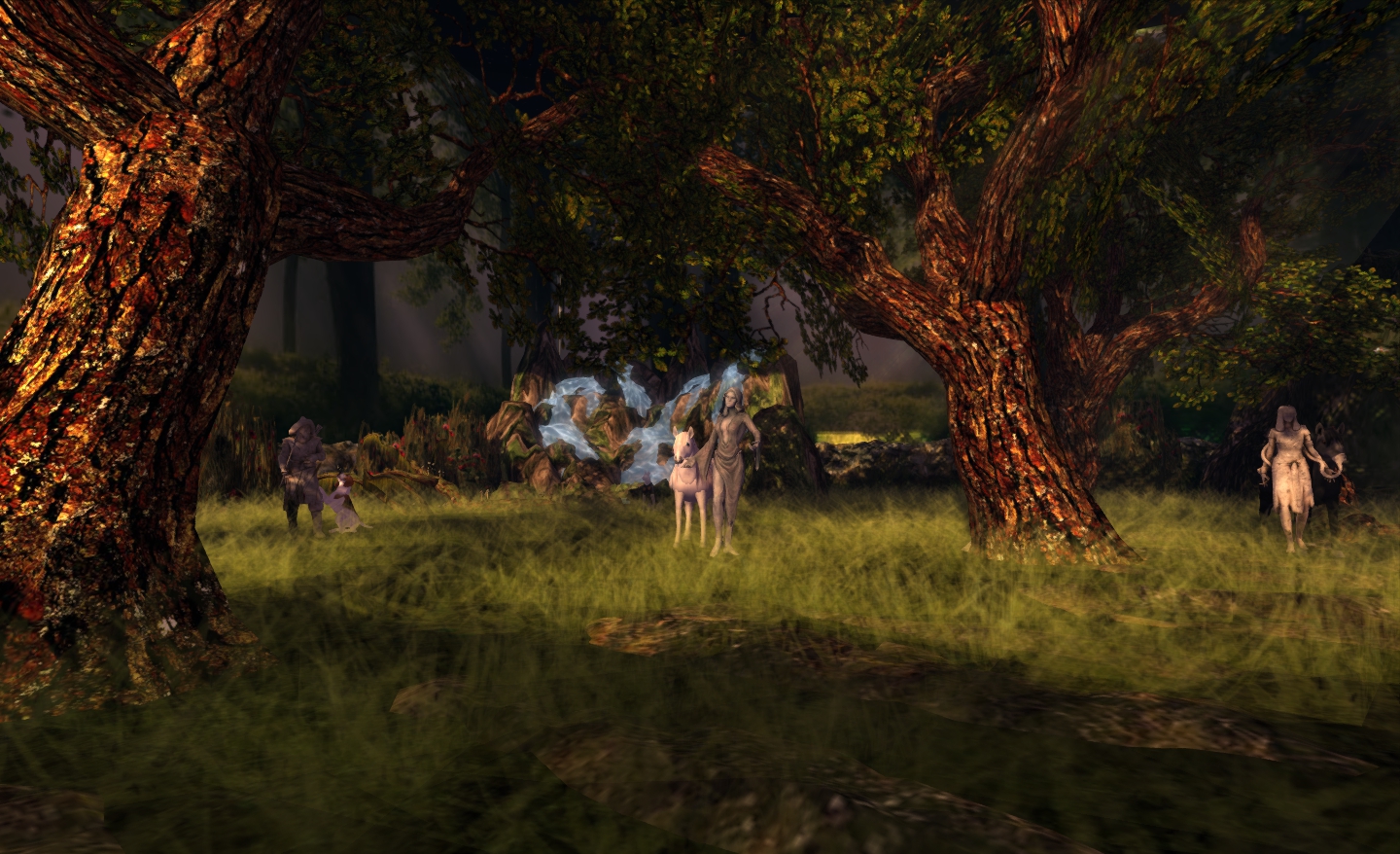
The elven communities are represent on Fun through the exhibit by the Elf Circle Community, which sits alongside the Exodus Viewer stand, where you can learn about how this TPV can help with photography and machinima production.
Elf Circle Community
There is much more to see and explore in both Party and Fun – as well as the rest of the SL9B regions. With the weekend coming, if you haven’t already visited SL9B, why not start making plans to do so? The entertainment schedule updates daily – and don’t forget, everything closes at midnight SLT on the 27th!
Note this is a 4-page piece. Please use the page options at the bottom of the article to page through.
Wednesday June 20th was Mesh Day at SL9B, and featured speakers and presentations on the subject of – you guessed it – mesh. The day saw the auditorium area swamped with people anxious to hear all the news and join in with practical discussions (for future SLB events, it might be worthwhile putting the auditorium at the junction of adjoining regions if hot topics are to be featured as a part of events).
One of the discussions taking place featured Karl Stiefvater, aka Qarl Fizz (formerly Linden). Qarl is the man most closely associated with the mesh parametric deformer project and who was, while working for Linden Lab, both behind the sculpty and a member of the Lab’s early mesh team. He was talking with Saffia Widdershins and taking questions from the audience.
The following is a transcript of the discussion between Saffia and Qarl, which covered the deformer and a few other things as well. It is taken from an audio recording I made and includes questions from the audience given in open chat during the course of the talk and which are addressed by Qarl. Please note that I unfortunately had issues actually hearing / recording Saffia’s audio feed (depite efforts my end, her voice was extremely faint both on SL Voice and in the recording), and I’ve had to edit out those comments I could not clearly discern (my apologies, Saffia!).
====================
Saffia Widdershins (SW): I would like to introduce to you to Qarl Fizz, who many of you will remember as Qarl Linden. When Qarl was working at Linden Lab, he introduced very innovative tools and was working on mesh, I believe before you left the Lab, weren’t you?
Qarl Fizz (QF): I was on the mesh team.
SW: So when mesh came in … I’m not sure that the Lab actually expected mesh to be put to all the uses that the creators in Second Life probably put mesh to.
Qarl’s familiar prim mannequin at SL9B, where he discussed the mesh deformer
QF: I would say that the Lab was not expecting the clothing at all. I think some of the people in the mesh beta group had warned that clothing would be huge, but they didn’t see it coming, no. So it caught them by surprise. They thought houses, and you know, cars … well, the developers are all boys so, you know (laughs).
SW: And the next thing of course is that people say is, “It doesn’t work. The clothes don’t fit. We can’t get the clothes to fit” – and I can see the Lab going, “We didn’t actually mean it…” “I don’t care! Clothes don’t fit! Fix it!”
QF: Right, right, right, right, right. That’s exactly what I saw happen. Yeah, because mesh is traditionally – honestly, this isn’t a problem that shows-up in computer graphics often. It’s only in the setting of avatars and people customising their avatars and that doesn’t happen a lot in 3D. So I can forgive them for not seeing that coming. Although Blue Mars had faced the same problem so, you know, they could have learned something there.
SW: I think that quite often the Lab do seem to under-estimate the creativity of the residents … the whole OpenSpace thing was an example of that: you give people scripts and you give them homesteads and what do they do? They build! So, anyway – there was a problem; the mesh clothing has a problem with fitting. Could you explain, first of all, why it has a problem fitting? I mean if I wear a system skirt or a system blouse they fit whether my boobs are out to Christmas or not or if I change my height; my system blouse and my system skirt are going to fit. Why doesn’t mesh?
QF: Well, the system skirt and the system clothes are a part of your avatar, so when you change your avatar, they change as well; they were built-in. But The other mesh stuff that you build – like even you know, when you build with prims [because] it’s not just meshes – when you’ve made a prim skirt, you would have to readjust its size to make it fit. And that’s because these things are rigid; they are imagined to be rigid and other things can move inside and outside of them. That’s the way Linden Lab expected them to behave. So the problem is that you put on a blouse that’s meant for a small person, and you dial-up your sliders and your skin just comes through the blouse, because the blouse is a rigid shape and it doesn’t change when your avatar changes shape, and ideally you would want it to.
SW: If I get a prim skirt, say, and it doesn’t quite fit me, generally I can play with it to get it to fit. Sometimes – not always – I can move it in and out, I can change things around. But when I get mesh, I can’t change it at all; that’s the deal….
QF: That’s true to. But … a prim skirt is a very simple thing, and these mesh clothing items that we’re getting are very complex and they fit tightly in places and, you know, standard scaling would not have been enough to get the clothes to fit, so something needed to be done.
SW: And that came up, I believe, in quite a casual conversation … where you suggested something could be done.
QF: Yeah. Maxwell Graf was a developer for Blue Mars and he was making mesh clothes over there, and he saw – before Linden Lab even had mesh – he saw this clothing fitting problem, and he worked together with their developers – and I guess a bunch of people did, I don’t want to short-change anybody – to develop a system that would work. And the system he developed he tried to get Linden Lab to pick-up as well, and they were less interested in doing that. So I mentioned, “Hey! Linden Lab doesn’t have to do it. We, the residents can take these things into our own hands.” And that’s how the project was launched.
Blue Mars users faced similar issues with mesh clothing
SW: We’re developing a habit of taking over projects for ourselves – like this birthday!
QF: And honestly, when we do, it tends to work-out pretty well. So maybe that’s a signal…
SW: So the project was set-up and the money was raised really quickly…
Funding raised through Indiegogo (organised by Max Graf)
QF: Yeah, it was like a week or so, so that was nice; you know, the community was very, very strongly interested – which we kind-of knew from the JIRA, from the comments – but when people put their money where their mouth is, I think it speaks more loudly … Yeah, we got the money, we got the funding, we did the development, and it works pretty well …
Sunshine Spiritweaver (asking from the audience): So now we can resize the mesh clothes?
SW: OK, good question. What does this mean? How does it work?
QF: What happens is your mesh clothing is treated very much like the system skirt or your blouse or your system clothing. As you change your own avatar’s shape, like you make yourself fatter or taller or more muscular, the clothing will – “deform” is the the technical term – will deform with that shape so that it remains fitting. It’ll get bigger where you’re getting bigger and it’ll get smaller where you’re getting smaller. And you know, it’s as simple as that. It doesn’t work for everything, but it works OK. It works pretty well, you know – and its a lot better than nothing. So if you fire it up – I think Linden Lab has a Viewer you can download and test – as you change your avatar parameters you’ll see your clothes change along with your body, you know, your clothes get bigger.






 Inara Pey: Living in a Modemworld