They shall grow not old, as we that are left grow old; Age shall not weary them, nor the years condemn. At the going down of the sun and in the morning We will remember them.
They mingle not with laughing comrades again; They sit no more at familiar tables of home; They have no lot in our labour of the day-time; They sleep beyond England’s foam.
From “For the Fallen” by Laurence Robert Binyon, 1869-1943
The latest Development – 3.2.3 (244722) Nov 8 2011 – and Beta – Second Life 3.2.2 (244666) – Viewers include a new snapshot floater that presents a set of simplified controls and some new features.
Snapshot folder – old (l) and new (r)
Send Snapshots to Your Feed
There is a button to send any snapshot directly to your feed ay my.secondlife.com. There is no charge associated with this option, and clicking the button allows you to:
Set the image size
Optionally include a caption for the snapshot and the location where the picture was taken
E-mail Revised
The option to send an image via e-mail has been revised; clicking on the button now opens the message options in the snapshot floater, rather than in a separate floater, and buttons allow you to toggle between the message view and the image settings.
Advanced Options
The advanced options for snapshots are now access by clicking the right-pointing chevrons at the top of the floater. Here you’ll find the familiar check boxes for including the interface and your HUDs in an image, and to set the auto-refresh function. However, there are two options some might not be familiar with that are worth mentioning.
Colour / Depth
Available when saving images to your computer via the drop-down menu, this option allows you to take a full colour image or something more atmospheric. The DEPTH option appears to work with the Viewer’s DoF (Depths of Field) option active in the PREFERENCES -> GRAPHICS tab. Examples of both settings are below.
Save options: Colour (l); Depth with Viewer DoF active (m); Depth with Viewer DoF disabled (r) – note loss of detail in (r)
Freeze Frame
This is probably the feature that will excite most people. Check the option will switch the Viewer to full screen mode, and freeze what you are seeing in-world while allowing you to position the camera for the shot you require!
With freeze frame active, you can pan, orbit, zoom until you’re satisfied, then take the shot. Clicking the refresh bution with the option active will update you screen to the last moves made by any avatars / moving objects in view.
All told, this is a very well-presented update with some fun new features. I like it!
With thanks to Opensource Obscure
Update 11th November
As has been pointed out – I’d somehow missed the fact that freeze frame has been around a while; as has, tbh the colour / depth options. Put this down to me staying up far too late at night looking at things when I should be a-bed!. Article revised to reflect these errors.
When it was first announced, the Linden Lab RFP for an Adult Gateway caused something of a stir among the Adult community. Just over a month ago, word circulated in-world that the Freedom Continent had won the bid; something that was not officially confirmed until the Adult Content User Group meeting on Monday November 6th.
Freedom Continent is a consortium of experienced Adult activity SL users and sim owners who have come together to provide a pooled resource of adult activities and who have had their sims relocated in-world to form a “mini-continent”. For the past several weeks, they’ve been at work developing the new Adult Gateway, which is located to the south of the current core of Freedom Continent sims.
In all, five sims have been allocated to that Gateway project – a central hub called Zindra Prime, surrounded on all four side by “focus” regions called North, South, West and East. Currently, three of the sims – North, Prime and South – are nearing completion, and work is underway on the remaining two. As such, I thought I’d pay the new Gateway a visit and see what was happening and what the broader plans might be.
The central Adult Gateway hub
The use of “Zindra” in the region names may seem a trifle confusing given none of them are physically connected to the Adult continent of the same name. This is because Linden Lab have decided that the name should be used exclusively with the new Gateway, rather than in reference to a specific geographic region in-world (not that the continent itself will be changing name). As such, the new Gateway represents all Adult activities in Second Life, regardless of physical location or ownership, and will provide a means of entry to those activities for anyone wishing to explore them.
Zindra Prime is intended as an arrival hub and information centre for those who are perhaps exploring Adult activities for the first time. From here, they can explore any or all of the four “compass” sims – North, South, West and East, each of which is specifically themed in terms of Adult content – the North sim, for example is for all activities related to BDSM and the south sim to Gor / medieval.
This has been a deliberate design choice, as Serjourn Daxter, one of the project’s leaders and a Freedom Continent pioneer, explained to me during my visit. “We’ve seen that ‘Adult’ is a far from homogenous term. BDSMers seem to be less than fond of Goreans and the traditional CARP/RP groups are not big fan of others – although some people play in more than one camp. So we have made four focus sims, surrounding the Adult hub.”
Adult Gateway Gor / Medieval hub
Each of the four focus sims has a unique build which reflects the environment it represents and provides a mix of areas that can be used for informational purposes or as shop fronts for Adult communities, sims and stores. Given this, I asked if the various hubs would offer classes for newcomers?
“The central hub will focus on adult in general,” Serjourn replied. “The speciality hubs will focus on their respective specialities. For example, the GOR hub will teach game meters, and the BDSM hub RLV. We will offer small shop space and adboards to let businesses present themselves.”
She continued, “The idea is really – when you come to the adult world, you need to feel welcome, learn basic skills and find your area of interest. So the idea is, you get here and you may or may not have skills. If you lack basic skills, we supply them in the main hub. We help you get to where your interest may be. If you lack, say, BDSM specific skills, your next stop may be the BDSM hub. But we don’t want to send an unskilled newcomer with a desire for sex action to a Gor sim, and certainly not without knowledge of what Gor is.”
And moving beyond the hubs, and helping people to get to where they might want to go? “We will not differentiate where a business is located,” Serjourn stated firmly, “We will gladly share traffic.”
The BDSM hub
As it is, staff – particularly non-English speakers – are being sought, and plans are to have full 24/7 cover on the sims to provide maximum support and assistance to visitors. The hubs themselves are certainly open to exploration and discovery; I spent a pleasant hour wandering between them and getting a feel for things. The builds are clean and simple, display space is plentiful, and region crossings relatively smooth.
Given the layout of the hub sims, I asked if there were plans for expansion. “We offer sim owners the opportunity to join the appropriate sector of continent, subject to the LL fee for sim moves,” Serjourn confirmed. “We have a lot of BDSM sims joining, and we are open for other sims. There are already [on-going] talks with GOR sims. We will have open areas between the sectors, so some sims will always have a water border.”
With working progressing so well, my last question to Serjourn was whether an opening date had been set for the Gateway. “Well, the target is Sunday,” she replied. “Then a week of ramp up and adjustments,” she added, then laughed, “It may be LATE on Sunday!”
There has been a lot of angst generated by the entire Adult Gateway RFP and how it has been handled over the last few months. However, what is being developed in the new Gateway sims looks to be a worthy addition to the Adult community, and will hopefully prove to be a benefit to all parties across the grid.
Update 14th November
In order to prevent confusion over the use of the name Zindra, Freedom Continent have voted to drop the name from the new Gateway. The new hub regions will now simply be called “Adult Hub”, followed by the focus name (so “Adult Hub BDSM” for example). Serjourn did hint this may well be the case during our interview, and a unanimous vote on the part of the Freedom Continent’s management group determined the name Zindra would be voluntarily dropped in order to assist in promoting unity within the Adult community.
Note: as of December 2011, Linden Realms is avialable to all SL users, not just Premium accounts.
A benefit of being Premium right now is getting to take a look at the new Project LR game (LR apparently standing for “Linden Realms”) that is set to introduce new concepts and tools to Second Life. As I had a spare 15, 20, 30 minutes – hour last night, I decided to see what it was like.
Game Portal
The first issue (as everyone is now probably no doubt aware) is getting to the game regions – you cannot teleport directly. Instead, one must go to one of the Premium gift kiosks locations and then locate the game portal. Not actually that taxing in effect, but an interesting way of managing numbers in the game regions: when the limit has been reached, the portal(s) cease teleporting until someone in the game leaves.
There is nothing to touch or sit on at the portal, no need to manually trigger a teleport – just walk through…
…And find yourself in a strange, mist-laden landscape. You’ll also find a HUD has attached itself to your screen, of which more anon.
The game has its own Windlight presets, and I strongly recommend you keep them to add to the sense of fun (and to make it harder to spot lurking rock monsters through the gloom).
Game world and HUD
The HUD is a simple-looking affair and auto-ADDS itself to the top left of your screen (it won’t knock-off any HUD item(s) already there). It comprises a register of crystals collected, a help button that will take you to the game’s FAQ page and a very tidy little prompt display that appears in the lower centre of your screen.
There are some nice touches to it: nothing is placed in your inventory; the HUD is simply delivered and attached. If you remove it or log out with it attached, it is deleted (in the case of removing it in the game regions, you are also automatically teleported home). Your progress in the game isn’t lost – records of your crystals collected and quests completed are stored on the server side, and you can resume where you left off on leaving the game.
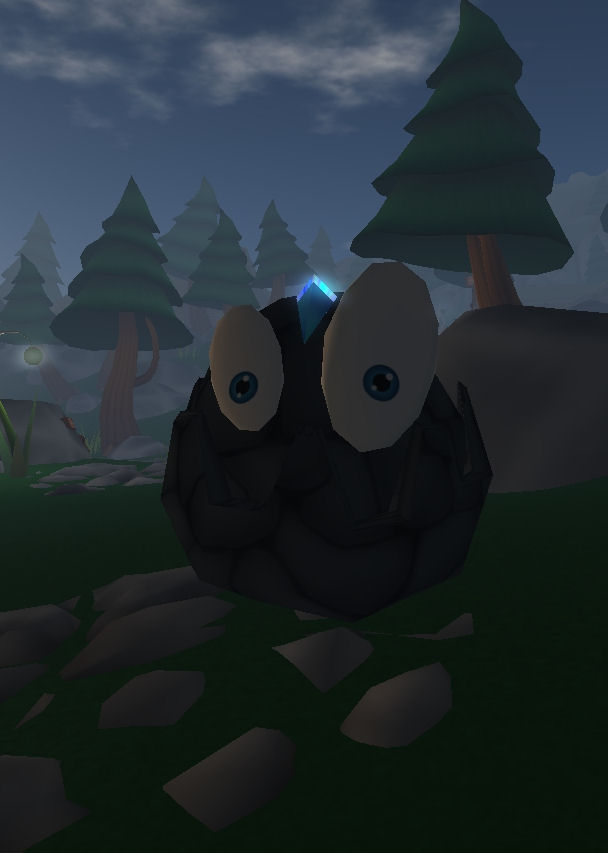
Rocky Chaser Cutie Show
Playing the game is relatively straighforward: follow the HUD prompts and complete each quest in turn. Along the way you can also earn small rewards in the form of L$.
Well, obviously, it is not all that straightforward, otherwise where’s the fun? There are obstacles to avoid – such as the aforementioned rock monsters that will, if given a chance, hunt you down and (presumably) squish you. However, they are by no means the only obstacles that can “kill” you.
The rocks themselves aren’t really all that monstrous – they actually look quite cute, but they’ll turn an angry pattern when chasing you down and they can be sneaky – popping up unexpectedly. Given FLY is denied in the game areas, you need to be fleet of foot when avoiding them. Having sound on helps, as you can hear the rumble should one get behind you and out of camera view, and so can take avoiding action.
I’m not saying anything about other hazards – if you’re able to play, you can find out about them for yourself :). However, this being SL, no-one stays dead for long; on being “killed” you are teleported to the nearest “resurrection circle”, from which you can resume your quest.
Resurrection Circle
Crystals come in a number of colours, and the HUD informs you of how many of each you need to collect, as well as the number of each colour collected. When you’re reached the required number for all the colours you have to collect, you’ll receive instructions on what to do next.
There’s actually nothing stopping you from grabbing as many crystals that you come across regardless of colour – and that makes something of a game in itself: simply grabbing crystals and avoiding rocks and other obstacles. You don’t physically pick the crystals up (no need to touch or right-click) – just run through them to add them to your tally.
Where’s a good hobbit when you need one?
Crystals appear to be somewhat randomly “seeded” on the game regions, with the result some are next to impossible to reach – take the one above for example: the tree it is under isn’t phantom, so walking through the crystal isn’t really possible.
When you opt to end the game just teleport home and detach the game HUD (or detach the HUD in the game regions to be auto-releported out). As noted above, the HUD will be deleted and you’ll receive a fresh HUD on your return, complete with your progress to date.
Lurid landscape
Currently, quests are limited – although LL are apparently considering adding more. I’ll be curious if this is the case: at the moment it would appear that once you have completed the available quests and removed the HUD, a new one doesn’t attach to your screen on returning to the game. I’ve visited the game twice since completing it, and on both occasions, no HUD materialised on my arrival at the Summoning Circle. Whether this is by design or a bug, I have no idea and am curious as to whether anyone else has experienced this.
Some have reported issues with lag in the regions, but my own experience last night was anything but – even with people arriving and leaving at regular intervals, I had not lag, excellent frame rates and a lot of fun. My only real issue was that some of the region boundaries were exceptionally bouncy without apparent cause (the neighbouring sim didn’t appear overloaded), but this didn’t dampen the fun.
Opinion
Tiggs Linden
Overall, this is a clever little game that is well put together and which offers very simple, but highly effective fun. Tiggs Linden and the rest of those who worked on it are to be congratulated.
As to the future of this particular Linden Realm game, if the current plans within LL come to pass, it will flow from “Premium-only” beta to being available for all SL users and thence to being an activity-based follow-on for new users to try their hands at after Welcome Island.
However, for many, it’s the tools within the game that hold promise – tools that are to be made available to the content creation community. HUD-wise, one can see a whole raft of potential uses for these in a wide variety of sims: combat environments, immersive art features, tour guide systems – the list goes on. Secure server-side auto teleports also have a number of potential uses as well, properly implemented, and I know from discussions that Tiggs Linden has worked hard to ensure this feature cannot be abused. Then there is the nascent AI aspect of the game – the rock monsters reacting to your presence and chasing you (which will happen regardless of having a HUD on).
I had fun last night; if you’ve not had a go already, why not give it a try? Nysray is a good place to start.
Quick Hints
Turn off your Viewer’s Fly Override, if enabled – flying is cheating 🙂
Turn on ALWAYS RUN if you really want to avoid the rocks, otherwise be daring and walk until you encounter them!
If you are using Penny Patton’s camera position settings (or a camera HUD similar in nature), you might want to revert back to default camera placement – I found that with a rock chasing me, there were times when the rock totally blocked my immediate screen view and I had no idea what lay ahead as I ran!
Keep to the local Windlight settings if you can.
And no, I’m not going to give hints on gameplay or what to do – the first is easy enough, and the second is more fun if you discover for yourself :).
Quick note: A couple of other blogs have linked to this piece as a review of the new UI. If you are looking for a review, you can find mine here. This article only references the fact the new Viewer is released, and doesn’t carry any specifics.
Well, well.
After blogging yesterday that Viewer 3.2 had reached Beta – lo and behold, and with no fanfare whatsoever, it’s released!
Apparently there was a blog post about it that Tateru spotted on Monday, but it appears to have vanished into the sub-etha.
Version 3.2.0 (244443), dated Nov 3rd, doesn’t have the latest revisions that the Beta release has – there is no Destination Guide open by default, and there are no translation options on the Chat Preferences, nor does Inventory have the Direct Delivery revision (not surprising, given yesterday’s announcement). The new attach points (Neck and Centre) have yet to appear – although they are in the Beta, so expect them & translate, etc., shortly.
However, everything else I covered in my First Looks piece on the new UI is there – including the direct-to-marketplace shopping button top right of the screen which is liable to annoy many who have in-world shops.
3.2.0 UI
I’m not sure when on Monday the switch-over occurred; I’ve been checking the download page daily of late (sometimes more than twice), and when I downloaded the latest Beta, the release Viewer was still 3.1.2.
Short Random Thoughts on the UI
Given we have a button-based UI, I’m not going to suggest anything radical, but here are some thoughts:
Make the Chat bar optionally “sticky” so that if positioned over the bottombutton area, it displays a-la V1, without the floater surround (i.e. so the “nearby chat” floater title and X to close vanish). This would:
Reduce screen space used by the bar
Allow a further V1-like feel to the Viewer, helping those moving over from V1 feel more at home
Add more button options for greater flexibility, for example:
Environment settings to access the Environment Settings floater (and add sun positions as buttons on the floater)
Quick Preferences button, a-la Phoenix / Firestorm, that provides access to frequently used options such as the Draw distance, Particles count, Height offset, Physics and LOD sliders, etc, and WindLight presets
Button floaters were an idea that crossed my mind as well, but I’m not convinced they’d be a benefit.I hope the code is such that TPVs adopting the UI can add their own buttons easily enough.
I’m a little surprised that the improved camera controls / floater still hasn’t appeared and can’t help wondering what LL are doing with it.
Would also be nice at some point to see some form of client-side AO option included in the Viewer. TPVs have these as standard, they don’t impact on the sales of AOs (as people still need the walks, etc.). On that subject, LL, isn’t it about time the default waddle was reworked into something of a “unisex” walk?
Anyway, random thoughts aside, if you’ve not given the new UI a test, I recommend you do, even if you’re not a regular official Viewer user – it’s worth a look-see, and even if buttons aren’t to everyone’s liking, they at least allow a greater flexibility of approach to screen layout – and even allow a sort-of pseudo Viewer 1.x layout.
Updates: 9th November
Two excellent JIRAs on the UI have been raised, and they are certainly worth Watching (which, as we all know, is the new Voting – although putting in a vote as well won’t do any harm!)
VWR-27388 – make all menu options draggable to the button areas – thanks to Pat Perth
VWR-27455 – make button groups repositionable within the button areas (i.e. move to left/right or top/bottom edge of placement areas – thanks to Gwyneth Llewelyn
I’ve also raised a JIRA for the addition of a “Quick Preferences” button to access specific sliders: VWR-27457.
Important update Nov 8th: Viale Linden dropped me a DM to state a confirmatory e-mail is sent out on upgrading. I’ve again check my spam folders & in-box, and can find no sign of receiving one – but as noted below, I did encounter an issue with Firefox when upgrading, and that could very easily have thrown a spanner in the works.
Ergo, I’m happy to correct this piece vis-a-vis the fact LL do sent out e-mails.
Once upon a time, I had a Premium account. For various reasons, I ended up at Basic and swore I wouldn’t upgrade again. Period. Never. Nada. Niet. Non. No chance in hell. Forget it.
Yesterday, I re-upped.
Yeah, I know. Some of you are no doubt thinking my middle name might well be “mug” – but if so, it sits alongside “optimist”, and as I’ve noted elsewhere, I’m feeling very optimistic about SL and LL. Something I’ll return to later :).
…There’s also that blasted Project LR game …
No, seriously. Thought it was time to put money where mouth is and give things a go once more. Call it a frivolous spend of a birthday gift.
So – the upgrade process. Simple enough. Click on an upgrade button on the website, then choose your payment preference:
Note the VAT… I’ll come back to that.
Choose the option that suits your pocket (annual is obviously the most cost-effective), and click SAVE CHANGES.
Now – I have to admit, I have no idea what happens after you do; I was upgraded, but my web browser (Firefox 7.0.1) locked on me loading the next page (an increasing issue I’m having with it, despite clearing cache, history, etc., routinely); clearing it left me with other issues I’m still trying to sort out.
In my original piece, I failed to receive an e-mail notifcation of the upgrade. Viale – as per the update at the top of this piece has indicated that e-mails are sent out, so I’ve removed my comments, as they don’t reflect what should happen.
Of Rewards and Bits
Once upgraded, I took time out to collect my exclusive gift. Some have mistakenly taken these as being offered monthly, and I’ve heard grumbles in fora about the initial set of furniture “still” being on offer. However, in their original blog post about the launch of the gifts and bits, LL actually said, ““Premium members will regularly receive exclusive virtual items that you won’t find anywhere else.” [My emphasis].
Note the word “regularly” – not “monthly”. This could mean bi-monthly, quarterly, half-yearly… As it is, I rather suspect the next round of gifts will be in the run-up to Christmas, and will be suitably themed.
As to the current offering, the furniture is very nicely styled and presented,but – as an established user, I again stand by what I’ve said previously: furniture and lighting isn’t something many established users are likely to need, as they’ll have an inventory packed with them. It’s also a little discomfiting when one considers balancing such gifts against encouraging people to engage in the SL economy and buy things and also the sticky question of how LL go about selecting merchants, commissioning gifts, etc.
Setpember gift: 47 prims and nicely styled. But…
But still, as pretty as it is, I’ll not be using my little gift.
Stipend is often cited as the major benefit for signing-up to Premium: L$300 a week back in your account, together with a bonus of L$1000 your account is Active for the first 45 days after upgrading. Stipend isn’t what it once was, but so the times change.
Those paying annual membership stand to gain the most (obviously) where the weekly stipend is concerned. Someone joining in the US, for example, sees approximately 62% of a $72 fee coming back to them in-world over the course of a year. Those of us in Europe, however, aren’t so lucky. VAT means this is substantially cut to a return of only 38.6%. Again, this isn’t LL’s fault, but it could be an offsetting factor when considering Premium and the benefits as a whole – particularly as not everyone in Europe is in a position to reclaim VAT paid. But – c’est la vie; what is there is welcomed.
Of the rest of the rewards, the Linden Home interests me the most. When I initially reviewed them. I’m not sure all my concerns have been realised, although the regions devoted to Linden Homes have continued to grow (but not all are fully occupied, LL appear ro keep a “float” of regions) – but it does seem from comments passed at SLCC 2011 that the houses aren’t working as expected. When launched, they were seen as a means of kick-starting people not on the SL property ladder into getting involved, with the hope they’d eventually out-grow their initial house and seek a residence elsewhere. From comments passed by Vogt Linden, this hasn’t really worked out (unsurprisingly), and Linden Homes may be in for a shake-up. Ergo, I shall likely be grabbing one in the near future, just to see what happens (no danger of me abandoning my existing home).
I’m not going to comment on anything else rewards-wise; my thoughts remain unchanged, and I didn’t upgrade for them (or any of the above, in fact). I am, however, curious as to where the “more privacy” comes from in the add (see above); I don’t see sandbox use quite cutting it here. My reason for upgrading falls into two parts:
A genuine renewal of optimism for Second Life and interest in what LL are doing. I think the last 12 months have – whether people are willing to be fair and honest or not – seen some tremendous progress within the Lab and Rod Humble is to be thoroughly congratulated for what (and who!) he’s brought to the company, and the way he has managed much that has happened in a short 11 months. As such, my upgrading is my little way of renewing my commitment to the platform
My joking at the top of this piece aside, Project LR does have me intrigued; not so much for the game (tho doubtless I’ll be trying it), but because of the way it’s being offered to premiums first. This leaves me wondering what else will come down the line with a “Premium preview”, and I’d like to be in a position to see for myself
So, the Pey Adventure is Just Beginning (cue fanfare and starships…). I’ll be exploring more on Premium in the near future.
Further Update 9th November
Click to enlarge
Following-on from my DMs with Viale, LL have helped put things right be re-sending my introductory e-mail (twice! :)). It’s well presented and laid out, with a series of useful links – including a major link through to registering for a Linden Home in the top half (also repeated lower down).
Many thanks to Viale, and happy to put this matter to rights.
 They shall grow not old, as we that are left grow old;







 Inara Pey: Living in a Modemworld