Going Premium 2: I get a Linden Home

Linden Homes came about some time after I’d given up my original Premium account and when they first arrived, I wasn’t overly impressed. I found some of the regions unimaginative, and most of them rather crowded. However, as I’m back on Premium, I thought I might as well exercise my option of having one, if only to see what the process is like.

Typical Tahoe (click to enlarge)

For those unfamiliar with Linden Homes, and to save repeating things here:

So…what’s it all like?

Before You Start

Shareta Osumai (click to enlarge)

Before leaping-in and selecting a Linden Home, it is worthwhile preparing the ground:

  • Read through the links above – especially the knowledge base article, the FAQ and the Linden Home Reference Guide
  • Visit the themed regions before you decide on which theme / style to go for – first hand experience outweighs leaping in blind and then finding you’d rather be elsewhere. Get a feel for the look of each theme and a taste of how the regions perform on your computer; view the various styles first-hand (while respecting people’s privacy!). You can reach the themed estates via their info hubs:

Registration

Typical Meadowbrook (click to enlarge)

Once you are suitably informed and have an idea of the theme you’d like,  hop over to the Registration Page to select your preferred home theme / style.

The main registration page is in two parts: on the left is a drop-down list for the various themes, with previews of the available styles shown below it. Click on a given preview image, and it is displayed in a larger size on the right of the page, together with further images you can flick through.

Again, some points to bear in mind:

  • As stated above, it’s worth seeing the various themes in situ, rather than relying on the images along, if you’ve not already done so
  • Not all the styles for a theme may be displayed (for example, Meadowbrook has 9 styles, but it appears rare for more than four or five to be displayed in the registration page at any one time)
  • If the style of house you’re seeking isn’t displayed, try reloading the page a few times – this can cause the listings to update
Available styles tend to vary
  • If the style you want still doesn’t appear, leave the page a while and come back to it.

Once you have selected your preferred style, enter a name for it and click NEXT. A confirmatory page is displayed, outlining your choice, with the nine covenant rules relating to the use of a Linden Home. You need to tick the check box relating to these rules and click the ACCEPT button in order for your order to be processed, or if you have a change of heart, you can go back and changed things before accepting.

Typical Elderglen (click to enlarge)

The order processing takes a couple of minutes to complete, after which a final page is displayed, listing the region in which your house is located, together with a SLurl, together with assorted additional links intended to help you get started with your new home. An e-mail containing this information is also sent to you as additional confirmation.

And that’s it! All that remains is to log-in to SL (if you’re not already) and go see your house!

So, What did I Get?

In the end and after careful explorations, I opted for the Tahoe theme purely on the basis of performance; I found this theme to be the least laggy for my PC. Firestorm also handled it somewhat better than the other theme regions, where I’d invariably crash after about 15 minutes of moving around – a novel experience for me when using Firestorm. Viewer 3 did tend to manage things better – but with appallingly low frame rates.

Outside my Linden Home

My specific choice of Tahoe house was the Aspen (my thanks to @SecondLife on Twitter for getting Aspen actually back onto the registration page options!). This, to me, offers the greatest flexibility for customisation.

Customising

Linden Homes can be customised in terms of textures and appearance via the web-based house control / configuration options. These present the textures specific to your house style and make applying them very easy. If you want, you can also load the texture sets for other house styles in the theme and try those out.

For the intrepid of mind, there are also texture packs available from the local info hubs that allow you to use the textures common to your house theme to make any additions of your own more readily match your chosen decor.

Tahoe “Aspen” default interior – note angled wall on the right

For my Aspen, I opted to understake a minor make-over, adding an additional vertical interior wall, net curtains on the end windows for add privacy without having to shutter the windows entirely, and a galleried bedroom loft. This claimed a total of 16 prims from my allowance of 117.

The new additions – wall, loft and net curtains

To get a feel for the place once furnished, I “borrowed” my PrimPossible furniture and added a few of my own. These gave me a comfortable home, complete with piano, pictures, some lighting of my own and a potted plant, all for a grand total of 23 prims.

The furnished house with lighting

Opinion

The process for obtaining a house is well-designed and easy to follow; the only potential issue being the fact that all the styles for a given theme may not always be available. Patience tends to win out when this does happen – most styles eventually turn up over the course of a day or two.

There’s nothing particularly eye-catching in the Linden Homes; build quality is good, but not especially outstanding; texturing is kept to 512×512 for better loading, so can appear a little blurry and flat when seen up-close. Houses with upper floors tend to have ye olde ramp rather than stairs of any description, which gives them a very dated feel. As they are intended as a “first step” on the property ladder in SL, much of this is possibly deliberate to encourage people to move on to bigger and better. So the best way of describing the Linden Homes is “workman-like”.

One point worthy of mention is that given the way houses are crammed together in some of the themes, it’s probably worthwhile invoking parcel privacy (if your Viewer supports it). This prevents your own chat being overheard from outside, and protects you from overhearing others.

As for the house I now have – well, I’m not sure what I’ll do with it. It’s no substitute for my “real” SL home, true enough. But on the other hand, now it’s sorted out, it’s not actually too bad. I also like the idea of having a little pied-à-terre I can use on occasion, so I might hang on to it for a little while!
Of crystals and games

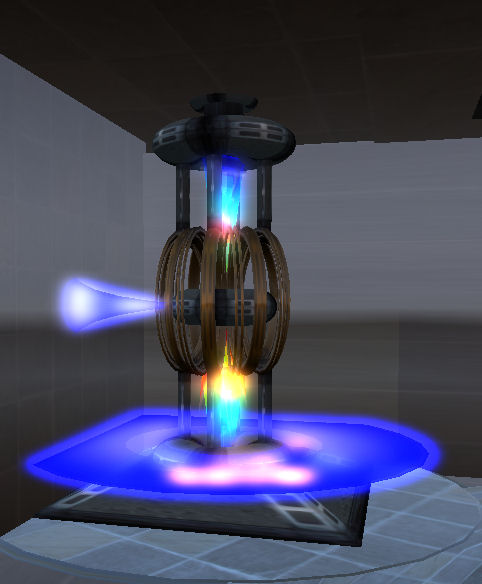
Last week I reviewed the Linden Realms game – and found it oddly compulsive (up until I completed the first three quests – I understand more are to be added). Shortly thereafter came a comment from Lani Global pointing towards a game she’d developed in OSGrid which bears a strong similarity to the LR game.

As I have an OSGrid account, I decided to go over, don a suitably sci-fi-ish outfit (the game is an a sci-fi rp region) and have a look.

I did actually have trouble finding the game the first two visits – I found the crystals OK, but couldn’t find a way to interact with them or any sign of a game HUD. In fairness, the HUD was there – I just didn’t recognise it as such at the time, as it appears to be for a combat system as well. Also, hovertext pointers appear to have been added since my initial visits to help point the way to the game – or at least, I don’t remember seeing them the first times I entered the pyramid and went downstairs.

Power source: the start of the quest

Anyway, with HUD and health metre safely installed, off I went into the bowels of the pyramid to start my quest.

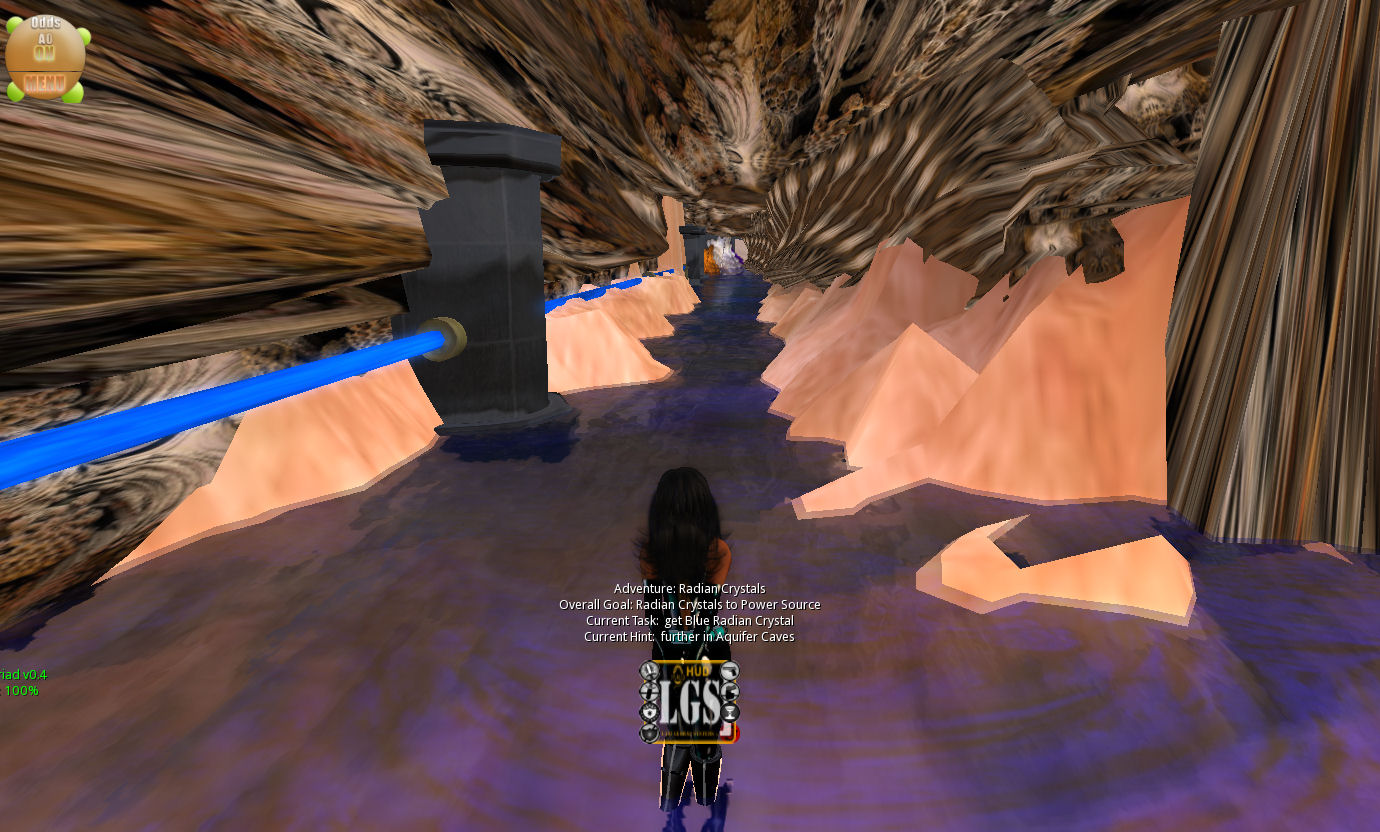
The first part of this is to locate the main power source. Here you are given your first task: locate a red crystal, together with a hint on where to find it.

From here, you’re off into the caves and hunting crystals and trying to avoid things that can do Nasty Things to you – when you encounter one, you’ll be teleported back to the start of the game.

Once you have collected all your required crystals as instructed, then it’s back to the start to complete your quest, ready to receive a rather nice little award I was unable to rez due to the sim being a no-rez environment, but did manage to see in a couple of images elsewhere.

It all sounds very familiar, doesn’t it? Find your start point, locate crystals, avoid nasty things, forced teleports and so on. So have LL copied Lani’s idea?

I’d have to say “no”. Crystal quest games have been around in varying forms since the 1980s. The formats may change, the hazards may change; some may take place in space, others on the ground; the key however, is that it is hardly an original idea. As such, similarities are bound to emerge. What’s more, the dynamics of OSGrid and SL – their respective mechanics and capabilities – will tend to lead to a good chance of there being strong areas of commonality between any such games in both that are based on the same principles and with the same aims in mind.

Game environment

Lani herself has recognised this since first posting on my blog – she’s written a thoughtful and open post on the SLU forums on the matter of both games. Given the way the rumour mill churns across SL and the metaverse, kudos to her for doing so clearly and concisely.

Opinion on Comparing the Games

Lani’s OSGrid game functions well and offers a nice diversion although there are a couple of things I didn’t get. I’m not sure why I furnished with a sword I didn’t appear to be able to use (none of the HUD buttons appeared to do anything other than allowing me to sheath or draw it) & I found the HUD icons hard to read without resizing it – which could be a reflection of my eyesight, now another birthday has passed as much as anything else! Overll, completing the quest is far less frenetic than the LR game, although it’s clear that the option to extend it a little more is there, should Lani so wish.

If you do come to it having played the LR game, then the OSGrid game is clearly at a disadvantage in terms of expectations – and this is hardly surprising. A lot of work has gone into the LR game to make it as intuitive as possible (no need to wear the HUD, no need to physically touch the crystals (just run through them), etc. BUT this has been achieved only because LL have the luxury of being able to tweak the server-side environment to suit their needs. Lani doesn’t have the same luxury, and has to work within the confines of what is available to her; at the end of the day, there is only so much you can do with LSL scripting. As such, what has been developed is very credible and shouldn’t be judged simply through a comparison with the Linden Realms game.

All told, everything worked well for me once I started out on things, although the game didn’t take that long to play overall. This again shouldn’t be seen as a disadvantage, it simply makes the game a nice little fun diversion when visiting the region. All I would advise is that you don’t randomly click the HUD icons – if you click RESET you’ll have to start over on the game back at the power source!

If you are using OSGrid, why not try-out Lani’s game (OSurl) for yourself.

Positively Phenomenal Particle Phantasmagoria

Last week I was able to see Tyrehl Byk’s Catharsis (more than once in fact, it is so good). It is an amazing tour-de-force in the use of music, particles and images within second Life. This weekend I’ve been fortunate enough to witness the show that started it all, Particle Phantasmagoria  – and it is a wonderful feast for both eyes and ears.

More abstract and free-form than Catharsis (although with a very subtle subtext to the images accompanying It’s the End of the World As We Know it), Particle Phantasmagoria is a fabulous ride marrying stunning particle effects and images with an inspired selection of music in a trippy rollercoaster of a ride that will not only have you watching in awe and whooping in delight, but also quiet probably seat dancing along to the soundtrack.

The show is running at LEA6, alongside Tyr’s Not -a-Knot, and shares the Event Horizon theatre with presentations of Catharsis. Words cannot really do the show justice – nor can still images; this is something that really has to be seen.

Show Details

  • Start location for Particle Phantasmagoria – enter through the door and follow the arrows
  • Calendar for Tyrehl’s performances (updated regularly)
  • Go as lightly scripted as possible (remove HUDs, scripted attachments, etc.)
  • On arrival at the Event Horizon theatre:
    • Sit in any available seat in any of the tiers
    • Set your Viewer Draw Distance to 250m
    • Set your Particle Count to maximum
    • Set Sun to midnight
    • Make sure the music stream is allowed and playing
    • Tap your ESC key a couple of times to free your camera – this is important, as it allows Tyrehl to take you into the show
    • If you can, turn off your RL lights and watch in the dark – the bigger the screen the better
    • Sit back and enjoy the 24-minute ride!

UWA 3D Open Art and MachinimUWA IV: Vote and win

The University of Western Australia is running two art competitions at the moment, and is requesting all Second Life Residents participate in both – with the chance to win some great prizes for doing so.

3D OPEN ART CHALLENGE

The UWA’s 3D Open Art Challenge draws to a close following the monthly rounds, with a Grand Finale which features a People’s Choice vote for both the Overall Prize category and the Non-scripted Prize category of art pieces.

There’s an impressive line-up of finalists in both categories, and the prizes are equally impressive:

  • Overall Prizes: L$100,000 (1st),  L$75,000 (2nd), L$50,000 (3rd), L$20,000 (4th), L$10,000 (5th) and L$5,000 each for 6th – 10th.
  • Non-Scripted Prizes: L$15,000 (1st), L$10,000 (2nd),  L$5,000 (3rd), L$3,000 (4th), L$2,000 (5th) and L$1,000 each for 6th – 10th.
  • People’s Choice Overall Prizes: L$15,000, $8,000 (2nd), $5,000 (3rd)
  • People’s Choice Non-Scripted Prizes: L$8,000, L$5,000 (2nd), L$3,000 (3rd).

Those voting in the People’s Choice categories could themselves win a prize. Three lucky voters will receive an award of L$5,000, L$3,000 and L$2,000 respectively, together with RL UWA packages.

How to Vote

To participate in the People’s Choice voting and a chance to win one of the three voters’ prizes:

  • Visit the UWA Winthrop region and view the finalists in the Overall Prize category (SLurl) and the Non-Scripted Prize category (SLurl)
  • List your top 10 preferences for each category in order of rating (so 1st = 1st prize, etc.) on a Notecard
  • Rename the card PEOPLE’S CHOICE AWARD UWA (YOUR NAME)
  • Send your entry to both Jayjay Zifanwe and FreeWee Ling by Midnight SLT 30th November 2011.

Voting is open to all SL residents, however, note that if you, your alts or your partners work is part of the Grand Finale, you may still vote, but you cannot list your own work or that of your alt / partner in your top 10.

MACHINIMUWA IV: ART OF THE ARTISTS

With a total of 81 entrants from around the world, Machinmuwa IV represents a stunning range of machinima, with more than L$350,000 on offer in prizes.

The Audience Participant Prize

L$20,000 has been set aside for an “audience participation event”, to be split between three prize winners (L$10,000, L$6,000 and L$4,000 respectively), together with special RL UWA packages which include a copy of 100 Treasure from UWA. Additionally, the first prize winner will be invited to join the judging panel for MachinimUWA V.

How to Enter

  • Visit the UWA blog for MachinimUWA IV, where you’ll find a complete list of entrants with links to the videos
  • Watch all the entries and list your top ten in order of preference, listing them either in an e-mail or a notecard (rename the notecard MACHINIMUWA IV (YOUR NAME)
  •  Send e-mail entries to jayjayaustralia-at-hotmail.com and notecard to Jayjay Zifanwe
  • Entries must be sent no later than Midnight SLT 30th November 2011
  • Prizes will be awarded to the three participants whose order comes closest to the final order decided by the judging panel for the MachinimUWA IV competition.

Further information is available on the UWA SL blog.

GALA EVENT

UWA, their partners and sponsors will be hosting a Gala Event on Sunday December 11th, 2011 for both the 3D Open Art Challenge and MachinimUWA IV, during which the prize winners for each and for the competitions will be announced.

The Gala will be held at the UWA – BOSL Grand Amphitheatre (Entrance 1, Entrance 2), and will kick off with The Phoenix Embers Showcats with “Gothica”. Further details on the event will be made available through the UWA SL blog.

RLV goes new UI

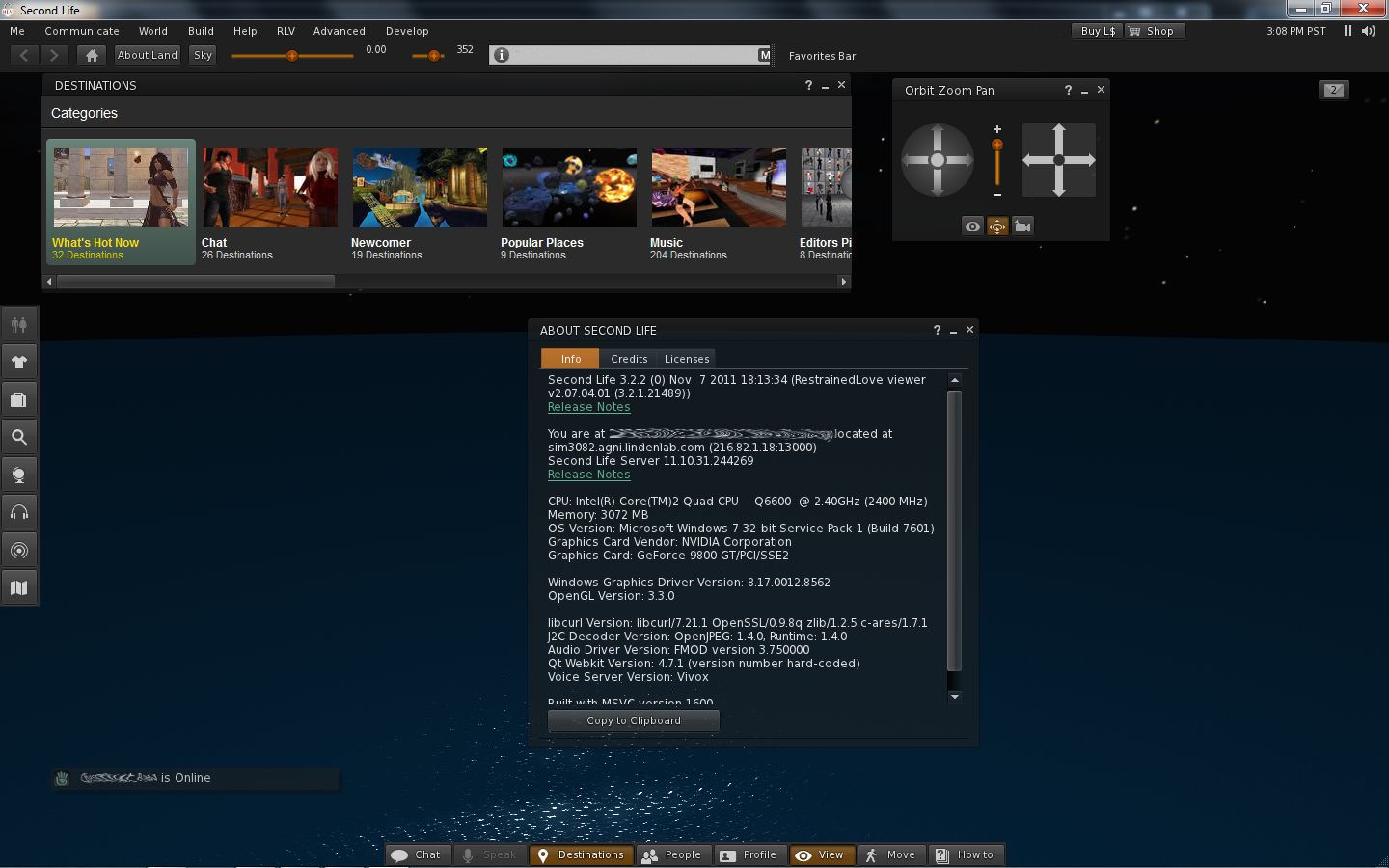
For RLV users wishing to try-out the new Viewer 3 UI, there is news: Marine Kelley already has a version of RLV out which incorporates the new UI and other bits.

RLV Viewer with new V3 UI

The Viewer, built on the 3.2.2 (0) release of November 7th, includes the new UI presentation of buttons, notifications appearing up in the top right corner (see image), Destination Guide open by default, and so on.

Additionally, it retains the RLV menu option and  includes a couple of familiar sliders seen in other TPVs up in the Navigation Bar: the avatar offset and the Draw Distance (the latter of which I’ve always appreciated in those TPVs that have it in difference to a Quick Preferences button), as well as including the ABOUT LAND and SKY buttons.

Unlike the latest versions of the official Viewer, the mini-location bar is displayed in addition to the Navigation Bar  / Favourites Bar, rather than the option allowing you to toggle between the Navigation / Favourites and the Mini-location. Being the (0) release means the Viewer doesn’t have the new snapshot floater – but given the speed with which Marine got this version out, one supporting the floater may not be far behind!

Performance-wise, on my usual machine the Viewer is on a par with the latest 3.2.2 release, coming in with an average fps around 20-22. Some have reported teleport issues with 3.2, I’ve not encountered any myself – and certain none in this Viewer while hopping around the place.

There’s not a lot to review here that I’ve not covered elsewhere when it comes to the new UI (see the link at the top of this post). All I can say is, kudos to Marine on the speed of her response with the release, and if you are curious about the new UI and want to give it a go but don’t want to crack out of RLV – now you can!

Parametric deformer: Linden Lab formally engages

It’s taken a little while – understandably, as wheels have to be set properly in motion – but the parametric deformer project has its first official update today, in which Max Graf gives an overview of what is happening:

“Karl [Qarl Fizz, aka Qarl Linden as was] has begun working on the code and was contacted by LL in order to facilitate development of this feature. He will be working directly with LL from this point forward to supply them with code as the project moves forward, allowing them to check the feature with compatibility for the official LL releases as he progresses so that when it is done it can quickly and easily be included without weekes of additional testing. They contacted him directly to expedite the process and work together from the start of this, which means it will be working correctly and will make it a lot easier for TPVs and other grids to implement once it is done!

“This is great news and in addition to the comment Charlar made about further development with open source features is indicative of some serious new possibilities for development. Kudos to LL and Karl for being able to come to the table together for the good of the SL community. This is a best case scenario for this project, and indicates a strong willingness on LL’s part to adopt and implement this new feature that we have wanted since July.”

Kudos indeed to Linden Lab!

As Max says, this is a best case scenario for the project, and will do much to ensure the completed deformer can be smoothly integrated into the Snowstorm code. This is turn should make the code easily more adaptable by those TPV developers who maintain V3.x-based Viewers, although older V1.x Viewer developers may still have a little work on their hands. Once again this is a win-win-win scenario for all: Second Life, Linden Lab and OpenSim (which faces similar issues when it comes to mesh clothing).

Estimates put the work of code development at around four weeks or so; given that LL are now going to help ensure the code can be integrated into the Viewer code more readily, the development cycle may well stretch a little – but the end result will be more than worth it.

It’s great to see the Lab respond so positively and openly with a user-based project in this way, and again demonstrates that the Lab is willing to engage and work cooperatively with the community as a whole.

It’ll be interesting to see whether this project yet proves to be a new building block in the way the Viewer is developed and enhanced in the future.