2020 Content Creation User Group week #19 summary

Grauland, March 2020 – blog post

The following notes were taken from my audio recording and chat log of the Content Creation User Group (CCUG) meeting held on Thursday, May 7th 2020 at 13:00 SLT. These meetings are chaired by Vir Linden, and agenda notes, meeting SLurl, etc, are are available on the Content Creation User Group wiki page.

SL Viewer

No further updates this week, leaving the current crop of in-flight viewers as:

  • Current Release version  version 6.4.1.540593, dated April 27th, promoted May 4th. Formerly the Zirbenz Maintenance RC viewer – NEW.
  • Release channel cohorts (please see my notes on manually installing RC viewer versions if you wish to install any release candidate(s) yourself):
  • Project viewers:
    • Copy / Paste viewer, version 6.3.5.533365, December 9, 2019.
    • Project Muscadine (Animesh follow-on) project viewer, version 6.4.0.532999, November 22, 2019.
    • Legacy Profiles viewer, version 6.3.2.530836, September 17, 2019. Covers the re-integration of Viewer Profiles.
    • 360 Snapshot project viewer, version 6.2.4.529111, July 16, 2019.

CEF Viewer

The “special release” CEF RC viewer, version 6.4.1.541204, does contain the anticipated codec, etc., updates. However, it is classified as a “special” release at this point in time, as it includes some “short cuts” taken in the build process in order to get it out as a proof-of-concept for the Adult Swim event.

The recommendation is that TPVs should not adopt the code from this particular build, but to wait until a more formalised RC release of the CEF updates is made.

See: Exclusive Adult Swim Second Life Event: Introducing Live Video Streaming in SL (Linden Lab) and Adult Swim special streaming event in Second Life (this blog).

OpenGL Replacement

As has been noted in this blog and elsewhere, Apple is deprecating OpenGL. This has raised questions over the last several months about the future of graphic support in SL for OS X.

Currently, one of the routes under consideration is to undertake a complete switch-over (Windows and OS X) from OpenGL to using Vulkan.

  • This is not a final decision, it is just one option under consideration, albeit one that is getting a good degree of thought.
  • Numerous pros and cons have been identified with such a switch. However, more analysis is required before a decision is made – e.g. overall impact on shaders, etc.
  • Even with any shift there are crucial questions to be asked, including how might it impact users on older, lower-spec systems. To help determine this, an upcoming RC viewer from the Lab will have some additional data collection code that will check to see if systems have / can support Vulkan.
  • Vulkan could potentially streamline some of the alpha sorting issues seen with OpenGL, and might also provide some general performance improvements.
  • There is a temptation when running a major graphics overhaul to try to include additional work as well, leading to drawn-out projects (a-la EEP). To avoid this, were a move to Vulkan to be made, LL will likely go for a focused implementation of Vulkan support, with broader graphics / shader work positioned as future follow-on work.

Advanced Lighting Model

With regards to any graphics system update, it is possible that the requirement to run with the viewer’s Advanced Lighting Model (ALM) always enabled might become universal. LL are aware that many people run the viewer with ALM disabled, and so are curious as to how much impact any decision to make it universal might have.

Part of the problem here is that people disable ALM for a variety of reasons. For example:

  • Those on metered / slow connections may disable it, to avoid having the additional load of downloading materials information (normal and specular maps).
  • Some disable ALM in the (not always accurate) belief that it carries a heavy performance hit, which is not necessarily true (e.g. enabling ALM on its own generally doesn’t place too much overhead on a system, but enabling ALM and shadows rendering does – so the trick is to turn of shadows via their own drop-down, rather than disabling ALM entirely).

In brief

  • The viewer’s bandwidth usage was raised  – notably the 3000 Kbps upper limit, and whether this was still valid in the era of fast connections people can access. Whether the limit is still valid or not is unclear (particularly how higher limits might stress the servers in terms of requests for information), however, it is seen as something the Lab could potentially look at.
  • Caching viewer: the upcoming viewer with updates to the cache is primarily focused on the VFS cache. If this is successful, it is possible the texture cache may be folded into the same structure.
  • Official Linux viewer: not news. The idea of the Lab providing (with third-party contribution support) a core Debian package & leaving the libraries to TPVs / self-compilers to determine based on the flavour of Linux they want to use is essentially at a standstill due to lack of resources.
  • Next meeting: Thursday, May 21, 13:00 SLT.

Kirsten’s Viewer gains the client-side AO

On May 2nd, I wrote about the return of Kirsten’s Viewer and its return to active duty. In that review I noted that while what goes into a viewer is down to those who maintain it, it would be nice to see Kirsten’s adopt the client-side AO mechanism, as first seen in the Firestorm viewer.

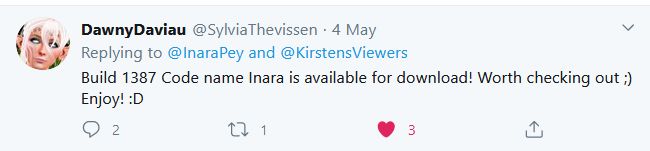
Following that review, KirstenLee’s partner, Dawny Daviau let me know the AO system was being considered and then, just a couple of days later, she Tweeted that the viewer had been updated with the AO code.

Even as an inside joke, I was flattered that KirstenLee had responded so rapidly to both Dawny’s prompting and my comment.

Dawny’s Tweet

I understand from KirstenLee’s own comments that getting the AO code into the viewer wasn’t easy, what with the UI changes created by EEP – so kudos and thanks got to KirstenLee and Dawny for going ahead and integrating it. Given it did take a little crowbarring, it’s not surprising that the AO floater has a couple of minor of rough edges to it – but these do not prevent it from being used or cannot be easily fixed.

For those unfamiliar with the idea of a client-side AO, it allows the animations from an animation overrider system to run directly from the viewer without the need to wear a resource-gabbing scripted HUD. It takes a little setting-up, but once done, it’s easy to use – and has the further benefit of allowing you to use multiple AOs together without having to worry about swapping HUDS or including different outfit links to different HUDs.

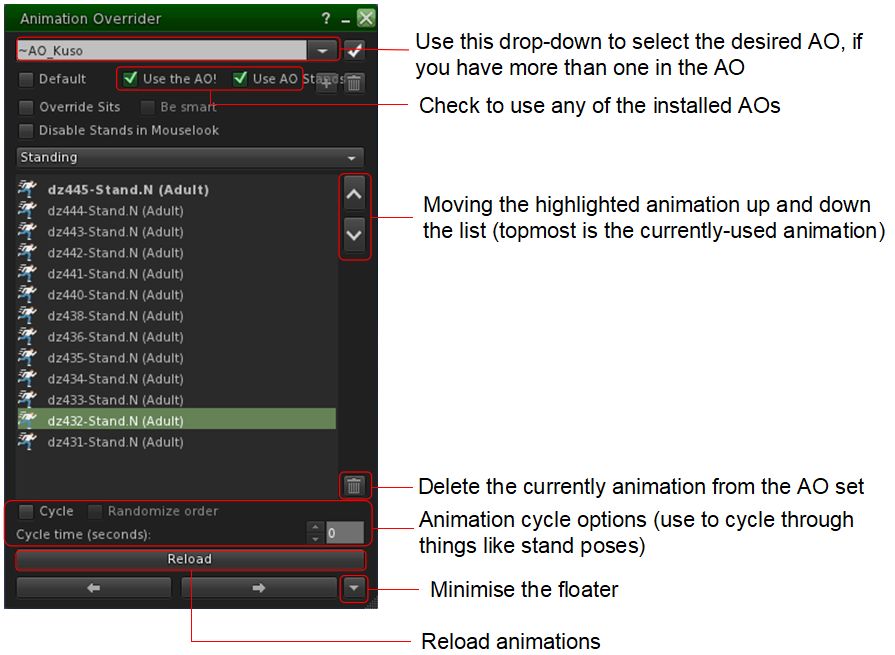
Quick guide to the essentials of the client-side AO as included in Kirstens Viewer

The best place to get information on setting-up and using the client-side AO is via the Firestorm wiki. A couple of points should be noted here:

  • When first loaded, the AO floater may not display all of the AOs in its floater (e.g. all your stands might be listed, but none of your walks). If this happens, click the Reload button at the bottom of the AO floater to get them to list and run.
  • The UI scaling in the floater is a little off in this S23-1387 KV iteration, so it my need to be broadened to correctly display.

Neither of the above points impact the AO’s usability, and in my own tests, I had no issues with setting it up and using it.

Also note that the AO will create a folder called #Kirstens in your invention, which will contain a copy of the AO(s) you have selected for client-side use – do not delete this folder when using the capability!

As a long-time user of client-side AO capabilities (including loading it with more than one AO set), I’m clearly a fan of the capability. I like the freedom it gives, and the fact there’s no need to have screen real estate (however small) taken up by a HUD and, more particularly, the fact that texture RAM and script resources needn’t be taken up by the use of a HUD. So while this might be a “small” update, I think it to be worthwhile and – if you’re trying out Kirsten’s Viewer and haven’t used a viewer-side AO system, this is a good opportunity to try it out.

For those who do use the client-side AO, and might be looking to an alternative to (say) Firestorm for photography, the addition of the AO button and floater offers another reason for giving Kirsten’s Viewer a try out.

My thanks again to KirstenLee for responding to the request from Dawny and I!

Related Links

2020 Simulator User Group week #19 summary

Studland Bay, March 2020 – blog post

The following notes were taken at the Simulator User Group meeting held on Tuesday, May 5th. Not a lot to report; most of the meeting was general chat about wish-lists for alternatives / updates to LSL, general commentary on animations and enquiries about the CEF viewer related to the Adult Swim event (see:Adult Swim special streaming event in Second Life).

Simulator Deployments

Please refer to the simulator deployment thread for updates.

  • On Tuesday, May 5th, the majority of the grid was updated to server maintenance release 540928, first deployed on Wednesday, April 29th, and comprising an update to the simulator build tools.
  • On Wednesday, May 6th. there should be a single RC deployment. Server update 541440 again comprises updates to fix issues with the Name Change feature still calling avatars by their “old” names for up to a week, together with some internal logging changes and improvements to how the simulator accesses internal servers, and a fix to llBase64ToInteger, the colour space LSL functions.

SL Viewer

On Monday, May 4th, the Zirbenz Maintenance RC viewer,version 6.4.1.540593 and dated April 27th, 2020, was promoted to de facto release viewer status.

The remaining official viewer pipelines are currently unchanged from the end of week #18:

  • Release channel cohorts:
  • Project viewers:
    • Copy / Paste viewer, version 6.3.5.533365, December 9, 2019.
    • Project Muscadine (Animesh follow-on) project viewer, version 6.4.0.532999, November 22, 2019.
    • Legacy Profiles viewer, version 6.3.2.530836, September 17, 2019. Covers the re-integration of Viewer Profiles.
    • 360 Snapshot project viewer, version 6.2.4.529111, July 16, 2019.

2020 viewer release summaries week #18

Logos representative only and should not be seen as an endorsement / preference / recommendation

Updates for the week ending Sunday, May 3rd

This summary is generally published every Monday, and is a list of SL viewer / client releases (official and TPV) made during the previous week. When reading it, please note:

  • It is based on my Current Viewer Releases Page, a list of all Second Life viewers and clients that are in popular use (and of which I am aware), and which are recognised as adhering to the TPV Policy. This page includes comprehensive links to download pages, blog notes, release notes, etc., as well as links to any / all reviews of specific viewers / clients made within this blog.
  • By its nature, this summary presented here will always be in arrears, please refer to the Current Viewer Release Page for more up-to-date information.
  • Note that for purposes of length, TPV test viewers, preview / beta viewers / nightly builds are generally not recorded in these summaries.

Official LL Viewers

  • Current Release version  version 6.4.0.540188, dated April 15th, promoted April 20th. Formerly the EEP RC viewer – No Change.
  • Release channel cohorts:
  • Project viewers:
    • No updates.

LL Viewer Resources

Third-party Viewers

V6-style

V1-style

Mobile / Other Clients

Additional TPV Resources

Related Links

Kirsten’s viewer: a return to active duty

Around a decade ago, a popular third party viewer (TPV) among Second Life photographers was Kirsten’s viewer, produced by KirstenLee Cinquetti (aka skilled coder Lee Quick).

At the time, it pushed hard to make the graphical appearance of SL rich and deep. It was also the first TPV to experiment with analgyph 3D, far back in 2011, long before “VR headset” was in common use.

Sadly, development of the viewer drew to a close in late 2011 as a result of personal circumstance (some of which is charted in these pages), although KirstenLee kept dabbling with it on-and off (such as returning to the S19 UI version and updating it in in 2013, and keeping pace with significant viewer updates from the Lab, such as Bento for the S22.x (current UI) version in 2017).  Now – and as pointed out to me by Austin Tate – the viewer is more formally back, KirstenLee having completed the self-certification required to have the viewer once more added to the Lab’s Third Party Viewer Directory.

Available for Windows, the updated Kirsten’s Viewer is bang-slap up-to-date, in that it is built on the most recent release of the official LL code base (release 6.4.0.540188 at the time of writing), and so includes the viewer 3.x+ UI, and all significant updates from the Lab up to and including EEP, the Environment Enhancement Project, although as Kirsten noted with it’s release, some tweaks might still be required.

Kirsten’s Viewer is EEP capable

KirstenLee refers to the viewer as something of a “hybrid”, and when approaching it, it is as well to keep this in mind. “Hybrid” is this case is a reference to the fact that while it is based on the core LL code base, the viewer also pulls in elements from what might be LL project viewers (and so not necessarily ready for “prime time” use), and from other TPVs. In doing so, the focus is very much on code that improves stability / performance.

I tend as a rule to keep any feature or alteration within the existing code base and not add extras which cannot be integrated into the standard source. I also use LL code style and naming conventions.

– KirstenLee, discussing Kirsten’s Viewer

In this regard, the viewer is also described as being “aimed specifically at experienced users, with emphasis on the visuals.” This is not so much to put people off, but to underline the fact that use of the viewer comes best if you have an understanding of the more esoteric aspects of viewer use – such as clearing caches and settings from any prior versions when installing a new version (aka, performing a “clean install”). Such capabilities are not hard to grasp, and can be found documented in various locations.

Given the S23.x release is based on the latest LL code base, you can comfortably expect all of the major Lab updates to be present, as noted, and may from time-to-time include elements from upstream of the release viewer (as with the Legacy Profiles, again as mentioned above). It also pulls some updates from TPVs like Firestorm; however, those familiar with the latter should not expect Kirsten’s Viewer to expose debugs or offer viewer-specific capabilities to anywhere near the same degree – that’s not the point of this viewer (although that said, it would be nice to see Kirsten’s adopt the client-side AO mechanisms, simply because it is available in several TPVs and used by many people as a result).

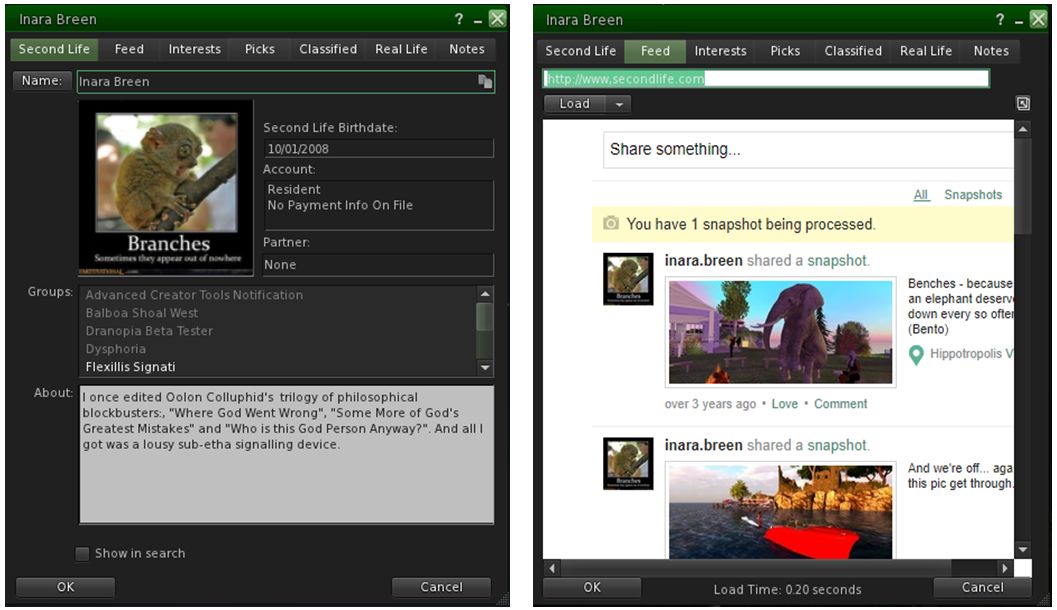
Kirsten’s Viewer includes the upcoming re-integration of viewer-based profile panels – which includes the profile feed from the web, and currently found in the Lab’s current Legacy Profiles project viewer

Given this, the viewer’s Preferences and Tool Bar options are pretty must as found in the official viewer, with just a trio of differences in the the former. The Move & View tab, for example, includes additional sliders for camera movement  – lag, smoothness zoom time – again in keeping with the ideals of photography / visuals. Further, the Set-up tab does not include the auto update options, for reasons KirstenLee also explains:

I do not use the Linden auto build system. I host all the build libraries because I occasionally work on those in concert with the viewer code. It allows for much finer control over the entire process. I have a tendency to do custom compilations with different tool-sets which is something an official client would never do, for reasons of the broadest compatibility with the consumer.

– Kirstenlee, discussing Kirsten’s Viewer

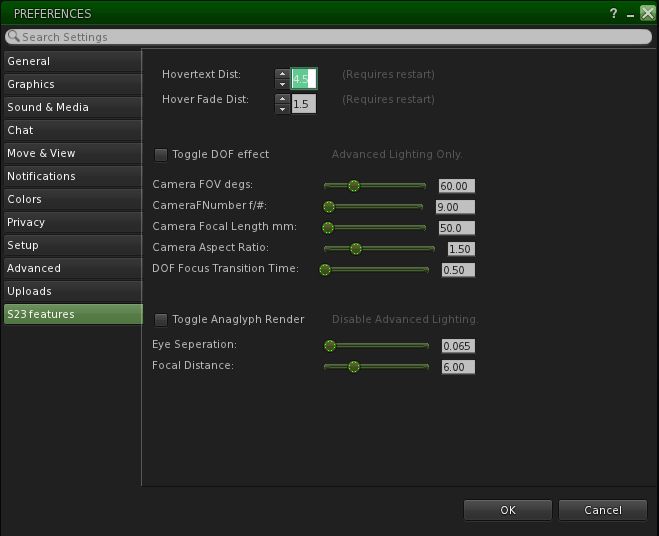
Thirdly, Kirsten’s Viewer includes a custom Features tab (called S23 Features in the current release, although this will doubtless increment to match future versions). This is again camera / visuals related, and includes the option for running the viewer in analgyph mode can be found.  This includes sliders for adjusting the analgyph 3D view to account for eye separation and focal distance.

The Features tab in Kirsten’s Viewer is where you can find the analgyph options, for those with analgyph glasses

Should you have analgyph 3D glasses and use the option, the following points should be noted:

  • Activating it will disable the viewer’s Advance Lighting Model (ALM) shaders – so shadows, ambient occlusion and depth of field will all be disabled.
  • Toggling analgyph mode off will not automatically re-enabled ALM, you must do this yourself from the Graphics→Advanced Settings floater.
  • If you log-out with the analgyph option enabled, it will be disabled automatically on logging back in, but again, ALM + options will remain disabled until turned back on.
  • If you use a 3D mouse such as SpaceNavigator, you may find activating the analgyph capability will severely alter default 3D mouse movement. As the overall defaults for the SpaceNavigator (Move & View→Other Devices) were not altered and given I don’t actually have analgyph glasses to make it worthwhile, I confess I did not fiddle with settings to see if the issue could be corrected.

It may seem odd in “bringing back” a viewer after so long, but there are reasons for it, again as KirstenLee notes:

Its a matter of public record as to how development ended, a perfect storm of circumstances made continued work on it impossible. But as with all things time is a great healer. Besides after nearly 16 years of SL I find myself enjoying my in world life. And have the luxury of  a good work balance and a happy and healthy home. So while the sun shines make hay 🙂

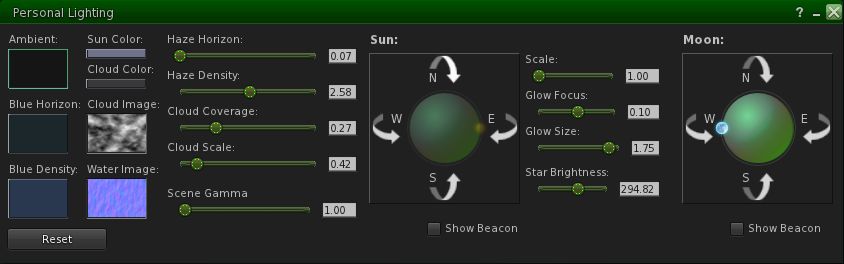
For my part, and while I’ve not not driven the S23 release hard or far, I can only say its good to see Kirsten’s Viewer back on the active list once more. While it was never my main viewer, it was a go-to viewer for me for photography. And while it may only be subjective, it does seems to add more depth to EEP skies than I’ve noted with the official EEP viewer – the stars seem to “twinkle” more noticeably.

It’s always tempting to offer a list of what a viewer “could” or “should” have, particularly if coming from something like Firestorm – but the point of TPVs are that they are not meant to all provide the same things. With its emphasis on visuals, performance and stability, Kirsten’s Viewer addresses a specific set of goals and as such, has – and likely will have – only the tools it needs to achieve that, my own earlier comment on the client-side AO above notwithstanding.  As such, I’m looking forward to seeing the viewer’s progress, and reporting on it.

Related Links

2020 SL project updates week #18: TPVD summary

Finian’s Dream, March 2020 – blog post

The following notes are taken from the TPV Developer meeting held on Friday, May 1st, 2020. These meetings are generally held every other week, unless otherwise noted in any given summary. The embedded video is provided to Pantera – my thanks to her for recording and providing it. Time stamps are included with the notes will open the video at the point(s) where a specific topic is discussed.

This was a short meeting, with long periods of silence.

SL Viewer News

[0:00-3:00]

  • The CEF Special RC viewer, version 6.4.1.541204, was issued on Thursday, April 30th.
    • [12:54-13:34] This is a specific update put out in support of a particular customer’s event.

The remainder of the official views currently in progress remained unchanged through the week as:

  • Current Release version  version 6.4.0.540188, dated April 15th, promoted April 20th. Formerly the EEP RC viewer.
  • Release channel cohorts:
    • Zirbenz Maintenance RC viewer, version 6.4.1.540593, April 27th.
    • Camera Presets RC viewer, version 6.3.9.538729 March 25th.
    • Love Me Render RC viewer, version 6.3.9.538760, March 25th.
  • Project viewers:
    • Copy / Paste viewer, version 6.3.5.533365, December 9, 2019.
    • Project Muscadine (Animesh follow-on) project viewer, version 6.4.0.532999, November 22, 2019.
    • Legacy Profiles viewer, version 6.3.2.530836, September 17, 2019. Covers the re-integration of Viewer Profiles.
    • 360 Snapshot project viewer, version 6.2.4.529111, July 16, 2019.

General Viewer Notes

  • The Zirbenz Maintenance RC looks set to be the next viewer in line for promotion (being the only RC thus far merged up to the EEP code base). This looks set for promotion in week #19 (commencing Monday, May 4th).
  • The mesh upload updates viewer is still expected to appear as a project viewer soon™.
  • The viewer build tools update viewer is still held up by a couple of significant crash issues.
  • An FMOD update viewer is anticipated as appearing soon™.
  • Further Chrome Embedded Framework (CEF) RC updates should result in improvements to handling more (and more recent) video codecs, once available.
  • [8:07-8:55] The Legacy Profiles viewer has apparently been hit with an issue that has delayed it – although it’s not certain whether or not this has now been cleared up.

In Brief

  • [18:02-18:38] There is work being carried out on group chat. however, it is not focused on performance improvements per se, although it may end up providing some. LL do acknowledge a further pass focused on group chat reliability is required “at some point”, but probably not until after the cloud uplift.
  • There are reports that the viewer’s built-in browser is experiencing issues retaining cookies, causing people to have to log-in to the Lab’s own websites when using it (accessing non-SL websites using the internal browser isn’t recommended).
  • The simulator-side fix for off-line inventory losses from objects (see: BUG-227179) still has yet to clear QA (due to other issue with the release it is bundled in). The hope is that it will make it onto a server-side RC update “in the next couple of weeks”.
  • Firestorm and EEP – it was mentioned that the Firestorm team still have “a lot of work to do” before they’ll be in a position to make an EEP release – the forthcoming Firestorm update will not include EEP.