Firestorm 6.4.12 the EEP and more release

On Wednesday, December 9th, 2020, Firestorm issued a release version of their viewer – 6.4.12.62831. This is the formal release of Firestorm supporting the Lab’s Environment Enhancement Project (EEP); it also includes a number of other Lab-specific updates to the viewer, such as the Camera Presets capability.

Note: while there has been an EEP beta release – 6.4.5.60799 (July 2020) – this summary has been written for those who may still be running the 6.3.9.58205 release from May 2020.

Also, given limitations of my own time (coupled with an inability to run 6.3.9.58205 in direct comparison with 6.4.12.62831), this is a much briefer overview of changes for a Firestorm release in comparison to past overviews in these pages.

Table of Contents

Installation

  • There is no need to perform a clean install with this release if you do not wish to.
  • Do, however, make sure you back-up all your settings safely so you can restore them after installing 6.4.12.
  • Again, please refer to the Firestorm 6.4.12 generic release notes for additional details of all changes and updates in this release.

Register Firestorm as Default Hander

Starting with this release, towards the end of the installation process, Firestorm will display a prompt:

Do you want to register Firestorm as default handler for virtual world protocols?

A response of Yes to this prompt will set the viewer to open map SLurls for example.

Linden Lab Derived Updates Overview

Firestorm 6.4.12 brings the viewer to parity with the Lab’s 6.4.11 viewer code base. As such, it incorporates updates from Linden Lab previously included in the 6.4.5 Beta release and from the following Lab viewer releases:

  • The Chrome Embedded Framework (CEF) Update 2020, viewer 6.4.4.543157, providing better support for media playback options win the viewer, including the ability to live stream into Second Life.
  • The FMOD Studio update, viewer 6.4.3.542964, updating the viewer’s audio playback support to use FMOD Studio.
  • The Camera Presets viewer, 6.4.2.541639, – see Camera Presets, below, for more.
  • The Zirbenz Maintenance viewer, 6.4.1.540593.
  • The Environment Enhancement Project (EEP) viewer 6.4.0.540188 – see below for more.

New to the 6.4.12 Firestorm release are updates and improvements from the following Linden Lab viewers:

  • ToolsUpdate2 viewer, 6.4.6.545962, viewer build tools update to Visual Studio 2017, a more recent version of XCode and Boost.Fiber, dated August 10th, 2020.
  • Love Me Render #4 viewer, 6.4.9.549455 – rendering updates with a focus on EEP bug fixes, dated September 24th, 2020.
  • Mesh uploader viewer, 6.4.10.549686 – Linden Lab’s implementation of the uploader improvements previously found in Firestorm, with additional changes from the Lab. Dated October 14th, 2020.
  • The following Maintenance releases with assorted fixes and updates:
    • Maintenance Arrack, version 6.4.7.546539, dated August 19th, 2020.
    • Maintenance Bormotukha, 6.4.8.548890, dated September 18th, 2020.
    • Maintenance Cachaça, version 6.4.11.551711, November 6th, 2020.

Camera Presets

Camera Presets provides the ability for users to create one or more custom camera positions to define where and how the viewer camera is placed relative to your avatar, More than one set of presets can be created and saved, so that you can, for example have a camera position for general exploring, another suitable for combat games, another for building, etc., all of which can easily be accessed and used at any time via the Camera Presets drop-down.

For a general introduction to Camera Presets, please refer to: Tutorial: Viewer Camera Presets. However, when doing so, please note that the Firestorm Camera Floater is laid out differently to the official viewer, being more compact, as shown in the image below.

Camera Presets: options and floaters, as seen in Firestorm 6.4.12.
  1. Presets can quickly be selected from the Camera Presets button in the top right of the viewer, which will open a drop-down menu. By default, this drop-down will display the standard viewer camera positions of Front, Rear, and Side. Additional presets will be displayed as you create them.
  2. A button on the drop-down will open the Camera floater, if not already open. As well as controlling the camera position, this floater now contains the options for creating and saving camera presets.
  3. The most accurate way to establish new camera defaults is to use the Camera Position spinners and slider that can be accessed by clicking on the Position button in the Camera floater – again, see my Camera Presets tutorial for more on this approach.
  4. When you have created your desired preset, use the Save as Preset button to save it as a viewer setting. This opens the Save Camera Preset floater, which allows you to save the preset settings under a unique name or to overwrite an existing setting.
  5. Alternatively you can manually adjust the camera position relative to your avatar using the camera controls then click on the current settings button to open the Save Camera Preset floater and save the settings as described in (4.).
  6. You can also select any defined Camera Preset by clicking on the gear icon in the Camera floater to display a list of available presets – default and your own – and then clicking on the desired one.
  7. If you only wish to select a preset you have created, click the Use Preset button on the Camera floater to display a drop-down of available presets that excludes the viewer defaults of Front, Rear and Side. If you have not created any defaults yourself, the drop-down will be empty.

Environment Enhancement Project (EEP)

It  is unlikely that many people have not heard of the environment Enhancement Project (EEP). But in short:

  • EEP Replaces the use of Windlight .XML files to control the water and sky environments seen in Second Life.
  • Environment settings are saved within environment assets that you can keep in your inventory and / or share with and sell to others.
  • These environment settings can be applied to a region or to a parcel (subject to region permissions) and / or to your avatar (thus allowing those travelling in vehicles to maintain a consistent environment across multiple region crossings).
  • EEP allows:
    • For up to four different, independently controlled sky layers.
    • The Sun, Moon and Cloud textures to be replaced with custom textures uploaded to the viewer.
  • EEP also provides:
    • An extended day cycle of up to 168 hours, thus allowing a 7-day, 24-hour day / night cycle to be defined, for example.
    • A Personal Lighting floater that allows you to make viewer-side adjustments to the local environment for the purposes of photography.
    • New LSL functions to allow scripts to interact with parcel environments and that can be used with experiences.

EEP Resources

EEP is a large and complex overhaul of environment settings for Second Life, and there are numerous resources available for it. If you have not used EEP before, and as the Firestorm implementation is more-or-less as per the official viewer, I recommend reading some of the following:

EEP and Phototools

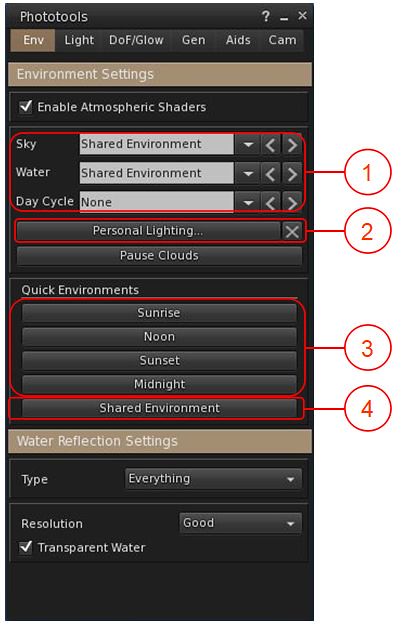
One of the popular elements within Firestorm is the Phototools floater. This has been updated to work with EEP, with the most noticeable changes being to the WL tab, now renamed Env, with the changes within it outlined in the image and notes below.
EEP and Phototools
  1. Environment drop-downs for Fixed Sky, Linden Water and Day Cycles. These display the currently-used environment settings for their respective environment types as seen in your viewer.
    • Click the down arrow for a list of all available environment asset types available to you in your inventory and via the Library → Environments folder.
    • Click on the required asset name to apply to your viewer only.
  2. Accesses the EEP Personal Lighting floater, which you can use to modify the current environment settings as seen in your viewer only.
    • The X button to the right of Personal Lighting will cancel any changes you have made to the current environment, and revert your viewer to displaying the settings for the selected asset.
  3. Quick Quick Environment buttons for setting the time of day to the SL default Sunrise, Noon, Sunset and Midnight settings.
  4. Shared Environment: presumably intended to re-apply the shared environment as set by the region / parcel holder. However, in testing, this did not appear to work.

Notes:

  • The drop-downs in (1) can also be found in the Quick Prefs panel, as can a button to open the EEP Personal Lighting panel.
  • As these options are applied to your viewer, note that the selected Day Cycle will not necessarily reflect the expected time of day – as Day Length / Offset can only be set at the parcel / region level.

Firestorm EEP Preferences

Firestorm provides two EEP-specific Preferences options. Both can be found in Preferences → Firestorm, and comprise:

  • A slider that allows you to set the interval in seconds over which manual environment changes will blend, with 0.0 being instantaneous. In previous versions of Firestorm, this was known as crossfade.
  • A checkbox to allow any personally applied EEP setting to persist between log-in sessions.
Firestorm 6.4.12 EEP Preferences

Additional EEP Notes

  • There are around 200+ EEP environment settings to be found in the Library → Environments folder. These have been provided to Linden Lab by Whirly Fizzle of the Firestorm team, and are available to all EEP-capable viewers.
  • As noted in the image above, these can be accessed via the WL tab in Phototools and via the drop-downs in Quick Prefs.
  • If you want to edit these any of the environment settings in the Environments folder, you must first copy them to a folder in your inventory (e.g. your Settings folder, or a sub-folder within it).
  • As per my tutorial, you can import the Windlight settings you have on your local drive and convert them to EEP settings – see Importing Windlight Settings as EEP Assets.

Continue reading “Firestorm 6.4.12 the EEP and more release”

Cica and Bryn’s White Veil in Second Life

White Veil, December 2020 – snowballs are a rollin’,rollin’, rollin’

Cica Ghost and Bryn Oh have once again teamed up to provide a little  light-hearted winter fun for those who feel like a little bit of a challenge with some avatar exercise.

White Veil, located on a snow-covered Homestead region under the patronage of Clementine Rosca, challenges visitors to make their way over wooden boards to a snowy valley between high peaks that winds up to where a strange tower twists its way up into the sky – and then climb the curving ramp of  said tower to reach the room at the top.

White Veil, December 2020 – will the magnets help or hinder you?

Sounds simple enough, doesn’t it? And it is – except for the gigantic snowballs that periodically rain from the sky to roll at random down the valley to sweep-up all that lies in their path. They are invariably followed by one true monster of a snowball that rumbles down the tower’s ramp to join its smaller brethren as they tumble down the valley.

Should you get caught by any of these great balls of snow, then you’re toast – or at least, you’re teleported back to the start line to try again. Nor are the snowballs alone in trying to hinder you. There are also white blocks lie  scattered around which, if you get too close will attempt to bounce you in the air, whilst blue bullets may be pelted at you from the tower’s open walls to try to delay you.

White Veil, December 2020, – meet the penguins

But, there is also assistance to be had. Scattered along the path are blue disks. Step on one and you’ll be enclosed in your own personal force-field for a time, impervious to snowballs blocks and bullets – just keep moving with the force field in order for it to benefit you the most. Magnets hanging over the curving ramp of the tower might also assist you by dragging you to them, and so up the slope – but they also might hinder, as once caught by one, it can be difficult to get free!

Nor is this all; while the goal is to reach the room at the top of the tower and witness the strangely garbed individual awaiting you there, so to are there opportunities to leave the valley and explore the lands beyond, occupied as they are by groups of Cica’s penguins, whilst pieces of Bryn’s art might also distract you.  Also to be found at the tower’s top is a narrow, snow-covered walkway leading to a flying chair; use the arrow and page Up / Down keys to manoeuvre it once seated.  A second narrow snowy walk can take you to a lonely television, whilst keeping an eye out for snow white pose balls might get you literally climbing the walls.

White Veil, December 2020 – having reached the top of the tower, I opted to take the flying chair back down, avoiding the snowballs

To experience the fun of White Veil, simply teleport over and then accept the experience associated with it (if you are a regular visitor at Bryn’s Immersiva, and have accepted the experience there, then you are actually all set). When you’ve done so, note the instruction about using Always Run (CTRL-R – although in places you might want to toggle it on / off. And for an added bit of fun, you could also try your hand at decoding the message in the region’s About Land description. It’s not hard, but all I’ll  say here is that it gives warning about the state of mind of certain flightless waterfowl …

SLurl Details

2020 SUG meeting week #50

Hidden Lake, October 2020 – blog post

The following notes were taken from the Tuesday, December 8th Simulator User Group (SUG) meeting.

Server Updates

Refer to the server deployment thread for the latest news and updates.

The week sees a series of deployments between Monday and Wednesday:

  • On Monday, December 7th, the simulators on the SLS Main channel were updated to simulator release 553168 contacting “some internal tweaks”.
  • On Tuesday, December 8th, the RC channels were updated to simulator release 553176, which again contains “some internal tweaks”.
  • If all goes will with the RC deployment, 553176 will be deployed to the SLS Main channel on Wednesday, December 9th.

Commenting on the week’s deployment, Rider Linden said:

So. We’re just about done with the tight sequence of rolls. Tomorrow [Wednesday  8th] we should be doing the main channel again, and then all will be right with the world. We are hoping that that is the final roll of the year. In January we should be back onto our regular Tuesday/Wednesday schedule. We know that the packed schedule has been disruptive over the last week, so thank you for being patient with us.

While there are no planned deployments between the end of this week and year-end, it is likely all regions will be restarted before the holiday break at the Lab to “keep things fresh”.

SL Viewer

The Start of the week has seen no change to the current crop of official viewers, leaving them as follows:

  • Current release viewer version 6.4.11.551711, formerly Cachaça Maintenance RC viewer promoted on November 12 – No Change.
  • Release channel cohorts:
    • Dawa Maintenance RC Viewer, version 6.4.12.553053, released December 3.
    • Custom Key Mappings project viewer, version 6.4.12.552100, November 12.
  • Project viewers:
    • Project Jelly project viewer (Jellydoll updates), version 6.4.12.552224, December 4.
    • Simple Cache project viewer, version 6.4.11.551403, issued on November 12.
    • Legacy Profiles viewer, version 6.4.11.550519, October 26.
    • Copy / Paste viewer, version 6.3.5.533365, December 9, 2019.
    • Project Muscadine (Animesh follow-on) project viewer, version 6.4.0.532999, November 22, 2019.
    • 360 Snapshot project viewer, version 6.2.4.529111, July 16, 2019.

In Brief

  • Map tiles are still not being regularity updated, however the Lab both identified the cause of the issue and a possible fix, however, it now seems probable this will not be deployed until after the holiday break.
  • LL have suggested that the Map system might be looked at in the future, with a request being made as to what people would like to see, were such a project to go ahead. Some of the suggested made at the meeting included:
    • The ability to add a logo over regions, rather than having to make one from prims (allowing for constraints that would be required to prevent abuse (such as having an expanded set of iconography?).
    • Allow the map to ignore region surrounds so the terrain can be seen on the map, rather than the map tile being a blank coloured square.
    • Heat maps showing traffic over varying time periods, a-la the old Metabolt client.
    • Better zoom capabilities.
    • Indicators / textures for showing whether the region is currently in daylight or night-time.
  • Work is continuing to try to improve the teleport issues some are experiencing.

A Silent Night in Second Life

Silent Night, December 2020 – click any image for full size

Early in December, Caitlyn and I visited Silent Night, a Homestead region design by Nessa  Nova of Lost Unicorn fame. As you might expect given the region’s name, it is a winter / Christmas setting – one that is eye-catching in the simplicity of its setting, carrying a natural beauty together with little touches of detail and humour than encourage visitors to explore.

Ringed by mountains, the region sits under a starlit sky across which the ribbon of the Milky Way has been thrown, a bridge of light and colour that spans the gap between two peaks, a gibbous Moon peeping at it from over the shoulder of another high mountain.

Silent Night, December 2020

Heavy in snow, the mountains shield the land from the rest of the world, a spur line of a railway cutting through the roots of the high peaks to bring a steam train hissing into the local station, the tunnel through which it has travelled seeming the one link between this place and the world at large. However, the train coming into the station is no ordinary service; it appears to be powered by the magic of the season: its coal tender empty of everything other than toys, presents and a Christmas tree glowing with lights.

The station is the region’s landing point, and from here, across the end of the line, a path winds past Babba’s Café where a hot drink can be enjoyed should the snow prove a little too much – and snow there is aplenty across the region. It  lies deep on the ground, has frosted the trees, and sits upon roofs and on benches as it falls softly from the sky.

Silent Night, December 2020

Beyond the end of the path, rutted tracks cut through the snow, marking routes that might be explored, whilst the heart of the region is given over to frozen lake where skating might be enjoyed around a tall, decorated tree at its centre, holding aloft a shining star.

The frozen lake is not the only place for skating, however. A Short walk across the snow from the café is a more formal rink, festooned with lights of its own, a snowman waiting to greet visitors and offer them skates.

Silent Night, December 2020

Elsewhere, a winding track runs back from one of the two piers that stretch out into the frozen waters of the Lake. It curls  through woodlands, passing under the high arch of rock curving out from the arms of a mountain, to lead the way to a cosy cottage to the north-east of the land.

To the south of the lake, a tongue of snow-covered land extends out into the frozen water. It shelters a heart-shaped tree guarded by a peacock and rabbits, where a fairy is waiting to offer couples the opportunity to dance. The path to it passes around the west side of the lake, offering the chance to visit a carousel and a little camp fire (one of three waiting to be found), whilst another little café offers food and drink.

Silent Night, December 2020

Simple in presentation, rich in contents – not everything is described here – and ideal for photography and winter romance, Silent Night is an engaging and attractive visit.

SLurl Details

Sensation & Perception in Second Life

Nitroglobus Roof Gallery – Sensation and Perception, Monique Beebe, December 2020

Monique Beebe returns to Nitroglobus Roof Gallery, curated by Dido Haas for the gallery’s final exhibition of 2020, entitled Sensation & Perception.

Monique – Moni to her friends – is one of my favourite artists when it comes to narrative avatar studies;  her work is richly evocative, sometimes provocative, and always fascinating to read and admire. Such is the richness of her work, Moni has been a semi-regular at Nitroglobus over the last few years, and it is always a pleasure to see her work there. However, for this exhibition, she presents something a little bit different; a series of images that challenge her and those of us who view them, as she explains:

The aesthetic experience is more a matter of emotion and feeling (sensation) than of the subjective image which we create in our heads of what we see (perception). In other words you can be ‘touched’ by an image, a feeling you have, before you interpret the story shown on the image …
In that same way this exhibition Sensation & Perception is made. It’s not like my usual artwork where I try to capture emotions in a face. This time I moved outside of my comfort zone to create art that I leave to the observer to respond to through their own sensations and perceptions.

– Monique Beebe on Sensation and Perception

Nitroglobus Roof Gallery – Sensation and Perception, Monique Beebe, December 2020

The result is a series of avatar studies, some of which might be considered not suitable for work (NSFW), others of which are richly layer via post-processing to offer a finish that is very different to many of Moni’s previous works, and which by doing so, particularly evoke sensations on a physical level as well as visuals by suggesting we might actually run fingers over their uneven surfaces in order to appreciate them through our sense of touch.

As per the title of the exhibition, all of the pieces presented generate an initial response that is guided by our senses – that initial wash of emotional response that may see us drawn to one image whilst perhaps stepping back from another. But so too, they challenge us to look again, to view them more deeply, and allow our perception to see past our initial reactions and let each piece tell its story as we study it more deeply. Again, as Moni notes:

Everybody has a different sense or perception: for instance when we see an image of a face with wrinkles we can get touched by the emotion of that face and we automatically assume it is an old person we see. But maybe we also see something different in it, like a person who went trough a lot, who suffered and/or lived in pitiful circumstances.

– Monique Beebe on Sensation and Perception

Nitroglobus Roof Gallery – Sensation and Perception, Monique Beebe, December 2020

This makes Sensation & Perception one of the most engaging exhibitions by an artist who has a deserved reputation for producing art that engages the eye and mind.

SLurl Details

2020 viewer release summaries week #49

Logos representative only and should not be seen as an endorsement / preference / recommendation

Updates for the week ending Sunday, December 6th

This summary is generally published every Monday, and is a list of SL viewer / client releases (official and TPV) made during the previous week. When reading it, please note:

  • It is based on my Current Viewer Releases Page, a list of all Second Life viewers and clients that are in popular use (and of which I am aware), and which are recognised as adhering to the TPV Policy. This page includes comprehensive links to download pages, blog notes, release notes, etc., as well as links to any / all reviews of specific viewers / clients made within this blog.
  • By its nature, this summary presented here will always be in arrears, please refer to the Current Viewer Release Page for more up-to-date information.
  • Note that for purposes of length, TPV test viewers, preview / beta viewers / nightly builds are generally not recorded in these summaries.

Official LL Viewers

  • Current release viewer version 6.4.11.551711, formerly Cachaça Maintenance RC viewer promoted on November 12th – No Change.
  • Release channel cohorts:
    • Dawa Maintenance RC Viewer, version 6.4.12.552224, released December 3rd.
  • Project viewers:
    • Project Jelly project viewer (Jellydoll updates) updated to version 6.4.11.551213 on December 4th.

LL Viewer Resources

Third-party Viewers

V6-style

  • No updates.

V1-style

Mobile / Other Clients

  • No updates.

Additional TPV Resources

Related Links