VWBPE 2021: Patch Linden – the board, Second Life, and more

VWBPE 2021

On Thursday, March 18th, 2021 Patch Linden, the Lab’s Vice President of Product Operations and a member of the company’s management team, attended the 2021 Virtual Worlds Best Practice in Education (VWBPE) conference in the first of three special events featuring representative from Linden Lab.

The following is a summary of the session covering the core topics raised. The notes provided have been taken directly from the official video of the session, which is embedded at the end of this article. Time stamps to the video are also provided to the relevant points in the video for those who wish to listen to specific comments.

Notes:

  • This is a summary, not a full transcript, and items have been grouped by topic, so may not be presented chronologically when compared to the video.
  • In places, information that is supplementary to Patch’s comments is provided in square braces (i.e. [ and ]) are used in the body text below to indicate where this is the case.

Linden Lab’s New Board

[Video: 4:04-10:55]

[For additional information on the new board members, please also see: Meet Linden Lab’s new board of directors (January 9th, 2021) and Linden Lab’s board of directors: snippets of news (February 4th, 2021).]

Linden Lab’s board of directors (l to r): Brad Oberwager, J. Randall Waterfield and Raj Date
  • New ownership team is a “joy to work with”.
  • Brad Oberwager is particularly active, and has the avatar name Oberwolf Linden  and is described as “a lot of fun” to be around and to work with. [He is both on the board and serves as Executive Chairman on the management team.]
Brad Oberwager has joined the Lab’s management team as Executive Chairman, and his long-time colleague, Cammy Bergren serving as Chief of Staff
  • As Executive Chairman Brad Oberwager’s aim is to see Second life set as the “largest and best” virtual world,  and has a genuine love for the platform.
  • Both J. Randal Waterfield and Raj Date (particularly) appear to lean more towards the Tilia Pay side of things, with Brad Oberwager more “in the middle”. However, this doesn’t mean there is a dichotomy. Tilia is a key component of Second Life (it runs the entire Linden Dollar eosystem), and Tilia’s own success and growth will benefit SL.
    • [Tilia is a wholly-owned subsidiary of Linden Research (Linden Lab). It’s board comprises two members of the Linden Research Board: Brad Oberwager and Raj Date), together with Aston Waldman, the Chief Financial Officer (CFO) at Linden Lab. The management team comprises: members of the the Lab’s management team: Aston Waldman, David Kim, Ray Johnson, Emily Stonehouse and Brett Attwood.]
    • The two entities enjoy a symbiotic relationship: Tilia is owned by Linden Research with Linden Research also a primary customer. However, day-to-day operations are carried out by two separate  teams.
  • [48:48-49:59] The new owners are bringing a tremendous new energy to Linden Lab, and are “super enthusiastic” about growing Second Life, including its educational use. What gets to be invested in the platform will only benefit everyone.
    • The key question Brad Oberwager asks and prompts people to ask is, “How will it benefit the residents, and how will it benefit Second Life?”

SL Short-Term and Longer Term

Priorities for the Second Life Team in the Next 12 Months

[Video: 10:57-16:02]

  • Immediate priority is to increase the Second Life active user base. This is very much being driven as a goal by Brad Oberwager, and includes:
    • “Drilling down into” the new user experience.
    • Refactoring the on-boarding process and orientation islands.
    • The work will include viewer-side changes that are intended to “smooth out a lot of the bumps in the road”.
    • The will will be built on two years of active study and A/B testing to try to determine what the on-boarding path should look like, together with learning from users returning to Second life as a a result of the SARS-CoV-2 impact.
    • It is hoped this work will both help LL improve user retention and also feed through to the community gateways, particularly with regards to the upcoming changes which will be made to the viewer.
    • No specifics provided, but the viewer changes are described as:
      • “New UIs”
      • Refreshed looks.
      • Easier to find information.
  • There is also the need to complete the work of transitioning to AWS – fixing the current issues directly related to the move and also on-going work to properly leverage the AWS environment for the benefit of the platform.
    • [29:24-30:00] This work includes a  lot of under-the-hood simulator performance improvements that will be continuing throughout the year.

Second Life in Five Years Time

[Video: 16:04-19:33]

  • The company would like to at least double the active user population over the next 3-5 years.
  • This is seen as a realistic goal in light of the shift in emphasis seen within business, education, etc., from purely physical world interactions towards more digitally-based interactions / hybrid opportunities that mix various formats [e.g. digital + virtual + remote working / learning].
  • AWS offers the potential for regions to be geographically located around the world, potentially bringing them closer to their core audience.
    • This could allow educational regions, for example, to be hosted much closer to the schools / colleges / students they serve, making them more responsive.
    • This approach could potentially start to be used towards the end of 2021.
  • Further out, geolocating regions could potentially offer the ability for the Lab to offer white label grids to specific customers / groups.
  • [24:00-28:25] White label grids present the opportunity for the Lab to better meet specific client requests to remove features and capabilities from the viewer – and also take features an capabilities required for a specific environment and potentially make them available across the entire Second Life product.
    • Two examples of the latter already exists: the new extended chat range feature available to region owners, and the Chrome Embedded Framework updates that allow video to be streamed into Second Life, as originally demonstrated in the Adult Swim streaming of episodes from The Shivering Truth in May 2020.

What Lessons has LL Learned due to the Pandemic?

[Video: 20:31-24:00]

  • The pandemic, particularly as a result of attempts to leverage the platform for education, business and similar use by organisations and groups, reinforced the fact that the new user experience needs to the overhauled.
  • It has also underlined the fact that people’s usage habits have changed.
  • The Land Team in particular has learned a lot about business, etc., needs of clients – the team deals directly with such requests as they come in to the Lab, and so have been dealing first-hand with understanding client requirements, determining the best for of assistance (e.g. providing one of the Lab’s turn-key solutions or brokering contact between the client and a solution provider who can meet their requirements.

Pricing and Options

[Video: 30:27-34:17]

  • Nothing on the roadmap related to pricing; land costs should remain untouched through the rest of the year.
  • There is the potential for AWS to allow the Lab to develop new region products; this is something that may start to be looked at 12-24 months hence.
  • AWS might also allow for on-demand spin-up of regions, initially building on the idea of Homestead holders being able to take a temporary upgrade to a Full region to run a specific event, then downsizing back to a Homestead.

Competition and Experimentation

[Video: 34:39-45:58]

  • Competition helps drive innovation.
  • There is no Lab-based group specifically tasked with investigation competitive platforms, but staff tend to try them out through their own interest.
  • Attention is paid to how other platforms adopt newer technologies and the challenges encountered in such adoptions.
  • There is still no real, direct competitor to Second Life in terms of size, flexibility of use, or in having an in-built content creation tool set.
  • LL don’t regard users as beta testers per se. However, major new features do require trialling / testing, which can involve selected users / tried at scale to determine feasibility / performance, etc. Sometimes the result is a capability has to be withdrawn as it is not performant enough (e.g. the VR headset viewer) and / or negatively impacts the user experience.

Oz Linden’s Departure

[Video: 46:09-46:56]

  • Oz was a fabulous colleague to work with. His retirement leaves a “gaping chasm” at the Lab.

Kokua: release 6.4.16

Kokua released version 6.4.16 of their viewer on Tuesday, March 16th. The release takes advantage of a pause in releases of the official viewer to allow the Kokua team to incorporate a number of TPV derived updates and capabilities.

Kokua 6.4.16 also sees a jump in version number as a result of the pause in official viewer promotions, which came as a result of the knotty problem of the Simple Cache viewer being promoted and then rolled back. The release notes for Kokua 6.4.16 provide a slightly complicated explanation about the version number jump, but this can really be summarised as to allow Kokua remain in lock-step with official viewer numbering when the next official viewer promotion (6.4.17) is made, and Kokua merge the changes.

The following is a summary of the core changes seen within Kokua 6.4.16. Again, please refer to the formal release notes as well.

From Firestorm

People Floater – Contact Sets

Possibly the largest update seen with this release ins the inclusion of Contact Sets, ported from Firestorm.

For those unfamiliar with the capability, Contact Set provides the means to organise the people on their Friends list into virtual groups for ease of reference.

You can, for example, assign all those you have friended because you’re all involved in the same role-play group into one Contact Set, your closest friends friends to another, customers you have friended into a third, and so on.

Once created, Contact Sets can be individually displayed and actions taken against selected names (IM, offer teleport, pay, etc), just as you can when viewing them in  your full Friends list, and a single name can appear in more than one Contact Set, depending on your needs.

With Kokua, Contact Sets ha been integrated into the People floater rather than (as with Firestorm) utilising a separate UI element, and thus can be accessed in four main ways:

  • Via Communicate Contact Sets.
  • By pressing ALT-CTRL-SHIFT-X.
  • By opening the People floater via its toolbar button and selecting the Contact Sets tab.
  • By enabling the new Contact Sets toolbar button and using that.

For a complete guide to Kokua’s Contact Sets, including differences between it and Firestorm’s implementation (for those familiar with the latter), please refer to the Kokua Contact Sets guide.

People Floater: Contact Sets tab and context menu updates

People Floater Nearby – Context Menu Updates

The right-click context menu on  the Nearby people list has been updated to include adding a person to a Contact Set; giving an avatar a coloured marker on the map; and options to Freeze / Eject avatars on your own land.

In addition, and while related to the Mini Map, the ability to see a place or avatar profile from the Mini Map has also been from Firestorm.

Crouch Mode

This allows your avatar to move in a “crouched” pose, which can be useful in things like combat games.

  • Enable the mode via Preferences → Move & View → Keyboard → check Enable Crouch Toggle Mode.
  • To use, with your avatar on the ground, press PAGE DOWN and your avatar will adopt a “crouching” pose and will remain in it and move around in it until PAGE DOWN is pressed again.

Note that as a part of this, Kokua has split Preferences Move & View into three sub-tabs:

  • Camera: the camera control options (View Angle, Distance, etc.).
  • Keyboard: the keyboard check options (using the arrow keys to move; using the AZERY keyboard layout, crouch mode, etc.).
  • Mouse: the mouse options (Show me in Mouselook, Enable Context Menus in Mouselook,  etc).

From Catznip

Kokua now includes the ability to mark any folder as a System Folder (so promoting it to the first group of folders and protecting it from deletion), as provided in Catznip.

Kokua Team Updates

Status Bar Graphs

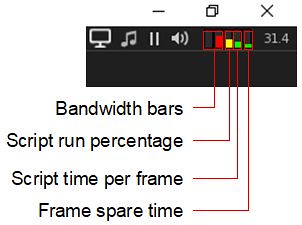
The new script bar graphs

Kokua 6.4.16 introduces three new bar graphs, located in the top right corner of the viewer, alongside the familiar bandwidth graphs. These are:

  • Script run percentage: how much of what scripts want to do per frame is actually achieved. A score of 100% means everything that should have happened did happen, and the bar graph will actually be clear. The more coloured bar is, the lower the script run percentage.
  • Script time per frame: how much of each frame (around 22ms) is used for scripts.
  • Frame spare time: is how much of the frame time was not used. Again, the less you can see of this bar the better things are. A full bar means there is no spare time.

Hovering the mouse over any of the bars will display a pop-up with the current value. Please refer to the Kokua web page on these bar graphs for a complete explanation of each of them.

Personal Lighting Floater Tool Bar Button

Following a Feature Request from Yours Truly, Kokua now includes a tool bar button to directly access the Personal Lighting floater. When enabled, this will hopefully make it easier for photographers to access the floater and make lighting adjustments.

The Personal Lighting tool bar button

Find the button on Toolbar Buttons floater, along with the new Contacts Sets button.

RLV Updates

The RLV and FTRLV versions of Kokua 6.4.16 incorporate RLV 2.9.30.0 and the RLVa @setsphere functionality. Note that white the following are a part of the RLV 2.9.30.0 release, they are not described in the release notes:

  • In the status floater it would try to resolve the UUID for camtextures to a name and fail, showing ‘waiting’. Instead it will simply show the UUID.
  • A new debug option RestrainedLoveSelectionOutlines allows switching between the earlier behaviour of no selection outlines/no change to vision spheres when an object is selected and the later behaviour of showing a selection outline whilst forcing the nearest vision sphere to opaque. The earlier behaviour is the default.
  • The RLV Status floater’s last tab has been updated to show @setsphere information whilst it is in effect

Feedback

An interesting selection of updates for Kokua – and I’m obviously pleased to see the Personal Lighting floater tool bar button.

I’ve admittedly never really used Contact Sets – the capability has always struck me as a exercise in playing people administrator rather than being of practical use, but then I don’t have any particular need for it: the Search option in the People list gives me all that I need. Others might find the addition a lot more useful – and if looking for a move from Firestorm, it could well be an added attraction to give Kokua a try.

Certainly, this release sees Kokua make good use of the pause in official viewer updates whilst allowing them to remain set to quickly adopt LL’s next promotion.

Links

Previewing the VWBPE 2021 conference in Second Life

VWBPE 2021

The 2021 Virtual Worlds Best Practice in Education (VWBPE) conference takes place between Thursday, March 18th and Saturday March 20th, 2019 inclusive. A grass-roots community event focusing on education in immersive virtual environments, VWBPE attracts 2200-3500 educational professionals from around the world each year. Its primary goals are to foster discussion on, and learning about educational opportunities presented through the use of such virtual spaces, a defining core values and best practices in doing so, including:

  • Helping to build community through extension of learning best practices to practical application of those ideas and techniques;
  • Providing networking opportunities for educators and the communities that help support education; and
  • Offering access to current innovations, trends, ideas, case studies, and other best practices for educators and the communities that help support education.

Carrying the theme of Reconnaissance, the conference will, as usual, take place in a group of dedicated regions, and will comprise its usual engaging programme of events and activities.

VWBPE Gateway

Programme

As with previous VWBPE conferences, Reconnaissance includes keynote speakers, workshops, presentations, social events and more.

The best way to find out what is going on over the three days of the conference is through the VWBPE programme page,  However, here are some of the highlights (note: all times SLT, and all events at the VWBPE auditorium  – landing points: Auditorium, Area 52; Auditorium, Norganon; Auditorium SkywallLP – unless otherwise stated):

  • Thursday, March 18th
    • 08:00-09:00 – Kick Off and Ribbon Cutting: the official opening of the conference during which the Conference Executive and Organisation Committees will share a few of the upcoming highlights at the VWBPE 2021 Gateway.
    • 09:00-09:50 – KEYNOTE: About the History of Virtual Reality and the Meaning of VR for Education, Dr. Undine Frömming (angenblick Winkler SL); HMKW Berlin, University of Applied Science for Media, Communication and Management.
    • 15:00-15:50Above the Book: What’s up at the Lab? – Patch Linden, VP of Product Operations.
  • Friday, March 19th
  • Saturday, March 20th
    • 09:00-05:00 – KEYNOTE: Reconnoitering higher education’s next generation – Bryan Alexander (Bryan Zelmanov SL).
    • 15:00-15:50 – Reconnaissance with the Lab – Brett Linden, VP of Marketing; Grumpity Linden, VP of Product. Taking place at Quadrivium.

If you cannot get in-world to attend any of these or the other major talks and presentations at the conference, note that you can watch them via You Tube – check the VWBPE website for the full schedule of You Tube live streams.

VWBPE Lecture A

Conference Facilities

For 2021, the conference uses the same facilities as the 2020 event. These are intended to match the stellar theme, and are largely located in the air over their respective regions. The following is a quick run-down of some of core facilities.

  • The VWBPE Gateway: located on the ground level, the Gateway offers a main landing point for in-coming visitors, complete with a swag bag for arrivals available through several givers.
  • The VWBPE Auditorium: with three access points (Auditorium, Area 52; Auditorium, Norganon; Auditorium Skywall), the auditorium is an asteroid that has a cloud of debris floating before it – just click one of the little rocks and take a seat!
  • The VWBPE Social Spaceport: the spaceport is the main entertainment centre for the conference, and offers rides and freebies and opportunities to relax.

The conference also includes lecture and workshop spaces and locations for presentations, all of which can be accessed via the teleport HUD.

The Teleport HUD

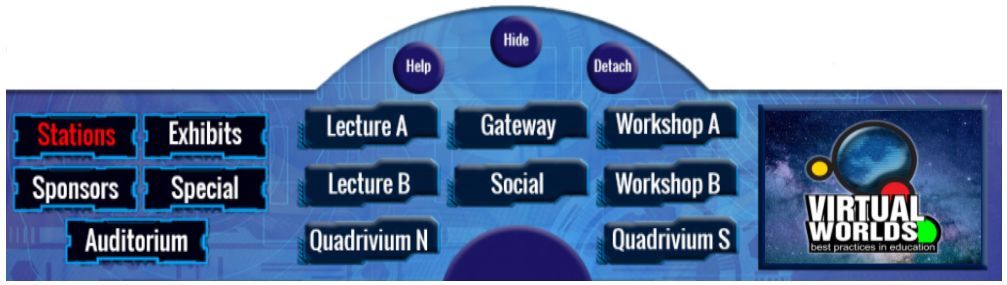
As noted above, the VWBPE teleport HUD is the best way of getting around the facilities. It can be obtained via the swag bag givers at the VWBPE Gateway and is delivered to inventory in a folder. Open the folder and right-click → ADD the HUD. Note that you will need to grant teleport permissions for it to work.

The VWBPE 2020 teleport HUD

By default, the teleport HUD attaches to the bottom of the viewer window. Click the Show button to reveal / hide it. When displayed, it will show the main buttons to the left:

  • Stations: displays buttons for all of the conference facilities except the main auditorium (shown active in the image above). click one of the buttons to be teleported to the named location.
  • Exhibits: displays a directory of exhibits, each numbered, and a corresponding set of numbered buttons. Again, click a button to go to the desired exhibition.
  • Sponsors: displays a directory of sponsors, each numbered, and a corresponding set of numbered buttons. Click a numbered button to visit the listed sponsor’s exhibit.
  • Special: offers a teleport button to the VWBPE Luminaria centre.
  • Auditorium: displays three buttons corresponding to the three landing points for the VWBPE Auditorium.
VWBPE Spaceport social area

To keep up-to date with the conference, be sure to check the VWBPE website daily.

About VWBPE

VWBPE is a global grass-roots community event focusing on education in immersive virtual environments which attracts over 2,000  educational professionals from around the world each year, who participate in 150-200 online presentations including theoretical research, application of best practices, virtual world tours, hands-on workshops, discussion panels, machinima presentations, and poster exhibits.

In the context of the conference, a “virtual world” is an on-line community through which users can interact with one another and use and create ideas irrespective of time and space. As such, typical examples include Second Life, OpenSimulator, Unity, World of Warcraft, Eve Online, and so on, as well as Facebook, LinkedIn, Twitter, Pinterest or any virtual environments characterised by an open social presence and in which the direction of the platform’s evolution is manifest in the community.

Read more here.

VWBPE Auditorium

Additional Links

Commemorating a tsunami through art in Second Life

(now) Ten Years After, March 2021 – Tsukioka Yoshitoshi: One Hundred Aspects of the Moon

Ten years ago, on March 11th 2011, the fourth most powerful earthquake in the world since modern record-keeping began in 1900, took place off the coast of Japan. The epicentre of the magnitude 9.0–9.1 megathrust ‘quake lay some 72 kilometres east of the Oshika Peninsula of Honshu, at a depth of around 32 km below the surface of the ocean. It caused an upthrust of between 6 to 8 metres that gave rise to a massively powerful tsunami.

The wave front of this tsunami struck the northern islands of Japan at speeds of up to 700 km/h and a maximum wave height of 39 metres (Omoe peninsula, Miyako City). It travelled inland up to 10 km, creating widespread devastation and caused the Fukushima Daiichi nuclear accidents. As of 2019, the death toll as a direct result of the tsunami was put at 15,899, most killed as a result of drowning. A further 6,157 were injured and 2,529 remain missing.

(now) Ten Years After, March 2021 – Tsukioka Yoshitoshi: One Hundred Aspects of the Moon

In the aftermath, national and international relief efforts were launched, and people around the world sought to help those affected by the disaster through a wide variety of fund-raising efforts. In Second Life, Curator, who was still relatively new to the platform at the time, put together a special art exhibition with funds going to a number of charities dedicated to recovery efforts.

Entitled One Year After, the exhibition featured the paintings of Tsukioka Yoshitoshi and Katsushika Hokusai, two of Japan’s foremost exponents of the ukiyo-e genre of woodblock printing and painting. Yoshitoshi’s career spanned the end of the Edo period of Japan and the rise of modern Japan following the Meiji Restoration, and he was the last great master of ukiyo-e. In particular, the exhibition featured his major series One Hundred Aspects of the Moon. Hokusai preceded Yoshitoshi (their lives overlapping by just ten years), and he was largely responsible for transforming ukiyo-e as an art form, with his greatest work being 36 Views of Mt. Fuji.

(now) Ten Years After, March 2021 – Tsukioka Yoshitoshi: One Hundred Aspects of the Moon

To mark the 10th anniversary of the Tōhoku earthquake and its tsunami, Curator once again offers one Year After for people to appreciate. Hosted at the gallery space above Bagheera Kristan’s Bohemian Underground store, it also has the alternate title of (now) Ten Years After to mark the tenth anniversary of the tsunami. And if you’ve never encountered either Yoshitoshi’s or Hokusai’s work before, I highly recommend paying a visit.

Ukiyo-e first rose to prominent in the late 1670s and continued to flourish through until the Meiji Restoration saw it enter a sharp decline in the rush towards modernisation. As an art form, it initially focused on portraiture featuring courtesans, geishas and kabuki actors. However, Hokusai, however, broadens the genre to include landscapes, plants, and animals, a broader expressionism Yoshitoshi would embrace.

(now) Ten Years After, March 2021 – Tsukioka Yoshitoshi: One Hundred Aspects of the Moon

There is particular relevance in using Yoshitoshi’s One Hundred Aspects of the Moon to commemorate the tsunami.  While he was fascinated by all that was happening as a result of Japan opening its doors to the rest of the world, Yoshitoshi became concerned with the loss of many aspects of traditional Japanese culture, so much so that towards the end of his life he turned more towards Ukiyo-e, using it as a means to comment on the passing of Japan’s traditional ways in its headlong rush to modernise.

Thus, One Hundred Aspects of the Moon as presented here provides a poignant means of commemorating both the washing away of translational Japanese ways in the tide of change witnessed by Yoshitoshi, and the loss of life caused by the tsunami.

(now) Ten Years After, March 2021 – Katsushika Hokusai: 36 Views of Mt. Fuji

Each image in One Hundred Aspects depicts figures from Japanese and Chinese legend, history, literature, folklore and theatre captured at a moment in time, often in a poetic dialogue with the Moon. The presence of the Moon additionally references the role it played in the pre-industrialised Japanese calendar, when specific events on both a national and personal level being marked by the lunar phases. In this, the choice of this collection for the exhibition adds a further layer of meaning, marking as it does an event and point in time that affected some many lives and a nation as a whole.

Similarly, Hokusai’s 36 Views of Mt. Fuji has a certain poignancy in the context of commemorating the tsunami. It’s a series in which several of the images embody Japan’s long relationship with the seas around it – the most famous being The Great Wave off Kanagawa, depicting a large rogue wave about to overwhelm three boats. They also, as the title of the collection suggests, feature images feature Mount Fiji – the enduring symbol of the nation, the people and the spirit of Japan throughout the ages.

(now) Ten Years After, March 2021 – Katsushika Hokusai: 36 Views of Mt. Fuji

Although some of the pieces are slightly blurred as a result of the reproduction process, these are genuinely engaging copies of an evocative series. Each piece has a a richness of narrative to it and a deep sense of history, and those that you find attractive enough can be purchased for L$100 each.

SLurl Details

ChicLand’s allure in Second Life

ChicLand, March 2021

I’ve recently received several suggestions / invitations for region visits, which I’m trying to work my way through in some semblance of order – thank you to everyone who sends them by IM, note card or via the blog itself.

One of the locations passed to me a couple of weeks back was for ChicLand. It came via Morgana Carter after I wrote about Poison Rouge (see: Sampling some Poison Rouge in Second Life), with a note accompanying it to explain that like that region, ChicLand is both the home of a store – Lilo Denimore’s ChicChica  (I’m using the region’s formal designation in this piece to differentiate it from the store) – and a landscaped public setting open to visitors, so might I be interested in taking a look?

ChicLand, March 2021

A Full region, Chicland is a setting of multiple parts. The store itself is located in the sky, reached via a teleport in the from of a large arrow at the main landing point. As such, it does not intrude into the multi-faceted landscape that flows outwards from the landing point to offer a rich assortment of locations and ideas to explore, appreciate and photograph.

At the foot of the steps leading down from the landing point is a broad French  boulevard, lined by the façades of tall town houses and places of business, vehicles parked at the roadside and under the shade of the richly blossoming trees that march down either side of the road.  Blossom petals drift on the breeze that’s gently funnelled by the height of the houses, the fluttering of the petals attracting the attention of a local cat. Static NPCs provide further depth to the scene, the mother and daughter in front of the ice cream kiosk particularly grabbing attention thanks to the upturns cone on the path nearby its former topping now oozing over the concrete suggesting a slight accident has prompted a return to the kiosk to stem the resultant upset.

ChicLand, March 2021

The road winds on to pass under the single span of an elevated walkway (that it goes nowhere makes no difference, it acts as a unique form of gateway) to arrive at a fresh produce market that offers a view across the region whilst remaining separated from it by the surrounding wrought iron fence; to reach the landscape beyond the fence it is necessary to either jump it or, more easily, re-trace steps and find an alternative route – thus encouraging exploration.

One of these alternate routes reveals the cleverness in parts of the design: one of the façades of town houses is double-sided. On the one side it forms an aspect of the street scene first encountered on leaving the landing point, whilst on the other it offers another row of of house fronts overlooking a marvellous walled garden space (one of two in the region, in fact, the other being alongside the produce market). The use of the façade in this way thus gives the impression the urban aspect of the region is much larger than its actual footprint.

ChicLand, March 2021

The walled garden here offers a lot to take in, including a path through to the rest of the region – although you do have to pick your way through the flowers growing around the borders of the garden space in order to reach the gates. Beyond the garden sits open countryside through which a stream meanders and which is watched over on the far side by a Tuscan style farmhouse sitting atop a low butte of rock and reached by a rough park.

A dusty track winds across this open landscape from the bridge connecting it with the town’s garden. This passes along the side of an orchard that straddles the path up to the farmhouse, and points the way to more places to discover: a little pergola where tea from a samovar might be enjoyed with some sweet desserts, and also a vine-enshrouded garden bar where a more varied selection of refreshments might be had. There’s also a playground and a Romany caravan to be enjoyed along the way, each offering views across the stream to two eye-catching terrariums.

ChicLand, March 2021

From the end of one arm of this dusty track, a grassy trail points the way onwards to the lee of the rocky table on which the farm house is perched. It leads to a cosy vineyard where the freshly decanted produce of vine and fermentation might be sampled in comfort.

Lightly furnished and sitting slightly above a walled courtyard, the farmhouse offers another retreat – although how to reach it from the courtyard may initially have you guessing, given it appears to sit on a sheer-sided block of rock with no visible steps cut into it. But check around to one of the sides, and you’ll find a steep, grassy slope provides the means to scramble up to the house. The courtyard itself is home to a little vegetable garden and cows and geese, both of which make it a little noisy, but for those who do not mind and farmyard noises, further freshly press grape juice and nibbles at a table are awaiting enjoyment.

ChicLand, March 2021

All of this and several more elements I’ve not mentioned in the piece make ChicLand a joy to explore. Each of these elements stands both as a part of and a part from, the whole, offering both a continuous setting and a series of individual vignettes that can uniquely catch the eye and / or camera lens. However, what I found particularly attractive were all the little touches awaiting discovery that give the region a sense of life.

There’s the mother / daughter vignette at the ice cream kiosk I mentioned earlier, complete with dropped cone. It is balanced by a woman holding up a small boy, both of them looking to the same point, inviting the suggestion they are posing for a photograph. There are also little touches of humour awaiting discovery – and I do mean little! – as anyone who spots grandpa gnome, his audience and his clearly less-than-happy wife will doubtless agree!

ChicLand, March 2021

Rich in detail throughout whilst avoiding overly taxing the viewer, ChicLand has much by which to commend itself to the casual visitor and the Second Life explorer alike, with the teleport up to the store offering the chance to mix a little shopping with exploration and photography.

Slurl Details

2021 SUG meeting week #11 summary

David Rumsey Maps – blog post

The following notes were taken from the Tuesday, March 16th, 2021 Simulator User Group (SUG) meeting.

Server Deployments

Please refer to the server deployment thread for the latest news and updates.

  • Tuesday, March 16th: no deployment to the the servers on the SLS Main channel.
  • Wednesday March 17th: all RC channel will receive simulator update 556847, comprising the following fixes / improvements:
    • Optimisations for crossing and teleporting into a region.This should result in less of a performance hit being felt with lots of people entering a region.
We were unwrapping the entire package of avatar data on arrival as soon as we got it. That processing is now being deferred, so the actual arrival may be a bit slower in high volume situations but you won’t get the hit on the main simulation frame that you did.

– Rider Linden on the changes to how avatars enter a region.

SL Viewer

The Custom Key Mappings RC viewer updated to version 6.4.17.556726, dated Monday, March 15th.

The remaining official viewer pipelines are as follows

  • Release viewer: version 6.4.13.555567 (Jelly Doll improvements) originally promoted February 17th.
  • Release channel cohorts (please see my notes on manually installing RC viewer versions if you wish to install any release candidate(s) yourself):
    • Maintenance RC viewer – Eau de Vie, version 6.4.14.556149, dated March 4th.
    • Love Me Render (LMR) 5 project viewer, version 6.4.14.556118, dated February, 23rd.
  • Project viewers:
    • Legacy Profiles viewer, version 6.4.11.550519, dated October 26th.
    • Copy / Paste viewer, version 6.3.5.533365, dated December 9th, 2019.
    • Project Muscadine (Animesh follow-on) project viewer, version 6.4.0.532999, dated November 22nd, 2019.
    • 360 Snapshot project viewer, version 6.2.4.529111, dated July 16th, 2019.

In Brief

  • Map tiles continue to be worked on, but still not fully fixed. However an unspecified “technical hurdle” has been passed in getting the issue corrected.
  • Inventory syncing between Agni (the main grid) and Aditi (the Beta grid) is currently not working following the migration to AWS. The issue is being addressed, but there is currently, but no ETA at present.
  • BUG-226851 “Only 30 – 50% of scripts run on regions since SLS Main server roll of April 18th [2019]” – a long-standing issue for which LL now has some ideas on how to address, but no promise on a possible deployment date.
  • BUG-230415 “Region Lordshore (Jeogeot) cannot be entered via vehicle and will not rez objects (either on ground or on avatar)” – this is an issue that appears similar to a former griefing vector. It appears confined to the one region, and data is being gathered.
  • BUG-229227 “Offline group invites not working” – no update on this long-standing issue, however it has been noted by the Lab that the entire methodology with off-line message handling could benefit from a “revisit”.