CastAR announce US $15 million funding

The CastAR banner
The castAR website banner

CastAR, formerly Technical Illusions, the company behind the augmented reality castAR headset with a VR capability and which I’ve been covering in this blog, has announced the completion of a US $15 million round of funding.

Former Valve employees  Jeri Ellsworth and Rick Johnson founded the company in 2013 after being let go by Valve – and given the blessings of Gabe Newell, Valve’s founder and Managing Director, to take the IP used within castAR with them.

Since then, they’ve been developing the headset with the aim of producing a low-cost, self-contained AR system initially aimed at games and entertainment, but with a wide range of other potential applications – including VR, through the addition of a clip-on that allows for wide field-of-view VR experiences.

The Development Kit / Kickstarter version of the CastAR headset
The Development Kit / Kickstarter version of the castAR headset (image via Engadget)

The early stages of the company’s work was largely funded by a Kickstarter campaign in late 2013 which raised just over US $1 million. This provided sufficient capital to get the company running, albeit on the small scale, and in October 2014, they were able to start shipping the first of the Developer / Kickstarter backer kits whilst also relocating from Seattle, Washington, to Mountain View, California, a move overseen by the newly hired CEO, David Henkel-Wallace.

However, fulfilling the obligations of the Kickstarter campaign has been difficult – so far the company has only been able to produce and ship around 1/3 of the pledged headsets. The Series A round of funding, which has been chiefly backed by Playground Global, co-founded by Andy Rubin of Android Inc. fame, will enable the company to take on staff, complete its Kickstarter obligations and lay the foundations for the future.

The news of the investment round was announced to Kickstarter backers in a personal note from Jeri and Rick, which reaffirms their commitment to their original supporters, reading in part:

What does this mean for Kickstarter? Delivery! We remain committed, as we always have, to giving our Kickstarter backers a high quality product and experience. Of course with only nine people and an ambitious engineering plan, it clearly has taken us longer than we had planned, but among other things, this investment will make sure we complete the Kickstarter in the next several months.

We recognise every day that we would not be where we are at without the support of you, our backers. You believed in us when we put together a video showing a product of 90% hot glue, some friends using it, and some crude software. That support reassured us that we weren’t crazy, and it helped send investors the message that there is significant excitement for castAR.

The conceptualised castAR production headset and VR clip-on system (image: Technical Illusions)
The conceptualised castAR production headset and VR clip-on system (image: CastAR)

The slightly ungainly – at least in its development form – headset uses projectors mounted on it to bounce light of a retro-reflective surface in an effect Ellsworth came across by accident, setting her with the initial idea for the system. The light from the projectors is delivered back to the wearer’s eyes through active-shutter glasses which also track the user’s position, allowing the projection to be updated in real-time.

Projections seen when wearing the headset appear as holographic elements directly in front of the user’s field of vision, which can then be manipulated via a “wand” hand controller.  Because the retro-reflective material bounces light back to its origin, multiple users can use the same surface simultaneously without experiencing any interference from other headset, allowing multiple headsets to be used in the same physical space for game play or other activities.

A key aim of the headset is to be affordable, ease-to-use system which users of all ages can immediate grasp conceptually and use with ease.

“When we say a consumer product, we mean a consumer price point,”  Henkel-Wallce told GamesIndustry.biz when discussing the funding announcement. “The Oculus headset is only a few hundred dollars but then you need a $1000 PC to run your games. That’s not a consumer product, that’s not something you’re giving to your kids.

Making CastAR fun, affordable and self-contained is key to the unit's success
Daivd Henkel-Wallace: Making CastAR fun, affordable and self-contained seen as key to the unit’s success

“Our vision is that Christmas day Grandma has bought these for the kids, they tear open the paper, they open the box, they’re eight and ten years old, they put down the game board and within a minute they’re playing. That’s where we want to get to.”

It was this approach which attracted Playground Global’s interest, with Rubin stating, “I was really intrigued by [their] approach to tackling the problem of how to drive mainstream adoption of AR. They’re the only company I found to be simplifying the utility and application of augmented and virtual reality technology into a fun, accessible, and portable system that will wow kids and adults alike.”

The company’s change in name was also announced alongside of the funding news, and is seen as a natural step for the fledgling company, as Rick Johnson explained when writing to Kickstarter backers:

One observation we’ve made along the way is that people kept calling us “castAR” as a company name. We used the financing as an excuse to change our official company name to castAR.

The Series a funding round comes on top of an undisclosed seed round of funding for the company. Together these demonstrate that castAR is a viable investment concern, opening the door to additional round of investment in the future, if / when needed. As Henkel-Wallace informed Gamesindustry.biz, “This money really marks an inflection point from being just a raw start-up to actually allowing us to become a really fully functioning company.”

Congrats to Jeri, Rick, David and the team.

Sources

Firestorm 4.7.3: are you ready to rock?!

firestorm-logoUpdate:this release has seen further issues for those using Webroot anti-virus (problems include low FPS, high ping rates to the simulator, very slow rendering, etc.). If you have Webroot installed on your system and are experiencing issues, please try manually whitelisting the viewer’s cache folder.

Tuesday, August 18th saw the release of Firestorm 4.7.3.47323. This release comes a little later than had been planned, thanks largely to a series of last-minute blockers caused be assorted external influences (such as win 10 driver issues for Intel).

This is once again a major release, packing a huge amount into it, and which brings Firestorm pretty much to parity with the Lab’s code base. It also sees the return of the Linux 64-bit build to the fold.

Given the sheer number of updates in the release, I do not intend to cover everything here, but rather offer an overview of some of the more major / interesting changes, updates and  fixes to be found in the release.   for full details of all changes, and all due credits to contributors, etc., please refer to the official release notes.

The Usual Before We Begin Notes

For best results when installing this release:

Version Blocking

As this is a full release, expect an announcement on the blocking of version 4.6.1 and 4.6.5 to be made once the dust from this release has settled.

Log-in Screen Updates: Text Mode and Remember User Name

Login Screen > Select Mode >Text

When enabled, this disables the viewer’s 3D rendering, allowing Firestorm to be used as a “text viewer” for low-end systems and launches the viewer with the in-world view blanked out, but all of the menu options and tool bar buttons accessible HUDs (which are not displayed) and other attachments can be manipulated via the Touch option in the Inventory context menu.

The Text Mode option, accessed from the Select mode drop-down on the right of the log-in / splash screen enables you to run Firestorm without 3D graphics on a low-end system - menus and buttons will still be accessible, as will floaters. The Remember user name check box (highlighted above left) is also a new feature, restoring the functionality last seen in Pheonix
The Text Mode option, accessed from the Select mode drop-down on the right of the log-in / splash screen enables you to run Firestorm without 3D graphics on a low-end system – menus and buttons will still be accessible, as will floaters. The Remember user name check box (highlighted above left) is also a new feature, restoring the functionality last seen in Phoenix

The Remember Username check box has been added to Firestorm in response to a series of requests to bring back this functionality from the Phoenix viewer – see FIRE-5735.

Additional Log-in Screen Fixes

  • The issue of Remember Password box checking itself after a failed log-in attempt and refusing to uncheck itself (see FIRE-16535) has been fixed
  • Several focus issues within the login panel have been fixed (see FIRE-6930)

Lab Updates

The 4.7.3.47323 release brings Firestorm up to parity with the Linden 3.8.2 code base (with some additional updates from the current 3.8.3 code base). Chief among the LL updates are the following.

Viewer Build Tools Update

This release means that Firestorm is now built using the updated viewer build tools, notably Visual Studio 2013 for windows and Xcode 6.1 for Mac, with some additional tool improvements, all designed to provide improved performance and stability, as well as easing the viewer build process. Details on the new build tools can be found in my blog post on the subject, however the key points with this change are:

  • The Windows version of this viewer will not install on Windows XP systems, regardless of the Service Packs also installed  (previous versions of the release viewer would install on Windows XP system which had Service Pack 3 installed)
  • The Mac version of the viewer will not install on any version of OS X below 10.7.

Attachment Fixes

Firestorm 4.7.3 includes the Lab’s Project Big Bird fixes for a wide range of viewer attachment loss issues, which tend to noticeably occur after regions crossings (physical or teleport), such as: attachments appearing to be detached in your view, but not to others, and vice-versa; attachments appearing to have detached from you, but showing as attached in Inventory, and so on. These also fix issues such as adding multiple attachments at the same time failing to attach everything selected, and attempting to wear an outfit with too many attachments failing.

Project Layer Limits

This changes how system clothing layers (shirts, pants, under shirts, jackets, etc.), are handled. Prior to this update, an avatar could wear a maximum of 5 items of any single layer – say the jacket – at one time. With this change, an avatar can wear any combination of layers up to a global maximum of 60 – so you can wear 1 pair of pants and 59 jackets if you so wish, or just 60 jackets, etc.

Note that this change does not apply to body layers – skins, shapes, eyes, etc., for which the limit is still one of each, nor is it applicable to attachments, which retain a limit of 38 per avatar.

Experience Keys / Tools

Firestorm 4.7.3 adds the full set of Experience Keys / Tools controls and floaters in the viewer. For those not familiar with Experience Keys / Tools, I offer my own overview from July 2015.

This update means that on entering an area where an Experience is running, Firestorm users will see the full permissions request dialogue, rather than an abbreviated version.

With release 4.7.3, Firestorm users can access the Experience floater and review information on those Experiences they have allowed, blocked, owned, etc., and display individual Experience profiles
With release 4.7.3, Firestorm users can access the Experience floater and review information on those Experiences they have allowed, blocked, owned, etc., and display individual Experience profiles. Land owners can also display information on Experiences running  / blocked on their land through World > Region Details and / or the About Land tab

In addition, Firestorm gains the additional Experiences-related panels and floater options. So users can now access the Experiences floater via Avatar > Experiences, and the Region and About Land floaters have also been updated to include Experiences tabs and information.

Viewer-Managed Marketplace

Firestorm 4.7.3 incorporates the Marketplace Listings folder
Firestorm 4.7.3 incorporates the Marketplace Listings panel (Avatar > Marketplace Listings)

Viewer-Managed Marketplace (VMM) is designed to enable merchants to manage the creation and management of Marketplace product listings through the viewer, bypassing the need to use the Merchant Outbox (and have copies of items stored on the Marketplace inventory servers) or using Magic Boxes (as VMM fully supports the sale on No Copy objects). It was fully deployed in July 2015, and all merchants have had their Marketplace listings migrated to VMM, and should by now have also migrated their Magic Box listings and items to VMM.

Firestorm 3.7.3 now fully supports VMM functionality, providing the Marketplace Listings panel and hiding the Marketplace Listings folder by default.

Those still requiring information on VMM are referred to my blog posts on the subject, which also include links to the Lab’s official information resources.

Dragging Folders into My Outfits

A recent change to viewer functionality meant that it was no longer possible to drag and drop sub-folders of items into the My Outfits  / Outfits folder – see BUG 9209 (FIRE-15603). This changed caused some consternation among those who use My Outfits to order their outfits. As a result of the use-cases supplied to the Lab within the JIRA, this has been reversed in an upcoming release, and has been cherry-picked for inclusion in Firestorm 4.7.3.

Continue reading “Firestorm 4.7.3: are you ready to rock?!”

Lab announces Sansar’s closed alpha officially under-way

Th obligatory Sansar promo image :) (please can we have some new ones?) - Linden Lab
Th obligatory Sansar promo image 🙂 (please can we have some new ones?) – Linden Lab

On Tuesday, August 18th, and running a couple of weeks behind schedule – such is the way with new projects – the Lab has officially announced they’ve invited a small number of content creators to try-out their Next Generation Platform for virtual experiences, currently code-named Project Sansar.

The announcement, which appears a press release on the Lab’s corporate pages, reads in part:

Slated for general availability in 2016, Project Sansar will democratize virtual reality as a creative medium. It will empower people to easily create, share, and monetize their own multi-user, interactive virtual experiences, without requiring engineering resources. The platform will enable professional-level quality and performance with exceptional visual fidelity, 3D audio, and physics simulation. Experiences created with Project Sansar will be optimized for VR headsets like the Oculus Rift, but also accessible via PCs and (at consumer launch) mobile devices. Users can explore and socialize within Project Sansar experiences through advanced expressive avatars, using text and voice chat.

Drawing on more than 12 years of unique experience running Second Life, the largest-ever user-created virtual world, Linden Lab will make it fun and easy for Project Sansar users to create social VR experiences, eliminating the complicated challenges that today limit the medium to professional developers with significant resources. Project Sansar will allow creators at all levels to focus on realizing their creative visions, without having to worry about issues such as hosting and distribution, multi-user access and communication systems, virtual currency and regulatory compliance, and other challenges associated with creating, sharing, and monetizing virtual experiences today.

As has been widely reported, the initial testing will be focused on Autodesk’s Maya® software for content creation and upload to Sansar, although the Lab have also announced that they intend the platform to operate with a wide range of content creation tools such as such as 3D Max, Sketchup, and Blender, with file format support for OBJ and FBX, and others.

Sansar alpha testing is focused exclusively on Maya - however, the Lab intend the platform to support a wide range of 3D content creation tools as work progresses
Sansar alpha testing is focused exclusively on Maya – however, the Lab intend the platform to support a wide range of 3D content creation tools as work progresses

During the alpha, the invited creators will be encouraged to “use each other’s games and other invented environments, trade feedback, and tweak their own work.” They’ll also have to be patient, with Ebbe Altberg having previously warned they may face having content deleted, removed or otherwise altered as the Lab continued to adjust, change, tweak (and bash?) what is still a very new platform that has a good way to go before it reaches something ready to have a lot of people pile on to it and play with it.

That said, if all goes according to plan, the alpha will slowly be opened out over time to include more creators, the Lab’s own announce noting:

In the coming months, Linden Lab will welcome additional creators and content partners to Project Sansar as new features are added to the platform and testing expands.

The emphasis on “content partners” is mine, as I do wonder precisely what it means for the direction Sansar will be taking, particularly given the differentiation given the term from “creators”.  More thoughts on that to come.

In the meantime, The Verge has been quick off the press in following-up on the Lab’s announcement, with a short piece entitled The VR successor to Second Life is inviting its first testers, which is in some ways an unfortunate title, as it does carry a certain implication that Second Life is perhaps no more. This view is perhaps further enhanced by the use of the past tense when referring to the platform, even though there is a nod to the fact that Sansar will run “alongside” SL.

VentureBeat, to name one other following-up on the Lab’s press release, has a similarly brief article in its GamesBeat section, Second Life creator Linden Lab starts testing its virtual-reality world: Project Sansar, which focuses on the core points of the press release.

For those wishing to catch-up on what I believe to be the core statements and information around Sansar, as gathered from cited sources, please refer to my July Sansar Summary.

Also, be sure to take a look at uploadVR’s very excellent conversation between Nick Ochoa and Ebbe Altberg on Sansar, which I reviewed at the start of August, and am embedding here again for reference.


A Bright Canopy set to open over Second Life and OpenSim

BC logoBright Canopy, the new streaming service, which allows users on low-end computers to access both Second Life and OpenSim has announced it will officially launch on Saturday, August 29th at a single monthly subscription price, which for the first 90 days (at least) will be $17.00 a month.

The service, which was established by SL users Bill Glover and his wife, Jeri (known in-world as Chaos Priestman and Beth Robbani respectively in-world),  arose directly as a result of the May 2015 closure of the SL Go streaming service provided by former on-line streaming games supplier, OnLive. What’s more, and on a personal note, I’m pleased to be able to say that this blog had a hand in bringing things about – although my involvement as a beta user hasn’t been as extensive as I’d hoped.

As a result of the cessation of SL Go as a result of OnLive’s decision to sell, I ruminated on the potential of the Lab running a streamed SL service through Amazon AppSstream. This caught Bill’s eye and imagination, prompting him to comment:

Let’s just do it ourselves! You really got me thinking. I’d can launch a service right now if I get enough folks for Beta.

Bill and Jeri Glover: heading the Bright Canopy team, and long-term Second Life users

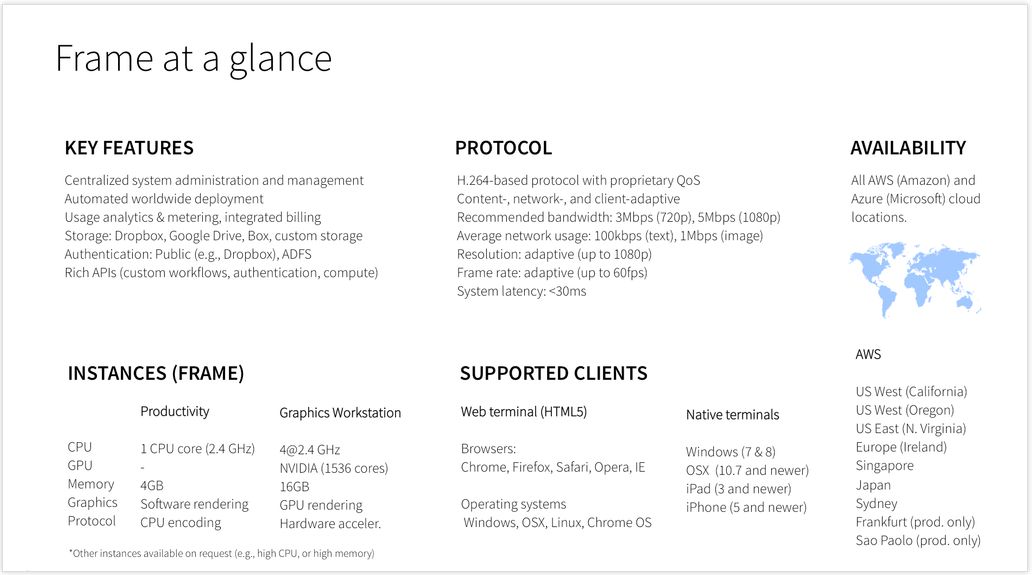
Things further progressed when I wrote about Nebadon Izumi’s work in getting the viewer and OpenSim delivered over AppStream.  My article prompted Nikola Bozinovic, founder and CEO of Frame, a cloud-based service focused on delivering Windows applications to users,  to suggest his service could be used to deliver Second Life through the cloud.

Bill and Nikola quickly got their heads together, and within 24 hours, they had their own proof-of-concept running, delivering the official SL viewer over Frame via Amazon.

Bright Canopy streams SL and OpenSim directly to your web browser, offering those on low-specification computers to enjoy the full graphic richness of both platforms with (allowing for network vagaries) low latency
Bright Canopy streams SL and OpenSim directly to your web browser, offering those on low-specification computers to enjoy the full graphic richness of both platforms with (allowing for network vagaries) low latency – note the data, bottom left (via Bright Canopy)

Not long after that, and with the support of SL and OpenSim users, a small alpha test commenced, which expanded to an invite-only pre-launch beta, which again in turn gradually opened its doors wider and wider as time as progressed and issues dealt with.

Nikola Bozinovic, founder of Frame, who extended an invitation to try the service as a possible means of accessing Second Life (and other grids) from the cloud
Nikola Bozinovic, founder of Frame, who extended an invitation to try his service as a means of accessing Second Life (and other grids) from the cloud – and thus paved the way for Bright Canopy to deliver

While operating as independent companies, the synergy between Frame and Bright Canopy has been impressive, with the former working hard to ensure the latter can provide a scalable, robust service, as Bill has worked to ensure the viewer behaves itself when streamed and can support the services users expect – notably voice.

“Frame is excited to provide infrastructure support to make projects like Bright Canopy scale globally,” Nikola stated during the official launch announcement. “Bill has captured the imagination and the energy of the Second Life community. We’ve been impressed by the cooperative and open approach of the Bright Canopy team.”

One of the core benefits of running with Frame, is the company has an established track record in delivering Windows applications over cloud services (indeed, in June 2015, Frame closed a further US $10 million round of funding, such is the scope of interest in their approach). This means they have the technical expertise to be able to help Bright Canopy scale over time, and to offer the kind of delivery speeds users expect (local network vagaries allowing). The company already has a global presence itself, notably utilising Amazon’s backbone, with points of presence across the United States, Europe, Asia and South America.

Initially, Bright Canopy ran using only Frame’s presence in California. Even so, and for many in the USA and Europe, results were impressive. Later, Dublin was added to the mix, offering greatly reduced latency to beta users in Europe.  With the launch on August 29th, Bright Canopy will additionally leverage Frame’s presence on the US East Coast to again enhance the service.

One of the key aspects of Bright Canopy being partnered with Frame is that the latter already has multiple points-of-presence with Amazon around the world - so Bright Canopy can leverage these as global demands requires. At launch, Bright Canopy runs out of California, serving the USA, and Dublin, serving Europe
One of the key aspects of Bright Canopy being partnered with Frame is that the latter already has multiple points-of-presence with Amazon around the world – so Bright Canopy can leverage these as global demands requires. At launch, Bright Canopy runs out of California, serving the USA, and Dublin, serving Europe

The new monthly pricing plan, which will completely replace the hourly plan used during the beta period, has initially been set at US $17.00 a month for the first 90 days. However, Bright Canopy warn that this may be subject to increase – although they hope very much to avoid this.

The problem here is that Bright Canopy is currently being provisioned via Amazon’s Spot Instances. Normally, these are the most cost-effective way to deliver a service, but they have lately been subject to an insane bidding war, resulting in massive price spikes.

This means that Bright Canopy need to watch the situation very carefully, as Bill explained in the launch announcement:

Our early bird price is going to be an experiment for 90 days. If you’ve been following the blog, you know we’ve seen price fluctuations on the back-end, and we still need to watch actual usage of the service. $17 is a sustainable price if the instance costs return to their typical, historical values. It is not a sustainable price with the current spike in instance price. We may need to get creative with how we split instances, or we may need to raise prices. We intend to remain transparent as always and will keep you posted. Our goal is to continue to maintain a sustainable, affordable service.

If a price increase is required, it will be announced when Bright Canopy have had an opportunity to assess the best way forward, and with sufficient time for users to determine how they’d like to proceed.

Continue reading “A Bright Canopy set to open over Second Life and OpenSim”

A Little Bee that’s a real honey in Second Life

The Foilborne AD25H
The FoilBorne AD25H “Little Bee” by Ape Piaggio

Regulars to this blog will know I’ve been closely following the development of Ape Piaggio’s latest project – the AD25H “Little Bee” – (see here and here). Well, I’m happy to say that the Little Bee is now ready for launch – and what a honey it is! This is a package overfull of surprises, and something every motorboat lover in SL is going to want.

The AD25H is a boat which has from the start been a winner in my eyes. Built on the lines of a classic tender speedboat, it evokes an immediate feeling of summertime on the Italian Riviera, cruising along a sun-drenched coast or speeding by golden beaches, the music of Dean Martin, Tony Bennett, Connie Francis, Morgana King or The Chairman himself – take your pick – playing on the boat’s radio.

My Little Bee moored against my Foilborne Kv23H to compare relative sizes

Marketed under Ape’s FoilBorne Industries brand, the Little Bee builds on the stunning work put into her Kv23H FoilStream (which I reviewed in January 2015), and while a lot smaller, the Little Bee actually packs a lot more into it.  With passengers aboard, it can be a gentle, caring ride with Ape’s Anti-Crash Security System (ACSS) doing much to assist with region crossings. But should you feel a need for speed when out on your own ,this boat can deliver – up to and including converting to a hydrofoil for that extra kick of driving fun.

One of the many things about Ape’s designs I love is the sheer attention to detail. With the Little Bee, this starts with the packaging, which is delightful in its presentation, and a promise of goodies to come.

Like a kid at Christmas: kneeling behind my newly-arrived AD25H, admiring the packaging
Like a kid at Christmas: kneeling behind my newly arrived AD25H, admiring the packaging

On unpacking, the box delivers a number of items to inventory: the boat, a HUD for the boat, a trailer and “TugBee” – a little VW Beetle  specifically designed for towing the Little Bee on its trailer. A paint system brings up the rear, while the boat itself hides a stand it is automatically mounted upon if rezzed away from Linden water.

This is a friendly boat. Get in as the driver, and it will welcome you aboard in both text and via an audio message (unless turned off).

The controls are the usual,  UP / DOWN or W & S for the throttle, LEFT / RIGHT or A & D for turning, with PAGE DOWN and PAGE UP operating the hydrofoils (only at low speeds / when stopped). Touching the boat as owner accesses the full menu, passengers the seating menu.  I’m not going to run through all the options – suffice it so say, everything you need is there to operate the boat, and owners of the Kv23H will see the Little Bee has matches it in options – and offers more besides.  The expected options such as multiple camera options, auto-mooring, engine / race options, and so on, are all here together with the AD25H’s wakeboard and parasail deployment options and a few surprises.

The boat includes a HUD for those who prefer not to see hover text floating over their vehicles, with essential controls for deploying / retarding the foils, rezzing the wakeboard / parasail, etc.

Talking of the parasail and wakboard, both of the latter can be rezzed from the boat’s Accessories menu. Note that you will have to be on water that allows object entry, and should leave a degree of space behind the boat (don’t rez them when moored with a pier right behind you, for example). Once rezzed, riders simply sit on the wakeboard / parasail (and will receive a wearable handle for the former), and away you go. You  can even rez multiple wakeboards and also have the parasail rezzed and used with the wakeboard(s).

Those riding either the wakeboard or the parasail have a degree of control on their motions. The former can be turned left or right via the usual A/S / arrow key options, with stunts accessed via the PAGE DOWN and the UP / DOWN keys. The parasail’s rider can adjust their height with the UP / DOWN keys. When driving the boat with the wakeboard / parasail in use, I’d recommend keeping your speed down to no more than about 50% of throttle to avoid region crossing complications.

When deploying the foils and  / or using the wakeboard / parasail, you’ll get to see two additional features on the Little Bee: the Event Cam and the CineCApe system. These allow for some dramatic shots of the boat in action, with CineCApe notably allowing the wakeboard and parasail riders to adjust their camera position using PAGE UP to gain some impressive views of their ride. I’ve used clips from both in the accompanying video.

Wakeboarding on the AD25H
Wakeboarding on the AD25H “Little Bee” – you can rez multiple boards for friends – and even take someone parasailing at the same time!

The car and trailer offer a sophisticated system for taking the Little Bee overland. The “TugBee” VW Beetle is nicely designed and comes with a range of features: opening doors, working lights and brake lights. The usual WASD / arrow keys are used for driving, and the Page keys for stepping up / down through the gears.

Hitching the trailer to the car is a matter of rezzing both, preferably in the same orientation and close to one another, then clicking the car for its menu and selecting Attach. To get the boat on the trailer, carefully reverse the car down a suitable slip or gentle bank so the trailer is about up to its axle in the water. Drive the boat up close to the trailer, click on it and select Trailer from the menu. The trailer’s hand brake should unwind and the boat haul itself out of the water and safely onto the trailer. Raise the hand brake by touching the trailer and you’re ready to drive away.

Continue reading “A Little Bee that’s a real honey in Second Life”

High Fidelity: into the solar system and STEM grant recipients

HF-logoI’m rather into space and astronomy – that much should be obvious from my Space Sunday reports, and coverage of mission like the Curiosity rover, astronomical events like the transit of Venus and so on.

So when High Fidelity posted news on the 2015 summer intern project, and the words “solar system” featured in it, my attention was grabbed. The post opens:

Hello! I’m Bridget, and I’ve been interning at High Fidelity this summer, working to build some JavaScript content in HF. As a math and computer science major, I had the opportunity to hone my programming skill set, learning from Hifi’s superb team of software engineers and design-minded innovators.

So here’s the culmination of my work this summer: a virtual orbital physics simulation that provides an immersive, interactive look at our solar system.

Bridget's solar system model correctly simulates the movement of planetary bodies around a stellar object , utilsing both Newton's and Kepler's laws, thus producing a dynamic teaching model for orbital mechanics and gravity
Bridget’s solar system model correctly simulates the movement of planetary bodies around a stellar object , utilising both Newton’s and Kepler’s laws, thus producing a dynamic teaching model for orbital mechanics and gravity – with a potential application for teaching aspect of physical cosmology

The goal of Bridget’s project is to demonstrate what can be built using JavaScript (and some C++), with a particular emphasis on building educational content in High Fidelity, and by using the solar system, she has come up with a highly innovative approach to teaching orbital mechanics – and more besides.

Essentially, she has created a model of the solar system which uses “real” gravitational physics to simulate the motion of the planets around the Sun. The planets themselves occupy orbits scaled relative to Earth, and fixed reference values are used for the orbital period, large and small body masses, and gravity. Then, a little Newtonian physics is thrown into the mix, together with a sprinkling of Kepler’s Laws of planetary motion. Thus, the scripting ensures that the planets maintain a stable orbit, while updates correct mimic each planet’s orbital trajectory around the Sun.

This generates a model that is interesting enough in itself, if somewhat simplified in nature, as Bridget notes, whilst also pointing to its potential for further use:

While the simulation exploits a somewhat simplified model, namely neglecting the elliptical nature of the planets’ orbits, it can easily be modified to account for additional factors such as the n-body problem.

In other words, there is the potential here to both refine the model in terms of orbital mechanics and planetary motion as a part of the teaching / learning process, and perhaps even dip a toe into physical cosmology.

the simulation
the simulation includes a UI which allows users to perform a number of tasks, including playing a little game and being able to zoom into the planets.

Bridget also notes:

Another fun aspect of the project was implementing UI to create possibilities for exploration and experimentation within the simulation. A panel with icons lets you:

  • Pause the simulation and show labels above each planet revealing its name and current speed
  • Zoom in on each planet
  • Play a “Satellite Game” (think Lunar Lander, but with a satellite around the earth), where you attempt to fling a satellite into stable orbit
  • Adjust gravity and/or the “reference” period, and see what happens!

Bridget’s work marks the second time a summer intern has reported on working at High Fidelity during the summer hiatus. In 2014, Chris Collins chatted to the (then) 17-year-old Paloma Palmer, a high School student also honing her coding skills. She focused on coding voxels to respond directly to volume inputs over a microphone in real-time. You can see her discussion with Chris on the HiFi YouTube channel.

Staying with education, and following on from my coverage of High Fidelity’s STEM VR challenge, Ryan Kampf announced the first of the grant recipients on Friday, August 14th.

The VR challenge invited educators, be they individuals or groups, to take up the STEM VR Challenge, to submit proposals for educational content in High Fidelity which meets the criteria set-out in the Challenge website, namely that the content is:

  • HMD (e.g. Oculus Rift) featured
  • High school age appropriate
  • STEM focused
  • Social (can be experienced by >3 people together).

On offer were up to three grants of US $5,000 each for recipients to further develop their ideas.

In his  announcement Ryan indicated that two recipients for grants had been selected from submissions: the TCaRs VR Challenge and Planet Drop VR.

Both use game mechanics, with TCaRs (Teaching Coding – a Racing simulation) enabling users get to interact with and customise their racing cars using JavaScript, while Planet Drop places players into an alien planet environment which they must explore through “cooperative asymmetrical gaming”. Each has highly specialised information, based on their chosen STEM field and provided to them via a game HUD, and the aim is for them to work together, sharing the information they receive as quickly and effectively as possible to allow the team to solve challenges and advance through a story arc of increasingly impressive accomplishments.

Conceptual illustration of the "Mech Pods" the players in Planet Drop will use to explore their alien environment
Conceptual illustration of the “Mech Pods” the players in Planet Drop will use to explore their alien environment

Congratulations to Bridget on her summer intern project (the script is available for those wishing to use it), and to the STEM VR challenge recipients.