Fantasy Faire: The Lost Lands – hints and guidelines

The Lost Lands is more than a hunt – it is an unfolding story, and you are one of the principal characters! To help you play your role to the fullest, here are some hints and suggestions to start you on your way.

The HUD and Getting Started

There are two versions of the HUD available, one priced at L$250 and one at L$350. Both operate exactly the same way inside the hunt; the L$350 version will also give you a costume to let you be more “in-character” as you seek to come to the assistance of Princess Flora. And it’s yours to keep as a memory of the Faire and the hunt; so why not treat yourself to the full package – remember 100% of all payments go to RFL of SL. It will also help you recognise other Hunters – and you can help each other!

When you have purchased your HUD package wear it, and then touch it to unpack the contents to a folder in your Inventory called FF2015 The LostLand Hunt. When it has done so, you can detach the HUD package and then wear your hunt HUD (and your costume, if you purchased the special edition of the HUD).

Wearing your HUD will deliver instructions on how to use it, please read them, as they will answer many of your questions.

The special edition hunt HUD includes a costume for you to wear, designed by June Dion of Bare Rose. When you purchase the HUD package, wear it (shown in my hand) and touch it to unpack it to your inventory
The special edition hunt HUD includes a costume for you to wear, designed by June Dion of Bare Rose. When you purchase the HUD package, wear it (shown hovering over my hand) and touch it to unpack it to your inventory

Game Play Guidelines

Part 1: Find the Orbs

  • Your first task in the HUD is to seek out the Bard Queen in Fairelands Junction and receive her instructions. If you prefer, a landmark in the HUD folder of your inventory will teleport you directly to her presence
  • Part of the Bard Queen’s story will be told through videos displayed in your viewer via a screen provided by your HUD. If the videos do not start automatically, click the screen. If they refuse to run, use the links in chat to watch them on YouTube (please do not share or embed links to the videos in blogs!)
Courtesy of Saffia Widdershins / Fantasy Faire blog
  • Sometimes you will need to click on someone after watching a video as well, so that they can give you an additional clue (such as how to find the Book of the Champions)
  • Champions are to be found across the Fairelands (although not in any shops). The Bard Queen will direct you to the Book of Champions, which will in turn help you locate each of the Champions.  Some might be close to a sim’s landing point, others you may have to seek out
  • Touch a Champion to interact with them, and it will display a dialogue box – be sure to check all of the options displayed, as there might be some special surprises!
  • Make sure you give them a ring via the dialogue box in order to gain a clue to find their orbs
  • Each orb is located in the same sim as its Champion (but again, not in any shops). When you have found the orb, return to the Champion and give it to them to receive a prize
  • You can visit the Champions and seek their Orbs in any order you like, as long as you find and return all 10 orbs to them
  • When you have found and returned all ten orbs, return to the Bard Queen to commence the second part of the hunt.
The HUD with the orb collector open - touching HINT in the centre will give you the last hint on an orb's location that you received
The HUD with the orb collector open – touching HINT in the centre will give you the last hint on an orb’s location that you received

Part 2: Help the Princess

  • This takes place in Ravenshold and will engage you in puzzle-solving
  • Clues to all the puzzles will be spoken in text or can be found in Ravenshold – so look around you carefully and pay attention to everything that is said!
  • Some of the puzzles are HUD-based, and sometimes the HUD can go wrong. If this happens, reset the HUD using Options > Reset HUD – this will not reset your hunt progress.

Other Things to Note

You can stop playing the hunt at any time and remove the HUD – your progress is automatically saved for you, so you do not have to do the entire hunt in one go.

If you don’t pick up a gift from a champion, or at the end of Part 2, you can return to receive the prize at any time.

When you complete the hunt, you can use Options > Reset Hunt and have another go, if you like.

Further Information and Related Links

Bright Canopy: first in-world Q&A, Saturday April 25th

Bright CanopyBright Canopy, the company working towards offering a new streaming access service for Second Life and OpenSim has announced its first in-world meeting and Q&A session.

The event will take place on Saturday, April 25th, starting at 11:00 SLT, and will take place in Thorncliff, Second Life. The meeting announcement reads in part:

Please join us for our first in-world Q&A at our shiny new, Bright Canopy Meeting Hall.

How This Works: To make sure everyone gets a turn to ask their question, please take a seat when you arrive. When we get everyone settled, we will begin taking question. If you have a question, please stand and I will call on you. Please ask questions in text chat so that we can keep a transcript.

Please be aware that we will be keeping a log of the chat and will be posting it to the website. We respect your privacy, but want to share the discussion with people who can’t make it

Seating may well be limited, depending on the numbers attending, and will be allocated on a first come, first serve basis. All things being equal, I’ll be attending myself and will be producing a full transcript of the meeting, which will appear both in the Bright Canopy blog and here.

Home again

The Skye Forest Cabin located at home

In February, I wrote about the most recent changes on the home front – raising house and garden to the top of a rocky, water-bound plateau. Since then, I’ve been allowing one or two little niggles nag at me, leaving me feeling things still weren’t entirely right.

Part of this is because of my slightly insane desire to keep multiple boats and ‘planes rezzed at all times (insane, as I’ve got sufficient space to pull things out of inventory whenever I want to use them, so I don’t actually need them rezzed all the time but hey-ho); and while the re-worked moorings for them gave me the space I wanted, things were still a tad ugly. Another niggle has been with the two large expanses of billiard table smooth grass on the island, which just haven’t sat right with me.

So it was that I set about fiddling with things,  starting with the moorings, which got completely re-arranged, and then raising a part of the island  so I could extend the garden and remove some of the expanse of flat grass. The new moorings are along a single pier, with a new helipad at the far end. It still looks a bit like a marina at that end of the island, but it’s a tidier marina 🙂 .

The revised mooring and the new helipad
The revised moorings and the new helipad

As I’d extended the amount of space available for my clifftop garden, I set out to get some new plants.. and managed to come home with … a new house…  *cough*.

The house in question Alex Bader’s Skye Luxury Forest Cabin, an eye-catching mesh design, the main structure of which weighs-in at a remarkable 18 LI, and the entire place, furnishings and fittings included tops-out at just 55 LI. And I have to say, it is simply gorgeous.

With very modern lines, a wood exterior finish and a pastel interior that suggests the latest in eco-friendly insulation, the cabin is ideal for rural settings, and with a total footprint of 23.5 metres by 21.5 metres, it doesn’t gobble up a huge amount of land. For that you get two good-sized furnished rooms (lounge and bedroom) complete with interior and exterior lighting, and an excellent feeling of space.

The Skye Luxury Cabin offers  excellent living space
The Skye Luxury Cabin offers excellent living space

The fixtures and fittings in the house are all removable, offering plenty of scope for those wishing to use their own furniture; however the range of animations on the chairs and bed are impressive, making them more than suitable for everyday use. There are some nice touches as well, such as the provided wall paintings and picture frames, all of which will take your own images and snapshots.

Obviously, the cabin has replaced the stone house I put up in February, and I have to admit, it is more in keeping with the theme of the island. I’ve modded it slightly, removing some exterior features (including the terrace rails and steps, which also meant losing some outdoor poses), and added a few others (the textures are supplied, which makes adding elements easy. As the bed and chairs have animations, I’ve kept those, but added a few items of decor from the “old” house. The overall style encouraged me to re-work the part of the island the “old” house stood upon, making better use of mesh to give a more natural feel (although I’ve retained a “lawn” to one side of the house so I’ve somewhere to put the sun loungers 🙂 ) .

The lounge provides plenty of space, although I swapped the dining table and chairs for my Trompe Loeil sofa and a side table from Sara Lok. Stitch, my cat, seems to approve of the new house!

These rearrangements have led to an overall fall in LI – 885 to 880 (at the moment, still looking to add more plants!) which, considering I’ve actually increased the number of plants on the land already and added another boat (32 LI) and a pond, really says a lot for the economy of Alex Bader’s mesh builds.

Overall, for an unexpected find / purchase, the Skye Luxury Forest Cabin is, in my opinion, superb if you’re looking for compact living space, and makes a great addition to his range. You can find it on the Marketplace and in-world as well.

Another view of the Skye Luxury Forest Cabin, which now forms my latest home in SL

Austin Tate opted to pick-up a copy of the Cabin and covers the snowy scene add-on for those into winter scenes. He also offers some super pictures of the Cabin in-situ – check his notes here.

Fantasy Faire: as the gates open, are you ready for amazing sights, role-play and more?

Enter the Dragon - one of many to be found at Fantasy Faire - at YoZakura, designed by Nya Alchemi
Enter the Dragon – one of many to be found at Fantasy Faire – at YoZakura, designed by Nya Alchemi

Bloggers across the grid had their first opportunity to witness the regions of this year’s Fantasy Faire. And the verdict is already in:

Amazing.

No fewer than thirteen regions await the arrival of visitors to the Faire, which runs from Thursday, April 23rd through until Sunday, May 3rd inclusive, all in aid for Relay for Life. And even before the gates have officially opened, this year’s Faire has already raised L$1,559,776 ($6,239) as of 12:00 noon on April 21st.

Ichi-go Ichi-e designed by Sharni Azalee & Marcus Inkpen

This year, the Faire brings a host of new activities and opportunities for everyone to get involved in the biggest fantasy event fund-raiser in virtual worlds today, together with the return of popular activities from previous years.

Role-play will once again be a feature of Fantasy Faire in 2015, with three unfolding role-play stories taking place within the Fairelands.

The Rickety Wesels will be trying to save Poppetsborough, designed by Luna Barak, Alrunia Ahn, Kyra - will you lend a hand?
The Rickety Wesels will be trying to save Poppetsborough, designed by Luna Barak, Alrunia Ahn, Kyra Reiter – will you lend a hand?

The Rickety Weasels have once more returned to the Faire, and this year have set-up house in the  station at Poppetsborough, the wonderful town of paper created from the pages of a book when a mouse accidentally sneezed upon it. Not only that, but the town appeared with its own inhabitants, the kind-hearted and magical Poppets, complete with a magic train capable of carrying passengers to any story, despite only travelling in a circle.

But Poppetsborough and the Poppets are frail, being made only of paper, and now tears and holes are appearing in the pages of Poppetsborough, which are corrupting the stories with wickedness and drawing others into nothingness. Can it be stopped? Can Poppetsborough be restored – the Rickety Weasels are determined to try to mend the Tears of Poppetsborough – will you aid them?

The Spires of Andolys, designed by Jaimy Hancroft, hosts The Origins of Sanctuary: Lut's Story
The Spires of Andolys, designed by Jaimy Hancroft and Eowyn Swords, hosts The Origins of Sanctuary: Lut’s Story

Meanwhile in the Spires of Andolys, the dark role play of The Origins of Sanctuary: Lut’s Story will unfold. Long ago Lut, the Sultan of Sanctuary, made a deal that tore the realm from God’s judgement. This deal Lut has never had to answer for until now. The dark Sultan will be placed before judgement for this deal he made. Will he be found innocent and justified, or guilty and be destroyed because of it?

Finally, and having started on April 15th on the NeoVictoria region,The NeoVictoria Project bring their latest role-play event to the Fairelands  and the winter City of Aurora. In The White Wedding, a despairing fae scientist, cursed to bring winter wherever he goes, the Sidhe empire for Aurora. But fate and love are not so easily abandoned.  The shade of his human wife seeks the help of the NeoVictorians and they bring her to the Fairelands, to find her spouse and end the curse.

The winter city of Aurora, designed by Asil Ares, will play host to
The winter city of Aurora, designed by Beq Janus, will play host to “The White Wedding” NeoVictoria role-play

Continue reading “Fantasy Faire: as the gates open, are you ready for amazing sights, role-play and more?”

SL project updates week 17/1: server, viewer, Avatar Complexity

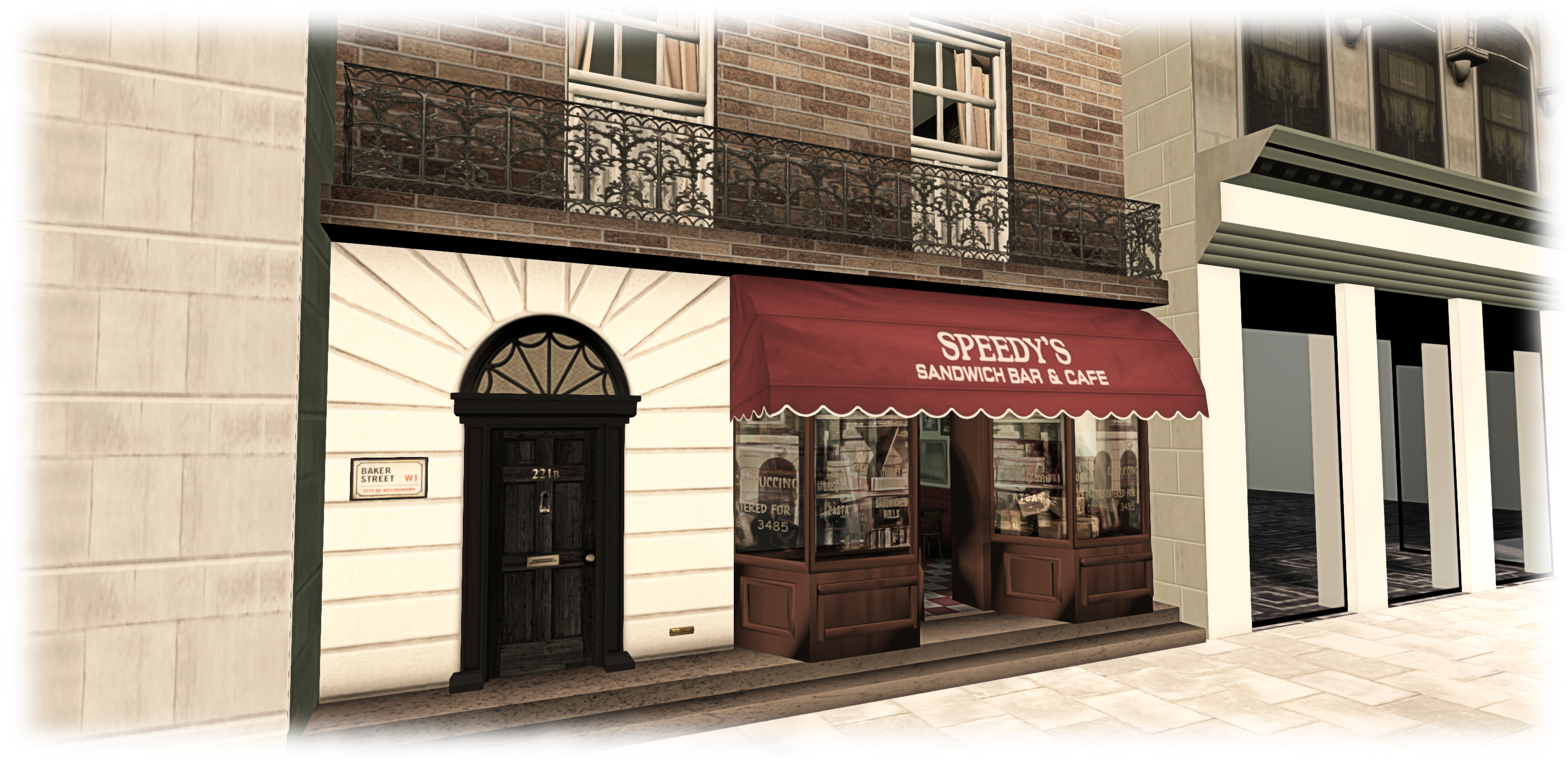
221B Baker Street; Inara Pey, April 2015, on Flickr 221B Baker Street, circa 2012-2015, as seen in the BBC’s series Sherlock – and in Second Lifeblog post

Server Deployments, Week 17

As always, please refer to the server deployment thread for the latest updates.

  • On Tuesday, April 20th, the Main (SLS) channel received the server maintenance package deployed to all three RC channel in week #16, which comprises internal server logging changes and new flags for llGetObjectDetails()
    • OBJECT_BODY_SHAPE_TYPE – returned list entry is a float between 0.0 and 1.0. Anything > 0.5 is male, otherwise female; -1.0 if the avatar is not found
    • OBJECT_HOVER_HEIGHT – returned list entry is a float, -1.0 if the avatar is not found.
  • There will be no deployment or restart on the three RC channels on Wednesday, April 22nd.

This means there will be no Main channel roll in week #18, but there should be a new RC update, although this is still being worked on.

SL Viewer

The Avatar Layer Limits RC viewer updated to version 3.7.28.301019 on April 20th. This viewer allows users to wear up to 60 wearable layers (jackets, shirts, tattoo, alpha, etc.) in any combination and any number per layer up to the overall maximum of 60, rather than each individual layer being limited to a maximum of 5 items.

The Tools Update RC viewer has been performing very well since the last update (April 15th), and there has been something of a debate in the Lab as to whether or not to promote it to the de facto release viewer. While there is no hard-and-fast rule about when an RC is promoted to release status, very often the Lab prefers to leave two weeks between releases unless something is urgently required. Sticking to this would mean the viewer won’t be promoted until week #18 (week commencing Monday, 27th April); however we’re still early in the week, and things might change.

Viewer Managed Marketplace Beta

The Viewer-Managed Marketplace (VMM) officially started an open beta test on the main grid, which is scheduled to last for about a month for details see:

Avatar Complexity

Avatar Complexity is the term the Lab has settled upon for the upcoming functionality which provides greater control to user to define how other avatars are rendered in their world-view.

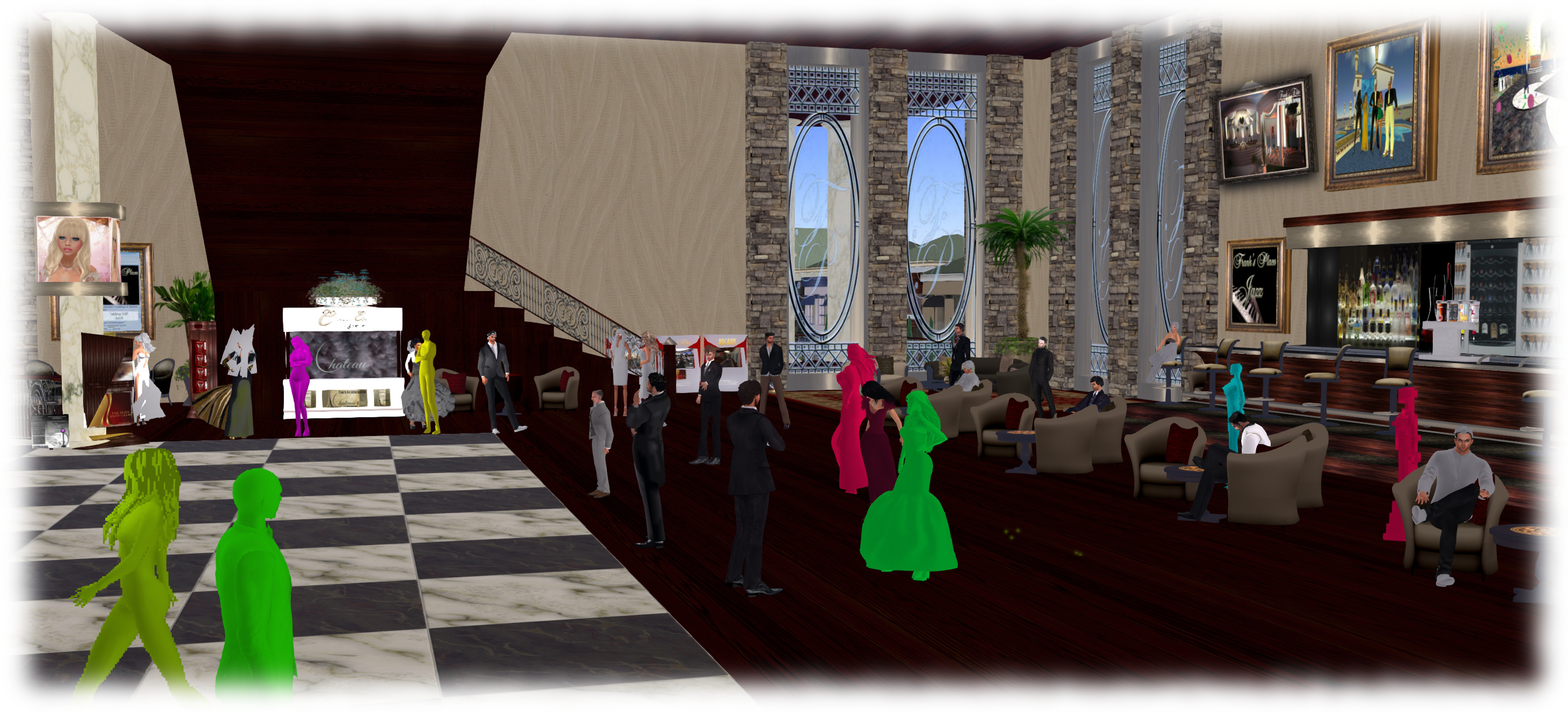
The idea is that as avatars can often be the single biggest impact on the viewer in terms of rendering, particularly in crowded places, so  Avatar Complexity will present a means by which avatars which require a load of render processing by your GPU can be rendered as a solid colour instead, which should help with performance on lower specification systems. Due to their solid colours, avatars rendered in this way have already been dubbed Jelly Babies or Rainbow People.

At the Open-source Developer’s meeting on Monday, April 20th, Oz Linden explained that “Avatar Complexity” has been chosen for the name of the capability to distinguish it from avatar imposter rendering, which will remain in the viewer alongside Avatar Complexity when it arrives. The difference between the two can be summarised as:

  • Avatar impostor rendering is a simplified and less frequent rendering of avatars further away from you, while those close to you remain fully rendered
  • Avatar Complexity renders any avatar exceeding the value set within your viewer as a single, solid colour, regardless of the avatar’s distance from you.
Avatar complexity is intended to help those who may hit performance issues as a result of their GPU struggling to render complex (hight render cost) avatars, by rendering such avatars as solid colours.

Oz further indicated that Avatar Complexity will be managed via the Advanced panel in Preferences > Graphics, and will initially be enabled / disabled in the official viewer based on your GPU’s benchmark (the value use to determine the viewer’s default graphics settings when first installed). Some TPVs may opt to leave the capability disabled by default (once the code is available for inclusion in TPVs), and allow users determine whether they wish to use it or not.

Currently, work at the Lab is focusing on a couple of aspects of the functionality:

  • Toning down the colours used by the viewer when rendering avatars in this way – as the functionality can currently be tested via two debug settings within the viewer, there have already been strong criticisms of that “Jelly Baby” rendering on account of the brightness of the colours
  • Server support is being added to pass on the counts of avatars that are and are not rendering to those using Avatar Complexity.

It is also probable that before the capability appears in a project viewer, it will also be set to  display notifications when you change your own complexity, and when the number of avatars not rendering you changes.

If you wish to experiment with the settings are they are at the moment, go to Advanced > Debug Settings and type-in RenderAutoMute. Select RENDERAUTOMUTEFUNCTIONS and set it to 7, then experiment with values under RENDERAUTOMUTERENDERWEIGHTLIMIT (start with 100,000, and increase or decrease it to alter the number of avatars around you rendered as solid colours (lower values = more avatars rendered as colours).

Rock’n’Roll

Roll'n'Roll, Molly Bloom - Holtwaye ArtSpace
Roll’n’Roll, Molly Bloom – Holtwaye ArtSpace

Now open at Holtwaye ArtSpace is a exhibition of recent work with a distinctly musical theme by Molly Bloom, entitled Rock’n’Roll.

Molly’s art is beautifully intriguing because with it, she often plays with our perception of depth: figures and elements of her images are unconstrained by the picture frame in which they sit, but  frequently extend beyond it. Individuals often appear as if they’re about to completely step out of the picture or are at least leaning out of the frame, while props and accessories often extend beyond the picture, or sit on the floor in front of it.

Roll'n'Roll, Molly Bloom - Holtwaye ArtSpace
Roll’n’Roll, Molly Bloom – Holtwaye ArtSpace

This approach gives Molly’s images a fresh and involving appearance which draws the observer into them, to almost become a part of the story each picture is telling. This is something which itself is given further dimension by some of the pieces forming duet and triptych-style groupings, with two or three pieces coming together to present a narrative flow.

An artist primarily known for her work in glass in the physical world, Molly regards herself as something of a “purist” in Second Life, by which she means her pieces are almost entirely created in-world. “Part of the challenge of making good art,” she says of her work, “is the joy of building and problem solving.” What minimal post-processing is used is restricted to correcting minor defects in images; any attempt as image enhancement and refinement through more extensive use of tools such as Photoshop are strictly avoided.

Roll'n'Roll, Molly Bloom - Holtwaye ArtSpace
Roll’n’Roll, Molly Bloom – Holtwaye ArtSpace

While the title of the exhibition might give the impression that the focus is purely on rock’n’roll, this is not the case. While various forms of rock are featured, including glam rock and blues rock (love the cover of the cover of Blind Faith’s album), so too are other genres portrayed, including classical and a good, old-fashioned hoe-down; even the mythical is beautifully touched upon in a stunning image of a demoness playing a lute, which also has faint echoes of a play on Pan and his pipes about it.

All told, another excellent selection of art from an artist who always piques my imagination with her work. If you’re like me, and enjoy Molly’s art, then this is not one to miss. If you’ve not encountered Molly’s work before, then thing exhibition is an opportunity to get introduced to it; you might also want to check Molly’s new gallery space afterwards as well.

Related Links