SL projects updates week 14/1: server, viewer updates

SL Server Deployments

As always, please refer to the server deployment thread in the forums for the latest news and updates.

Main (SLS) Channel

On Tuesday April 1st, the Main channel received the server maintenance package deployed to the Magnum RC in week 13. This package comprises:

  • Crash mode fix.
  • Fixed a rare case in which certain users were unable to log in (BUG-5130)
  • Fix for a case in which multiple scripts in the same prim calling llTakeControls() with heterogeneous ‘accept’ and ‘pass_on’ parameters would not receive a control() event correctly in some cases (BUG-5281)
  • Updated LSL syntax file to use a new schema (fixes STORM-2000) related to a viewer in testing and apart of STORM-1831.

As the roll-out progressed, there were reports on the forum thread that some regions are having a double restart. After investigating the issue, Caleb Linden reported: “I got the word from engineering that the double rolls were manually triggered by accident but they shouldn’t compromise the sims’ performances once up. This only affected a small group of regions.”

Release Candidate Channels

On Wednesday April 2nd, all three RCs should receive the same maintenance update, which incorporates the bug fixes deployed to the Main channel and which also sees AIS v3 support returned on the Magnum RC, after it was disabled / removed in the week 13 deployment. There seems to be yet more confusion over that actual status of AIS v3 server-side. and whether this means it will actually be enabled on all three RCs, or just re-deployed.

SL Viewer Updates

The SL Voice RC returned to the release channel on Monday March 21st, with the arrival of version 3.7.5.288516. This viewer pulls in Vivox 4.6.x libraries instead of 4.5 for improved voice stability and to address Mavericks issues (download and release notes).

the Sunshine / AIS v3 Rc should return to the channel later in the week if all goes according to plan.

SL Share 2 Project Viewer

As I’ve reported here, on Tuesday april 1st, Linden Lab released the SL Share 2 project viewer, version 3.7.5.288424. This includes:

  • An option to connect to Twitter and upload tweets  / snapshots from in-world to your Twitter account
  • An option to connect to Flickr and upload snapshots
  • An updated Facebook floater with revised snapshot upload tab incorporating the features found in the Flickr and Twitter snapshot uploads, and a new Friends tab.

An interesting element in this viewer is the use of filter effects which can be applied to snapshots, and which allow users to add their own filter options.

Group Chat and Group Bans

There’s little to report here, other than:

  • At the Simulator User Group meeting on Tuesday April 1st, Simon Linden said of the most recent group chat test, ” We had a good group chat test last week that gave me a few more things to fix. They weren’t new issues, but showed some more ways the current system can fail. So it was a good test.” It’s not clear whether this means the testing will now move to Agni and a selected group with a large number of users, or whether there will be further Aditi testing first.
  • With group bans, and as reported last time on the subject, Baker Linden is busy repairing the code that want broken / lost during a merge process and trying to make sure everything is back together and working properly,
 

Lab issues SL Share 2 project viewer: Flickr and Twitter

Update April 3rd: As per this LL blog post, the Facebook photo upload has been re-enabled by Facebook.

Update April 2nd: The lab have now officially announced this project viewer – see my blog post here. I’ve also included the filters wiki page link below, now it is publicly accessible

On Tuesday April 1st, Linden Lab introduced the SL Share 2 project viewer, version 3.7.5.288424, which incorporates support for both Flickr and Twitter.

These options are designed to work alongside the existing SL Share to Facebook feature, and provide the means to link your SL account with your Twitter and / or Flickr accounts and then send tweets (and photos) or upload photos.

The new options have their own dedicated toolbar buttons (Flickr and Twitter) and can also be accessed through the Communicate menu.

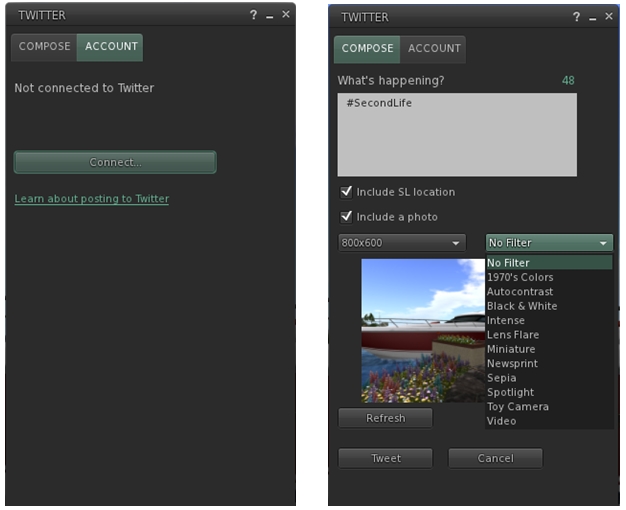
The SL Share 2 Twitter Floater tabs
The SL Share 2 Twitter Floater tabs. note the filter drop-down list displayed in the Photo tab

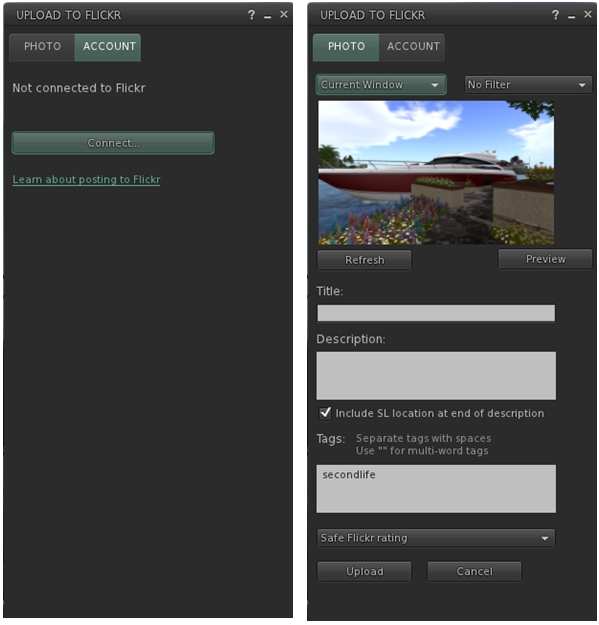
The two floaters are similar, in that they include a tab for connecting to your Flickr or Twitter accounts, and a tab for uploading messages / snapshots.

The account connection options will open floaters allowing you to log-in to Flickr or Twitter and authorise the linking of your SL account to them. Once linked, the Twitter floater allows you to send Tweets either with or without snapshots attached. Both of the floaters allow you to include your current in-world location as a part of a Tweet / with a snapshot.

The Share 2 Flickr floater tabs

Insofar as snapshots are concerned, both capabilities provide the following options:

  • A refresh button
  • An image size drop-down
  • A filter options drop-down (users and developers can design their own filtering scripts if they so wish using the filter documentation in the wiki
  • A preview button for checking how shots will look prior to upload.

Additionally, the Flickr floater includes the ability to provide snaps with a title, description, and Flickr tags.

facebook-photo
The updated SL Share to Facebook floater, with the location option removed, and the filter options added

Finally, the SL Share to Facebook floater has also been updated with this viewer:

  • The photo floater includes the same filter options, etc., as the Twitter and Flickr options, although there is no longer an option to include a SLurl, as per Facebook’s requirements (see right)
  • There is a new Friends tab, which I assume lists all your Facebook friends when you SL account is linked to your Facebook account. I have no idea if any additional functionality is available in the tab, as I don’t use Facebook and so cannot check.

At the time of writing, it is unclear whether or not the Facebook photo upload block has been lifted by Facebook or not. As I reported in my week 13 SL projects updates, LL believe they have updated both the viewer and the back-end intermediate process linking to Facebook in order to comply with Facebook’s requirements. However, any official lifting of the block by Facebook as yet to be confirmed by the Lab.

Currently, the new SL Share 2 features are only available in the project viewer, and will not be available in the release viewer until they progress to a release status.

In the meantime, details on the new project viewer can be obtained from the release notes page, which includes download links to the Windows, Mac and Linux versions (as does the viewer’s entry in the Alternate Viewers wiki page).

Related links


Linden Lab announces anaglyph 3D compatibility!

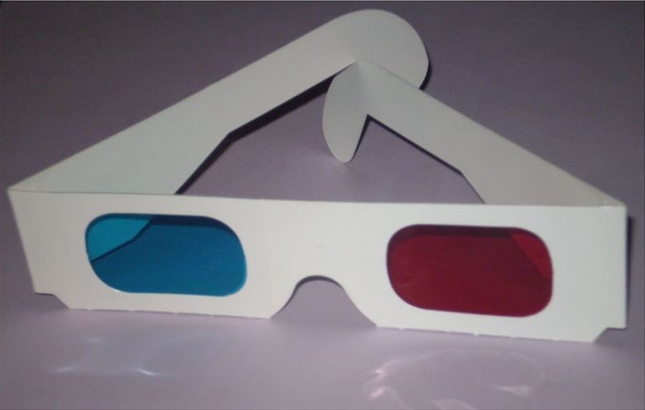
So… can’t wait for Oculus Rift? Fed-up with no 3D capability on the Linden Viewer with nVidia 3D glasses?

Well, fear not! On April 1st, the Lab announced FULL SUPPORT for anaglyph glasses! This great news was announced in a blog post which reads in part:

As we’ve previously blogged, we recently integrated the Oculus Rift with the Second Life Viewer; users with the development headset can try out the beta now and experience Second Life in a uniquely immersive way. Today, we’re happy to announce another exciting new way to experience Second Life: anaglyph 3D mode.

We think this will appeal to literally dozens of Second Life users nostalgic for the kind of 3D experiences provided by comic books, cereal boxes, and B-movies.

Hungry for nostalgia? Linden Lab's new project viewer brings you just that!
Hungry for nostalgia? Linden Lab’s new project viewer brings you just that!

The post goes on:

A key immersion feature of the Oculus Rift is the ability to look around the world by moving your head. This works with the anaglyph 3D mode as well. Simply attach the monitor to your head and coordinate your camera controls with your head movements.

Those wishing to take advantage of this latest innovation from the Lab, a company which demonstrates it can look backwards as well as forwards, can grab the project viewer today – but be quick, this is a one-day opportunity only!

Son of a gun, we’ll have big fun in The Bayou

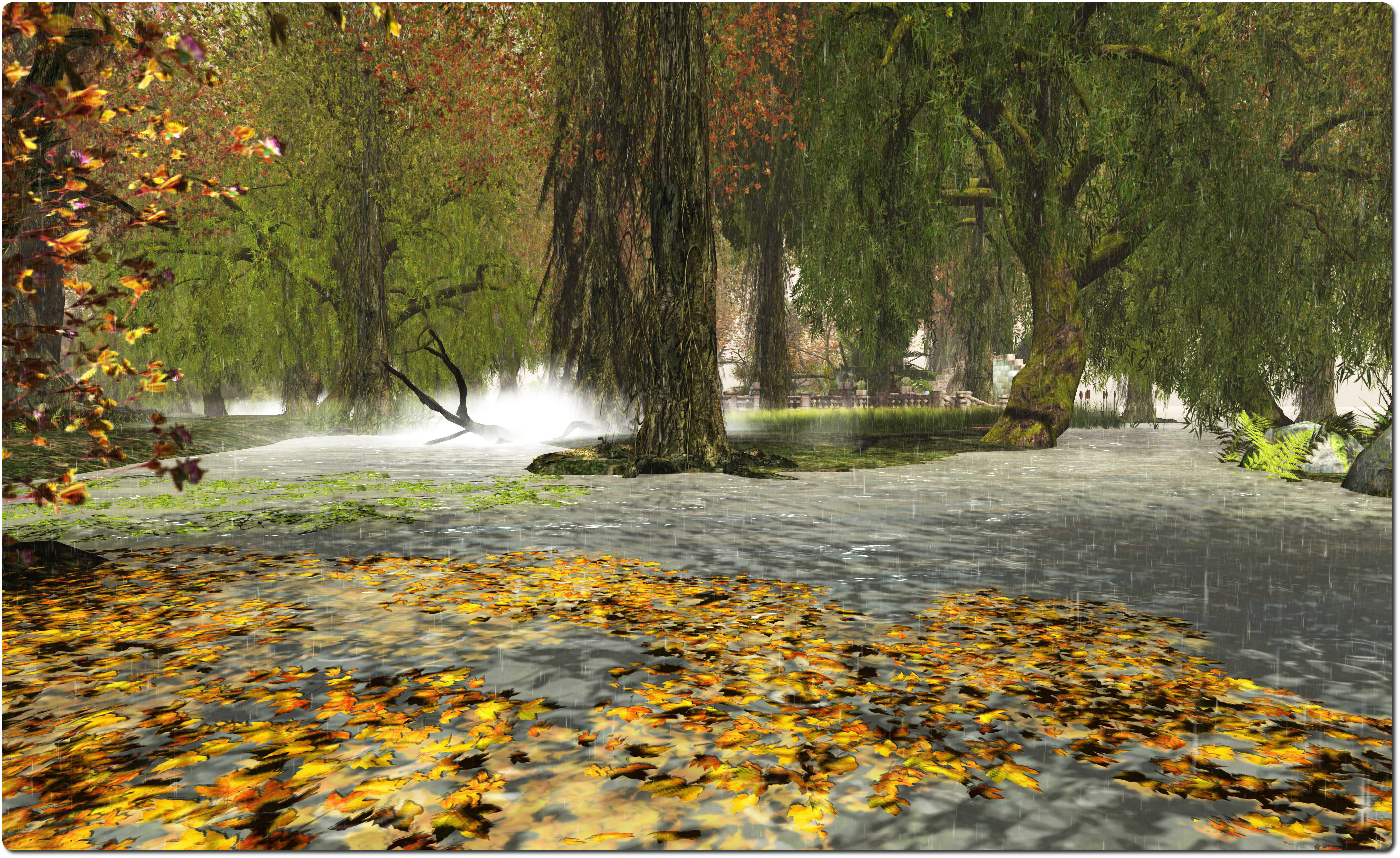
The Bayou, April 2014The Bayou, April 2014

The Bayou first opened its doors – albeit it briefly – in September 2013. Designed by BuTToNs (pecandeluxe), it was a beautiful recreation of a bayou environment. At the time, it didn’t remain open long, although I did get to take a quick peek.

The doors re-opened to public access around the end of February, retaining all of its original beauty (with some small additions). As I’ve made several quick hops back since then, I thought it about time I actually blogged about it.

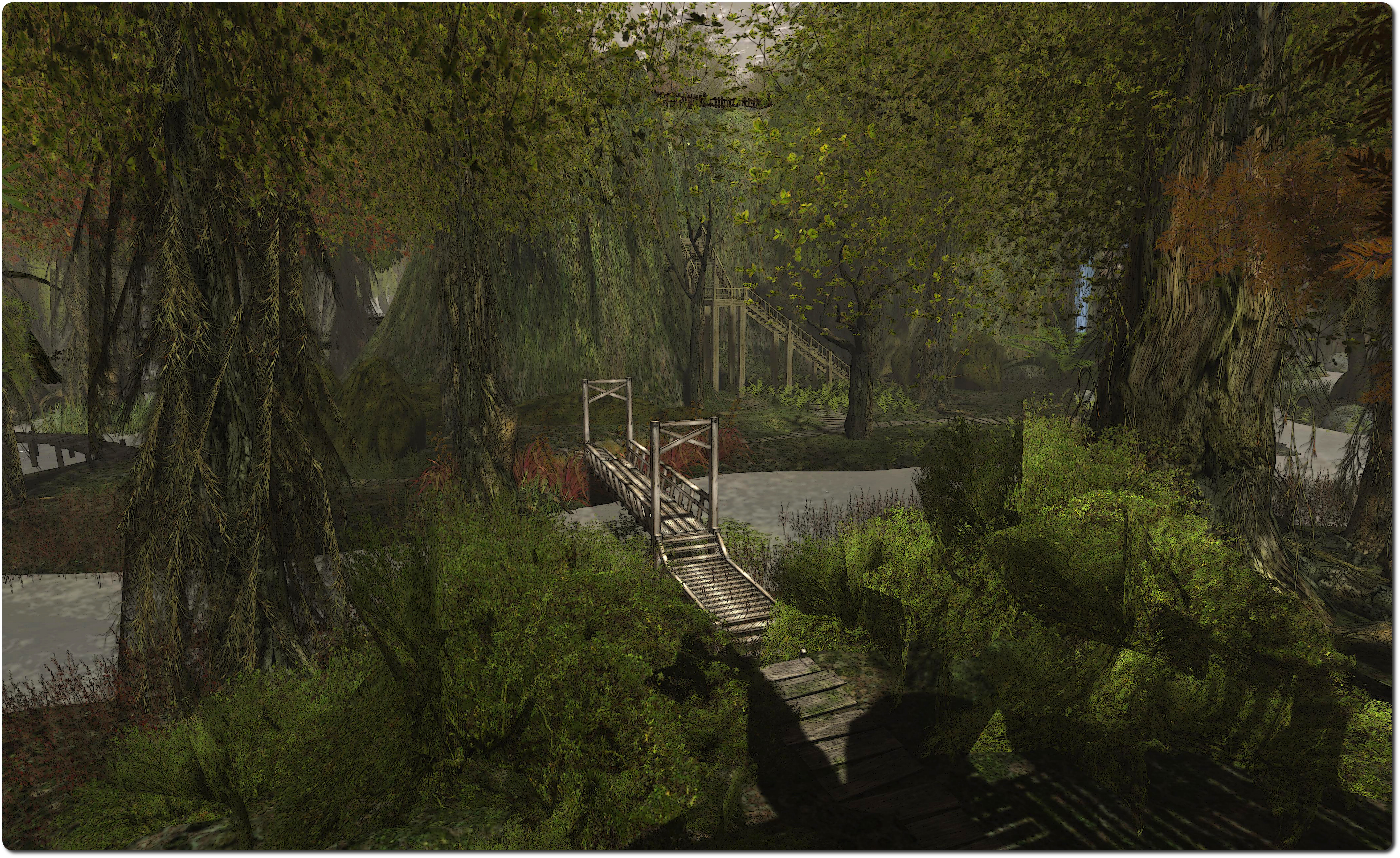
The Bayou, April 2014The Bayou, April 2014

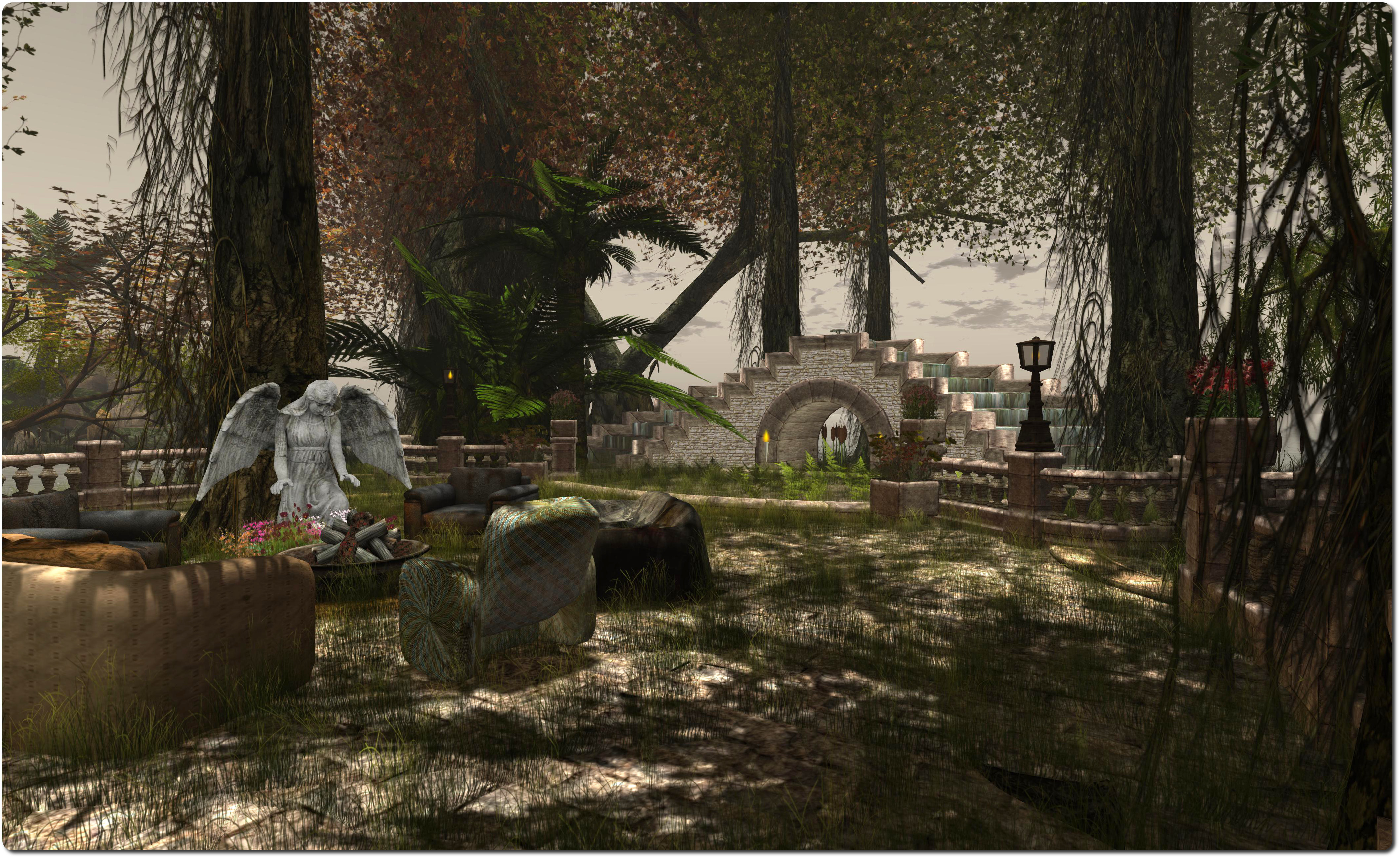
Those who love really natural-looking environments in SL should love The Bayou. The signs of habitation are minimal: there’s a ramshackle cabin and a tree platform, plus a seating area to one side of the region. but beyond these and a couple of other scattered indications, the majority of the region is given over to trees, undergrowth, dark, flowing water and wooden walkways over what might otherwise be waterlogged ground.

The wooden board walks lead the visitor around the region, little wooden bridges providing the means to cross the water – and avoid the alligators. You might want to take a brolly with you, as it is raining heavily in one place. Along the way you’ll pass a fair number of InTan dance systems – so those of a romantic inclination will find a welcome in The Bayou (and don’t forget the couples’ pose systems near the landing point, which allow you to explore hand-in-hand).

The Bayou, April 2014The Bayou, April 2014

Wander inland, and you’ll eventually find your way to a couple of wooden stairways leading upwards. One will take you up into the hills on the far side of the region to the arrival point, where a path winds up to the start of the waterfalls. The other provides access to a grassy plateau where couples can again enjoy a dance.

There are some open areas down at ground level as well, but one of the things that makes The Bayou so attractive is that in places you can look around yourself and see nothing but trees and meandering water; with the ambient sounds, it really gives a feeling of being in the bayou.

The Bayou, April 2014The Bayou, April 2014

Several of the trees found in the region are the work of Serenah Raynier, who has a store and rezzing platform in the sky overhead. These can be reached via the teleport near the region’s landing point. The store offers the trees and other items for sale, while the rezzing platform offers the ability to view  / purchase prefab packs up to a full region in size.

Now, given this is a post about The Bayou, there is really only one way to sign-off, and that’s with a song.

Related Links


It’s the first of the month…

Note: To all those who have been poking me about the big secret in the Firestorm video. Yes I am aware – admittedly after-the-fact, as I didn’t check the link at the time, so egg-on-face to me! However, Jessica informed me what was really going on not long after I’d blogged, but asked me to keep mum, as the hope had been that people would discover it for themselves (hence why I’m still not mentioning it here, although the cat is out of the bag elsewhere). There is yet more to come on this; again I’ve been asked to hold-off blogging on it to allow the fun to be had!

Yes, it’s April 1st, and time for the tradition of April Fools jokes. Last year, Firestorm hit the nail on the head with their Firestorm Mobile hoax, which was beautifully conceived and executed. In some ways, it was perhaps too successful, given the upset that came from some who didn’t pick-up on the hints throughout.

This year, they’re back with another video, introducing the Firestorm DUI.

It’s a cute video, but I can’t help thinking that it would have worked a lot more effectively as an April Fools joke had it been approached with the same gravitas as marked last year, and  leaving the reveal until the end rather than announcing the intention in the title and the opening few seconds of the video. Nevertheless, the video should raise a smile or two, and I also have to say…

Jessica, really! Such language! 😉  .

Catzip are also into the April Fools theme this year as well. More low-key than Firestorm, they’ve issued an April 1st Press Release concerning the revolutionary Catzcoin:

The long-awaited next version of the Catznip Viewer™ for Second Life™, Catznip R9 will ship with its own built-in peer-to-peer crypto-currency, CATZCOIN™.

CATZNIP R9 users will be able to mine CATZCOIN while logged in without impacting viewer performance. The longer they use Second Life with Catznip the more CATZCOIN they will generate. CATZCOINS will be tradeable for L$, US$, Dogecoin, BitCoin and directly for virtual goods in Second Life via the CATZAPI™.

Catzcoin: not available real soon!

A Revolutionary Digital Currency for your Digital Second Life.

Earning and spending CATZCOIN in Second Life will reinvigorate in world commerce, helping customers to be more active and involved. Hot spots allow store owners to boost traffic by offering CATZCOIN mining surges while preventing campers thanks to our patent pending CATZNAP™ anti AFK wizardry. CATZCOIN means real anonymous people earning and spending in world.

 CATZNAP™ anti AFK wizardry ensures the most active SL users mine the most!

  • FREE Achievements and CATZCOIN hats in Second Life for major milestones!
  • CATZEYES™ for easy CATZCOIN block inspection!
  • Firestorm integration with our CATZCLAWS™ P2P protocols.
  • CATZCOIN surges for members of the CATZPURR™ mentor and live help programs!
  • The really awesome CATZCOIN logo. So awesome you want it on a mug.
  • No chance of being bought out by Facebook. Ever.

The “mug” link (there’s a hint there as well, in the use of “mug”, methinks!) will take people to a Cafe Press page (which is genuine) where anyone who enjoyed the joke or who wants to support Catznip and purchase merchandise. Proceeds from any sales will go towards offsetting costs involved with paying for the project’s VPS server.

Virtual Ability: “Quality of Life” – the 2014 Mental Health symposium

Mental Health SymposiumOn Saturday April 26th 2014, Virtual Ability will be holding their 2014 Mental Heath Symposium, and both Gentle Heron and  Sister Abeyante from Virtual Ability have asked if I’d help spread the word – which I’m delighted to do!

The symposium is an all-day event, commencing at 07;00 SLT on the 26th April and running through until 17:00 SLT.

The theme for this year’s event is Quality of Life, and it will take place at the Sojourner Auditorium on Virtual Ability Island. I’ll be joining them in passing-on news on speakers and presentations as the schedule is finalised.

The Mental Health symposium is one of two major events Virtual Ability host in-world each year, the other is the annual International Disability Rights Affirmation Conference (IDRAC), which is held later in the year.

The Sojourner Auditorium, Virtual Ability Island

Those wishing to learn more about either the Mental Health symposia or IDRAC can view the archives of past events as follows:

Virtual Ability Island - the hub of Virtual Ability's work in Second Life
Virtual Ability Island – the hub of Virtual Ability’s work in Second Life

About Virtual Ability

Virtual Ability, Inc. is a non-profit corporation, chartered in the state of Colorado, USA.  We are a non-profit tax exempt organization under section 501(c)(3) of the United States Internal Revenue Code. This means that for US citizens, contributions made are deductible as a charitable donation for federal income tax purposes.

For further information on the board of directors, please visit the Virtual Ability About Us page.

Related links