If you missed the live premiere of the Designing Worlds special I blogged about as being shown on Monday May 13th at 14:00, you can now play catch-up here.
The show is also available on the Treet TV Designing Worlds channel.
Inara Pey: Living in a Modemworld
Second Life, virtual worlds and virtual realities
If you missed the live premiere of the Designing Worlds special I blogged about as being shown on Monday May 13th at 14:00, you can now play catch-up here.
The show is also available on the Treet TV Designing Worlds channel.
Earlier, I blogged about a number of Chrome browser extensions users have developed for use with Second Life, and which Daniel Voyager had spotted. As a result of that article, Lance Corrimal pointed-out he had a number of SL-related search helpers for Firefox, which he suggested he could make available on his Dolphin Viewer website.
Well, he did – so true to my word, here’s a look at them.
The helpers are designed to allow a user to use the Firefox search option to use for terms and items using the various Second Life search engines. In all, Lance provides five helpers:
All of the options can be used without you having to be logged-in to Second Life (or the JIRA or the Marketplace or wiki).
You’ll need to download and install the helpers:

One the helpers have been installed, they will be available directly from the Firefox search option. Simply click on the search engine selector in the search field to display a drop-down list of your installed search engines / options, and select the required SL helper.
When a helper has been selected, its name will base displayed in the search bar, and you can type-in your search term as you would for any other search engine.
The JIRA Search
Second Life Search
Typing in any term using this Helper will cause the normal SL search engine to run and will return results using the search engine’s default page display.

Marketplace Searches
The two Marketplace searches work in much the same way as the SL Search option, except they invoke the Marketplace search engine. Using the general Marketplace search allows you to display a Marketplace page displaying all products which match the search string, while the Merchant search will display one or more Merchants matching the search string, allowing you to click on the required name and view the store.
Wiki Search
The wiki search helper will search the English language version of the SL wiki, returning a list of topics which may match the given search text.
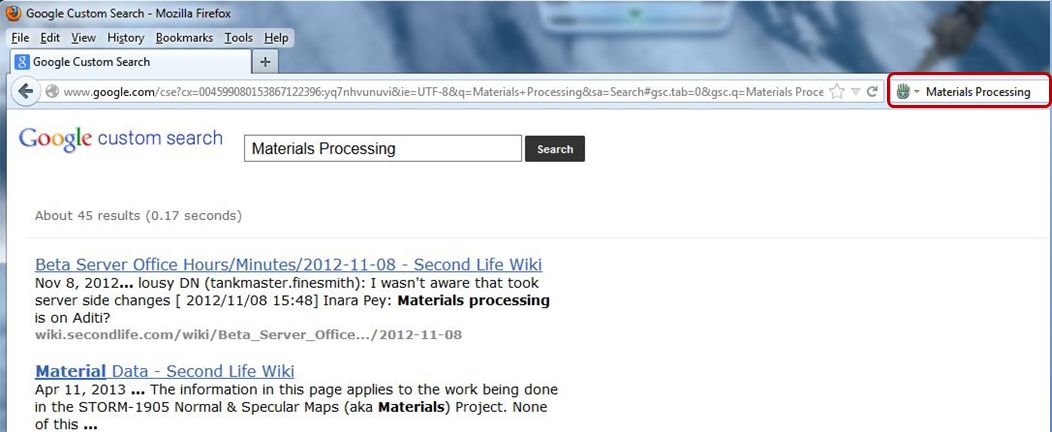
Installation is simple, the helpers all do exactly what they same in their names, and work – as mentioned above – regardless of whether you are logged-in to the SL website or not. As such, for any Firefox user who spends time searching SL, they form a most useful suite off add-ons to Firefox (the 2012 changes to the SL public JIRA notwithstanding). Kudos to Lance for developing them and for making them available for general use!
With thanks to Lance Corrimal.
Update: Lance Corrimal has produced a set of search helpers for Firefox, which I’ve reviewed as well.
Daniel Voyager brings word that the Chrome browser offers a number of user-made extensions for Second Life. In particular, he points to three which appear to have value. As a sometimes-Chrome user (I tend to switch between it and Firefox on Windows, depending on what each new release brings), I decided to take a bit of a closer look at them. All three were located by searching for “Second Life” in the Chrome extensions web store.
This is described as an extension which, “Shows a list of friends online when logged into the SL website” and that “Users can check if their friends are online from any web page, instead of having to go through the tricky Second Life dashboard.”
The extension adds a Second Life icon to the browser, and I assume clicking on it is intended to display a list of friends online when you are logged-in to the SL website (although not necessarily with the web dashboard page open). However, the last update for the extension is 2010, and I was unable to get it to work.
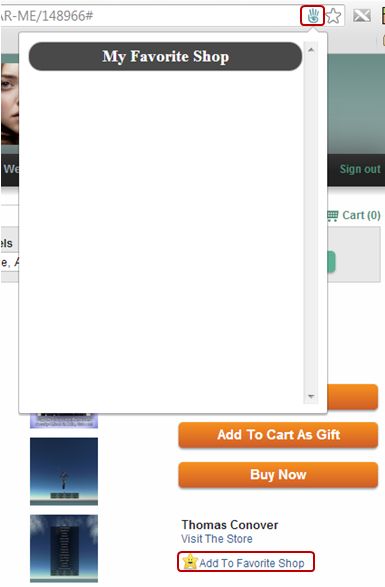
Apparently last updated in January 2013, this extension is supposed to make browsing your SL Marketplace favourites easier. Installing it does two things:
I gather the idea is to click on the “Add to Favourite Shop” to add an item to a “Favourite Shop” list which can be opened using the icon in the address bar. However, I was (again) unable to get anything to work, although it did not, as the one review of the extension suggested, “make the Marketplace unavailable”.
This is the one extension I did get to work. It adds a Second Life icon to the Chrome tool bar which, when you are logged-in to the SL website (regardless of whether you have your SL web dashboard page open in the browser or not) will display the number of your friends currently on-line. Additionally, as friends log-in to SL, a pop-up will briefly appear in the bottom right corner of your screen announcing the fact they have.
Clicking on the icon itself will display a list of all your friends currently on-line, and if any have given you permission to map them, hovering the mouse over the globe which appears alongside their name will display a hovertip of their location.
When clicked, the icon also displays a note of your current L$ balance and a list fo your Groups. The extension is also configurable in terms of what is displayed via the Options link in your browser Extensions page.

I assume the reason why Second Life Friends isn’t working is because it has not been updated in a good while and may no longer be displayed. Quite why the Marketplace Helper doesn’t appear to work, I’ve no idea. Chrome Life appears handy if you need to keep tabs on specific friends and want to see when they go in-world without having to keep the SL web dashboard open in a browser tab. I’m not sure I’d want to use the extension all the time myself (I actually removed it after playing with it through my Crash Test Alt), but for the SL-addicted it could prove useful :).
Obviously, these are third-party extensions, so the usual warnings about them not in any way being associated with Linden Lab or Second Life and using at your own risk, etc., apply.
With thanks to Daniel Voyager
 On Monday May 13th at 14:00 SLT, Designing Worlds will be premiering a special show in their current series which explores some of the new Second Life shiny which is coming out of Linden Lab at the moment.
The show, recorded earlier in the month, features Brooke, Oz, Troy and Nyx Linden as they discuss the upcoming deployments of Server Side Baking/Appearance and Materials Processing in SL.

As regular readers here will know, Nyx Linden has very much been the public face / lead of Server-side Baking, and he’s joined in the show by Troy Linden to explain what is going on with the project, and why people need to understand the importance of ensuring they are running a viewer which supports SSB/A.
Following this, Oz and Brooke Linden will be explaining about Materials Processing and the use of normal and specular maps in Second Life. They’ll also be demonstrating some of the capabilities of Materials Processing, using samples of various items on display at Hippotopolis. Just remember that if you want to go and see them for yourself, you’ll need to download, install and run the Materials Processing project viewer until such time as the necessary code is made more widely available in the main SL viewer and TPVs.

All of the Lindens attending the show took time to answer questions put to them by the Designing Worlds team on behalf of users.
Saffia Widdershins, who co-hosts the show with Elrik Merlin, said to me in discussing the premiere, “We were really pleased to have been able to do this show and discuss the issues with people from the Lab. Changes like this can worry a lot of users, and it was good to have the issues and benefits clearly explained.”
If you would like to watch the show, you can do so in one of two ways:
If you missed either of these, catch up with the broadcast via my blog, or via the Designing World’s channel on Treet TV.
This summary is published every Monday and is a list of SL viewer / client releases (official and TPV) made during the previous week. When reading it, please note:
Update: We can continue to Smile, as Kaelyn Alecto reports, “Thanks to many insanely amazing donations I have been able to keep my sim open! Come on by and pay a visit and have fun exploring :)” – so please go along and visit!

As I’ve mentioned in these pages a number of times, I tend to use the Photogenic Spots section of the Destination Guide as a reference when looking for places to visit in SL. One of the places listed there is It All Starts with a Smile, located on Onyx Isle, the Homestead region of Kaelyn Alecto and her SL partner, Maxxster. While I’d frequently made a mental note to visit the region in the past, I’d never quite managed it.
Then I heard by way of Mona Eberhardt and Ziki’s blog that the region may be vanishing around May 15th 2013. This is not because the tier is too high per se, but apparently because the region’s tier is partially underwritten by one of the third-party exchanges (TPEs) hit by the Lab’s recent changes to the SL Terms of Service and the decision to write to all such exchanges and request they cease trading / providing Linden Dollars.

If this is indeed the case, then it is a shame, because the region is beautifully put together with a keen eye for composition and photography – Maxxster is a photographer himself, and there is a Flickr group devoted to the region.
From the seaside town frontage of the arrival point, complete with carousel and Ferris wheel, you can walk down to a sun-kissed beach, sit on a fading wooden dock or follow a path around the island (or simply climb over the hills behind the shops!) to reach beautiful and restful meadows. There are beauty spots scattered across the island where you can sit and admire the view or snap away with the camera to your heart’s content. Romantics are also catered for, with places to dance, places to sit and cuddle and corners to snuggle in and hide from the world – there is even a cute little caravan with a blanket and pillows spread on the roof, hitched to a sporty little Mini!

In short, this is a place designed to bring a smile to your face – and keep it there; which makes its potential removal from Second Life all that more poignant. I don’t – as I hope the destination reviews in this blog demonstrate – run with the “sim deathwatch” crowd; while SL undoubtedly has its problems, there are still many fabulous places left to visit. Even so, when it comes to one which is as beautifully presented as It All Starts With a Smile, then its possible passing is to be lamented.
I only wish I’d visited sooner.

P.S. there is a donations piggy bank at the landing point, and as the saying goes, “Every little helps,” so if you do pop in to have a look around, a few L$ dropped into it would likely be appreciated and might even help keep the region going…

 Inara Pey: Living in a Modemworld