December 5th sees a further update to Lumiya, with the release of version 2.3.3.
Over the course of the last year Lumiya has developed from a basic text client into a app which rivals the viewer in terms of its capabilities – 3D rendering, avatar rendering, inventory access and management, outfits, touch, pay, OpenSim support. What’s more, all this has been ahieved in less than a year; it’s an incredible testament to Alina Lyvette’s abilities and determination to develop a functional, credible mobile client for virtual worlds like Second Life.
With version 2.3.3, Alina again raises the bar with a host of new features, as well a a number of fixes and updates:
Texture updates, including textured terrain in 3D view and option high-quality textures
Flying controls in 3D view
HUD support
“Clear cache” option in settings
Chat messages and user keys can be copied to clipboard
Option to restart sim for land owners
Configurable LED blinking for notifications
NEON-optimized code for texture decompression
Textures
The first big update with Lumiya 2.3.3 is textures and texture handling. First and foremost, Lumiya will now render ground textures in the 3D view, something which immediately increases the attractiveness of outdoor scenes when rendered.
We haz teh grass! Lumiya now displays terrain textures
Lumiya also includes a number of configurable texture options available through the 3D View section of Settings (tap the menu button on your device, then tap Settings). These are:
High Quality Textures: toggles the high quality option on and off – this can put a device’s GPU under considerable stress and lead to extended rezzing times
Texture Memory Limit: set the maximum limit your device can use for textures from a set of four defaults: 32MB, 64MB, 128MB and 256MB. Note that Android can limit GPU memory use to 128MB, so using the 256MB may cause problems on some devices, including locked the application completely
Concurrent Texture Downloads: set how many textures can be downloaded concurrently (2, 4, 8, or 16)
Terrain textures: toggle the terrain texture rendering on / off.
Flying Controls
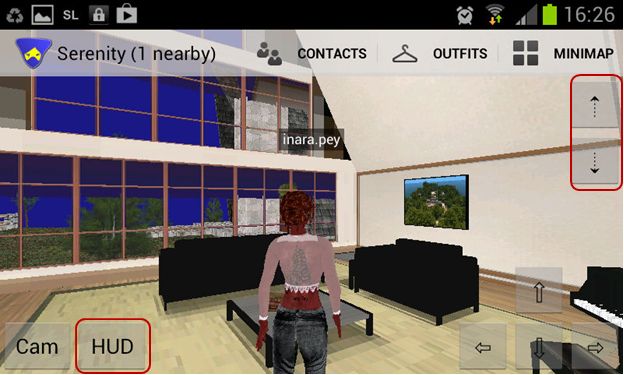
Lumiya 2.3.3 sees three new buttons appear on the 3D world view, two of which (in the top right corner of the screen) allow you to fly, as with a full viewer. Tap the UP arrow key to start flying / fly up, and the DOWN arrow to descent / land. Fly forwards / backwards using the movement keys in the lower right corner of the screen.
The new Fly buttons (top right) and HUD access button
When you start flying, a STOP FLYING button is displayed. One being tapped, it does precisely what it says: stops you flying – complete with the traditional falling animation as well!
On Monday 3rd December, NASA provided an update on the Mars Science Laboratory’s (MSL) most recent findings in analysing soil samples gathered from the “Rocknest” region of Gale Crater on Mars.
As reported last time, the findings had been the subject of intense media speculation for almost two weeks after radio reporter Joe Palca over-egged relatively innocent comments made by MSL’s Principal Investigator John Grotzinger concerning the initial soil analysis results received from the SAm Analysis at Mars suite of instruments while the reporter was setting-up and testing his recording equipment for an interview on November 20th. In his subsequent broadcast, Palca was unable to resist couching Grotzinger’s comments in terms of something “earth-shaking” having been found.
Had Curiosity found evidence of organics in just its first soil sample? Had Curiosity found evidence of past life on Mars? Had Curiosity found life on Mars? The questions and speculation seemed to grow with each passing day. Not even a firm, but low-key statement put out by NASA on the 26th November stopped the speculation growing, forcing them to issue a very strongly worded press release on the matter on November 29th and use Curiosity’s “Twitter personality” team to underline the fact that no organics had been found in a series of tweets the same day.
MSL Principal Investigator John Grotzinger
The rumour-mill had been fuelled in part by the fact that NASA planned to give an update on the first four months of the MSL mission at the fall meeting of the American Geophysical Union (AGU), with some believing the space agency would only do so if they had something “major” to announce about the mission. The fact that NASA has regularly attended AGU meetings in the past to provide updates on missions – including Curiosity’s predecessors, the Mars Exploration Rovers, seemed to escape people’s notice…
And the Findings Are….
An update was given at the AGU on Monday December 3rd, with NASA summarising them in a press briefing for those unable to attend the live meeting. While the results are not “earth-shaking”, they are nevertheless interesting.
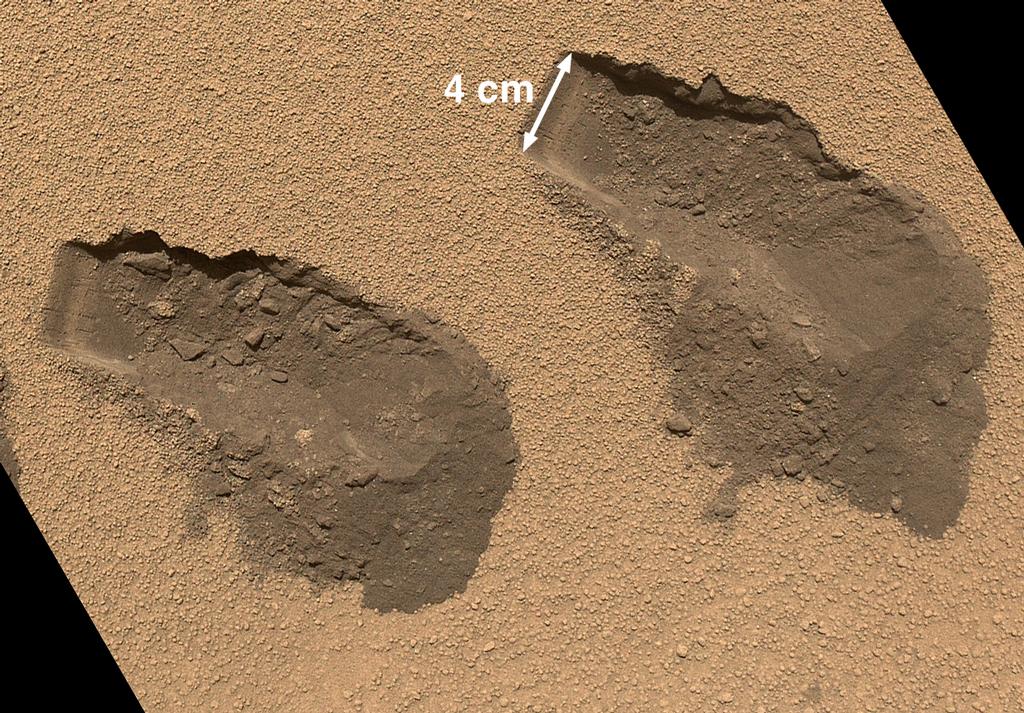
A Mars Hand Lens Imager (MAHLI) image of the third (left) and fourth (right) trenches made by Curiosity’s 4 cm-wide scoop. Acquired on Sol 84 (Oct. 31, 2012) the image shows details of the properties of the “Rocknest” sand dune. The upper surface is covered by crust of coarse sand grains approx. 0.5 to 1.5 mm, mantled with fine dust, giving it a light brown/red colour. The crust is about 0.5 cm thick and beneath it is finer, darker sand. The left end of each trough wall shows alternating light and dark bands, indicating that the sand inside the drift is not completely uniform. This might be due to different amounts of infiltrated dust, chemical alteration or deposition of sands of slightly different colour.
Please use the page numbers below to continue reading this article
Update: June 2020: following the sad passing of Darrius in late 2019, his VLM product is no longer available.
Update, February 2013: The number of VLM packages has been reduced to two, an Unlimited Version and a free Business Promo Version (30-day trail period with 5 VLMs. The details of this post have been updated to reflect these changes and the associated pricing restructure.
Update December 9th, 2012: Darrius has now produced an online Quick Reference Guide (QRG) to getting started and using VLMs.
Update December 6th, 2012: In order to make VLM management even easier, Darrius has now introduced the VLM Location Beacon as a part of all VLM packages. You can read more here. I first reported on Virtual Landmarks, Toysoldier Thor’s revolutionary idea for bringing the likes of SL landmarks into the 21st century, back in August 2012. The idea started as a post in Toysoldier Thor’s blog before it moved to a forum thread post he started, and which generated a good deal of discussion, finally moving to a JIRA on the idea – SVC-8082.
The idea initially received favourable feedback from “front-line” LL staff at various User Group meetings, but appears to have been stuck in the “Someday / Maybe” category of things to do on the Lab’s side of the fence. However, things have now started to move elsewhere – but before we get to that, a brief recap.
Virtual Landmarks – What Are They?
The VLM promotional poster by Toysoldier Thor
It’s a problem we’ve all faced one way or another; as a user, we’ve opened inventory and double-clicked on a landmark to a store to find it has moved elsewhere; as a merchant, we’ve moved location only to realise that every landmark in every one of out magic boxes, vendor packs, Direct Delivery folders, recorded in every Marketplace listing now needs to be updated, not to mention every LM we’ve ever given out is now invalid; as a role play group we’ve relocated or revised our regions so that all previous teleport points and their associated landmarks are obsolete… The list goes on.
In his proposal, rather than creating and distributing a landmark, a store-owner (or whomever) would create a user-friendly VLM (e.g. “My Wonderful Store”) which can be associated with one (or more) landmarks people can teleport to. The association(s) between a VLM and the landmark(s) are stored in a dedicated database (Toysoldier called it “VLM Mapping Service”). Copies of the VLM can then be created in-world and distributed exactly as landmarks are currently distributed. When someone uses the VLM, their viewer sends a request to the Mapping Service, which looks-up the physical landmark associated with the VLM and sends the information back to the viewer, enabling the user to be teleported to their desired destination.
The power of VLMs is that should one of the underlying landmarks associated with a VLM subsequently change, all the creator of the VLM has to do update the VLM record stored in the VLM database with the new landmark – and every instance of the VLM in existence will automatically route people to the new location when used. There is no need to pass out new LMs, replace existing LMs or anything else.
Toysoldier also proposed a range of other capabilities as well, and it is worthwhile reading his blog post on the subject; but the above is enough to give you a flavour of the idea’s potential.
Sadly, and as noted, while the idea received initially favourable feedback from LL, there has been little or no movement on the idea. Until now.
Enter VLMs for Virtual Worlds
VLMVW – VLMs for Virtual Worlds has been developed by Darrius Gothly, the man behind DGP4SL, one of the most respected brands in Second Life, and who has been a strong supporter of the idea since Toysoldier Thor first proposed it.
VLMVW is primarily a subscription-based service designed to provide a powerful and integrated implementation of the VLM concept. Highlights of the service include:
The ability to create VLMs which can be linked to up to eight in-world locations
The ability to create as many copies of a VLM as desired. Note that:
Copies can be distributed in exactly the same ways as “traditional” landmarks
Copies of a VLM take the form of an in-world scripted attachment which is worn in order to faciliate teleporting
The ability to create “VLMurls” for use in webpages and in SL Marketplace listing. These function in the same way as SLurls, but with the advantage that if the location they refer to within a VLM is updated, all instances of the VLMurl will automatically point to the new location
A publicly viewable web Listing page for all VLMs a subscriber has created
A private (key-protected) web page displaying statistics on VLM usage
An optional “Store Kiosk” system which can be placed around a store / location and provide visitors with a means to quickly teleport between departments / locations.
The service is provided in two packages:
A free Business Promo Version which allows you to create up to 5 VLMs and provides a 30 day trial period. This allows you to test out the VLM system free of charge to see if it works for you. It is also available from the SL Marketplace
An Unlimited Version which allows for an unlimited number of VLMs to be created and has no account expiration date. This now sells for L$499 and is available from the SL Marketplace.
Both packages is supplied with comprehensive documentation and an optional info / demonstration pack using the DGP4SL stores.
Please use the page numbers below to continue reading this article
On November 17th, the Firestorm team made a beta release of their latest update to Firestorm in order to offer users access to the new Group Services updates for managing large groups. At the time, it was indicated that the “full” release would occur in early December.
Keeping to their word, the team released 4.3.1.31155 on December 3rd, which includes everything featured in the beta release, and a few more goodies besides.
Given I’ve already given a comprehensive review of the beta release, this article will be focused primarily on the updates made between it and 4.3.1.31155 – although there will be some overlap.
As always, please refer to the Firestorm release notes for full details on credits, etc., for code contributions to the viewer, and for details of known issues and problems (known issues carried over from the LL code can be found here).
Download and Installation
As noted in the last review, the download .EXE is big – 40MB, which is unsurprising given that Firestorm packs so much into it. Installation – at a least for Windows users – is where the first set of changes occur, and it is worth recapping on these for people who have not installed the beta release:
A pop-up requesting whether or not the user wishes to have a Windows Start menu entry created for Firestorm during installation
Addition of the version string and estimated installed size to the installer
Addition of new OS detection code to warn if Windows Service Packs are not up-to-date and to prevent Firestorm being installed on Windows XP with
Publisher data, Phoenix URLs and Firestorm icon for the Firestorm entry in the Windows uninstall list
Automatic deletion of all previously installed skins to reduce issues arising from an unclean install
Addition of a DETAILS button in the installer pop-up window to allow the installation to be reviewed.
Havok Sub-licence
As noted last time, Firestorm has now signed a Havok sub-licence agreement with Linden Lab. This means that Firestorm is now available in two flavours – one for SL and one for OpenSim grids, with the SL version having both the –loginURI capabilities and the Grid Manager functionality removed.
This change means that Firestorm is now able to access the new LL-supplied Havok libraries, allowing the viewer to immediately include the pathfinding navmesh visualisation tools (as covered in my review of the beta release), and which could allow Firestorm to switch over to using the official LL mesh uploader code in the future, should they so wish, rather than using the current HACD code for mesh uploads.
For those using OpenSim, Firestorm 4.3.1.31155 can be downloaded here, and I’ve included an update on the OpenSim-specific updates to the viewer at the end of this article.
One point to note is that it is possible to use the OpenSim version of Firestorm on SL – the only difference is the OpenSim flavour of the viewer will not be able to access the SL Havok libaries or use any functionality associated with them.
Updates from Phoenix
Further updates from Phoenix have been added to Firestorm 4.3.1 in addition to those found in the 4.3.0 beta:
Texture Comment Metadata
When opening any texture, this will display the uploader name with a link to their profile together with the date / time the texture was uploaded. If permissions are sufficient, it will also display the asset ID on the texture preview floater.
Progressive Draw Distance (PDD)
A popular Phoenix feature, when enabled, this causes Firestorm to use a progressive Draw Distance stepping after a teleport, to help improve rezzing times. The Firestorm version includes an option to cancel stepping in progress if Draw Distance is manually changed (Preferences > Firestorm > General).
More Phoenix-like default settings for Phoenix Mode
The following Phoenix-like behaviours have been added to Firestorm when running in the Phoenix mode (selected via the Firestorm log-in splash screen):
“Resident” is not trimmed off legacy names
L$ balance changes will be shown in nearby chat instead of toasts
Received Items folder is shown as a normal Inventory folder
Firestorm will now send accept/decline responses for inventory offers after the according button has been pressed and not if the item has been received at the receiver’s inventory already
Group and IM notifications are now sent to the nearby chat console (v1-style) instead of toasts (v3-style)
Legacy Search
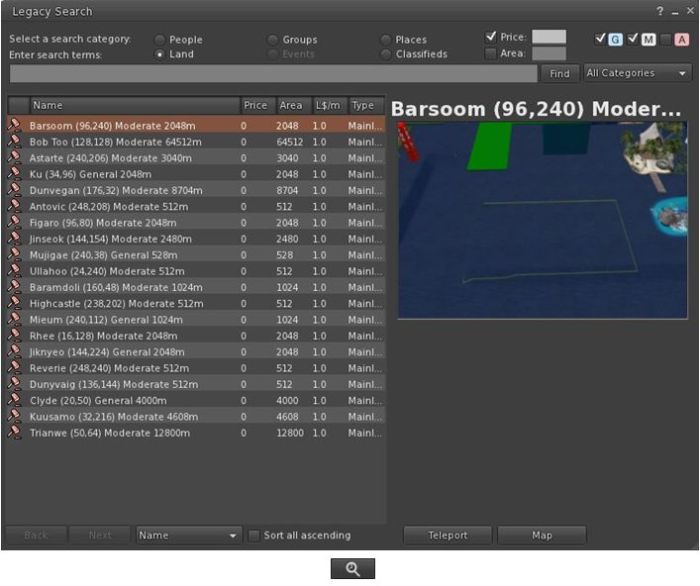
Firestorm 4.3.1.31155 re-introduces the V1-style “legacy” search capability for those who prefer it to the V2/V3 web-style search functionality.
The Legacy Search floater and its associated toolbar button shown in icon mode
Provided by Cinder Roxley, the legacy search option is currently available via a menu option (Content > Legacy Search) or via a dedicated toolbar button, and works for all search categories except Events, which will be added in a future update.
Documentation on the search function is available via the Firestorm website.
Phototools, Windlight and Snapshots Updates
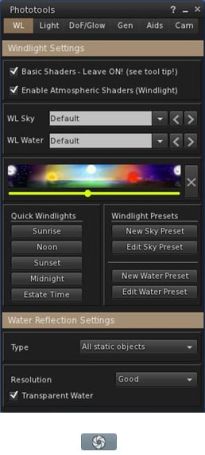
The main Phototools floater & toolbar button, shown in icon mode
Phototools is a suite of floaters which bring together a range of controls, debug settings and options available within the viewer into a single, cohesive set of options aimed at the SL photographer and machinima artist. I’ve covered them in detail previously, and provided a further update in my last Firestorm review. With this release of Firestorm the Phototools floaters (Phototools and revised Camera floater) can be accessed via a menu option: World > Photo and Video.
Alongside of these comes a windlight update of some 100+ presets for water and sky developed by Phototools developer William “Paperwork Resident” Weaver.
These additional presets can be accessed either via the Fixed Sky / Water presets menu option (World > Environment Editor > Environment Settings) or via the Phototool floater (shown right). All of the Phototools presets have “Phototools” at the start of their name.
Also, the Flickr tab on the Firestorm snapshot floater includes Katharine Berry’s update which add the parcel name to the location option.
This summary is published every Monday and is a list of SL viewer / client releases (official and TPV) made during the previous week. When reading it, please note:
It is based on my Viewer Round-up Page, a list of all Second Life viewers and clients that are in popular use (and of which I am aware) and which are recognised as adhering to the TPV Policy
By its nature, this summary will always be in arrears
The Viewer Round-up Page is updated as soon as I’m aware of any releases / changes to viewers & clients, and should be referred to for more up-to-date information as the week progresses
The Viewer Round-up Page also includes comprehensive links to download pages, blog notes, release notes, etc., as well as links to any / all reviews of specific viewers / clients made within this blog.
Updates for the week ending: 2 December, 2012
(With a couple of extras!)
SL Viewer updates:
Current version rolled to 3.4.2.267137 on November 26 – release notes
Development version rolled to 3.4.4.267322 on November 28
Mesh Deformer project viewer rolled to 3.4.1.267522 on December 1
Dolphin – two updates:
November 27 rolled to 3.4.4.26695 – core updates: primarily fixes and updates – see the release notes
December 3 (included here due to updates) – rolled to 3.4.5.26752 – core updates: changes to graphics setting to reflect latest updates from LL reflecting the underlying changes to how graphics cards are grouped into classes; “rebake region” button moved into a menu option in Build/Pathfinding; adds fix for edge-on rotation always behaving as if “snap to grid” is enabled; columns in the Area Search floater can now be properly resized; IM tabs can now be vertically stacked in the Conversations floater – release notes
Firestorm rolled to a FULL release – 3.4.1.31155 on December 3 core updates: too many to mention; please see the release notes and my Beta release review (update to follow)
Niran’s viewer rolled to version 2.0.4.2321 on November 27 – core updates: ESC now closes the overlay floater; explanatory notes on issues with saving graphics presets; assorted fixes and updates – release notes
Cool VL updates:
Stable branch rolled to 1.26.4.41 on December 1 – core updates: removal of unused crash reporter (see release notes for explanation); improved default positioning of floater panels when running Cool VL for the first time; better defaults for the camera settings; improved the media HUD, now with a volume slider; implemented click events on the status bar stats graphs; added highlighting and tool tip support for the missing llGetParcelMusicURL() LSL function, and for the new LSL constants OBJECT_PHYSICS, OBJECT_PHANTOM and OBJECT_TEMP_ON_REZ; assorted fixes, including crash issue on opening/immediately closing pathfinding tools
Experimental branch rolled to 1.26.5.21 also on December 1 – core updates as per main release, plus: Many changes to shared media support see this message for details; fixed improper default settings for local lights and water reflections in the feature tables
The Seanchai Library will be presenting another round of stories and readings in Voice this coming week, where they continue three of their serialisations, together with a lot of other goodies.
As always, all times SLT, and unless otherwise stated, events will be held on the Seanchai Library’s home on Imagination Island.
Sunday December 2nd, 18:00: Peter Pan
Illustration from “Peter and Wendy” by James Matthew Barrie, Published 1911 by C. Scribner’s Sons, New York
Caledonia Skytower presents the final part of novelist and playwright J. M. Barrie’s most famous work.
While Peter Pan first appeared in another of Barrie’s works, The Little White Bird, written for adults in 1902, it was in the 1904 stage play, Peter Pan, or The Boy Who Wouldn’t Grow Up in which he first came to widespread public attention. The play was later expanded upon by Barrie to form the 1911 novel, Peter and Wendy, which later became Peter Pan and Wendy and, eventually, simply Peter Pan.
Both the stage play and the novel tell the story of Peter Pan, a mischievous little boy who can fly, and his adventures on the island of Neverland with Wendy Darling and her brothers, the fairy Tinker Bell, the Lost Boys, the Indian princess Tiger Lily, and the pirate Captain Hook.
Caledonia will be reading this installment at Magiclands, commencing at 18:00 SLT.
Monday December 3rd, 19:00: All Seated on the Ground
Caledonia Skytower continues her reading of All Seated on the Ground, Connie Willis’ 2007 science-fiction novella and winner of the 2008 Hugo Award for Best Novella.
The story follows Meg, a newspaper columnist who has joined a commission studying aliens that have landed on the Denver University campus. The aliens glare at everyone, and allow themselves to be led to various locations, but the commission has no idea how to communicate with them. Following an incident at a local mall during the Christmas shopping season, Meg and a school choir director team up to try to decipher the aliens’ actions before they leave Earth.
Tuesday December 4th, 19:00: Christmas at The Vinyl Cafe
Dave owns the world’s smallest record store, where the motto is “We may not be big but we’re small.” Dave is frequently neurotic and prone to small accidents and mishaps – but he’s not the only one in his family, or his neighbourhood.
Bear Silvershade reads two stories penned by Stuart McLean for his CBC Radio show, The Vinyl Cafe. In The Great Gift Giving we find that all it takes is one pebble to start an avalanche. While in Morley’s Christmas Pageant, Dave’s wife, the long-suffering Morley, tries her hand at running a children’s Christmas concert.
Wednesday December 5th, 19:00: Miracle on 34th Street
Caledonia Skytower commences an adaptation of the George Seaton / Valentine Davies Christmas classic, which first appeared in 1947 starring Maureen O’Hara, John Payne, Natalie Wood and Edmund Gwenn, and which has been subject to a number of remakes and updates, including the 1994 version starring Sir Richard Attenborough. A novella based on the film, also penned by Davies, was published simultaneously with the film’s release, and was itself turned into a stage play in about 2006 by Will Severin, Patricia Di Benedetto Snyder and John Vreeke.
Join Caledonia at Imagination Island as she retells the story of how Kris Kringle is hired by Macy’s to become their “Santa Claus” in what is regarded as a classic tale for Christmas.
Thursday December 6, 19:00 The Santa Clause
Shandon Loring one more hitches a ride on a sleigh drawn by a team of rangifer tarandus to Imagination Island to bring us the second part of The Santa Clause, a “novelisation” of the Leo Benvenuti / Steve Rudnick screenplay from the 1994 film starring Tim Allen.
Saturday December 8th, 18:00: Christmas Classics
Join Derry McMahon and Bear Silvershade at the Holiday Sim (please check the Seanchai Library SL blog for the LM, which will be available on the day) for a round of classic Christmas tales.
Saturday December 8th, 18:00: Christmas Classics
Join Derry McMahon and Bear Silvershade at Fruit Islands’ Winterland (please check the Seanchai Library SL blog for the LM, which will be available on the day) for a further round of classic Christmas tales.
 December 5th sees a further update to Lumiya, with the release of version 2.3.3.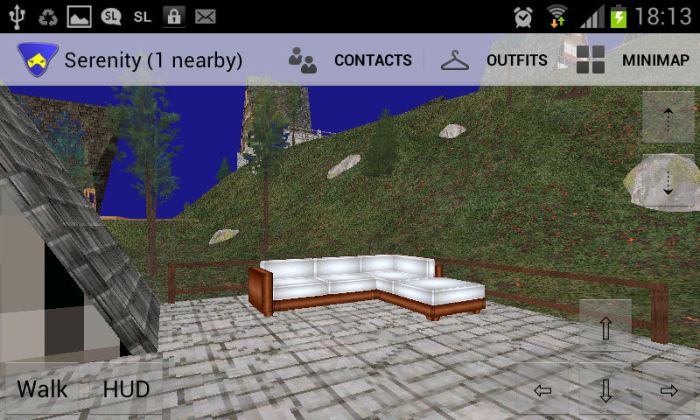
 On Monday 3rd December, NASA provided an update on the Mars Science Laboratory’s (MSL) most recent findings in analysing soil samples gathered from the “Rocknest” region of Gale Crater on Mars.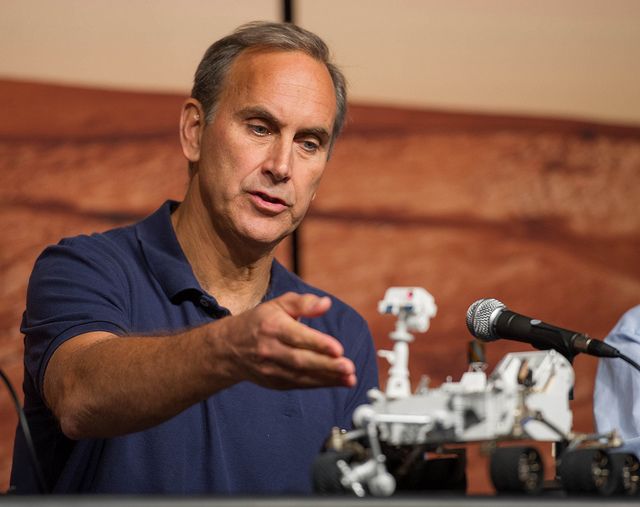
 I first reported on Virtual Landmarks, Toysoldier Thor’s revolutionary idea for bringing the likes of SL landmarks into the 21st century,


 Caledonia Skytower continues her reading of All Seated on the Ground, Connie Willis’ 2007 science-fiction novella and winner of the 2008 Hugo Award for Best Novella.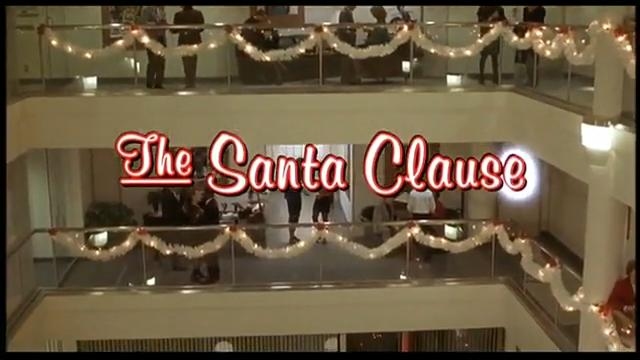
 Inara Pey: Living in a Modemworld