Flying high in Kitely

Kitely, the “on-demand” grid service recently added Twitter and e-mail sign-up / log-in capabilities to its existing Facebook option. This has opened the service to far more potential users, many of whom were put-off by the Facebook-only approach that was put in place during initial start-up – and I was one of them. However, with the new options available, I decided to drop in to Kitely and take a look around.

For those not in the know, Kitely is a cloud-based VW that utilises an on-demand service operated through Amazon’s S3 and EC2 services. Essentially, if a “world” (analogous to an SL region) is not in use it is stored away rather than running constantly on a server, but can be instantly enabled when someone wishes to access it. This frees Kitely from having to operate complex infrastructure on a 24/7 basis, and allows them to offer a product that is markedly different to other grid-based offerings, as demonstrated by their payment plan – all levels of which provide at least one world / region to every user…

Payment Options
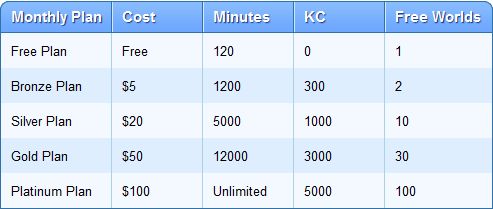
Payment plans (click to enlarge)

The payment options are a mix of fixed monthly plans and what is essentially pay-as-you-go. In this, it very much resembles the types of tariff options offered by cellphone / mobile phone operators.

By default, every new user on Kitely gets a free account. This gives them 2 hours a month access and a “world” (region) of their own if they wish to create one. With this option, additional time in-world is gained through the purchase of Kitely Credits (KCs), which can be brought via PayPal in packs starting at $5 for 1,000. KCs can then be used at the rate of 1 KC per minute of in-world time so a $5 pack can give you an additional 16 hours in-world per month.

The payment plans start from $5 a month. This gives you 20 hours of in-world time, two worlds to use and 300 Kitely Credits a month. The latter can be used to pay for additional in-world time over the allotted 20 hours at the rate of 1 KC per minute (if not used elsewhere), giving you a potential total of 25 hours of in-world time (20+(300/60=)5).

World owners can also define who pays when you visit their worlds – you or them. By default it is you – but to encourage visitors, some worlds are set so that time spent visiting is deducted from the world owner’s KC balance, leaving the balances of any visitors unchanged (so it’s essentially “free” access to the world). Users can also “earn” free time through encouraging those new to Kitely to sign-up and visit their world for 5 minutes or more prior to visiting anywhere else. For every new user who does this, the world owner gains 200 minutes of in-world time.

Finally, as well as the default world available with each payment option, you can also purchase as many additional worlds as you require at the rate of 1 KC per day for each world you require.

Sign-Up

Three options for sign-up to Kitely are available: Facebook, Twitter and E-mail. All three require a valid e-mail address for account validation purposes. The sign-up process is essentially the same for all three: you define your preferred avatar name and gender, provide your e-mail address & accept the Kitely ToS (available to read from the bottom of the website). If you use either Facebook or Twitter, then your credentials from these are used to verify you when logging-in to the system. If you are using the E-mail option, you’ll need to use the e-mail address you supply and password when logging-in.

There are a few points of note with the sign-up / log-in process:

  • If you have both a Twitter and Facebook account, you can have them linked, allowing you an either / or option to log-in to Kitely – useful if either Facebook or Twitter has a major hiccup
  • If you log-in using Facebook, you’ll see your Facebook Friends and Facebook Groups; when you log-in via Twitter, you’ll see Twitter Followers and Twitter Lists
  • The mechanism you use for logging-in may also impact your ability to access Kitely worlds. This won’t be a problem when accessing public worlds (see below), but may affect your ability if attempting to access a specific world. for example: if a world owner has set their world to be accessed by people on their Facebook Friends list, and you are one of those people, but log-in via Twitter, you won’t be able to access that particular world until you re-log to Kitely via your Facebook credentials
  • As you can only use one e-mail address per account, if you wish to sign-up an Alt at any stage, you’ll have to use an additional e-mail address.

Once you’ve completed the sign-up form and verification process, you can log-in to Kitely. This displays a pop-up advising you on what you can do next – create your own world, visit other worlds or buy Kitely Credits. Clearing this drops you into your My Worlds page, which provides summary information on your account and the world(s) you have created.
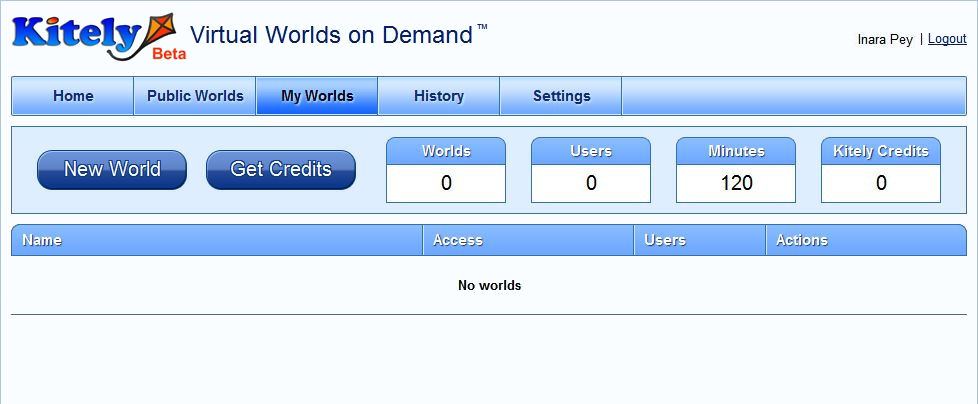
My Words summary page, as seen by a new account holder

Accessing Worlds: the Kitely Plug-in and Viewer Selection

Accessing a world within Kitely requires two steps:

  • Logging into the Kitely website
  • Logging-in to the required world via the world’s web page

However, the very first time you attempt to enter a world, there are two additional steps you must take: downloading and installing the Kitely plug-in.

You’ll be asked to do this the very first time you click on the ENTER WORLD button from within the Kitely website (see below) – after that, logging-in to a Kitely world from the website is seamless. The plug-in itself takes less than a minute to download on any decent connection, and around the same time to install. It performs a two-fold function:

  • It launches your Viewer of choice  / default Viewer (providing a Viewer is installed)
  • It automatically completes the username and password fields in the Viewer, allowing you to access your selected world without having to log-in manually through the Viewer

By default, the Viewer selected is the last Viewer installed on your computer. However, it is possible to change this if necessary by following some straightforward instructions.

This is actually a very clean and efficient means of logging-in to Kitely, and gives the appearance that everything is being run directly from the website; but it does assume that everyone coming to Kitely has prior exposure to grid-based VWs and has at least one Viewer installed on their computer. Users new to VWs and without a Viewer will find themselves stuck at the ENTERING WORLDS prompt, quite possibly with no idea as to what has gone wrong.

Note, 16th March: As per Ilan’s comment ion this article, the plug-in should in fact prompt for a Viewer download should no Viewer be detected. The current Viewer is Imprudence, but this may change to Firestorm in the future. 

I understand from Ilan Torchner, Kitely’s CEO, that the plug-in is due to be re-written. Whether this will enable it to also install a Viewer (such as the ubiquitous Hippo or similar) as a default is unclear. However, it would appear to be a prudent capability to add as the service increases its user base and increases public awareness of its existence.

Creating Your Own World

Clicking the NEW WORLD button on your MY WORLDS page displays a two-tab pop-up. The first tab allows you to supply the desired name for your world together with any descriptive text (which can be formatted and include images and URLs to websites, etc.) you wish to supply. You can also chose to have the land delivered “empty” (flat default terrain) or with a collaborative environment that includes a number of prefab buildings, or you can opt to upload your own OAR file, if you have previously saved one from another grid.

The second tab of New World enables you to set up who actually pays for their time visiting your world – your visitors or you in terms of minutes / KCs deducted from accounts (default is your visitors), and to set-up access lists of allowed visitors. Once you have satisfied yourself with your initial set-up, click the CREATE button, and the world will be generated and added to your MY WORLDS list.

To enter your new world, click on the world name in MY WORLDS. This will display the world page, which includes a large ENTER WORLD button. Clicking this will launch your browser and automatically log you in to your world (duly noting the plug-in installation described above).
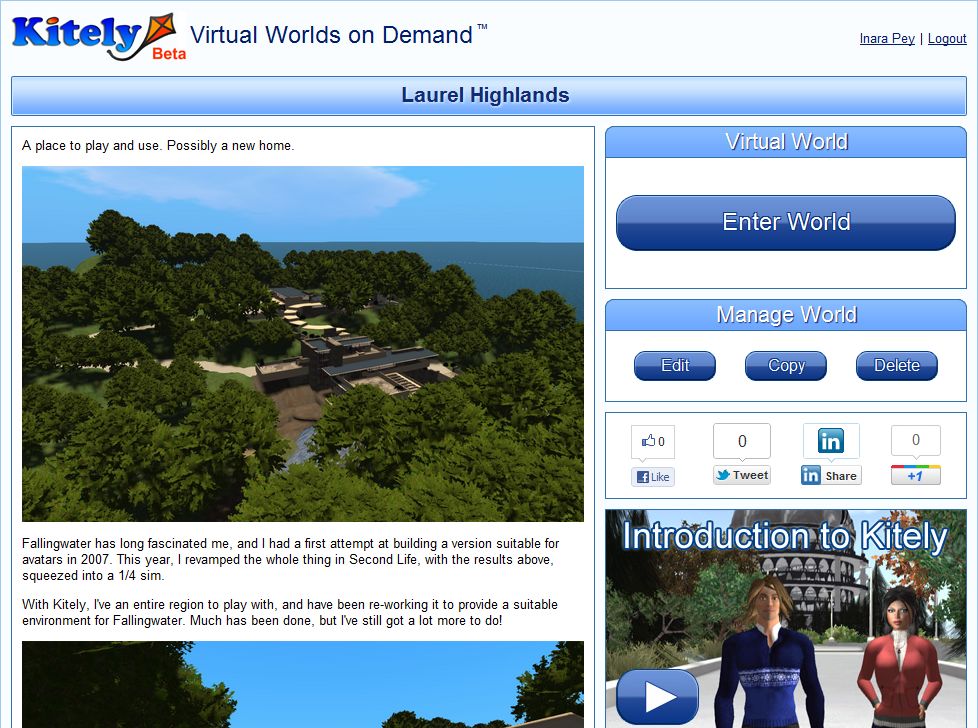
My Kitely world page for my (first?) Kitely world…

Entering Your World

Once logged-in via the Viewer of your choice, you’ll have a default male / female avatar in a default outfit there seem to be a number of avatar option for each gender; a friend who logged-in to also take a look at Kitely arrived with a very different default outfit to the one my avatar was wearing.

If you haven’t used an OAR file to define your world, you’ll have a familiar flat, grass / sand 65K+ square metres to play with and – wait for it – 100,000 prims. You also have full region / estate tools access, allowing you to import terrain files, adjust terrain levels and appearance, etc.
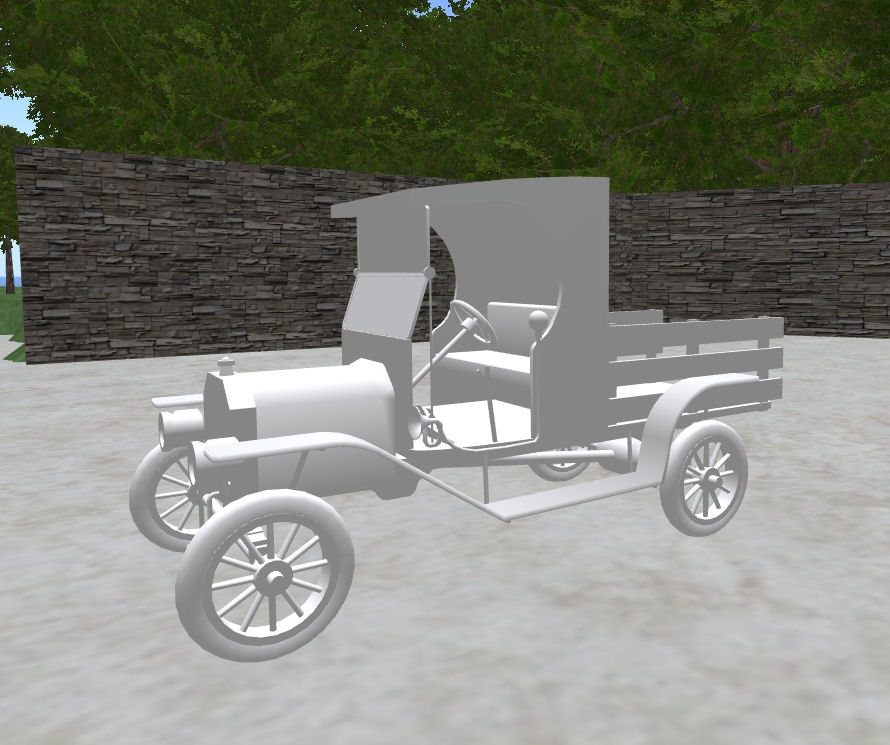
Mesh import on Kitely

Building and terraforming in Kitely is the same as for SL  / OpenSim, and sculpts / mesh are supported. I tested both of the latter using my own sculpt maps generated for Fallingwater and by temporarily uploading a familiar mesh demo model from SL for the latter (right).

XML imports are supported through a suitable Viewer such as Imprudence, allowing you to import content you have created elsewhere and have been able to save locally. There are currently no upload costs to Kitely (including no charges for mesh), making the upload / import of content and your own sculpt maps, textures, etc., easy on the pocket.

Direct Delivery: 21st March launch

In keeping with the time scale indicated by Oz Linden (as pointed to in these pages by Latif Khalifa), Direct Delivery will be launching on March 21st.

The news came via a post from CommerceTeam Linden in the Merchant’s Forum, which states:

Beginning on March 21, purchases on the Marketplace using Direct Delivery will go directly to recipient’s Received Items folder. The Received Items folder will NOT be used for other inventory transfers at this time. Magic Box purchases will continue to go to the Objects folder.

The Delivery folder will appear on the order and in all email notifications to the recipient.

At launch, we will be sharing additional details as well as updated Knowledge Base articles in all four languages supported on the Marketplace. We will also provide more details on migration.

Direct Delivery is the mechanism that will replace Magic Boxes for merchants using the SL Marketplace and which should bring improvements to the overall delivery of items purchased on the Marketplace. It has been in development now for around a year, and reached public beta in January this year, which presented the first real opportunity to report on the system in detail to a wider audience.

No Wider Use of Received Items – Yet

A core part of Direct Delivery is the Received Items panel. This was originally going to be a sub-section of the inventory floater and would be used to received items purchased on the Marketplace into your inventory. However, Linden Lab recently sought to extend the functionality of Received Items so that all new incoming items to your inventory would arrive in Received Items, essentially breaking-out the idea into a project of its own, which was not particularly well received by the community.

As a result of feedback on Received Items, and because of wider impacts of the system on SL functionality, LL have started revising aspects of the broader Received Items functionality. Because of this, and to repeat LL’s own statement, Received Items will only be used for SL Marketplace Deliveries at the March 21st launch. All other items incoming to your inventory will continue to be handled as they are now

Merchants have requested as to when the wider functionality might be rolled out, but LL has, at this time, declined to comment beyond re-confirming that the project is “on hold”.

While it would be nice to have a clearer roadmap as to Received Items itself, the fact that LL have listened to concerns from all parties – merchants, RLV users, those providing feedback to the initial survey and the follow-up is to be applauded, and one hopes that the dialogue will continue in the run-up to the Direct Delivery launch and thereafter through to the roll-out of the wider Received Items functionality (assuming this goes ahead), in order to ensure all potential adverse impacts are either avoided or at least reduced to manageable levels.

Problems

Direct Delivery itself, as a long-term project, both serves as demonstrating the complexities involved in making alterations to the overall SL infrastructure, and the need for open and on-going dialogue between the Lab and the merchant community / community as a whole; something that many feel has been distinctly lacking at times, with the project almost rolled-out inspect of known issues.

Even now problems potential remain, with questions still being asked about ANS functionality once Direct Delivery goes live, a subject Darrius Gothly gave considerable insight to last November. Potentially more damaging is the fact that little further communication on Direct Delivery appears to be on the cards prior to the launch, again as noted in the forum post:

At launch, we will be sharing additional details as well as updated Knowledge Base articles in all four languages supported on the Marketplace. We will also provide more details on migration

Direct Delivery is a major change in functionality, especially for merchants. While many have been involved in the development of the project and the initial “private beta” (even with its daft requirement to complete an NDA before merchants could find out what they were signing-up for) prior to the public beta, many equally have not – and precisely what has changed as a result of the public beta – if anything – many be equally unclear.

As such, there needs to be a positive communications campaign ahead of the launch in order to ensure merchants have all the information at their fingertips prior to the launch, and have time to ensure they are fully prepared for Direct Delivery going live. Similarly, a more pro-active approach to announcing the roll-out needs to be taken towards the user community as a whole – preferably through a full blog posting ahead of March 21st announcing the arrival of Direct Delivery and informing / reassuring users as to what to expect, with a follow-up on the day of the launch.

If nothing else, a more pro-active approach to the launch will help restore some of the trust between merchants and the Commerce Team / Linden Lab, which has been somewhat eroded during the development of Direct Delivery and through earlier projects, such as the morphing of XStreet into SL Marketplace (itself frequently a morass of conflicting communications) and other breakages.

I’m not alone in being concerned over the “wait until the day” approach when it comes to further information, as implied by the forum post: Tateru points to this with a comment on her blog about allowing 14 days for information absorption, and Darrius Gothly also posts on the subject as well.

It’s good that LL have been listening to concerns over Received Items and that they are responding to such fully and carefully by placing the broader aspects of the project on hold. I very much hope that they do listen to concerns being voiced around the matter of Dirrect Delivery announcements and documentation and continue to respond positively to these concerns by addressing them ahead of time, as suggested here and elsewhere.

Text Clients 6: Lumiya

Oz Linden recently dropped by this blog and made mention of Lumiya, a new Android text-based SL client. As I have access to an Android phone, and have previously reviewed the Mobile Grid Client for Android, I decided to check it out.

Lumiya, developed by Alina Lyvette, is relatively new – the initial release appears to have been on January 12th 2012, although this is version 1.2.1, so it is possible there were earlier releases prior to it getting to the Android market. The Lumiya website itself is very polished, and provides core information on the application, including screen shots, support details (e-mail), version history and links for obtaining the client either via direct phone download or the use of a QR code.

Unlike Mobile Grid Client, there is a download fee for Lumiya: some $2.95 (£1.87 / 2.24 Euros) at the time of writing this review. After that, usage is free – subject to network charges, etc., when accessing SL when roaming.

Logging-in

Once you’ve paid for the app and it has downloaded & installed, staring it will display the log-in screen. Enter your avatar name and password – not that by default, your password is saved, allowing rapid log-in in the future. When done, tap SIGN IN to get started. The first time you do, you’ll be prompted to accept the SL Terms of Service.

On logging-in, you will be presented with the Local Chat screen (see below) and if media is available at your log-in location, you’ll be prompted as to whether you wish to play the media over your phone or not. If you opt not to receive the media stream you can turn it on later via the Media menu button.

Lumiya log-in screen (l); Local chat screen (c) and menu options (r) – click to enlarge)

The Local Chat screen (above centre) is a little devoid of details. This provides the maximum amount of space for chat, but I can’t help wondering if having the Contacts buttons displayed might be a good idea, rather than having hidden within a menu option (below). I’m also, if I’m honest, not overly keen on the white-on-light-grey text / background combination at the top of the screen, which some users might find hard to read. That said, in a rather charming difference to just having your avatar standing around (often times with arms outstretched on either side), Lumiya animates the ground sit for your avatar, sitting you wherever you have logged-in – which is probably a more natural pose for those observing you from in-world.

All major functions for the client are accessed via you phone’s menu button. Pressing this presents the following options:

  • Contacts: allows you to view your Friends and Group lists, and see who is nearby you
    • Tapping on any displayed name will open an IM / Group chat to the individual / Group
    • Friends online will have a green icon displayed next to their name
    • A sub-menu can be displayed, allowing you to swap to Local Chat, Recent or Landmarks (both below) or sign-out from SL
  • Recent: displays the last lines of any recent conversations. Again, a sub-menu can be displayed, allowing you to swap to local Chat or Landmarks or sign-out
  • Landmarks: lists any favourites you have set-up (V3.x & associated TPVs), and your landmarks. Tapping a favourite or landmark will open an option to teleport to that destination. A sub-menu can also be displayed, allowing you to (again) swap to local Chat, Recent or sign-out
  • Media: enables you to see if any local media is playing & listen to it.
  • Settings: accesses the client’s settings
  • Sign-out logs you out of SL.

You can also use you phone’s Back button to return to Local Chat from any other screen / menu.

Client settings options (click to enlarge)

The Settings option allows you a set-up a number of client preferences:

  • Start location: choose between last location visited or your default home location
  • Always in status bar: shows your on-line status in the phone’s status bar (although I didn’t actually notice any different toggling this off / on)
  • Message sounds: allows you to set a sound for Group chat / private IMs. If the option is unchecked, both are disabled. If checked, you can select a sound for each from a list (default is your default ring tone).

That’s pretty much it for the client at the moment. As it is fairly new, it’ll be interesting to see how it develops and whether features are added.

Opinion

While I find the Local Chat window perhaps a little too minimalistic, Lumiya is a lean client that does exactly what it sets out to do: provide you with a lightweight, mobile means of maintaining contact with those in-world when away from your computer. Once installed, the app may currently lack the capabilities in other text clients, but it does allow for fast and easy use for communications. The only issue I encountered with the app is that signing-out with a media stream playing didn’t shut down the stream; the only way of preventing this appears to be to go to the Media option and manually shutting-down the stream before signing-out. I assume this is the result of the app effectively calling a separate URL outside of the SL connection in order to play the stream.

For those who want a quick, fast means of accessing SL and who don’t necessarily need access to the likes of inventory, notecards, etc., or additional monthly use fees for the client, then Lumiya may well be the ideal solution.

Related Links

Viewer release summary 2012: week 10

Updates for week ending: 11 March, 2012

A day late due to RL commitments yesterday.

A quiet week – only the Usual Suspects 🙂 updating in the TPV arena – Dolphin, Niran’s, Zen and Cool VL  LL have updated their Beta Viewer, dated March 1st – although I swear that wasn’t the one I got in my weekly download / check for the March 5th Round-up. The Development Viewer has also been updated, with all others remaining as-is.

Changes since the last Round-up shown in green.

SL Official Viewers

Available for: Windows, Linux, Mac

V3.2-based TPVs

V1-based TPVs

This is intended to be a weekly round-up of current public SL viewers (of which I’m aware / for which I have information). As few Viewers are static, and releases are made according to individual development cycles, further versions of any given Viewer may well be released between these updates, and as such the information here may become out-of-date as the week progresses. Please check with the relevant download pages.

Related Links

Code change impacts RLV functionality

Update 12th March: As can be seen from the comment from Trinity below, Brooke Linden has responded to concerns over this issue, and has confirmed that the code causing it will be rolled-back from LeTigre and BlueSteel this Wednesday (RC channel release window) and won’t be re-deployed until the problem is fixed.

Kitty Barnett reports via JIRA SVC-7748, that functionality related to the InventoryAPI maintenance project adversely impacts the widely used RLV / RLVa functionality within Second Life.

RLV provides a means by which, and under controlled conditions (the user “opts-in” to the process by clicking an acceptance button), a folder is created within the #RLV folder under MY INVENTORY. Items are then delivered into the new folder, wherein a script runs to attach the items to the recipient avatar.

While this functionality does have a direct use within the BDSM community, it can have uses elsewhere as well.  However, changes rolled-out to the BlueSteel and LeTigre RC channels this week as a part of the InventoryAPI maintenance project, have inadvertently broken the functionality – the required redirection to use #RLV doesn’t occur and the associated script fails – hence JIRA SVC-7748.

The degree of impact on RLV is debatable. As Marine Kelley states within the JIRA:

On a positive note, if LL decides not to do anything and leave things as is (i.e. in a broken state), the RLV could simply check what’s coming into the “Received Items” folder and move it automatically under #RLV if the name matches. This would be transparent to the user and would overcome this breakage. 

Nevertheless, it would be preferable for LL to ensure the functionality isn’t broken in the first place (as Marine herself goes on to state).

A potential problem here is that, despite Kitty’s own efforts to point out that Received Items itself is not the problem per se, many of the comments appearing on the JIRA are further critiques of Received Items rather than a discussion of the problem as identified by the JIRA itself.

As strong as feelings are around the subject of Received Items, what is more important here is that functionality that is key to a range of user expectations / desired experiences has been inadvertently broken within LeTigre and BlueSteel, and there is a risk that this could become more widespread if the fix is rolled-out beyond these two RC channels. As such, it is important that LL hear, read and understand the core issue itself (i.e. via use-cases where the update breaks things), in order for them to try to correct the matter.

Given it is the weekend, it will likely be a while longer before any response on this matter is heard from LL – which also gives people more time to submit specific examples on the issue that outline the problem. It’s also worthwhile pointing out that LL are prepared to reconsider proposed actions – as has been demonstrated around the concern relating to llGetAgentStatus (which Oz has indicated is on-hold as a result of the number of clear-cut use-cases received), and have shown a willingness to re-think elements of Received Items based on constructive feedback from users.

Received Items: LL provide feedback

On March 1st, due to the level of concern arising from the initial beta, LL put out a call  for feedback in the form of a short survey (now closed). This weekend they provided feedback to those who participated in the survey in the form of a proposal on how the new functionality might be improved and a further request for people’s views on the proposal itself.

The notice of feedback came through a notecard from Brooke Linden which was delivered in-world via Dakota Linden. The notecard reads:

Hi all,

We’d like to thank you for your feedback on the use of the Received Items folder. Based upon the feedback, we have pulled together a similar, but hopefully improved, proposal. Please take a look and provide feedback.

After which there are links to the proposal and an additional survey.

The proposal offers the promise of some improved functionality over the initial beta, including:

  • Context-sensitive menus within Received Items that allow you move specific asset types directly to their system folder OR to the Objects folder (so that notecards can be moved directly to the Notecards folder, landmarks directly to the Landmarks folder, etc.), without the need to drag-and-drop manually
  • Selecting multiple items (as opposed to folders) within Received Items will display a similar context menu allowing the items to be moved to an appropriate folder or to the Objects folder
  • Selecting multiple folders will display a menu presenting options to move the folders either to the Objects folder or you MY INVENTORY root folder
  • The promise to “fix” current issue around offline delivery problems through the use of the Received Items folder.

There are a number of other changes outlined, some of which LL are requesting specific feedback against (for example: they are proposing capping the number of items a resident can receive in an hour to prevent the system being used for griefing, and they are looking for suggestions as to a reasonable number at which to cap hourly deliveries), as well as instigating measure that are presumably aimed at getting people to manage Received Items: such as blocking the ability to rez items directly from the panel (which may actually become a floater in its own right).

Overall, the proposal is a step forward compared to the initial beta system, but it is unlikely to address all concerns – which is why open feedback via the JIRA and on blogs / the SL forum relating to specific concerns remains important. However, what is being offered in terms of context menus, the ability to search (and hopefully sort) Received Items does make the idea something of a stronger offering, and if the system does solve issues around failed deliveries, etc., then that alone might well outweigh some of the shortcoming people might otherwise feel the system has – although there are still potential problems that need to be addressed.

It will be interesting to see how the RI project develops, and whether there are further revisions based on the feedback given to the new survey – and whether all the ideas outlined in the proposal are implemented. However, what is really important within this process is the fact that LL are demonstrating a willingness to pro-actively engage with the community and seek solutions where a fundamental change in the way most people work with SL is seen to be counter-intuitive to the ways in which people use the platform, or which seemingly fails to offer any significant advantages over current capabilities – and this is to be applauded.