Paint your skies with Stevie Davros’ EEP sets

A dramatic EEP Fixed Sky with custom cloud texture (Painted Drama Windy Afternoon from the Painted Clouds set) by Stevie Davros

Back in 2018, I wrote about Stevie Davros, and Australian photographer, who had produced as series of Windlight skies and clouds for people to use to help enhance their environment when taking pictures, or to offer a unique environment within their region (see: Clouds and windlight skies by Stevie Davros).

Since the arrival of the Lab’s Environment Enhancement Project (EEP), Stevie has been working on new skies and cloud assets specifically for use with EEP, and offered me the opportunity to try some of them out. And I have to say, that like his Windlight skies and clouds, these are impressive collections, ideal for photographers looking to enhance their images, and offering region and parcel holders a set of options for setting a Fixed Sky over their parcel / region (and which can also be used to create dynamic Day Cycles).

If you are unfamiliar with using EEP assets and settings, I recommend you refer to one of the following:

However, and for completeness, these notes include a quick overview of how to apply Stevie’s settings.

Saturn looms large: a EEP Fixed Sky setting from the Cosmic Skies set by Stevie Davros

At the time of writing this article, Stevie had a dozen EEP packs available via his Marketplace store, comprising:

  • Painted Clouds: a folder of 13 Fixed Sky assets featuring cloud texture files sampled from the brush strokes of 19th Century French impressionist painters.
  • Aussie Cirrus: a folder of 19 skies featuring cloud texture files created from photographs Stevie took of the skies over Adelaide in Australia, and then processed.
  • Gossamer Cirrus: a set of 19 skies featuring cloud textures depicting very high altitude cirrus strands, some of which are presented in a their own “fantasy” style of sky.
  • Cirrus Cloudbank: a set of 21 skies featuring strands of cirrus cloud overlaid with / extending from banks of cloud
  • Cirrus Clouds: a bumper set of 34 cloud textures, suitable for “real” and “fantasy” settings.
  • Stormy Skies: a selection of cloud texture collages created by Stevie to give dramatic sky and cloudscapes.

All of these packs, whilst focusing on cloud formations, include customised ambient lighting and may include custom Sun / Moon textures.

Painted Sky Banded Sky from the Painted Clouds set by Stevie Davros

In addition, Stevie has produced several sets of Fixed Skies offering more of a “cosmic” setting:

  • Replacement Moons: a set of six replacement Moon textures (crescent, waxing, full, gibbous dual crescent and blue).
  • Replacement Suns: a set of replacement Sun textures very suitable for sci-fi settings, including a blue giant and a binary system with a blue giant and red dwarf star.
  • Cosmic skies: a set of 10 textures offering various astronomical / sci-fi images, including solar eclipses, a comet, a (frighteningly large) meteor, galaxies, a crescent Earth (ideal for a Moon base setting) and Saturn with his rings.
  • Aurora Night Sky: a selection of night skies with cloud textures designed to give the effect of looking at the aurora (Borealis or Australis, you pick 🙂 ).

The remaining two packs are more quirky in nature the first presents something for the romantics: link heart clouds,  and the second that places an erupting volcano on the horizon (the volcano replacing the Sun texture).

A radical sunrise (Gossamer Cirrus Surf Beach Sunrise from the Gossamer Clouds set) by Stevie Davros

There are a few points worth noting with these sets:

  • When purchased, each pack is delivered as a folder to the Received Items folder / panel of  your inventory (so no unpacking required). They can all be used directly from the folder they are received in; however, you might want to copy said folder to the Settings folder in your inventory – the system folder than is intended to contain all EEP assets you create and / or purchase.
  • As Fixed Sky elements, these are all assets that have fixed ambient lighting, and fixed Sun / Moon positions in the sky, with the clouds moving dynamically in response to the wind direction and speed.
  • The assets are supplied Copy / Modify, so you can make copies of any of them and then make alterations to it using the EEP Fixed Sky editor to produce your own variants. You can also use any of them as a basis to create your own dynamic Day Cycles.
  • Alternatively, to make changes purely for photography purposes, these assets can be applied and then adjusted using the Personal Lighting panel.
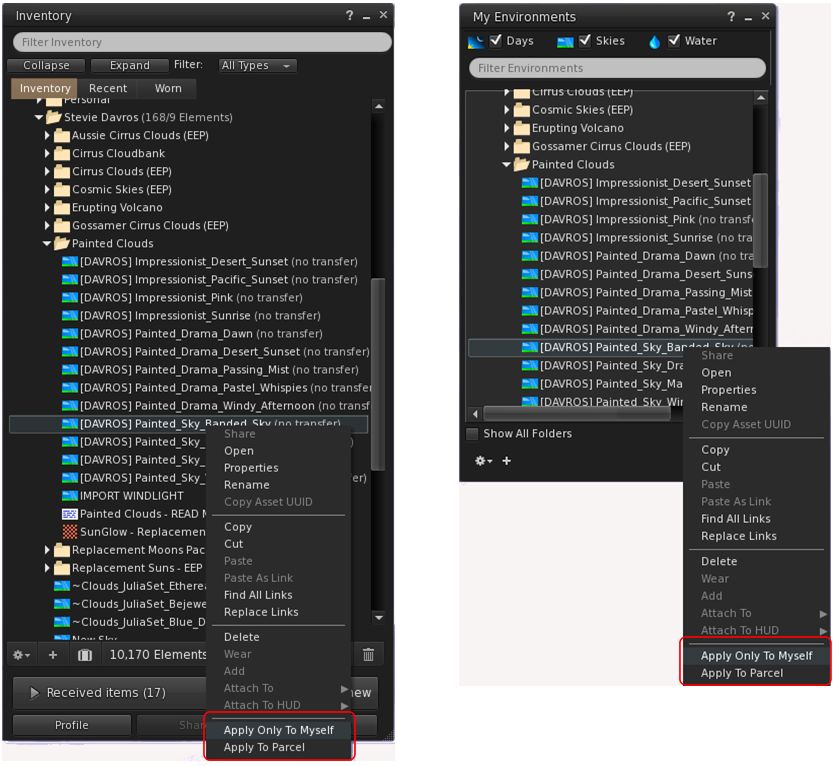
Use the standard EEP options for using Stevie’s assets

The easiest way to use these assets is to apply them directly to your avatar – highlight the asset you wish to use the right-click on it and select Apply only To Myself. This can be done from inventory or from World → Environment → My Environments … Applied in this way, the setting you’ve selected is only visible within your viewer, and will not be seen by others.

Alternatively, and if you have the requisite permissions, you can apply the asset to your parcel, where anyone within it who is using an EEP-supporting viewer set to (World → Environment →) Used Shared Environment, will also witness it. Further, if you are a region holder, you can apply the asset to your region  this option is not shown in the image above, as I do not have region rights, and so Firestorm has removed the option from my context menu).

Rigel in the sky (Big Giant Sun from the Replacement Suns set) by Stevie Davros
With prices ranging from L$99 to L$399 for the cloud packs, and the “cosmic” sky packs all priced below L$100, Stevie’s EEP sets represent very good value for money for photographers, and a potentially useful means for those interested in learning how to manipulate EEP settings (although the latter can admittedly be done via EEP settings available through the Library → Environments folder as well).

Again, you  can pick up Stevie’s packs from his Marketplace Store, and my thanks to him for taking them for a test drive.

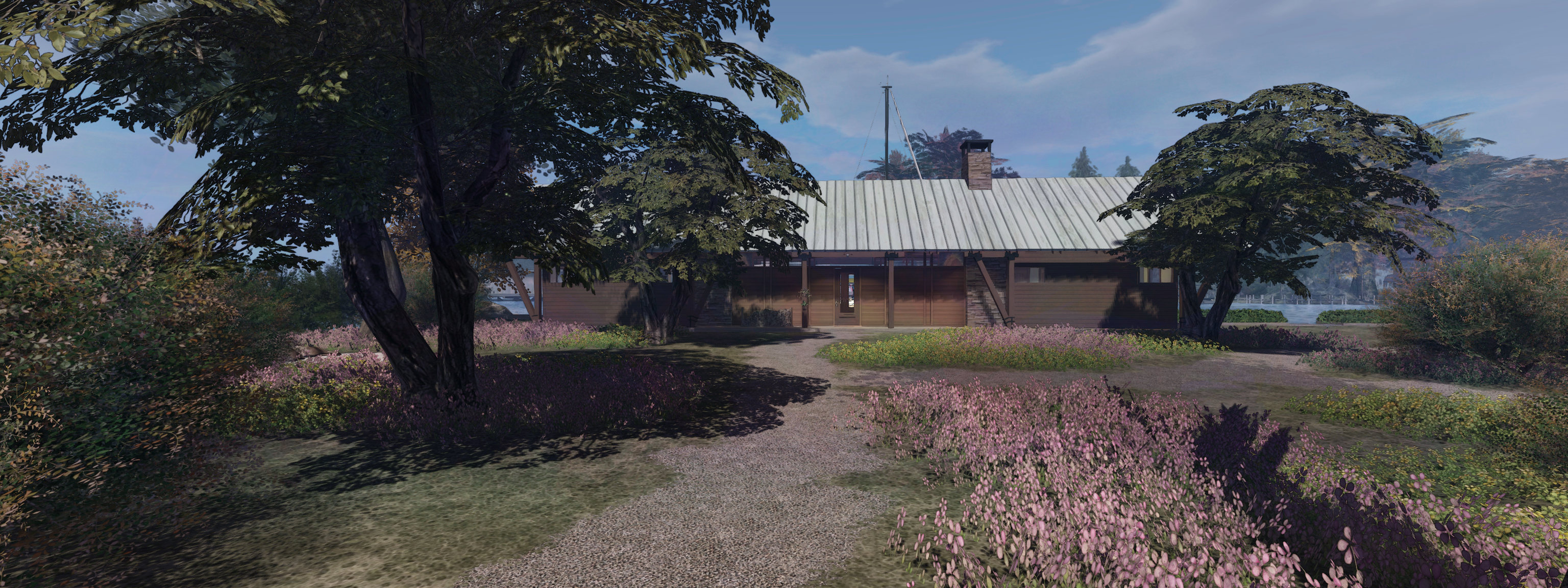
A Bridge House in Second Life

The CONVAIR Bridge House at Isla Caitinara, with modified bridge / deck with added pergola from Maya’s Builds

So, another couple of months have gone by, so it must be time for a change of house at Isla Pey 🙂 . Well, the reason is a bit more complicated than that, given it involves things going on in Second Life and the physical world that combined to make me feel I needed to tinker around and ktbash … again.

The SL side of things was in part down to the fact that, while the last house was fun to covert (see: A Country Hall in Second Life), it was, given the size of our new island, a little small. So, given we were in Second Norway, I hunted around for a design that might be taken to have something of a Scandinavian feel to it. And I found the CONVAIR Bridge House by Tobias Convair.

Priced at L$2,00 in-world, or L$2,200 via the Marketplace, the Bridge House is a single-storey property with a linear layout: a central lounge / kitchen /dining area flanked by end rooms on either side, one the same width as the lounge area,  they other slightly narrower, and with a narrow fourth room – advertised as a bathroom – to one side.  The lounge area benefits from a large fireplace and exposed ceiling trusses and boarding that gives it a very spacious build. The three remaining rooms all have flat, lower ceilings in wood. Outside, the house has extended eaves, particularly at either end, whilst one side also has full hight windows that could offer picturesque views in the right setting, the other having small windows. double doors are set into the “windows” side of the house, and a single door on the other.

The re-textured CONVAIR Bridge House, coloured in an attempt to match the original, sitting without our garden

No lighting is supplied, nor does the house come in a rezzer – at 56 LI, the structure doesn’t need one, being a single linkset. However, it comes are a range of deck / bridge “add-ons” that can be used in a variety of ways to extend the available space around the house and offer various over-the-water options. These are something I found particularly attractive, as they gave me a range of ideas for dock and deck options for a water-side setting like Isla Caitinara.

However, there are a couple of small niggles I have with the design. The fist is that it includes baked textures. Nothing unusual with this – many SL items do include shadow elements, both baked and linkset elements. However, with this house, the bakes reflect the shadows cast by chimneys, eaves, timber frames, etc, by a static Sun. Not a problem if you run with Shadows disabled in the viewer or life under a fixed sky. Bu, if you’re like me, and run with shadows enabled and under a dynamic sky, these baked shadows can conflict with “natural” shadows, and look odd. Getting around this was was no biggie; as I like kitbashing (and wanted to retexture the floors and stone walks in the build, it was a simple task to replace the supplied textures – once I’d found some that close matched the original woodwork and roof, as I wanted to maintain as much as a the original character of the design as possible.

The other point to note with this design is that it relies very heavily on transparent prims to provide physics / “solidity”. Again, there’s nothing wrong with this per se, particularly if you’re using the house “as is”. However, I found it preferable to remove those making up the floors and the floor mesh with prims I could then more easily texture to suit our needs, Doing so his increase the default LI a little – from 56 to 61; but it allowed for a better finish from my perspective.

This slideshow requires JavaScript.

Like the Country Hall build, I opted to make  the new house a waterside house adjoining our boat docks, and the included bridge add-ons worked as a good template for me to re-work the existing dock, and a deck for a gazebo. However, again given the use of transparent prims, I opted to replace almost all of the bridge elements with my own, again for no increase in LI – at least until I linked them in to the existing docks on the island!

Despite the above niggles on my part, the Bridge House does make for a stylish home, and can be used “as is” from the box – instructions are supplied with it for correctly aligning the desired bridge and deck sections; although this does assume the bridge goes to one side of the house and the deck to the others. But again, if you’re OK with editing and moving items in-world, manual  alignment of elements can be done relatively easily.

Overall, an aesthetically pleasing build offering plenty of scope for customisation / expansion that can easily be tailored to suit individual needs. Ours came out at a total of 89 LI, including additional rugs, pictures and wall hangings, lighting, net curtains and window blinds.

Link and SLurl


A Country Hall in Second Life

The Apple Fall Country Hall at Isla Pey

It’s pretty well established in these pages that when it comes to home life in Second Life (and while I do still build with prims), I’m one for playing with house builds and kitbashing bits to produce something I like. As such, I’m always on the look-out for building I think might fit the bill.

One of such building is Apple Fall’s Country Hall, available in-world from the Apple Fall store. It’s a unit that has long caught my eye, being a frequent choice with region designers who have often used as a summer house or a café, but it’s taken a while for my ideas with the building to develop into something I might want to have a try at bringing together. However, the recent addition of AustinLiam’s Captain’s Retreat to our range of homes (see: A Captain’s Retreat in Second Life) started me thinking more about seeing what I could produce using the Apple Fall Country Hall.

For those unfamiliar with the Hall, it is a single-storey, building with a brick exterior and a worn-looking interior priced (at the time of writing) at L$625. It has a footprint of 15m ant 14m  and comes in at 148 LI. The interior comprises two linked spaces: a room that runs the full length on one side with an almost full-length skylight, with a second square space opening off to one side, separated from the larger room by three columns. Double doors at either end of the building allow either end to be oriented as the “front”, so depending on preference you can have a double entrance or single.

The Apple Fall Country Hall with additional decking and moorings at Isla Pey

What is particularly attractive about this build (and I assume others in the Apple Fall range, although I’ve not tested them), is that it is designed with sufficient faces on parts, allowing it to be re-textured with relative ease. Which is not to say this must be done; the default finish has a certain shabby-chic interior look with faded plasterwork, paint flaking from woodwork, faded, worn (and in one place, damaged) floors, careworn doors, and so on. However, should you want something a little brighter on the interior, those individual faces make it comfortably possible.

For my part, I liked the aged look of the building’s exterior, but I wanted the interior to offer a brighter contrast and give the feeling that the interior has been renovated. To this end, I opted for a light cream paint look for the ceilings, white walls and refreshed woodwork. The two floor sections allowed themselves to be re-textured with a “new” herringbone parquet, which I finished with a light tint of grey to deepen the colour and a soft specular application to offer a slightly polished look.

This slideshow requires JavaScript.

In terms of layout, the modular nature of the build also meant I could remove the interior columns and a section of the floor to incorporate a gallery kitchen that, with the assistance of blinds, can act as a divider between the large “living” area and the smaller “bedroom”. This required minor physical adjustment to the ceiling panels in the smaller room area to maintain a degree of symmetry, while a clean-up of the six doors helped finish things off.

For those who like smaller living spaces, the Apple Fall Country Hall offers a very flexible design that can be used in a number of ways (hence its popularity among region designers), and I hope the brief slide show above – taken at a time when things were still a work-in-progress helps gives others ideas at what might be achieved.

The Apple Fall Country Hall at Isla Pey

As noted towards the top of this piece, the Country Hall is available through the Apple Fall store in-world.

SLurl Details

A Captain’s Retreat in Second Life

AustinLiam’s Captain’s Retreat boathouse / house on display with accessories at his in-world store.

While I like to build in SL – particularly my own homes – I’m always on the lookout for units made by others that might suit our needs or be up for a bit of kitbashing. One of those I’ve had my eyes on for  a fair while is AustinLiam’s Captain’s Retreat, and moving to a home literally just across the water from Austin’s in-world base of operations has tended to sharpen my interest in having a play with that design.

For those unfamiliar with Austin’s work, he produces a range of commercial and residential units and accessories ideal for those wishing to build a waterside setting or who live on / near the water. Most are of a wooden design, and so well suited to being used in a variety of settings.

AustinLiam’s Captain’s Retreat integrated into Isla Caitinara

The Captain’s Retreat is a split-level building well suited to a coastal locations or on the banks of broad rivers / the edge of lakes. It’s an over-the-water design, the lower level forming a boathouse suitable for small or modest sized powered boats, with the upper  level offering a large open-plan area providing some 20 square metres of accommodation space (including 2 balconies) that can easily and comfortably be split into two living areas,  and is well-lit thanks to large windows on three sides of the building, two sets of which incorporate sliding doors to access balconies that bracket the building.

At 84 LI, the building is supplied without a rezzer – you just unpack it and drag it out of the resultant  folder (which also contains a single armchair, a flag pole and a bearskin rug referred to as “bear … already dead” 🙂 ), then place it. This is handy for those who don’t like messing around with rezzers; however, for those who (like me) enjoy kitbashing / modding designs, thought has been given to making this a flexible design well suited to modding. The fireplace elements, for example, can be easily selected and relocated within the house. External lighting is supplied as a part of the build, the lights individually switchable, while the boathouse has a door that can be raised / lowered and has piers for easy access to any moored boat.

This slideshow requires JavaScript.

The interior living space can be comfortably split into smaller areas to suit needs. Borrowing from Austin’s approach, I used a room divider rather than full-height walls, and added slatted blinds from additional privacy between “day” room and sleeping area

In our case, the mood nature of the design allowed me to add external decking around two sides of the house, and then split the main living area into two areas – one a general living space,  with more than enough room for a sofa and armchairs, a dining  area and even a gallery kitchen. Taking a leaf from Austin’s in-world show home for the Captain’s Retreat, the remaining half of the room became a bedroom area,  overlooking the open waterway passing our Second Norway island.

The mod nature of the house allowed the fireplace to be relocated as noted above, whilst also allowing me to add greater depth to the two balconies and the glass awnings over the top of them. While it is not vital, I also modified the lighting supplied with the house, removing the supplied  scripts and replaced them with a system integrated with the room lighting I added to the house, with a script to activate all lights a SL sunset and turn them off at SL sunrise.

The living area of the house has balconies on either side, served by sliding window doors. The modular design of the build means that these balconies can be made deeper if required to provide more space, and the supporting beams of the house frame adjusted to match

At  L$1680, this isn’t a design that will break the bank – but it can provide a surprisingly comfortable living space. Thanks to Ydille’s Multi Scene Rezzer & Multi Scene Erazer Pro V5 I reviewed last month, the Captain’s Retreat house now forms a 4th option of house we can have at Isla Caitinara whenever we feel like a change – and for those looking for a house they can easily mod and / or create a cosy home on the water, I’d have no hesitation in recommending this design.

Links

House changing with a scene rezzer in Second Life

A rezzing system makes it easy to swap between house designs and furnishings, and the Multi Scene Rezzer & Multi Scene Erazer Pro V5 makes it an exceptionally low-cost option

While hardly new to SL, rezzing systems are something I’ve written about on a few occasions as a means of making convenient use of space, and being quickly able to swap between house interiors with things like Linden Homes (see: Saving your Bellisseria house designs for re-use with a rezzing system) and / or being able to swap back and forth between vehicles within taking up too much in the way of LI by keeping them rezzed all the time (see: Adding a little vehicle space with a rezzing system).

I’ve used such systems extensively throughout my SL time, particularly with reference to house / landscape designs, where I’ve tended to lay out house and landscape and then drop everything into a rezzer so that we’ve always been able to swap back and forth with house and garden options relatively easily – with the usual caveat that anything placed in a rezzer must have Copy  / Modify capabilities.

With our recent move to Second Norway (see: Farewell, Isla Pey, hello, Isla Caitinara), I again wanted us to have the freedom to swap between houses, but not quite to the same extent as with our old island. The latter was totally based on mesh landforms (due to limitations of terrain texturing available to us), so it was easy to have house designs, furnishings and landscaping placed within individual rezzers. With the new island, the layout is such that given we may want to change the house and some of the grounds from time-to-time, the gardens are pretty much as we want to keep them. Therefore, using a single rezzing system containing multiple house options makes a lot more sense. However, while the RF Scene Rezzer I’ve previously used does support this kind of approach could be used, it does rely of on coalesced objects to create a scene, and these can be tricky to manage when they comprise a lot of objects.

The broad design of the islands in Second Norway make them very amenable to tucking away houses, be they a relatively large design like our “skytower” …

So, whilst looking for a further alternative, I came across Ydille’s Multi Scene Rezzer & Multi Scene Erazer Pro V5. I’ll confess that when I saw the price – just L$49 – I was sceptical as to how well it would work. For that I owe Ydille an apology, as this is actually one of the most capable personal rezzing systems I’ve yet used, offering the kind of capabilities normally reserved for systems costing ten times the fee.

In short, the system provides the following capabilities:

  • Storing and rezzing up to eleven individual scenes (e.g. house, furnishings, gardens, etc.).
  • Auto-clearing a currently rezzed scene before rezzing another.
  • Rezzing multiple scenes side-by-side.
  • Easy updating of individual scenes, or adding further scenes to a rezzer up to the maximum of 11.
  • Using one than one rezzer in a single location.
  • Options to:
    • Manually clear all currently rezzed scenes.
    • Relocate the rezzer without impacting object placement.
    • Set access to the rezzer to one of owner, group or public.

In addition, the Pro V5 rezzer includes the ability to configure the rezzing options menu with unique names via note card.

For our purposes – easily swapping between different house options – the system is absolutely perfect, and set-up couldn’t be easier, comprising two main steps: creating your scene(s) and then updating the rezzing menu.

….Or something a little more cosy, like a stone cottage – note the change to the grounds in front of the house as well

Creating A Scene

  • Lay out the items to form a scene (in our case, the house, its furnishings and fittings, and the immediate surrounding plants).
  • Edit each object in turn and:
    • Rename it in accordance with the system’s object naming convention (see below).
    • Drop the system’s Position / Eraser script into it.
    • Allow the script to record the object’s position (region X,Y,Z co-ordinates and rotation).
  • When the Item is ready – the script’s hover text will flash in yellow – Take the object back to inventory.
  • Drop the updated object into the scene rezzer’s contents.
  • Repeat for all remaining objects in the scene.

Object Naming Convention

Items for a scene must use the correct naming convention. For the first 9 scenes in a unit, this takes the form of “S1_[name]”, “S2_name”, etc.

  • So items for the first scene might be: called “S1_house”, “S1_sofa”, “S1_chair”, etc.
  • While items for the second scene might be “S2_house”, “S2_sofa”, “S2_chair”, etc.

Items for the 10th and 11th scenes follow a similar convention, but without the underscore (so S10House, S10Sofa, etc.).

Updating the Rezzing Menu

Ydille’s Multi Scene Rezzer & Multi Scene Erazer Pro V5 provides a customisable scene rezzing menu.

By default, the Pro V5 rezzing system has a pre-configuring scene rezzing menu (“Skybox”, “Pool”, “Clouds”, Plants”, etc.). These names can be updated to more meaningful terms by editing a note card contained in the rezzer itself. To change them:

  • Edit the note card in the rezzer.
  • Delete the 11 single-line entries in the top portion of the card (“Skybox”, “Pool”, “Clouds”, Plants”, etc.).
  • Replace them with your own names, one per line.
  • If you have less than eleven scenes, you must add additional lines (use a space or period), so the list is always 11 items long.
  • Save the note card.

Note that you can update the note card as you add further scenes to your rezzer.

Using the System

When you’ve loaded one or more scenes:

  • Click the rezzer.
  • Click the Rez Scenes button to display your available scenes.
  • Click the button of the scene to be rezzed.
  • Allow the scene to rez.

By default, any current scene that is rezzed will be deleted. This can be toggled off / on via the Pre Erase button on the the rezzer’s main menu. Access options can similarly be set by clicking the Access button to toggle between Owner, Group and Public. Please refer to the system’s documentation for further notes.

Another look at the cottage – a design from Domineaux Prospero we’ve not used in a few years

Observations

Considering it is only L$49, the Multi Scene Rezzer & Multi Scene Erazer Pro V5 packs in a lot, as noted, and is extremely easy to use. Given I didn’t really want to dramatically change the overall layout of our new island home, but wanted a quick means of changing the house space, it has already proven to be absolutely ideal for our needs on Isla Caitinara, Certainly, if you’re looking for a low-cost personal rezzing system – if you’re looking for a system to sell items, you’ll need to look elsewhere – this system really cannot be beaten – and it is capable of packing in a lot large scene areas than we”re using.

Shippe & Saille Harbor Master in Second Life

The Shippe and Saille Harbor Master (Bimini and fishing rods deployed)

As a rule of thumb, I tend not to seek copies of items for review in these pages; those I do produce tend towards items I have purchased. The reason for this is because I feel I can give a fairer review if I’m writing about something I’ve purchased. That said, there are a couple of of exceptions to the rule, and I’m about to make a third in this case.

LadyJane Shippe sent me the latest from her Shippe and Saille brand, the Harbor Master, a slightly rescaled model of the Harbor Master 19, a dory style hulled cruiser with a forward cabin space, and itself based on the classic open Outboard Dory 18. It’s a small, fairly nimble craft driven (in the case of this version) by a 50 horse power outboard motor.

The Shippe and Saille (r) moored alongside the Bandit 170 at home, with the Bandit 580 behind them both

The S&S Harbor Master is reportedly 15% larger that its physical world equivalent, so as to present enough space for all sizes of human  avatars within the cabin and the covered pilot house. It is not, at first glance, a particularly elegant boat when compared to other cabin cruisers; the snub bow, forward placement of the cabin and high roof to the pilot house tend to give it something of an ungainly look. But looks, as the hoary old saying goes, can be deceptive.

Outside of the increase in size – which given it is proportional, isn’t that noticeable – this is a faithful reproduction of the Harbor Master 19, fully capturing the shape of the dory hull, the cabin and pilot house. The latter offers bench seating for two, and the cabin basic sleeping space for two – although the boat will carry up to three.  Behind the benches, the open cockpit offers room for equipment stowage, etc. A cooler box sits at the back of the cockpit, which might be considered at keeping drinks on ice or used to hold any fish caught when out and about.

Fishing aboard the Shippe & Saille Harbor Master

Fishing, because the boat is compatible with a number of Second Life fishing systems – WZW fishing, 7 Seas, and Goldtokens rod. Two rods can be rezzed in the holders towards the stern of the hull, and the pose system also include fishing poses that will auto-rez (temp) fishing rods. In addition, the user manual provides instructions on swapping the latter out for any preferred rods an owner might have.

Rezzing the two rods on the boat increases the LI from 31 to 34, which still leaves the boat a modest count in terms of LI. Other options that are included with it are a cockpit Bimini “raised” and “lowered” by the pilot’s chat command of “Bimini”, an opening /closing cabin skylight or door, and an anchor that can be raised / lowered, as can the outboard motor (the latter of which is raised by default on a fresh rezzing of the boat)., and the boat’s fenders. All of these, bar the cabin skylight and door, are activated via chat commands (the skylight by touch).

If rezzed out of Linden Water, the boat will raise itself and rez a 6 LI trailer underneath to support it

Handling-wise the boat follows the usual lines: the majority of commands are chat based, although some  – such as the lights – use the switches in the pilot house. the arrow / WASD keys handle steering and the throttle. The latter has four forward and four reverse settings (dead slow, slow, half, and full) sitting either side of the idle setting. Additionally, the Page keys can be used to rapidly toggled between idle and half speed (forward or reverse). In terms of driving, the boat is extremely responsive and the chat command for the camera can be used to help recover the camera position should things go sideways on a region crossing (including the “cc” command for any passenger – a nice touch).

Painting the boat can be handled in one of two ways. Those wishing to just change their Harbor Master’s name can use the hull texture included in the user guide. Those wishing to make more extensive changes can find a link to download a comprehensive set of texture and UV maps. As a copy / mod vehicle, this boat is also open to a degree of physical customisation – general guidelines are provided in the user guide for those wishing to do so.

The Shippe & Saille Harbor Master

Those who enjoy Get The Freight Out will find a GTFO option in the the Habor Master package. Once unpacked, simply add the script and GTFO item it contains to the boat’s contents, and your ready to use it with the game.

I’ve not used the Harbor Master extensively, having made fewer than a dozen runs in it – although three have been reasonably long distance across and around Blake Sea and along the coast of Nautilus. Throughout, I found the boat to be responsive, made good recoveries on region crossings and generally presented no real handling problems.  At L$1,900, it’s very well priced, and just the job for those looking for a modestly-priced, small-sized motor cruiser for open water or river cruising.

Related Links