Listening to the Silence in Second Life

Kultivate Signature Gallery: Melusina Parkin, Listening to the Silence

Kultivate Magazine and Gallery premier a new exhibition space on Tuesday, March 17th, 2020 with the opening of the Kultivate Signature Gallery, a new 3-storey hall that will provide exhibitions by established Second Life artists. for its opening exhibition, it features the work of Melusina Parkin.

Melu, whose work stands as one of my featured artists in this blog, has an exquisite balance in her photography, a fine blend of detail, space and minimalism, all carefully combined and crafted to present images that are elegant in their unique focus, and rich in narrative and feeling. This is once again apparent with Listening to the Silence, as presented at the Signature Gallery.

In writing about the exhibition, Mule notes:

Sounds and words fill the world up. Nature talks by wind whistling, waves lapping, animal sounds; humans speak, cities talk by signs. Silence is rare and it’s never absolute. It’s a gem we have to keep carefully. Silence allows us seeing the world without the distractions caused by the sounds and seeing more clearly our interior worlds.

Kultivate Signature Gallery: Melusina Parkin, Listening to the Silence

And so it is that with Listening to the Silence, we are presented with a series of signature Melusina Parkin views of Second Life. No, not “views”, but “portraits”; Melu’s work so uniquely captures the virtual world in which we spend so much time, that each piece genuinely presents a sense of a living, breathing entity, one in which the presence of avatars would actually reduce that sense of life within it, rather than enhance it.

This is a collection of images that offer something of a continuation / reflection of ideas witnessed in past exhibitions such as Empty Spaces and Night Walks. In this selection, we are presented with views into deserted rooms, along empty streets, and over lonely waters. Each piece is haunting in its singular beauty – but we’re not being asked to just look at them, but to hear their very sounds of silence, again as Melu notes:

A photograph doesn’t produce sounds, although it can suggest them; so we can observe things just imagining their noise or appreciating their quietness. Images stop any movement, then they stop any sound as well. Silent images – images of silent things – are closely related to a sense of loneliness and of absence; we can multiply the meanings we give them.

Kultivate Signature Gallery: Melusina Parkin, Listening to the Silence

In pointing us towards this consideration of the absent sounds within photographs, Melu is opening a much broader door to how our imaginations might otherwise create the narrative to accompany each piece. However, there is perhaps something more to this exhibition; something perhaps unintended when conceived (or perhaps not, I’ve no idea as I’ve not spoken directly on the exhibit), but utterly prevalent to the global situation the is unfolding before all of us.

The spread of novel coronavirus disease 2019 (COVID-19) has seen cities forced into lockdown, travel restrictions enforced, and general warnings for people not to gather in groups and to remain home / work from home wherever possible. The result has been a strange emptying of streets and places – perhaps not to the extent witnessed with Melu’s images, but still very evident. Thus, her pieces within this exhibition might be seen as presenting a silent echo of what we’re seeing world-wide in the physical world. In doing so, they offer a very different voice, a reminder of the chorus of sounds that accompany our daily lives that, if not entirely silenced, has been quelled.

So it is that Listening to the Silence can be seen as a richly layered exhibition, one with the power to not only engage us in reflections about how we perceive the digital world where we spend or time or on how sounds affect our daily living; but also the potential for the world that we regard as ours and familiar, to still present us with a collective threat and challenge.

Kultivate Signature Gallery: Melusina Parkin, Listening to the Silence

Listening to he Silence formally opens at 13:00 SLt on Tuesday, March 17th, with music by live performers Parker Static and SaraMarie Philly (14:00 SLT).

SLurl Details

Speedlight client: recent updates and 3D world view

via Speedlight

The Speedlight client for web browsers and Android, continues to be developed apace, with a number of recent updates delivering further functionality, including:

  • The ability to teleport, including via landmarks.
  • The ability to buy and / or sell land.
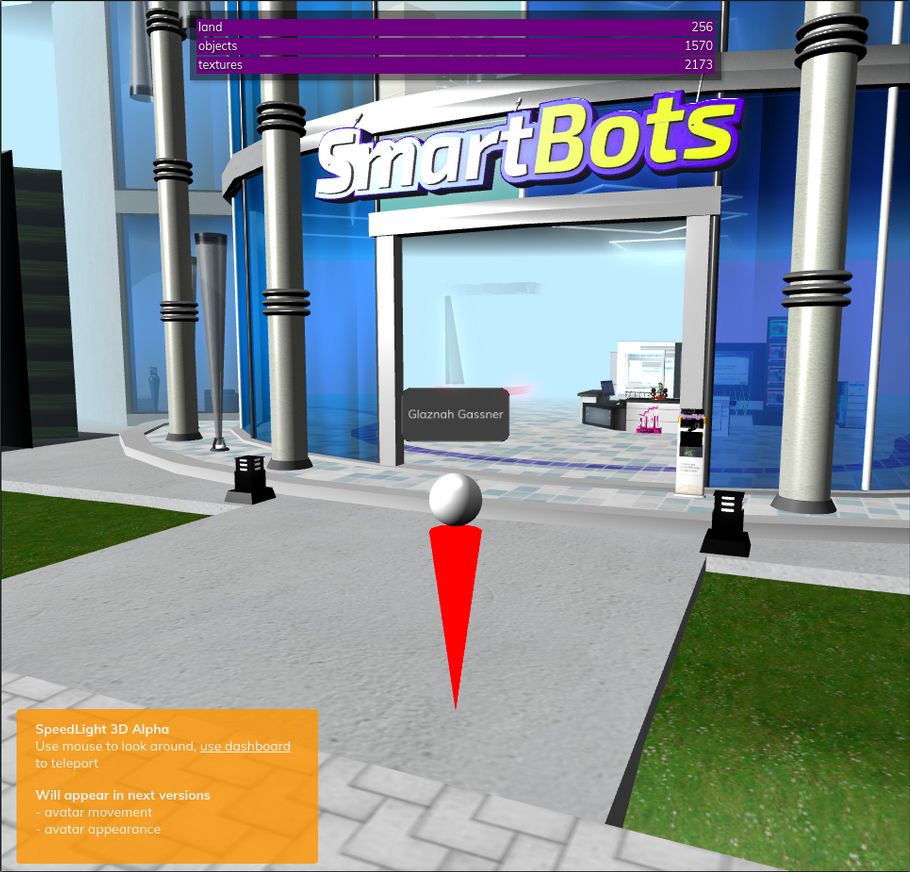
  • The initial 3D world rendering capability (currently only available to Gold subscribers).

Teleporting

Speedlight now offers two means of teleporting around SL:

  • Via the summary screen.
  • Using inventory landmarks.

Via the Summary Tab

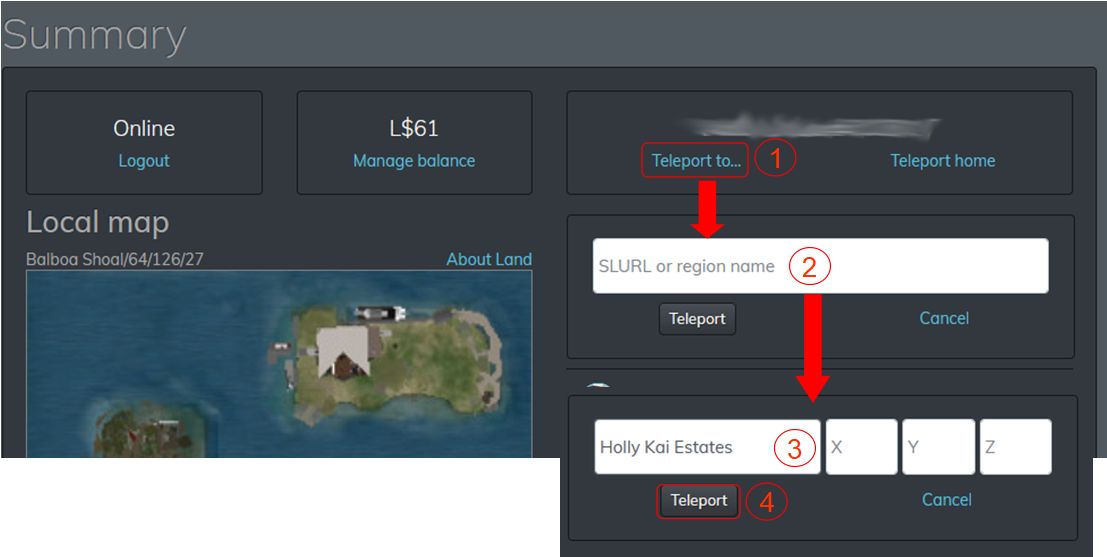
If you know the name of the location to which you wish to teleport, you can do so directly from the Summary tab when logging-in to Sppedlight and Second Life (see Speedlight: access SL via a browser (incl. mobile devices for details on creating Speedlight accounts and linking them to your Second Life account(s) if required).

  • When you are logged in to Second Life with Speedlight, click on your avatar’s name on the left-side menu to display the Summary tab (if it is not already displayed).
  • Click the Teleport To… option under the name of your current location. The location display changes to a field where you can enter a SLurl Or Region Name.
    • As you start to type-in a SLurl / name, the field will further change to display spaces for (optionally) entering the X, Y, Z coordinates for the location.
  • Click the Teleport button.
  • The location map should update to show you have moved to the desired location.
Teleport via the Summary tab: 1. Click the Teleport To… option; 2. The Enter SLurl or Region Name input field is displayed. 3. Start entering a SLurl or region name and the input field will add (optional) X, Y, Z coordinate fields; 4. Click the Teleport button to teleport your avatar.

Teleport via a Landmark

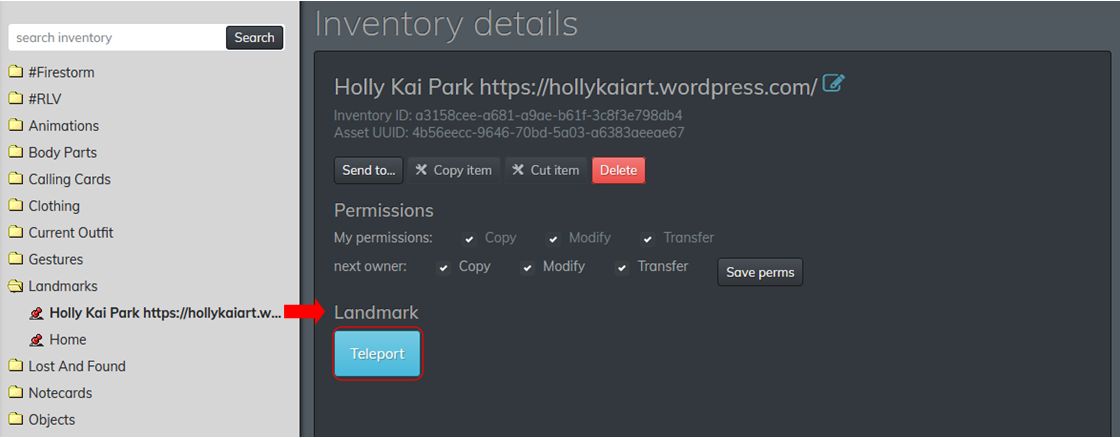
  • When you are logged in to Second Life with Speedlight, click on the Inventory option in the left-side menu.
  • Open your Landmarks folder and click on the Landmark you wish to use.
  • The landmark’s details are displayed in the Inventory Details tab.
  • Click the Teleport button to teleport.
Teleporting via Landmark

Buying and Selling Land

As of March 2020, it is possible to buy / sell land using Speedlight.

Buying Land

As with a viewer, you need to be on land that is for sale in order to purchase it.

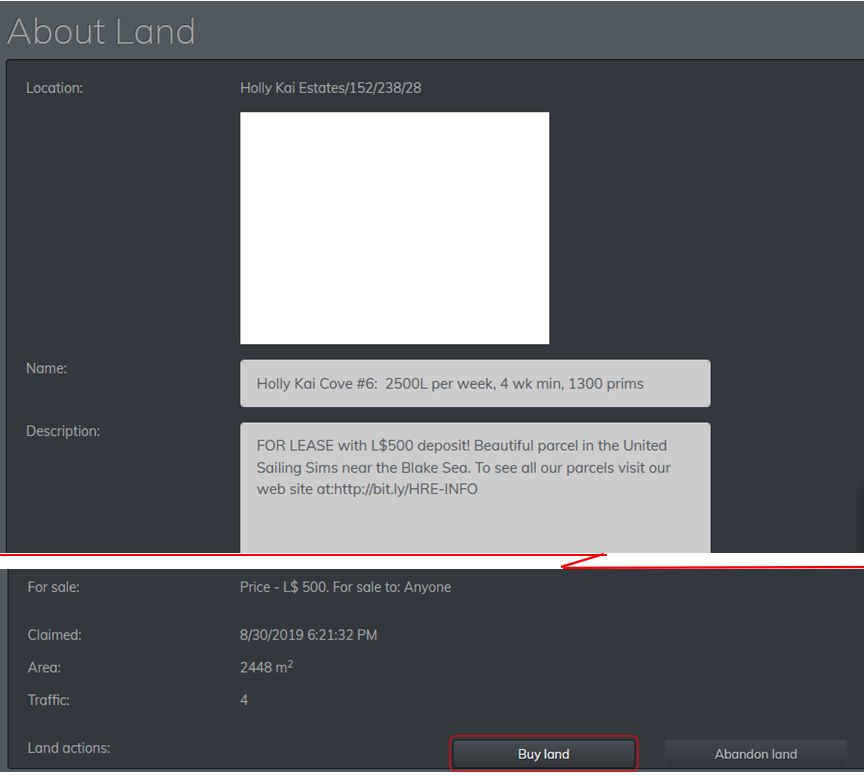
  • In the Summary Tab, click on the About Land link displayed to the top and right of the map.
  • The About Land tab is opened, detailing information relating to the land – location, name, description, whether it is for sale or not, etc.
Buying Land in Speedlight: the Buy Land button
  • At the bottom of the tab will be a combination of up to three buttons: Sell Land, Buy Land and Abandoned Land.
  • Click Buy Land.
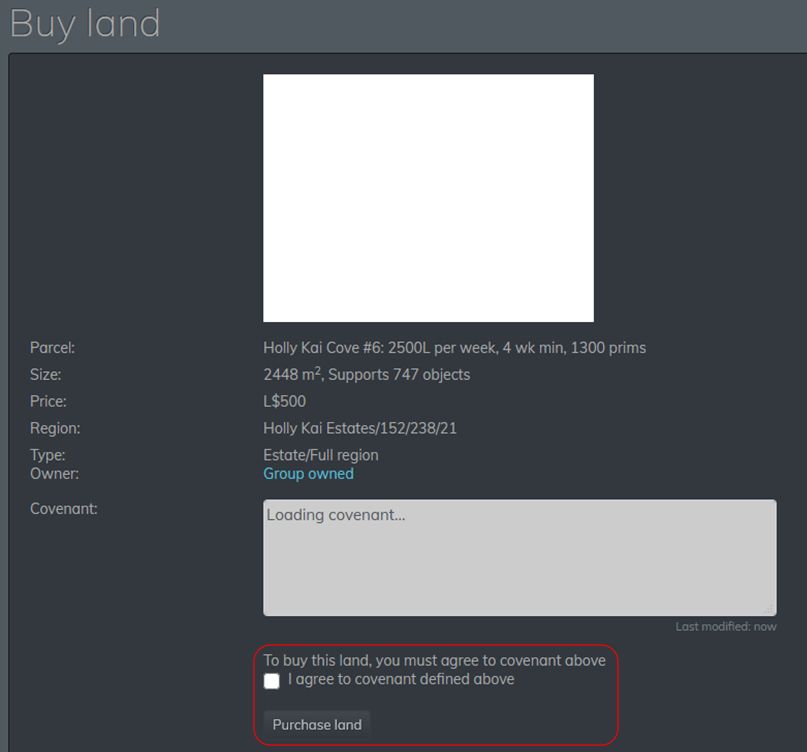
  • A summary of the land you are about to purchase is displayed, giving information on size, purchase price etc.
  • If you want to purchase the land:
    • Click the check box to accept the covenant (required whether or not a covenant is displayed). This enables the Purchase Land button.
    • Click Purchase Land.
    • To cancel a purchase, return to the Summary tab display without clicking the Purchase Land button.
Buying Land in Speedlight: completing the purchase
  • Providing you have sufficient funds on account, the purchase will be made, and the summary screen will update to display your purchase has been made and display you as the owner.
    • Note that you may be required to complete additional steps to make full use of the land – such as contacting the estate owner and request group access for rezzing rights, etc. These are land-dependent and outside the scope of this article.
  • With the land purchased, you should be able to rename it and change the description, and use the Parcel Options link to set the parcel’s capabilities (Fly, Build, Object Entry, Run Scripts).

Selling Land

To sell land you have permission to sell:

  • In the Summary Tab, click on the About Land link displayed to the top and right of the map.
  • The About Land tab is opened, detailing information relating to the land – location, name, description, whether it is for sale or not, etc..
  • At the bottom of the tab will be a combination of up to three buttons: Sell Land, Buy Land and Abandoned Land.
  • Click Sell Land.
  • The Land Management summary is displayed.
  • You must now:
    • Set the price for the land.
    • (Optionally) set an avatar name against the sale (so the land can only be sold to that avatar, if required).
    • Set whether or not any objects on the land are to be sold with the land.
  • When you have done so, click the Set Land On Sale button.
  • The summary tab will update, and will display an orange Cancel Land Sale button, should you wish to cancel the sale at any time prior to a purchase being made.

3D World View

The Speedlight 3D world view, March 2020, showing an avatar “mannequin”

Speedlight’s 3D world view is in the early stages of development, but is currently available for Gold subscribers to test. The capability comprises two elements:

  • The client-side world renderer.
  • A “world storage” server-side database. Details on this are not clear, but I assume it is a server operated by Smartbots that received asset data from the Lab (via CDN) and then feeds that data to the client.

The renderer has a number of limitations / issue at this point in time, all of which are being worked on:

  • Limitations:
    • Avatars can only be rendered in “mannequin” form.
    • The renderer will not draw avatars seated on objects.
    • There is no avatar / world interaction (so you cannot touch objects, etc).
    • Avatar mannequins  cannot walk or move (teleporting is possible).
  • Issues:
    • Semi-transparent textures will render in black.
    • Other texture issues may be encountered.
    • Numerous additional problems and issues to be resolved.

Obviously, the “mannequin” avatar form is only rendered by Speedlight, Those using a viewer will see your avatar fully rendered when you are logged-in to SL via Speedlight.

For those wishing to try the 3D renderer / help with its development, Gold subscriptions are available at L$1990 (US $8.00) a month, and can be purchased in L$ through the client for those wishing to obtain an early look at the capability.

Feedback

A good set of updates, along with a series of issues fixes made in the end-of-February 3.059 release that demonstrate Speedlight is continuing along a steady development path.

It’s still – as noted – early days for the 3D renderer, and before anyone complains at the avatar appearance, lack of functionality, etc., at this point in time, it’s worth pointing out that 3D world rendering in Lumiya started from a very similar point, and went on to become flexible and usable, so time should be allowed for Speedlight’s capabilities to develop.

Related Links

SL17B exhibitor applications

via and © Linden Lab

On Friday, March 13th, 2020, Linden Lab opened applications for those wishing to exhibit at the upcoming 17th anniversary of Second Life.

SL17B will run from Friday, June 19th through until Friday, July 10th, with the core entertainments for the celebrations taking place between June 19th and Sunday, June 28th. This year the theme is vacations and road trips (or road trips and vacations as the Lab has previously referred to it – amounts to the same thing), with the official blog post announcing the opening of exhibitor applications reading in part:

In Second Life, you can explore the (virtual) world from the safety and comfort of your own home — and that’s why we’ve selected  “vacations and road trips”  as this year’s SL17B theme. Whether you teleport directly or travel to your favorite SL destinations by plane, train or automobile, we hope to see a wide variety of community exhibits and experiences that celebrate the spirit of Second Life escapism and travel.

However, in a change from previous years, those wishing to exhibit at SL17B are not being asked to tie their exhibit ideas just to the core theme of the event, as the blog post goes on to note:

A major change for exhibitors this year is the freedom to create an exhibit that reflects your own passions in Second Life. This means that while “vacations and road trips” is our official SL17B theme, exhibits will not be limited by it. We welcome a wider variety of topics this year, including exhibits that may serve as introductions to the varied and abundant communities throughout SL. We also are inviting original art installations and other personal projects that people want to share with the SL community at large.

Those who are interested in exhibiting in a 32x32m plot at SL17B are asked to both read the rules and policies and then complete and submit the official exhibitor application form before the end of Friday, May 22nd, 2020 (PST).

Music Fest

A reminder that applications for those interested at performing at the SL17B Music Fest, scheduled to take place over Friday 19th / Saturday 20th June 2020, can still apply to participate in auditions through until the end of Monday, May 18th 2020. The Lab is looking for at least a dozen performers, both veteran Second Life musicians and those new to the scene, with sets in the past running to 60 minutes per performance.

Auditions are to be held on a rolling basis held every other week at the the Bellisseria Fairgrounds, and as applications are received, performers will be asked to attend one of these auditions to perform. Every audition event will be open to the general public to attend as an audience, and details will be made available ahead of the first such audition via a Second Life blog post, with each audition session additionally advertised through the following in-world groups (both with open enrolment):

  • Second Life Birthday.
  • Bellisseria Citizens.

Those interested in auditioning for the Music Fest should be sure to complete the audition application form and submit it before the closing date.

Keep Up To Date and Early Access

Updates on SL17B preparations will be made via official blog posts and through the Second Life Birthday in-world group. In addition, and as indicated during the Lab Gab show featuring Patch Linden and the Moles, it is planned to offer members of that group early access to the SL17B grounds on Thursday, June 18th.

Related Links

2020 viewer release summaries week #11

Logos representative only and should not be seen as an endorsement / preference / recommendation

Updates for the week ending Sunday, March 15th

This summary is generally published every Monday, and is a list of SL viewer / client releases (official and TPV) made during the previous week. When reading it, please note:

  • It is based on my Current Viewer Releases Page, a list of all Second Life viewers and clients that are in popular use (and of which I am aware), and which are recognised as adhering to the TPV Policy. This page includes comprehensive links to download pages, blog notes, release notes, etc., as well as links to any / all reviews of specific viewers / clients made within this blog.
  • By its nature, this summary presented here will always be in arrears, please refer to the Current Viewer Release Page for more up-to-date information.
  • Note that for purposes of length, TPV test viewers, preview / beta viewers / nightly builds are generally not recorded in these summaries.

Official LL Viewers

  • Current Release version 6.3.7.535996, formerly the Yorsh Maintenance RC, dated February 7, promoted February 20 – No Change.
  • Release channel cohorts:
    • Premium RC viewer updated to version 6.3.8.538264 on March 12th.
  • Project viewers:
    • No updates.

LL Viewer Resources

Third-party Viewers

V6-style

  • No updates.

V1-style

  • Cool VL viewer Stable branch updated to version 1.26.24.11 on March 14th – release notes.

Mobile / Other Clients

  • No updates.

Additional TPV Resources

Related Links

Space Sunday: inside Apollo, rover delays & LOP-G changes

Apollo in Real Time. Credit: NASA
2019 through 2022 mark the fiftieth anniversaries of the Apollo Moon landings, and I’ve previously covered the flights of Apollo 11 (in three parts: part 1, part 2 and part 3) and the flight of Apollo 12. This year marks the 50th anniversary of the only Apollo mission to take place in 1970, and perhaps the second most famous of them all: the flight of Apollo 13.

On Friday, March 13th, in the run-up to marking the 50th anniversary of that dramatic mission (which I’ll be covering nearer the time), NASA has released Apollo 13: The Third Lunar Landing Attempt, the third in its web-based Apollo in Real Time.

Developed and produced by NASA software engineer and historian Ben Feist, Apollo in Real Time is a series of in-depth on-line resources that allow people to relive Apollo missions 11, 17 and now 13 by presenting all of the space-to-ground and on board audio from the missions; all of the mission control film footage, news pool television transmissions and press conferences audio; and all of the flight photography synced to a timeline for each mission covering when every word was spoken, scene was filmed and image was taken. Together they represent the most complete records of the three missions.

Putting these sites together has been a labour of love and a technical challenge for Feist. While almost all of the original audio recordings for the missions had been archived, they had been made using a tape format for which only one playback machine remained, requiring they be re-recorded digitally.

Apollo 13 In Real Time showing (top l) the moment of engine ignition; (bottom l) mission milestone / transcript / commentary options; (r top) adjustable audio tracks for entire mission and current period; (bottom r) options for displaying additional information / images. Credit: NASA

For Apollo 13, however, there was a particular problem: the five most important tapes from the mission – those recording the events leading up to, during and immediately following the explosion that crippled both the Service and Command modules – were missing, having been removed to be used in the post-accident investigations. These took time to locate, and proved to be in as poor condition as the rest.

Fortunately, Feist was able to enlist the help of Jeremy Cooper, a software audio specialist, who wrote an algorithm that allowed the distortions in all of the tapes to be eliminated during the re-recording process, providing a complete, high-quality audio record of all three missions.

Most poignantly, perhaps with the Apollo 13 mission, are not the exchanges between mission team members or with mission control and the spacecraft (many of which run concurrently with one another, hence the sheer volume of audio available), but the recordings of telephone conversations between the wives of the astronauts aboard the stricken space craft, and astronaut Ken Mattingly (who had been due to fly the mission, before he was exposed to a risk of contracting German measles and was replaced by Jack Swigert) at mission control.

My kids aren’t up yet and they don’t even know what is going on. They went to sleep before all this came up last night. And I was wondering what I could tell them as far as… um, um, in other words, are we really pretty safe right now?   

– Marilyn Lovell, wife of Apollo 13 commander James Lovell, on the phone to mission CapCom
Ken Mattingly
in the early hours of April 14th, 1970, following the explosion aboard the
spacecraft.

These exchanges, filled with angst and concern, yet delivered in an eerie calmness, really bring home the situation faced by all involved in the unfolding situation.

Apollo 13 in Real Time includes photography by the crew. In these images, captured by Fred Haise, (l) the Lunar Module can be seen stowed in the upper section of the Saturn V S-IVB stage as Lovell guides the command and Service Module towards a docking with the round port in the top of the LM, ready to withdraw it from the spent stage. (r) The S-IVB stage as it drifts and diverges away from the mated CSM and LM post-extraction. The nozzles in the lower left corner are a group of attitude control thrusters on the LM. Credits: F. Haise / NASA

As well as recovering the audio from the missions, Feist and his team had to also painstakingly match it to footage recorded within Mission control throughout each mission – much of it without sound. All of this took considerable time and effort by Feist and his small team; in the case of Apollo 13, a total of eight months of continuous work went into putting together a complete history of the mission’s exact timeline of event from launch to splashdown.

Currently, you can join Apollo 13 in the moments leading up to launch or while it is “in progress.” However, from April 10th, and for the period of the mission from pre-flight through to recovery, you’ll be able to join in “right now” exactly to the hour in the mission, 50 years later and witness it unfolding.

Apollo 13 in Real Time: the Lunar module Aquarius, which served as the crew’s lifeboat (l) and the Command and Service Module (CSM), showing the area of the explosion and damage. Credit: NASA

Apollo 13 In Real Time, together with Apollo 11 and Apollo 17, provides a remarkable insight into these historic flights of exploration and discovery.

ESA Delays Rosalind Franklin’s Flight to Mars

Rosalind Franklin, the European Space Agency’s ExoMars rover, together with its Russian-built lander, has had its July launch date pushed back by two years. The British-built rover, which has had far more than its fair share of woes over the 10+ years of its development (including having to be entirely re-designed after NASA welched on an agreement to launch the rover), will now not launch until the August / September 2022 opposition launch opportunity.

The primary reason for the launch delay is related to the mission’s complex parachute system intended to slow the combined lander / rover as they pass through the Martian atmosphere and to a soft landing on the planet’s surface.

In all, the mission utilises three parachute systems: a high-altitude pilot parachute, designed to steady the vehicles after entry into the Martian atmosphere; an initial “first stage” supersonic parachute, designed to act as a speed brake and slow the lander and rover to subsonic speeds; and finally a much larger “second stage” parachute designed to manage the descent through the atmosphere. As late as August 2019, both of these latter parachutes were failing test deployments in simulated Martian conditions.

The ExoMars parachute systems. Credit: ESA

With the assistance of expertise from NASA – who have the greatest experience in the use of parachute landing systems on Mars – the cause of the failures was eventually traced to the containment bags for the parachutes, which were damaging both on their deployment. This forced a complete redesign of the bags, which was due to be tested at a high-altitude test range in Oregon, USA this month to confirm their readiness for use. However, the spread of the COVID-19 coronavirus strain means that the testing is not now possible. Nor is the testing the only aspect of the mission impacted by the virus: the primary control and management centre for the rover mission is located in Turn, Italy, and is under lock-down, severely hampering mission management and coordination work.

However, it was the inability to carry out the parachute deployment tests that prompted the decision to postpone the mission’s launch date.

We agreed together it’s better to go for success than just to go for launch at this time. Although we are close to launch readiness we cannot cut corners. Launching this year would mean sacrificing essential remaining tests. We want to make ourselves 100% sure of a successful mission. We cannot allow ourselves any margin of error. More verification activities will ensure a safe trip and the best scientific results on Mars.

– ESA Director General Jan Wörner, announcing the ExoMars mission delay

Landscapes and avatars in Second Life

Focus Magazine: Charly Keating

Currently open at both the Focus Photo Gallery and the Focus Artist In Residence (FAIR) galleries, operated by Focus Magazine and curated by AngelaThespian and PatrickofIreland are a set of exhibitions I enjoyed viewing over the weekend for their mix of subject and styles.

Having opened on March 6th, the exhibition that the Focus Photo Gallery, located on the upper floors of the Magazine’s main building, features the landscape photography of Charly Keating (ladycharis). Described as a “painter of thoughts; photographer of dreams” her work is just that: art that offers settings as they might appear in thoughts and dreams.

Focus Magazine: Charly Keating

Dark-toned, carefully post-processed to emphasise certain elements – clouds, Sun, sky as a whole, the fall of light on a wall, and so on, and composed with an eye for harmony and balance between foreground and background, these are pieces in which it is easy to become lost. Such is the beauty of each scene offered, that it is both simultaneously new and yet familiar, regardless of whether or not we recognise the actual location where the original image may have been captured. They are evocative of memories that appear to be ours whilst in truth remaining Charly’s own vision.

Rich in colour and content, evocative in presentation, this exhibition served as my first exposure to Charly’s work in-world, and I look forward to seeing more in the future.

Focus Magazine: Rachel Magic

The remaining four artists considered here have their work exhibited at the FAIR gallery, a short walk across the sky platform from the Focus offices.

On the ground floor, Rachel Magic (larisalyn) similarly use her studies of landscapes settings and self-portraits to tell a story. She does so through a broad palette of styles, from black and white through to colour, with some using tonal approaches to their finish, others leaning more to painted scenes than photographs. All have touches of detail that help to draw the observer into them and frame their own narrative around the picture.

Focus Magazine: Jason Westfield

Across the hall, Jason Westfield offers a series of avatar studies that again offers a range of styles and approaches, from self-portraits through to subtle female studies rendered in a number of finishes that tend to draw the eye to them, although I personally felt the most evocative of the pieces displayed are Mask and Hand. The latter in particular is beautiful in its apparent simplicity, and yet deeply nuanced in potential interpretation and artfully presented.

The upper floor of the FAIR building presents what might be considered a join exhibition by SL partners Vin Soulstar and Airi Soulstar (AiriTryst).

Focus Magazine: Vin Soulstar

Both exhibits again focus on avatar studies and between them revel the couple’s relationship and a couple and as photographers. As such, these exhibits stand as both complimentary and complementary halves of the same coin, so to speak.

Within each side of the floor where they are displayed, we’re offered insight into the individual styles used by Vin and Airi – colour, tone, lighting, post-processing, finish – which sets them apart as individual photographers. At the same time, we are given witness to the manner in which they view their work and lives as an SL couple, which draws their respective exhibitions together into a single whole.

Focus Magazine: Airi Soulstar

An engaging series of exhibitions, nicely brought together in a single place, the Focus Magazine and FAIR galleries are well worth a visit. Should you do so, don’t forget to also pay a visit to the Exploratorium of Art, located under the main platform, and accessed via the building at its southern end.

SLurl Details