Update April 29th: Don’t forget my additional piece on the new cloud options in Firestorm 4.4.0.
Firestorm 4.4.0.33720 made its formal debut on Monday 22nd April, although it has been well and truly put through its paces by both the Firestorm beta testers and the preview group for some time now, in order to ensure it is as ready for mainstream release as possible. It includes a huge number of updates and revisions, both from the Firestorm team and their contributors and from Linden Lab.
Given the size of the release, this is not intended to be a review of absolutely everything within Firestorm 4.4.0 – please refer to the release change log for that. Instead, this review focuses on what I regard as the key updates / changes. As always, credits for the various updates and contributions to Firestorm which re mentioned here can be found in the release change log – again, please check them there.
Server-side Baking /Appearance Support
Note that this item is Second Life-specific.
This isn’t actually a visible change to the viewer in term of UI, etc., – but it is an important one.
Server-side Baking / Appearance is a major change within Second Life which is primarily aimed at reducing or eliminating issues of “bake fail” (when the avatar skin & clothing layers fail to render correctly and with remain blurred or show the avatar wearing the “wrong” outfit). This capability is being introduced in two parts: viewer-side support and server-side support.
Viewers which do not have the viewer-side support will not work with the Server-side Baking / Appearance service once it starts being deployed on the grid – people using them will increasingly see grey avatars around them. Therefore, it is essential that Firestorm users update to Firestorm 4.4.0.
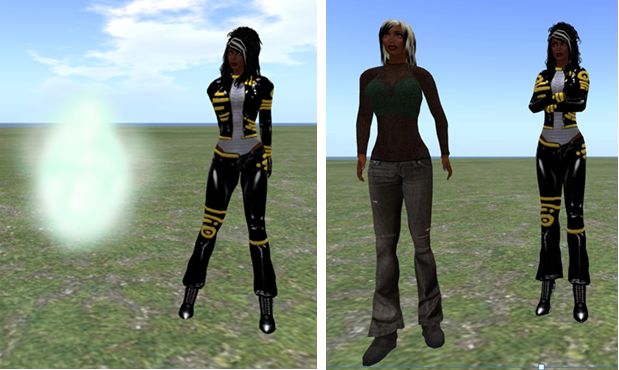
For further information on Server-side Baking / Appearance, see the following blog posts:
Preferences Updates
This release sees a large number of Preferences updates, all of which are reported in the change log, and which include:
- Chat:
- General: new option to select display name format for IM tabs – a drop-down list of: Display Name, Username, Display Name (Username) and Username (Display name)
- Notifications: a new option to Show group chat in chat console (useful if you opt to hide chiclets – see below); new drop-down option for IM receipt sounds: Play sound only if not in focus
- Graphics:
- General: the Quality and Speed slider incorporates additional settings (Low-Med, Med-High and High-Ultra); Lighting and Shadows is renamed Advance Lighting Model (as per the LL viewer); the Depth of Field check box is moved to the Depth of Field tab; the Windlight Sky Detail slider and the Avatar Physics slider swap positions
- Rendering: Max number of concurrent HTTP GET requests slider removed; check box to Enable rendering of screen space reflections added
- Sound and Media > General: uses radio buttons to show stream title notifications in chat, toasts or to be turned off
- Move & View:
- View: new check boxes to: disable the mouse wheel from controlling camera zoom; Show user interface in Mouselook; Enable context menus in Mouselook and Leave Mouselook after regaining focus
- Firestorm: new check boxes to Reset camera position on avatar movement and Show the default camera controls mini-floater always as opaque
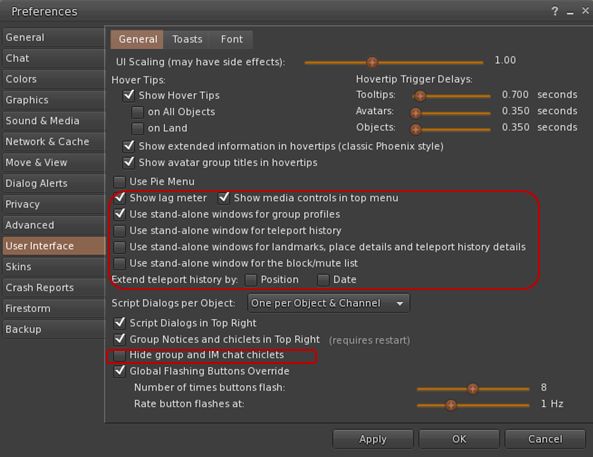
- Skins: new colour option (Ectoplasma) for AnsaStorm
- Firestorm:
- Windlight: new capability to define cloud texture
- Build: options to default prim settings, texture and permissions on creation – see the Firestorm Custom Prim Parameters video tutorial and the Firestorm wiki
- Backup tab – see below.
Custom Quick Preferences
A popular feature with Firestorm is the Quick Preference floater which, as the name suggests, provides fast and easy access to some of the most frequently used options in the viewer without having to open the “full” Preferences floater.
With release 4.4.0, the Quick Preferences floater has been made somewhat customisable – essentially allowing almost anything which is a debug setting to be added to the floater. However – be warned that this capability is considered to be for advanced users, and does require a willingness to delve deeper into the viewer than some users may be used to. Further, not every debug setting can be added to the floater.

For those wishing to find out more, Firestorm have produced a tutorial video on using the Customise Quick Preferences option, and a Firestorm wiki page.
Settings Back-up
Often, when installing a new version of a viewer, the recommendation is that one performs a “clean install” – removing all cached and settings files. This can make any viewer installation labour-intensive, as settings all need to be restored after the installation is complete, and this can take time and effort.
Firestorm 4.4.0 attempts to ease some of the pain by presenting users with a Preferences option which allows them to back-up many of their global and account settings to a local hard drive. Once done, the back-up can then be restored to an updated version of Firestorm following installation; so providing the back-up is kept up-to-date, restoring the majority of preferred settings is no longer a chore.
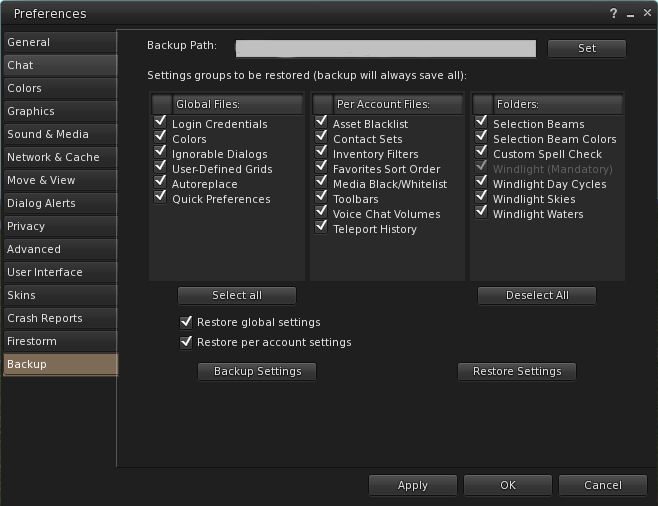
The back-up option can be found in Preferences > Backup. To use it, simply select a folder on a local hard-drive as the back-up location, then select those options which are to be saved; you can then delete all files associated with Firestorm prior to performing a clean install.


 Inara Pey: Living in a Modemworld