Firestorm: where next and early looks

Update February 25th: As per a comment from Jessica Lyon, Firestorm have now merged the Server-side Baking code and updates to RLVa into one of their private repositories.

Update, 19th February: A transcript of the core part of the meeting, including Jessica’s Firestorm status overview and the Q&A session, complete with the video recording, is now available.

Update, 14th February: The initial video recording of the meeting is now available on YouTube, and an HD version will be available soon.

firestorm-logo

Wednesday February 13th saw the Firestorm team host an open meeting to discuss what is happening vis-à-vis Firestorm given all the various ongoing viewer-related projects currently underway (CHUI, materials processing, server-side baking, plus Firestorm’s own updates and improvements) – and when the next release is liable to hit the public at large,

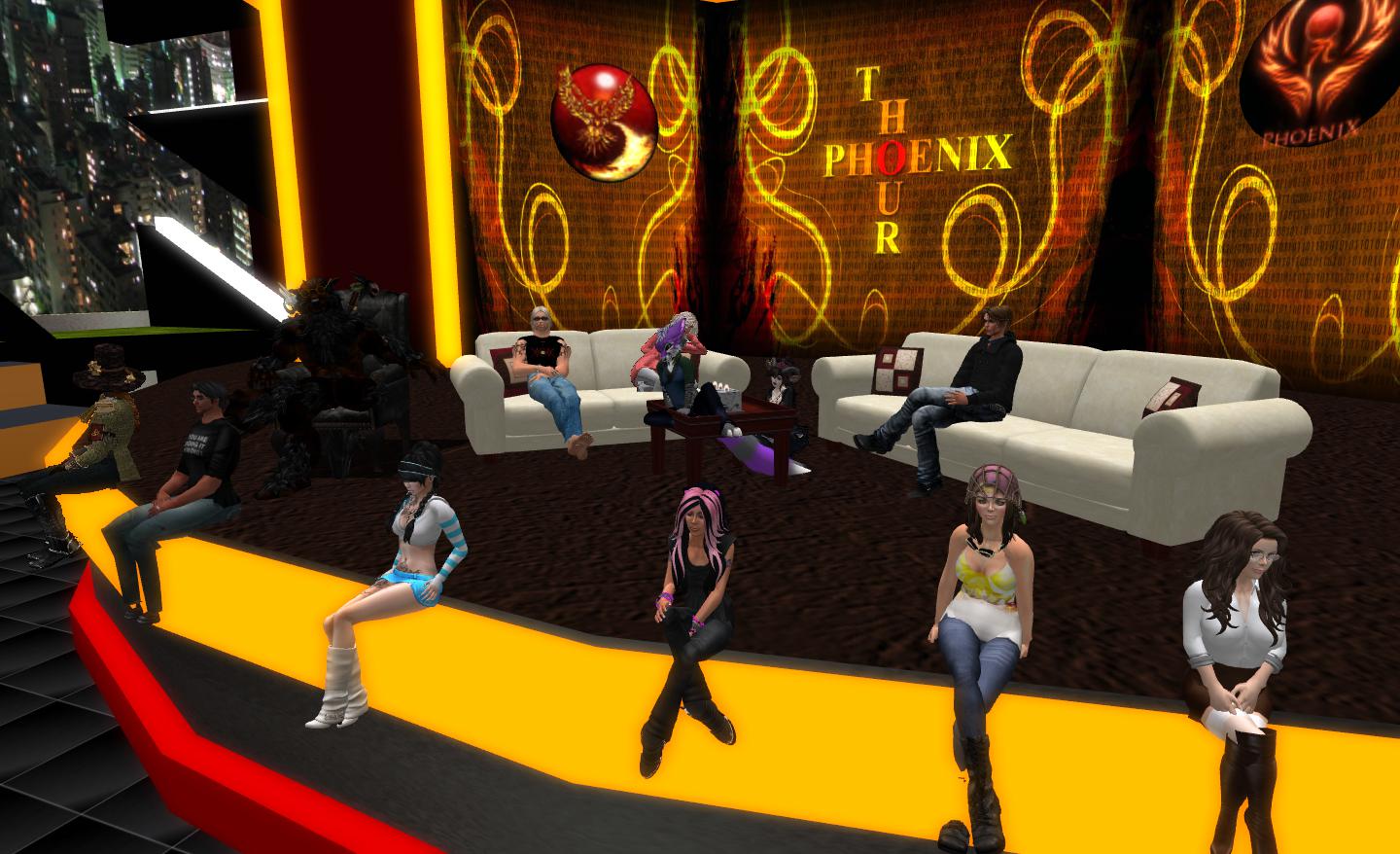
Several members of both the Firestorm development and support teams were on-hand to field questions, with Project Lead Jessica Lyon leading things off with a 15-20 minute overview as to what is happening, where the viewer stands at this point in time, what the plans are for the immediate future and what we might expect to see in Firestorm in upcoming releases.

The Short Version

  • The Good:
    • Firestorm will be supporting all of the new viewer capabilities coming out of LL, although CHUI will require careful consideration as to what is adopted and how, as Firestorm already offers several similar options to those being added to the viewer by CHUI
    • Firestorm will be getting a range of new features (although not all at once) which include: further work on re-implementing legacy search capabilities, the ability to save and reload personal settings; more OpenSim support; new windlight settings; new UI skinning; further work on adding v1-style functionality
  • The Not-so-good:
    • Serious crash and other issues have also come to light in merging Firestorm with the latest LL 3.4.5 code which the team are endeavouring to resolve
    • Server-side baking (SSB) is the priority for the Firestorm team at present (as it is with other TPVs), as it has a major impact on how people will see things in-world, and it is the project which LL are emphasising. However, integration of the SSB code into TPVs (particularly those supporting RLVa) is not proving easy
    • The emphasis on work at the moment is overcoming bugs, issues and problems and trying to get Firestorm to a point where it is running the SSB code.

Taken together, the latter points mean that while a new version of Firestorm is in development, there will be something a further wait before it appears, and when it does, it my not have such a huge range of new features as has been found in previous releases and might suffer from stability issues.
Jessica Lyon
Jessica Lyon (seated centre, at the edge of the stage) with members of the Firestorm development and support teams, discusses Firestorm on Wednesday February 13th

Viewer Status

There are some serious issues within the Firestorm development code which are delaying progress towards a potential release. Firestorm has been merged-up to the Linden Lab 3.4.5 viewer code, and this has given rise to some severe problems for Firestorm (and is actually having an impact on other projects, as I reported earlier this week).

Commenting on the situation, Jessica Lyon pulled no punches, stating:

I’m going to be completely honest with you guys. Right now Firestorm, for us internally, is in pretty bad shape since our merge with Linden Lab’s TIP (3.4.5 code). There are a lot of bugs that we’ve inherited; there’s a lot of regressions which we’ve inherited. Ed [Merryman, lead for Firestorm Support] is crashing about two times a day – and for those of you know Ed, know that Ed never crashes. So if Ed is crashing on our recent builds, we’ve got some problems. We’ve got some log-out crashes, log-out things; log-in crashes … Basically, we’re not in great shape, and we’ve got a lot of fixing-up to do before we’re ready for a release.

As well as inheriting bugs, the merge has also highlighted bugs and issues within the Firestorm code itself which also need to be fixed. All of this adds up to recent builds for the viewer being “way worse” than the current release version in terms of stability and issues, and it is going to be a while before these issues are fully resolved.

Server-side Baking

Server-side baking is perhaps the most prominent viewer project underway at the moment, inasmuch as it is essential that all viewers connecting to Second Life be able to support it in order to avoid in-world experiences from being broken. Simply put, avatar skins and system clothing will not render on viewers which do not support SSB once the code is fully deployed, as shown below. )Things are somewhat more involved than that, and for those unfamiliar with the project, I’ve covered it in-depth in Avatar Baking: “and the clock has started!”. )

The SSB problem in part: I'm stabding on an SSB-enabled region. On the left  - as I appear to others who are using an SSB-enabled viewer; On the right, as I appear to others who are using a viewer which does not support SSB.
The SSB problem in part: I’m standing on an SSB-enabled region. On the left – as I appear to others who are using an SSB-enabled viewer; On the right, as I appear to others who are using a viewer which does not support SSB.

As it stands, Firestorm has yet to be merged with the Lab’s supplied server-side baking code for the viewer, although work has been underway within the team in a separate repository to the 3.4.5 code merge. A major problem here, as I again reported earlier this week, is that SSB has considerable (and negative) impact with RLVa. These problems are compounded by the fact that the test regions for SSB functionality are all on Aditi, which has considerable issues of its own at the moment, which are affecting people’s ability to reliably test code, and all have scripts disabled – which makes testing RLVa fixes alongside SSB somewhat difficult.

Currently, the Lab remains sympathetic to the issues TPVs are facing (and have offered help wherever practicable), and are not currently pushing a date by which TPVs must be ready for SSB to go live. They’ve also acknowledged that some of the problems TPVs are facing are down to delays on the Lab’s part, such as not making any bug fixes to the viewer code available until January 30th, some seven weeks into the planned eight-week window in which it had been hoped TPVs would be able to integrate the code. However, it is clear that TPVs are feeling under pressure to get SSB-capable versions of their viewers sooner rather than later.

Please use the page numbers below to continue reading this article

Firestorm Q and A: 13:00 on the 13th

firestorm-logoJessica Lyon, project lead for the Firestorm team, has announced that there will be a limited capacity meeting on Wednesday 13th February at 13:00 SLT, to discuss the Firestorm project. The core part of the announcement reads:

Every once in a while, and probably not often enough, we host a Question and Answer session in Second Life for the Second Life community. The purpose is to give us the opportunity to update you all with what we are doing and give you the opportunity to have a say, ask questions you may have to the team, voice complaints, make requests and in general communicate with us directly. This Q&A will not be quite like our office hours. It will not be as formal, it will be far less structured, and it will not be streamed live.

Seating is limited to 70 avatars and is first come first serve. We will, however, try to record it and offer the recording for folks who couldn’t make it.

All are invited, fans and haters alike, people who use our viewers and those who don’t… everyone.
All questions are welcome, we only ask that language be kept PG and folks be civil to each other.

Again, note that the meeting will not be streamed live. The venue for the meeting is the Firestorm Office Hours meeting place on the Phoenix Firestorm support region.

Kokua 3.4.4 goes CHUI

Update February 28th: Nicky has posted that the CHUI code has now been merged with the main Kokua code, and a new version of Kokua is available for testing with it.

kokua-logoNicky  Perian, working on the Kokua viewer for SL / OpenSim, issued an experimental version of the viewer on January 24th which includes the new SL Communications Hub User Interface (CHUI).

Release 3.4.4 (CHUI) has a dedicated repository, and is available for Windows and Linux.

As reported on its launch, CHUI complete overhauls the communications floater within the official viewer, and introduces a new Conversations Logs floater, allowing users to access saved chat and IM histories from within the viewer. In updating the Conversations floater, CHUI brings some functionality to it which users of several TPVs may find somewhat familiar, even if the presentation doesn’t match anything they’ve been used to in the past.

CHUI goes purple: the initial integration of the CHUI code into Kokua

A Kokua blog post accompanying the release of the experimental viewer provides additional information:

The Communication Hub UI  has Instant Messaging , Chat,  and Voice controls in one floater as was done in version 1 viewers.

Imprudence users have asked that Kokua implement the Imprudence UI for communications. I would like comments from Imprudence users about this interface .

This merge affected many parts of Kokua code. Please test and report problems using our bug tracker.

There is also a link to the Kokua wiki page on recommended practices for using Kokua experimental viewers.

The implementation appears to be a “straightforward”  merge of the code, with the familiar Kokua UI colour changes, but otherwise no additional updates. “Straightforward” is given in inverted commas because, as the Kokua blog post notes, the CHUI changes impact many areas of the viewer’s code, making integration somewhat difficult – particularly if the TPV merging the code already has modifications to how  communications within the viewer are presented to the user.

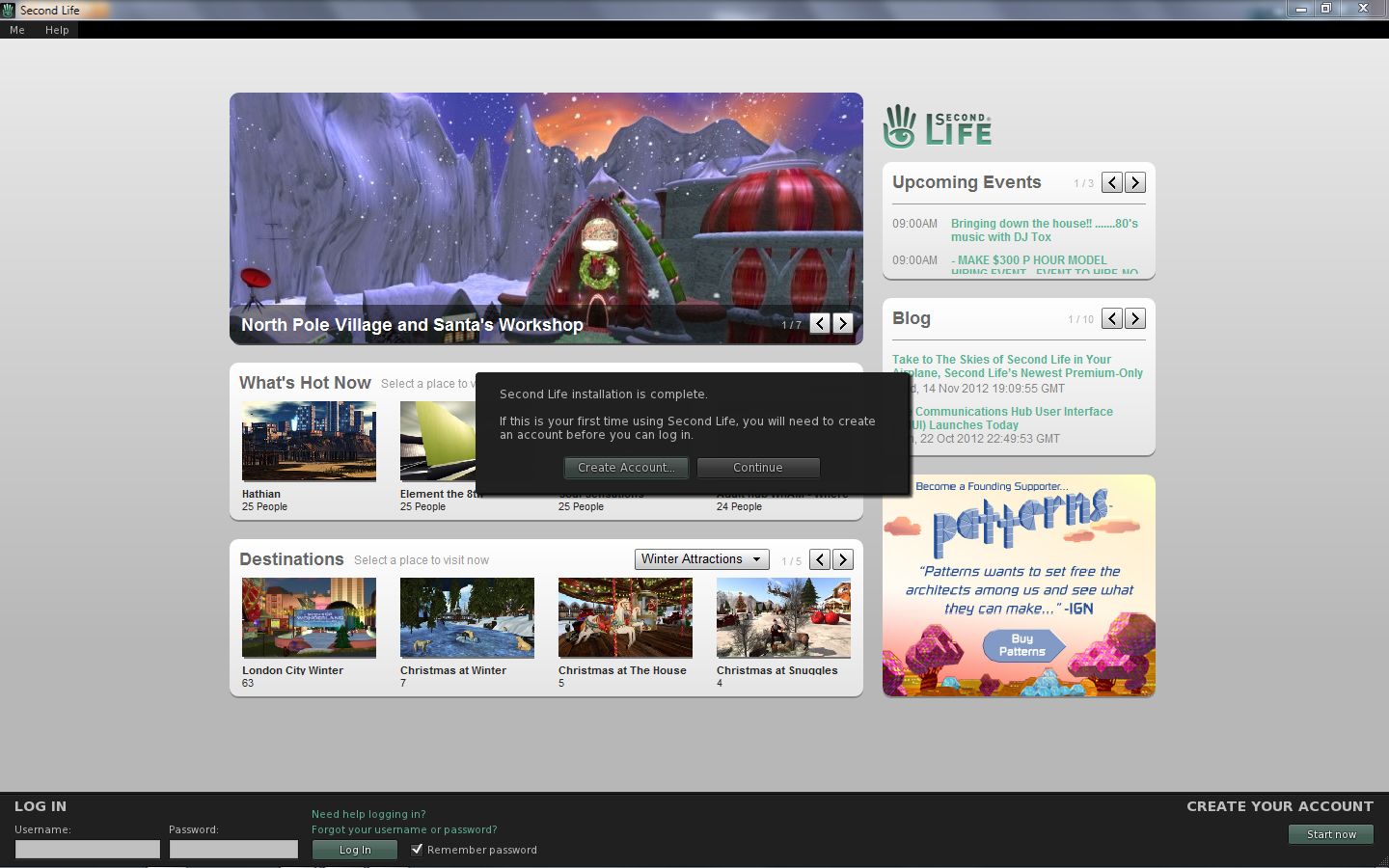
The experimental viewer also includes the default “account creation” prompt found in the beta and development versions of the SL viewer which appears to be in relation to the forthcoming SL / Steam link-up, and which is displayed on the viewer’s log-in splash screen if no account details are found on the local computer when the viewer loads. As with other viewers which have merged-up with SL viewer development code, this should be taken as a sign that the code has been included in Kokua by default rather than having any deeper meaning associated with it.

Other recent updates for Kokua (from the 3.4.4.25633 release of January 13th, 2013) include:

  • The use of Vivox as the default Voice system, as a result of the latter relaxing licencing requirements for grids
  • The addition of a draw distance slider to the top right of the menu bar
  • The ability to set a minimum draw distance of 3 metres (seen as a means of improving performance for those involved in close-quarter combat / duelling)
  • Minor UI changes (such as the “Me” menu being renamed “Avatar”).

Overall, this looks to be a clean implementation of CHUI, and one which gives OpenSim users a further opportunity to get a look ad feel for the revised  / new floaters for communications.

Related Links

“Tiling” snapshot fix (and more) now in the SL release viewer, Dolphin, Niran’s and RLV

Snapshot Tiling Fix

The snapshot tiling fix (MAINT-628) can now be found in the following viewers:

  • Dolphin viewer 3.4.6.26773+ (current release now 3.4.7.26856)
  • Niran’s Viewer 2.0.5+
  • Restrained Love 2.8.3.5+ (Windows)
  • SL release viewer 3.4.3.268262+ (released: 18th December).
Tiling test for Dolphin
Tiling test for Dolphin (3.4.6.26773+): image taken at 3500×2134 resolution using Dolphin 3.4.6.26773. Location: The Island of Armenelos (M) (click to enlarge) – fix also in the latest SL official viewer (3.4.3.28262), Niran’s Viewer (2.0.5+) and RLV (2.8.3.5+)

Graphics Preferences Updates for GPU Classes

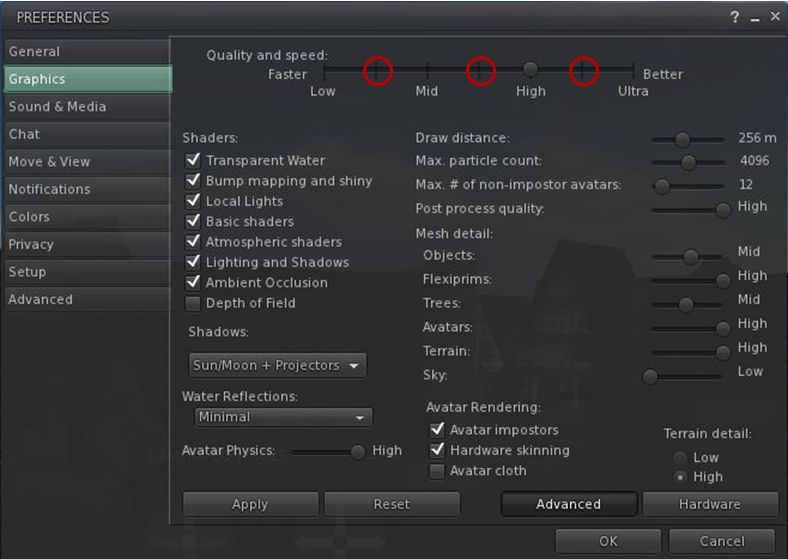
The SL viewer, Dolphin and RLV all include the new Graphics Preferences settings related to the ongoing GPU table updates. These new options place additional “stops” on the Quality and Speed slider between the four original settings of Low, Mid, High and Ultra, which are intended to better represent the default SL capabilities of different GPU classes,

The new "intermediary" graphics settings intended to better represent the capabilities of different GPU classes
The new “intermediary” graphics settings intended to better represent the default SL capabilities of different GPU classes

SSAO Fix for Horizon Haze

Also included in the recent Dolphin and Niran’s Viewer releases, is Tofu Buzzard’s SSAO improvements for generating horizon haze over Linden Sea (“ambient  distance fog”). This helps overcome a long-standing bug within the viewer which has effectively broken / nerfed horizon haze over Linden Water for a considerable time.

SSAO haze effect - fix from Tofuu blizzard, available in deferred mode on Dolphin and Niran's viewers.
SSAO haze effect – fix from Tofu Blizzard, available in deferred mode on Dolphin and Niran’s viewers. (image courtesy of Niran V Dean) – click to enlarge

Space Reflections

Niran’s viewer also introduces an interesting / experimental viewer-side feature from Tofu Blizzard called “space reflections”, designed to create reflections on shiny surfaces when running in deferred mode and with the appropriate Graphics Preferences option enabled. It’s not perfect, but it can be used to produce some interesting effects, as shown below, if only for those running a viewer which can render the desired results.

Tofu blizzard's "space reflections": (l) a viewer running in deferred mode; (r) Niran's viewer running in deferred with "space reflections" active
Tofu Blizzard’s “space reflections”: (l) a viewer running in deferred mode; (r) Niran’s viewer running in deferred with “space reflections” active to produce reflections both on the floor and inside the large sphere (click to enlarge)

Related Links

Firestorm 4.3.1.31155: the wait is over

Firestorm: forking development

On November 17th, the Firestorm team made a beta release of their latest update to Firestorm in order to offer users access to the new Group Services updates for managing large groups. At the time, it was indicated that the “full” release would occur in early December.

Keeping to their word, the team released 4.3.1.31155 on December 3rd, which includes everything featured in the beta release, and a few more goodies besides.

Given I’ve already given a comprehensive review of the beta release, this article will be focused primarily on the updates made between it and 4.3.1.31155 – although there will be some overlap.

As always, please refer to the Firestorm release notes for full details on credits, etc., for code contributions to the viewer, and for details of known issues and problems (known issues carried over from the LL code can be found here).

Download and Installation

As noted in the last review, the download .EXE is big – 40MB, which is unsurprising given that Firestorm packs so much into it. Installation – at a least for Windows users – is where the first set of changes occur, and it is worth recapping on these for people who have not installed the beta release:

  • A pop-up requesting whether or not the user wishes to have a Windows Start menu entry created for Firestorm during installation
  • Addition of the version string and estimated installed size to the installer
  • Addition of new OS detection code to warn if Windows Service Packs are not up-to-date and to prevent Firestorm being installed on Windows XP with
  • Publisher data, Phoenix URLs and Firestorm icon for the Firestorm entry in the Windows uninstall list
  • Automatic deletion of all previously installed skins to reduce issues arising from an unclean install
  • Addition of a DETAILS button in the installer pop-up window to allow the installation to be reviewed.

Havok Sub-licence

As noted last time, Firestorm has now signed a Havok sub-licence agreement with Linden Lab. This means that Firestorm is now available in two flavours – one for SL and one for OpenSim grids, with the SL version having both the –loginURI capabilities and the Grid Manager functionality removed.

This change means that Firestorm is now able to access the new LL-supplied Havok libraries, allowing the viewer to immediately include the pathfinding navmesh visualisation tools (as covered in my review of the beta release), and which could allow Firestorm to switch over to using the official LL mesh uploader code in the future, should they so wish, rather than using the current HACD code for mesh uploads.

For those using OpenSim, Firestorm 4.3.1.31155 can be downloaded here, and I’ve included an update on the OpenSim-specific updates to the viewer at the end of this article.

One point to note is that it is possible to use the OpenSim version of Firestorm on SL – the only difference is the OpenSim flavour of the viewer will not be able to access the SL Havok libaries or use any functionality associated with them.

Updates from Phoenix

Further updates from Phoenix have been added to Firestorm 4.3.1 in addition to those found in the 4.3.0 beta:

Texture Comment Metadata

When opening any texture, this will display the uploader name with a link to their profile together with the date / time the texture was uploaded. If permissions are sufficient, it will also display the asset ID on the texture preview floater.

Progressive Draw Distance (PDD)

A popular Phoenix feature, when enabled, this causes Firestorm to use a progressive Draw Distance stepping after a teleport, to help improve rezzing times. The Firestorm version includes an option to cancel stepping in progress if Draw Distance is manually changed (Preferences > Firestorm > General).

More Phoenix-like default settings for Phoenix Mode

The following Phoenix-like behaviours have been added to Firestorm when running in the Phoenix mode (selected via the Firestorm log-in splash screen):

  • “Resident” is not trimmed off legacy names
  • L$ balance changes will be shown in nearby chat instead of toasts
  • Received Items folder is shown as a normal Inventory folder
  • Firestorm will now send accept/decline responses for inventory offers after the according button has been pressed and not if the item has been received at the receiver’s inventory already
  • Group and IM notifications are now sent to the nearby chat console (v1-style) instead of toasts (v3-style)

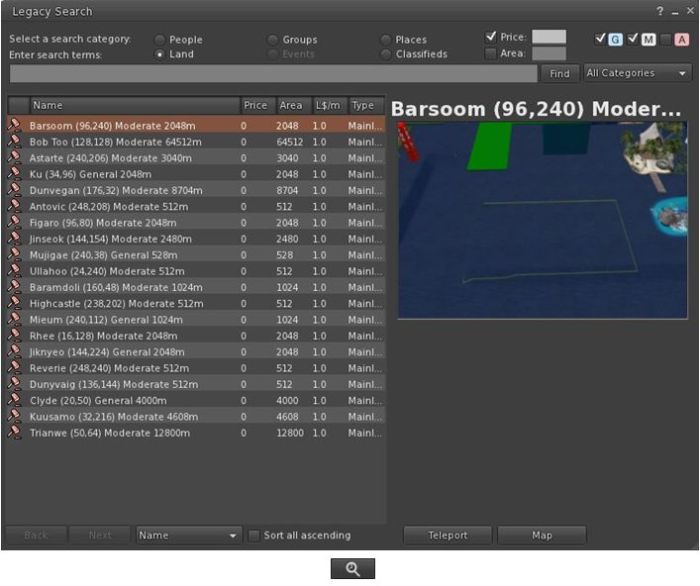
Legacy Search

Firestorm 4.3.1.31155 re-introduces the V1-style “legacy” search capability for those who prefer it to the V2/V3 web-style search functionality.

The Legacy Search floater and its associated toolbar button
The Legacy Search floater and its associated toolbar button shown in icon mode

Provided by Cinder Roxley, the legacy search option is currently available via a menu option (Content > Legacy Search) or via a dedicated toolbar button, and works for all search categories except Events, which will be added in a future update.

Documentation on the search function is available via the Firestorm website.

Phototools, Windlight and Snapshots Updates

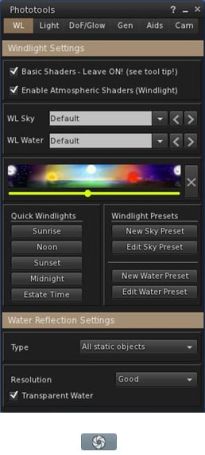
The main Phototools floater and dedicated toolbar button, shown in icon mode
The main Phototools floater & toolbar button, shown in icon mode

Phototools is a suite of floaters which bring together a range of controls, debug settings and options available within the viewer into a single, cohesive set of options aimed at the SL photographer and machinima artist. I’ve covered them in detail previously, and provided a further update in my last Firestorm review. With this release of Firestorm the Phototools floaters (Phototools and revised Camera floater) can be accessed via a menu option: World > Photo and Video.

Alongside of these comes a windlight update of some 100+ presets for water and sky developed by Phototools developer William “Paperwork Resident” Weaver.

These additional presets can be accessed either via the Fixed Sky / Water presets menu option (World > Environment Editor > Environment Settings) or via the Phototool floater (shown right). All of the Phototools presets have “Phototools” at the start of their name.

Also, the Flickr tab on the Firestorm snapshot floater includes Katharine Berry’s update which add the parcel name to the location option.

Continue reading “Firestorm 4.3.1.31155: the wait is over”

SL production viewer reaches 3.4.2

Update 18:35 GMT: Sometimes one reads the release notes and misses things. See the section on the Volume Controls towards the end of this article

The official SL viewer has now moved to the 3.4.2 code base with the release of version 3.4.2.267137.

This release brings with it a couple of signficant changes and a host of updates and fixes.

Steam Link-up Changes

Anyone performing a completely fresh install (including the removal of all account-related folders from the computer) will clearly see that the code for the forthcoming link-up with Steam is now present in the viewer, as the prompt to create an account will be prominently displayed.

The prompt displayed for anyone who installs the SL viewer for the first time – primarily aimed at those who will soon be able to download the viewer through Steam without necessarily having an SL account.

For those who do not perform a clean install, the prompt will not be displayed (as the viewer will locate existing account-related folders), nor will anyone who automatically updates their viewer should they see a prompt to do so. This means that the pop-up dialogue will not plague everyone who has an SL account, so shouldn’t be a source of annoyance. However, the cleaned-up bottom section of the screen (also with a “Create Your Account” option in the lower right corner) will obviously be visible to all, and gives a further indication that things are progressing.

This change also doesn’t mean the Steam link-up is live; I understand from Linden Lab that there are still some steps to be completed outside of this work. But again, given the viewer updates are starting to appear, it is reasonable to anticipate the time for a formal announcement to be drawing closer.

The prompt will also (I believe) be seen by those who come to SL via the “traditional” route of signing-up for an account first via the SL website (or any of the third-party sign-up options which may still be available) and then downloading the viewer. As such, it’ll be interesting to see if anyone gets a little confused by a prompt asking them to create an account when they believe they’ve already done so, rather than simply ignoring the pop-up by clicking CONTINUE.

Group Services Code

Large group management via HTTP service now part of the official release viewer

Key among the rest of the updates to the viewer is Baker Linden’s Group Services code designed to make use of the new HTTP service already available on the grid.

As there has been some confusion as to what this is all about, and at the risk of repeating myself, here’s a quick recap of the main points:

  • The new code allows for improved loading of membership lists of very large groups, together with improved reliability in editing such groups (i.e. assigning roles, removing people, etc.), by the group moderators
  • Until such time as the viewer-side code has been incorporated into all TPVs, the “old” method of loading group lists into the viewer will still be available. However, viewers using the “old” method (a protocol referred to as UDP) will have group loading capped at 10K members. This means:
    • That for groups with 10K or fewer members, there will be no change regardless as to whether the viewer is using HTTP or UDP
    • But for groups large than 10K, viewers running the UDP code will be unable to load the group until such time as they have been updated to the new code
  • The code will not lead to any improvements in group chat reliability, and is not aimed at improving group chat.

The new code is gradually appearing across all third-party viewers, with many already incorporating it ahead of this release from LL. Further, the Lab will not be “turning off” the UDP service in the short-term, so there is no risk of a viewer which hasn’t yet updated being completely unable to load any groups at all.

Volume Controls – Update

New volume control options

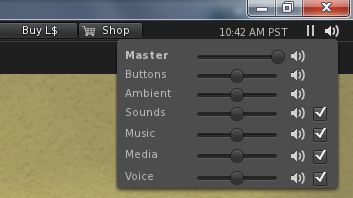
This release also see the official viewer adopt the “Quick volume” controls from Firestorm. These provide access to ALL major volume control options for the viewer, rather than just the master volume control, and can be accessed by hovering the mouse over the speaker icon in the top right of the viewer window.

The controls appear colourless as they are awaiting work to render them in the official viewer UI skin colour; as this work has yet to be completed (JIRA STORM-1868), I missed the fact that the update has reached the release version of the viewer when writing this update.

Other Notable Changes

The list of updates for the release is extensive (and unfortunately without any JIRA references where relevant and tha JIRA themselves are still public). As such, it is advisable to take a look at the release notes to determine what has been fixed / updated.

What’s NOT Included

The new HTTP texture fetching service code from Monty Linden is not in this release. this work is currently a part of the beta viewer project (viewer code base 3.4.3), and will be making its way into the release version of the viewer in the near future.

Performance and Feedback

Performance-wise, 3.4.2.267137 is very good on my personal set-up, and allowing for the arbitrary nature of such FPS tests.These were performed in my “new” test area, a premium sandbox with 3 other avatars present (and building):

  • Deferred off:
    • Ground: 38-39 fps
    • 370 metres: 43 fps
    • 2875 metres: 62 fps
  • Deferred on + lighting set to Sun/Moon + Projectors; ambient occlusion off:
    • Ground: 11 fps
    • 370 metres:16-17 fps
    • 2875 metres: 18 fps

The non-deferred rates have me wondering what might be achieved on an i5 machine with something like a GTX660 and oodles of memory with a 64-bit OS…

This is a somewhat overdue update to the official viewer and marks a return to periodic viewer releases. Linden Lab still have much more in the pipe to filter down to the release viewer, and it’s liable that we’ll be seeing Christmas before everything is sufficiently caught up such that the release cycle returns to its normal pace. In the meantime, there will be on-going frequent beta updates with changes filtering through to the release viewer as and when they are deemed ready. Overall, however, this release should be welcome news for those who use the official viewer.

Related Links