Catznip R8: purring with delight at SSB/A support

catznip logoCatznip slipped out R8 on June 11th. I actually missed it, as it appears the redirector to their wiki page was still pointing to the old blog, so when checking I was still seeing R7 as the last release; so I was a little surprised to check the link this evening and end-up at the Catnip wiki and see Catznip R8 sitting there and purring at me!

Anyway, the important thing is the release is here and sees Catznip join the ranks of Server-side / Appearance ready SL viewers, gain pathfinding functionality and become the latest viewer to offer full Havok support, as a part of the Lab’s Havok sub-licensing arrangement. As well as these two major updates, R8 gets a number of improvements and bug fixes.

Server-side Baking / Appearance

Not actually a lot to say here, other than “it works”!
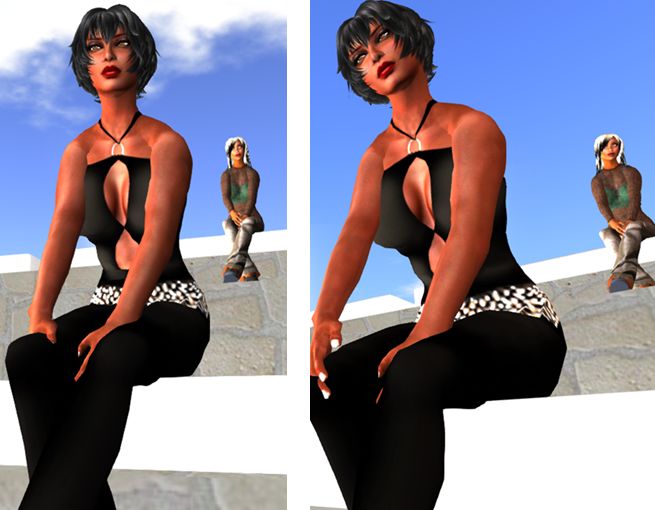
Catznip R8: SSB/A ready: (l) my Alt (at the back), running the SL SSB/A-rady viewer, renders correctly in Catznip R8, while (r) I render correctly in the SL SSB/A-ready viewer
Catznip R8: SSB/A ready: (l) my Alt (at the back), running the SL SSB/A-ready viewer, renders correctly in Catznip R8, while (r) I render correctly in the SL SSB/A-ready viewer

When tested on an SSB/A enabled region, Catznip R8 rendered my Crash Test Alt (running on the official SL viewer, which is SSB/A ready) and my avatar correctly, as did the official SL viewer. No grey ghosts or clouds with either.

Pathfinding and Havok Sub-licensing

A major element missing for the last Catznip release – R7 – was pathfinding support. This wasn’t because the Catznip team have anything against pathfinding; they simply found time working against them, as I noted in my R7 review:

Catznip R7 does not include any pathfinding tools, as the team had enough on their hands getting all the updates, changes and fixes already planned for this release merged, tested and made ready for release. This doesn’t mean pathfinding is being ignored, however. Expect to see it in a future release.

R8 rectifies this. Not only does it provide the expected Linksets and Characters options, Catznip R8 becomes the latest SL viewer to sign-up to the Havok sub-licence agreement, meaning it also gains the ability to visualise the navmesh when working with pathfinding.

The pathfinding navmesh can now be visualised in Catznip R8
Pathfinding arrives in Catznip with the release of R8, and the Havok sub-license agreement means that the release includes navmesh visualisation

A further benefit with the agreement is that Catznip can also use the official Havok-powered mesh uploader.

Further Updates

In addition, Catznip sees the following added / updated:

  • Addition of a “Per user” option to the “Show friends permissions” in the friends gear menu to always show non-default permissions
  • Addition of an Edit Hover button functionality to show the shape editor, scrolled down to the “Hover” wearable param
  • Addition of a further toolbar at the top of the world view
  • Addition of a Close All Folders button to the inventory outfits view toolbar
  • Addition of alignment options to toolbar buttons. Those at the bottom of the screen can be centred or left or right aligned, while those to the side can be aligned to the top or bottom of the screen as well as in the centre.
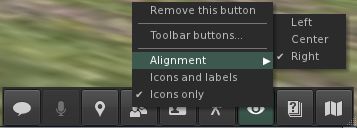
Catznip R8 adds left/right alignment to bottom toolbar buttons and Top/bottom alignment to side toolbar buttons
  • changed : highlight the currently worn outfit folder in bold
  • changed : rearrange the avatar inspector to add extra lines to the profile description
    • one extra line added by default through layout changes
    • two extra lines are added by expanding the textbox to fill the volume slider space if voice is disabled
  • changed : report more useful information about memory state in case of a crash
  • changed : allow multiple crashes to be selected in the “Crash reporting” preferences panel.

There are also a number of bug fixes which have been implemented by the Catznip team and / as a result of fixes coming out of the Lab; there are also a number of updates to RLV/a. For details on all of these, please refer to the R8 release notes.

Feedback

This isn’t a huge update compared to others, but it marks a significant step forward for Catznip both with the Havok su-licence support and, most importantly, the SSB/A support. I also have to admit I like the button alignment options (something we’re unlikely to see in the official viewer, but which is so very handy in making screen space more usable.

Given this release is to ready Catznip for the grid-wide deployment of Server-side Baking / Appearance, it is strongly recommended that if you are a Catznip user and have not updated, that you do so ASAP.

Performance-wise, Catznip R8 on my PC offers around the same performance as most viewer releases over the past few months. Running with Advanced Lighting Model off while in my home region with around four other avatars, FPS varies from the high 20 through the high 40s, depending on my altitude. When running with Advanced Lighting Model enabled but no shadows enabled, rates tend to range from the low teens through to high teens / low 20s.

Related Links

What dreams may come: Kirstenlee further updates S19

kirstensKirstenlee Cinquetti has issued a further update to the S19 version of Kirsten’s Viewer – version S19 1.19.4 (407). Released on Thursday May 16th, 2013, the update primarily fixes a nasty cache crash when user settings and local cache are manually deleted.

There have been a lot of questions as to why the S19 (v1-style) viewer from Kirsten’s stable is being updates rather than the S22/S23 viewers. In a blog post accompanying the release, Kirsten/Lee gives an answer:

So I guess the most pertinent question is why? It is probably the most pointless one to answer also.

But lets just take a wild stab at it!

I need to be in SL occasionally so I need a viewer (Duh), V2 is dead sorry S22 it was fun, V3 is well lets just say it’s not my cup of tea. I could just download someone else’s viewer but thats not what I want.

I LIKE S19 it was and still is quick, its code in comparison to newer clients is simpler it has much more modest hardware demands I can merge from many sources more rapidly etc, etc, etc..
It ticks all my boxes, on a more personal note it’s NOT limited to Second Life.

That is important to me, so it may have bugs, it may not compile on macs very well… sorry.

But if I wish to drift around SL or jump into Opensim I can.. anyway hope that kinda answers some of my motivations, and why I share the corresponding installer.

As mentioned in my last piece marking the “return” of the S19 viewer, and people shouldn’t anticipate routine updates and improvements; as Lee indicates in his bog post, this viewer has been updated and is being tweaked purely to suit his needs – and rightly so.

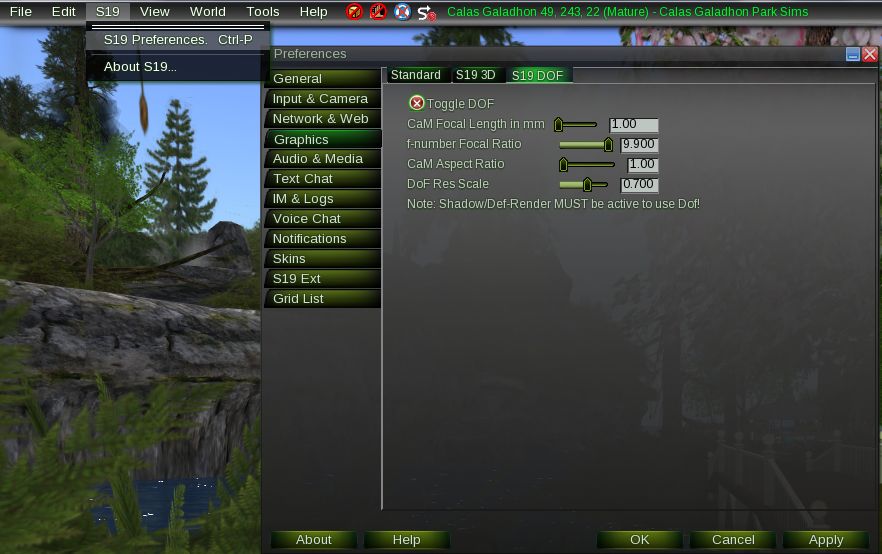
A couple of notable changes have been made since version S19.1.19.4.(404), the last version I used. Preferences have been moved from their “traditional” location in the File menu to appear under the S19 menu, and Depth of Field (DoF) has been added to the Graphics tab, in a dedicated sub-tab.

DoF is back!
DoF is back!

Sadly for me, I’m unable to test DoF, as deferred will not run on my hardware set-up, no matter how I fiddle with AA (which was Lee’s suggestion to me after I’d encountered problems with the 404 build). But then, as I noted last time, while I’ve always like Kirsten’s Viewer, my hardware has tended to sulk badly when using it.

However, for those of you missing Kirsten’s Viewer, here’s yet another update for you! Going on feedback following my original piece on S19’s return (in comments, IMs and DMs), it’s good to know the viewer still has loyal fans!

Related Links

Restrained Love Viewer updated

Update: May 13th: The Linux version of RLV was updated by Kitttin Ninetails to version 2.8.4.1 on Sunday May 12th, and is available here.

On Friday May 10th, 2013, Marine Kelley released the latest version of her standalone version of the Restrained Love Viewer (RLV) for Windows – RLV 2.8.4.1. The release is the first update to RLV in 2013, and is based on LL’s 3.5.2 viewer code (3.5.2.264760, dated April 21st, 2013). As such, it brings RLV pretty much up-to-date with the majority of LL’s viewer-side updates and fixes.

Note that this article only applies to RLV for Windows, as supplied by Marine Kelley. The Linux and Mac versions supplied by Kittin Ninetails remain at version 2.8.3.5.

Communications Hub User Interface

With this release, RLV now uses the Communications Hub User Interface (CHUI) and the standard means of managing chat and IMs, together with the majority of fixes and updates made to CHUI through recent development and beta updates.

RLV 2.8.4.1 includes CHUI for managing communications

Server-side Baking / Appearance

Despite no mention being made of it in the release notes, version 2.8.4.1 of RLV appears to also include viewer-side support for the upcoming deployment of Server-side Baking to the main grid.

To confirm this, as I was somewhat surprised that the release notes failed to make mention of any support, I dropped into the SSB/A test regions on Aditi to see how my avatar would render to others, and they would render to me when using the viewer. With the aid of my Crash Test Alt, all appeared to be fine.

Server-side baking: my avatar and Crash Test Alt as seen through RLV 2.8.4.1 (l) and through another SSB-capable viewer (r). Both render correctly; no greying or ghosting

I also didn’t encounter any issues in changing / re-ordering outfits which others have reported as encountering recently (although I admittedly have  – perhaps fortunately – yet to encounter any issues of this type while using any SSB/A-enabled viewer).

Other Updates and Fixes

Marine provides a list of additional updates and fixes:

Changes:

  • Camera focus is no longer lost when clicking on an in-world object. To change camera focus, right-click on your avatar, press Escape or focus on something else
  • Viewer allows moving an item or a folder from a locked folder to another locked folder (prevent only from locked to unlocked and from unlocked to locked)
  • Viewer does not expect the user to press Enter before chatting while in Mouselook, since they don’t have to when in 3rd person view
  • Viewer does not automatically rename folders or items in the inventory unless “RestrainedLoveAutomaticRenameItems” is set to TRUE (it is FALSE by default). This is no longer necessary since the viewer no longer needs to figure out whether or not it will kick a locked object because it now Adds by default now.

Fixed:

  • It is no longer possible to drag and drop an item from an object in-world directly into  inventory, regardless of RLV attach restrictions
  • It is no longer possible to wear rezzed items by right-clicking on them in-world and selecting “attach to”, even when @unsharedwear was active
  • It is now possible to hide the UI when unable to rez
  • It is no longer possible to create new pieces of clothing regardless of RLV outfit restrictions
  • The Control key wouldn’t work in Mouselook. Fixing this removes the ability to control the speed of the mouse view while holding Control, but Shift already does something similar.

Related Links

Jessica talks Firestorm and Second Life

The Carter and Dar Show, hosted by Carter Giacobini and Dar Writer, isn’t something, I confess, I watch on a regular basis. There’s no bias here on my part, it’s just that I don’t have time to take everything going on in and around SL to take everything in.

However, on May 3rd, they broadcast a show featuring Jessica Lyon, recorded just after the release of Firestorm 4.4.0, so I tuned in to take a look. The show is just under an hour in length, with the interview with Jessica starting at the 12:50 mark.

Jessica Lyon with
Jessica Lyon with

During the show, Jessica talks about a range of topics, including: Server-side Baking / Appearance; the HTTP updates, very LOUD users, viewer bugs (and how it’s not always easy to catch everything), the “missing prim” issue and the interest list, why the z-offset Quick Preference is no more in Firestorm, and more. She also explains some of the reasoning behind Firestorm and why it focuses so much on features and capabilities in comparison to the official viewer.

So, if you’re looking to find out more about Firestorm and what might be coming down the road, take a look at the Carter and Dar Show.

Related Links

LL announce revamp to the viewer release process

secondlifeLinden Lab have announced a revamp to the way in which they will be releasing viewer updates in future.

Currently, the process for the majority of viewer changes is that they go through a progression – generally being seen first in the development channel (or sometimes prior to that in a project viewer), before moving through to the beat viewer (where updates go through what is effectively a final validation  / user test) prior to being adopted into the SL release viewer.

This system has generally worked, but can cause problems, particularly when there is a lot going on in terms of projects and updates, and things end up being “queued up” for the release (as is currently the case, where CHUI, Server-side Baking / Appearance, and a host of other updates / fixes are concerned all being “queued” awaiting their turn in the beta viewer release channel.

Another problem – as seen at the end of last year – can be that should a significant issue occur within the beta viewer code, it can completely block further viewer releases until such time as the problem can be tracked down and effectively fixed. Last year this meant that viewer updates were effectively stalled for around a two month period while LL sought to isolate and fix the problem.

To try to overcome any bottlenecks which might occur with viewer releases, the Lab is adopting a similar process to that used by the server-side code release mechanism, as the blog post explains:

We’ll release more than one new version at the same time in parallel to subsets of users for final validation, and then promote the most important of the best of those to the default Release Viewer when that testing shows it to be ready.

If a development project wants to put out an early version for testing prior to it being ready for the Release channel, a channel specific to that project (either ‘Project <project>’ for very early versions, or ‘Beta <project>’ for more mature ones) will be created, just like we do today. These will be shut down when the project is ready to move to final testing in the Release channel, and users in the early project test channels will automatically be upgraded to the corresponding Release candidate version.

This means that in the coming weeks, we’ll start to see different versions of the viewer start to appear in parallel in their own “release candidate” channels, and people will be able to choose which versions they want to download and try-out. Once it is deemed the code from a specific “release candidate” viewer is ready for release, it will be integrated into the SL viewer and made available to the community through the established mechanism. As such, the beta viewer channel will be vanishing in the near future.

Quite how well different flavours of the viewer will run together on a single computer for those who want to try-out more than one upcoming release remains to be seen. Generally, different versions of the SL viewer tend to play nicely together. However, as was seen with the 3.4 and 3.5 code base changes problems can occur. In that particularly instance, running a development or beta viewer using the 3.5 code and then swapping back to the SL release viewer on the 3.4 code resulted in all the toolbar buttons vanishing from the latter.

The overall hope is that this change will mean that specific features and updates will reach the release version of the viewer at a greater pace than can be achieved with the current process, which in turn should not only smooth the path for new capabilities and features to reach users quicker (allowing for the inevitable bugs and hiccups such projects tend to encounter anyway), but perhaps also help in get fixes for significant issues and problems out to the mainstream viewer.

Firestorm clouds

One thing I neglected to mention in my recent review of Firestorm 4.4.0 is the inclusion – by Cinder Roxley – of Vincent Nacon’s alternative cloud maps, which can be used to change / enhance the rendering windlight clouds.

The default cloud layer seen over Extropia, using the
The default cloud layer seen over Extropia, using the AnaLutetia-outdoor windlight setting and the sun adjust to around 10:00.

I’ve no excuse for this, given Cinder actually nudged me on the matter prior to the release; just blame it on me having a blonde moment…

So, what is it all about? Quite simply, Firestorm now includes additional cloud maps made by Vincent Nacon, and which Cinder has added to the Preferences > Firestorm > Windlight tab for easy selection.

The Windlight cloud options

This presents you with four basic cloud types – the default map, Altocumulus (a middle altitude cloud, usually characterised by globular masses or rolls in layers or patches), Cumulonimbus (the familiar towering cloud formations associated with thunderstorms) and a “Layered” map. Do note that selecting any option other than the one already in use appears to require a viewer re-start in order to take effect.

Exactly what effect these different maps will have on your in-world view is a matter of experimenting with the various available windlight settings within Firestorm (a task made easier thanks to William Weaver’s Phototools). However, they can be used to produce some stunning effects – the images here are simply to provide some form of comparison.

Extropia
Extropia seen under the same windlight setting as the first image in this article, but using the Layered cloud map.

What’s more, as Cinder indicated in her little nudge to me, you can create (or obtain) cloud maps of your own and add them to Firestorm to create your own unique cloud looks. “Drop any 8-bit grayscale tga with a power of 2 size you make or find under app_settings/windlight/clouds,” she comments, “And they’ll be automatically added to the list.”

For those wishing to try the cloud maps on other viewers, Vincent provides forum thread in which his discusses the maps and provides guidelines and caveats on their usage in viewers. Links to download the maps are also provided.

The Cumulunimbus map applied to the sky, using the same windlight setting and time of day - note the "stacking" effect visible in the formations on the right of the image
The Cumulonimbus map applied to the sky, using the same windlight setting and time of day – note the “stacking” effect visible in the formations on the right of the image, given the impression of some additional vertical height

The maps appear to be particularly well-suited to sunrise / sunset images, where the combination of sun and clouds can be particularly dramatic and result in some incredible images.

Why not have a play yourself?

With thanks to Cinder Roxley.

Related Links