Kokua forks development and releases version 3.7.8 for OpenSim

kokua-logoNikcy Perian has announced that Kokua is to fork development between Second Life and OpenSim.

While both versions of the viewer will operate on either OpenSim or Second Life for the immediate future, due to an increasing numbers of issues the viewer has been experiencing in connecting to OpenSim-based grids as a result of recent SL-specific updates, the two will diverge over time, each focusing on fixes and updates specific to the gird type to which they are intended to connect.

Commenting on the move in a blog post accompanying the release of version 3.7.8.35024, Nicky states:

The release of Kokua.3.7.12 exposed some vulnerabilities of having one viewer handle both environments. The problem with Kokua-3.7.12 was that it could log on and perform well on some OpenSim grids but, would hang and then crash on others. Particularly troublesome was that it would crash on a standalone instance built from opensim git Master , OpenSim’s development track. Also, as reported by Inara Pey LindenLab is moving to content delivery network (CDN) for Meshes and Textures and plans drop UDP portocol once CDN is adopted. I suspect there will be a delay while the OpenSim core developers determine how best to approach those changes.

The comment relating to the Lab’s plans to introduce a CDN solution for texture and mesh fetching (and possibly more in the future), is interesting, as it also applies to those other TPVs which span both OpenSim and Second Life in terms of how they handle the changes as the progress (will they attempt to retain the UDP legacy code once the Lab start to remove it from their core code base? Will they also opt to fork?). As Nicky points out; there is also the question as to how the OpenSim core developers respond to the Lab’s move, and whether CDN capabilities will be added as an option for those grids as can afford it, or whether grids themselves might opt to add supporting code, depending on their needs and the perceived benefits.

Kokua 3.7.8.35024

In the meantime, and alongside the announcement, Kokua have released version 3.7.8.35024 for OpenSim. The version number reflects the fact that the more recent code releases from the Lab (3.7.9  AIS v3 updates; 3.7.10 – SL Share 2; 3.7.11 – Snowstorm contributions: and 3.7.12 – Maintenance release quick fixes) have all been removed from the viewer, leaving it based on the 3.7.7 (interest list updates)  and the 3.7.8 (Maintenance fixes) Linden code.

To assist those using Kokua on both OpenSim and Second Life, the OpenSim version of Kokua will (under Windows) install separately to the SL version – I assume the same is possible with the Mac and Linux versions, allowing for the differences in how software is installed on those platforms. This means that once the differences between the two versions of Kokua become more apparent, users will be able to move between them when logging between SL and OpenSim with relative ease.

In addition, the OpenSim release includes the following updates (please refer to the release notes for full attributions):

  • The chat text entry bar has tinted background based of the type of conversation. Nearby chat remains as white. The rest of the chat types are:
    • IM sessions are tinted red
    • Group chat sessions are tinted green
    • Conference sessions are tinted blue
  • Added the following to the avatar context menu:
    • Remove friend
    • Grant or revoke permissions granted to a friend (see when you’re online, map you, etc) – only visible when clicking on a friend
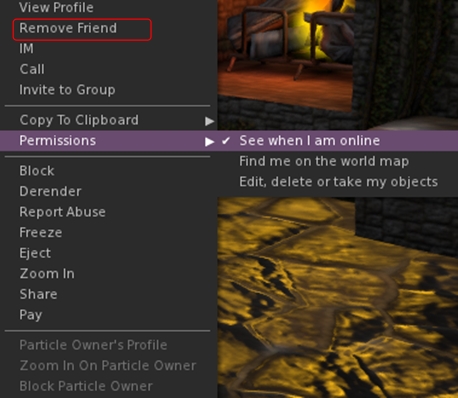
The option to remove a friend from the avatar context menu (replaces Add Friend), and the Permissions sub-menu
  • Added the grant/revoke friend permissions sub-menu to the People floater right-click context menu (only visible when clicking on a friend’s name)
  • Added localhost Win Grid Proxy 127.0.0.1:8080 and localhost Local Grid 127.0.0.1:8002 to the default drop down list; also added Tangle Grid to the default grid selection.

Kokua 3.7.12.34831

Released on July 15th (and which I thought I’d written about at the time – my sincere apologies to Nicky) includes the changes noted above, and the additional LL code base updates (3.7.9-3.7.12) as listed above. Additional highlights for the release include (please refer to the release blog post for proper accreditation):

  • New Preferences option to display your avatar name and grid display in the program title bar (Preferences > Kokua – note these changes should only be set after logging-in; if set from the log-in splash screen, they will crash the viewer)
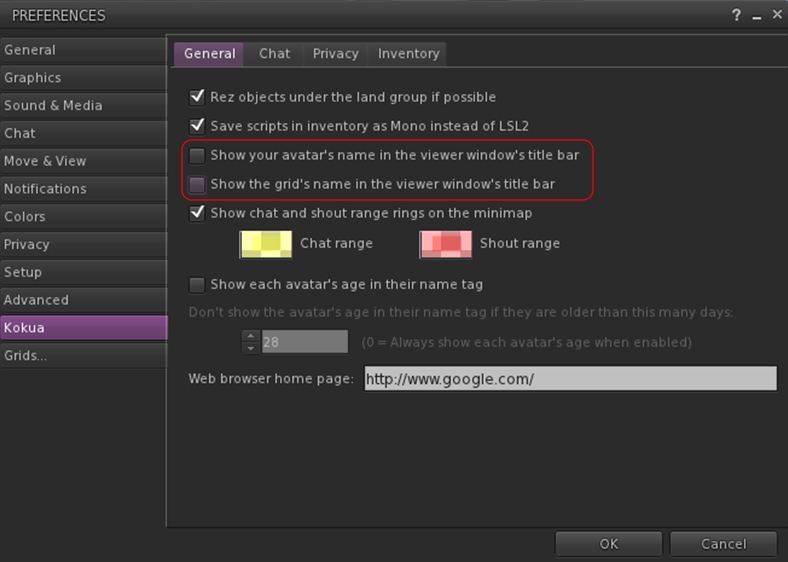
Kokua's options to display your avatar name and the grid name in the program title bar
Kokua’s options to display your avatar name and the grid name in the program title bar
  • Received Items folder now displays as a system folder in Inventory when Preference set (Preferences > Kokua > Inventory > Show the Received Items Folder in Normal Inventory), rather than appearing as a normal folder
  • Ported, with author permission, a change by Aleric Inglewood that prevents wearing of Inventory and Library root folders.

Both the 3.7.8 and 3.7.12 versions of Kokua work well on Second Life; both had a test-drive while I took my PBY6A for another trip around Blake Sea – where I encountered not one, but two other Cats! Both viewers are also available for the Kokua wiki download page – just scroll down for the 3.7.8 version.

Related Links

Viewer release summaries: week 34

Updates for the week ending: Sunday August 24th, 2014

This summary is published every Monday and is a list of SL viewer / client releases (official and TPV) made during the previous week. When reading it, please note:

  • It is based on my Current Viewer Releases Page, a list of all Second Life viewers and clients that are in popular use (and of which I am aware), and which are recognised as adhering to the TPV Policy. This page includes comprehensive links to download pages, blog notes, release notes, etc., as well as links to any / all reviews of specific viewers / clients made within this blog
  • By its nature, this summary presented here will always be in arrears, please refer to the Current Viewer Release Page for more up-to-date information

Official LL Viewers

  • Current Release updated to version 3.7.14.292638 August 18th (formerly the Library Refresh RC viewer – contains an update to a large set of libraries used by the viewer to provide security, stability and consistency improvements to this and future viewers (download page, release notes)
  • Release channel cohorts (See my notes on manually installing RC viewer versions if you wish to install any release candidate(s) yourself):
    • No updates
  • Project viewers:
    • No updates.

LL Viewer Resources

Third-party Viewers

V3-style

V1-style

  • Cool VL viewer updated on August 23rd – Stable release to version 1.26.12.13 and Legacy version 1.26.8.71 – core updates: please refer to the release notes

Mobile / Other Clients

  • No updates.

Additional TPV Resources

Related Links

SL viewer to get unified snapshot floater

secondlifeUpdate, September 8th: The unified snapshot floater is now a part of the de facto release viewer.

Update, August 26th: The unified snapshot floater is now available in a release candidate viewer, version 3.7.15.293376. 

Niran V Dean is familiar to many as the creator of the Black Dragon viewer, and before that, Niran’s Viewer. Both viewers have been innovative in their approach to UI design and presentation, and both have been the subject of reviews in this blog over the years, with Black Dragon still reviewed as and when versions are released.

Once of the UI updates Niran recently implemented in Black Dragon was a more unified approach to the various picture-taking floaters which are becoming increasing available across many viewers. There’s the original snapshot floater, and there are the Twitter, Flickr and Facebook floaters offered through the Lab’s SL Share updates to the official viewer, which are now also available in a number of TPVs.

In Black Dragon, Niran redesigned the basic snapshot floater, offering a much improved preview screen and buttons which not only provide access to the familiar Save to Disk, Save to Inventory, etc., options, but which also provide access to the Flickr, Twitter, and Facebook panels as well.

He also submitted to the code to Linden Lab, who have approved it, and it is currently working its way through their QA and testing cycle and should be appearing in a flavour of the official viewer soon (see STORM-2040).

A test build of the viewer with the new, more unified approach is available, and I took it for a quick spin to try-out the snapshot-related changes. Note it is a work-in-progress so some things may yet be subject to change between now and release.

First off, the snapshot floater is still accessed via the familiar Snapshot button, so there’s no loking for a new label or icon. The Twitter, Flickr and Facebook floaters and buttons are also still available (so if one or other of them is your preferred method of taking pictures, you can still open them without having to worry about going an extra step or two through the snapshot floater).

Opening the new snapshot floater immediately reveals the extent of Niran’s overhaul – and as with Black Dragon, I like it a lot.

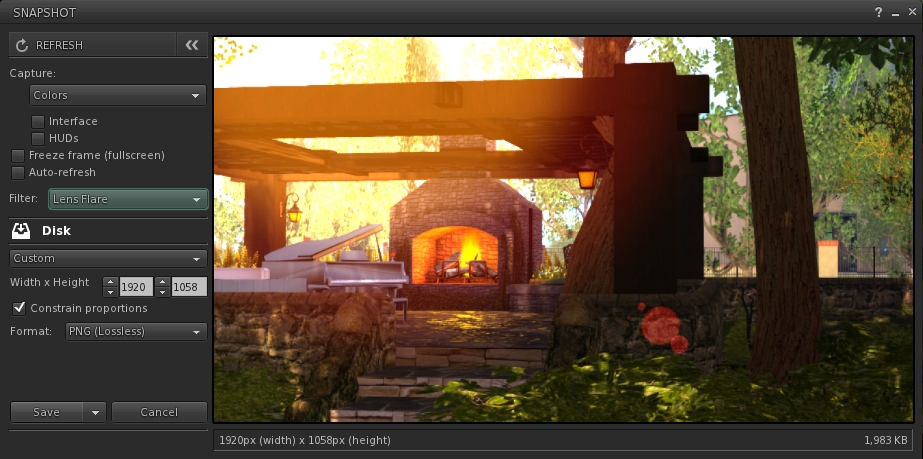
The new snapshot floater by Niran V Dean: note the button options for Flickr, Twitter and Facebook uploads

The increased size of the preview panel is immediately apparent, and might at first seem very obtrusive. However, when not required, it can be nicely hidden away by clicking the << on the top left of the floater next to the Refresh button, allowing a more unobstructed in-world view when framing an image (you can also still minimise the floater if you prefer).

Beneath the Refresh button are the familiar snapshot floater options to include the interface and HUDs in a snapshot, the colour drop down, etc., and – importantly – the SL Share 2 filter drop down for post-processing images. The placing of the latter is important, as it is the first clue that filters can, with this update, be applied to snaps saved to inventory or disk or e-mailed or – as is liable to prove popular – uploaded to the profile feed.

With the new snapshot floater, you will be able to add filters to the snaps you save to disk or inventory, or which you e-mail or upload to your profile feed
With the new snapshot floater, you will be able to add filters to the snaps you save to disk or inventory, or which you e-mail or upload to your profile feed – here is a snap being prepared to save to disk with the lens flare filter added

Below these options are the familiar buttons allowing you to save a snapshot to disk, inventory, your feed or to e-mail it to someone. click each of these opens their individual options, which overwrite the buttons themselves – to return to them, simply click the Cancel button. Saving a snapshot will refresh the buttons automatically.

Within these buttons are those for uploading to Flickr, Twitter or Facebook. These buttons work slightly differently, as clicking any one of them will close the snapshot floater and open the required application upload floater.

While this may seem inconvenient over having everything in the one floater, it actually makes sense. For one thing, trying to re-code everything into an all-in-one floater would be a fairly non-trivial task; particularly as Twitter, Flickr and Facebook have their own individual authentication requirements and individual upload options (such as sending a text message with a picture uploaded to Twitter, and the ability to check your friends on Facebook. Also, and as mentioned earlier, keeping the floaters for Flickr, Twitter and Facebook separate means they can continue to be accessed directly by people who use them in preference to the snapshot floater.

However, this latter point doesn’t mean they’ve been left untouched. Niran has cleaned-up much of their respective layouts and in doing so has reduced their screen footprints. The results are three floaters that are all rather more pleasing to the eye.

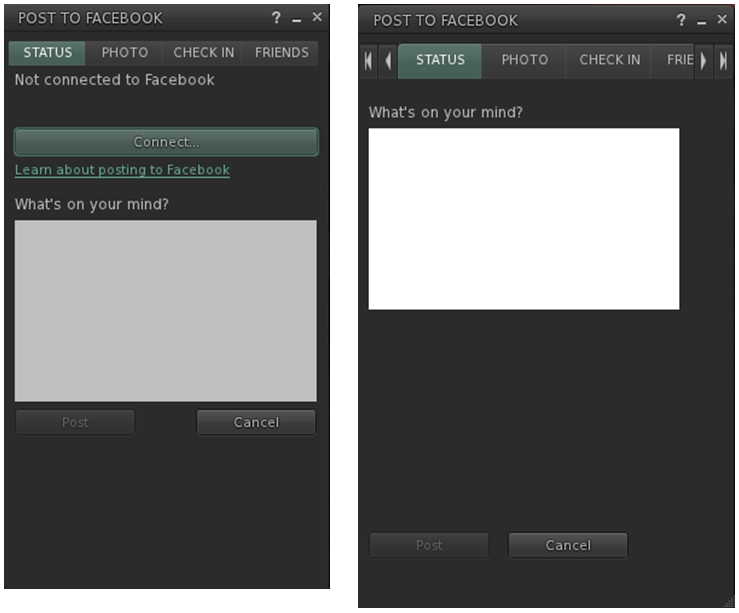
Niran's revised Facebook floater, left - note the new Connect button, removing a need for an extra tab; and the orginal floater  on the right
Niran’s revised Facebook floater, left – note the new Connect button, removing the need for an extra tab; and the original floater on the right

All told, these are a sweet set of updates which make a lot of sense. It may be a while longer before they surface in a viewer; I assume they’ll likely appear in a snowstorm update, rather than a dedicated viewer of their own, but that’s just my guess. Either way, they’re something to look forward to,

Kudos to Niran for the work in putting this together, and to Oz and the Lab for taking the code on and adding it to the viewer.

CtrlAltStudio offers preliminary Oculus DK2 support

CAS-logoDave Rowe, who develops the CtrlAltStudio viewer has announced he has some preliminary support for the Oculus Rift DK2 available in an alpha version of his viewer.

The viewer version – 1.2.2.41183 Alpha, dated August 19th, should also support existing DK1 headsets, but it doesn’t yet support head tracking for DK2 hardware.

Announcing the availability of the viewer in a blog post, Dave said:

I know some people are very anxious to try their DK2s in Second Life / OpenSim so I’ve released this alpha with some very preliminary DK2 support.

It works with the DK2 configured in extended mode: use the Windows key + right-arrow to move your viewer window onto the Rift’s display, then Ctrl+Alt+3 makes the window full screen and switches into Rift view.

Have I mentioned that this release is very preliminary? It does not work with direct mode yet as the current Rift SDK 0.4.1 Beta does not work in direct mode with OpenGL. Also, in this alpha, head orientation is tracked but not yet head position. Plus there’s no display of any UI. And Advanced Lighting Model must be turned on. For more details on usage, see the Release Notes.

I haven’t tested this alpha with a DK1 yet but it should in theory work. Note though that the mirrored windows mode used in previous viewer releases for the DK1 is and will not be supported by the new Oculus software.

Austin Tate has provided an overview of his experience with the viewer and the DK2, for those who would like more first-hand information.

Related Links


Viewer release summaries 2014: week 33

Updates for the week ending: Sunday August 17th, 2014

This summary is published every Monday and is a list of SL viewer / client releases (official and TPV) made during the previous week. When reading it, please note:

  • It is based on my Current Viewer Releases Page, a list of all Second Life viewers and clients that are in popular use (and of which I am aware), and which are recognised as adhering to the TPV Policy. This page includes comprehensive links to download pages, blog notes, release notes, etc., as well as links to any / all reviews of specific viewers / clients made within this blog
  • By its nature, this summary presented here will always be in arrears, please refer to the Current Viewer Release Page for more up-to-date information

Official LL Viewers

  • Current Release: version 3.7.13.292225 no change – update aniticipated in week 34
  • Release channel cohorts (See my notes on manually installing RC viewer versions if you wish to install any release candidate(s) yourself):
    • No updates
  • Project viewers:
    • No updates.

LL Viewer Resources

Third-party Viewers

V3-style

  • Firestorm updated to version 4.6.7.42398 –  core updates: parity with LL 3.7.8 code base + some items from later versions; viewer-side interest list updates; Mac 64-bit version + much more – release notes; release review

V1-style

  • Cool VL viewer updated on August 16th – Stable release to version 1.26.12.12 and Legacy version 1.26.8.70 – core updates: please refer to the release notes

Mobile / Other Clients

  • Mobile Grid Client updated to version 1.22.1221 – core updates: fix to prevent service from being killed by the latest Samsung firmware – change log

Additional TPV Resources

Related Links

Firestorm 4.6.7: rolling forward

firestorm-logoOn Sunday August 17th, the Firestorm team announced the release Firestorm 4.6.7.42398. As with the 4.6.5 release in May, this is far more of a stability and bug addressing update more than it is a release of major new features, although it does contain a lot of updates which most Firestorm users will find to their liking.

As always, the complete list of changes, together with attributions, can be found in the release notes / change log, and I refer readers to that document for specifics on all contributors, FIRE JIRA links, etc. The following is intended as an overview of some of the more major / interesting changes, updates and  fixes to be found in the release.

The Before We Begin Notes

For best results when installing this release:

Firestorm Blocking

Note that as a result of the Firestorm team’s policy to keep only 3 versions running, version 4.5.1 beta will be blocked in the coming weeks. The advice from the team is that If you are on 4.5.1, to please update now. Version 4.4.2 will continue to remain for Mac users until all the major Cocoa Mac bugs have been resolved. However, if you are not a Mac user, then there really isn’t any reason for you not to have updated, and the team again ask that you update as well. 

Mac 64-bit Version And Mac Fixes

This release of Firestorm sees the arrival of a Mac 64-bit version. As with the original windows and Linux 64-bit versions, this first release of the Mac 64-bit variant of the viewer is regarded as a beta release. However, the Firestorm team fully expect it to have far greater stability than the 32-bit version, and better performance, so Mac users in a position to do so are encouraged to download it and try it.

Blog posts on the 64-bit version can be found on Tonya Souther’s blog and in my blog.

As a heads-up to Mac users, please note that this release of Firestorm also includes a couple of partial fixes for known issues:

  • Alt-clicking while moving the mouse moves the camera significantly (see STORM-2041 and FIRE-12241) has been partially fixed by Linden Lab
  • The Firestorm team have implemented a partial fix for the keystroke entry lag issue (see FIRE-12172).

These may not entirely solve the issues to which they relate, but hopefully they’ll give at least some Mac users a degree of improvement.

One thing those experiencing the typing lag, and who are in a position to do so, might like to try is to create a clean virtual desktop in Spaces, switch to it and then start Firestorm, pinned it to that desktop, and make it full screen (see the suggestion from Spikeheel Starr here).

Lab Updates

This release sees Firestorm reach parity with LL’s 3.7.8 code-base, together with cherry-picked updates from later releases. Updates and fixes directly from the Lab include, but are not limited to) the following.

Project Interesting Scene loading Updates

Project Interesting has been a part of the Lab’s long-term Project Shining updates which were recently officially drawn to a close. The interest list work, primarily led by Andrew Linden prior to his departure from the Lab to join High Fidelity, is a set of improvements to how the viewer and simulator work together to know what information the viewer has or needs in order to render the world around your avatar.

The interest list updates provide more predictable and faster scene rendering, such as large objects and those closest to you appearing first, rather than at random. More use is also made of the viewer's cache (so the warning for not clearing cache as a first action in "fixing" issues becomes even more important
The interest list updates provide more predictable and faster scene rendering, such as large objects and those closest to you appearing first, rather than at random, as with the scene shown here. More use is also made of the viewer’s cache (so the warning for not clearing cache as a first action in “fixing” issues becomes even more important

The work has seen several server-side and viewer updates, and the updates included with this release of Firestorm enable the viewer to more intelligently store and reuse scene data, helping to make regions you’ve previously visited load faster (as long as you don’t clear cache!), and help improve viewer performance.

Further information on the project interesting work can be found in the following blog posts:

Google Breakpad Updates

Google Breakpad is the tool used in gathering information used in reporting underpinning reasons for viewer crashes to help with tracing causes, etc. Linden Lab have been engaged in a programme of improving when and where Google Breakpad becomes active as the viewer starts, and ceases reporting as the viewer shuts down. This release of Firestorm sees the most recent updates and improvements made to Google Breakpad integrated into the viewer, allowing the support team to improve the triaging and debugging of issues.

Other Updates of Note

  • Added a viewer check box to extend parcel entry limits to a higher ceiling (World > Region Details > Region > Block parcel fly over): when checked, extends access checks vertically to prevent parcel flyover
  • Opening large chat histories from conversation log no longer eats huge amounts of memory resulting in a viewer crash (see: BUG-4517 and FIRE-12242)
  • Searching inventory for “online” now correctly returns online friends calling cards in search results (see BUG-4409 and FIRE-12178)
  • Merchant Outbox fixes: includes fixes for accurately detecting Merchant status and improves recovery for Merchant Outbox errors
  • Improved discoverability of the Region Debug console has been moved to Develop > Consoles > Region Debug Console. Also added to World > Region Details > Debug > Region Debug console
  • Having a space after your cursor and pressing return to add a new line no longer forces an extra space to be made in the next line in notecards and script editor
  • Opening square textures now sets the 1:1 size constraint.

Building and Scripting Updates

LSL Functions for Materials

Firestorm 4.6.7 sees the addition of LSL support for materials capabilities. Materials can be added to object faces with llSetPrimitiveParams() and llSetLinkPrimitiveParams functions using the following parameters:

  • [PRIM_SPECULAR, integer face, string texture, vector repeats, vector offsets, float rotation_in_radians, vector color, integer glossy, integer environment]
  • [PRIM_NORMAL, integer face, string texture, vector repeats, vector offsets, float rotation_in_radians]
  • [PRIM_ALPHA_MODE, integer face, integer alpha_mode, integer alpha_cutoff]
    • Valid alpha_mode options are PRIM_ALPHA_MODE_NONE, PRIM_ALPHA_MODE_BLEND, PRIM_ALPHA_MODE_MASK, PRIM_ALPHA_MODE_EMISSIVE
LSL support for materialsarrives in Firestorm with the 4.6.7 release
LSL support for materials arrives in Firestorm with the 4.6.7 release

Materials can be read with  llGetPrimitiveParams() and llGetLinkPrimitiveParams functions using the following parameters:

  • [PRIM_SPECULAR, integer face] returns [string texture, vector repeats, vector offsets, float rotation_in_radians, vector color, integer glossy, integer environment]
  • [PRIM_NORMAL, integer face] returns [string texture, vector repeats, vector offsets, float rotation_in_radians]
  • [PRIM_ALPHA_MODE, integer face] returns [integer alpha_mode, integer alpha_cutoff].

For further information, please refer to the relevant LSL documentation as linked-to above.

In addition:

  • CTRL + mouse grab of objects is now disabled by default in all of Firestorm’s log-in modes other than V3. This is because the option offers no “undo” option should it be used accidentally. A toggle option has been added to Preferences > Firestorm > Build 2 (Use CTRL+mouse to grab and manipulate objects) to enable / disable the ability.
  • Clicking the area in between the Full Bright check box and the Materials drop down box no longer incorrectly opens the colour picker.

Continue reading “Firestorm 4.6.7: rolling forward” →