Following the recent release of Firestorm 4.6.7 (see my overview for details), the Firestorm team has announced that Firestorm 4.5.1 will be blocked as from Friday September 12th, 2014.
The blocking of version 4.5.1 – which does not affect any of the more recent releases of Firestorm, is in keeping with the Firestorm team’s agreement with Linden Lab to only allow – as far as possible – only the most recent three releases of Firestorm to connect to Second Life.
Also unaffected by the block, and for the benefit of Mac users, is version 4.4.2 – in keeping with their promise to Mac users, Firestorm will not be blocking version 4.4.2 until such time as more of the Mac-specific bugs which have occurred in more recent SL viewer releases (and inherited by Firestorm and other TPVs) have been dealt with.
However, although the blocking is related to Second Life, please note that this announcement does mean that as from September 12th, Firestorm version 4.5.1 will no longer be able to connect to OpenSim grids as well.
If you want to know why Firestorm block versions, you can find an explanation on their blog. Similarly, if you wish yo know how Firestorm implement a block, you can do so via the Firestorm wiki.
In terms of the upcoming block, those users who are still running 4.5.1 are asked to update to a more recent very of Firestorm sooner rather than later. As the official blog post from the team notes:
If you wait until the last minute to update you will have a harder time reaching support since most people seem to wait until the last minute and then contact support for help.
Nikcy Perian has announced that Kokua is to fork development between Second Life and OpenSim.
While both versions of the viewer will operate on either OpenSim or Second Life for the immediate future, due to an increasing numbers of issues the viewer has been experiencing in connecting to OpenSim-based grids as a result of recent SL-specific updates, the two will diverge over time, each focusing on fixes and updates specific to the gird type to which they are intended to connect.
Commenting on the move in a blog post accompanying the release of version 3.7.8.35024, Nicky states:
The release of Kokua.3.7.12 exposed some vulnerabilities of having one viewer handle both environments. The problem with Kokua-3.7.12 was that it could log on and perform well on some OpenSim grids but, would hang and then crash on others. Particularly troublesome was that it would crash on a standalone instance built from opensim git Master , OpenSim’s development track. Also, as reported by Inara Pey LindenLab is moving to content delivery network (CDN) for Meshes and Textures and plans drop UDP portocol once CDN is adopted. I suspect there will be a delay while the OpenSim core developers determine how best to approach those changes.
The comment relating to the Lab’s plans to introduce a CDN solution for texture and mesh fetching (and possibly more in the future), is interesting, as it also applies to those other TPVs which span both OpenSim and Second Life in terms of how they handle the changes as the progress (will they attempt to retain the UDP legacy code once the Lab start to remove it from their core code base? Will they also opt to fork?). As Nicky points out; there is also the question as to how the OpenSim core developers respond to the Lab’s move, and whether CDN capabilities will be added as an option for those grids as can afford it, or whether grids themselves might opt to add supporting code, depending on their needs and the perceived benefits.
Kokua 3.7.8.35024
In the meantime, and alongside the announcement, Kokua have released version 3.7.8.35024 for OpenSim. The version number reflects the fact that the more recent code releases from the Lab (3.7.9 AIS v3 updates; 3.7.10 – SL Share 2; 3.7.11 – Snowstorm contributions: and 3.7.12 – Maintenance release quick fixes) have all been removed from the viewer, leaving it based on the 3.7.7 (interest list updates) and the 3.7.8 (Maintenance fixes) Linden code.
To assist those using Kokua on both OpenSim and Second Life, the OpenSim version of Kokua will (under Windows) install separately to the SL version – I assume the same is possible with the Mac and Linux versions, allowing for the differences in how software is installed on those platforms. This means that once the differences between the two versions of Kokua become more apparent, users will be able to move between them when logging between SL and OpenSim with relative ease.
In addition, the OpenSim release includes the following updates (please refer to the release notes for full attributions):
The chat text entry bar has tinted background based of the type of conversation. Nearby chat remains as white. The rest of the chat types are:
IM sessions are tinted red
Group chat sessions are tinted green
Conference sessions are tinted blue
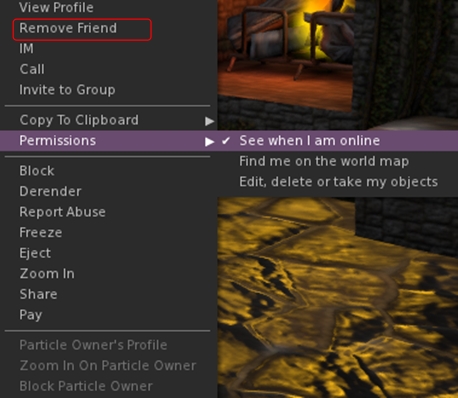
Added the following to the avatar context menu:
Remove friend
Grant or revoke permissions granted to a friend (see when you’re online, map you, etc) – only visible when clicking on a friend
The option to remove a friend from the avatar context menu (replaces Add Friend), and the Permissions sub-menu
Added the grant/revoke friend permissions sub-menu to the People floater right-click context menu (only visible when clicking on a friend’s name)
Added localhost Win Grid Proxy 127.0.0.1:8080 and localhost Local Grid 127.0.0.1:8002 to the default drop down list; also added Tangle Grid to the default grid selection.
Kokua 3.7.12.34831
Released on July 15th (and which I thought I’d written about at the time – my sincere apologies to Nicky) includes the changes noted above, and the additional LL code base updates (3.7.9-3.7.12) as listed above. Additional highlights for the release include (please refer to the release blog post for proper accreditation):
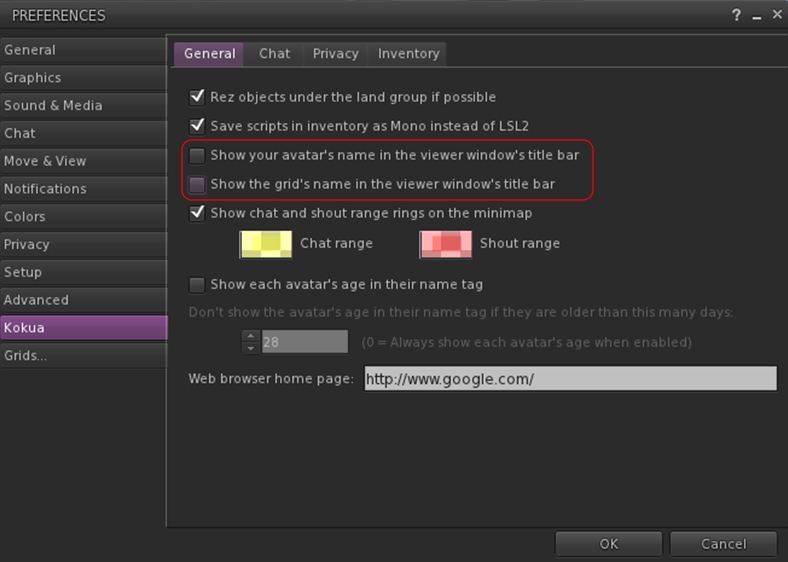
New Preferences option to display your avatar name and grid display in the program title bar (Preferences > Kokua – note these changes should only be set after logging-in; if set from the log-in splash screen, they will crash the viewer)
Kokua’s options to display your avatar name and the grid name in the program title bar
Received Items folder now displays as a system folder in Inventory when Preference set (Preferences > Kokua > Inventory > Show the Received Items Folder in Normal Inventory), rather than appearing as a normal folder
Ported, with author permission, a change by Aleric Inglewood that prevents wearing of Inventory and Library root folders.
Both the 3.7.8 and 3.7.12 versions of Kokua work well on Second Life; both had a test-drive while I took my PBY6A for another trip around Blake Sea – where I encountered not one, but two other Cats! Both viewers are also available for the Kokua wiki download page – just scroll down for the 3.7.8 version.
Updates for the week ending: Sunday August 24th, 2014
This summary is published every Monday and is a list of SL viewer / client releases (official and TPV) made during the previous week. When reading it, please note:
It is based on my Current Viewer Releases Page, a list of all Second Life viewers and clients that are in popular use (and of which I am aware), and which are recognised as adhering to the TPV Policy. This page includes comprehensive links to download pages, blog notes, release notes, etc., as well as links to any / all reviews of specific viewers / clients made within this blog
By its nature, this summary presented here will always be in arrears, please refer to the Current Viewer Release Page for more up-to-date information
Official LL Viewers
Current Release updated to version 3.7.14.292638 August 18th (formerly the Library Refresh RC viewer – contains an update to a large set of libraries used by the viewer to provide security, stability and consistency improvements to this and future viewers (download page, release notes)
Alchemy viewer added to the TPV directory, and to my Current Viewer Releases page (website, release notes, download)
CtrlAltStudio released version 1.2.2.41183 Alpha on August 19th – with Preliminary Oculus DK2 support (release notes and download)
V1-style
Cool VL viewer updated on August 23rd – Stable release to version 1.26.12.13 and Legacy version 1.26.8.71 – core updates: please refer to the release notes
Update, September 8th: The unified snapshot floater is now a part of the de facto release viewer.
Update, August 26th: The unified snapshot floater is now available in a release candidate viewer, version 3.7.15.293376.
Niran V Dean is familiar to many as the creator of the Black Dragon viewer, and before that, Niran’s Viewer. Both viewers have been innovative in their approach to UI design and presentation, and both have been the subject of reviews in this blog over the years, with Black Dragon still reviewed as and when versions are released.
Once of the UI updates Niran recently implemented in Black Dragon was a more unified approach to the various picture-taking floaters which are becoming increasing available across many viewers. There’s the original snapshot floater, and there are the Twitter, Flickr and Facebook floaters offered through the Lab’s SL Share updates to the official viewer, which are now also available in a number of TPVs.
In Black Dragon, Niran redesigned the basic snapshot floater, offering a much improved preview screen and buttons which not only provide access to the familiar Save to Disk, Save to Inventory, etc., options, but which also provide access to the Flickr, Twitter, and Facebook panels as well.
He also submitted to the code to Linden Lab, who have approved it, and it is currently working its way through their QA and testing cycle and should be appearing in a flavour of the official viewer soon (see STORM-2040).
A test build of the viewer with the new, more unified approach is available, and I took it for a quick spin to try-out the snapshot-related changes. Note it is a work-in-progress so some things may yet be subject to change between now and release.
First off, the snapshot floater is still accessed via the familiar Snapshot button, so there’s no loking for a new label or icon. The Twitter, Flickr and Facebook floaters and buttons are also still available (so if one or other of them is your preferred method of taking pictures, you can still open them without having to worry about going an extra step or two through the snapshot floater).
Opening the new snapshot floater immediately reveals the extent of Niran’s overhaul – and as with Black Dragon, I like it a lot.
The new snapshot floater by Niran V Dean: note the button options for Flickr, Twitter and Facebook uploads
The increased size of the preview panel is immediately apparent, and might at first seem very obtrusive. However, when not required, it can be nicely hidden away by clicking the << on the top left of the floater next to the Refresh button, allowing a more unobstructed in-world view when framing an image (you can also still minimise the floater if you prefer).
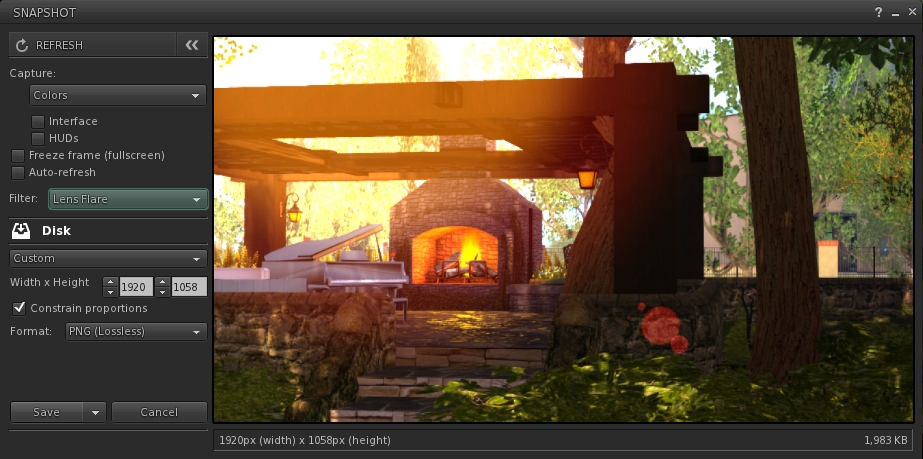
Beneath the Refresh button are the familiar snapshot floater options to include the interface and HUDs in a snapshot, the colour drop down, etc., and – importantly – the SL Share 2 filter drop down for post-processing images. The placing of the latter is important, as it is the first clue that filters can, with this update, be applied to snaps saved to inventory or disk or e-mailed or – as is liable to prove popular – uploaded to the profile feed.
With the new snapshot floater, you will be able to add filters to the snaps you save to disk or inventory, or which you e-mail or upload to your profile feed – here is a snap being prepared to save to disk with the lens flare filter added
Below these options are the familiar buttons allowing you to save a snapshot to disk, inventory, your feed or to e-mail it to someone. click each of these opens their individual options, which overwrite the buttons themselves – to return to them, simply click the Cancel button. Saving a snapshot will refresh the buttons automatically.
Within these buttons are those for uploading to Flickr, Twitter or Facebook. These buttons work slightly differently, as clicking any one of them will close the snapshot floater and open the required application upload floater.
While this may seem inconvenient over having everything in the one floater, it actually makes sense. For one thing, trying to re-code everything into an all-in-one floater would be a fairly non-trivial task; particularly as Twitter, Flickr and Facebook have their own individual authentication requirements and individual upload options (such as sending a text message with a picture uploaded to Twitter, and the ability to check your friends on Facebook. Also, and as mentioned earlier, keeping the floaters for Flickr, Twitter and Facebook separate means they can continue to be accessed directly by people who use them in preference to the snapshot floater.
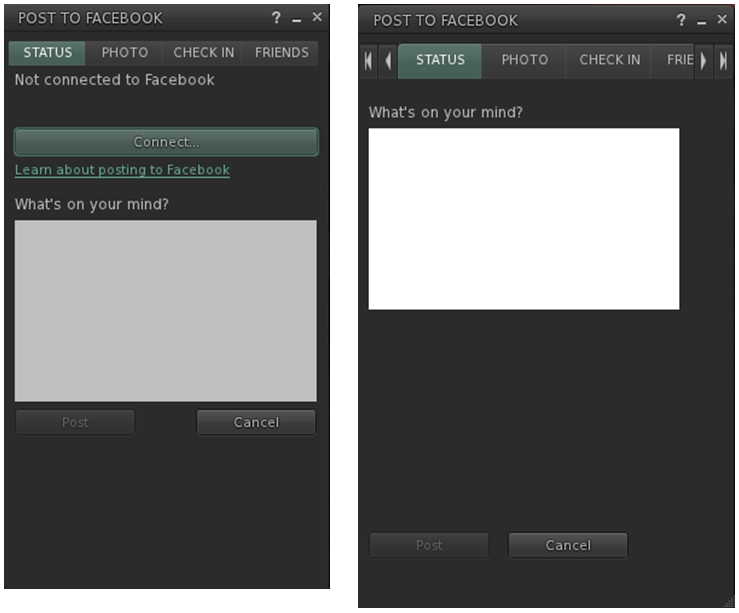
However, this latter point doesn’t mean they’ve been left untouched. Niran has cleaned-up much of their respective layouts and in doing so has reduced their screen footprints. The results are three floaters that are all rather more pleasing to the eye.
Niran’s revised Facebook floater, left – note the new Connect button, removing the need for an extra tab; and the original floater on the right
All told, these are a sweet set of updates which make a lot of sense. It may be a while longer before they surface in a viewer; I assume they’ll likely appear in a snowstorm update, rather than a dedicated viewer of their own, but that’s just my guess. Either way, they’re something to look forward to,
Kudos to Niran for the work in putting this together, and to Oz and the Lab for taking the code on and adding it to the viewer.
Dave Rowe, who develops the CtrlAltStudio viewer has announced he has some preliminary support for the Oculus Rift DK2 available in an alpha version of his viewer.
The viewer version – 1.2.2.41183 Alpha, dated August 19th, should also support existing DK1 headsets, but it doesn’t yet support head tracking for DK2 hardware.
Announcing the availability of the viewer in a blog post, Dave said:
I know some people are very anxious to try their DK2s in Second Life / OpenSim so I’ve released this alpha with some very preliminary DK2 support.
It works with the DK2 configured in extended mode: use the Windows key + right-arrow to move your viewer window onto the Rift’s display, then Ctrl+Alt+3 makes the window full screen and switches into Rift view.
Have I mentioned that this release is very preliminary? It does not work with direct mode yet as the current Rift SDK 0.4.1 Beta does not work in direct mode with OpenGL. Also, in this alpha, head orientation is tracked but not yet head position. Plus there’s no display of any UI. And Advanced Lighting Model must be turned on. For more details on usage, see the Release Notes.
I haven’t tested this alpha with a DK1 yet but it should in theory work. Note though that the mirrored windows mode used in previous viewer releases for the DK1 is and will not be supported by the new Oculus software.
Austin Tate has provided an overview of his experience with the viewer and the DK2, for those who would like more first-hand information.
Updates for the week ending: Sunday August 17th, 2014
This summary is published every Monday and is a list of SL viewer / client releases (official and TPV) made during the previous week. When reading it, please note:
It is based on my Current Viewer Releases Page, a list of all Second Life viewers and clients that are in popular use (and of which I am aware), and which are recognised as adhering to the TPV Policy. This page includes comprehensive links to download pages, blog notes, release notes, etc., as well as links to any / all reviews of specific viewers / clients made within this blog
By its nature, this summary presented here will always be in arrears, please refer to the Current Viewer Release Page for more up-to-date information
Official LL Viewers
Current Release: version 3.7.13.292225 no change – update aniticipated in week 34
Firestorm updated to version 4.6.7.42398 – core updates: parity with LL 3.7.8 code base + some items from later versions; viewer-side interest list updates; Mac 64-bit version + much more – release notes; release review
V1-style
Cool VL viewer updated on August 16th – Stable release to version 1.26.12.12 and Legacy version 1.26.8.70 – core updates: please refer to the release notes
Mobile / Other Clients
Mobile Grid Client updated to version 1.22.1221 – core updates: fix to prevent service from being killed by the latest Samsung firmware – change log
 Following the recent release of Firestorm 4.6.7 (see my overview for details), the Firestorm team has announced that Firestorm 4.5.1 will be blocked as from Friday September 12th, 2014.



 Inara Pey: Living in a Modemworld