Environment Enhancement Project: a primer

The Environment Enhancement Project (EEP) is a set of environmental enhancements designed to replace windlight XML settings to control the water and sky environments seen in Second Life, and provides a wide range of additional / new capabilities for region holders, parcel holders and general users. It represents a fundamental shift in how environment settings are used and applied.

In brief EEP:

  • Uses environment objects that you can keep in your inventory and / or share with others.
  • Provides parcel-level control of environments.
  • Allows up to four different, independently controlled sky layers.
  • Allows the Sun, Moon and Cloud textures to be replaced with custom textures uploaded to the viewer.
Table of Contents
  • Provides an extended day cycle of up to 168 hours (thus allowing a 7-day, 24-hour day / night cycle to be defined, for example).
  • Allows users to override region / parcel settings as seen within their own viewer, by either attaching EEP settings to their avatar or through the Personal Lighting floater.
  • Provides new LSL functions to allow scripts to interact with parcel environments.
EEP allows you to have a little fun, if you wish. Credit: Bellimora

Many have already gained familiarity with EEP whilst it has been in development, using both the original project viewer and iterations of the release candidate viewer. However, given it is such a fundamental shift in how environment settings are created and used, I have attempted to break things down into more easily digestible pieces through the use of this EEP primer, and a more comprehensive EEP tutorial.

  • This primer is designed to provide an overview of the basic EEP capabilities and options from the point-of user of someone wishing to use them.
  • The EEP Tutorial is intended to provide a comprehensive breakdown of EEP capabilities, including how to create new EEP sky, water and day settings for personal use or which can be given or sold to others.

You can use either this primer or the tutorial to better understand EEP (the information here is also presented in the tutorial, which also explores the various floaters and options in greater depth).

For official information on EEP, please refer to the Environment Enhancement Project SL wiki page.

EEP Basic Concepts and Terminology

In brief EEP:

  • Uses environment objects that you can keep in your inventory and / or share with others – including selling (subject to the SL permissions system) via in-world stores and on the Marketplace.
  • Provides parcel-level control of environments.
  • Allows up to four different, independently controlled sky layers.
  • Allows custom textures for the Sun, Moon and clouds.
  • Provides an extended day cycle of up to 168 hours (thus allowing a 7-day, 24-hour day / night cycle to be defined, for example).
  • Means that as environments settings are simulator-side, and so by default are automatically seen by anyone using any EEP enabled viewer on entering the region / estate / parcel.
  • Still allows the use of “personal” settings seen only be the use applying them, for the purposes of photography, machinima, etc.

Terminology

EEP uses some key terminology that should be understood.

  • Settings: used to define the environment you see. There are three settings types:
    • Sky: define the atmosphere and lighting for a day (or night); the movement, density, etc., of the clouds; and the appearance of the Sun and / or the Moon (which remain in a fixed point in the sky).
    • Water: define the appearance of Linden Water (prim or mesh animated water is not affected): water colour and reflection; wave movement; amount of light refraction, etc.
    • Day Cycles: collections of Sky and Water settings that are combined to present a dynamically changing environment over a user-defined time period representative of a “day” (by default this is set to the legacy Second Life day / night cycle of 4 hours, but can be extended out to represent physical world time periods of up to one week).
    • Note that Sky and Water settings are referred to as Fixed Environments.
  • EEP assets: physical “containers” for storing EEP settings. These are inventory items that by default, are stored in the new Settings folder in your inventory (see below), they are split into three types:
    • Sky – Sky settings. Icon: a blue sky with clouds.
    • Water – Water settings. Icon: a water droplet.
    • Day Cycle – for Day Cycles. Icon: a split Sun / Moon.
    • EEP assets (permissions allowing) can be exchanged, given away, and / or sold through a store or via the Marketplace.

Note that EEP settings are:

  • Created or edited using their corresponding EEP asset (e.g. to create Sky settings, you use the Sky asset type).
    • New EEP assets can be created directly from inventory, just like any other system inventory asset type (notecard, clothing item, gesture, script, body part).
    • Creating / editing EEP assets and settings is covered in depth in my EEP tutorial.
  • By default stored within a new system folder in inventory – the Settings folder. This folder may be hidden until such time as an EEP asset is created.
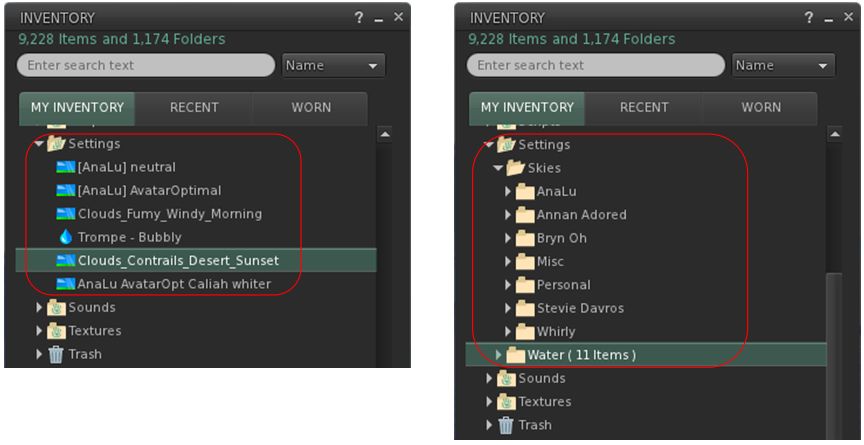
By default, EEP assets are stored and created in the Settings folder in your inventory (l). If you want, you can manually sub-divide your settings into suitable folders for easier tracking (r)

EEP Permissions

There are a few notes on permissions associated with EEP settings / assets.

  • Copy/no-copy: EEP settings assets may never be marked no-copy. A person who owns a setting object may always make a copy of it in their inventory.
  • Transfer/no-transfer: the no-transfer permission is persistent. If you import any no-transfer day or water setting into a day cycle, that day cycle will also become no-transfer. Once saved, this change cannot be undone.
  • Modify/no-modify: these permissions behave as normal.

EEP Library Assets

EEP includes a collection of Sky, Water and Day Cycles, together with a set of textures that can be used for clouds and / or to replace the Sun and Moon, etc.

  • These are located in Inventory (CTRL-I) → Library → Environments.
  • They can be used in one of two ways:
    • Unmodified, directly from Library → Environments.
    • By copying them to your inventory (e.g. to your own Settings folder, if it is visible through the creation of an EEP asset; if not, any other folder can be used), where they will become modifiable, allowing you to adjust them / use them to create your own settings.
    • See my EEP Tutorial for editing / modifying EEP assets and settings.

Differences to Windlight

Some of the key differences between EEP and windlight are:

  • EEP settings are stored in inventory assets, not as XML files saved to your computer.
  • Because they are server-side, EEP settings are by default seen by any viewer affected by the. This can mean:
    • Parcel owners using a specific set of environment settings no longer have to request visitors manually switch to them.
    • Settings are no longer dependent on visitors to a parcel with a custom environment having the precise windlight XML file stored on their computer.
  • EEP setting do not require any external storage (e.g. Dropbox) in order to be shared with other users, if they are to be given away.

Second Life: EEP – the Environment Enhancement Project

The Environment Enhancement Project introduces an entirely new way to create and use environment settings for the appearance of the sky, day cycles and , Linden Water, within the viewer. Among other things, EEP capabilities include the means to apply environment settings to individual parcels, allows them to the sold and bought,enable day cycles that can last up to 168 hours, and permit the use of custom Sun / Moon textures, as seen here, with settings by default automatically to all viewers they affect.

On April 20th, 2020, Linden Lab announced the official release of the Environment Enhancement Project (EEP). Originally announced in 2017 – see Second Life Windlight environment enhancements – it has taken longer than anticipated to reach a release status, but it brings with a host of new features and capabilities.

What is EEP?

For those who many have missed it, EEP provides an whole new way of creating, modifying and applying environments (sky and water settings and day cycles) in Second Life. in brief, EEP:

  • Uses environment objects that you can keep in your inventory and / or share with others – including selling (subject to the SL permissions system) via in-world stores and on the Marketplace.
  • Provides parcel-level control of environments.
  • Allows up to four different, independently controlled sky layers.
  • Allows the Sun, Moon and Cloud textures to be replaced with custom textures. uploaded to the viewer.
  • Provides an extended day cycle of up to 168 hours (thus allowing a 7-day, 24-hour day / night cycle to be defined, for example).
  • Allows users to override region / parcel settings as seen within their own viewer for the purposes of photography, etc.
  • Provides new LSL functions to allow scripts to interact with parcel environments.

Currently, to use EEP, you will require the official Second Life viewer – version 6.4.0.540188, dated April 15th (or later). However, TPVs will be releasing version supporting EEP in due course.

I’m in the processes of polishing a basic EEP Primer and an in-depth EEP tutorial, which will be published shortly. In the meantime, here’s the official video on EEP.

2020 SL project updates week #16: TPVD summary

Little World, February 2020 – blog post

The following notes are taken from the TPV Developer meeting held on Friday, April 17th, 2020. These meetings are generally held every other week, unless otherwise noted in any given summary. The embedded video is provided to Pantera – my thanks to her for recording and providing it. Time stamps are included with the notes will open the video at the point(s) where a specific topic is discussed.

The latter part of this meeting as largely general text chat related to group chat issues – please refer to the video, if required.

SL Viewer News

[0:00-7:20]

  • As per my week #16 CCUG meeting notes, the EEP RC viewer updated to version 6.4.0.540188 on Wednesday, April 15th.
  • If no issues are found with this version of the viewer, it will likely be promoted to de facto release status in week #17 (commencing Monday, April 20th).

The remainder of the official views currently in progress remained unchanged through the week as:

  • Current Release version  version 6.3.8.538264, dated March 12, promoted March 18th. Formerly the Premium RC viewer – No change.
  • Release channel cohorts:
    • Camera Presets RC viewer, version 6.3.9.538729 March 25.
    • Love Me Render (LMR) RC viewer, version 6.3.9.538760, March 25.
    • Zirbenz Maintenance RC viewer, version 6.3.9.538719, issued March 19.
  • Project viewers:
    • Copy / Paste viewer, version 6.3.5.533365, December 9, 2019.
    • Project Muscadine (Animesh follow-on) project viewer, version 6.4.0.532999, November 22, 2019.
    • Legacy Profiles viewer, version 6.3.2.530836, September 17, 2019. Covers the re-integration of Viewer Profiles.
    • 360 Snapshot project viewer, version 6.2.4.529111, July 16, 2019.

General Viewer Notes

  • EEP is expected to be promoted “early” in week #17. By close of business Friday, the viewer had around 1/3 of the preferred number of users hours LL look to have before determining on a viewer’s promotion.
    • This viewer should allow personal environment settings applied to an avatar to persist across log-ins. However, if this is used with custom settings, there is a risk the viewer will crash on logging-in; a fix for this will follow the viewer’s release.
  • The order of promotion for the remaining RC viewers still TBD.
    • It had been indicated that the LMR RC would not follow behind EEP in the order of promotions, as the Lab did not want to have two sets of rendering updates going out almost back-to-back to one another (allowing for the 2-week gap between release promotions). However, from comments made at the CCUG and the TPVD meetings, LMR may be the next to be promoted after EEP.
    • However, all of the current RC viewers appear to be in good shape and ready for promotion over the next 1-2 months.
  • The Camera Presets RC viewer is currently suffering from around an issue a week cropping up that is preventing it being declared as fit for promotion.
  • The mesh upload updates viewer is expected to appear in project viewer form soon, but could rapidly move to RC status once available.
  • Another viewer due to appear is the build tools viewer (using the updated tool chain with VS 2017  / a more recent version of Xcode). This currently has a couple of significant crash issues that are to be resolved, but once available might also go through a short cycle to achieve release status.
  • Once the build tools viewer is out, there are plans to upload the viewer’s Chrome Embedded Framework (CEF) for media handling, that should result in improvements to handling more (and more recent) video codecs.

In Brief

  • [11:18-16:10] Names Changes
    • Currently causes a breakage in the viewer’s ability to handle chat logs and settings (e.g. if you have a log of “user XY” who changes their name to “user XZ”, the viewer cannot reconcile the two names and give you the complete chat history using both names). There is currently no viewer-side change being implemented to auto-update chat logs should someone change their user name. But if this becomes an issues, LL will consider doing so – although a contributed patch would be most welcome.
    • Despite the US $40 fee, name changes have proven popular, as has been noted by the Lab and by Firestorm (who have received a lot of support calls over it). Oz noted in particularly that the initial demand has gone higher than the more optimistic forecasts by LL.
    • Scripted support for finding and listing the past names of and avatar will not be supported.
    • It was suggested by user Anastasia Horngold that Premium members should be able to pay the fee to change the name of the alt accounts without having to upgrade said accounts to Premium as well – and it has been suggested that the idea be submitted as a feature request.
  • [18:23-20:03] Could the viewer have a separate rendering distance for shadows (e.g. so a user can have draw distance set to 200m, but can set the maximum distance for rendering shadows to (say) 20m), to reduce the processing load on their system?
    • Would need to be tested for potential performance boost, but could be worth considering. Again, a feature request has been requested.
    • An ancillary suggestion to this would be to tie shadow rendering to an object’s LOD settings so shadows are only rendered on the high and medium models.
    • It was also suggested a simple general cap on the distance from the camera at which shadows are rendered might also help with performance.
  • [30:50-33:05] Could terrain drawing be decoupled from object drawing, so aviators, etc., have a “long” terrain draw set so they can see the land ahead, but without the load of object data transmission / rendering? LL is not well-disposed to setting relatively “long” drawing ranges (e.g. 512m or greater), as this ends up putting extra update load on all the simulators on which an avatar could have a child agent.
  • [36:57-39:24 + beyond in text chat] Chat lag: the increase in user concurrency has resulted in some strain on the group chat services, particularly those handling very large groups – however, the issue is not a common across-the-board issue with all groups.
    • It is believed the issues of failing group chat message delivery is down to an issue with a single group chat server that has a couple of “spectacularly large” groups running on it, which at present cannot be relocated (efforts focused on cloud uplift). LL is investigating to see if something else can be done to alleviate the problem.
    • It is hoped that transitioning group chat services to the cloud will help improve general performance, but it is likely that specific issues such as group loads will require algorithmic changes to the code itself.

2020 Content Creation User Group week #16 summary

Otter Lake, February 2020 – blog post

The following notes were taken from my audio recording and chat log of the Content Creation User Group (CCUG) meeting held on Thursday, April 16th 2020 at 13:00 SLT. These meetings are chaired by Vir Linden, and agenda notes, meeting SLurl, etc, are are available on the Content Creation User Group wiki page.

Environment Enhancement Project

Project Summary

A set of environmental enhancements (e.g. the sky, sun, moon, clouds, and water settings) to be set region or parcel level, with support for up to 7 days per cycle and sky environments set by altitude. It uses a new set of inventory assets (Sky, Water, Day), and includes the ability to use custom Sun, Moon and cloud textures. The assets can be stored in inventory and traded through the Marketplace / exchanged with others, and can additionally be used in experiences.

Resources

Current Status

  • The (possibly last) RC version of the viewer  – version 6.4.0.540188 was issued on Wednesday, April 15th.
  • If all goes well with this RC viewer, then EEP will likely be promoted at week #17 (commencing Monday, April 20th).
  • Once EEP has been promoted, the flow of RCs in the coming weeks also being promoted – allowing for the Lab preferring to keep to one promotion per every 2 weeks – should increase.

ARCTan

Project Summary

An attempt to re-evaluate object and avatar rendering costs to make them more reflective of the actual impact of rendering both. The overall aim is to try to correct some inherent negative incentives for creating optimised content (e.g. with regards to generating LOD models with mesh), and to update the calculations to reflect current resource constraints, rather than basing them on outdated constraints (e.g. graphics systems, network capabilities, etc).

As of January 2020 ARCTan has effectively been split:

  • Immediate viewer-side changes, primarily focused on revising the Avatar Rendering Cost (ARC) calculations and providing additional viewer UI so that people can better visibility and control to seeing complexity. This work can essentially be broken down as:
    • Collect data.
    • Update ARC function.
    • Design and provide tool within the viewer UI (i.e. not a pop-up) that presents ARC information in a usable manner and lets users make decisions about rendering / performance.
  • Work on providing in-world object rendering costs (LOD models, etc.) which might affect Land Impact will be handled as a later tranche of project work, after the avatar work.
  • The belief is that “good” avatar ARC values can likely be used as a computational base for these rendering calculations.

Current Status

  • Vir is looking at the avatar visibility controls – jelly dolls (which are not optimised for avatars with a lot of attachments) and imposters.
    • He’s been particularly looking at getting better performance from jelly dolls (e.g. avoiding any drawing of rigged attachments for jelly dolled avatars, reducing the memory required to handle them).
    • There are places in the code where jelly dolled avatars are handled inconsistently (e.g. setting an avatar to never render should see it treated the same as jelly doll, but this in not the case – it can actually be more expensive to render as shadows are still turned on for it, etc).
    • Improvements arising from this work could be issued within a maintenance RC viewer, rather than awaiting a specific ARCTan viewer to fix them.
  • Another thing Vir has looked at briefly with a view to possibly looking at in more detail in the future, is the time taken to compute a mesh preview when right-clicking an avatar, which can impact the time it takes for the corresponding menu to be displayed. How big an effort it might be to improve this is unclear, but it “would be nice” to see it improved.

More on Jelly Dolls

  • One of the things Vir has been experimenting with vis jelly dolls, is displaying them as monochrome system avatars, so the system avatar mesh is used, and so rigged mesh it is wearing is ignored (as per notes above). A disadvantage here is that non-human avatar forms that are jelly dolled then look “a little weird”.
    • This could be avoided by ignoring all scripted transforms contained in any mesh the avatar is wearing, as these most directly deform the avatar, and so ignoring them would prevent the monochrome system avatar  “looking weird”.
    • The question was asked if having non-human avatars appear in a humanoid shape if jelly dolled would be a problem, with the opinion broadly being that would be up to the person using the jelly doll option.
  • Some alternatives to jelly dolling discussed at the meeting included:
    • Simply render jelly dolled avatars as elliptical capsules.
    • Follow Firestorm’s lead and provide an option to only render avatars on a user’s Friend list (all others are ignored and not rendered).
    • Offer improved lower LOD options for avatars that could be automatically swapped (or used when jelly dolled).
  • One of the issues with jelly dolls is whether or not the capability is widely used – people tend to complain more about seeing mono-coloured avatars in their view than worrying about having their performance hit by fully rendering all the avatars around them; it’s not clear if alternative options would change this.

In brief

  • Mesh Uploader project viewer:
    • Not available as yet, but getting close to a project viewer release.
    • Incorporates Beq Janus’ contributions, as see in Firestorm.
    • Also adds additional information about joint offsets and provides better logging.
  • Next meeting: Thursday, April 23rd.

2020 Simulator User Group week #16 summary

Lake NumB, February 2020 – blog post

The following notes were taken at the Simulator User Group meeting held on Tuesday, April 14th.

Simulator Deployments

Please refer to the simulator deployment thread for updates.

  • On Tuesday, April 14th, the majority of the grid was updated to server maintenance update 539684, previously deployed to an RC channel on April7th, and comprising:
    • BUG-228417 Emails created by llTargetedEmail() in deeded objects show owner as NULL_KEY in the received email metadata.
    • BUG-228412 Emails created by llTargetedEmail() are missing header info in the received email.
    • SL-12941 Disable TARGETED_EMAIL_ROOT_CREATOR in llTargetedEmail
    • SL-11502 New LSL function llTargetedEmail
    • BUG-226917 EEP Environment, New Sky should default to midday and not 6pm
    • BUG-226737 [EEP] The ‘get parcel_dayoffset’ request returns the value of the ‘parcel daylength’ parameter in the Region Debug Console.
  • On Wednesday, April 15th, two RC deployment should take place:
    • 540032 – containing infrastructure updates related to the cloud migration.
    • 540037 – containing fixes for the just released name changes after it was discovered the feature could, in a couple of places still call you by your former name for up to a week (“oops!”, as the Lab put it), and assorted internal changes.

SL Viewer

At the time of writing, there had been no updates to the current crop of official viewers to mark the start of the week, leaving the current official viewer pipelines as follows:

  • Current Release version  version 6.3.8.538264, dated March 12, promoted March 18th. Formerly the Premium RC viewer – No change.
  • Release channel cohorts:
    • Camera Presets RC viewer, version 6.3.9.538729 March 25.
    • Love Me Render RC viewer, version 6.3.9.538760, March 25.
    • EEP RC viewer updated to version 6.4.0.538823, March 20.
    • Zirbenz Maintenance RC viewer, version 6.3.9.538719, issued March 19.
  • Project viewers:
    • Copy / Paste viewer, version 6.3.5.533365, December 9, 2019.
    • Project Muscadine (Animesh follow-on) project viewer, version 6.4.0.532999, November 22, 2019.
    • Legacy Profiles viewer, version 6.3.2.530836, September 17, 2019. Covers the re-integration of Viewer Profiles.
    • 360 Snapshot project viewer, version 6.2.4.529111, July 16, 2019.

Group Chat

With the general increase in user concurrency, issues are being experienced with group chat (general slowness, sent messages failing, etc). Commenting on the situation, Simon Linden said:

Group chat traffic grows in “interesting” mathematical ways … a single person will have X number of groups, and thus joins them all and increases the number of people in the group. That multiplies out as groups get larger so a single message goes to more people … it’s not linear. Add in the updates on people coming on-line or logging off and it bogs down –  and yes, we’ve done some work on it and want to get time for more.

A factor that’s likely contributing to the issue is that the plan to cut back on the number of group update messages created when users log-on  / log-off of Second Life was actually curtailed, with Simon also noting:

[There was] some pretty strong push-back that managers need that info … so it got more complicated about who should get what messages when, and the project went back on the shelf. But you can imagine the math … if you have a group with about 10 people on-line, every once in a while someone joins or leaves, and about 10 updates have to be sent out. Put 1000 people in a group … people are coming and going all the time, and 1000 updates have to go out if everyone needs to know

And yes – there are some different ways it can be fixed. The real issue is people getting upset if they can’t do something any more, and finding that magic spot where it works right for those that need the feature, and not a load slowing down chat for everyone

2020 Simulator User Group week #15 summary

Aoshima, February 2020 – blog post

The following notes were taken at the Simulator User Group meeting held on Tuesday, April 7th.

Simulator Deployments

Please refer to the simulator deployment thread for updates.

  • There was no deployment to the grid on Tuesday, April 7th, 2020, leaving the majority of regions running simulator version 538914, containing support for the upcoming mobile companion applications (see: Second Life companion app: mini update, March 2020).
  • On Wednesday, April 8th, there should be two RC updates:
    • Simulator release 539362, containing infrastructure improvements related to the cloud uplift.
    • Simulator release 539684, containing the following:
      • BUG-228417 Emails created by llTargetedEmail() in deeded objects show owner as NULL_KEY in the received email metadata.
      • BUG-228412 Emails created by llTargetedEmail() are missing header info in the received email.
      • SL-12941 Disable TARGETED_EMAIL_ROOT_CREATOR in llTargetedEmail
      • SL-11502 New LSL function llTargetedEmail
      • BUG-226917 EEP Environment, New Sky should default to midday and not 6pm
      • BUG-226737 [EEP] The ‘get parcel_dayoffset’ request returns the value of the ‘parcel daylength’ parameter in the Region Debug Console.

SL Viewer

There have been no updates to the current crop of official viewers to mark the start of the week, leaving the current pipelines as follows:

  • Current Release version  version 6.3.8.538264, dated March 12, promoted March 18th. Formerly the Premium RC viewer – No change.
  • Release channel cohorts:
    • Camera Presets RC viewer, version 6.3.9.538729 March 25.
    • Love Me Render RC viewer, version 6.3.9.538760, March 25.
    • EEP RC viewer updated to version 6.4.0.538823, March 20.
    • Zirbenz Maintenance RC viewer, version 6.3.9.538719, issued March 19.
  • Project viewers:
    • Copy / Paste viewer, version 6.3.5.533365, December 9, 2019.
    • Project Muscadine (Animesh follow-on) project viewer, version 6.4.0.532999, November 22, 2019.
    • Legacy Profiles viewer, version 6.3.2.530836, September 17, 2019. Covers the re-integration of Viewer Profiles.
    • 360 Snapshot project viewer, version 6.2.4.529111, July 16, 2019.

In Brief

With work progressing on the cloud uplift, some concern has been raised by those using external services and HTTP calls to / from the simulators once the latter start to be transitioned and have their domains changed.

While in-world object URLs are dynamic, it’s been suggested that some use external services use URL validation with hard-coded domain names (e.g. “http://sim10446.agni.lindenlab.com….”) in response to issues, and will therefore need a formal warning of URL changes as a result of domain changes. Given this approach is not recommended, the fact that LL will start to transition simulators to AWS services later in 2020 should be taken as fair warning that such validation checks will break. However, for those with concerns:

  • Aditi (the beta grid) will be transitioned first, allowing scripts, external calls, etc., to be tested.
  • With respect to this issue,  llHTTP on the wiki will be updated to reflect domain changes and HTTP call requirements.