Note: Due to a lack of concentration on my part, I managed to originally publish this article in Private mode, and only realised when looking to obtain the details of BUG-9504 for the Week 38 update! I’ve now flicked it to public for completeness of reports.
On Tuesday, September, 1st, the Main (SLS) channel received the server maintenance package deployed to all three RC channels in week #35, comprising:
A fix for BUG-9504 “Clicking on any object that affects the navmesh while in Mouselook dirties the navmesh”
Internal simulator fixes
On Wednesday, September 3rd, the BlueSteel RC received an updated version of the server maintenance package first deployed (and subsequently rolled back) in week #34, which comprises internal fixes aimed at improving inventory performance.
BlueSteel Issues
The BlueSteel deployment was followed by issues with note cards and scripts, including issues trying to create / save scripts and note cards created on BlueSteel regions and when trying to open scripts / note cards created on other channel regions while in a BlueSteel region (see BUG-10183).
As a result of these problems, and following investigation by the Lab, the BlueSteel deployment was rolled back on Thursday, September 3rd.
SL Viewer
The Quick Graphics project viewer, comprising the new graphics presets capabilities and Avatar Complexity options updated on Thursday, September 3rd to version 3.8.4.304761. An overview of the capabilities can be found in this blog, and official information on Avatar Complexity can be found in the SL wiki.
On Tuesday, September, 1st, the Main (SLS) channel received the server maintenance package deployed to all three RC channels in week #35, comprising:
A fix for BUG-9504 “Clicking on any object that affects the navmesh while in Mouselook dirties the navmesh”
Internal simulator fixes
On Wednesday, September 3rd, the BlueSteel RC received an updated version of the server maintenance package first deployed (and subsequently rolled back) in week #34, which comprises internal fixes aimed at improving inventory performance.
Due to the issues experienced when this latter package was deployed to all three RC channels (such as the “zombie eyes” situation), the package is only being deployed to the one RC; Magnum and LeTigre will remain unchanged from week #34, keeping them on the same release as the Main channel.
SL Viewer
On Tuesday, September 1st, the Mesh Importer RC viewer updated to version 3.8.4.304605, making its promotion to the de facto release viewer in week #36 unlikely, but not impossible.
Region Restarts and Caps Failures
A problem often encountered following region restarts is that some regions come back with a caps failure (so a lot of things that should work, don’t). While less frequent an occurrence than has previously been the case, the problem does still occur. The problem is thought to be at the server level, as regions hitting the problem tend to all be located on the same server.
Commenting on the matter at the simulator User Group meeting on Tuesday, September 1st, Simon Linden said:
I have a good theory about caps failure on the rolls but the last time I tried to fix it, the update went badly and we rolled back :). My theory is good, the side effect was bad. When we restart regions, we do them all at once. My fix was to pace that slightly, and not overwhelm the caps system. However, the delays confused the system starting the grid, and it started the same regions multiple times, which didn’t go well. And of course it didn’t do that on the beta grid.
Since his initial attempt at correcting things, Simon has been engaged on other work (such as getting group chat fixed), but he is hoping to get back to working on this problem at some point in the future.
Update, September 4th: Please note there will be a Bright Canopy community meeting in-world in Second Life at 11:00 SLT on Saturday, September 5th, at the Bright Canopy island. All those wishing to catch-up on the latest situation for the service are invited to attend.
Saturday, August 29th saw Bright Canopy, the new cloud streaming service delivering Second life (and the viewer) directly to your web browser, officially launch.
Already extensively previewed by SL bloggers – you can catch my overview of the service here – the launch was given a further boost when the Lab also blogged about it. announcement of the formal launch led to a huge amount of interest being shown in the service.
While there were the inevitable hiccups which tend to accompany such launches, it was the overall demand which perhaps caused the fledgling company the most problems. So much so, that Bright Canopy have been forced to revise their subscription model, and suspend the service while they do so.
The news of the change to the subscription model came via an e-mail to existing subscribers which was also posted to the Bright Canopy blog. Currently the plan is that:
From Sunday, September 6th, those signing-up to the service will be charged $17.00 a month for up to 20 hours of use. Additional time will be charged at $0.013 per minute
From now until 12:00 am on Sunday, September 6th, those who signed up for the service will be charged $7.00 for 20 hours, then at the $0.013 per minute
All existing subscriptions have been cancelled, and all existing users will need to subscribe to the new plan once the door is open to subscriptions once more.
Bright Canopy are the first to admit this is hardly an ideal situation, and the hope is that it will be an interim measure, until more favourable terms can be introduced in the future, once a few more things have been put in place.
Discussing the situation with me, Bill Glover, Bright Canopy’s founder said, “It’s been a whiplash weekend. We had more than 1000 sign-ups in just a few hours and that actually worked really well.”
However, there were some niggling issues as the launch progressed into the weekend. Transitioning those users who had been on the beta / pre-launch service raised a few problems, as did the migration for those users best served by it to Bright Canopy’s US East coast POP, which also came on-stream as a part of the launch. It was while working on these issues the alarms started ringing around unconstrained cost risks due to the volume of use, forcing Bright Canopy to take action.
Bill Glover: remarkable response to Bright Canopy forced a re-think in approach
“The alarms required us to throttle down use,” Bill told me. “When the experience suffered long wait times, I pulled the plug [on accepting subscribers]. We’re not going to charge people unless we can be sure this is going to be there for them and they will get value for the money.”
The throttling also meant that over the launch weekend, users were limited to one hour’s in-world time before they were disconnected and had to re-log. To compensate people for this, Bright Canopy have indicated they’ll not be charging anyone for their time over the weekend of 29th / 30th of August.
To understand why the pricing structure change was required despite the good response, it is necessary to understand how Bright Canopy is provisioned. Currently, when logging-in to the service, users are hosted on individual servers, supplied by Amazon’s Spot Instance bidding system. The problems here are twofold.
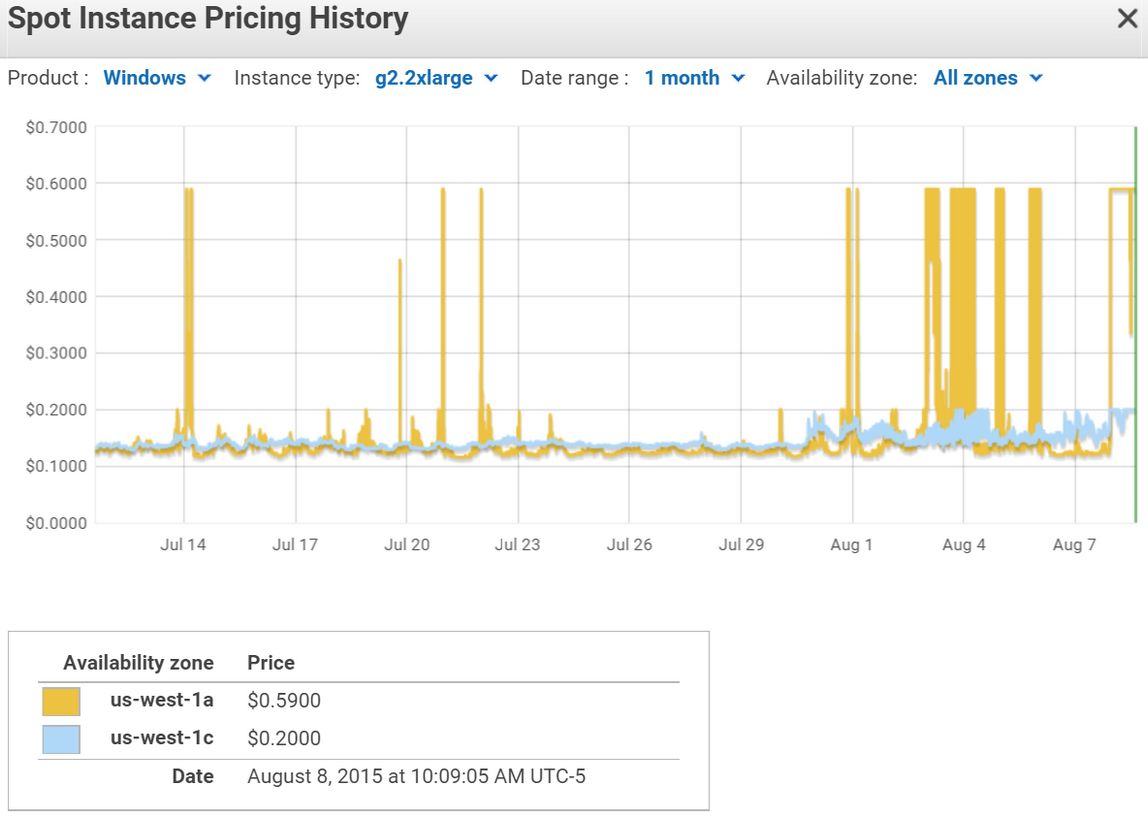
On the one hand, using an entire server to host just one user isn’t terribly efficient; Frame, as Bright Canopy’s infrastructure partner, are already working to offer more efficient means of hosting without impacting individual user’s experiences with Bright Canopy. On the other, and as I’ve previously reported, Amazon’s Spot Instance mechanism, so long the most cost-effective means of obtaining server space, has become subject of bidding wars which have caused sudden and unpredictable spikes in service pricing.
Volatility with Amazon’s Spot Instance pricing has caused huge fluctuations in pricing, making it had to predict how realistic fees charged by small start-ups like Bright Canopy are in meeting costs – click for full size
While Bright Canopy were aware of this, and developed contingencies they hoped would be sufficient to handle pricing fluctuations, etc., until such time as better hosting options were ready to roll, the sheer volume of demand for the service meant that these contingencies were burnt through in the course of the first weekend, thus prompting the current situation.
As noted earlier in this article, Bright Canopy hope the new plan will be an interim measure. The problem here of course is that 20 hours + $0.013 a minute isn’t going to be that attractive an offering to users – something Bright Canopy is all too aware of. With many users spending tens of hours a week in-world, the additional costs could easily mount up, and so people are understandably going to be more focused on the potential for additional costs than on the potential for improved pricing down the road.
As a result of the overall situation, Bright Canopy have opted to keep the service suspended while discussions on the situation continue.
The announcement that Bright Canopy will remain down as they continue to try to work through the price / cost issues, as Tweeted and delivered via in-world message
“We are verifying and double verifying so that when we come up, we stay up,” Bill said to me as the announcement was sent out.
I’ll have more updates on this as further information becomes available / announcements are made.
This summary is published every Monday, and is a list of SL viewer / client releases (official and TPV) made during the previous week. When reading it, please note:
It is based on my Current Viewer Releases Page, a list of all Second Life viewers and clients that are in popular use (and of which I am aware), and which are recognised as adhering to the TPV Policy. This page includes comprehensive links to download pages, blog notes, release notes, etc., as well as links to any / all reviews of specific viewers / clients made within this blog
By its nature, this summary presented here will always be in arrears, please refer to the Current Viewer Release Page for more up-to-date information.
On Thursday, August 20th, the Alchemy team released version 3.8.2.36473 of their viewer in the first of their promised monthly updates.
This release brings the viewer to par with the Lab’s 3.8.2 code base – which means Viewer-Managed Marketplace support. Also, and interestingly, the windows version of the viewer is now built using Visual Studio 2015 (this will generate a VS2015 Redistributable message as a part of the installation process as core elements required for the viewer to run are installed).
Also with this release – and the Alchemy team are calling it a release, rather than a “beta”, as with recent updates – is support for up to 2 gigabytes of texture memory; improvements to the build floater and right-click context menu option; some tweaks to Preferences; and the arrival of OpenSimulator support as well.
So, as a quick look at the main updates.
Alchemy now has VMM support
The SL VMM support offers the expected Marketplace Listings panel, found under the Me menu.
I admittedly did not play with it extensively (i.e. I didn’t attempt to create an entirely new listing, as I don’t have anything not already listed via VMM), but everything did appear to be working quite happily while I poked at updating listings, etc.
In Preferences, the Sound and Media tab gets two new sub-tabs. The first of these is for media, and entitled Sounds; it also includes a toggle for enabling / disabling audio stream notifications.
The second sub-tab is called Voice, and does exactly what it says on the label: provides access to the Voice options.
A minor update to the Setup tab sees the Use Built-in Browser option re-labelled to be more generic in recognition of OpenSimulator support (“in-world” rather than “Second Life”).
A new tab in Preferences, called Grids, provides access to the viewer’s grid manager for adding OpenSimulator grid details, which can then appear on the log-in / splash screen grid selection. By default, both the SL main (Agni) and beta (Aditi) grids are listed, and adding further grids is the usual case of adding the appropriate URI, with the Grid Manager set to recognise the more popular destinations.
Alchemy 3.8.2 brings with it OpenSimulator support
In testing I found everything working as expected, and I had no issues adding Kitely and logging-in. In addition to the new grid options, the OpenSim updates also include both hypergrid support, and support for OpenSim variable regions.
The build tool updates come in two parts. The first is an expanded build sub-menu available from the right-click context menu, which now includes the various script-related options (recompile, reset, set running, etc). The second is the addition of a check box to the build floater itself to automatically synchronise settings (repeats, offsets, etc), between materials layers on an object / object face.
Alchemy 3.8.2 brings with it expanded build options in the right-click context menu, and the ability to synchronise materials on an object / object face
All told a tidy update in which the OpenSimulator support could be very welcome. As always, for full information on updates, any known issues, etc., please refer directly to the release notes.
This summary is published every Monday, and is a list of SL viewer / client releases (official and TPV) made during the previous week. When reading it, please note:
It is based on my Current Viewer Releases Page, a list of all Second Life viewers and clients that are in popular use (and of which I am aware), and which are recognised as adhering to the TPV Policy. This page includes comprehensive links to download pages, blog notes, release notes, etc., as well as links to any / all reviews of specific viewers / clients made within this blog
By its nature, this summary presented here will always be in arrears, please refer to the Current Viewer Release Page for more up-to-date information.
Quick Graphics project viewer version 3.8.4.304433, release on August 21st – provides the new Avatar complexity options to assist with viewer performance when rendering avatars in busy locations, and the new graphics preset capabilities for setting, saving and restoring graphic settings for use in difference environments / circumstances (download and release notes).
Alchemy updated to version 3.8.2.36473 on August 20th – core updates: OpenSimulator Support, Build tools improvements (incl. VS 2015 for Windows), parity with LL 3.8.2 code base; support for up to 2 gigabytes of texture memory – release notes.
Firestorm updated to version 4.7.3.47323 on August 18th – core updates: parity with LL 3.8.2 code base; VVM support; attachment fixes; Experiences support; Layer Limits and much more – release notes – review notes.
UKanDo updated to version 3.8.3.28132 on August 18th – core changes: parity wit the LL 3.8.3.304115 and RLV 2.9.12 releases – release notes
 Tranquility Dreams September 2015 (Flickr)