This summary is published every Monday, and is a list of SL viewer / client releases (official and TPV) made during the previous week. When reading it, please note:
It is based on my Current Viewer Releases Page, a list of all Second Life viewers and clients that are in popular use (and of which I am aware), and which are recognised as adhering to the TPV Policy. This page includes comprehensive links to download pages, blog notes, release notes, etc., as well as links to any / all reviews of specific viewers / clients made within this blog
By its nature, this summary presented here will always be in arrears, please refer to the Current Viewer Release Page for more up-to-date information.
Official LL Viewers
Current Release version: 4.0.6.315555 (dated May 23), promoted July 5th – formerly the Inventory Message RC viewer download page, release notes
Project Bento (avatar skeleton extensions) updated to version 5.0.0.317597 on July 14th – incorporation of final skeleton and slider updates from the test viewer (download and release notes)
CtrlAltStudio for WINDOWS updated to version 1.2.6.43412 on July 18th – Oculus CV1 support (release notes)
V1-style
Cool VL viewer Stable branch updated to version 1.26.18.15 and the Experimental branch updated to version 1.26.19.17, both on July 16th (release notes)
On July 18th, 2016, Strachan Ofarrel (Dave Rowe) released an updated Windows version of his CtrlAltStudio viewer. Version 1.2.6.43412 Alpha use Oculus Rift SDK 1.5.0 and so should support the Oculus CV1, DK2 and DK1.
The release has been made to provide a level of Oculus HMD support in Second Life and OpenSim following the Lab’s decision to withdraw their own project viewer support for the Rift, after significant issues were found with the July update to that viewer.
However, as Strachan states in his blog post on the release, the CtrlAltStudio Windows update is presented “as is”, and still utilises the Firestorm 4.6.9 code-base, which is itself running well behind current releases, and therefore lacks functionality users might otherwise be familiar with in more recent versions of the SL viewer. This means CtrlAltStudio doesn’t support recent HTTP updates, inventory improvements or the TLS 1.2 update (so the built-in web browser will not work with things like Marketplace transactions when using the built-in browser).
Stratchan also warns that it is unlikely that users will get the level of recommended frame rates for CV1 use (which is something the Lab were stating prior to the release of their update), although he notes – again as did the Lab – that the experience should be enough to get a feel for what user-generated VWs are like in immersive VR.
Windows CtrlAltStudio users should be able to install this version over the 1.2.5 Alpha and 1.2.4 Alpha versions if they have either already installed. Those with older versions of the viewer should carry out a clean install (and can always back up and restore their settings before / after doing so). Note that if you install over the top of a previous version you may need to press the “Reset” button next to the “UI depth” Display Output option.
To overcome issues of the viewer failing to recognise very high performance GPUs, CtrlAltStudio 1.2.6.43412 includes and Enable All GPU Features option to force enable all graphics settings (e.g. Basic Shaders, etc.)
The full set of updates in this release are given as:
Updated to Oculus Rift SDK 1.5.0 so that the viewer works with the Oculus runtimes supporting the CV1 as well as the DK2.
Fixed the “UI depth” display setting to work for both DK2s and CV1s.
Added an “FOV multiplier” display setting that decreases or increases the field of view with respect to the Rift-recommended value.
Added a “Pixel density” display setting that decreases or increases the number of pixels rendered in the process of calculating the Rift display output.
Removed the following display options which are no longer available in the Rift SDK: “Low persistence”, “Dynamic prediction”.
Fixed crash at start-up if Rift display output is enabled but no Rift is connected and turned on.
Updated the GPU table.
Added an “Enable All GPU Features” display setting that enables all graphics settings that may otherwise be limited if a new, high performance GPU is not listed in the GPU table.
Added a “Combine Xbox One triggers” joystick setting that combines the left and right trigger values of the Xbox One controller into a single value like the Xbox 360 controller outputs, thus letting the triggers be used to fly up and down.
It is worth noting that when in Riftlook mode, the cursor is only visible in the left eye. This is intended behaviour, allowing the cursor to hover over UI elements and in-world objects correctly without having to use additional and complex code to calculate what relative depth should be used to place the cursor in a stereo rendering.
Release 1.2.6.43412 also includes a new FOV Multiplier and Pixel Density display settings to adjust the displayed field of view and number of pixels rendered in the Rift images. Depending on your graphics card capabilities, these may provide improved visuals when adjusted upwards (at the cost of FPS). Reducing the settings will improve FPS. Both require a viewer restart after adjustment
Ai Austin has provided a blog post on his experiences in using this viewer, and I would recommend it for further reading, particularly in you are new to using the Rift with Second Life, as Ai provides point-by-point sets on getting started.
An interesting broader note in Ai’s post is with regards to using the HTC Vive with CtrlAltStudio – a questions which has been raised a a couple of “Meet the Lindens” sessions. In this regards, Ai:
Some users have reported that the CtrlAltViewer set to use the Oculus Rift works with the HTC Vive using LibreVR/Revive. This is a compatibility layer between the Oculus SDK and OpenVR. It allows you to play Oculus games on your HTC Vive.
The following notes and audio were taken from the weekly Bento User Group meeting, held on Thursday, July 14th at 13:00 SLT at the the Hippotropolis Campfire Circle. For details on the meeting agenda, please refer to the Bento User Group wiki page.
Note that this update is not intended to offer a full transcript of the meeting, nor does it present the discussion points in chronological order. Rather, it represents the core points of discussion, grouped together by subject matter were relevant / possible, whilst maintaining the overall context of the meeting.
Viewer Update
The Bento project viewer updated shortly ahead of the meeting to version 5.0.0.317597. This is intended to be the final round of skeleton and slider changes, and as such includes the modifications to the head bones that were previously offered through the experimental viewer, which can be summarised as:
A new bone, mFaceJawShaper, intended to resolve issues around the jaw angle (see my Bento update #17 for background)
Additional tweaks to existing facial bones
Some slider changes.
In addition, the viewer includes the avatar height update referred to in my Bento update #18, although this has been causing some issues, and some quasi-scaling for wings and tails with avatar height.
These latest updates may mean that content built using earlier versions of the skeleton may no longer display correctly in the updated viewer.
With this release, the Lab is not intended to make any further significant changes to the skeleton or sliders, but focus solely on bug fixes and moving the viewer to Release Candidate status. The only exceptions will be if major regressions are found which affect pre-Bento content, or major issues of a similar nature. If such issues are found with the project viewer, the request is to let the Lab know via bug report and forum thread feedback.
There are also updated avatar test models to go with the updated viewer, which can be found on the SL wiki Bento testing page. These also include mesh eyes now that scaling has been added to the eyes.
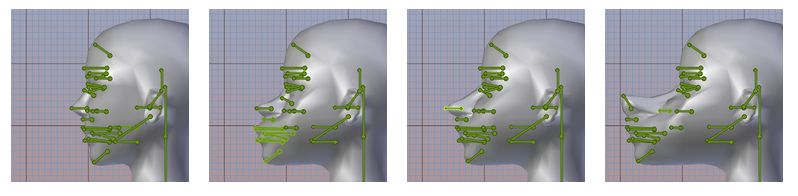
The hope is that allowing for vacations and there being no significant issues found within the July 14th project viewer, it will move to RC status in August. This may also be dependent on whether or not the Lab an resolve the issue of facial distortions occurring at altitude when software skinning is used, which is still being examined.
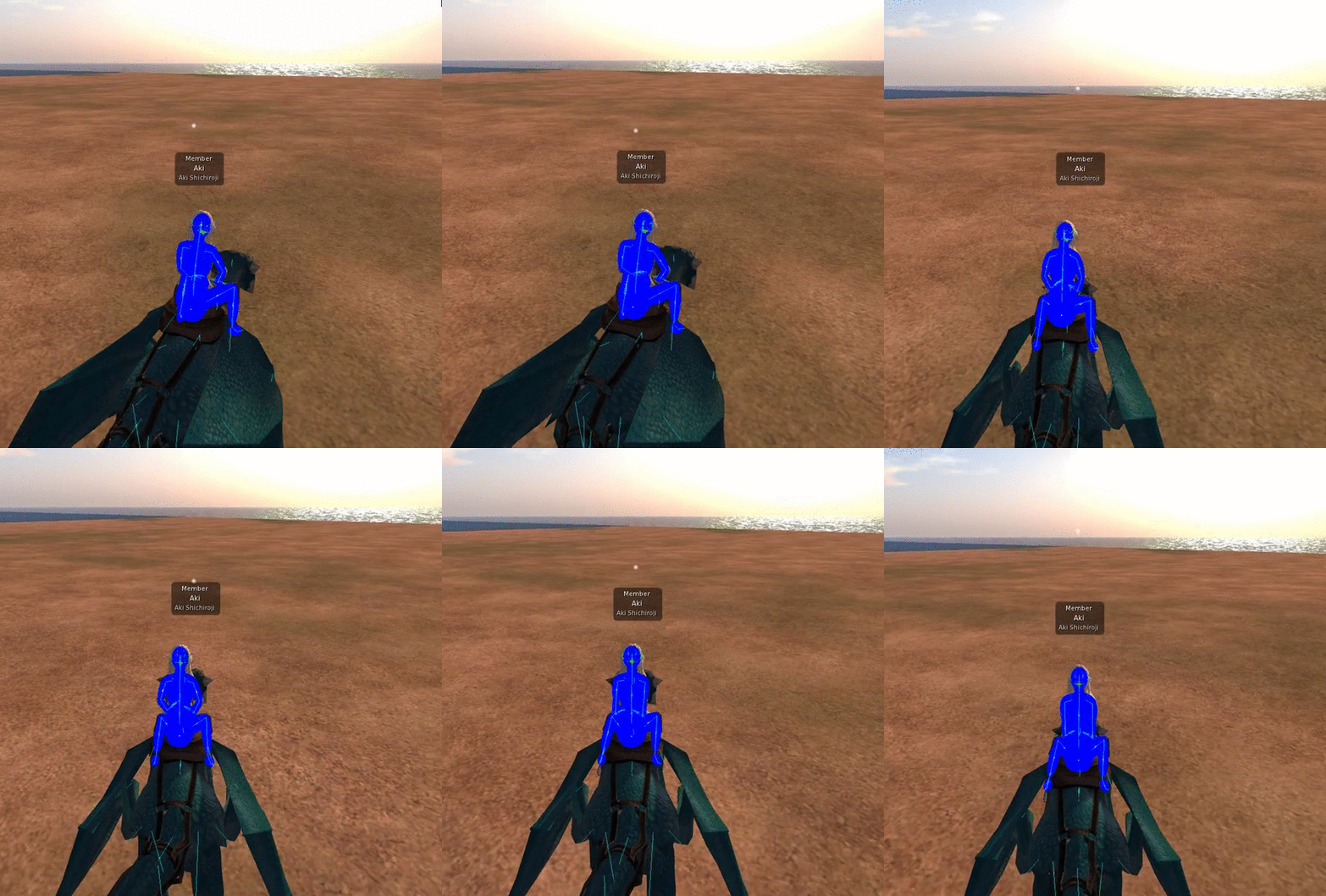
The issue of facial distortions at altitude when using software skinning in Bento has yet to be fully resolved (images courtesy of Cathy Foil)
Should finding a resolution to this issue continue to prove problematic, and providing the issue does not cause performance issues, the Lab might leave it unresolved with the recommendation that creators use hardware skinning, so that the viewer can be promoted to RC status with this flagged as a known issue.
Any progress from RC to release status for the viewer will depend on whether further bugs or issues are found within the Bento viewer, what other RC viewers are in the release channel, what the relative priorities are for the viewers in the release channel in terms of promotion to release status, etc.
Questions were raised in the meeting about making use of the body fat slider with Bento to make for easier weighting of body weights with mesh heads. However, the body fat slider works entirely on morphs, so to be effective with Bento, it would require the addition of additional body joints, which is not on the cards at this point in Bento.
Alt_Eyes
Following the discussion about the Alt_Eye bones, some modifications have been made. In particular, they are now parented to the face root bone, rather than having the same parenting as the original eyes, although they still respond to the same sliders. The viewer has also been updated so that it will animate both sets of eyes consistently (e.g. looking at speakers or other visual targets).
The re-parenting of the alt_eyes is intended to make things eyes for people wishing to use them on non-human avatars. This isn’t as general-purpose as had been hoped (see my update #18), but there were constraints on how the original eyes could be handled for non-human avatars without risk of breaking pre-Bento content, so this route was seen as the best means of presenting people with alternative eye sets, rather than completely re-purposing the alt-eyes.
Rigging to Attachment Points
During the development of Bento, the Lab were introducing validation checks on the simulator side to improve reliability in SL (e.g. checks to ensure animations are what they say they are, further checking of mesh uploads to ensure they can be rendered correctly, etc.). A side effect of these updates would have been that it would no longer be possible to upload mesh items rigged to attach points.
This caused a degree of consternation among content creators (see my SL project update for 2015 week #44), and the decision has now been made not to disable the upload to content weighted to attachment points so as to prevent breakage with existing content (e.g. when issues updates). However, the Lab will not be encouraging people to rig to attachment points.
The majority of the notes in this update are taken from the TPV Developer meeting held on Friday, July 15th. The video of that meeting is embedded at the end of this update, and references to it are indicated through the use of time stamps in the paragraphs below (note that there were some extended pauses in the meeting where there was no discussion, hence some of the time gaps evident between time stamps, where given). My thanks as always to North for recording and providing it.
Server Deployment – Recap
There was no deployment to the Main (SLS) channel on Tuesday, July 12th.
Wednesday July 13th saw a new server maintenance package deployed to all three RC channels comprising “minor internal changes”. One of these sees worn scripts capped at a count of 2500. Attempts to add attachments which take an avatar over this limit should result in the attachments failing to wear.
There is unlikely to be an RC deployment in week 29 (week commencing Monday, July 18th), although the current RC update should be deployed to the Main (SLS) channel.
SL Viewer
[01:04] The Bento project viewer updated to version 5.0.0.317597 on Thursday, July 14th. This viewer incorporates the changes to the head bones and sliders from the test viewer, and also includes an update for some inconsistencies in avatar height as viewed by self versus others. This is most likely the last iteration of this viewer, prior to it moving to release candidate status.
[00:34] The VLC Media Plugin viewer, version 4.0.6.316258 at the time of writing, should be promoted to release candidate status “shortly”, pending the fix of a rendering bug. This viewer had also had fixes for some of the media sound issues which were being experienced.
[02:03] The Visual Outfits Browser viewer, version 4.0.6.316422 dated July 1st at the time of writing, is also awaiting a final bug fix prior to being promoted to RC status.
64-bit Viewers
[02:44 and 18:33] A project version for the 64-bit versions of the official viewer should be appearing “pretty soon”. When these do arrive, the Lab plan to offer Windows in both 32-bit and 64-bit flavours going forward, and Mac as 64-bit only, pretty much as TPVs support 64-bit already do. IF there is a Linux build, then this will also be 64-bit only. The 64-bit versions will also include 64-bit updates to the Havoc sub-libraries as well.
Linux Support
[10:15] As a part of the discussion on SL Voice (see below), Oz re-interated that the Lab will not be directly supporting Linux, but remains willing to accept contributions from TPVs which do support that platform in order to keep the official Linux viewer up-to-date. This is essentially because the effort involved in maintaining a Linux flavour of the viewer when compared to the very small number of Linux users who actually make use of the Lab’s own viewer (overall, Linux users are thought to account for around 1% of the total active user base, many of whom use TPVs).
SL Voice
Voice on Linux
[03:50] Vivox has, for some time, focused updates for the SL Voice package on Windows and Mac, and have ignored Linux. Unfortunately, a recent update from Vivox changed how random handle values in the protocol between the SL Voice package and the viewer are generated, a change which effectively stopped Voice working on Linux (see BUG-20174).
Unfortunately, Vivox have no plans to update their support for Linux, so this is unlikely to be fixed. Some TPVs have therefore been reverting the SL Voice package for their Linux offerings to an early version. Commenting on this, Oz requested that they do not do this for other flavours of their viewers, and noted that even with Linux is not ideal, as the fix actually helps prevent “people subverting the security of your system in really unpleasant ways.” Rather, the suggested approach is for users to run the Windows viewer or the Windows SL Voice package on Linux using Wine.
Voice Support Updates
[07:12 and 13:05] The Lab is engaged in a programme with Vivox to update much of the Voice support. This will involve a new version of SL Voice “pretty soon”. This initial update should be backward compatible on Mac and Windows, allowing TPVs to adopt it, and will include a new codec which should improve the quality of voice for those using the update.
However, further down the road, this programme will include further improvements to Voice security and prevent it being abused, fixing a number of long-standing vulnerabilities. This programme will involve changes to SL Voice package, the viewer, the simulator and the Vivox servers, and due to their nature, they will not be backwards compatible, and viewers not incorporating them – including Linux flavours – will not be able to use Voice(again, running the Windows viewer / Windows SL Voice package under Wine is the suggested route forward for Linux users).
Because of this, the changes will be phased in over a period of time, starting with the viewer changes, and the announcement at the TPV meeting is essentially to put TPVs on notice of what will be happening over the next couple of quarters. Once the viewer / SL Voice package updates have been adopted by TPVs, the necessary changes to the simulator software and to Vivox’s own servers will be introduced.
Voice Connection Issues
[23:19] BUG-20075 notes an uptick in voice connection failures. These have been noted by the Lab as well, and they are thought to be in part the result of a number of attacks directed at Vivox, which the company has been responding to. The hope is that new monitoring tools within the latest version of SL Voice may help identity further problem areas.
There was no deployment to the Main (SLS) channel on Tuesday, July 12th.
Wednesday July 13th saw a new server maintenance package deployed to all three RC channels comprising “minor internal changes”. One of these sees worn scripts capped at a count of 2500. Attempts to add attachments which take an avatar over this limit should result in the attachments failing to wear.
SL Viewer
The Maintenance RC viewer updated to version 4.0.7.317394 on Friday July 8th, following a merge with the current release viewer code.
The Oculus Rift project viewer was withdrawn on July 6th, and development work with the headset has been suspended for Second Life – see my update from last week for more.
This leaves the rest of the current official viewer as follows:
Current Release version: 4.0.6.315555 (dated May 23), promoted July 5 – formerly the Inventory Message RC viewer download page, release notes
Project viewers:
Visual Outfit Browser viewer, version 4.0.6.316422, dated July 1st – ability to preview images of outfits in the Appearance floater
Project Bento (avatar skeleton extensions), version 5.0.0.317134, dated June 30th
Project VLC Media Plugin Viewer, version 4.0.6.316258, dated June 15th – replaces the QuickTime media plugin for the Windows viewer with one based on LibVLC
Obsolete platform viewer, version 3.7.28.300847 dated May 8th, 2015 – provided for users on Windows XP and OS X versions below 10.7.
This summary is published every Monday, and is a list of SL viewer / client releases (official and TPV) made during the previous week. When reading it, please note:
It is based on my Current Viewer Releases Page, a list of all Second Life viewers and clients that are in popular use (and of which I am aware), and which are recognised as adhering to the TPV Policy. This page includes comprehensive links to download pages, blog notes, release notes, etc., as well as links to any / all reviews of specific viewers / clients made within this blog
By its nature, this summary presented here will always be in arrears, please refer to the Current Viewer Release Page for more up-to-date information.
Official LL Viewers
Current Release version: 4.0.6.315555 (dated May 23), promoted July 5th – formerly the Inventory Message RC viewer download page, release notes