Visual Outfit Browser RC viewer, version 4.0.8.318686, dated August 17th – ability to preview images of outfits in the Appearance floater
VLC Media Plugin RC viewer, version 4.1.1.318504, dated August 15th – replaces the QuickTime media plugin for the Windows version of the viewer with one based on LibVLC
Project viewers:
Project Bento (avatar skeleton extensions), version 5.0.0.317597, dated July 14th – incorporation of final skeleton and slider updates from the test viewer
Obsolete platform viewer version 3.7.28.300847, dated May 8, 2015 – provided for users on Windows XP and OS X versions below 10.7.
SL Wiki
As noted under a separate article, the SL wiki is currently locked from public editing due to spamming issues. There is currently no ETA on when it will be made generally available for access. Those with a definite need to have edit rights should raise a support ticket requesting access.
Crap Mariner has been working on a new Arts wiki page on the SL wiki – on which I’ll have more in a future article – when he contacted me earlier in August to let me know that SL wiki editing had been locked to a limited number of permitted editors / users.
The locking has since become more widely seen, prompting Soft Linden to issue an e-mail update as a result of enquiries on what is happening, made via the open-source dev e-mail list. In the e-mail, Soft states:
There is a ridiculously persistent party who uses numerous wikis to promote fake Microsoft support phone numbers. Given the fraud or malware potential, we couldn’t let that keep returning.
There’s a less intrusive long-term solution in the queue, currently blocked by other work.
Hopefully, whatever is blocking the long-term solution will be cleared soon, allowing full edit access to the wiki to be restored.
In the meantime, those requiring urgent access to wiki pages to maintain data / information, are asked to create a support ticket (I’d suggest include which pages need to be accessed and why, rather than just raising a generic request to gain access). Third-party viewer developers who require wiki edit rights can also contact Oz Linden to request access to their wiki pages. If you only require access to update you profile or add a discussion point to a page, etc., it might be advisable to wait until after the wiki has been re-opened to all, rather than filing a support ticket.
This isn’t the first time the wiki had to be placed in lock-down. In October 2014, a lock-down was initiated while the wiki underwent an extensive security update, resulted in limited edit access for users through until January 22nd, 2015. Hopefully, this current period of lock-down, which started in early August, will not be for as long.
This summary is published every Monday, and is a list of SL viewer / client releases (official and TPV) made during the previous week. When reading it, please note:
It is based on my Current Viewer Releases Page, a list of all Second Life viewers and clients that are in popular use (and of which I am aware), and which are recognised as adhering to the TPV Policy. This page includes comprehensive links to download pages, blog notes, release notes, etc., as well as links to any / all reviews of specific viewers / clients made within this blog
By its nature, this summary presented here will always be in arrears, please refer to the Current Viewer Release Page for more up-to-date information.
Official LL Viewers
Current Release version: 4.0.7.318301 (dated dated August 8), promoted August 11 – formerly the Maintenance RC viewer download page, release notes
Visual Outfit Browser viewer updated to version 4.0.8.318686, on August 17 – ability to preview images of outfits in the Appearance floater (download and release notes)
VLC Media Plugin Viewer RC updated to version 4.1.1.318504 on August 15 – replaces the QuickTime media plugin for the Windows version of the viewer with one based on LibVLC (download and release notes)
Cool VL viewer Stable branch updated to version 1.26.18.20 and the Experimental branch updated to version 1.26.19.22, both on August 20th (release notes)
Mobile / Other Clients
Group Tools updated to version 2.2.41.0 on August 16th – no change log provided (download)
My apologies for the latest of this update. Working on my recent Sansar Summary pushed this update completely out of my mind!
Server Deployments – Recap
There were no deployments to the Main (SLS) channel or the RC channels this week. It is currently “doubtful” there will be an RC deployment next week – although this may change. A contributing reason for the slowdown is that the Lab is currently focused on server-side operating system upgrades.
SL Viewer
The Visual Outfits Browser RC viewer updated on August 17th. Version 4.0.8.318686 sees the viewer merged to the current release viewer code, and the following additional updates:
A fix for Outfit Gallery failing to use local files Select Photo Picker
A fix for Snapshot preview being corrupted
A fix for a crash in the viewer when using the snapshot preview.
The following notes were taken from the weekly Bento User Group meeting, held on Thursday, August 18th at 13:00 SLT at the the Hippotropolis Campfire Circle. For details on the meeting agenda, please refer to the Bento User Group wiki page. No audio is supplied, as the meeting was fairly short and sharp, without a major amount of discussion.
SLM Files
SLM files are produced alongside of the Mesh .DAE files. They can be a problem as by default, the official viewer is set to check for any existing SLM file when uploading a mesh model, and this can lead to confusion when trying to fix issues by overwriting the original .DAE, only to have the viewer reference the existing SLM file, either causing problems on upload or giving the impression the issues in the model haven’t actually been fixed.
Firestorm has always avoided this by having the debug setting MeshImportUseSLM set to FALSE by default, and the suggestion going forward is for the official viewer to do them same.
Mesh Distortions with Altitude
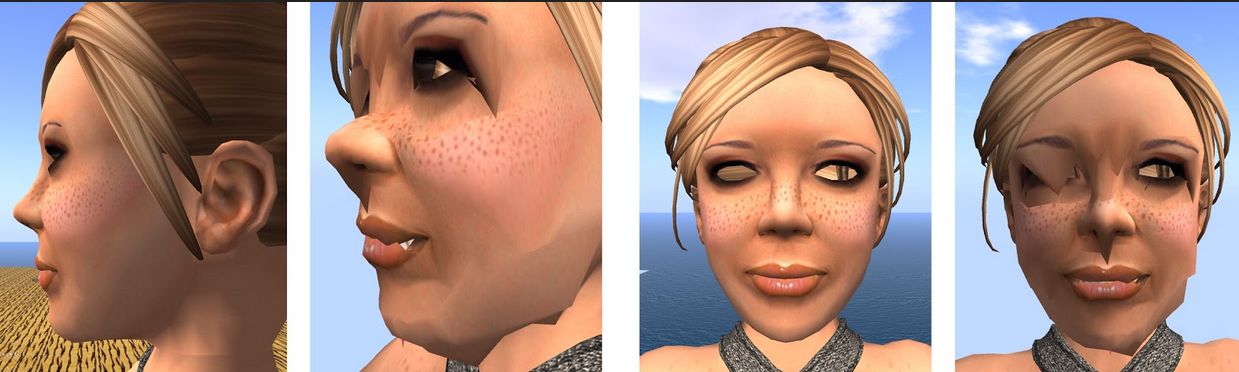
The issue of facial distortions with altitude when software skinning is used continues to prove difficult to resolve. The general recommendation is to use hardware skinning (my Bento Update #19). The root cause of the problem appears to be a floating point error which can affect any mesh. The Lab is still looking at it, but given there is a workaround by using hardware skinning, the problem is not seen as a major blocker.
The issue of facial distortions at altitude when using software skinning in Bento has yet to be fully resolved (images courtesy of Cathy Foil)
Proposals for NOT Having Mesh Influenced by Sliders
There have been requests to not have the avatar bones influenced by the shape sliders (i.e. by a creator optionally locking both the scale and position of a joint). The Lab is looking at this, but if any work is done, it will not be prior to the Bento viewer reaching release candidate status. Whether anything may be done was the RC version of the viewer progresses towards release (the work is not seen as a huge amount of effort), or whether it is a piece of “post-Bento” work is still to be decided.
Avatar Test Files
Cathy foil has now updated the Maya male and female avatar models on the Bento Test wiki page so they match the latest Bento skeleton updates (as of August 17th, 2016). Then both utilise the same (female) skeleton, the male version have a male mesh / morphs applied. Cathy has used the Avatar Bento angel weights and apply them to the models, so the faces and fingers are all fully rigged, although both are sans wings and tails.
Cathy will be making a set of .FBX files of the models, which will also be placed on the Bento Test page when available, for those who are not using tools such as 3D Studio Max for their work.
Elizabeth Jarvinen (polysail) is also working on a tool for 3D Studio. Max which is intended to provide a second means of producing animations / meshes etc that isn’t reliant upon Blender / Avastar. However, this requires a considerable amount of work, not least in providing slider support, and Elizabeth has received offers of assistance from Vir and Cathy, who will also see about having the AvaStar team lend assistance.
Rigs Modifying Collision Volumes
As noted in my Bento update #22, recent reports of people encountering problems with Bento rigs which modify collision volumes (see here for details). As noted in that update, this was not something that the Lab planned on supporting, particularly as it did not come up during the initial Bento development meetings with creators.
However, and as further indicated in my update #22 (with thanks to Whirly Fizzle), an update will be included in the next project viewer release for Bento which should hopefully fix the issues being encountered.
Release Progress
There has been a lot of questioning over the Bento release time frames recently, both within the Bento user group meetings and elsewhere (e.g. at TPVD meetings). Currently the plan is to get a further project viewer released in the near-term (possibly before the end of August), and then progress to release candidate status from there.
However, time frames beyond that become nebulous, because the Bento viewer, as a release candidate, will be vying for release alongside other RC viewers, some of which may have a higher priority, some of which may need to be issued in sequence, or have other pressures, and so predicting a date when Bento will be the de facto release viewer is difficult to predict.
This is further exacerbated by the fact the recent changes and requirements have required extensive updates to AvaStar, much of which is still work-in-progress (see my Bento updates #22 and #21 for more). Once completed, this work will require further testing in order to confirm any problems within AvaStar are resolved, and any remaining issues (if uncovered) are viewer related, rather than external tools related. Then over and above this, there is the list of existing Bento issues which needs to be worked through, depending on the severity of the problems reported.
That said, it would appear the overall hope is to get Bento formally released before the end of 2016.
There was no deployment to the Main (SLS) channel on Tuesday, August 16th, and there will be no deployment on Wednesday, August 17th.
It is currently “doubtful” there will be an RC deployment next week – although this may change. A contributing reason for the slowdown is that the Lab is currently focused on server-side operating system upgrades.
SL Viewer
Release Viewer
BUG-37646 “Attachments get ghosted at login on 4.0.7.318301”; and BUG-37653 “Every time I delete Cache and Relog, my Saved Appearances do not load and I am left as a White Cloud in Second Life Viewer 4.0.7.318301”, noted in my last TPVD meeting update have both been accepted by the Lab and are being worked on.
VLC RC Viewer
As expected, the VLC Media Plugin RC viewer, which contains the LibVLC-based replacement for QuickTime for Windows, updated on August 15th to version 4.1.1.318504. An additional fix is included with the update, which should correct an issue with new MOAP objects losing audio.
Remaining Official Viewers
This leaves the remaining list of official viewers, at the time of writing as follows:
Current Release version: 4.0.7.318301 (dated August 8), promoted August 11 – formerly the Maintenance RC viewer
RC viewers:
Visual Outfit Browser viewer updated to version 4.0.7.318263, on August 1 – ability to preview images of outfits in the Appearance floater – due to update
Project viewers:
Project Bento (avatar skeleton extensions) updated to version 5.0.0.317597 on July 14 – incorporation of final skeleton and slider updates from the test viewer
Obsolete platform viewer version 3.7.28.300847 dated May 8, 2015 – provided for users on Windows XP and OS X versions below 10.7.
This summary is published every Monday, and is a list of SL viewer / client releases (official and TPV) made during the previous week. When reading it, please note:
It is based on my Current Viewer Releases Page, a list of all Second Life viewers and clients that are in popular use (and of which I am aware), and which are recognised as adhering to the TPV Policy. This page includes comprehensive links to download pages, blog notes, release notes, etc., as well as links to any / all reviews of specific viewers / clients made within this blog
By its nature, this summary presented here will always be in arrears, please refer to the Current Viewer Release Page for more up-to-date information.
Official LL Viewers
Current Release version: 4.0.7.318301 (dated dated August 8), promoted August 11 – formerly the Maintenance RC viewer download page, release notes
Cool VL viewer Stable branch updated to version 1.26.18.19 and the Experimental branch updated to version 1.26.19.21, both on August 13th (release notes)
Mobile / Other Clients
Group Tools updated to version 2.2.40.0 on August 14th – no change log provided (download)