2019 SL User Groups 8/2: Content Creation summary

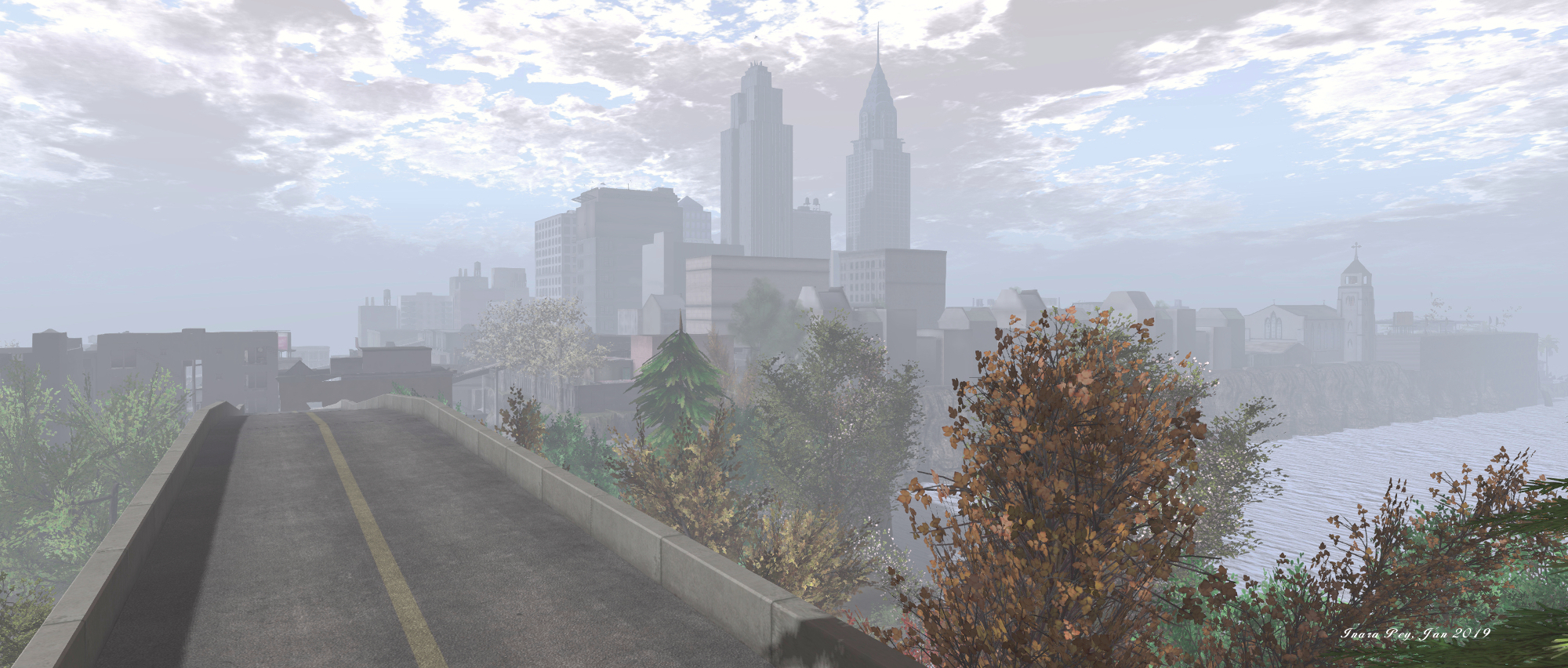
COBKOBO; Inara Pey, January 2019, on FlickrCOBKOBO – blog post

The following notes are taken from the Content Creation User Group (CCUG) meeting, held on Thursday, February 21st, 2019 at 13:00 SLT. These meetings are chaired by Vir Linden, and agenda notes, meeting SLurl, etc, are usually available on the Content Creation User Group wiki page.

Animesh Follow-On

  • Vir has been assisting with the clean-up following the inventory issues users experienced over the weekend of February 9th /10th. These apparently impacted a number of SL’s back-end services and are still being worked on.
  • A planned change for Animesh designed to throttle the number of complexity updates for avatars and Animesh objects actually never made it into a release viewer. This will now likely get pulled into the (non-public) viewer repository where Vir is experimenting with Animesh follow-on work.
    • The lack of this throttle has meant that some TPVs have implemented their own throttles on these complexity updates to reduce their potential impact.
  • Will there be attachment points for Animesh? Currently unknown. Vir will be investigating options; attachments to Animesh won’t function in quite the same way as avatar attachments, so the optimal mechanism needs to be determined, if possible.
    • One option might be to have attachments behave as part of the Animesh linkset, but have a flag set for them that forces them to be displayed in the required location when used.
    • This doesn’t allow the full range of capabilities seen with avatar attachments, but it would allow the attachment to be made, and the Animesh complexity calculations to be properly updated.

Environment Enhancement Project

Project Summary

A set of environmental enhancements allowing the environment (sky, sun, moon, clouds, water settings) to be set region or parcel level, with support for up to 7 days per cycle and sky environments set by altitude. It uses a new set of inventory assets (Sky, Water, Day),  and includes the ability to use custom Sun, Moon and cloud textures. The assets can be stored in inventory and traded through the Marketplace / exchanged with others, and can additionally be used in experiences.

Due to performance issues, the initial implementation of EEP will not include certain atmospherics such as crepuscular rays (“God rays”).

Resources

Current Status

  • It is hoped that the current project viewer version of the EEP viewer (version 6.0.2.524476, dated Tuesday, February 19th) will be the last before EEP moves to viewer release candidate status.
    • There are still a couple of bugs to be hunted down which may impact the promotion.
  • Rider hopes to see the viewer go to RC status before the sider code for EEP moves beyond the LeTigre and BlueSteel simulator RC channels, to allow more widespread testing of the viewer once it is in RC without the risk of bugs impacting other simulator updates.
  • People using the EEP viewer (project or RC, once it has been promoted) should see no difference in behaviour when using it on non-EEP regions.

Bakes On Mesh

Project Summary

Extending the current avatar baking service to allow wearable textures (skins, tattoos, clothing) to be applied directly to mesh bodies as well as system avatars. This involves viewer and server-side changes, including updating the baking service to support 1024×1024 textures, but does not include normal or specular map support, as these are not part of the existing Bake Service, nor are they recognised as system wearables. Adding materials support may be considered in the future.

Resources

Current Status

  • A further appearance server update is required to fix the “black skirt” issue that can result in an avatar appearing to wear a long, jet black “skirt” when seen in the BoM viewer.

Multiple Texture Uploads

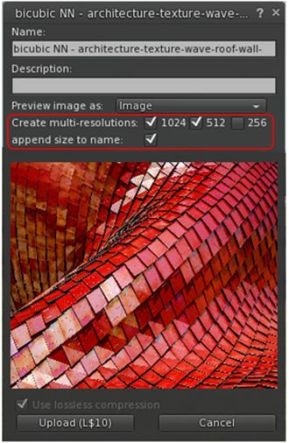
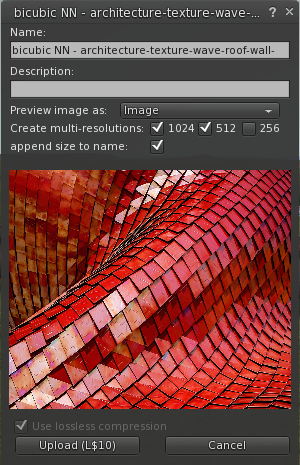
  • BUG-226352 requests multiple suitable image resolutions are made available when uploading textures. Image courtesy of Beq Janus

    As noted in my previous Content Creation UG meeting notes, there was some discussion on textures and uploads, during which, Beq Janus suggested making it possible for users to select more than one image resolution when uploading textures to the viewer.

  • The idea here is to encourage people to experiment and see how the different resolutions work on surfaces, rather than always automatically opting for the highest resolution (e.g. 1024×1024), which might not always be required.
  • A feature request was subsequently submitted for this – see BUG-226352 – which has been accepted.
    • It’s not clear if / when this might be implemented, although it is acknowledged as being “a nice thing to have” (particularly given the different resolution mipmaps are generated at upload anyway, but only the selected resolution is made available).
    • It is not clear how much would be involved in the necessary back-end updates required to support the idea.
    • Also, the usual caveat: “accepted” means the idea is something the Lab is interested in tracking / possibly investigating. It doesn’t automatically mean a feature request will be implemented.

 

2019 SL User Groups 8/1: Simulator User Group and EEP oddities

A Way of Life; Inara Pey, January 2019, on FlickrA Way of Life – blog post

Server Deployments

Please refer to the server deployment thread for the latest news.

  • On Tuesday, February 19th, there was no deployment to the SLS (Main) channel, leaving it on server maintenance package 19#19.01.25.523656; however, region on the channel were restarted. The planned update for the channel was again postponed due to a late-breaking bug.
  • On Wednesday, February 20th, 2019 the RCs are likely to be updated as follows:
    • BlueSteel and LeTigre should receive EEP update server maintenance package 19#19.02.16.524516, comprising the following fixes:
      • BUG-226252 [EEP] Please create an internal error code for llReplaceAgentEnvironment() & llSetAgentEnvironment() that distinguishes whether an agent does not have the experience allowed and if the experience is not allowed at their location.
      • BUG-226246 [EEP] llGetEnvironment() reports SKY_LIGHT fade_color as a rotation instead of a vector. (SKY_LIGHT only returns vector light_direction and vector total_ambient. fade_color is removed https://wiki.secondlife.com/wiki/LlGetEnvironment)
    • Magnum should receive server maintenance package 19#19.02.16.524515, comprising further internal fixes.

SL Viewer

The EEP Project viewer updated to version 6.0.2.524476 on Tuesday, February 19th. The remaining viewer pipelines remain as  follows:

  • Current Release version 6.0.1.522263, dated December 5th, promoted December 13th, 2018. Formerly the Spotykach Maintenance RC viewer – No Change.
  • Release channel cohorts (please see my notes on manually installing RC viewer versions if you wish to install any release candidate(s) yourself):
    • BugSplat RC viewer, version 6.1.0.524348, dated February 13th. This viewer is functionally identical to the current release viewer, but uses BugSplat for crash reporting, rather than the Lab’s own Breakpad based crash reporting tools.
    • Estate Access Management (EAM) RC viewer, version 6.1.0.523351, dated January 23rd.
    • Love Me Render RC viewer, version 6.0.2.523177, dated January 16th.
  • Project viewers:
  • Linux Spur viewer, version 5.0.9.329906, dated November 17th, 2017 and promoted to release status 29 November – offered pending a Linux version of the Alex Ivy viewer code.
  • Obsolete platform viewer, version 3.7.28.300847, dated May 8th, 2015 – provided for users on Windows XP and OS X versions below 10.7.

EEP Deployment Oddities

There are some oddities being witnessed while EEP is being deployed. These should all go away once the code is fully deployed on the servers and the viewer code has reached all release versions of viewers.

Day / Night Cycle Differences

With the EEP updates currently on around 20% of the main grid, it is possible for very different values to be returned to the viewer when travelling between adjacent EEP and non-EEP regions, and this has been causing some confusion. Rider explains it thus:

EEP changes how the time is calculated. llGetSunPosition is dependent on the environment. It was not before. Legacy regions determine the beginning of the day differently than EEP regions. So until [they] have been [updated] there will be some disruption.

The way the start of the day has changed. It is now GMT-8, this [also] may not align with neighbouring legacy regions.

Other Oddities

  • There are also reports of jarring region crossing transitions that can sometimes occur when moving between regions with different EEP settings – see BUG-225689.
  • Stars on EEP regions will appear black against the daytime sky when seen on a non-EEP viewer with Advanced Lighting Model (ALM) enabled, or as white stars with ALM disabled.

Marketplace Gifting

There is an issue with the redelivery of gifts made via the Marketplace that (depending on the age of the original gift delivery) might result in the redelivery going to the sender, rather than the intended recipient – see BUG-226124. If you encounter this, please raise a support ticket.

Catznip R12.1: Animesh and more

Tuesday, February 19th, 2019 saw the long-awaited release of Catznip R12.1 – the release coming a little over a year since the last update.

The key feature with this update is support for Animesh, although it also sees Catznip come up to parity with the Lab’s viewer cove (release 6.0.1.522263 at the time of writing), which means there are a lot of bug fixes and other tweaks within the viewer.

Table of Contents


Catznip R12.1 also introduces a number of features and enhancements directly from the Catznip team.

These notes are designed to cover the most visible changes with the release. For details on specific bug fixes, please refer to the R12.1 release notes.

Log-In Splash Screen

The first major change with Catznip R12.1 can be seen within the viewer splash screen. This includes a revised destination panel and revised information tabs.

Web Links

The splash screen now includes five buttons located to the left of the large Catznip logo. These are links to:

  • The Catznip Patreon page.
  • The Catznip Flickr pool (empty at the time of writing).
  • Clearer buttons to Catznip on Google+ (although Google+ will be closing on April 2nd, 2019), Facebook and Twitter.

Destination Guide Panel

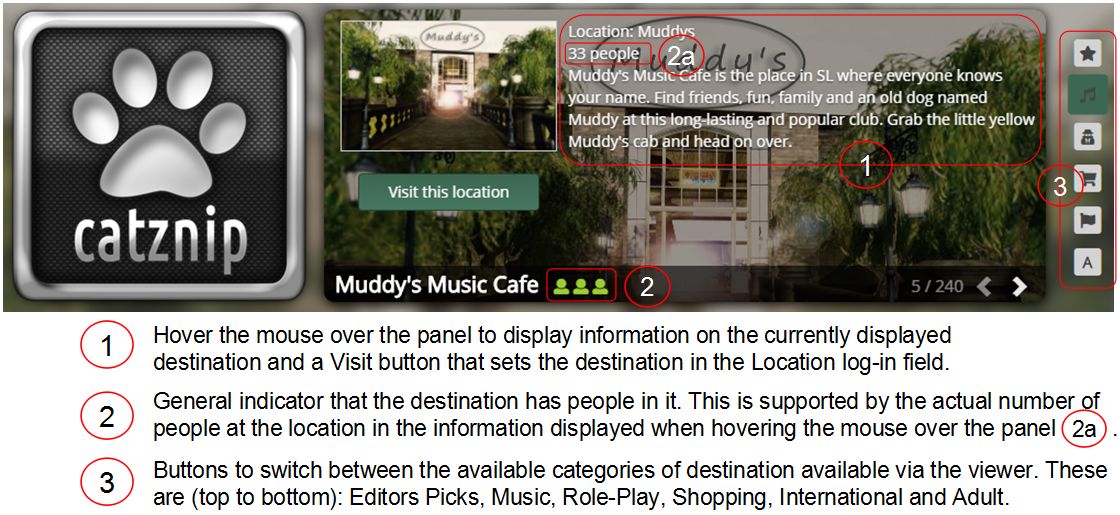
The Destination Guide panel has been overhauled for better access to destinations by selected category and to display information, as outlines in the image below.

The updated Destination Panel of the Catznip log-in screen

Revised Information Tabs

The log-in screen information tabs located below the destination panel have also been revised, so it contains the following tabs:

  • What’s New: primarily useful during Catznip beta releases, when it lists all the JIRAs that were fixed or added for that particular beta.
  • Grid Status: displays information from the Second Life Grid Status RSS fed.
  • Modem World: displays posts recorded by this blog’s RSS feed.
  • Reddit : displays recent threads from the Second Life Reddit community.
  • Seraphim: lists blog posts recorded in the Seraphim blog RSS feed. Clicking the location column will set your login location to that specific event.
The log-in screen information tabs

Note that the tabs are considered experimental, and feedback on their inclusion from Catznip users is requested.

Lab Derived Updates

This version brings Catznip up to parity with Linden Lab release viewers through to release version 6.0.1.522263 (formerly the Spotykach RC viewer, promoted on December 13th, 2019. Major updates in that release include:

  • Voice Server:
    • Second Life: Vivox version 4.9.0002.30313.
  • Chromium Embedded Framework (CEF) Dullahan:
    • Dullahan: 1.1.1080
    • CEF: 3.3325.1750.gaabe4c4.513446.
    • Chrome: 65.0.3325.146.

Animesh

Animesh allows the avatar skeleton to be applied to any suitable rigged mesh object, which can then in turn be animated using suitable scripts and animations contained within the object’s Contents. This opens up a whole range of opportunities for content creators and animators to provide things like independently moveable pets / creatures, and animated scenery features.

While Animesh is likely to primarily be used by content creators, it has been designed so that any suitable rigged mesh can be converted to Animesh directly from the Build / Edit floater. Do be aware, however that simply converting an object will not cause it to start animating – you’ll need suitable animations and a script to run them. Like any other object utilising animation, this is done by adding the animations and scripts via the Edit > Contents tab for your converted object.

A razzle of raptors? Animesh used to animate rigged mesh raptors from Linden Lab

The best way to get started with Animesh is to use the available resources. These include:

Continue reading “Catznip R12.1: Animesh and more” →

2019 viewer release summaries week #7

Logos representative only and should not be seen as an endorsement / preference / recommendation

Updates for the week ending Sunday, February 17th

This summary is generally published every Monday, and is a list of SL viewer / client releases (official and TPV) made during the previous week. When reading it, please note:

  • It is based on my Current Viewer Releases Page, a list of all Second Life viewers and clients that are in popular use (and of which I am aware), and which are recognised as adhering to the TPV Policy. This page includes comprehensive links to download pages, blog notes, release notes, etc., as well as links to any / all reviews of specific viewers / clients made within this blog.
  • By its nature, this summary presented here will always be in arrears, please refer to the Current Viewer Release Page for more up-to-date information.
  • Note that for purposes of length, TPV test viewers, preview / beta viewers / nightly builds are generally not recorded in these summaries.

Official LL Viewers

  • Current Release version 6.0.1.522263, dated December 5th, promoted December 13th. Formerly the Spotykach Maintenance RC viewer – No change.
  • Release channel cohorts:
    • The BugSplat RC viewer updated to version 6.1.0.524348 on February 13th.
  • Project viewers:
    • The Bakes on Mesh project viewer updated to version 6.0.2.524367 on February 15th.

LL Viewer Resources

Third-party Viewers

V5/V6-style

V1-style

Mobile / Other Clients

  • No Updates.

Additional TPV Resources

Related Links

Firestorm 6.0.2: Animesh release

On Sunday, February 17th, 2019, Firestorm release version 6.0.2.56680 of their viewer, marking the official release of Animesh support within Firestorm.

This release is essentially a follow-on to the Animesh Early Access release made in December 2018.

Table of Contents

As I covered this in Firestorm 6.0.1: Animesh Early Access, aside from highlighting some of the more user-visible updates in that release, this article provides information on those updates specific to Firestorm 6.0.2.

Please use the table of contents above right to jump to any specific topic of interest. Full details of all changes, and contributor credits can be found in the official release notes.

The Usual Before We Begin

As per my usual preamble:

  • There is no need to perform a clean install with this release if you do not wish to.
  • Do, however, make sure you back-up all your settings safely so you can restore them after installing 6.0.2.
  • Please refer to the official release notes for a full breakdown and changes, updates and credits associated with this release.

Notable Firestorm 6.0.1 Updates

The following is a short update of some of the more user-visible updates present in the Firestorm 6.0.1 Early Access release, presented for the benefit of users who may not have downloaded that version.It includes both Lab-drived and Firestorm-specific updates. For a more detailed overview on that release, please refer to Firestorm 6.0.1: Animesh Early Access.

Animesh

For a detailed overview, see my Firestorm Animesh notes.

Animesh allows the avatar skeleton to be applied to any suitable rigged mesh object, which can then in turn be animated using suitable scripts and animations contained within the object’s Contents. This opens up a whole range of opportunities for content creators and animators to provide things like independently moveable pets / creatures, and animated scenery features.

While Animesh is likely to primarily be used by content creators, it has been designed so that any suitable rigged mesh can be converted to Animesh directly from the Build / Edit floater . Do be aware, however that simply converting an object will not cause it to start animating – you’ll need suitable animations and a script to run them. Like any other object utilising animation, this is done by adding the animations and scripts via the Edit > Contents tab for your converted object.

The best way to get started with Animesh is to use the available resources. These include:

Firestorm Animesh Additions
  • Derender Animesh: depending on your system, Animesh may impose some performance impacts, particularly where a lot of Animesh is active within a scene. To help mitigate this, Firestorm 6.0.2 includes an option to derender all Animesh in a scene (Developer menu > Rendering > Derender All Animesh). Note that this is only temporary, and derendered Animesh will reappear after a teleport or re-logging.
  • Auto-scaling amortisation of the new Animesh dynamic bounding box calculations. This fix limits the overhead of the new dynamic bounding box calculations to AvatarExtentRefreshMaxPerBatch per AvatarExtentRefreshPeriodBatch frames. The default is 5 avatars per 4 frames, so in a busy region, 25 avatars would take 20 frames to refresh the bounding boxes.
  • Performance tweaks by reducing Matrix operations per render pass.
  • More JointMatrix Palette caching tweaks:
    • The cache has been moved to drawable for more benefit (reduces CPU overhead when rendering shadows and materials by caching the jointmatrixpallette).
    • Sacrifices some potential cache locality but savings seem to outweigh this.

Other Notable 6.0.1 Updates

Additional updates in the Firestorm 6.0.1 pre-release worth noting are:

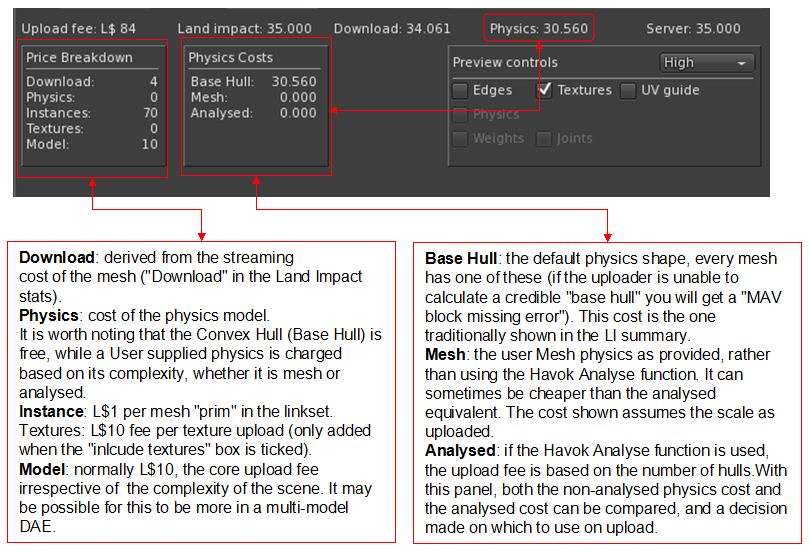
  • Mesh Uploader (for full details on the mesh uploader changes, please refer my Firestorm Mesh Uploader notes): Beq Janus has overhauled the mesh uploader to improve its use and the information it provides. She has also provided comprehensive documentation on these updates, which are summarised below:
    • Upload cost and physics cost calculation breakdowns – see image below for more.
    • Physics details, the costs of the different types of physics (convex hull, prim).
    • Resizable preview window with higher resolution image and improved shading/lighting.
    • Correct highlighting of degenerate mesh.
    • Improved error handling for physics models (avoid some MAV errors).
    • UV Guide overlay.
    • Note Firestorm 6.0.2 includes further updates to the uploader
  • Experimental Teleport Attachments Fix (Debug Settings > FSExperimentalLostAttachmentsFixKillDelay): a timer delay designed to prevent attachments from being detached temporarily after a teleport has completed.  Works with FSExperimentalLostAttachmentsFix when set to TRUE; set to 3 seconds by default.
  • Left-click None option (Build Menu):  allows transparent prims / mesh to be clicked-through that might otherwise be in the way when trying to touch other objects (via LL).
  • Auto Replace for Note Cards: dynamic replacement of text within note cards when the Auto Replace function for spelling is enabled via Preferences > Chat > Typing > Auto Replace (see the Firestorm wiki on Auto Replace).

Linden Lab Derived Updates in Firestorm 6.0.2

This version brings Firestorm up to parity with Linden Lab release viewers through to release version 6.0.1.522263 (formerly the Spotykach RC viewer, promoted on December 13th, 2019. Major updates in that release include:

  • Voice Server:
    • Second Life: Vivox version 4.9.0002.30313 (Mac and Windows) (Opensim: Vivox version 4.6.0017.22050 (Mac and Windows); Linux: Vivox native voice version 3.2.0002.10426, Firestorm only).
  • Chromium Embedded Framework (CEF) Dullahan:
    • Dullahan: 1.1.1080
    • CEF: 3.3325.1750.gaabe4c4.513446
    • Chrome: 65.0.3325.146
    • Page of test URLs for Dullahan. With the Developer Menu enabled (Ctrl Alt Q) press Ctrl-Shift-Z then the Home page button.

Firestorm 6.0.2 Updates

Appearance and Inventory

  • The Avatar menu includes new short cut for the Avatar > Avatar Health > Refresh Attachments option (Alt-Shift-R).
  • Replace Links – Delete links check box

    Inventory: Delete Links: the Replace Links inventory option now includes the ability to delete all links to an object:

    • Open your inventory.
    • Locate the object which has links you wish to delete (or one of the links themselves). Right click on the item / link and select Replace Links.
    • The Replace Links dialogue box opens, recording the object link name, the option to replace it with a new name and a new Delete Links Only check box.
    • Click the Delete Links check box to activate it. The Replace field in the dialogue box is replaced by the warning Links To This Item Will Be Removed.
    • Click Start to delete all links.
  • Experimental Lost Attachments Report (Debug Settings > FSExperimentalLostAttachmentsFixReport): when enabled, this reports attachments that were attempted to get detached during a teleport or region crossing to nearby chat.
  • Inventory should no longer automatically opening to show new items regardless of settings (FIRE-23476).
  • Enabling Disable Random Eye Movements (Preferences > Firestorm > Avatar > Disable Random Eye Movements) will no longer cause the avatar’s hands to splay (FIRE-23457).

Build Updates

  • Revisions and updates to the mesh uploader introduced in Firestorm 6.0.1
    • Allow intentional degenerate placeholders – this fixes the problem of “Physics mesh too dense” false positives (FIRE-23367 and FIRE-23387).
    • Allow override of client side mesh validation as a workaround for edge cases and different grid validation.
      This effectively restores previous server-side MAV error dialogues alongside client-side warnings.
    • Fixed up 3-point lighting (so it has 3 points) that was messed up in a rogue merge.
    • Fixed up black bar in mesh preview when the mesh uploader is used with low resolution screen (FIRE-23340).
    • Increased panel height to avoid warning message overlapping.
Mesh Uploader: new cost calculations breakdown elements by Beq Janus – see Firestorm 6.0.1: Animesh Early Access

UI Updates

  • Texture picker should no longer open the wrong floater when pressing space in preview mode (FIRE-23582).

RLVa Updates

Firestorm is still using RestrainedLove API: RLV v3.2.1 / RLVa v2.2.0.56680.

@setgroup Throttle

With Firestorm 6.0.2 @setgroup is throttled to one (unowned) call every 60 seconds across all objects. An object a @setgroup lock may bypass this throttle once, to allow @setgroup=n,setgroup:[;]=force to succeed regardless of any/other objects’ command history.

This will break all animated group tag cyclers introduced after the @setgtoup feature was added to Firestorm 5.1.7. However, it has been introduced at Linden Lab’s request due to the performance issues multiple frequent @setgroup calls were causing (each call generates a database write). Further, Linden Lab will shortly be introducing a server-side throttle to active group changes and group role changes, and so @setgroup will be broken in any viewer using it.

Please do not blame Firestorm or any other TPV using @setgroup for this change. There is nothing that can be done about it, given the forthcoming server-side throttle. We did attempt to contact all the sellers of these group title animators on the Marketplace many weeks ago to warn them that the feature had to be removed & sadly only one creator removed their listing.

Other RLVa Changes
  • New ‘RLVaSplitRedirectChat’ setting: splits long chat lines when @redirchat restricted.
    • Debug: RLVaSplitRedirectChat) – set to TRUE.
    • Menu bar > RLVa > Split Londe Redirected Chat
  • Fixes for:
    • @setoverlay_alpha causing a diagonal line to appear on the rendered texture.
    • @shownames exceptions should not have their name anonymised in nearby chat.
    • @shownames exceptions not having the correct colour on the minimap (FIRE-23473).

Other Updates of Note

  • FMOD Studio updated to version 1.10.10.
  • KDU updated to version 7.A.6.
  • Firestorm application icon should no longer randomly flash on the Windows 10 taskbar (FIRE-23498)
  • Fix for the camera floater zoom glitch (FIRE-23470).
  • Firestorm should no longer crash when adding a large number of users to a contact set.
  • Firestorm should correctly request microphone permissions on OS X Mojave (FIRE-23405).
  • The context menu in scroll lists (LLScrollListCtrls) can now be opened with the Windows keyboard (FIRE-19933).
  • Skinning and translation updates – see the release notes.

Feedback

Not a major update, unless you skipped the 6.0.1 early access. As with that release, the core element for 6.0.2 is Animesh, together with the revised mesh uploader for content creators.

Performance-wise, I’ve found Firestorm 6.0.2 to be equitable to Firestorm 6.0.1. Other than this, not a lot to report.

Links

2019 SL User Groups 7/3: TPV Developer Meeting

Petit Lac Des Cygne; North Providence, January 2019, on Flickr
North Providence – blog post

The following notes are taken from the TPV Developer meeting held on Friday, February 15th, 2019. A video of the meeting is embedded below, my thanks as always to North for recording and providing it. Time stamps are provided to the major topics of discussion, which will open the video in a new tab for ease of reference.

SL Viewer

[0:00-1:18 and 3:54-4:15]

The Bakes On Mesh project viewer updated to version 6.0.2.524367 on Friday, February 15th. The rest of the current viewer pipelines remain as per earlier in the week:

  • Current Release version 6.0.1.522263, dated December 5, promoted December 13. Formerly the Spotykach Maintenance RC viewer – No Change.
  • Release channel cohorts (please see my notes on manually installing RC viewer versions if you wish to install any release candidate(s) yourself):
    • BugSplat RC viewer, version 6.1.0.524348, February 13. This viewer is functionally identical to the current release viewer, but uses BugSplat for crash reporting, rather than the Lab’s own Breakpad based crash reporting tools.
    • Estate Access Management (EAM) RC viewer, version 6.1.0.523351, January 23.
    • Love Me Render RC viewer, version 6.0.2.523177, January 16.
  • Project viewers:
  • Linux Spur viewer, version 5.0.9.329906, dated November 17, 2017 and promoted to release status 29 November – offered pending a Linux version of the Alex Ivy viewer code.
  • Obsolete platform viewer, version 3.7.28.300847, May 8, 2015 – provided for users on Windows XP and OS X versions below 10.7. This viewer will remain available for as long as reasonable, but will not be updated with new features or bug fixes.

It is hoped that one of the current RC viewers will gain promotion to de facto release status, although there is one further issue in the Love Me Render viewer to be seen to. Also, the EEP viewer could see promotion to RC status in the very near future.

Viewer-Related Web Changes

Release Notes

[16:35-18:20] The Lab will be introducing a new system for release notes. In short:

  • It will use a new website for publishing release notes, and not the currently SL wiki pages.
  • Those release notes currently on the wiki will remain there for archival purposes.
  • Once visible, any issues should be reported via Jira.

User Profiles – Viewer and Web

[18:23-24:35] The current user profiles seen in the viewer, on the web, via various feeds, etc., are all powered by a single application. There is an upcoming system upgrade in the pipeline that might result in some breakage within this app. The Lab will therefore be moving viewer profiles back to using floater-style user profiles, as is seen with the like of Firestorm.

Upcoming changes will impact the current means of providing profile information. In particular, this means the official viewer will, in the future cease using the web format for displaying profile information (l) and will revert to a more “legacy” style, as seen in various TPVs (like Firestorm, shown r).

It is not currently clear what will happen to the current web profiles and feeds. It is hoped these will be able to continue to work, but the Lab is also contemplating a “worst-case” scenario that they may be retained for historical purposes (so snapshots uploaded to feeds are preserved and remain viewable, for example), but will no longer work as they do now – but this is not what the Lab is hoping to achieve.

This will not be an immediate change, as there may be issues along the way the Lab need to work through.

Weekend Issues

[5:27-6:31] The weekend of February 9th /10th saw some significant issues with Second Life, and extended periods of unscheduled maintenance. The problems that contributed to the issues are still being investigated, ut the Lab is close to understanding exactly what went wrong, and how to respond should a similar issue occur.

As an aside, the weekend issues result in inventory problem that caused some uses to see the “cannot remove protected categories” error. If you are still seeing this message, and have not already done so, file a support ticket.

In Brief

  • [1:20-1:46] Visual Studio 2017 Build Process Update: work on this is progressing well, but will like pause in the coming week, due to the project lead being on vacation.
  • [2:09-2:40] EPP: As per my SUG meeting and CCUG meeting notes, the simulator EEP code is now on BlueSteel and LeTigre. This will not get a further promotion in week #8, as there is a fix for another issue the Lab wants to see get wider exposure on the grid.
  • [6:50-10:18] Avatar attachment issues: there have been reports of attachments belonging to other avatars randomly appearing to be attached to your screen when logging-in to / teleporting to busy regions. The underlying problem appears to be a race condition in which the object data for the attachment is received by the viewer ahead of the avatar / attachment point data (and should correct when the latter is received).
    • In the meeting, the issue is specifically reported as occurring with “jellydolled” avatars, but this appears to be purely coincidental.
  • [10:39-11:28] New EEP Assets causing log-in freezes: a default set of new EEP object types were added to the asset library recently for use with the EEP viewer. However, if pulled into a non-EEP viewer, they can cause log-in freezes, as the viewer repeatedly generates an error message for each individual asset it encounters in loading inventory, rather than simply throwing a single message of the asset type, and simply ignoring the rest of the individual assets. There is a fix for this, but it has yet to reach the current release viewer code base.
  • [11:37-14:10] Landmark assets getting fetched twice at log-in: this appears to be a new(ish) issue. Although landmark assets only appear once in inventory, the viewer appears to be fetching them twice; once around mid-way through the log-in process, and then again at the end. The cause is unknown at present, but it has been noted by the Lab.
    • An intermediate workaround if your logins are being delayed unduly is to delete you landmarks.
    • This can might cause the degraded performance message (see below).
  • [13:07-15:33] Degraded performance message: “Linden Lab has detected degraded performance on your connection”, with a suggestion you relog, is a message users might receive when the viewer is failing to acknowledge enough of the UDP messages exchanged with the simulator.
    • This can be the result of your router being overloaded by whatever else it might be doing, so responses from the viewer fail to reach the simulator.
    • It might also be the result of issues being experienced in the simulator.
    • While a lot of asset-related UDP messaging has been removed from simulator / viewer communications, there is still much that does require / well suited to UDP, particularly where information is changing, and the viewer needs the latest update, not a re-send of a now outdated updated (e.g. object updates), as would be the case using something like TCP, which attempts to re-send the data it has, rather than any new data.
    • See also BUG-225544.
  • BUG-226352 requests allowing users to define more than a single resolution when uploading a texture

    [30:21-31:37] In-Viewer Animation Creation: This is a project based on contributions from NiranV Dean (Black Dragon viewer). Vir and Nat Linden had been working on elements of the project, but are both also busy with other viewer-related projects (e.g. Animesh follow-on investigations for Vir, working on the VS 2017 update for Nat). Resources are also being swallowed by the under-the-hood work required for the transition to the cloud, which is also impacting assorted projects.

  • [32:18-32:35] Texture resampling & mipmap availability: this has been the subject of extensive blog and forum discussions – see my week #7 CCUG summary) One outcome of this is Beq Janus has filed a feature request so users can define more than a single resolution when uploading a texture (see the dummy uploader floater design, right). The hope is this might encourage more people to make better choices about texture resolution use (very high resolutions aren’t always required, depending on how / where they are used, but can result in unnecessary texture memory use if unwisely employed).
  • [32:39-32:50] Asset UDP messaging deprecation: Aura Linden is now engaged in this work. This will include removal of the GrantUserRights message (found in LL PropertiesProcessor::sendfriendrights() ), which has been completely disconnected in the viewer since 2.0 days.TPVs are asked to check their code to confirm removal of the message path will not cause them problems.
  • [34:37-35:19] Does SL use multi-threading: yes, in parts of the viewer and the simulator code, but not as extensively as the Lab would like.