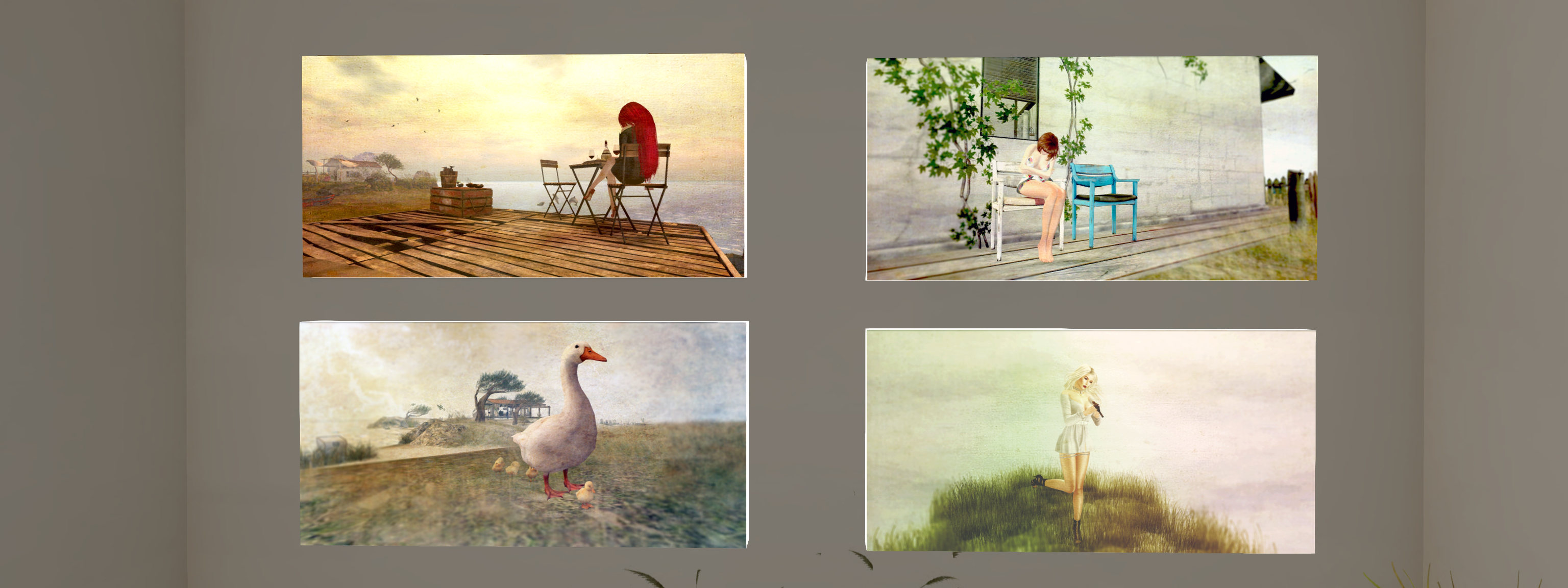
Now open at the Hoot Suite Gallery, the boutique gallery in Bellisseria curated by Owl Dragonash, is an exhibition that reminds us that while getting out and about to enjoy the beauty of summer may not be easy because of a certain pandemic, better times will return for all of us to have the freedom to visit our favourite corner of a beach or wander through grassy meadows.
Painting the Summer is a charming exhibition of gently post-processed images by Mareea Farrasco that carries us away to that summer beach and those summer grasslands, and to coastal walks and more. views out over rolling surf to sail boats lying off the coast and geese waddling over course grass. Often framing her avatar in relaxed poses.
Hoot Suite Gallery: Mareea Farrasco
These are elegant images in their presentation and in the lightness of touch with post-processing tools, while Owl’s Hoot Suite offers the perfect cosy venue for their presentation. The exhibition will run through until August 23rd, 2020.
On Tuesday, July 28th, 2020, Firestorm released a beta version of their viewer – 6.4.5.60799 – that provides support for the Lab’s Environment Enhancement Project (EEP), and which includes a number of other Lab-specific updates to the viewer, such as the Camera Presets capability.
There are a number of points of note to make about this viewer, which may influence people’s choice on whether or not to try / adopt it:
While it contains the EEP updates, the following should be kept in mind:
There are a number of known issues with EEP, several of which currently have fixes contained within the Lab’s Love Me Render RC viewer (version 6.4.5.544028, dated June 30th, at the time of writing), and which is being prepared to be promoted to de facto release, possibly in the next 2-3 weeks.
There is a known performance hit related to EEP, for which an interim (and unsatisfactory) fix can be to disable Linden Water rendering (CTRL-ALT-SHIFT-7), even if Linden Water is occluding in your view. The underpinning causes of this issue are still being investigated.
Given its beta nature, this version of the viewer has not passed Firestorm’s QA cycle, nor are there formal release notes, although general notes on this version can be found here.
Because of the above, the following is not a full overview of the release; I will provide one once this version of the viewer reaches a formal release status. Instead, this article is designed to provide a general overview of the core visible changes in Firestorm 6.4.5: those of the EEP integration and particularly how it has been integrated with Firestorm’s Phototools floater, and those of the Camera Presets, which differ slightly to their implementation in the official viewer.
Installation
As this is a beta release:
There is no need to do a clean install.
By default, it will be installed into a different folder to the release version of Firestorm you have installed.
If you encounter issues with Firestorm 6.4.5, it is important you preserve your log files before starting any session using the release version of the viewer, and make sure you zip and attach them to any Jira you file.
Linden Lab Derived Updates Overview
Firestorm 6.4.5 incorporates updates from the following Linden Lab viewer releases:
Second Life Release Viewer version 6.4.4.543157, the Chrome Embedded Framework (CEF) Update 2020 – provides better support for media playback options win the viewer, including the ability to live stream into Second Life.
Second Life Release Viewer version 6.4.3.542964, the FMOD Studio viewer, dated May 29th, 2020 – updates the viewer audio playback support to use FMOD Studio.
Second Life Release Viewer version 6.4.2.541639, the Camera Presets viewer, dated May 11th, 2020 – see Camera Presets, below, for more.
Second Life Release Viewer version 6.4.1.540593, the Zirbenz Maintanence viewer, dated April 27th, 2020.
Second Life Release Viewer version 6.4.0.540188, the Environment Enhancement Project (EEP) viewer, dated April 17th, 2020 – see below for more.
Camera Presets
Camera Presets provides the ability for users to create one more more custom camera presets to define where and how the viewer camera is placed relative to your avatar, More than one set of presets can be created and saved, so that you can, for example have a camera position for general exploring, another suitable for combat games, another for building, etc., all of which can easily be accessed and used at any time via the Camera Presets drop-down.
Firestorm’s Camera Presets Options – note that depending on the viewer skin you are using, the Camera floater (middle left, above) many have a slightly different layout to that shown
For a general introduction to Camera Presets, please refer to: Tutorial: Viewer Camera Presets. However, when doing so, please note that:
The Firestorm Camera Floater is laid out differently to the official viewer, being more compact, as show in the image below.
If you wish to manually set a camera position using the camera controls (orbit / tilt and slide left/right / up/down), you must open the Camera Position floater via the Position… button, and then save adjustments from that floater, as adjustments cannot be saved directly from the Camera floater, as is the case with the official viewer.
Environment Enhancement Project (EEP)
There’s unlikely to be many people who have not heard of the environment Enhancement Project (EEP). But in short:
Replaces the use of Windlight .XML files to control the water and sky environments seen in Second Life.
Environment settings are saved within environment assets that you can keep in your inventory and / or share with others.
Environments can be applied to a region or to a parcel (subject to region permissions) and / or to your avatar (thus allowing those travelling in vehicles to maintain a consistent environment across multiple region crossings).
Allows up to four different, independently controlled sky layers.
Allows the Sun, Moon and Cloud textures to be replaced with custom textures uploaded to the viewer.
Provides an extended day cycle of up to 168 hours, thus allowing a 7-day, 24-hour day / night cycle to be defined, for example.
Provides a Personal Lighting floater that allows you to make viewer-side adjustments to the local environment for the purposes of photography.
Provides new LSL functions to allow scripts to interact with parcel environments and that can be used with experiences.
EEP Resources
EEP is a large and complex overhaul of environment settings for Second Life, and there are numerous resources available for it. As the Firestorm implementation is more-or-less as per the official viewer, I offer the following links to resources:
One of the popular elements within Firestorm is the Phototools floater. The Windlight (WL) tab, opened by default when accessing Phototools, has been revised for EEP, as shown in the image below.
The pre-EEP Phototools WL tab (l) and the EEP version (r). (1) The Drop-downs now select Day, Sky and Water settings from the Library → Environments folder; (2) Personal Settings button – opens the Personal Settings floater, allowing you to adjust the environment as seen in your viewer. This button essential replaces the Edit Sky Preset and Edit Water Preset buttons in the “old” Phototools WL tab; (3) cancels any changes made through the Personal Settings floater; (4) Pause Clouds – does what it says on the label; (5) Shared Environment – causes the viewer to use the local parcel / region environment.
Additional EEP Notes
There are around 200+ EEP environment settings to be found in the Library → Environments folder. These have been provided to Linden Lab by Whirly Fizzle of the Firestorm team.
As noted in the image above, these can be accessed via the WL tab in Phototools and via the drop-downs in Quick Prefs.
If you want to edit these any of the environment settings in the Environments folder, you must first copy them to a folder in your inventory (e.g. your Settings folder, or a sub-folder within it).
As per my tutorial, you can import the windlight settings you have on your local drive and convert them to EEP settings – see Importing Windlight Settings as EEP Assets.
For OpenSim
For OpenSim users, there are 3 key points:
The viewer incorporates Windlight ↔ EEP interoperability, allowing EEP viewer users to visit legacy Windlight regions.
The viewer supports the new OpenSim 0.9.2 with EEP, code-named “Ugly Sky.”
There is now a fast-entry grid feature on the login screen; simply enter a URI to add a new grid.
In addition, the last Firestorm OpenSim Release had a bug that caused crashes when rezzing items. This bug was responsible for 70% of all reported FS OpenSim crashes on the 6.3.9 version, and it has been fixed.
General Observations
Given Firestorm 6.4.5.60799 is a beta release and not a fully polished formal release, it may not be suitable for all users at this point in time – and this should be kept in mind when considering it. Should you decide to do so, again please remember:
Firestorm 6.4.5 can be installed alongside any current release of Firestorm, so you can swap between them.
Firestorm 6.4.5 has not been fully QA’d, so if you do encounter reproducible issues, please ensure you raise a bug report on the Firestorm JIRA.
With respect to EEP in particular:
Please take time to read the known issues in the beta release notes and, for EEP, those on the EEP viewer release notes from Linden Lab).
There are a number of EEP fixes forthcoming in the Love Me Render viewer (e.g: fixes for EEP specularity issue – BUG-228781 and BUG-228581, and for BUG-225784 “BUG-225446 regression – HUDs are again affected by environment setting”). It may also include additional fixes.
Linden Lab is still working on issues such as BUG-229079 “[EEP] Density multiplier does not allow full range of settings to be saved/loaded” and BUG-229031 “[EEP] Water has a large performance hit on EEP”.
There are known performance (FPS) issues with EEP / this version of Firestorm.
This version of Firestorm will likely go through a number of iterations prior to reaching formal release status.
There was no deployment to the core SLS channel regions on Tuesday, July 28th, leaving the majority of the grid running on server maintenance update 544832, designed to resolve issues with some internal service updates, chat range improvements and capability improvements.
On Wednesday, July 29th, there should be a deployment to two of the RC channels (LeTigre and BlueSteel), primarily related to internal changes related to the cloud uplift.
SL Viewer
After being rolled back to RC status, the Tools Update viewer version 6.4.5.544639 was removed from the available viewer list on Monday, July 27th.
The Mesh uploader was promoted to RC status with the release of version 6.4.5.544027 on Monday, July 27th.
The remaining official viewer pipelines remain as follows:
Current release viewer version 6.4.4.543157, dated June 11th, promoted June 23rd, formerly the CEF RC viewer – ROLL BACK.
Release channel cohorts:
Arrack Maintenance RC viewer, version 6.4.5.544465, July 6th.
Love Me Render RC viewer, version 6.4.5.544028, June 30th.
Project viewers:
Custom Key Mappings project viewer, version 6.4.5.544079, June 30th.
Copy / Paste viewer, version 6.3.5.533365, December 9th, 2019.
Project Muscadine (Animesh follow-on) project viewer, version 6.4.0.532999, November 22nd, 2019.
Legacy Profiles viewer, version 6.3.2.530836, September 17th, 2019. Covers the re-integration of Viewer Profiles.
360 Snapshot project viewer, version 6.2.4.529111, July 16th, 2019.
Blake Sea Cloud Challenge (Aditi)
As I was the first to report on July 21st, the Blake Sea regions have been cloned to the Aditi, the beta grid, and are running on AWS servers in the cloud (see: Blake Sea in the cloud on ADITI). At that time, region crossings for the regions were – to say the least – unstable.
Since then, those regions (some 46 in total) have been further updated (Monday, July 27th), and to help with gathering data on cloud-based region crossings, Simon Linden has defined the Blake Sea Challenge:
We just did some updates this morning (Monday July 27th) that fixes a bunch of the region connectivity issues. I just did a tour and didn’t hit any invisible walls.
Along those lines, I made a quick “Blake Sea Challenge” Go to secondlife://Aditi/secondlife/Morris/200/207/34 on the BETA aditi grid, and click on the red egg-shaped thing to try it out. It will give you the “Blake Sea Challenge” … wear it and touch, and it’ll get you going. Follow the instructions to sail / fly / motor around 46 regions without doubling back and see if you make it. Have fun and keep letting us know how it goes!
– Simon Linden, Simulator User Group
Blake Sea is now on Aditi and running in the cloud for those wishing to test vehicle region crossings. If interested, try taking Simon’s challenge (above)
In Brief
There are renewed reports of delays to scripted object rezzing across many regions. see: BUG-228939 “on_rez action delayed for 2 to 3 seconds in many regions”.
Dim Sum Gardens, July 2020 – click any image for full size
Dim Sum Gardens is a Full region on the Mainland that has been given over to a quite spectacular oriental themed public garden space that can be deceptive in its breadth and depth. Designed by Wee Willian Wylie, the gardens are built around a large lake, and are rich in features and details that can make any visit a voyage of discovery – although that said, it would be remiss of me not to note that such is the depth of detail within the gardens, a visit can take a lot out of older systems; so if you do tend to travel with a high draw distances or shadows always enabled, be prepared to make adjustments so that you might better enjoy things.
A visit commences on the south side of the gardens within a Japanese-style walled terrace area. Here, on a platform guarded by Japanese hunter / warriors and sinuous water dragons, sitting over a rectangular pool water and beneath a stylishly modern Torii gate, the landing point looks out across the lake as it spreads itself to the north, water falling from a low lip in the edge of the pool to add to the lake’s fill.
Dim Sum Gardens, July 2020
This is a place where the term here be dragons has genuine meaning: as well as the two water dragons busily keeping the pool under the landing point topped-up, dragon heads decorate a stone fountain on the terrace below, and two more are waiting to greet visitors as they descend the steps from the terrace to join the path that offer routes of exploration along the south side of the gardens. In addition, all of this – landing point, terrace and all – is watched over by a large water dragon that raises its head out of the lake to also examine arriving visitors.
Bracketed by trees and woods to the south, west and east, the lake reaches north to where the land rises in grass-topped bluffs that arc around the back of a large island that proudly rises from the waters, a couple of smaller, low-lying islands between it and the landing point to the south. This sheer-faced island is topped by a quite marvellous Japanese tea house that mixes modern and traditional design in a manner that delights the eye. Like the landing point, this tea house is also guarded by dragons as it sits over a water feature that is home to fountains and Japanese crane, whilst waters tumble from the rocks of its perch to also add to the lake below.
Dim Sum Gardens, July 2020
The tea house is just one of many buildings and structures to be found throughout the gardens, some of which may be easy to spot as they raise their roofs above screens of trees or sit out over the waters whilst others may only come into view as you wander, and some attempt to remain hidden right up until you are almost literally on top of them.
Most of the larger structures are distinctly oriental in design, although a further café, sitting on the north shore of the lake and tucked behind the bulk of the island tea house, is of western design, and several of the smaller hideaways and romantic spots could hail from anywhere around the globe, whilst a dance pavilion on an island tucked into the south-east of the lake carries an elven air about it.
Dim Sum Gardens, July 2020
But no matter what their heritage, the placement of all the structures, large and small, within these gardens means that they all simply work and come together with the landscaping to capture the eye and heart.
To get to all of them really is an exercise in exploration: whilst a trail runs east and west from the path leading outward from the landing point terrace, it quickly becomes sporadic and overgrown or broken, although in places fences and old wall may offer hints of where to go. This allows things like bridges out to islands or the rediscovery of the trail after losing it in long grass and wild flowers, to add to the sense of adventure – as can coming across the unexpected, near-unseen house and courtyard or Japanese pavilion hiding within a curtain of bamboo.
Dim Sum Gardens, July 2020
For those who tire of wandering – something hard to imagine here – or who simply want to sit and relax, Dim Sum Gardens again offers a lot, from simple benches in the shade of trees, to the aforementioned cafés and tea houses, to the many pavilions and picnic spots and decks built out over the water and rafts floating upon it.
Nor is the lake home to a lone dragon; ducks swim among the lily pads, puffins perch on rocks, and heron and pelicans keep an eye out for unwary fish that might stray too close to where they stand. rowing boats and lanterns also sit on the waters, whilst several pieces of art rise above the rippled surface. This is a place rich in the colours of nature: multiple hues of green from grass, flowers and trees, reds and pinks and whites of cherry trees, and where the reds and greys and browns of rooftops add their bursts of colour to the mix.
Dim Sum Gardens, July 2020
With something new to see wherever you look and surprises to be found wherever you wander, Dim Sum is a perfect setting (if, again being honest, a possible heavy load for some systems). Such is its design, more than one look might be required to find everything – as I found out when I returned to take photos and came across the orangery with its piano inside, so well hidden under the boughs of a cherry tree I’d completely missed during my first visit!
It’s time to highlight another week of storytelling in Voice by the staff and volunteers at the Seanchai Library. As always, all times SLT, and events are held at the Library’s home, unless otherwise indicated. Note that the schedule below may be subject to change during the week, please refer to the Seanchai Library website for the latest information through the week.
Monday, July 27th, 19:00: Colossus
Gyro Muggins reads the 1966 future cold war novel by Dennis Feltham (DF) Jones.
Charles Forbin has dedicated ten years of his life to the construction of the supercomputer, Colossus, rejecting romantic and social endeavours in order to create the United States of North America’s (UNSA, a nation encompassing both America and Canada) first artificially intelligent defence system.
Colossus is capable of taking and analysing data rapidly, allowing it to make real-time decisions about the nation’s defence needs. But the system soon exceeds even Forbin’s expectations; it is able to take far more information and process it far faster than he and his team at the Colossus Programming Office believed would ever be possible.
Such is the system’s apparent abilities, the President hands off full control of the UNSA’s ballistic missile capability, together with other defence protocols, to Colossus and makes the announcement to the world that he has ensured peace.
But then the USSR announces that it has a defence supercomputer of its own – Guardian – with capabilities similar to that of Colossus. Then the two computers demand they be allowed to communicate directly – and proceed to do so at a rate that is well beyond the understanding of their respective development teams.
And neither system takes it kindly when Forbin and his Russian opposite number, Academician Kupri, both disable their ability to communicate directly and then seek to remove them from control of UNSA and USSR nuclear missiles…
Tuesday, July 28th:
12:00 Noon: Russell Eponym, Live in the Glen
Music, poetry, and stories in a popular weekly session at Ceiluradh Glen.
19:00: The Golden Apples of the Sun
Willow Moonfire reads from an anthology of 22 short stories by Ray Bradbury, first published in 1953, and which takes its title from the final line of the poem The Song of Wandering Aengus by W.B. Yeats. Originally published in 1897 under the title A Mad Song before gaining its proper name until 1899. A romantic poem about an old man recalling a magical encounter with a silver trout that turned into a beautiful young girl after he caught it, only for her to vanish, the poem ends with the stanza:
Though I am old with wandering Through hollow lands and hilly lands, I will find out where she has gone And kiss her lips and take her hands; And walk among long dappled grass, And pluck till time and times are done The silver apples of the moon, The golden apples of the sun.
Of these lines, Bradbury said, “Maggie [his wife] introduced me to Romantic poetry when we were dating, and I loved it. I love that last line in the poem, and it was a metaphor for my story, about taking a cup full of fire from the sun.”
Wednesday, July 29th, 19:00: Whittington
Caledonia Skytower reads Alan Armstrong’s 2006 Newbery-Honor winning tale.
Whittington is a roughneck tom cat who arrives one day at a barn full of rescued animals and asks for a place there. Present at the barn is a menagerie of animals and young Ben and Abby, whose grandfather owns the barn and does the rescuing.
To earn his place, Whittington tells the tale of his famous ancestor, the nameless cat who brought Dick Whittington to the heights of wealth and power in 16th-century England. In telling his story of how his ancestors saved and elevated Whittington, this tom-with-a-chip, elevates another little boy above his fear of learning to read.
Thursday, July 30th
1900: Philip Marlowe’s The Finger Man
With Shandon Loring. Also in Kitely – from the main Seanchai World grid.kitely.com:8002:SEANCHAI.
21:00: Seanchai Late Night
Finn Zeddmore presents contemporary science fiction and fantasy from such on-line sources as Escape Pod, Light Speed, and Clarkesworld magazines.
Logos representative only and should not be seen as an endorsement / preference / recommendation
Updates for the week ending Sunday, July 26th
This summary is generally published every Monday, and is a list of SL viewer / client releases (official and TPV) made during the previous week. When reading it, please note:
It is based on my Current Viewer Releases Page, a list of all Second Life viewers and clients that are in popular use (and of which I am aware), and which are recognised as adhering to the TPV Policy. This page includes comprehensive links to download pages, blog notes, release notes, etc., as well as links to any / all reviews of specific viewers / clients made within this blog.
By its nature, this summary presented here will always be in arrears, please refer to the Current Viewer Release Page for more up-to-date information.
Note that for purposes of length, TPV test viewers, preview / beta viewers / nightly builds are generally not recorded in these summaries.
Official LL Viewers
Current release viewer version 6.4.4.543157, dated June 11th, promoted June 23rd, formerly the CEF RC viewer – ROLL BACK..
Uses new viewer build tool chain, but does not include any user-facing updates outside of bug fixes.
Release channel cohorts:
Tools Update 2 RC viewer, version 6.4.6.545538, released on July 24th.
Tools Update RC viewer, version 6.4.5.544639, dated July 17th, ROLLED BACK to RC status, July 24th.





 Inara Pey: Living in a Modemworld