High Fidelity: running the client

HF-logoUpdate: It appears the video referred to in this article wasn’t for public consumption, as it has been made fully private.

High Fidelity recently started alpha testing elements of their platform, which follows-on from a public call made in January via the High Fidelity website for alpha testers. The Alpha Sign-Up form is still available, and the client and other code is available through High Fidelity’s public code repository for those wanting to give it a go.

For those that do, Chris Collins (not to be confused with AvaCon’s Chris Collins / Feep Tuque!) from High Fidelity has produced a video (no longer open to public viewing) introduction to the High Fidelity client (simply called “Interface” by High Fidelity), which is designed to get people comfortable with using some of the basics, and which provides a useful means of gaining greater insight into the platform. I’m including a link here rather than embedding, as the video is currently unlisted, so I’m not sure how far he wants it shared, although I’ve dropped him a line to obtain an OK. In the meantime, I’ve taken the liberty of including some screen shots with this article.

Chris doesn’t run through the steps required to build the client, but instead takes launching the client (on a Mac system in his case) as his starting-point, which allows the initial “what you can do” screen to be displayed – a quick overview of what can be done with the current alpha release and also – possibly – a useful way in the future of drawing people’s attention to the very basics of using a client.

The "What you can do" pop-up displayed when the Hi-Fi client starts. Could a pop-up like this help provide new users with basic pointers to the UI?
The “What you can do” pop-up displayed when the Hi-Fi client starts. Could a pop-up like this help provide new users with basic pointers to the UI?

An interesting aspect with High Fidelity is that even with the alpha, many optional hardware devices – such as a Razer Hydra, Leap Motion, Kinect, PrimeSense, Oculus Rift, etc. – appear to be pretty much plug-and-play.

The layout of the client is remarkably similar to that of the SL viewer 3.x UI. At the top is a typical menu bar, while to the left and bottom of the screen are a set of toolbar buttons, all related directly to building, and which can be turned off/on by tapping the Tab key.  An interesting aspect of the UI is the inclusion of a picture-in-picture (PiP) frame, which shows you your own avatar, as seen by others. Whether this frame can be repositioned around the UI window isn’t clear from the video, but it does appear to be pretty fixed in place.

High Fidelity's Interface UI, with picture-in-picture frame showing the user their avatar (clisk for full size)
High Fidelity’s Interface UI, with picture-in-picture frame showing the user their avatar (click for full size)

Even with a standard webcam, the system will pick-up the user’s facial expressions and translate them to the avatar’s face. As voice is the primary means of communication with High Fidelity (although not the sole means of communication – text is also possible), Voice Over IP (VoIP) is enabled on starting the client, and this is reflected in a sound level bar directly beneath the PiP avatar, which is graduated between blue, green and red, with the latter indicating that perhaps the microphone is being over-driven. There’s also a mute button to mute the sound of your own voice in your own headset / speakers.

The default avatar is a little robot, and the video demonstrates the easy with which this can be changed – although as an alpha, the avatars within High Fidelity, even with their facial expressions, are very basic which compared to the like of a grid-based VW; it’ll be interesting to see how far down the road towards detailed customisation the company will go, and how much further that takes them into the Uncanny Valley should they do so. Altering an avatar is done via menu selection and file name – there are no image previews of the avatars (as yet – something that would likely be better received by users).

There are a number of default avatars supplied with the system, and while changing your appearance is somewhat basic at this point, it's a simple matter of a couple of menu selections
There are a number of default avatars supplied with the system, and while changing your appearance is somewhat basic at this point, it’s a simple matter of a couple of menu selections

There is an option to upload avatars of your own – but the format and complexity of such models isn’t explored in the video.

As the video progresses, building using voxels is demonstrated, and more particularly, the coalesced nature of the voxels is demonstrated – as Chris hovers a distance from the default @alpha.highfedility.io location, everything appears as voxel cubes of varying sizes, and doesn’t make for a pleasant-looking world at present. However, as he flies closer, the voxels “break down” into smaller and smaller units and reveal more and more detail. Again, I assume the overall “big voxel blocks” will be somewhat more refined and allow greater detail at a distance in the future, vis-a-vis Philip Rosedale’s discussion of the High Fidelity architecture and use of voxels, at the moment things are terribly blocky even from what seems to be a reasonable distance, and may draw unfavourable comparisions with something like Minecraft.

Anyone familiar with building in Second Life will be instantly familiar with building in High Fidelity; voxels, in shape, are analogous to the default cube prim, and even the way detail “pops-out” at you could be said to be akin to how the shape of sculpties pop-out in an SL-style grid VW, although obviously the underpinning technology is vastly different. There are also options to import / export voxel models, although as with the avatar upload options, there are outside the scope of this initial video.

Continue reading “High Fidelity: running the client”

Seanchai in Kitely

The Seanchai Library megaregion in Kitely

Friday May 2nd, 2014, marks an important step in Seanchai Library’s virtual development, as it will see the Library’s new venture on Kitely, the on-demand grid, open its gates in a special preview event.

Seanchai Library’s presence on Kitely is extensive, comprising a 4-region Kitely megaregion, which offers a number of different story telling environments, and no fewer than eight individual regions – “worlds” in Kitely parlance – offering their own unique environs for stories and – perhaps – a little more.

The main 4-region world, Seanchai, forms the hub of the Library’s presence in Kitely, and is home to the main reading room and the teleport hub linking it to the other region “worlds”. It is also divided into a number of individual areas where events can be run simultaneously, including the Campfire Ring, Ghostly Pirate Bay, Undersea Discovery, Volcano Island, Celtic Castle Ruins and more.

The Seanchai Library teleport portals, Kitely

The teleport hub, which also acts as the region’s landing point, features a circle of ten stone portals, one of which is currently inactive and another leads to the Kitely Welcome Centre. Walking up to one of the remaining, labelled, portals will transfer you to the named region. Note that if the region is not already in use, you may see a warning pop-up on your screen. This is because Kitely worlds are “on demand”, and only exist when there are avatars present (the rest of the time they are safely stored). Should you find this is the case, you’ll be automatically teleported to your selected world once it has started – which should only take a few seconds.

The eight individual storytelling worlds are: Beachworld, Celticworld, Octoberworld, Spaceworld, Swampworld, Waterworld, Westworld and Winterworld – and the names pretty much sum up their individual themes!

Each world offers a unique environment for stories and events, and they include freebie areas where visitors and patrons can dress to look the part if they wish. Exploration of the regions is encouraged, and some offer the means to host multiple story telling activities at once.

"The ship rose out of the mist, her sails tattered and torn...." the
“The ship rose out of the mist, her sails tattered and torn….” the

To mark the opening of Seanchai Library’s presence in Kitely, the preview event will start at 18:30 SLT (PDT) on Friday May 2nd. This will comprise a guided tour of the estate, and will be followed by ghost stories around the campfire, starting at around 19:00 SLT. This will feature tales from a host of masters of the macabre, including Stephen King, Guy de Maupassant, Ramsey Campbell, and Tony Richards, and by literary greats like Ambrose Bierce, Washington Irving, Sir Water Scott, and J Sheridan Le Fanu.

So does this mean Seanchai Library is leaving Second Life? No. Rather, they are expanding into new areas and new opportunities. So why not hop over to Kitely and join them? It’s pretty easy, even if you’ve never visited another grid.

"The town was small, but the hotel big, I moseyed on down, heading for the stables and a chance to give my horse a rest..." Seanchai Westworld, Kitely
“The town was small, but the hotel big, so I decided to mosey on down, heading for the stables and a chance to give my horse a rest before looking to see if the beds in that hotel were as grand as the place looked from the outside…” Seanchai Westworld, Kitely

Getting Started with Kitely

You can register a free account with Kitely via their website. This will give you access to Kitely, and a free region of your own – please make sure you read Kitely’s notes on membership options and the costs involved in visiting worlds if you intend to either develop your own region or explore more of Kitely.

The Seanchai worlds are all fixed-price, so access to them is open to all. Once you have created your account, you’ll need a viewer capable of accessing OpenSim grids – Kitely recommend Firestorm as their preferred viewer.  When you have installed a suitable viewer (if required), you can reach the Seanchai region by:

Again, note that if the Seanchai region is not already running, you may be initially logged-in to a Kitely teleport station. You should only be there a few seconds before being automatically teleported to Seanchai.

"We took the ski lift up to the peak for a final run down the slopes before retiring to lodge for hot drinks by a blazing fire and a tale or two from out hosts..." Seanchai Winterworld, Kitely
“We took the ski lift up to the peak for a final run down the slopes before retiring to lodge for hot drinks by a blazing fire and a tale or two from out hosts…” Seanchai Winterworld, Kitely

Related Links


Of asteroids, rocks and drills

CuriosityThings are starting to pick-up on Mars once more as Curiosity starts into a new round of science studies in the region dubbed “The Kimberley”. Having been surveying the region since its arrival there at the beginning of April, the rover was commanded to move to a sandstone slab scientists dubbed “Windjana” after a gorge in Western Australia, and is in keeping with giving notable landmarks in the area unofficial names lifted from that part of Australia.

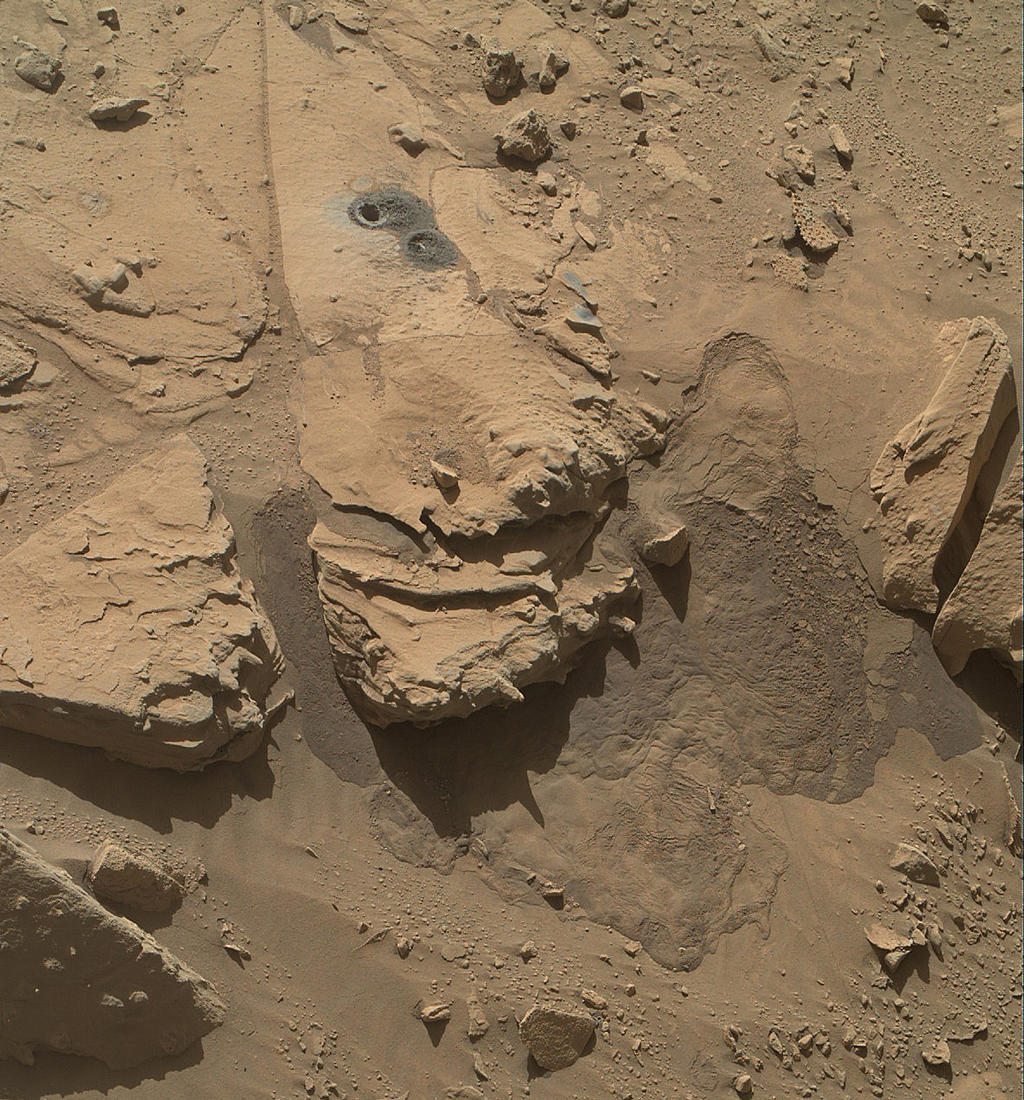
The slab lay a short distance roughly southwards from the rover’s position where the Mars Reconnaissance Orbiter (MRO) imaged it on April 11th, 2014. Following the initial selection of the slab as an area for further study, the rover was commanded to drive closer to it to enable further visual inspection. The slab is around 60 centimetres (2 feet) across, and was selected because it offered a good surface for drilling, and lay within what scientists call the “middle unit” because its location is intermediate between rocks that form buttes in the area and lower-lying rocks that show a pattern of striations.

A white-balanced image, calibrated, linearly scaled and brightened to present colours that resemble those that would be seen under daytime lighting conditions on Earth, of the rock dubbed “Windjana”. The image combines several exposures taken by the Mastcam’s left-eye camera during the 609th Martian day, or Sol, of the rover’s work on Mars (April 23rd PDT, 2014).

The sandstone rock in the area is of particular interest to mission scientists because it represents a somewhat different environment to that studied extensively by Curiosity during the time it spent in the “Yellowknife Bay” area, drilling and sampling mudstone rocks.

“We want to learn more about the wet process that turned sand deposits into sandstone here,” Curiosity’s lead Project Scientist, John Grotzinger, explained. “What was the composition of the fluids that bound the grains together? That aqueous chemistry is part of the habitability story we’re investigating.”

Understanding why some sandstones in the area are harder than others also could help explain major shapes of the landscape where Curiosity is working inside Gale Crater. Erosion-resistant sandstone forms a capping layer of mesas and buttes. It could even hold hints about why Gale Crater has a large layered mountain, dubbed “Mount Sharp” (officially called Aeolis Mons), at its centre.

Once the rover had positioned itself close to the rock, initial inspection operations were carried out, which included using the turret-mounted spectrometer on Curiosity’s robot arm as well as the mast-mounted ChemCham laser so that the rock could be properly analysed ahead of any drilling operation. These operations also included deploying the rover’s “wire brush” to clean an area of the rock’s surface, removing dust and debris to expose the rock itself, allowing for further examination and analysis.

Clean sweep: a “before and after” animation showing a patch of the sandstone rock dubbed “Windjana” scrubbed clean of surface deposits ready for further examination. The images used in the animation were taken by the turret-mounted Mars Hand Lens Imager (MAHLI) during the 612th Martian day, or Sol (April 26th PDT, 2014). The exposed area of grey rock measures some 6 centimetre (2.5 inches) across.

Before any sample drilling could occur, however, the rover would need to carry out a “mini-drilling” operation, much as it did at “Yellowknife Bay”. Such operations both confirm the drill’s readiness for sample gathering and confirm that the subject rock is a suitable target for drilling and gathering sample material.

This “mini-drilling” operation took place on Tuesday, April 29th, cutting a hole around 2 centimetres (0.8 inch) deep into the rock. This allowed the science team to evaluate the interaction between the drill and this particular rock – an important factor given issues enountered due to vibration during the rover’s previous operations – and also for the tailings of powder rock created by the drilling operation to be examined for their suitability for collection by the drilling mechanism.

When collecting sample material, the rover’s hammering drill bores as deep as 6.4 centimetres (2.5 inches) into a target rock. As it does so, some of the tailings from the drilling operation are forced up into the drill bit itself, and delivered to one of two holding chambers (Chambers A and B in the diagram below) located in the head of the drill bit mechanism.

How the drill works: On the left, a view of the drill mechanism mounted on the rover's turret, with the drill bit centre bottom. On the right a cutaway showing the sample collection mechanism in the drill bit
How the drill works: On the left, a view of the drill mechanism mounted on the rover’s turret, with the drill bit centre bottom. On the right a cutaway showing the sample collection mechanism in the drill bit

Once drilling is complete, the gathered samples are transferred to CHIMRA – the Collection and Handling for In-Situ Martian Rock Analysis system, also within the rover’s turret system, where the tailings are sifted and sorted ready for eventual transfer to the Curiosity’s on-board chemical laboratory systems, comprising the Chemical and Mineralogy (CheMin) and Sample Analysis at Mars (SAM) suites of instruments.

At the present time, the outcome of the analysis of the mini-drilling operation, and the suitable of “Windjana” as a sample-gathering point is unclear; however, it would appear likely that sample drilling operations will go ahead nearby as a result of this test.

An image from Curiosity’s Mars Hand Lens Imager (MAHLI) instrument shows the “mini-drilling” operation hole cut by the rover’s drill mechanism on Sol 615 (April 29th PDT, 2014). The hole is some 2 centimetres deep and 1.6 centimetres in diameter.

 First Asteroid Image from the Surface of Mars

Curiosity racked-up another first on Sol 606 (April 20th), when the Mastcam captured the first image of  asteroids taken from the surface of Mars. The image was combined with pictures captured the same night of the Martian Moons Phobos and Deimos, and the planets Jupiter and Saturn. Deimos, the outermost on the Martian moons, and which may have itself been an asteroid prior to wandering in Mars’ gravitational influence, appears at its correct location in the sky at the time the image of Ceres and Vista was captured. Phobos, Jupiter and Saturn, which were all imaged at different times, are shown as inset images on the left. All of the images form a part of ongoing astronomical work the rover has been performing periodically.

Ceres, with a diameter of about 950 kilometres (550 miles), is the largest object in the asteroid belt, large enough to be classified as a dwarf planet. Vesta is the third-largest object in the asteroid belt, about 563 kilometres (350 miles) wide. These two bodies are the destinations of NASA’s Dawn mission, which orbited Vesta in 2011 and 2012 and which is now on its way to begin orbiting Ceres in 2015.

A composite of images taken after nightfall on the 606th Sol (April 20, 2014, PDT) of Curiosity’s work on Mars, showing the asteroids Vesta and Ceres, and Mars’ outer moon, Deimos. The same night, the rover also captured images of Mars’ inner moon, Phobos, and the planets Jupiter and Saturn, shown in the inset images

The main image appears grainy, with Ceres, Vista and three stars appearing as streaks because it was captured over a 1-2 second exposure period. The graining on the image is the result of cosmic rays striking the camera detector is the image was captured. The images of Deimos, Phobos, Jupiter and Saturn were all captured over a much shorter 0.25-second exposure, thus rendering them as bright objects against a “clean” black background. Sunlight reflected by Deimos makes it appear overly large.

The interesting point (for those into astronomy) with the main image is that Vesta and Ceres would be naked-eye visible to anyone with average eyesight were they to be standing on the surface of Mars.

All images courtesy of NASA JPL.

The High Fidelity architecture of virtual worlds to be

HF-logoI’ve been trying to keep an eye on High Fidelity of late, particularly since things like the SVVR meet-up in March and VWBPE 2014 in April, both of which featured presentations / talks by Philip Rosedale. However, I missed a recent blog post on the High Fidelity site, so my thanks to Nalates Urriah for giving a heads-up about it.

One of the things that has caused people some consternation with high Fidelity is that while there have been various demonstrations and some talk about it using distributed computing (a-la Seti@Home) as an operating model, more precise information on the architecture for High Fidelity has been lacking.

The official blog post, dated Thursday April 24th, goes some way towards rectifying this, by providing a high-level system diagram for High Fidelity and providing some additional notes on the various aspects of how it is hoped the system will work.

How High Fidelity will work - click for full size (courtesy of High Fidelity)
How High Fidelity will work – click for full size (courtesy of High Fidelity)

High Fidelity won’t, as they’ve previously made clear, be providing a virtual word per se. Rather, they are seeking to provide the software and protocols which will allow others to create virtual worlds and connect to one another, and the means for uses to connect to, and move between these worlds as they become available. The idea here is that by providing the means to create fully distributable virtual worlds, harnessing shared computing devices to scale their content and load, thus theoretically making a scalable, global virtual environment with shared resources through which users can travel.

The top section of the diagram denotes those services where High Fidelity hope to generate revenue.

  • The Nameserver allows virtual world domains to be uniquely identified if the owners wish (think DNS) – so that, as a totally hypothetical example, @secondlife could be registered to allow users to quickly discover and access Second Life. The registration service for virtual worlds is optional, rather than required. This service can also supply authentication mechanisms which can be used to both restrict access to a virtual world or allow users a particular virtual world to securely disclose chosen aspects of their identity.
  • The Digital Marketplace is fairly self-explanatory, allowing people to buy, sell and transfer digital goods to and from each other, and move these goods among different virtual worlds.
  • The Currency Server provides the wallet services and other API’s needed to allow people to quickly and easily share their computing devices as well as buy and sell digital goods using a cryptocurrency. Whether the latter will be a recognised cryptocurrency (such as Bitcoin) or something new, remains to be seen.
  • The Assignment Server, allows people to share their computers with each other to act as servers or as scripted interactive content. It monitors and analyses devices which are made available as servers in order to try to assign them suitable tasks – so that a mobile ‘phone offered as a server might be used to control a scripted agent such as a dog wandering around a virtual world, while a high-end PC might be assigned more intensive tasks. This Assignment Server will also oversee the transfer of cryptocurrency between users, so that those providing their systems to help run a world are compensated by those making use of their computing capabilities to run their world.
High Fidelity 2013 image (via Singularity Hub)

Another core aspect of the system, which has been covered in various commentaries on High Fidelity, is the use of voxels, and more particularly, the voxel server, which stores and serves the content that is found inside the virtual world. Voxels can be nested within one another, or averaged together, allowing for significant levels of detail to be achieved over distances than is otherwise possible. The voxel server allows elements within a world to be distributed across multiple servers, so for example, an apartment block in a cityscape could comprise apartments which are each running on their own server.

The Voxel Server, together with the remaining elements of the software (the Domain Server which sits at the heart of any virtual world using the software and protocols, the Audio Mixer, Avatar Mixer, Interactive Client, etc.), are available under the Apache 2.0 open-source licence, Further information on them can be found in the High Fidelity blog post, and they can be downloaded from High Fidelity by those who wish to play with them.

The post has drawn a fair number of comments and questions, and as Nalates points-out, they make further interesting reading – particularly Philip Rosedale’s replies (or where some questions are concerned, lack of a reply).


Small blue dot on a red planet

CuriosityOn Wednesday April 16th, NASA JPL released a remarkable image captured using the High Resolution Imaging Science Experiment (HiRISE) camera on the Mars Reconnaissance Orbiter (MRO).

The image reveals the the Mars Science Laboratory, Curiosity parked alongside the multi-layered rock formation dubbed “The Kimberley”, as it prepares to undertake a range of science studies in the area.

The image was captured by MRO on April 11th during an overflight of the rover’s position as it sits at the foot of a rocky butte mission scientists have dubbed “Mount Remarkable”, and which forms a part of a multi-layered rocky location which has been dubbed “the Kimberley” due to its resemblance to a similar confluence of rock types found in Western Australia.

A rover’s progress: Curiosity, the blue form just off-centre in this false-colour image, sits at the foot of “Mount Remarkable”, a butte located in the area mission scientists have dubbed “the Kimberley”. the rover’s tracks can be seen leading back toward the top left corner of the image, where it entered the region on March 12th, 2014.

“The Kimberley” is an area of four distinguishable rock types exposed close together in a decipherable geological relationship to each other.  As such, they should provide further clues about ancient environments that may have been favourable for life. It is of particular interest to Scientists because like “Yellowknife Bay”, where the rover spent several months analysing and drilling rocks, “the Kimberley” demonstrates features which suggest that some of the rocks have only been exposed for a short time, geologically speaking.

This matters because Mars doesn’t have a magnetosphere and thick atmosphere like Earth’s, which protect us from energetic particles from space that break down organic material. So, rocks that have been exposed or close to the surface for a very long time are less likely to contain complex organic material, which might either be the remnants of past life, or help inform scientists about past habitability, the potential to support life in an area – as was the case with “Yellowknife Bay”.

Continue reading “Small blue dot on a red planet”

Talking castAR and High Fidelity

The Silicon Valley VR (SVVR) Meet-up at the end of March featured a series of presentations from people within the VR field, including those by Brian Bruning, VP of Business Development and Marketing at Technical Illusions (castAR) and Philip Rosedale of High Fidelity.

The full video of the presentations is provided below, and I’ve included notes on each of these two presentations in particular. When reading, please be aware that these are notes, and not a full transcript.

Brain Bruning – castAR

Brian Bruning’s presentation commences at the 0:05:48 mark.

Image courtesy of Technical Illusions

I’ve covered the early work on castAR in the past, some of which is touched upon at various points in the presentation, so I don’t want to repeat things here. What is interesting is that the system’s development has been following a similar route to that of the Oculus Rift: Technical Illusions have been out attending technology shows, conferences, exhibitions, etc., to gain visibility for the product , they ran a successful Kickstarter campaign for castAR which raised $1,052,110 of a $400,000 target.

[07;10] castAR has three modes of operation:

  • Projected augmented reality (AR), which presents a 3D hologram image projected onto a retro-reflective surface in front of you. allowing you to interact with it via a “wand”
  • Augmented reality of a similar nature to that of Google Glass
  • Virtual reality of the kind seen with the Oculus Rift.
castAR projected AR gaming with the castAR wand (image via Technabob)

The emphasis is that the headset is natural, comfortable-looking (a pair of glasses) which has three product features built-in. As a result of the Kickstarter, the company has now grown to 10 people, and the technical specifications for the system have been decided:

Glasses

  • Less than 100 grams in weight
  • Fits over most prescription glasses
  • Ultra flexible micro coax cable
  • Active shutters with 50% duty cycle
Projectors

  • 1280 x 720 resolution per eye
  • 120hz refresh rate per eye 24 bits of color per pixel
  • 65 degree horizontal field of view 93% fill factor
Tracking System

  • 110 degree FOV
  • 120hz update rate
  • 8.3ms response time
  • 6 degrees of freedom
  • Absolute positioning Over 200 unique tracking points
  • 0.07mm accuracy at 1.5m
AR & VR Clip-On

  • 90 degree horizontal FOV
  • Very low distortion freeform optics
  • 5mm by 8mm eye box
  • Removable flip-up shutter for AR mode

[11:20] castAR has its roots within the gaming environment and has been developed with the games market in mind (again, as had pretty much been the case with Oculus Rift), although they had recognised the potential for wider applications – they just hadn’t anticipated that someone like Facebook would step into the VR / AR arena and potentially add impetus to the wider applications for VR / AR.

[11:45] One of the benefits seen with a combined approach to VR / AR is that there are situations in work, in education, in research / medical fields where a completely occluded view of the real world  – as required by head-mounted displays (HMDs) such as the Oculus Rift – are simply not appropriate (Mr. Bruning jokes that there are even some activities associated with gaming where a HMD is inappropriate – such as simply trying to eat a snack or take a drink without interrupting the game flow!). In these situations, the projected AR or the Google Glass-like” AR are seen as more beneficial, and hence the drive to address all three modes of operation.

[13:20] Technical Illusions believe that many of the challenges faced by AR and VR content creators are similar in nature – such as dealing with UI issues, both seeing UI elements and interacting with those UI elements, or dealing with physical objects which my be places within a VR / AR scene. As such, Technical Illusions are focused on educating content creators to the needs of immersive / augmented environments and are producing dev kits to assist content creators in developing suitable environments / games / activities which take such issues into account.

[14:57] Current planning is for Technical Illusions to have their dev kits and the Kickstarter sets shipped in summer 2014, and to have the consumer version ready to ship by the fourth quarter of 2014, and it is indicated that price-point for consumer kits (glasses, tracking components, retro-reflective surface and input wand) will be “sub $300”.

The castAR update is an interesting, fast-paced piece, primarily focused on the projected AR capabilities of the glasses. Little or nothing was said reading the ability of the system to be used as a VR system, and no disclosure was given on the VR clip-on system.

This is apparently a deliberate decision on the part of the company, in that they are allowing VR HMD focused companies promote the potential use of VR, While Technical Illusions focus on the potential of projected AR capabilities.  While an interesting approach to take, I can’t help but feel that (assuming the VR clip-on is at a “feature complete” status) promoting all capabilities in castAR  wouldn’t be better, as they help present the product as a more versatile tool.

Continue reading “Talking castAR and High Fidelity”